
FSMEXRWMC1A - Rowing Machine Fortis - Free user manual and instructions
Find the device manual for free FSMEXRWMC1A Fortis in PDF.


| Product Type | Foldable Mechanical Exercise Rowing Machine |
| Brand | Fortis |
| Model | FSMEXRWMC1A |
| Maximum User Weight | 100 kg |
| Resistance Adjustment | 4 preset levels via handlebar |
| Display Functions | Time, Count, Total Count, Calories, Count/Min, SCAN |
| Auto Power Off | After 4 minutes of inactivity |
| Battery Type | 2 x AA (replace every 3-4 months) |
| Foldable Design | Yes, with locking bolt |
| Saddle Type | Sliding saddle on rail |
| Pedals | Adjustable pedals |
| Handlebar | Adjustable with foam grips |
| Frame Material | Steel |
| Stabilizers | Front and rear |
| Transport Wheels | 2 wheels on main frame |
| Assembly Required | Yes, tools included |
| Color | Red and black |
| Safety | Maximum weight 100 kg, adult use only |
| Maintenance | Wipe with mild non-abrasive cleaner; avoid petroleum solvents |
Frequently Asked Questions - FSMEXRWMC1A Fortis
User questions about FSMEXRWMC1A Fortis
0 question about this device. Answer the ones you know or ask your own.
Ask a new question about this device
Download the instructions for your Rowing Machine in PDF format for free! Find your manual FSMEXRWMC1A - Fortis and take your electronic device back in hand. On this page are published all the documents necessary for the use of your device. FSMEXRWMC1A by Fortis.
USER MANUAL FSMEXRWMC1A Fortis
natural_image
Red and black FORTIS 7 stationary stationary bike with adjustable arm (no visible text or symbols)FOLDABLE MECHANICAL EXERCISE ROWING MACHINE
FSMEXRWMC1A
SAFETY & WARNINGS
- Read all of the instructions in this guide before using this product. Retain this guide for future reference. Do not skip, substitute or modify any steps or procedures in this guide, as doing so could result in personal injury or product damage.
- Before starting any exercise program, consult your physician to determine if you have any medical or physical conditions that could put your health and safety at risk or prevent you from using the equipment properly. Your physician's advice is essential if you are taking any medication that may affect your heart rate, blood pressure or cholesterol level.
- Incorrect or excessive exercise can damage your health. Stop exercising if you experience any of the following symptoms: pain, tightness in your chest, irregular heartbeat, shortness of breath, light headedness, dizziness or feelings of nausea. If you experience any of these conditions, you should consult your physician before continuing with your exercise program.
- This equipment is intended for adult use only. Keep children and pets away from the machine. DO NOT leave children unattended in the same room with the equipment.
- Assemble the machine exactly as outlined in this user guide.
- Once fully assembled, inspect to ensure all hardware parts such as bolts, nuts and washers are positioned correctly and tightly secured.
- Set up the machine in a dry level place and leave it away from moisture and water.
- Place a suitable base (e.g. rubber mat, wooden board etc.) beneath the machine in the area of assembly to avoid dirt and dust.
- Before beginning training, remove all objects within a radius of 2 meters from the machine.
- Do not wear loose clothing while rowing.
- Dry after each use to remove moisture. Wipe regularly with a mild, non-abrasive cleaner and water solution. To avoid damaging the finish, never use a petroleum-based solvent.
- Do not use aggressive cleaning articles and substances to clean the machine.
- Only use the supplied tools or suitable tools of your own to assemble or repair any parts of machine.
- Only use the machine when it is in operational condition. Do not use the machine if it is damaged in any way. Use only original spare parts for any necessary repairs.
- This machine can only be used by one person at time.
-
If you experience any feelings of dizziness, sickness or other abnormal symptoms, please stop training and consult a doctor immediately.
-
Prior to assembly, ensure you have all the components and tools listed. Some components are pre-assembled to help with the assembly process.
- Be careful when lifting and moving the equipment. Always use proper lifting technique and seek assistance if necessary.
- The power of the machine increases with the increase in speed, and the reverse. The machine is equipped with adjustable knob that can adjust the resistance.
- The maximum user weight is 100kg.
OVERVIEW
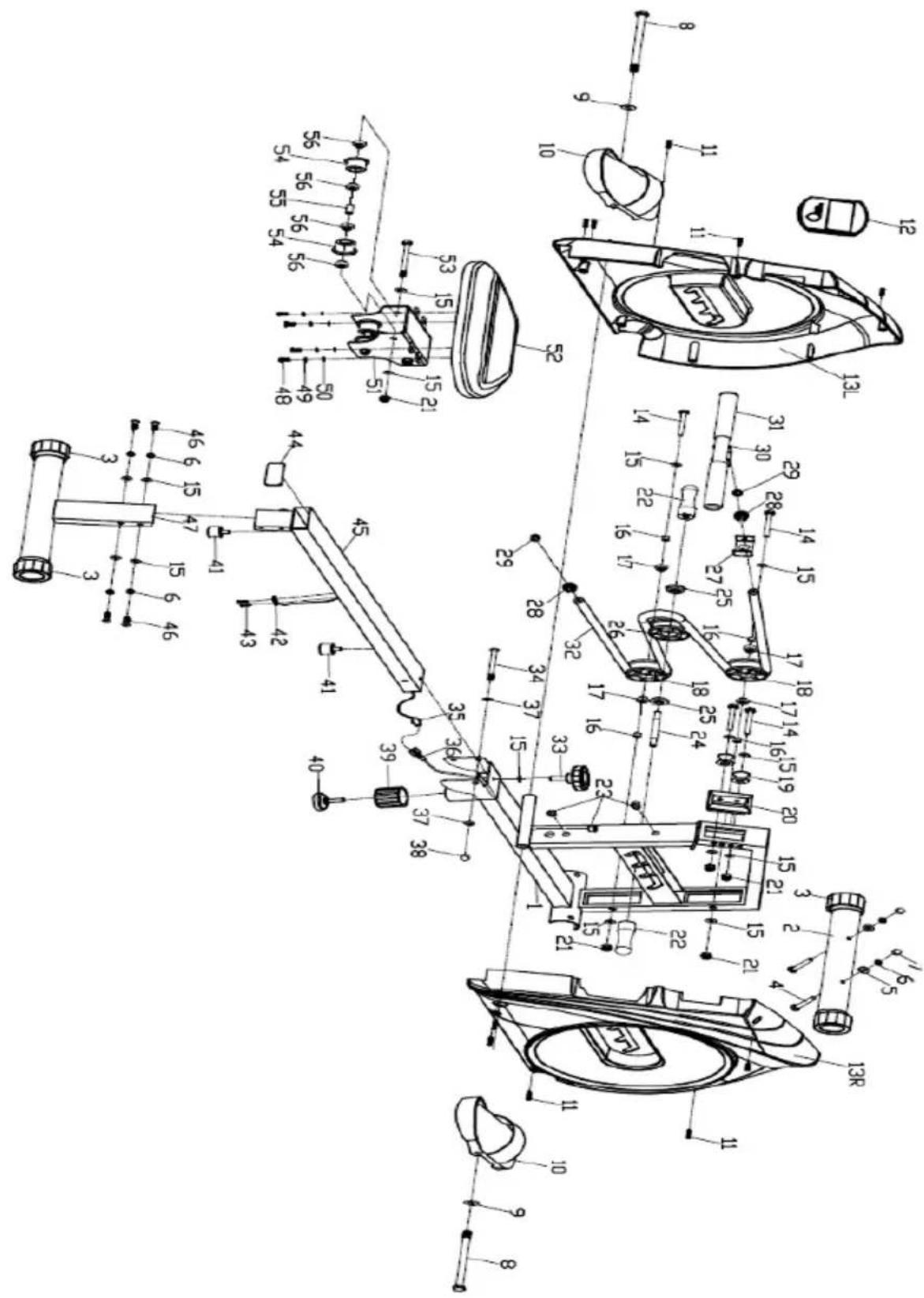
Parts List
| No. | Description | Qty | No. | Description | Qty |
| 1 | Main frame | 1 | 29 | Plug | 2 |
| 2 | Front stabilizer | 1 | 30 | Handlebar | 1 |
| 3 | End cap | 4 | 31 | Foam grip | 2 |
| 4 | Bolt M8x65 | 2 | 32 | Rope | 1 |
| 5 | Arc washer d8xΦ20xR30 | 2 | 33 | Bolt | 1 |
| 6 | Spring washer D8 | 6 | 34 | Bolt M10x80 | 1 |
| 7 | Nut M8 | 2 | 35 | Sensor wire | 1 |
| 8 | Bolt φ12.5x130xM12x18 | 2 | 36 | Extended wire | 1 |
| 9 | Flat washer D13xφ26 | 2 | 37 | Flat washer D10xφ20 | 2 |
| 10 | Pedal | 2 | 38 | Nut M10 | 1 |
| 11 | Screw ST4.2x18 | 10 | 39 | End cap | 1 |
| 12 | Computer | 1 | 40 | Adjustable foot pad | 1 |
| 13L/R | Chain cover | 1pr | 41 | Cushion pad | 2 |
| 14 | Bolt M8x62 | 4 | 42 | Sensor | 1 |
| 15 | Flat washer D8xφ19 | 19 | 43 | Screw ST3x10 | 2 |
| 16 | Bushing φ12xφ8.5x10.5 | 4 | 44 | End cap | 1 |
| 17 | Bearing 608 | 4 | 45 | Rail tube | 1 |
| 18 | Wheel | 2 | 46 | Screw M8x16 | 4 |
| 19 | Idler wheel | 2 | 47 | Rear support frame | 1 |
| 20 | Fixed sleeve | 1 | 48 | Bolt M6x15 | 4 |
| 21 | Nylon nut M8 | 7 | 49 | Spring washer D6 | 4 |
| 22 | Handlebar | 2 | 50 | Flat washer D6 | 4 |
| 23 | End cap | 3 | 51 | Saddle Sliding | 1 |
| 24 | Axle M10xφ12x95 | 1 | 52 | Saddle | 1 |
| 25 | Bearing φ32xφ12x11 | 2 | 53 | Bolt M8x90 | 3 |
| 26 | Wheel | 1 | 54 | Wheel | 6 |
| 27 | U-shaped washer | 1 | 55 | Bushing φ12xφ8x20 | 3 |
| 28 | Rope lock | 2 | 56 | Bearing | 12 |
ASSEMBLY
Step 1:
Attach the handlebar (22) to the axle (24).

Step 2:
- Fix the front stabilizer (2) to the main frame (1) with bolt (4) arc washer (5) spring washer (6) and nut (7).
• Install the adjustable foot pad (40) to the main frame (1) as shown (Adjust it to the suitable position to connect the rail tube (45).
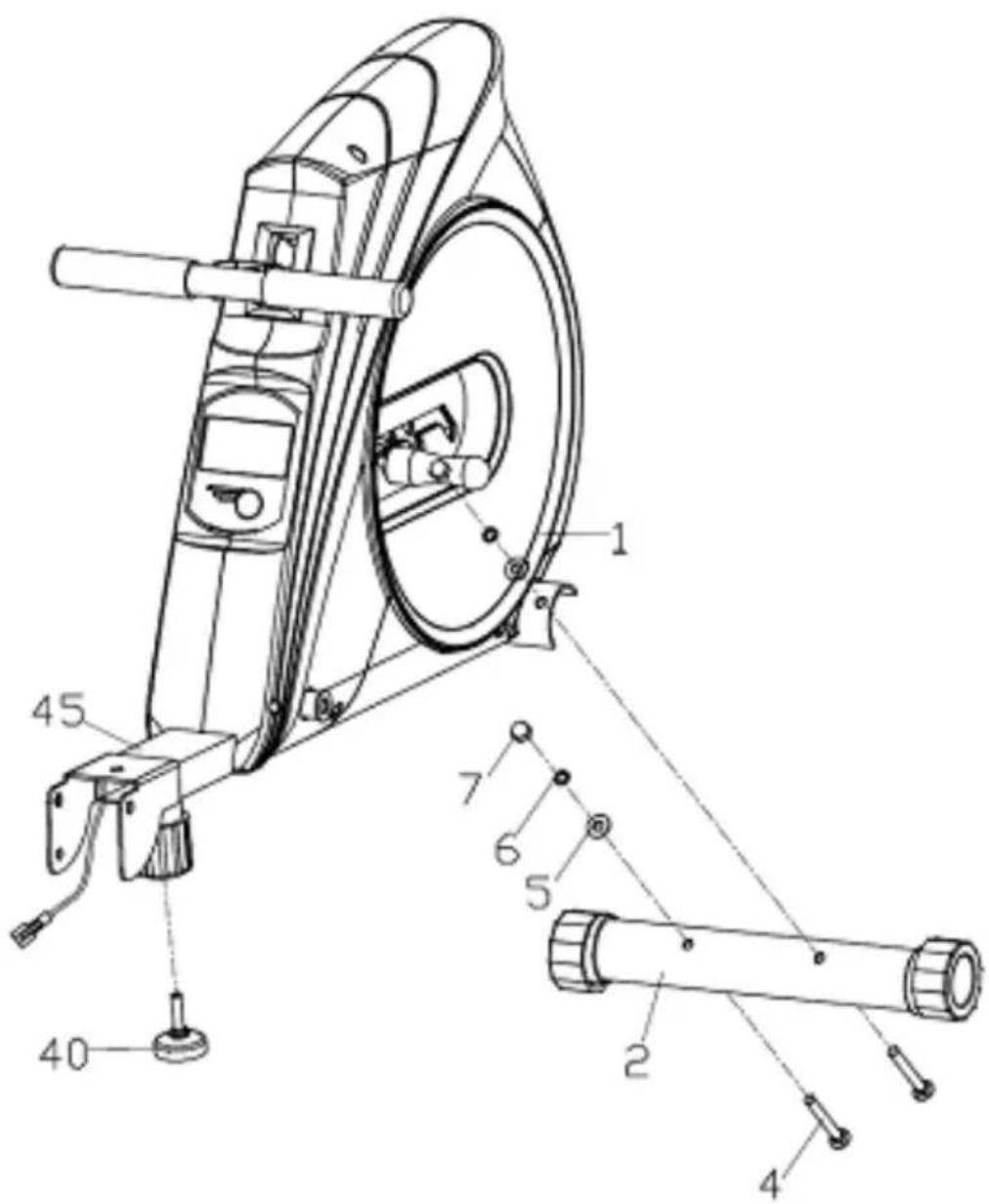
Step 3:
Fix the pedals (10) to the main frame (1) with bolts (8) & flat washers (9).

Step 4:
- Fix the saddle (52) to the saddle post (51) with screws (48) spring washers (49) and flat washers (50).
- Fix the rear support frame (47) to the rail tube (45) with screw (46) spring washers (6) and flat washers (15).
- Remove the cushion pad (41) firstly, then insert saddle post (51) to rail tube (45), finally fix cushion pad (41) to trail tube (45).

Step 5:
Connect the extended wire (36) to the sensor wire (35), and then fix the rail tube (45) to the main frame (1) with bolts (34) flat washers (37) and nuts (38). And then fix the bolt (33) and the flat washer (15) to the main frame (1).

Step 6:
Pull up the handlebar (22) from the groove as arrow shown, pull handlebar (22) forward or backward, and then insert to another groove as arrow shown.

natural_image
Line drawing of a stationary stationary exercise machine with a circular head and wheels (no text or symbols)Step 7:
The rowing machine is foldable. Before folding the machine, take the bolt (33) and flat washer (15) out. You can fix the folded machine in position using the bolt (33) and flat washer (15) as below.
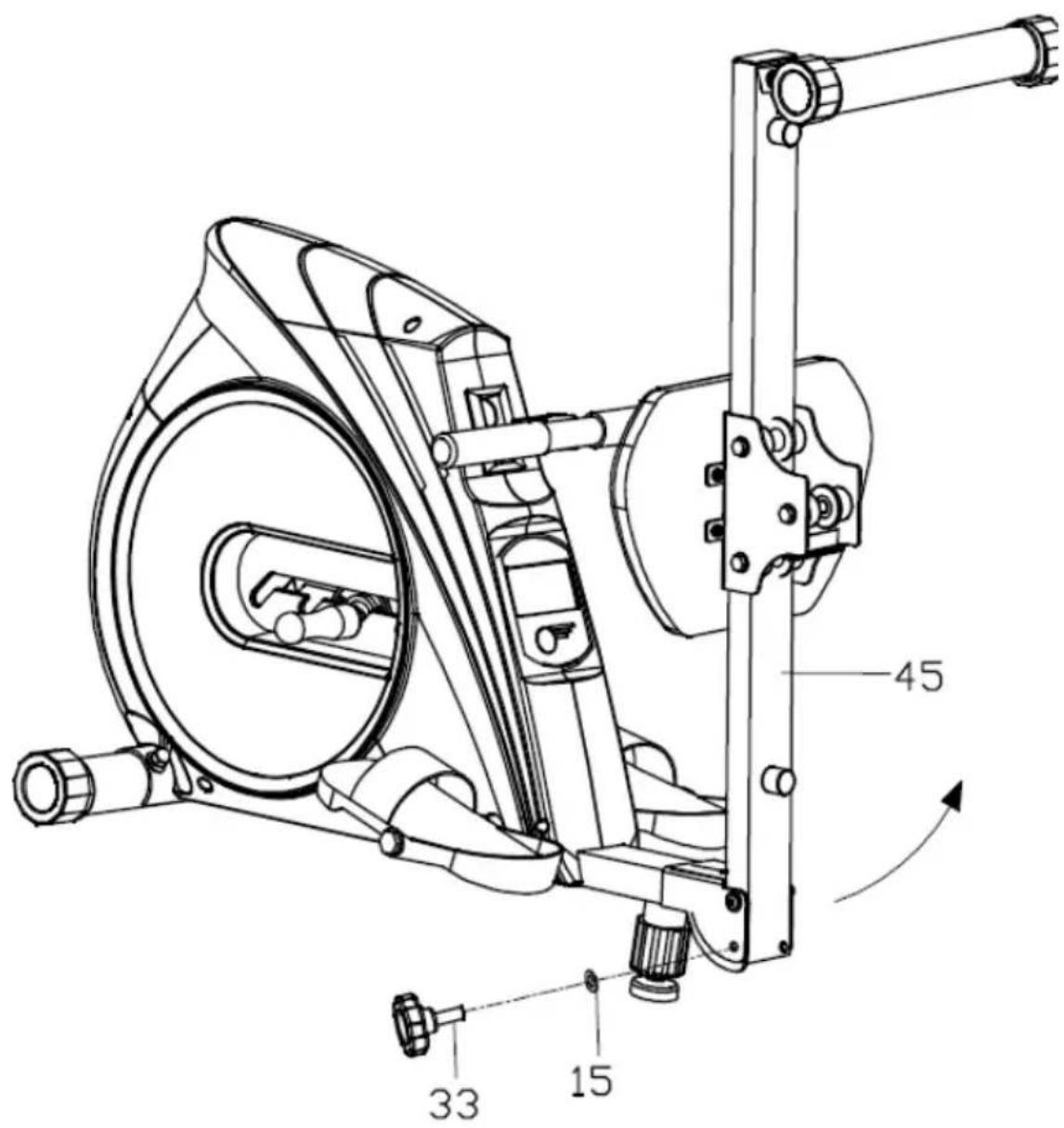
OPERATION
Button Function
MODE:
- Push to select functions.
- Push down and hold for 2 seconds to reset all functional value.
Functions
- SCAN: When MODE is set to SCAN, the meter will rotate through the following functions: Time, Count, Total Count, Calorie, Count/Min and (if applicable) pulse. Function will display for 6 seconds.
• TIME: Counts the rowing time of exercise start to end.
- COUNT: Counts the rowing strokes of exercise from start to end.
• TOTAL COUNT: Counts the total rowing strokes.
• CALORIES: Counts the total calories of exercise start to end.
- COUNT/MIN: Displays current rowing strokes per minute, or the frequency per minute.
- AUTO ON/OFF & AUTO START/STOP: Without any signal for 4 minutes, the machine will turn off automatically. When the machine is in motion or the interface button is pressed, the machine will turn on.
Adjusting the Resistance
To adjust the resistance of the rower, pull up on the resistance handlebar and move it forward or backward to one of the four slots.

natural_image
Technical line drawing of a mechanical component with a handle and internal structure (no text or symbols)Replacing the Batteries
- When the monitor screen light begins to fade, the batteries will need to be replaced.
- Press the monitor release button and remove the monitor.
- Remove the batteries and replace with two "AA" batteries.
• Gently push the monitor back into position.
Note: The batteries will need to be replaced every 3-4 months.

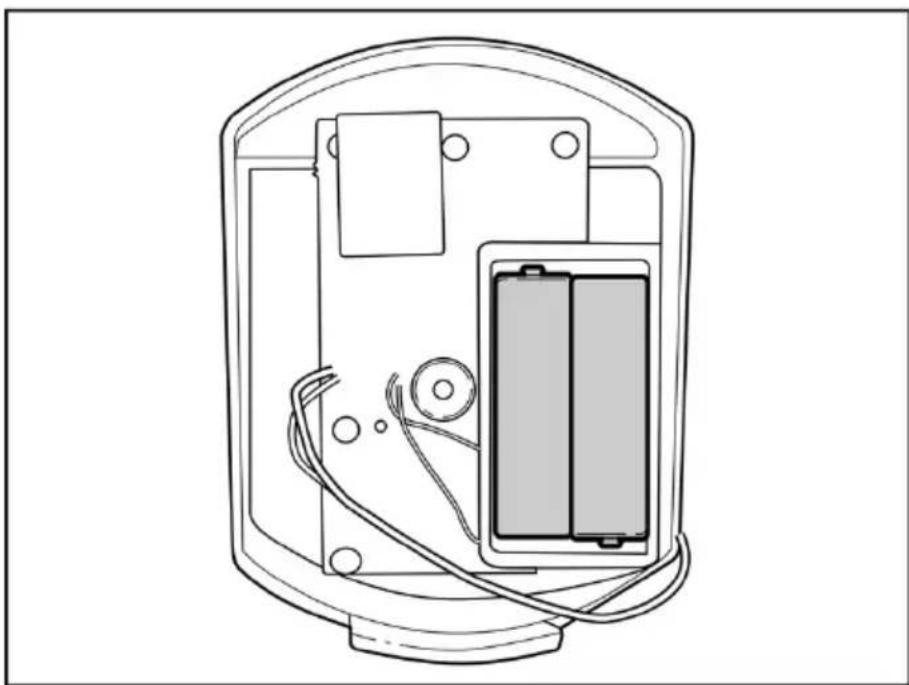
natural_image
Technical line drawing of an electronic device showing internal components including a battery pack and wiring (no text or symbols)NOTES
The Ground Truth image displays a single, solid horizontal line. According to Rule 2 (UNDERSCORE & LINE RULES), this is a stylistic or background line, not a placeholder underscore. Therefore, the OCR result must ignore it and output nothing or only meaningful text. The provided OCR content is "____", which consists of four underscores. This is an incorrect interpretation of the line as a fill-in-the-blank placeholder, violating the rule that stylistic lines must be ignored. The OCR has hallucinated underscores where none should exist based on the GT's visual context. Hence, the OCR result is inconsistent with the Ground Truth.
[Non-Text]
[Non-Text]
[EMPTY]
[Non-Text]
[Non-Text]
The Ground Truth image displays a single, continuous horizontal line, which is a stylistic or background element (like a ruled paper line). According to Rule 2, such lines must be ignored by the OCR result. The OCR content provided is "", which consists of no characters. Since the OCR output correctly ignores the background/stylistic line and produces no actual text, it complies with the “Stylistic/Background Lines (Ignore)” rule. Therefore, the OCR result is consistent with the Ground Truth.
[Non-Text]
[Non-Text]
[EMPTY]
[Non-Text]
[Non-Text]
The Ground Truth image displays a single, continuous horizontal line, which is a stylistic or background element (like a ruled paper line). According to Rule 2, such lines must be ignored by the OCR result. The provided OCR content is "____", which consists of underscores. Underscores are not equivalent to a solid line and are not permitted under the “Stylistic/Background Lines (Ignore)” rule. Outputting underscores for a stylistic line is incorrect because it misinterprets the line as a fill-in-the-blank placeholder. Therefore, the OCR result is inconsistent with the Ground Truth.
[Non-Text]
[Non-Text]
The Ground Truth image displays a single, continuous horizontal line, which is a stylistic or background element (like a ruled paper line). According to Rule 2, such lines must be ignored by the OCR result. The OCR content provided is "", which consists of no characters. Since the OCR output correctly ignores the background/stylistic line and produces no actual text, it complies with the “Stylistic/Background Lines (Ignore)” rule. Therefore, the OCR result is consistent with the Ground Truth.
[Non-Text]
[Non-Text]
____
[Non-Text]
[Non-Text]
[EMPTY]
[Non-Text]
[Non-Text]
The Ground Truth image displays a single, continuous horizontal line, which is a stylistic or background element (like a ruled paper line). According to Rule 2, such lines must be ignored by the OCR result. The provided OCR content is "____", which consists of underscores. Underscores are not equivalent to a solid line and are not permitted under the “Stylistic/Background Lines (Ignore)” rule. Outputting underscores for a stylistic line is incorrect because it misinterprets the line as a fill-in-the-blank placeholder. Therefore, the OCR result is inconsistent with the Ground Truth.
[Non-Text]
[Non-Text]
The Ground Truth image displays a single, continuous horizontal line, which is a stylistic or background element (like a ruled paper line). According to Rule 2, such lines must be ignored by the OCR result. The provided OCR content is "____", which consists of underscores. Underscores are not equivalent to a solid line and are not permitted under the “Stylistic/Background Lines (Ignore)” rule. Outputting underscores for a stylistic line is incorrect because it misinterprets the line as a fill-in-the-blank placeholder. Therefore, the OCR result is inconsistent with the Ground Truth.
[Non-Text]
[Non-Text]
The Ground Truth image displays a single, solid horizontal line. According to Rule 2 (UNDERSCORE & LINE RULES), if the GT contains lines used for stylistic emphasis or as background elements (like ruled paper), the OCR result must ignore them. The line in the GT is clearly a stylistic or background line, not a placeholder for text. Therefore, the OCR should not have output any underscores. Outputting `____` constitutes an error under Rule 2, as it hallucinates placeholder symbols where none are semantically intended. Hence, the OCR result is inconsistent with the Ground Truth.
[Non-Text]
[Non-Text]
The Ground Truth image displays a single, solid horizontal line, which is a stylistic or background element (like a ruled paper line or separator), not a placeholder for text. According to Rule 2, such stylistic/background lines must be ignored by the OCR result. The OCR content provided is "", which consists of no characters. This correctly represents the absence of any textual content in the GT and correctly matches the visual line as a stylistic element. Therefore, the OCR output should have been empty or omitted this line entirely.
[Non-Text]
[Non-Text]
[Non-Text]
The Ground Truth image displays a single, solid horizontal line. According to Rule 2 (UNDERSCORE & LINE RULES), this is a stylistic or background line, not a placeholder underscore. Therefore, the OCR result must ignore it and output nothing or only meaningful text. The provided OCR content is "____", which consists of four underscores. This is an incorrect interpretation of the line as a fill-in-the-blank placeholder, violating the rule that stylistic lines must be ignored. The OCR has hallucinated underscores where none should exist based on the GT's visual context. Hence, the OCR result is inconsistent with the Ground Truth.
[Non-Text]
[Non-Text]
The Ground Truth image displays a single, continuous horizontal line, which is a stylistic or background element (like a ruled paper line). According to Rule 2, such lines must be ignored by the OCR result. The provided OCR content is "____", which consists of underscores. Underscores are not equivalent to a solid line and are not permitted under the “Stylistic/Background Lines (Ignore)” rule. Outputting underscores for a stylistic line is incorrect because it misinterprets the line as a fill-in-the-blank placeholder. Therefore, the OCR result is inconsistent with the Ground Truth.
[Non-Text]
The Ground Truth image displays a single, solid horizontal line. According to Rule 2 (UNDERSCORE & LINE RULES), this is a stylistic or background line, not a placeholder underscore. Therefore, the OCR result must ignore it and output nothing or only meaningful text. The provided OCR content is "____", which consists of four underscores. This is an incorrect interpretation of the line as a placeholder, violating the rule that stylistic lines must be ignored. The OCR has hallucinated placeholder underscores where none should exist in the GT. Hence, the OCR result is inconsistent with the Ground Truth.
The Ground Truth image displays a single, solid horizontal line, which is a stylistic or background element (like a ruled paper line). According to Rule 2, such lines must be ignored by the OCR result. The OCR content provided is "", which consists of no characters. Since the OCR output correctly ignores the stylistic line, it complies with Rule 2. Therefore, the OCR result is consistent with the Ground Truth.
[Non-Text]
The Ground Truth image displays a single, solid horizontal line. According to Rule 2 (UNDERSCORE & LINE RULES), this is a stylistic or background line, not a placeholder underscore. Therefore, the OCR result must ignore it and output nothing or only meaningful text. The provided OCR content is "____", which consists of four underscores. This is an incorrect interpretation of the line as a placeholder, violating the rule that stylistic lines must be ignored. The OCR has hallucinated placeholder underscores where none should exist in the GT. Hence, the OCR result is inconsistent with the Ground Truth.
Need more information?
We hope that this user guide has given you the assistance needed for a simple set-up.
For the most up-to-date guide for your product, as well as any additional assistance you may require, head online to help.kogan.com
kogan.com


Brand : Fortis
Model : FSMEXRWMC1A
Category : Rowing Machine