
ROWER-700 - Rowing Machine LifeSpan - Free user manual and instructions
Find the device manual for free ROWER-700 LifeSpan in PDF.


| Product Type | Rowing Machine (Water Resistance) |
| Brand | LifeSpan |
| Model | ROWER-700 |
| Resistance Type | Water resistance (adjustable by water volume) |
| Monitor Display | LCD screen showing Speed, Time, Distance, Calories, Total Distance |
| Monitor Functions | Reset, Mode (selects Time/Distance/Cal), Setting |
| Heart Rate Monitoring | Pulse sensors on handle (trend only, not medical device) |
| Phone Holder | Included |
| Power Supply (Monitor) | 2x AAA batteries (not included) |
| Power Supply (Water Pump) | Rechargeable 5V battery (included electric siphon) |
| Water Pump Capacity | Pumps 18L of water up to 3 times per full charge |
| Water Treatment | Aqua Blue additive included; purification tablets recommended every 6 months |
| Maintenance Cleaning | Wipe with dry cloth; clean plastic tube monthly; prevent water in electrical parts |
| Maintenance Lubrication | Grease moving joints after periods of use |
| Assembly Required | Yes (seat, rear feet, main frame connections) |
| Safety Features | Emergency stop? Not specified; general safety: consult doctor, keep children away, use on flat surface |
| Warranty | Covered by Australian Consumer Law; details at lifespanfitness.com.au/warranty-repairs |
| Spare Parts Availability | Available through official website - parts purchase form |
Frequently Asked Questions - ROWER-700 LifeSpan
User questions about ROWER-700 LifeSpan
0 question about this device. Answer the ones you know or ask your own.
Ask a new question about this device
Download the instructions for your Rowing Machine in PDF format for free! Find your manual ROWER-700 - LifeSpan and take your electronic device back in hand. On this page are published all the documents necessary for the use of your device. ROWER-700 by LifeSpan.
USER MANUAL ROWER-700 LifeSpan
natural_image
Exterior view of a mounted machine with transparent internal components and black frame (no visible text or symbols)Product may vary slightly from the item pictured due to model upgrades.

Read all instructions carefully before using this product. Retain this owner's manual for future reference.
NOTE:
This manual should not be used to guide your purchasing decision. Your product, and the contents inside its carton, may vary from what is listed in this manual. This manual may also be subject to updates or changes. Updated manuals are available through our website at www.lifespanfitness.com.au
TABLE OF CONTENTS
I. Important Safety Instructions 03
II. Care Instructions 04
III. Assembly Instructions 05
IV. Operation Guide 08
V. Computer Display 09
VI. Exercise Guide 10
VII. Water Care Instructions 12
VIII. Troubleshooting 13
IX. Warranty 14
I. IMPORTANT SAFETY INSTRUCTIONS
WARNING: Read all instructions before using this machine.
It is important your machine receives regular maintenance to prolong its useful life. Failing to regularly maintain your machine may void your warranty.
Please keep this manual with you at all times.
- It is important to read this entire manual before assembling and using the equipment. Safe and effective use can only be achieved if the equipment is assembled, maintained and used properly. PLEASE NOTE: It is your responsibility to ensure that all users of the equipment are informed of all warnings and precautions
- Before starting any exercise program you should consult your doctor to determine if you have any medical or physical conditions that could put your health and safety at risk, or prevent you from using the equipment properly. Your doctor's advice is essential if you are taking medication that affects your heart rate, blood pressure or cholesterol level.
- Be aware of your body's signals. Incorrect or excessive exercise can damage your health. Stop exercising if you experience any of the following symptoms: pain, tightness in your chest, irregular heartbeat, and extreme shortness of breath, lightheadedness, dizziness or feelings of nausea. If you do experience any of these symptoms, you should consult your doctor before continuing with your exercise program.
- Keep children and pets away from the equipment. This equipment is designed for adult use only.
- Use the equipment on a solid, flat level surface with a protective cover for your floor or carpet. To ensure safety, the equipment should have at least 2 meters of free space around it.
- Before using the equipment, check that the nuts and bolts are securely tightened. If you hear any unusual noises coming from the equipment during use and assembly, stop immediately. Do not use the equipment until the problem has been rectified.
- Wear suitable clothing while using the equipment. Avoid wearing loose clothing that may get caught in the equipment or that may restrict or prevent movement.
- This equipment is designed for indoor and family use only.
- Care must be taken when lifting or moving the equipment so as not to injure your back.
• Always keep this instruction manual and assembly tools at hand for reference.
- The equipment is not suitable for therapeutic use.
- The pulse or heart rate sensors are not medical devices. Various factors, including the user's movement, may affect the accuracy of heart rate readings. The pulse sensors are intended only as exercise aids in determining heart rate trends in general.
II. CARE INSTRUCTIONS
- Lubricate moving joints with grease after periods of usage.
- Be careful not to damage plastic or metal parts of the machine with heavy or sharp objects.
- The machine can be kept clean by wiping it down using dry cloth.
- All nuts and bolts are to be checked and tightened on a regular basis. This includes pedals and other moving parts. Failure to do so may cause damage to your thread and void your warranty.
BATTERY USAGE
a. Batteries are to be installed or replaced by adult only.
b. Do not use rechargeable batteries. Do not mix different battery types. Do not mix old and new batteries. Do not mix alkaline, standard (Carbon Zinc), or rechargeable (Nickel-Cadmium) batteries.
c. Remove batteries when product is not in use.
d. Remove exhausted batteries from product and dispose of in accordance with the manufacturer's recommendation.

e. Do not attempt to recharge non-rechargeable batteries.
f. Batteries are to be inserted with correct polarity.
g. The supply terminals are not to be short-circuited.
h. Do not dispose of batteries in fire, batteries may explode or leak.
III. ASSEMBLY INSTRUCTIONS
Some items on this list may come pre-installed on your equipment. If you feel like you're missing anything, please double check your equipment.
Bolts are attached on the main parts, you will need to unscrew and re-install to join the parts.
ACCESSORIES LIST
①Rowing Machine

natural_image
Technical line drawing of a mechanical assembly with gears and shafts (no text or symbols)② Injection Water Pump (Electric Pump)
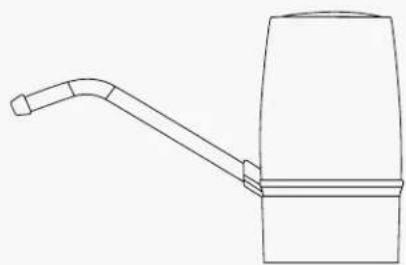
natural_image
Line drawing of a mechanical lever or lever assembly (no text or symbols)③ User's Manual

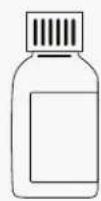
④ Phone Holder 5 Aqua Blue

natural_image
Line drawing of a handheld device with a coiled cable and handle (no text or symbols)O
PARTS LIST
1
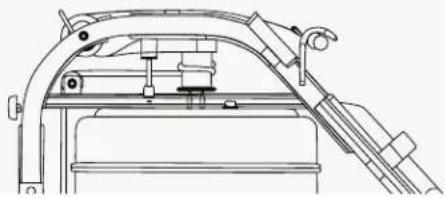
natural_image
Technical line drawing of a mechanical assembly with no visible text or symbols2

natural_image
Pure mechanical component diagram without any text, numbers, or symbols345
Seat Cushion
Sliding Rail
STEP 1
Remove the front stopper pad from the slide rail at the back, and then insert the seat cushion into the slide rail.

Connect rear feet frame to sliding rail with the 2 x M10*50 bolt and nut.

STEP 3
Lock up the sliding rail and main base frame with the screws.
The 1 x M10*120 screws to the side of the rail and the main frame.
The 1 x M10*170 screws to the front of the rail and onto the main frame.
IV. OPERATION GUIDE
HOW TO USE
- Add water for more resistance: Open the cap for the tank and pour water inside.
- Remove water for less resistance: Use the electric siphon to take the water of the tank.
- Add the full contents of Aqua Blue to the tank to help keep the water clean.
- Press the ON/OFF button to start or stop the siphon.
B. Charging
- The battery voltage is 5V, it can pump 18L of barreled water for 3 times once fully charged.
- The electric siphon is lower-voltage and explosion-proof control for safety precaution.
- When the supply current of the product is lower than 3.2A, a red warning light will flash. Please turn off the siphon and charge.
- When the battery is fully charged, the green light will appear.
C. Using
- Please carefully read the manual before using the product.
- Please connect one side of the plastic tube to the pump intake underneath the product and stick the other side into the barreled water before using.
- Please charge it fully after using or if not used for quite a long time.
- Please clean the plastic tube periodically or replace it once a month to keep healthy.
D. Cleaning and Maintaining
- Please unplug the power supply and store it out of the sun in cool dry condition after cleaning it, when it is not in use.
- Please prevent the water getting into the electrical parts and do not clean it in water. Use a soft, damp cloth to eliminate dirt and dust.
V. COMPUTER DISPLAY

FUNCTIONS
Reset: Sets value to zero
Mode: Selects Time/Distance/Calorie function and confirmation key.
Setting: Setting various values.
VI. EXERCISE GUIDE
! PLEASE NOTE:
Before beginning any exercise program, consult your physician. This is important especially if you are over the age of 45 or individuals with pre-existing health problems.
The pulse sensors are not medical devices. Various factors, including the user's movement, may affect the accuracy of heart rate readings. The pulse sensors are intended only as an exercise aid in determining heart rate trends in general.
Exercising is great way to control your weight, improving your fitness and reduce the effect of aging and stress. The key to success is to make exercise a regular and enjoyable part of your everyday life.
The condition of your heart and lungs and how efficient they are in delivering oxygen via your blood to your muscles is an important factor to your fitness. Your muscles use this oxygen to provide enough energy for daily activity. This is called aerobic activity. When you are fit, your heart will not have to work so hard. It will pump a lot fewer times per minute, reducing the wear and tear of your heart.
So as you can see, the fitter you are, the healthier and greater you will feel.
natural_image
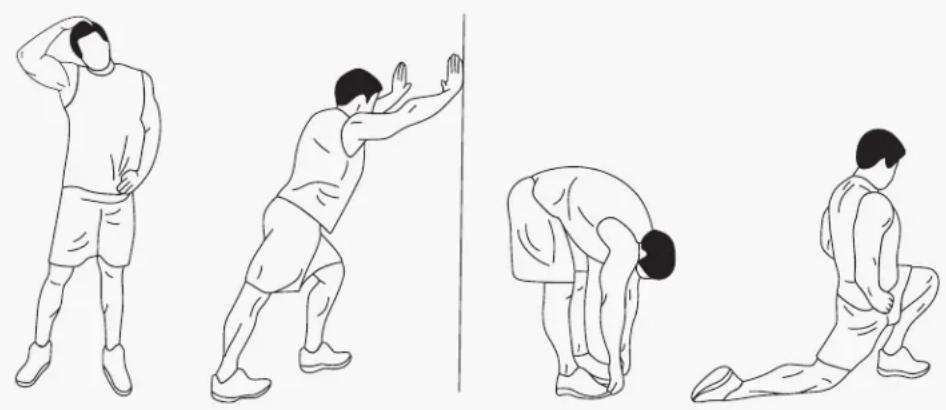
Four sequential illustrations of a person performing a stretching or martial arts pose, showing forward and backward movements (no text or symbols)WARM UP
Start each workout with 5 to 10 minutes of stretching and some light exercises. A proper warm-up increases your body temperature, heart rate and circulation in preparation for exercise. Ease into your exercise.
After warming up, increase the intensity to your desired exercise program. Be sure to maintain your intensity for maximum performance. Breathe regularly and deeply as you exercise.
COOL DOWN
Finish each workout with a light jog or walk for at least 1 minute. Then complete 5 to 10 minutes of stretching to cool down. This will increase the flexibility of your muscles and will help prevent post-exercise problems.
WORKOUT GUIDELINES

line
| AGE | HEART RATE | | --- | --- | | 40 | 160 | | 75 | 90 |This is how your pulse should behave during general fitness exercise. Remember to warm up and cool down for a few minutes.
VII. WATER CARE INSTRUCTIONS
HOW TO KEEP THE WATER CLEAN OR CLEAR:
- Rinse the tank and get out as much of the dirty water before refilling with clean water.
- Use bottled or distilled water rather than tap water.
- Add one purification tablet when you refill with clean water.
PLEASE NOTE: adding purification tablets to already cloudy water will not help to clear up the water.
- Store the water tank away from direct sunlight, if possible. This is to prevent algae growth.
HOW OFTEN DO YOU NEED TO ADD PURIFICATION TABLETS?
It is recommended to add one tablet into your tank every 6 months. If your rower is in direct sunlight, it is recommended to add every 3-4 months.
ALGAE GROWTH
If your tank is not regularly maintained, algae growth will occur.
To clean algae you should empty as much of the infested water as you can and refill the tank with clean water. Add about 14 cup of algae cleaner solution into the tank and give a few rows to mix the solution. Once the tank is clear, you can add a purification tablet.
VIII. TROUBLESHOOTING
| Issue | Reason | Solution | |
| Water discoloration or turbid | a. Water exposed to direct sunlight.b. Water was not treated. | a. Place the rower away from direct sunlight.b. Change or treat the water according to this manual. Consider using distilled water for water re-injection. | |
| The handle belt slips from the rubber wheel | a. The tension rope is not tight, and the counter charge is not strong. | a. According to the re-installation of the rowing machine pull tape instructions for processing, drawing the tension rope. | |
| Display isn’t working after installing the battery | Battery is either installed incorrectly or dead. | Check to ensure it is installed correctly or try a new battery. If it is still not working, contact support. | |
IX. WARRANTY
AUSTRALIAN CONSUMER LAW
Many of our products come with a guarantee or warranty from the manufacturer. In addition, they come with guarantees that cannot be excluded under the Australian Consumer Law. You are entitled to a replacement or refund for a major failure and compensation for any other reasonably foreseeable loss or damage.
You are entitled to have the goods repaired or replaced if the goods fail to be of acceptable quality and the failure does not amount to a major failure. Full details of your consumer rights may be found at www.consumerlaw.gov.au.
Please visit our website to view our full warranty terms and conditions: http://www.lifespanfitness.com.au/warranty-repairs
WARRANTY AND SUPPORT
Any claim against this warranty must be made through your original place of purchase. Proof of purchase is required before a warranty claim may be processed.
If you have purchased this product from the Official Lifespan Fitness website, please visit https://lifespanfitness.com.au/warranty-form
For support outside of warranty, if you wish to purchase replacement parts or request a repair or service, please visit https://lifespanfitness.com.au/warranty-form and fill in our Repair/Service Request Form or Parts Purchase Form.
Scan this QR code with your device to go to lifespanfitness.com.au/warranty-form


- TABLE OF CONTENTS
- IMPORTANT SAFETY INSTRUCTIONS
- WARNING: Read all instructions before using this machine.
- CARE INSTRUCTIONS
- BATTERY USAGE
- ASSEMBLY INSTRUCTIONS
- ACCESSORIES LIST
- PARTS LIST
- STEP 1
- OPERATION GUIDE
- HOW TO USE
- Charging
- Using
- Cleaning and Maintaining
- COMPUTER DISPLAY
- FUNCTIONS
- EXERCISE GUIDE
- ! PLEASE NOTE:
- WARM UP
- COOL DOWN
- WORKOUT GUIDELINES
- WATER CARE INSTRUCTIONS
- HOW TO KEEP THE WATER CLEAN OR CLEAR:
- HOW OFTEN DO YOU NEED TO ADD PURIFICATION TABLETS?
- ALGAE GROWTH
- TROUBLESHOOTING
- WARRANTY
- AUSTRALIAN CONSUMER LAW
- WARRANTY AND SUPPORT
Brand : LifeSpan
Model : ROWER-700
Category : Rowing Machine