
01.348700.02.001 - Heating PRINCESS - Free user manual and instructions
Find the device manual for free 01.348700.02.001 PRINCESS in PDF.


| Brand | Princess |
| Model | 01.348700.02.001 / 01.348701.02.001 |
| Product Type | Smart Heating & Cooling Tower |
| Power (Max) | 2000W |
| Voltage | 220-240V~ |
| Frequency | 50/60Hz |
| Operating Modes | Cool, Heat, Natural, Sleep |
| Oscillation | Yes (left-right) |
| Timer Range | 1-24 hours |
| Fan Speeds | 10 in cool mode, 4 in heat mode |
| Temperature Setting | 16°C-30°C (in heat mode) |
| Display Colors | Blue (cool), Orange (heat) |
| Remote Control | Included (requires 2x AAA batteries) |
| Smart App Control | Yes (Princess Home app for iOS/Android) |
| Voice Control | Compatible with smart speakers via app |
| Wi-Fi Specifications | Operating frequency 2412-2484.5 MHz, max RF power 20 dBm |
| Safety Features | Overheat protection, tip-over auto shut-off |
| Cleaning Instructions | Wipe surface with soft dry cloth; clean air inlet/outlet with soft brush or vacuum |
| Usage | Indoor, well insulated spaces or occasional use |
| Battery for Remote | 2x AAA (not included) |
Frequently Asked Questions - 01.348700.02.001 PRINCESS
User questions about 01.348700.02.001 PRINCESS
0 question about this device. Answer the ones you know or ask your own.
Ask a new question about this device
Download the instructions for your Heating in PDF format for free! Find your manual 01.348700.02.001 - PRINCESS and take your electronic device back in hand. On this page are published all the documents necessary for the use of your device. 01.348700.02.001 by PRINCESS.
USER MANUAL 01.348700.02.001 PRINCESS
Smart Heating & Cooling Tower
01.348700.02.001 / 01.348701.02.001
PARTS DESCRIPTION

SAFETY
- By ignoring the safety instructions the manufacturer cannot be held responsible for the damage.
- If the supply cord is damaged, it must be replaced by the manufacturer, its service agent or similarly qualified persons in order to avoid a hazard.
- Never move the appliance by pulling the cord and make sure the cord cannot become entangled.
- The appliance must be placed on a stable, level surface.
- The user must not leave the appliance unattended while it is connected to the supply.
- This appliance is only to be used for household purposes and only for the purpose it is made for.
- This appliance shall not be used by children aged less than 8 years. This appliance can be used by children aged from 8 years and above and persons with reduced physical, sensory or mental capabilities or lack of experience and knowledge if they have been given supervision or instruction concerning use of the appliance in a safe way and
understand the hazards involved. Children shall not play with the appliance. Keep the appliance and its cord out of reach of children aged less than 8 years. Cleaning and user maintenance shall not be made by children unless older than 8 and supervised.
• To protect yourself against an electric shock, do not immerse the cord, plug or appliance in the water or any other liquid.
- WARNING: Some parts of this product can become very hot and cause burns. Particular attention has to be given where children and vulnerable people are present.
- Children aged from 3 years and less than 8 years shall only switch on/off the appliance provided that it has been placed or installed in its intended normal operating position and they have been given supervision or instruction concerning use of the appliance in a safe way and understand the hazards involved. Children aged from 3 years and less than 8 years shall not plug in, regulate and clean the appliance or perform user maintenance.
• Children of less than 3 years should be kept away unless continuously supervised.
Instruction manual
- Do not use the appliance with a programmer, timer, separate remote-control system or any other device that switches the heater on automatically, since a fire risk exists if the heater is covered or positioned incorrectly.
- Do not use this heater in the immediate surroundings of a bath, a shower or a swimming pool.
- Please do not install the appliance close to curtains and other combustible materials. This could cause a fire.
- The heater must not be located immediately below a socket-outlet.
- The heater needs to be installed so that the switches and other controls cannot be touched by a person in the bath or shower.
- WARNING: In order to avoid overheating, do not cover the heater.

This product complies with conformity requirements of the applicable European Regulations or Directives.
This product complies with conformity requirements of the applicable UK Regulations.

Waste electrical products should not be disposed of with household waste. Please recycle where facilities exist. Check with your Lokal Authority or local store for recycling advise.
Safety
• The manufacturer cannot be held responsible for damages resulting from a failure to comply to the safety instructions.
- Do not expose the battery to high temperatures or direct sunlight. Never throw batteries into the fire. There is a danger of explosion!
- Keep batteries away from children. Batteries are not a toy!
- Do not open the batteries by force.
- Avoid contact with metallic objects.(Rings, nails, screws et cetera) there is a danger of short-circuiting!
- As a result of a short-circuit batteries may heat up considerably or even catch fire. this may result in burns.
- For your safety the battery poles should be covered with adhesive strips during transport.
- Do not touch a ruptured and/or leaking battery. If the liquid from the battery gets into your eyes, rinse your eyes as soon as possible with clean water, without rubbing your eyes. Immediately go to the hospital. If it is not treated properly, it can cause eye problems.
PARTS DESCRIPTION
- Cover
- Air outlet
- Air duct
- Body
- Power button
- Display
- Air inlet
- Base
- Remote control
Instruction manual
BEFORE THE FIRST USE
- Place the device on a flat stable surface and ensure a minimum of 100 cm. free space around the device. This device is not suitable for installation in a cabinet or for outside use.
- Connect the power cable to the socket. (Note: Make sure the indicated voltage on the device matches the local voltage before connecting the device. Voltage 220V-240V\~50-60Hz.)
- This device includes an overheat protection sensor and an automatic fail-safe that cuts power to the unit if it's accidentally tipped over or overheat. If this sensor is triggered, unplug the machine and allow the fan to cool down. Check and remove any obstructions before restarting the device and be sure to place them on a hard, flat stable surface.
- The power switch or the power button on remote will turn this fan to standby, not complete shutdown. Use the switch on the back of the device to turn off completely when the unit is not in use.
- When the device will not be in use for a long time, please unplug the power cord.
- Warning: The below may sometimes occur due to the overlap of the remote control frequencies. Please pay attention to this while using the remote control:
- This device may react when using a remote control for other appliances.
- When using the remote control of this device, other electrical appliances may react.
- Place 2x AAA batteries into the remote control, make sure the polarity (+ and -) is correct.
DISPLAY/BUTTON FUNCTIONS
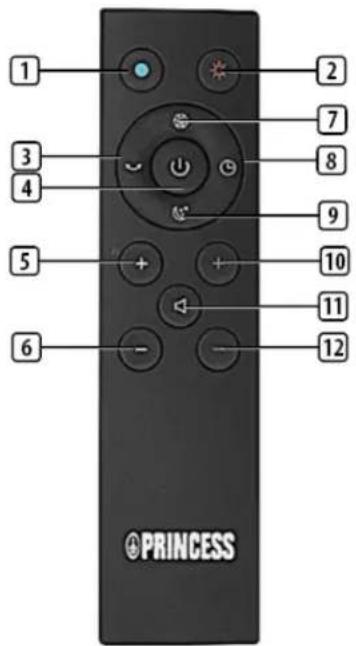
| 1 Cool mode |
| 2 Heat mode |
| 3 Oscillation |
| 4 Power button |
| 5 Increase volume of air |
| 6 Decrease volume of air |
| 7 Natural mode |
| 8 Timer |
| 9 Sleep mode |
| 10 Increase temperature |
| 11 Mute |
| 12 Decrease temperature |
EN
USE
Button / Switch / Display on device
• The power button on the device can be used for:
- Turn the machine on and off, short press.
- Long press for 6 seconds to enter pair mode.
- Long press 15 seconds to enter factory reset which the machine will forget all your wifi credentials.
- The on/off switch on the back of the device can be used to turn off the device completely.
• The temperature is visible in the display. - Display color will be blue in cool mode or orange in heat mode.
Remote control buttons
- Cool mode: In cooling mode, the LED lamp is blue. Press this button to activate the cooling mode. Note: The default start mode is the cooling mode.
- Heat mode: The display number in heat mode is orange. Press this button to activate the heat mode.
- Oscillation button: Press the Oscillation button to turn on the oscillation function. The fan will swing from left to right. Press this button again to stop oscillating.
- Power button: The device can be switched on and off by pressing the power button.
-
Increase/Decrease volume of air: Press the "+" button on the left side of the remote control to increase the volume of air, press the "-" button on the left side of the remote control to decrease the airflow. It can be set in 1-10 fan speed in cooling mode, heat mode can be set for 4 levels.
-
Natural mode: The device show the current fan speed on screen, the fan simulates the natural breeze, it works in both cooling and heating mode.
- Timer: Press the timer button to select the desired range between 1 hour to 24 hours.
- Sleep mode: Sleep mode works in both heating and cooling. The fan speed will reduce to speed 1 from whichever fan speed you set. The display will show the current fan speed where it reduced to.
- Increase/Decrease temperature: In heat mode, press the temperature button on the right side of the remote control to set the temperature between 16°C and 30°C . Note: this button does not work in cool mode.
- Mute: This will turn off the sounds of the device.
Heating mode instructions
- Press the heat mode button and the display shows the ambient temperature.
- Press temperature button to set the temperature, the display will flash digitally, which can be set to 16 to 30 degrees.
- Set temperature should be higher than the ambient temperature, so that the heating function will be turned on.
- When the ambient temperature reaches the target temperature, the heating element will stop for a while and machine will be fanning to vent heat, after a few seconds the fan will stop too until the ambient temperature is below target temperature.
- If the ambient temperature is lower than the set temperature the heating function will activate automatically.
- Note: The default setting temperature is 20°C . In the heat mode, when the ambient temperature is below 0°C , the display only shows 01, it does not display negative temperature value. When the heat mode runs over 9 hours, the machine will automatically stop. Restart by pressing the host power button or by using the button on the remote control.

USING THE DEVICE WITH PRINCESS HOME APP
- The device can be used manually with its built-in controls or you can use a smart phone or smart speaker to control it. Before you begin, ensure the Princess Home app is downloaded. The Princess Home app is available on Android and iOS.
- Download the correct version of the Princess Home app via our website princesshome.eu/nl-nl/princess-home-app or use QR:

IOS

Google Play
Pair your device to the Princess Home app
• Make sure your device is powered.
- Open the Princess Home app.
- Select your country code, enter the cell phone number and tap "Get" to get a message containing the verification code.
- Enter the verification code in the message and tap "Log in" to log in to the App.
- Click "Add Device" to add a new device.
- Select the device you wanted to connect.
- Follow the instructions on the app to connect the device.
- To control your device with voice using a smart speaker please refer to the manufacturer's instructions on how to enable a skill through your device.
Technical Specification
| Details 348700/348701 | |
| Voltage 220-240V~ | |
| Frequency 50/60Hz | |
| Power (maximum) 2000W |
CLEANING AND MAINTENANCE
- Before cleaning, unplug the device and wait for the device to cool down.
- Surface cleaning: Wipe the surface with a soft, dry cloth, if extremely dirty clean the appliance with a damp cloth. Never use harsh and abrasive cleaners, scouring pad or steel wool, which damages the device. Then wipe with a dry soft cloth.
Instruction manual
- Air inlet/outlet: Use a soft brush or a vacuum cleaner to clean the dust at the air inlet and outlet. Make sure to clean it when there is less dust. Too much dust is not healthy and will reduce fan efficiency.
- Remote control: Gently wipe the surface of the remote control with a soft, dry cloth. Remove the batteries if the remote control will not be used for a long time.
DECLARATION OF CONFORMITY
- Hereby, Smartwares Europe declares that the radio equipment type 348700.02/348701.02 is in compliance with Directive 2014/53/EU
- The full text of the EU declaration of conformity is available at the following internet address: www.princesshome.eu/doc
ENVIRONMENT

This appliance should not be put into the domestic garbage at the end of its life, but must be offered at a central point for the recycling of electric and electronic domestic appliances. This symbol on the appliance, instruction manual and packaging puts your attention to this important issue. The materials used in this appliance can be recycled. By recycling of used domestic appliances you contribute an important push to the protection of our environment. Ask your local authorities for information regarding the point of recycling.
The European directive for batteries (2006/66/EC) states that it is not permitted to throw batteries away with the household waste. They may contain substances which are harmful to the environment. Empty batteries can be handed over to a local, public collection point or a local recycling centre. To avoid overheating as a result of a short circuit, lithium batteries must be removed from the product and the poles must be protected using insulation tape or some other means against short-circuiting.
FOR HOUSEHOLD USE ONLY SAVE THESE INSTRUCTIONS
Support
www.princesshome.co.uk


This product is only suitable for well insulated spaces or occasional use.
Wireless technology: Wi-Fi
Operating frequency: 2412MHz\~2484.5MHz
Max. radio-frequency power: 20dBm

smartwares® Europe
The Netherlands | www.princesshome.eu

smartwares® Safety and Lighting Ltd.
Meriden House | 6 Great Cornbow
Halesowen| West Midlands | B63 3AB |
United Kingdom | www.princesshome.co.uk


- SAFETY
- INSTRUCTION MANUAL
- PARTS DESCRIPTION
- BEFORE THE FIRST USE
- USE
- BUTTON / SWITCH / DISPLAY ON DEVICE
- REMOTE CONTROL BUTTONS
- HEATING MODE INSTRUCTIONS
- USING THE DEVICE WITH PRINCESS HOME APP
- CLEANING AND MAINTENANCE
- DECLARATION OF CONFORMITY
- ENVIRONMENT
- FOR HOUSEHOLD USE ONLY SAVE THESE INSTRUCTIONS
- SUPPORT
Brand : PRINCESS
Model : 01.348700.02.001
Category : Heating