SB2040U - Soundbar Mitsai - Free user manual and instructions
Find the device manual for free SB2040U Mitsai in PDF.


| Product Type | Cinema Soundbar System |
| Brand | Mitsai |
| Model | SB2040U |
| Dimensions (W x H x D) | 770 x 103 x 55 mm |
| Weight | 2.1 kg |
| Power Consumption | 15 W |
| Standby Power Consumption | ≤ 1 W |
| Total Output Power | 65 W RMS (10% THD) |
| Frequency Response | 20 Hz - 20 kHz ± 3 dB |
| Full Range Speaker Drivers | 2 x 52 mm (2") 4 ohm |
| Built-in Subwoofer | 78 mm (3") 8 ohm |
| FM Tuning Range | 87.5 - 108 MHz |
| FM Preset Memory | 30 stations |
| Audio Inputs | TV (L/R), AUX (3.5mm), USB, Memory Card |
| Supported Audio Formats | MP3, WMA |
| Supported Memory Cards | SD, MMC |
| Remote Control | Smart remote with learning function |
| Wall Mountable | Yes, bracket included |
| Alarm Clock | Buzzer or radio wake-up |
| Sleep Timer | 5 - 90 minutes |
| Sound Modes | Standard, Movie/Game, Music, News |
| Bass Boost | Adjustable (0, 1, 2) |
| Display Brightness | Adjustable |
| Power Cable Length | 1.8 m |
| Warranty | 2 years (manufacturer) |
Frequently Asked Questions - SB2040U Mitsai
User questions about SB2040U Mitsai
0 question about this device. Answer the ones you know or ask your own.
Ask a new question about this device
Download the instructions for your Soundbar in PDF format for free! Find your manual SB2040U - Mitsai and take your electronic device back in hand. On this page are published all the documents necessary for the use of your device. SB2040U by Mitsai.
USER MANUAL SB2040U Mitsai
natural_image
Black rectangular air conditioner unit with orange square pattern overlay, no visible text or symbolsINSTRUCTIONS MANUAL
MANUAL DE INSTRUÇÕES
EN
CINEMA SOUNDBAR SYSTEM
InStrUctlon ManUal
Dear client,
We thank you for purchasing this product.
This appliance was submitted to several laboratorial tests, which certify its quality. To simplify the use of this appliance, this instruction manual has been provided. The instructions must ensure a quick and safe use.
Please read carefully the instructions and safety measures described in this manual.
We wish our clients great satisfaction in using their new appli- ance.
Index
1. Safety Instructions 4
1.1. Energy Supply 5
1.2. Power Cord and Other Cables 5
1.3. Humidity and Water 5
1.4. Cleaning 5
1.5. General Precautions 5
2. Your Soundbar 7
2.1. Introduction 7
2.2. What's in the Box 7
2.3. Main Unit 8
2.4. Remote Control 10
3. Get Started 12
3.1. Prepare the Remote Control 12
3.2. Connect the FM Antenna 13
CINEMA SOUNDBAR SYSTEM
EN
3.3. Connect Audio Devices 13
3.4. Connect Power 14
3.5. Turn On 15
3.6. Set time and date 15
4. Utilization and Functioning 15
4.1. Play Audio from Tv or other Devices 15
4.2. Play from USB or Memory Cards 15
4.3. Listen to Radio 17
5. Adjust Sound 18
5.1. Adjust Volume 18
5.2. Select a Preset Sound Effect 18
5.3. Enhance Bass 19
5.4. Mute Sound 19
6. Other Uses for the Soundbar 19
6.1. Set the Alarm Timer 19
6.2. Set the Sleep Timer 20
6.3. Adjust Display Brightness 20
6.4. Prepare the Smart Remote Control to Operate TV 21
7. Wall Mount your Soundbar 21
7.1. What else you'll need 22
7.2. Mount your Soundbar 22
- Troubleshooting 24
- Product Specifications 26
- Aftermarket 26
- Environment Conservation 28
EN
CINEMA SOUNDBAR SYSTEM
1. SAFETY INSTRUCTIONS

ATTENTION RISK OF ELECTRIC SHOCK DO NOT OPEN

ATTENTION: TO AVOID THE RISK OF ELECTRIC SHOCK, DO NOT REMOVE THE COVER. THE INTERIOR DOES NOT CONTAIN ANY PARTS THAT MAY BE REPAIRED BY THE USER. ASK FOR ASSISTANCE TO QUALIFIED PERSONNEL.
Important Warnings
Before using your appliance, read carefully this instruction manual and keep it in a safe place, as you may need it for future consultations.
Before you start your appliance, and to ensure a correct use, do not use it if:
- It has fallen on the ground;
- You notice any evidence of damage;
- Any anomaly occurs during its operation;
To avoid hazards and deterioration of your appliance by an incorrect use, it is advisable to read the instructions carefully and attentively.
Your appliance must not be used to other ends than the ones foreseen in the instructions manual. Your safety is only guaranteed in a household use and not for commercial use. The incorrect use will not be covered and automatically cancels the right to warranty.
Assistance
Be sure that, in case of malfunction, you take your appliance to a qualified technician for assistance.
DO NOT ALLOW CHILDREN TO USE ELECTRIC APPLIANCES WITHOUT SUPERVISION.
DO NOT ALLOW CHILDREN OR ADULTS WITH REDUCED PHYSICAL, SENSORIAL OR MENTAL CAPACITIES, OR PEOPLE WITHOUT EXPERIENCE/KNOWLEDGE, TO USE ELECTRICAL APPLIANCES WITHOUT SUPERVISION.
1.1. Energy Supply
Check if the voltage of the electric power is compatible with the one mentioned on the appliance. If not, please contact your seller or the Customer Service.
1.2. Power Cord and Other Cables
Unplug your appliance whenever you are not using it.
Do not roll nor pull the cable to unplug the appliance. Keep the power cord away from hot surfaces.
Never use this appliance if it has a damaged cord or plug, nor if it is not working correctly.
If the power cord is damaged, do not use your appliance, take it to an authorized technical assistance to be replaced.
1.3. Humidity and Water
Do not use your appliance in moist environments. Do not let your appliance subject to get wet in any way, since it may be dangerous. TO AVOID FIRE OR ELECTRIC HAZARD DO NOT EXPOSE THE APPLIANCE TO WATER NOR MOISTURE. Do not put your appliance under water (for example, to wash it).
1.4. Cleaning
Unplug the appliance before you clean it. Later, clean it with a soft and dry cloth. Do not use cleaning products.
1.5. General Precautions
Risk of electric shock or fire
EN
CINEMA SOUNDBAR SYSTEM
- Never place the product and accessories near naked flames or other heat sources, including direct sunlight.
- Never insert objects into the ventilation slots or other openings on the product.
- Where the main plugs or an appliance coupler is used as the disconnect device, the disconnect device shall remain readily operable.
- Disconnect the product from the power outlet before lighting storms.
Risk of injury or damage to the Soundbar
- For wall-mountable products, use only the supplied wall mount bracket. Secure the wall mount to a wall that can support the combined weight of the product and wall mount. The producer or dealer bears no responsibility for improper wall mounting that results in accident, injury or damage.
- Never place the product or any objects or power cords or on other electrical equipment.
- If the product is transported in temperatures below 5^ , unpack the product and wait until its temperature matches room temperature before connecting it to the power outlet.
Risk of overheating
- Never install this product in a confined space. Always leave a space of at least four inches around the product for ventilation. Ensure curtains or other objects never cover the ventilation slots on the product.
Risk of contamination
- Risk of explosion if battery is incorrectly replaced. Replace only with the same or equivalent type.
- Remove battery if it is exhausted or if the remote control is not to be used for a long time.
- Battery Contains chemical substances, it should be disposed
of properly.
Hearing Safety
Listen at a moderate volume:
- Sound can be deceiving. Over time your hearing “comfort level” adapts to higher volumes of sound. So after prolonged listening, what sounds “normal” can actually be loud and harmful to your hearing. To guard against this, set your volume to a safe level before hearing adapts and leave it there.
To establish a safe volume level
- Set your volume control at a low setting.
- Slowly increase the sound until you can hear comfortably and clearly without distortion.
Listen for reasonable periods of time
- Prolonged exposure to sound, even at normally safe levels, can also cause hearing loss.
- Be sure to use your equipment reasonably and take appropriate breaks.
2. YOUR SOUNDBAR
2.1. Introduction
With this unit, you can:
- Listen to FM radio.
- Enjoy audio from TV, USB, memory card or other audio devices.
- Know the time.
- Wake up by buzzer alarm or radio.
- Get 3D sound.
2.2. What's in the Box
Check and identify the contents of your package:
EN
CINEMA SOUNDBAR SYSTEM
- Main unit.
- Smart remote control.
- 1x audio cable.
- FM Antenna.
- User manual.
2.3. Main Unit

1) Ⓧ(Stand-by)
- Turn on the Soundbar or switch to standby mode.
- When the Soundbar is on Standby, the current time appears on display.
2) (SOURCE)
- Select an audio source from TV, AUX, FM, USB device or CARD reader.
3) ▶||
- Star or pause.
- Press and hold ▶ for 3 seconds to seek radio stations.
- Confirm and save a radio station.
4)
- Skip to the previous audio file.
CINEMA SOUNDBAR SYSTEM
EN
- Select a preset radio station.
5)
- Skip to next file.
- Select a preset radio station.
- Press and hold ▶ for 3 seconds to skip a weak radio station not be saved during seek mode.
6) VOL +/-
- Adjust volume.
7) USB Slot
- Jack for a USB device.
8) Memory card slot
- Slot for memory card.
9) AUDIO IN - TV L/R
- Connect to the analog audio output on a TV or other analog audio devices.
10) AUDIO IN - AUX
• Audio input from a MP3 player.
11) FM antenna
- Improve FM reception.
12) Display panel
- Show the status.
13) Wall-mount bracket
14) Power supply cable
EN
CINEMA SOUNDBAR SYSTEM
2.4. Remote Control

1) Ⓧ(Stand-by).
- Turn on the Soundbar or switch to standby mode.
- When the Soundbar is on Standby, the current time appears on display.
2) (SOURCE)
- Select an audio source from TV, AUX, FM, USB device or CARD reader.
3) ▶||
- Star or pause.
CINEMA SOUNDBAR SYSTEM
EN
- Press and hold ▶ for 3 seconds to seek radio stations.
- Confirm and save a radio station.
4) SOUND MODE
- During play, press SOUND MODE repeatedly to select a sound effect from Standard, Movie/Game, Music or News.
5) CLOCK
- Set date and time.
6) ALARM
- Set the alarm timer.
- Turn off the alarm timer.
• View alarm settings.
7) MUTE
- Mute/unmute volume.
8) DIM./SLEEP
- Adjust display brightness.
- Set the sleep timer.
9)
- Skip to the next audio file.
- Select a preset radio station.
- Press and hold ▶ for 3 seconds to skip a weak radio station not to be saved during seek mode.
10)
- Skip to previous audio file.
- Select a preset radio station.
11) VOL +/-
- Adjust volume.
EN
CINEMA SOUNDBAR SYSTEM
12) BASS BOOST
- Enhance bass of built-in subwoofer.
13) DSHUFFLE
- Play audio files randomly.
14) REPEAT
- Select a repeat play mode.
15) Indicator
- Indicate remote control learning mode.
16) LEARN
- Activate remote control programming.
17) Programming buttons
- Buttons reserved for remote control programming.
3. GET STARTED:
Always follow the instructions in this chapter in sequence.
3.1. Prepare the Remote Control
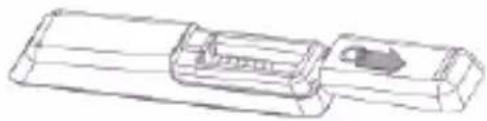
- Open the battery compartment.
natural_image
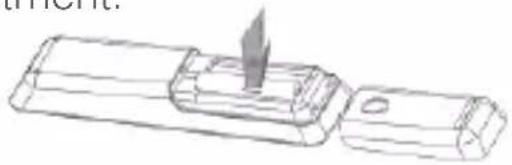
Technical line drawing of a mechanical component with no visible text or symbols- Insert two AAA size batteries, with the polarity (+/-) as indicated inside the compartment.
natural_image
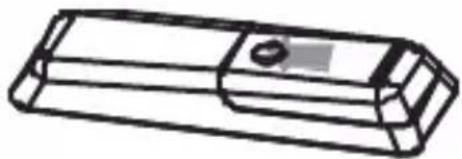
Line drawing of a mechanical component with a pointed tip and base, no text or symbols present- Close the battery compartment.
natural_image
Technical line drawing of a rectangular mechanical part with a central hole and side notches (no text or symbols)3.2. Connect FM Antenna
- Connect the supplied FM antenna to the FM antenna jack on the side of the main unit.

Note: For optimal reception, fully extend and adjust the position of the antenna.
3.3. Connect Audio Devices
Connect TV, DVD player or game console.
Connect the cables by following the descriptions below:

EN
CINEMA SOUNDBAR SYSTEM
Note: The type of devices and connections in the following instructions are for reference only.
When you connect cables, ensure that the color of the plug matches the color of the jack.
Connect MP3 player or other portable audio devices.


Earphone
Out
3.4. Connect Power
- Connect the AC power cord to the wall outlet.

Note: Before connecting AC power, ensure you have completed all other connections.
Caution: Risk of product damage. Ensure that the power supply voltage corresponds to the voltage printed on the back or the side of the product.
Risk of electric shock. When you unplug the AC power, always pull the plug from the socket. Never pull the cord.
3.5. Turn On
- Press ⏻
The unit switches to the last selected source.
Switch to Standby
- Press 🏻 again to switch the unit to standby mode.
The time (if set) appears on the display panel.
3.6. Set Time and Date
1 – Press and hold CLOCK for 3 seconds to activate clock setting mode.
- The hour digits begin to blink.
2 - Press ↔ repeatedly to set hour.
3 - Press CLOCK to confirm.
4 - Repeat steps 2-3 to set the minutes, year, month and day.
Know the time:
- Press CLOCK, the current time is displayed.
4. UTILIZATION AND FUNCTIONING
This section helps you to use the Soundbar to play audio from connected devices.
Before you start, check that you make the necessary connections.
4.1. Play Audio from TV or Other Devices
- Press SOURCE to select the audio output of the connected device.
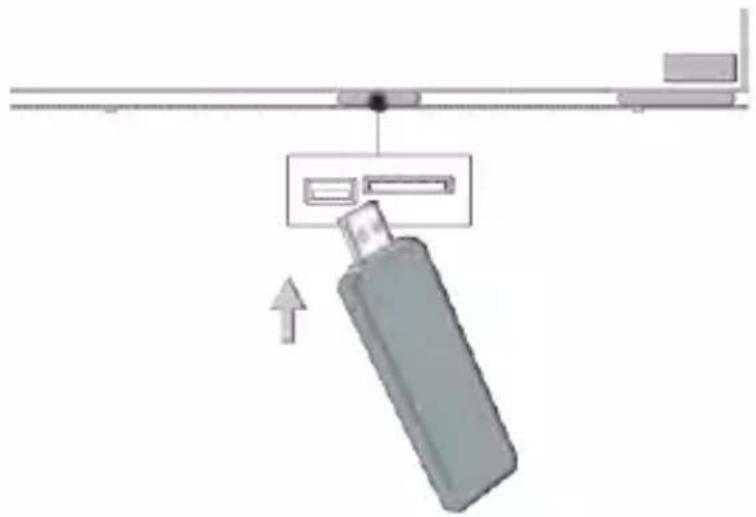
4.2. Play from USB or Memory Card
- Insert the USB plug (or memory card) into the slot.
EN
CINEMA SOUNDBAR SYSTEM
natural_image
Diagram of a device with an arrow indicating direction, showing a battery and control panel (no text or symbols)-
Press SOURCE to select USB (or CARD).
-
Press ▶ to star play.
-
During play, press ◀◀to skip to the previous or next audio file.
- Press ▶to pause or resume play.
Note:
- Ensure that the USB device or memory card contain playable music.
- Supported USB or memory file formats: MP3 or WMA.
- Supported memory card types: SD or MMC.
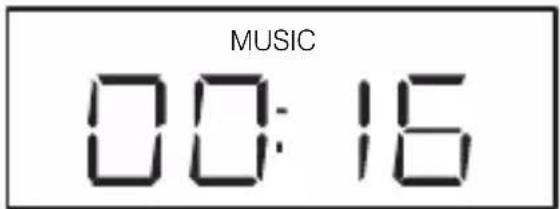
Repeat Play:
1 – During play, press REPEAT repeatedly to select.
• (repeat all): play all tracks repeatedly.

• (repeat): play the current track repeatedly.

2 – To return to normal play, press REPEAT until the selected function is no longer displayed.
Random Play:
1 - Press SHUFFLE.
• All tracks are played randomly.
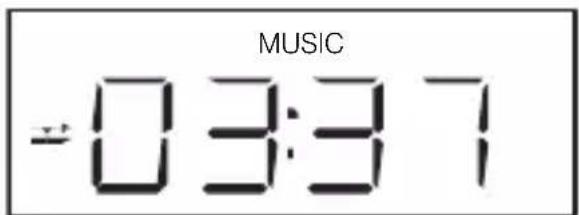
2 – To return to normal play, press SHUFFLE again. The function is no longer displayed.

4.3. listen to radio
Tune to Radio
1 – Press SOURCE repeatedly to select FM mode.
2 - Press and hold ▶ for 3 seconds.
- SEEK is displayed.
EN
CINEMA SOUNDBAR SYSTEM
- The radio tunes to a station with strong reception automatically.
3 – Press ▶ to save a station as preset.
- If you want to tune a weak station, press repeatedly until you find an optimal reception.
- To skip a weak station not to be saved, press and hold▶for 3 seconds.
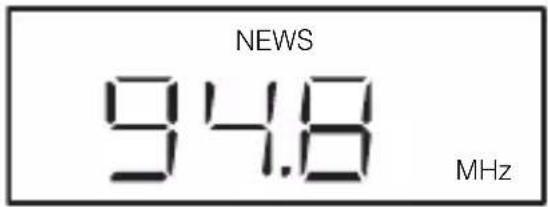
4 - Repeat step 3 to tune to more stations.
Select a preset radio station
1 – In FM mode, press ◀ to select a preset station.
5. ADJUST SOUND
5.1. Adjust Volume
1 – During play, press VOL +/- to increase/decrease the volume.
5.2. Select a Preset Sound Effect
1 – During play, press SOUND MODE repeatedly to select.
- Standard.
- Movie/Game.
- Music.
- News.
The mode appears on the display.

5.3. Enhance Bass
1 – During play, press BASS BOOST repeatedly to choose bass enhancement from 0, 1 or 2.

5.4. Mute Sound
1 – During play, press MUTE to mute/unmute the sound.
- The mute begins to blink on display panel.
6. OTHER USES FOR YOUR SOUNDBAR
6.1. Set the Alarm Timer
This unit can be used as an alarm clock. The BUZZER, iPod/iPhone/ iPad or radio is activated to play at a preset time.
1 – Ensure that you have set the clock correctly.
2 – Press and hold ALARM for 3 seconds.
- The hour digits are displayed and begin to blink.
3 – Press ◀ to set the hour.
4 – Press ALARM to confirm.
- The minute digits are displayed and begin to blink.
5 – Press ◀ to set the minutes.
6 – Press ALARM to confirm.
7 – Press ◀▶to select an alarm sound source from FM to BUZZER.
8 – Press ALARM to confirm.
The alarm timer is activated and ALARM appears on display.
EN
CINEMA SOUNDBAR SYSTEM
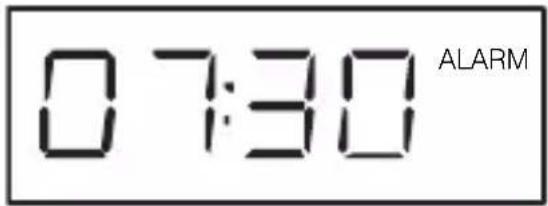
Activate and deactivate the alarm timer:
1 – Press ALARM repeatedly to activate or deactivate the timer.
- If the timer is deactivated, ALARM will disappear from the display.
Stop alarm ring:
1 – When the alarm rings, press ALARM to stop.
- The alarm stop but the alarm setting remains.
View the alarm setting:
1 – Press ALARM twice continuously.
6.2. Set the Sleep Timer
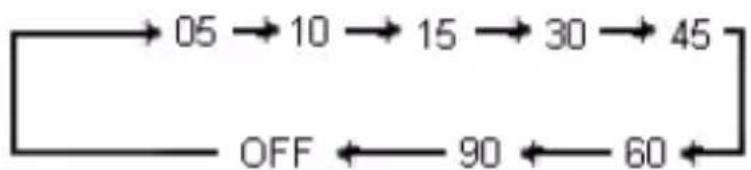
This unit can switch to standby automatically after a set period of time.
1 – When the unit is turned on, press SLEEP repeatedly to select a set period of time (in minutes).
flowchart
graph LR
    A["05"] --> B["10"]
    B --> C["15"]
    C --> D["30"]
    D --> E["45"]
    E --> F["60"]
    F --> G["90"]
    G --> H["OFF"]
6.3. Adjust Display Brightness
1 - When the unit is turned on, press and hold DIM (dimmer) for
3 seconds to adjust level of display brightness.
2 - Repeat step 1 to select different levels of display brightness.
6.4. Program Smart Remote Control to Operate your TV
You can store a total of 11 most frequently used functions of your TV in the smart remote control. This feature allows you to use only one remote control to operate your TV also.
1 – Place the smart remote control (A) within 1-10mm distance from your TV remote control (B) (see below illustration):

2 – Press LEARN for 3 seconds to activate the learning mode.
- A red indicator on the smart remote control (A) lights up.
3 – Press the learning button (for example INPUT) on the smart remote control (A).
- The red indicator blinks.
4 – Press and hold the correspondent button (for example INPUT, or SOURCE), to be learned on your TV remote control (B) until the red indicator on smart remote control (A) stays in red.
- The red indicator on smart remote control (A) first blinks quickly, when the code is stored successfully, the indicator stays in red.
5 – Repeat steps 3-4 to program more buttons from your TV remote control (B) to the smart remote control (A).
6 – Press LEARN to exit the learning mode.
7. WALL MOUNT YOUR SOUNDBAR
You can use the wall mount bracket (fixed on unit) to mount your Soundbar to the wall.
EN
CINEMA SOUNDBAR SYSTEM
7.1. What else you'll need
- Electric drill.
- Screws.
- Screwdriver.
- Pencil.
Caution:
- Risk of product damage. Always consult professional personnel to safely mount the product to a wall.
- Risk of injury. Ensure that no supply ducts such as gas, water or electricity are harmed when you drill the holes.
- Do not install on a place other than vertical wall.
- Check the material of the wall. If the wall is made of plaster board, marble or iron board, purchase and use the appropriate fixing screws.
- Be sure to turn off and unplug the unit before installation. Otherwise, it may cause electric shock.
7.2. Mount your Soundbar
- Align the Soundbar in the chosen location on a wall. Use pencil to mark the drilling positions with a distance of 400mm.

CINEMA SOUNDBAR SYSTEM
EN
- Keep the Soundbar at least 7,5 cm/3" from your TV.

3 inches (7,5cm) or more
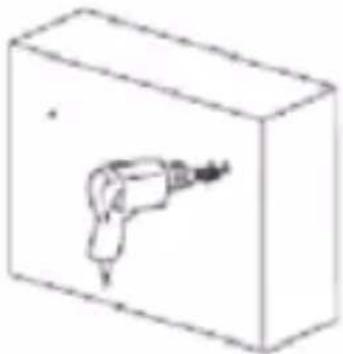
- Drill holes as marked.
natural_image
Simple line drawing of a handheld tool inside a rectangular box (no text or symbols)- Screw 2 screws (not supplied) in the holes, but leave 5mm between the screw head and the wall.

natural_image
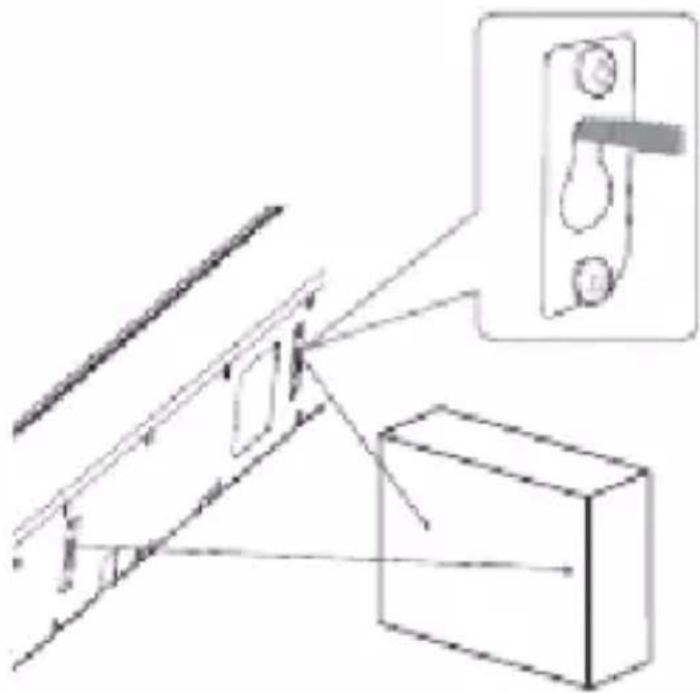
Simple 3D diagram of a rectangular box with two hanging weights (no text or symbols)- Hook the Soundbar onto the screws. For secure installation, make sure the mounting screws slide firmly into the narrow part of the slot of brackets.
EN
CINEMA SOUNDBAR SYSTEM
natural_image
Pure technical line drawing of a mechanical assembly with no text, numbers, or symbols8. troUBleSHootInG
No power
- Ensure that the AC power plug of this unit is connected properly.
- Ensure that there is power at the AC outlet.
No sound
- Adjust the volume.
- Adjust the volume of the main unit.
- Increase the volume output of the device.
- If there is no sound in the USB/CARD mode, ensure that you have connected a USB/CARD device that contains playable music.
No response from the unit
- Disconnect and reconnect the AC power plug, then turn on the unit again.
Remote control does not work
- Before you press any function button, first select the source with remote control instead of the main unit.
- Reduce the distance between the remote control and the unit.
- Insert the batteries with its polarities (+/- signs) aligned as indicated.
- Replace batteries.
- Aim the remote control directly at the sensor on the front of the unit.
Cannot play some files in USB/memory card
- The number of folders or files in the USB/memory card device has exceeded a certain limit. This phenomenon is not a malfunction.
- The format of these files are not supported.
USB/memory card not supported
- The USB/memory card is incompatible with this unit. Try another one.
Poor radio reception
- Increase the distance between the unit and your TV or VCR.
- Fully extend the FM antenna.
Timer does not work
- Set the clock correctly.
- Switch on the timer.
Clock/timer setting erased
- Power has been interrupted or the power cord has been disconnected.
- Reset the clock/timer.
EN
CINEMA SOUNDBAR SYSTEM
9. ProdUct SSpecification
Amplifier
• Total output power: 65 W RMS (10% THD)
• Frequency response: 20 Hz-20 kHz/ ± 3dB.
- Input sensitivity: 480 mV.
FM
• Tuning range: 87.5-108 MHz.
• Tuning grid: 100KHz.
- Preset memory: 30.
Main unit
• Power consumption: 15W.
- Standby power consumption: ≤ 1 W.
• Full range speaker drivers:
Impedance: 4 ohm.
52 mm (2").
Frequency response: 250 Hz \~20 kHz.
• Built-in Subwoofer:
Impedance: 8 ohm.
78 mm (3").
Frequency response: 55 \~ 250 Hz.
- Dimensions (A x L x P): 770 x 103 x 55 mm.
- Weight: 2.1 kg.
- Cable length: 1.8 m.
10. afterMarket
Mitsai has designed this appliance in order to guarantee the maximum reliability. However, if a problem occurs, by following the procedures suggested in this section you may be able to determine its cause.
Do not attempt to open the appliance – there is a risk of electrical shock.
If you are not able to solve the problem, please contact your seller or manufacturer.
All users must be familiarized with this section. Knowing what could go wrong can help you avoid the occurrence of problems.
WARNING: any attempt of fixing the appliance without contacting the manufacturer will nullify the warranty.
In case the problem persists, take your appliance to an aftermarket section of any Worten, Modelo or Continente store in order to solve the problem.
Worten Equipamentos para o Lar ensures for a period of 2 years, counting from the date of purchase of this appliance, a warranty against any found manufacturing defect. The warranty supposes a correct use and maintenance of the appliance, namely according to the instructions expressed in this manual. In case otherwise identified, the malfunctions will not be under the warranty.
The repairing of electrical appliances must only be made by qualified technicians, as otherwise there may occur future complications on the appliances.
To avoid unnecessary risks, in case there are any malfunctions on the wires or on another type of components, repairing must be made on the specialized locations of technical assistance, as appropriate tools are needed.
EN
CINEMA SOUNDBAR SYSTEM
11. enVIronMent conSerVatlon
Aiming to protect the environment, we try to reduce to a maximum the volume of the packages which are confined to three easy separation materials: cardboard, paper and plastic.
The appliance is made of recyclable material, once disassembled by a specialized company. Follow the local legislation concerning recycling of all materials.

natural_image
Orange circular icon with white cross symbol resembling a trash bin or kiln, no text or numbers present.CINEMA SOUNDBAR SYSTEM
EN
ES
SISTEMA DE BARRAS DE SONIDO PARA CINE
ManUal de InStrUcccloneS
natural_image
Pure mechanical component diagram without any text, numbers, or symbolsnatural_image
Technical line drawing of a mechanical component with a triangular cutout and cylindrical body (no text or symbols)natural_image
Technical line drawing of a rectangular mechanical part with a central hole and side brackets (no text or symbols)3.2. Enchufar la Antena FM
natural_image
Diagram showing a cable being inserted into an electrical outlet, with no text or symbols present.natural_image
Diagram of a device with a USB flash unit and control panel, showing an upward arrow (no text or symbols)natural_image
Simple line drawing of a handheld tool inside a rectangular box (no text or symbols)natural_image
Simple 3D diagram of a rectangular box with two hanging weights (no text or symbols)natural_image
Diagram of a mechanical assembly with a bracket and inset showing a close-up of a component (no text or symbols present)natural_image
Orange circular icon with white crossed-out trash bin symbol (no text or numbers)ES
SISTEMA DE BARRAS DE SONIDO PARA CINE
natural_image
Pure technical line drawing of a mechanical component with no text or symbolsnatural_image
Line drawing of a mechanical component with a triangular cutout and a rectangular base (no text or symbols)natural_image
Technical line drawing of a rectangular mechanical part with internal features and a small circular feature (no text or symbols)3.2. Conectar a Antena FM
- Conecte a antena FM, à entrada da antena FM na parte lateral da unidade principal.

natural_image
Diagram showing a cable routing through an electrical outlet with a plug, no text or symbols presentnatural_image
Diagram of a device with an arrow pointing to a component, no text or symbols present5.4. Sem Som
Ativar e desativar o alarme do despertador:
natural_image
Simple line drawing of a handheld electric shaver inside a rectangular box (no text or symbols)natural_image
Simple 3D diagram of a rectangular block with two internal curved lines and one horizontal line, no text or symbols present.natural_image
Diagram of a mechanical assembly with a bracket and inset view showing a lever mechanism (no text or symbols)PT
SISTEMA SOUNDBAR PARA CINEMA
natural_image
Orange circular icon with white cross symbol resembling a trash bin or trash can (no text or numbers)SISTEMA SOUNDBAR PARA CINEMA
PT

bar
| Category | Value | |---|---| | Row 1 | 0.95 | | Row 2 | 0.88 | | Row 3 | 0.72 | | Row 4 | 0.65 | | Row 5 | 0.58 | | Row 6 | 0.52 | | Row 7 | 0.46 | | Row 8 | 0.40 | | Row 9 | 0.34 | | Row 10 | 0.28 | | Row 11 | 0.22 | | Row 12 | 0.16 | | Row 13 | 0.10 | | Row 14 | 0.04 | | Row 15 | -0.02 | | Row 16 | -0.08 | | Row 17 | -0.14 | | Row 18 | -0.20 | | Row 19 | -0.26 | | Row 20 | -0.32 | | Row 21 | -0.38 | | Row 22 | -0.44 | | Row 23 | -0.50 | | Row 24 | -0.56 | | Row 25 | -0.62 | | Row 26 | -0.68 | | Row 27 | -0.74 | | Row 28 | -0.80 | | Row 29 | -0.86 | | Row 30 | -0.92 | | Row 31 | -0.98 | | Row 32 | -1.04 | | Row 33 | -1.10 | | Row 34 | -1.16 | | Row 35 | -1.22 | | Row 36 | -1.28 | | Row 37 | -1.34 | | Row 38 | -1.40 | | Row 39 | -1.46 | | Row 40 | -1.52 | | Row 41 | -1.58 | | Row 42 | -1.64 | | Row 43 | -1.70 | | Row 44 | -1.76 | | Row 45 | -1.82 | | Row 46 | -1.88 | | Row 47 | -1.94 | | Row 48 | -2.00 | | Row 49 | -2.06 | | Row 50 | -2.12 | | Row 51 | -2.18 | | Row 52 | -2.24 | | Row 53 | -2.30 | | Row 54 | -2.36 | | Row 55 | -2.42 | | Row 56 | -2.48 | | Row 57 | -2.54 | | Row 58 | -2.60 | | Row 59 | -2.66 | | Row 60 | -2.72 | | Row 61 | -2.78 | | Row 62 | -2.84 | | Row 63 | -2.90 | | Row 64 | -2.96 | | Row 65 | -3.02 | | Row 66 | -3.08 | | Row 67 | -3.14 | | Row 68 | -3.20 | | Row 69 | -3.26 | | Row 70 | -3.32 | | Row 71 | -3.38 | | Row 72 | -3.44 | | Row 73 | -3.50 | | Row 74 | -3.56 | | Row 75 | -3.62 | | Row 76 | -3.68 | | Row 77 | -3.74 | | Row 78 | -3.80 | | Row 79 | -3.86 | | Row 80 | -3.92 | | Row 81 | -3.98 | | Row 82 | -4.04 | | Row 83 | -4.10 | | Row 84 | -4.16 | | Row 85 | -4.22 | | Row 86 | -4.28 | | Row 87 | -4.34 | | Row 88 | -4.40 | | Row 89 | -4.46 | | Row 90 | -4.52 | | Row 91 | -4.58 | | Row 92 | -4.64 | | Row 93 | -4.70 | | Row 94 | -4.76 | | Row 95 | -4.82 | | Row 96 | -4.88 | | Row 97 | -4.94 | | Row 98 | -5.00 | | Row 99 | -5.06 | | Total Bar Chart (a) = Group of values from the 'Value' column in the table.- EN
- CINEMA SOUNDBAR SYSTEM
- InStrUctlon ManUal
- Index
- Safety Instructions 4
- Your Soundbar 7
- Get Started 12
- Utilization and Functioning 15
- Adjust Sound 18
- Other Uses for the Soundbar 19
- Wall Mount your Soundbar 21
- SAFETY INSTRUCTIONS
- ATTENTION RISK OF ELECTRIC SHOCK DO NOT OPEN
- Important Warnings
- Assistance
- Energy Supply
- Power Cord and Other Cables
- Humidity and Water
- Cleaning
- General Precautions
- Risk of injury or damage to the Soundbar
- Risk of overheating
- Risk of contamination
- Hearing Safety
- YOUR SOUNDBAR
- Introduction
- What's in the Box
- Main Unit
- 5)
- 6) VOL +/-
- 7) USB Slot
- 8) Memory card slot
- 9) AUDIO IN - TV L/R
- 10) AUDIO IN - AUX
- 11) FM antenna
- 12) Display panel
- 13) Wall-mount bracket
- Remote Control
- 4) SOUND MODE
- 5) CLOCK
- 6) ALARM
- 7) MUTE
- 8) DIM./SLEEP
- 9)
- 10)
- 11) VOL +/-
- 12) BASS BOOST
- 13) DSHUFFLE
- 14) REPEAT
- 15) Indicator
- 16) LEARN
- 17) Programming buttons
- GET STARTED:
- Prepare the Remote Control
- Connect FM Antenna
- Connect Audio Devices
- Connect MP3 player or other portable audio devices.
- Connect Power
- Turn On
- Set Time and Date
- UTILIZATION AND FUNCTIONING
- Play Audio from TV or Other Devices
- Play from USB or Memory Card
- Note:
- Repeat Play:
- listen to radio
- ADJUST SOUND
- Adjust Volume
- Select a Preset Sound Effect
- Enhance Bass
- Mute Sound
- OTHER USES FOR YOUR SOUNDBAR
- Set the Alarm Timer
- Activate and deactivate the alarm timer:
- Stop alarm ring:
- View the alarm setting:
- Set the Sleep Timer
- Adjust Display Brightness
- Program Smart Remote Control to Operate your TV
- WALL MOUNT YOUR SOUNDBAR
- What else you'll need
- Caution:
- Mount your Soundbar
- troUBleSHootInG
- No power
- No sound
- No response from the unit
- Remote control does not work
- Poor radio reception
- Timer does not work
- Clock/timer setting erased
- ProdUct SSpecification
- Amplifier
- FM
- Main unit
- afterMarket
- enVIronMent conSerVatlon
- ES
- SISTEMA DE BARRAS DE SONIDO PARA CINE
- ManUal de InStrUcccloneS
- Enchufar la Antena FM
- Conectar a Antena FM
- Sem Som
- Ativar e desativar o alarme do despertador:
- PT
- SISTEMA SOUNDBAR PARA CINEMA
Brand : Mitsai
Model : SB2040U
Category : Soundbar