
PATVSB3600 - Soundbar Pyle - Free user manual and instructions
Find the device manual for free PATVSB3600 Pyle in PDF.


| Product Type | Soundbar |
| Brand | Pyle |
| Model | PATVSB3600 |
| Dimensions (W x H x D) | 38.6 x 3.1 x 2.8 inches |
| Weight | 5.5 lbs |
| Power Output | 100W RMS |
| Speaker Configuration | 2.0 channel |
| Driver Size | 2 x 3.5 inches |
| Bluetooth Version | 5.0 |
| Bluetooth Range | Up to 30 feet |
| Audio Inputs | HDMI ARC, Optical, 3.5mm AUX, USB |
| Audio Output | Subwoofer pre-out (RCA) |
| Remote Control | Included (CR2025 battery) |
| Wall Mountable | Yes (bracket included) |
| Power Supply | AC 100-240V, 50/60Hz (external adapter) |
| Standby Power Consumption | < 0.5W |
| Cleaning Instructions | Wipe with dry cloth; avoid liquids |
| Safety Certifications | FCC, CE, RoHS |
| Spare Parts Availability | Remote control, power adapter via Pyle support |
| Repairability | Consumer replaceable remote, power adapter; speaker repair by service center |
Frequently Asked Questions - PATVSB3600 Pyle
User questions about PATVSB3600 Pyle
0 question about this device. Answer the ones you know or ask your own.
Ask a new question about this device
Download the instructions for your Soundbar in PDF format for free! Find your manual PATVSB3600 - Pyle and take your electronic device back in hand. On this page are published all the documents necessary for the use of your device. PATVSB3600 by Pyle.
USER MANUAL PATVSB3600 Pyle
PATVSB2600/ PATVSB3600/PATVSB4600
Wireless BT Sound Bar Speaker System
26"/36"/46"Wide Aluminum Alloy Sound Bar Speaker System
w AUX/BT/USB/RGB Lights and Remote Control
4 x 30atts / 6 x 30 Watts / 8 x 30 Watts
Features:
Marine/UTV/ATV Waterproof Soundbar Speaker
26"/36"/46" Sound Bar with Stylish Design
Built in USB Playback
Built-in 4/6/8 x 4-inch Woofer and 2 x 1-inch Treble
DC 12V Input
Colorful RGB Lights
Lighting, Easily turn On/Off the Light or Change the Color Mode
Front Panel Control Center
3.5mm Auxiliary Input
Marine Rated with Rugged Weatherproof Exterior
IPX5 Waterproofing/Weatherproofing
Weather Resistant Grill and Hardware
Bluetooth Connectivity:
Wireless Music Streaming Ability
Quick & Hassle-Free Device Pairing
Works with All of Your Favorite BT-Enabled Devices
(Smartphones, Tablets, Laptops, Computers, etc.)
Wireless BT Version 5.3
Wireless BT Network Name: 'PATVSB2600' / 'PATVSB3600' / 'PATVSB4600'
What's in the Box:
Sound Bar Speaker
Remote Control
Car Cigarette Lighter Cable
Bracket and Screws
USB Cable
3.5mm Audio Cable
Technical Specs:
Power Supply
120 Watts RMS/180 Watts Peak (PATVSB2600)
180 Watts RMS/270 Watts Peak (PATVSB3600)
240 Watts RMS/360 Watts Peak (PATVSB4600)
Construction Materials: Aluminum Alloy Sound Bar with silicone buttons
BT Range:up to 82 ft.
Aluminum Clamp System Fits 1.5"-2" Bars
Frequency Response: 20Hz-20KHz
Remote Control Battery: Need 2x'AAA' battery(not included)
Tweeters: 1" -inch
Product Dimensions (L x W x H):
24.46" x 4.84" x4.05' -inches
34.72" x 4.84" x4.05' -inches
43.23" x 4.84" x4.05' -inches
PYLE
PyleUSA.com
PATVSB2600
PATVSB3600
PATVSB4600
Aluminum Alloy Sound Bar Speaker System w AUX/BT/USB/RGB Lights and Remote Control


natural_image
Pure electrical circuit lines without any symbols
natural_image
Pure electrical circuit lines without any symbolsUSER MANUAL
Panel control
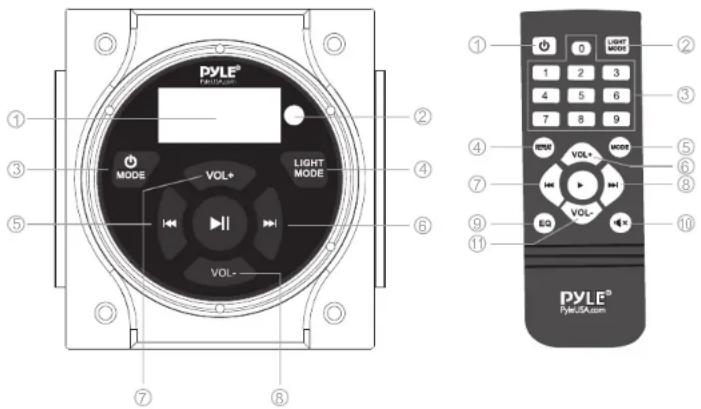
Front panel control:
- Display screen
- Remote Control Receiver
- MODE-Press this button to select input source
- Light mode: Press this button to turn on/off the light or change the light color
- Press this button to select next track
- Press this button to select previous track
- Vol+:Press this button to increase the volume
- Vol:-Press this button to decrease the volume
Remote control
- Power switch
- Light mode: Press this button to turn on/off the light or change the light color
- NUMBER PAD
- Repeat: Press to repeat the current songs
- Mode: Press to select input source
- Vol+:Press this button to increase the volume
- Press this button to select previous track
- Press this button to select next track
- EQ:Press to toggle between preset EQ curves
- MUTE
- Vol-:Press this button to decrease the volume
IMPORTANT SAFETY INSTRUCTIONS:
Do not use your mobile equipment during a motorized vehicle-safe driving and safety consideration of others should always be your highest priority.
In the event you should notice smoke, strange noises from this product, or any other a bnormal signs, immediately turn off the power.
Set your volume control at a low setting, then increase the volume slowly until you can hear it comfortably.
BE SURE TO OBSERVE THE FOLLOWING GUIDELINES:
Do not turn up the volume so high that you can't even hear what's around you.
Use cautions or temporarily discontinue use in potentially hazardous situations.
INSTALLATION INSTRUCTIONS:
Profession installation recommended. Do not attempt to service this product by yourself. Servicing of this product by persons without profession training and experience in electronic equipment and motorized vehicle accessories may be dangerous.
This product can be powered from a vehicles cigarette lighter/auxiliary power port, or hard wired directly to the battery through an optional relay/accessory switch.
This product has a weather resistant design, but it should not be submerged in or under water under any circumstances.
Use only the installation parts provided with the product.
Wash with a mild soap or detergent and lukewarm water using a clean sponge or a soft cloth. Rinse well with clean water.
“DON'T” -VERY IMPORTANT
Don't clean this product in hot sun or very hot days.
Don't use abrasive or highly alkaline cleaners on the main body.
Don't scrape the main body with razor blades, or other sharp instruments.
Don't even use, gasoline, acetone or carbon tetra chloride
BLUETOOTH OPERATION INSTRUCTIONS:
External devices which have built-in Bluetooth functions can be connected to this sound bar. If your devices is connected to the sound bar, you'll hear audible tones which will help for connecting.
- At first be sure the sound bar is powered on, and turn the volume to low.
- Press "MODE" button on the front panel and select Bluetooth mode.
- Turn on the Bluetooth of your external device.
- Search for available Bluetooth devices and make sure to be within range of your sound bar, and wait for your device to select "PATVSB2600" or "PATVSB2600" or "PATVSB4600".
- You can now play music on your external device through the sound bar.
Installation method ①
Take the bracket and screws out of package
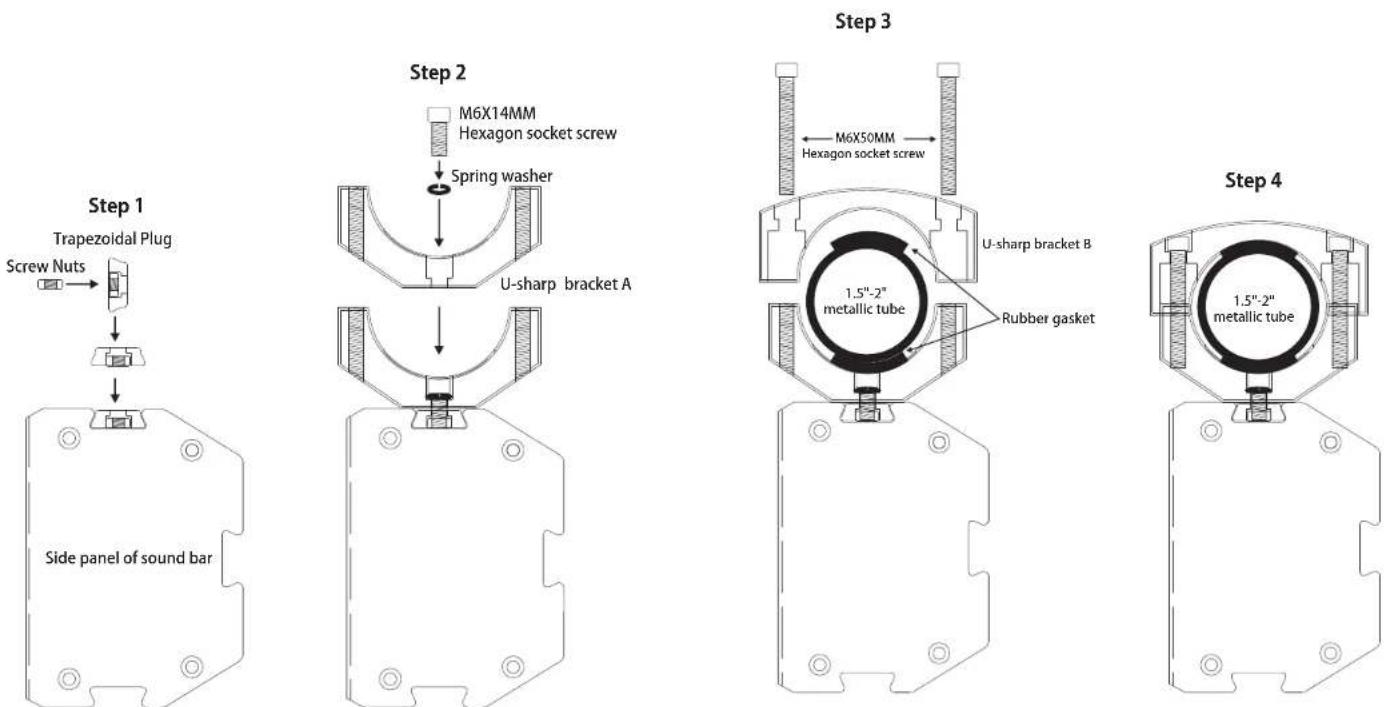
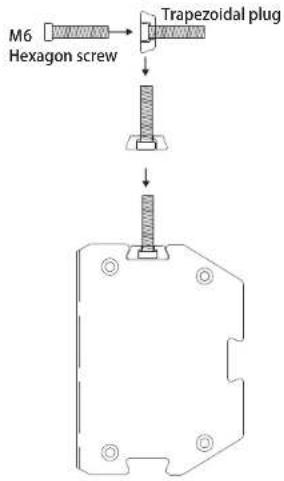
Installation method②
Take the bracket and screws out of package
Step 1
Step 2

Step 3

Step 4


natural_image
Illustration of a laptop with a red checkmark on the screen (no text or symbols visible)VISIT US ONLINE:
Have a question?
Need service or repair?
Want to leave a comment?
PyleUSA.com/ContactUs
PYLE
- Features:
- Bluetooth Connectivity:
- What's in the Box:
- Technical Specs:
- PATVSB2600
- PATVSB3600
- PATVSB4600
- Front panel control:
- Remote control
- IMPORTANT SAFETY INSTRUCTIONS:
- INSTALLATION INSTRUCTIONS:
- “DON'T” -VERY IMPORTANT
- BLUETOOTH OPERATION INSTRUCTIONS:
- Installation method ①
- Installation method②
- VISIT US ONLINE:
Brand : Pyle
Model : PATVSB3600
Category : Soundbar