
PSBV162 - Soundbar Pyle - Free user manual and instructions
Find the device manual for free PSBV162 Pyle in PDF.


| Product Type | Soundbar |
| Brand | Pyle |
| Model | PSBV162 |
| Channel Configuration | 2.0 |
| RMS Power Output | 30 Watts (15W x 2) |
| Wireless Connectivity | Bluetooth 5.0 |
| Bluetooth Range | Up to 50 feet |
| Speaker Impedance | 4 Ohms |
| Inputs | AUX (3.5mm), Optical, USB, HDMI (ARC) |
| Power Supply | AC 100-240V, 50/60Hz; DC 15V/2A |
| Frequency Response | 60Hz - 20kHz (+/-6dB) |
| Input Sensitivity | 450mV |
| Signal-to-Noise Ratio | 63dB |
| Total Harmonic Distortion | 1% |
| Dimensions (W x H x D) | 15.75 x 2.56 x 3.94 inches |
| Additional Features | LED display, remote control, touch button controls, ported tube design |
| Cleaning Instructions | Clean with dry cloth only |
| Included Accessories | Remote control, audio cables, power adapter |
Frequently Asked Questions - PSBV162 Pyle
User questions about PSBV162 Pyle
0 question about this device. Answer the ones you know or ask your own.
Ask a new question about this device
Download the instructions for your Soundbar in PDF format for free! Find your manual PSBV162 - Pyle and take your electronic device back in hand. On this page are published all the documents necessary for the use of your device. PSBV162 by Pyle.
USER MANUAL PSBV162 Pyle
Questions? Comments?
We are here to help!
Phone: (1) 718-535-1800
Email: support@pyleusa.com
PYLE®
PyleUSA.com

natural_image
Black cylindrical electronic device with 'bE' branding and a logo, no visible text or symbols beyond brandingPSBV162
Wave Base Wireless BT Streaming Tabletop Soundbar Digital Speaker System
with Remote Control, AUX (3.5mm),
Optical In, USB In & HDMI (ARC)
USER GUIDE
PLEASE READ THIS MANUAL CAREFULLY BEFORE OPERATION
Features:
- LED Display
- Designed to Sit Under Your Television
• Home Theater Tabletop TV Stand Mount - Powerful and Compact Speaker Sound Bar System
• Built-in BT for Instant Wireless Music Streaming - Works with All of Your Favorite BT-Enabled Devices (iPhone, Smartphone, iPod, MP3 Player, iPad, Tablet, PC, etc.)
- System Doubles as TV Speaker Base Entertainment System
- Ported Tube Design for Extended Bass Performance
• Full-Range Audio Spectrum Stereo Sound Reproduction - Convenient Source Selection with LED Indicators
- Easy Touch Button Audio Select Control Center
• Aux (3.5mm) Input Connector Jack - Easy-to-Use and Easy-to-Setup
Technical Specs:
• 2.0 Channel Soundbar
• RMS Power Output: 30 Watt (15 x 2)
- Wireless BT Version: 5.0
• Wireless BT Range: 50 Feet
• Speaker Impedance: 4 Ohm
- Inputs: 3.5mm (AUX), OPTICAL Input, USB Port, HDMI/ARC
• Power Supply: AC100-240V\~50/60Hz,
- DC15V/2A
• Frequency Response: 60Hz - 20kHz (+/- 6dB)
- Input Sensitivity: 450mV
• S/N: 63dB
• THD: 1%
- Soundbar Unit Size: 15.75 " x 2.56" x 3.94" -inches
What's in the Box:
• TV Soundbar
• Audio Connection Cables
- Remote Control
- Power Adapter
IMPORTANT SAFETY INSTRUCTIONS
- Read these instructions.
- Keep these instructions.
- Heed all warnings.
- Follow all instructions.
- Do not use this apparatus near water.
- Clean only with dry cloth.
- Do not block any ventilation openings. Install in accordance with the manufacturer's instructions.
- Do not install near any heat sources such as radiators, heat registers, stoves, or other apparatus (including amplifiers) that produce heat.
- Do not defeat the safety purpose of the polarized or grounding-type plug. A polarized plug has two blades with one wider than the other.
A grounding type plug has two blades and a third grounding prong.
The wide blade or the third prong are provided for your safety. If the provided plug does not fit into your outlet, consult an electrician for replacement of the obsolete outlet.
- Protect the power cord from being walked on or pinched particularly at plugs, convenience receptacles, and the point where they exit from the apparatus.
- Only use attachments/accessories specified by the manufacturer.
- Unplug this apparatus during lightning storms or when unused for long periods of time.
- Refer all servicing to qualified service personnel. Servicing is required when the apparatus has been damaged in any way, such as power-supply cord or plug is damaged, liquid has been spilled or objects have fallen into the apparatus, the apparatus has been exposed to rain or moisture, does not operate normally, or has been dropped.
- To reduce the risk of fire or electric shock, do not expose this device to rain, moisture, dripping, or splashing, and no objects filled with liquids, such as vases, shall be placed on it.
Using close to a TV or computer
Some older TVs and computer monitors are magnetically sensitive devices and as such are likely to suffer discoloration or picture distortion when conventional speakers are placed nearby. If discoloration problems persist, try moving the soundbar away from your TV or monitor.
Placement
- Sensitive to extreme temperatures and humidity. Do not put it in locations subject to direct sunlight or in humid places, such as near an air conditioner, humidifier, bathroom, or kitchen.
- Do not put water or other liquids close to the soundbar. If liquid is spilled over the soundbar, it may be damaged.
- The soundbar should be placed on a sturdy, flat surface that is free from vibration, or mounted on a wall. Do not put the soundbar on an uneven or unstable surface, where it may fall and cause damage.
This user manual explains how to correctly install, operate, and get the best performance from your Home Theater Wireless BT Soundbar Speaker. Read this user manual carefully before installing your system, and then keep it handy for quick reference.
FUNCTION DESCRIPTION
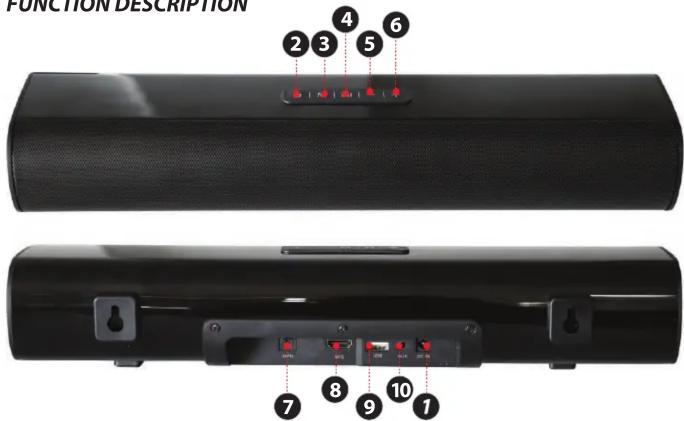
FUNCTION DESCRIPTION
- Connect power via 15V 2A adapter.
- Press the key "⏻" to turn ON, then go directly to Wireless BT mode.
- Press to change between modes BT/OPTI/AUX.
- Play/pause music.
- Press and hold to decrease the volume/short press to previous track.
- Press and hold to increase the volume/short press to next track.
- Optical Port.
- HDMI (arc) IN Port.
- USB Port.
- AUX IN Port.
Note: The RC sensor is at the front of the sound bar.
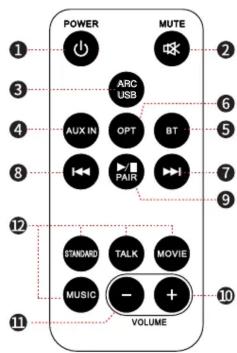
REMOTE CONTROL FUNCTIONS
- Power: Switch on or to standby
- Mute/Unmute
-
Press to enter USB Mode when USB is Plugged in.
-
Press to enter AUX Mode
-
Press to enter BT Mode
-
Press to enter OPT Mode
-
Press to Next track on USB/BT Mode; Press and hold to fast forward on USB Mode
-
Press to Previous Track on USB/BT Mode; Press and hold to fast rewind on USB Mode
-
Press to Play/Pause on USB/BT Mode. In BT, press and hold to disconnect current connection and enter pairing mode. Press to mute/unmute in AUX or Optical mode.
-
Press for Volume +; Press and hold for fast Volume increase.
-
Press for Volume -; Press and hold for fast Volume decrease.
-
EQ button
- Connect the DC port of adapter to the sound bar then connect the power cord to a wall socket.
- Press the "POWER" to switch ON the sound bar, and it will enter BT mode automatically, with both sound alerts, LED flashes quickly; press and hold the "POWER" again to switch OFF.
WIRELESS BT CONNECTION
- Put the soundbar near the BT device.
- Switch ON the PSBV162, an alert sound will appear and blue LED flashes quickly, which means it is ready for pairing.
- Turn ON the BT function of the mobile device, search for "PYLE" and connect to it once found. If a Passkey is requested, enter "0000".
- An alert will appear when connected, and the blue LED light will be on.
- The soundbar will reconnect to the last paired device when switched on, If it doesn't connect, the soundbar will enter pairing mode automatically.
OPTICAL FUNCTION
- Plug the optical cable into the optical port and the other side to TV or other device with optical/digital port.
- Short press "MODE" into optical mode, LED lights (white) will light indicating that the "optical", music will start playing.
USB FUNCTION
- Insert your USB device into the USB port.
- Press "▶" on Soundbar or "▶/II" on remote control to play/pause.
- Press “-/+” or “|◀◀/▶▶” to go to previous/next song.
AUX IN FUNCTION
- Plug the AUX cable into the AUX port and the other side to TV or other device with AUX port.
- Short press "MODE" into AUX mode, LED lights (white) will light indicating "AUX", music will start playing.
ARC IN FUNCTION
Connection with HDMI (ARC) cable, e.g. to the HDMI ARC connection of the television set, DVD player.

natural_image
Black cylindrical electronic device with visible speaker grille and brand logo (no text or symbols on body)
California Prop 65 Warning
! WARNING:
This product contains Nickel carbonate which is known to the state of California to cause cancer birth defects and other reproductive harm. Do not ingest.
For more info go to: www.P65warnings.ca.gov
- PYLE®
- PyleUSA.com
- PSBV162
- Wave Base Wireless BT Streaming Tabletop Soundbar Digital Speaker System
- PLEASE READ THIS MANUAL CAREFULLY BEFORE OPERATION
- Features:
- Technical Specs:
- What's in the Box:
- IMPORTANT SAFETY INSTRUCTIONS
- - Read these instructions.
- Using close to a TV or computer
- Placement
- FUNCTION DESCRIPTION
- REMOTE CONTROL FUNCTIONS
- WIRELESS BT CONNECTION
- OPTICAL FUNCTION
- USB FUNCTION
- AUX IN FUNCTION
- ARC IN FUNCTION
- California Prop 65 Warning
- ! WARNING:
Brand : Pyle
Model : PSBV162
Category : Soundbar