
KD-X444SP - Audio/video converter Key Digital - Free user manual and instructions
Find the device manual for free KD-X444SP Key Digital in PDF.


| Product Type | 4K/UHD HDMI over CAT5e/6 Extender (Transmitter + Receiver set) |
| Brand | Key Digital |
| Model | KD-X444SP |
| Max Resolution | 4096x2160 @ 60Hz with 4:4:4 chroma (18Gbps) |
| HDR Support | HDR10 |
| HDCP Compliance | HDCP 2.2 (backward compatible) |
| Video Extension (CAT5e/6) | 4K 18G: up to 164 ft (50 m); 1080p: up to 230 ft (70 m) |
| Video Extension (CAT6A STP) | 4K 18G and 1080p: up to 328 ft (100 m) |
| Audio Support | Surround up to Dolby/DTS 5.1/6.1 |
| Control Interfaces | IR (two channels) and RS-232 (bi-directional) |
| Power over CAT (PoC) | Single power supply; Tx can power Rx or vice versa |
| Power Supply | 12V/2A, 24W DC (screw-in type), SKU: KD-PS12V2ASC |
| EDID Management | 14 internal EDID handshakes including 4K with HDR |
| Full Buffer Technology | EDID, HDCP, TMDS re-clocking, and HPD management |
| Dimensions (each unit) | 4.3 x 4.12 x 0.82 inches (109.2 x 104.6 x 20.8 mm) |
| Weight (each unit) | 0.595 lbs (0.27 kg) |
| Package Weight | 2.34 lbs (1.06 kg) |
| Package Dimensions | 10.24 x 5.67 x 3.15 inches (260 x 144 x 80 mm) |
| Enclosure Material | Black metal |
| Regulatory Compliance | CE, RoHS, WEEE, EAC |
| Included Accessories | 1x power supply, 1x IR emitter, 1x IR sensor, 4x mounting brackets |
| Inputs (Tx) | 1 HDMI, 1 IR (serial), 1 RS-232 (Phoenix) |
| Outputs (Tx) | 1 CAT6/6A, 1 IR, 1 RS-232 |
| Inputs (Rx) | 1 UHDoTP (CAT), 1 IR (sensor), 1 RS-232 |
| Outputs (Rx) | 1 HDMI, 1 IR, 1 RS-232 |
| Bandwidth | 18 Gbps TMDS |
Frequently Asked Questions - KD-X444SP Key Digital
User questions about KD-X444SP Key Digital
0 question about this device. Answer the ones you know or ask your own.
Ask a new question about this device
Download the instructions for your Audio/video converter in PDF format for free! Find your manual KD-X444SP - Key Digital and take your electronic device back in hand. On this page are published all the documents necessary for the use of your device. KD-X444SP by Key Digital.
USER MANUAL KD-X444SP Key Digital
Table of Contents
About KD-X444SP 3
Application Diagram 4
Quick Connection Guide 5
Connections, LEDs, Rotaries & Switches 6
Rack Mounting 11
Specifications 11
Product Warnings & Safety Instructions 12

Operation Manual
Please visit www.keydigital.com for the latest product documentation, firmware, control drivers and software downloads. Product features and specifications are subject to change without notice
Always follow the instructions provided in this Operation Manual.
About KD-X444SP
Key Digital® KD-X444SP is a 4K/UHD 18Gbps, HDCP2.2 compliant HDMI over CAT5e/6 Transmitter plus Receiver set for extension of digital video signals with the latest standards in resolution, HDR, and Chroma over a single CAT cable.
KD-X444SP extends video resolutions up to 4096x2160 at 60hz with 4:4:4 chroma sub-sampling over a single CAT5e/6 cable up to 164ft (50m).
In addition to HDMI AV, KD-X444SP carries IR or RS-232 for controlling remotely located equipment. An IR sensor and IR emitter are included, and the Tx unit's IR Input port supports Serial IR input directly from a control system / IR block. With Power over CAT (PoC), only one power supply is needed, and it may be connected at either unit for ease of installation.
KD-X444SP features Key Digital's proprietary Full Buffer Technology software suite, with EDID handshake management, fixed hot plug detection, HDCP authentication to the connected source, and TMDS signal re-clocking for installation with long cabling or many connectivity layers.
Key Features
- Single CAT5e/6 UTP/STP Extension: Fully automatic equalization, and amplification depending on cabling length.
- 4K Resolution Support: 4096x2160 or 3840x2160 24/25/30/60hz at 4:4:4 (signals up to 18Gbps bandwidth).
- Flexible Power over CAT (PoC): Only one power connection needed. Tx may power Rx, or Rx may power Tx.
- Visually Lossless Compression: 18G enabling technology applied to all video formats exceeding 10.2Gbps to accommodate transmission channel.
• Low Profile: Super slim chassis design.
• Signal Extension via CAT5e/6:
- 4K/UHD (18G) and 1080p: Up to 164ft / 50m
• 10G Pass-thru: Mode enables uncompressed 10.2Gbps signal extension.
• HDR10 (High Dynamic Range): More life-like images through a greater range of luminance.
• HDCP 2.2: Compliancy up to HDCP 2.x and backward compliant
- Deep Color Support: Up to UHD/4K 30Hz 4:4:4/12 bits or 60Hz 4:4:4/8 bit
- IR Sensor: Sensor powering via +5V on IR In ports collects line-of-sight IR from remote(s) without external IR connecting block.
- Up/Down IR: Two channels of IR enable control to/from devices or control systems connected to Tx and Rx units.
• RS-232: Bi-Directional control to/from Tx and Rx unit on Phoenix connector..
- Full Buffer Technology: Key Digital's proprietary suite of EDID, HDCP, TMDS, and HPD management to overcome Pro AV installation obstacles.
- EDID Management: Internal library with 14 internal EDID handshakes including 4K with HDR in addition to native EDID data copied from CAT5e/6 or HDMI pass-thru outputs.
- HDCP Authentication: HDCP sources are authenticated by HDCP key on transmit unit, for one-to-one topology.
- Hot Plug Detection Control: Enables integrator to choose if active signal voltage is forced to connected display/output device.
- TMDS Re-Clocking: Re-generation of TMDS (AV signal) channel data at Transmit unit for brand new AV signal.
- Surround Audio Support: Up to Dolby®, DTS™ (formats up to 5.1/6.1)
Accessories
- 1x 12V/2A, 24W DC Power Supply (Screw-In Type). SKU: KD-PS12V2ASC
- 1x IR Emitter
- 4x Mounting Brackets
- 1x IR Sensor
Application Diagram

flowchart
graph TD
    A["Video Source"] -->|IR| B["KD-X444SP Tx"]
    B -->|HDMI| C["Control System"]
    B -->|IR or RS-232| D["Display / Projector 4K 18G w/HDR"]
    B -->|RS-232| E["Control System"]
    B -->|CAT5e/6| F["Display / Projector 4K 18G w/HDR"]
    F --> G["HDMI"]
    F --> H["IR or RS-232"]
    G --> I["Display / Projector 4K 18G w/HDR"]
    H --> I
    I --> J["IR Source Remote"]
Quick Connection Guide
Begin with the Tx and Rx units and all input / output devices turned off with power cables removed
-
Connect your HDMI source to the input port of the Tx unit.
-
Connect your HDMI display to the output port of the Rx unit.
-
Connect a CAT5e/6 cable between Tx and Rx unit. Use 568-B termination.
-
Connect IR emitter from the IR Out port of the Tx or Rx unit and mount over the IR receptor of the device you wish to control.
-
IR Input is specific on the Tx and Rx unit.
a. The Tx unit supports hard-wired / serial IR connections only with the following pinout:
| IR In | Tip | Ring | Sleeve |
| Serial IR | IR In | N/C | Ground |
b. The Rx units supports connection with the included IR Sensor only. Mount the sensor in a location to easily collect line of sight IR signals from remotes.
- Connect RS-232 from your control system or computer.
a. TxD from the Controller connects into RxD of the extender
b. RxD from the Controller connects into TxD of the extender
c. Ground from the Controller connects into Ground of the extender
-
BEFORE connecting power supply to power outlet, screw-in the power supply to the Tx or Rx unit. AFTER all connections are made, plug-in power supply to power outlet
-
Power on source and display
Connections, LEDs, Rotaries & Switches
HDMI Input and Output

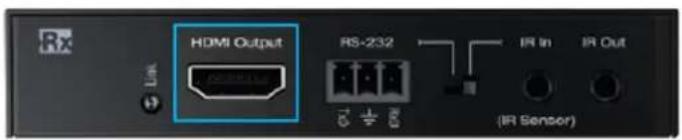
HDMI Input: Using a short HDMI cable, connect your source device.
HDMI Output: Using a short HDMI cable, connect your display device.
- For DVI-D/DVI-I sources or monitors, use appropriate adapters. For Display Port, use active converters.
• Supports up to UHD/4K @ 50/60 fps [4:4:4], 18Gbps signals. See Supported standard 4K Video Formats table
• Supports HDR10
• Compliant with HDCP 2.2 and previous
Supported standard 4K Video Formats:
| Resolution | Bandwidth | |
| 1 | 4K@24/25/30 [4:4:4] 8bit | < 10.2Gbps |
| 2 | 4K@24/25/30 [4:2:2] 8/10/12bit | < 10.2Gbps |
| 3 | 4K@50/60 [4:2:0] 8bit | < 10.2Gbps |
| 4 | 4K@24/25/30 [4:4:4] 10/12bit | < 18Gbps |
| 5 | 4K@50/60 [4:2:2] 8/10/12bit | < 18Gbps |
| 6 | 4K@50/60 [4:2:0] 10/12bit | < 18Gbps |
| 7 | 4K@50/60 [4:4:4] 8bit | < 18Gbps |
CAT6/A Output and Input



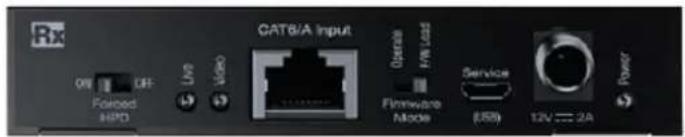
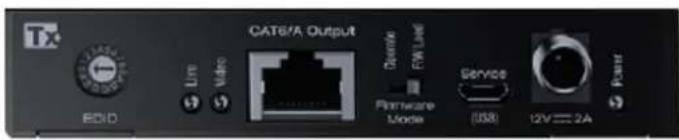
Connect Tx unit's CAT6/A Output port to Rx unit's CAT6/A Input port using CAT5e/6 UTP or STP in 568-B termination.
• 4K/UHD (18G) Extension
- with CAT5e/6: Up to 230ft / 70m
- with CAT6A STP: Up to 328ft / 100m
- 1080p Extension
- with CAT5e/6: Up to 230 ft / 70m
- with CAT6A STP: Up to 328ft / 100m
• Supports Dolby®, DTS (5.1 formats max)
- Connect to KD-X444SP only. Damage will occur if connected to non-KD-X444SP products and warranty will be void.
IR, RS-232 Ports and Selection Switch


Select RS-232 or IR control extension as desired. RS-232 and IR may not be extended simultaneously.
- If IR is selected, both IR In and IR Out ports may be utilized simultaneously.
- The Tx unit's IR In supports a hard-wired / Serial IR from a control system / IR block only. The incoming IR signal is output on the Rx unit's IR Out port.
- Pinout of Tx unit IR In port:
| IR In | Tip | Ring | Sleeve |
| Serial IR | IR In | N/C | Ground |
- Note that both mono or stereo 3.5mm plugs may be used.
- The RX units IR In supports connection with the included IR sensor only. The incoming IR signal is output on the Tx unit's IR Out port.
- The IR Sensor receives signals from a 90° angle at up to 30 ft. away. It accepts a maximum IR burst frequency of 55kHz.
• TX & Rx unit IR Out Port outputs IR signal with a driving power of 5V with 32mA minimum current.
• RS-232 control extension:
- TxD from the Controller connects into RxD of the extender
- RxD from the Controller connects into TxD of the extender
o Ground from the Controller connects into Ground of the extender
EDID Management Rotary
Use the EDID rotary if you wish for your source to output a different video resolution and audio format
- The default EDID handshake setting is "A" (4Kx2K@60, 18G, HDR, 2ch audio).
- If setting 0 is selected, the Rx unit collects the EDID handshake from the connected display and a handshake is provided to the source that is similar to the EDID file of the display, but within KD-X444SP's capabilities.
- Although it is not necessary, power cycling the Tx unit and HDMI source may help the detection of the newly selected handshake.


| Position | EDID Handshake Description |
| 0 | Auto EDID from Rx |
| 1 | 1920x1080p, 2ch Audio |
| 2 | 1920x1080p, Dolby/DTS 5.1 |
| 3 | 1920x1080p, Dolby/DTS 5.1, Dolby Atmos 5.1.2 |
| 4 | 1920x1200p, 2ch Audio |
| 5 | 1920x1200p, Dolby/DTS 5.1 |
| 6 | 1920x1200p, Dolby/DTS 5.1, Dolby Atmos 5.1.2 |
| 7 | 4Kx2K@60, 10.2G, HDR, 2ch Audio |
| 8 | 4Kx2K@60, 10.2G, HDR, Dolby/DTS 5.1 |
| 9 | 4Kx2K@60, 10.2G, HDR, Dolby/DTS 5.1, Dolby Atmos 5.1.2 |
| A | 4Kx2K@60, 18G, HDR, 2ch Audio |
| B | 4Kx2K@60, 18G, HDR, Dolby/DTS 5.1 |
| C | 4Kx2K@60, 18G, HDR, Dolby/DTS 5.1, Dolby Atmos 5.1.2 |
| D | 1280x720p@60 DVI (No Audio) |
| E | 1920x1080p@60 DVI (No Audio) |
| F | 1920x1080p, 2ch Audio |
Forced HPD Switch

Troubleshooting tool to help overcome installation obstacles.
- In cases of many connectivity layers or use with non-standard devices, hot plug detection (HPD) voltage may be lost or drop below detectable levels and lead to a “no source connected” error message and/or no image on the connected display.
- If set to ON, Hot Plug Detection (HPD) voltage is fixed at the HDMI connection of the Rx unit. The connected display will be fed a constant voltage to inform the device that a partner is always connected and active.
- If set to OFF, Hot Plug Detection (HPD) voltage is passed thru from connected source to the display
USB Service Port, Operate / FW Load Switch


Used for firmware updates only.
- Ensure that the Firmware Mode switch is set to Operate on the Tx and Rx units for proper functionality.
- Consult with Key Digital Technical Support (tech@keydigital.com) before upgrading firmware.
- USB to RS-232 interface required. Not included.
Power Connection

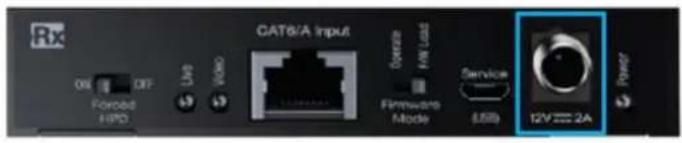


• 12V/2A (24W) power supply
- Only one power connection needed. May be connected at Tx or Rx unit
- Flexible Power over CAT (PoC). Tx may power Rx, or Rx may power Tx.
• Not compatible with third-party PoC devices
LED Indicators
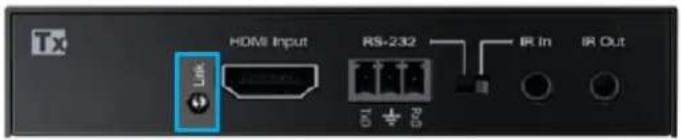


- Power (Green)
- Solid illumination during power on state, as provided by healthy connection with power supply and healthy PoC extension.
- Steady blink if unit has a power short
- HDMI Link (Blue)
- Tx Unit HDMI Input: Solid illumination from active signal from connected source
- Rx Unit: Solid illumination from active incoming signal from the connected TX and active Hot Plug Detection voltage from connected display/output device.
• Live (Yellow)
- Steady blink from healthy unit CPU state
- Video (Orange)
o Illumination with active TMDS (video + audio) signal is extended
○ Off with no TMDS (video + audio) signal
Rack Mounting
In addition to mounting with the supplied L-Brackets, multiple KD-X444SP units may be mounted in KD-SMS16 using the side mounting screws. KD-SMS16 is a mounting shelf for Key Digital units with side mounting screw spacing of 2.912", 2.582", or 2.252".
Do NOT exceed 12 units as doing so will result in unit damage by overheating.

Specifications
Technical
- Inputs Tx (Each): 1 HDMI, 1 IR, 1 RS-232
- Outputs Tx (Each): 1 CAT6/6A, 1 IR, 1 RS-232
- Inputs Rx (Each): 1 UHDoTP, 1 IR, 1 RS-232
• Outputs Rx (Each): 1 HDMI, 1 IR, 1 RS-232
• Bandwidth: TMDS bandwidth 18Gbps - Deep Color Support: Digital video formats in Deep Color Mode up to 12 bits per color
- DDC Communication: EDID and HDCP Bidirectional buffering from Display to Source
General
• Regulation: CE, RoHS, WEEE, EAC
• Enclosure: Black Metal
- Product Dimensions (ea) (LxWxH): 4.3" x 4.12" x 0.82" (109.2 x 104.6 x 20.8mm)
• HDMI Connector: Type A, 19 Pin Female
- RJ45 Connector: Shielded Link Connector, Proprietary TMDS, IR, RS-232 extension technology
• IR In & Out Connectors (Each): 3.5mm
• RS-232 Connector: 3-pin phoenix
- Power: (1) 12V/2A, 24W DC Power Supply (Screw-In Type). 100-240VAC, 50-60Hz. Interchangeable transformer plug with screw-in connector. SKU: KD-PS12V2ASC
• Product Weight (ea): 0.595 lbs (0.27 KG)
- Package Dimensions (LxWxH): 10.24" x 5.67" x 3.15" (260 x 144 x 80mm)
• Package Weight: 2.34 lbs (1.06 KG)
Product Warnings & Safety Instructions

Important Product Warnings:
- Connect all cables before providing power to the unit.
- Test for proper operation before securing unit behind walls or in hard to access spaces.
- If installing the unit into wall or mounting bracket into sheet-rock, provide proper screw support with bolts or sheet-rock anchors.

Safety Instructions:
Please be sure to follow these instructions for safe operation of your unit.
- Read and follow all instructions.
- Heed all warnings.
- Do not use this device near water.
- Clean only with dry cloth.
- Install in accordance with the manufacturer's instructions.
- Do not install near any heat sources such as radiators, heat registers, stoves, or other apparatus (including amplifiers) that produce heat.
- Only use attachments/accessories specified by the manufacturer.
- Refer all servicing to qualified service personnel. Servicing is required when the device has been damaged in any way including:
o Damage to the power supply or power plug
- Exposure to rain or moisture

Power Supply Use:
You MUST use the Power Supply provided with your unit or you VOID the Key Digital® Warranty and risk damage to your unit and associated equipment.

Key Digital ^® , led by digital video pioneer Mike Tsinberg, develops and manufactures high quality, cutting-edge technology solutions for virtually all applications where high-end video and control are important. Key Digital ^® is at the forefront of the video industry for Home Theater Retailers, Custom Installers, System Integrators, Broadcasters, Manufacturers, and Consumers.

- Table of Contents
- Operation Manual
- About KD-X444SP
- Key Features
- Accessories
- Quick Connection Guide
- Begin with the Tx and Rx units and all input / output devices turned off with power cables removed
- Connections, LEDs, Rotaries & Switches
- EDID Management Rotary
- Power Connection
- LED Indicators
- Rack Mounting
- Specifications
- Technical
- General
- Product Warnings & Safety Instructions
- Important Product Warnings:
- Safety Instructions:
- Power Supply Use:
Brand : Key Digital
Model : KD-X444SP
Category : Audio/video converter