
M319660 - Scale ADE - Free user manual and instructions
Find the device manual for free M319660 ADE in PDF.


| Product Type | Electronic Wide Body Platform Scale |
| Model Numbers | M319660 (basic), M319660-01 (with handrail), M319660-02 (with handrail and height rod) |
| Capacity | 300 kg / 660 lb |
| Graduation | 100 g / 0.2 lb |
| Power Supply | Mains adapter 6–9 VAC, ≥500 mA (central negative) |
| Battery | 4× AA NiMH rechargeable battery pack |
| Display | LCD with weight, unit, hold, BMI, battery, zero, standstill indicators |
| Weighing Units | kg and lb |
| Functions | Tare, preset tare, hold, BMI, zero, print via RS-232 |
| Interface | RS-232 (full duplex) |
| Baud Rate | 1200 to 38400 bps selectable |
| Operating Temperature | -10 °C to +40 °C |
| Storage Temperature | -20 °C to +70 °C |
| Material | Metal platform with plastic housing |
| Safety Features | Auto zero, standstill detection, overload indication |
| Handrail Options | Available with handrail and height measurement rod (M319660-01/-02) |
| Cleaning | Wipe with damp cloth; avoid abrasive cleaners |
| Warranty | 2 years (excluding moving parts such as batteries, cables) |
| Certification | CE, RoHS compliant, EMC Directive 2014/30/EU, Low Voltage Directive 2014/35/EU |
| Manufacturer | ADE Germany GmbH, Hamburg |
| Assembly | Handrail and column assembly required for models -01 and -02 |
Frequently Asked Questions - M319660 ADE
User questions about M319660 ADE
0 question about this device. Answer the ones you know or ask your own.
Ask a new question about this device
Download the instructions for your Scale in PDF format for free! Find your manual M319660 - ADE and take your electronic device back in hand. On this page are published all the documents necessary for the use of your device. M319660 by ADE.
USER MANUAL M319660 ADE
Assembly and set up....3
M319660 – Platform scale assembly .... 3
M319660-01 – Handrail scale assembly .... 3
M319660-02 – Handrail scale assembly 5
Leveling the Balance....6
Power supply 6
Replacing the rechargeable battery 6
Display 7
Front view and side view of the display....7
Display description 7
Key pad description 8
Operation....9
Correct weighing 9
How to change the unit....9
Tare function....9
Weighing with preset tare values 9
HOLD function 10
BMI (Body Mass Index) 10
Evaluation of the Body Mass Index....10
Connecting additional devices 10
Print out a record 10
Error Messages 11
Cleaning and Maintenance 12
Cleaning 12
Storage and Transport....12
Warranty – Liability 12
Technical details....12
CE-marking and Declaration of Conformity....13
Declaration of CE Conformity 13
Introduction

This symbol means: "Consult operating instructions". To achieve accurate results, read the instructions for use carefully before use and follow all instructions provided therein. Keep the instructions for use for future reference.
Your ADE electronic floor-scale is a quality, sturdy and durable product manufactured in accordance with national regulations in Germany. The scale is used to evaluate the weight of obese and/or adipose patients.
ADE instruction manuals have been prepared to provide the user with all the necessary knowledge about the safe use of ADE scales and their related accessory equipment.
In order to achieve the best possible results kindly read and follow the operation manual in all respects.
| Electronic Wide Body Platform Scale | |
| Series M319660 | |
| Configuration of the basic version M319660: | 1 platform1 remote display device1 mains adapter1 rechargeable batteries1 operation manual |
| Description of supplementary equipment to the basic version: | |
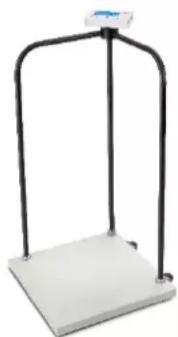
| M319660-01 with handrail | 1 upright column2 side- rail angled handrails1 signal cable- already attached4 M4 screws2 M12 screws1 pair of castors already mounted to the platform |
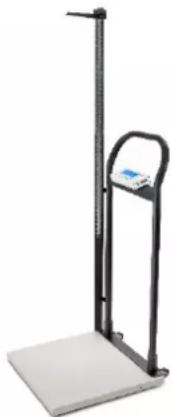
| M319660-02 with handrail and height measurement rod | 1 handrail4 M4 screws2 M12 screws1 pair of castors already mounted to the platform1 height measurement rod with 2 screws |
natural_image
White metal scale with black frame and blue top (no text or symbols visible)M319660-01
natural_image
Digital balance scale with a black vertical stand and white base (no visible text or symbols)M319660-02
Safety
The ADE-display unit corresponds to the latest state of the art technology and complies with standard regulations and directives. Kindly follow the safety instructions in this operating manual, the country-specific installation standards as well as the applicable safety conditions and accident prevention regulations in all aspects.
- Operate the scale only with the original ADE mains adapter.
■ Always connect the mains adapter to the scale BEFORE connecting it to the electrical outlet - Disconnect from the electrical outlet BEFORE disconnecting the adapter from the scale.
- In case the mains adapter became wet or show visible damages the scale can no longer be operated by using this mains adapter. In this case please contact your local dealer or service partner.
- The voltage and power supply as mentioned on the type plate must match the mains voltage and power type at the place of use.
- When using the scale with a mains unit ensure that the supply cable is routed in such a way as to exclude any type of potential trip hazard.
- Remove the mains plug before cleaning the unit.
- Do not operate the unit in hazardous or unstable conditions.
- Set up the unit as far away as possible from equipment that generates electromagnetic or other interference. Portable and mobile HF-communication systems may influence electronic medical devices.
- All actions and operations described in this operation manual may only be carried out by professional personnel authorized by ADE or official appointed dealers.
Assembly and set up
The ADE scales are been delivered in a fully or part-assemble condition. Remove the packaging and place the scale on a firm and plane surface.
M319660 – Platform scale assembly
The scale is being delivered in an already assembled condition. The indicator/ display of your ADE scale could be mounted on walls. The scope of delivery contains a steel-bracket for wall mounting. The screws for wall mounting are not included.
M319660-01 – Handrail scale assembly
Take all scale parts out of the carton and put them on a flat and hard surface. Follow below procedures to fulfill the installation.
The guidance of the cable for the connection between measuring cell and display device is supported by a twine. Take the twine and attach one end to the plug of the load cell cable that comes from the scale platform and the other end to a nut. The nut serves as weight.
➢ Guide the attached nut with the twine from bottom side through the middle tube.
Then insert the attached connector also from bottom side into the middle tube.
Pull the load cell cable connector with the twine through the tube.
➢ Insert the column into the socket on platform and fix it by screw. (Fig.P4)
Insert the handrail connector onto the handrails, insert the handrails into the socket on platform. Have the three poles vertical with each other, then fix the handrails connector by screws. (Fig.P5)

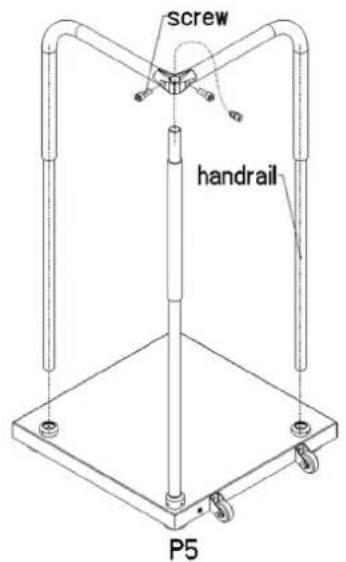
Rotate the scale 90 degrees, firmly attach the handrails to the base with the 2 large cap screws. (Fig.P6)

P6
Follow below procedure to attach the bracket to the indicator and connect the connectors.
➢ Loose the bolt and nut of indicator bracket

natural_image
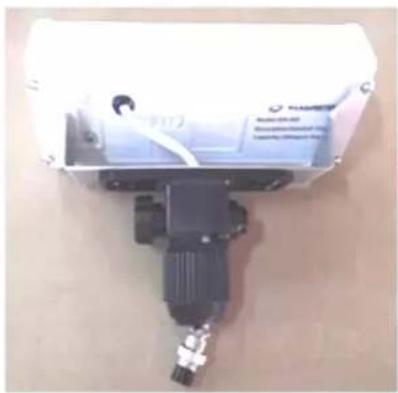
Close-up of a mechanical device with black components and a metallic rod (no visible text or symbols)➢ Run the pigtail cable of the indicator through the tube, then fasten the bolt and the nut. Fix the bracket to the indicator by 4 screws.
natural_image
Close-up of a mechanical device with a black component and attached wiring, no visible text or symbols.Connect the indicator connector and loadcell cable connector, then have them go back into the column.
➢ Insert the indicator assembly into the column, fix it by rotating the knurled nut.

M319660-02 – Handrail scale assembly
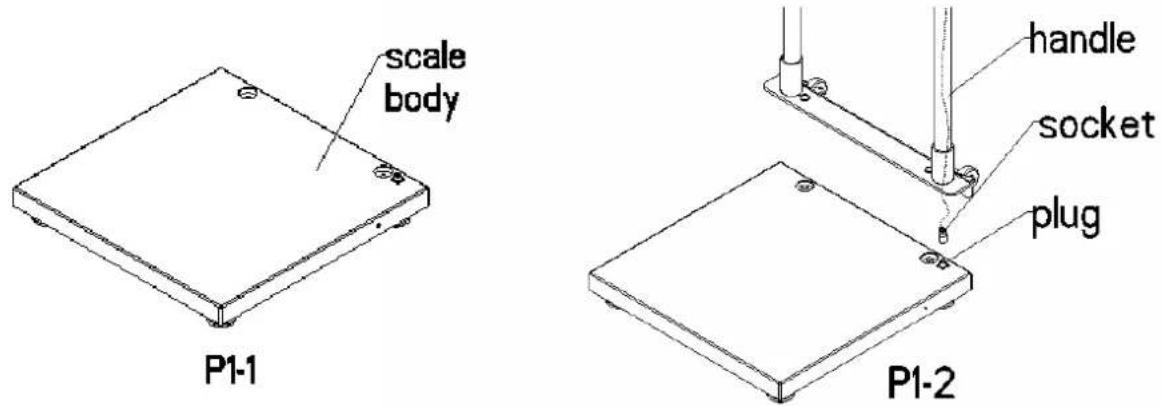
1) Connect the signal cable coming from the handrail with the socket in the scale body, then have them go back into the column.
2) Insert the bracket into the mounting holes provided on the scale platform. The bracket is screwed to the scale platform from below using two screws.
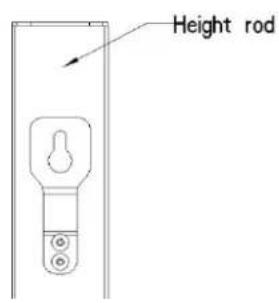
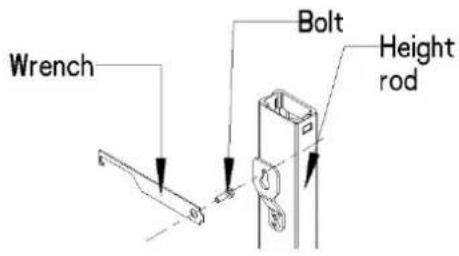
3) Fix the Height Measurement Rod with the corresponding screws on the designated brackets of the left side of the handrail.

Leveling the Balance
1) Before use, place the obesity/support balance on a vibration-free, flat and dry surface.
2) Please make sure that all four feet are in contact with the floor and that the scale is securely positioned.
Power supply
Power is supplied either by the rechargeable battery in the display unit or by the mains power via the supplied power unit. The rechargeable battery pack is consisting of 4xAA NIMH rechargeable batteries.
Use the AC adapter to load the rechargeable batteries. The imprinted voltage value at the mains adapter must match the local mains voltage. When the battery is being charged for the first time a sufficient charging period of approx. 24 hours is necessary to achieve a full battery load.
The wall socket must be located near to the unit and be easily accessible. Please use only the mains adapter supplied by ADE. The mains adapter is charging the battery pack at the same time.
Replacing the rechargeable battery
The battery compartment is located at the back of the display

1) Open the battery compartment.
2) Remove the battery cables carefully from the housing, connect the wires and insert the battery into the housing.
3) Close the battery compartment again.
Only use original rechargeable batteries and charger units from ADE. The warranty does not cover any damage caused by using other types of batteries or charger units.
Display
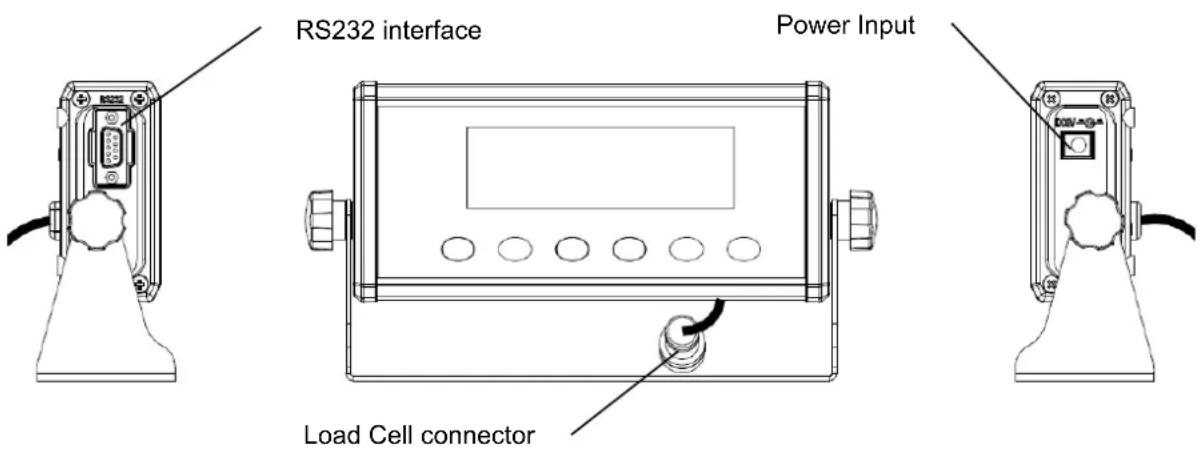
Front view and side view of the display
Display description

| Name Description | |
| Status indicator for the current battery charge level. When this symbol appears is the scale in battery operation mode or will be charged. | |
| →0← | The scale is within the zero level. |
| Standstill status indicator (14) ▲▲: | The scale is at a standstill, meaning the weight is stable and no movement is on the platform. This is a mandatory precondition for functions such as resetting, printing and taring.In case the LCD is not displayed is the scale not in the standstill mode |
| “Hold” Displayed when the hold function is activated. | |
| “Ib” Displayed when the weighing unit is displayed in pounds. | |
| “kg” Displayed when the weight is displayed in kilograms. | |
Key pad description

flowchart
graph LR
    A["HOLD"] --> B["PRINT"]
    B --> C["BMI"]
    C --> D["UNIT"]
    D --> E["TARE/PRESET"]
    E --> F["ZERO/ON/OFF"]
| Name | Description |
| HOLD | Activates the Hold-Function. |
| Transfer of data to the serial communication port RS 232. | |
| BMI | After the user steps on the scale enter same in order to proceed with the BMI mode. |
| UNIT | Switch- button between kgs and lbs. |
| TARE PRESET | Activates the tare function and the preset tare function. |
| ZERO ON/OFF | Switches the scale on/off and activates the zero function. |
| ← | During operation this key is being used to switch between the displayed figures. |
| → | During operation this key is being used to switch between the displayed figures. |
| ↓ | In BMI mode use this key to switch between the numbers downwards. |
| ↑ | In BMI mode use this key to switch between the numbers upwards. |
| ← | Enter button to confirm the value. |
Operation
Patient positioning
For safety reasons, make sure that the scale is on a flat surface before the patient steps on the scale.
During weight measurements on the handrail scales, the patient can lean on the handrail without distorting the measurement result.
After completing the weight measurement, the patient leaves the weighing platform carefully.
Correct weighing
- Enter ON/OFF to get into the normal operating mode of the scale with no load on the platform. An automatic function test will be performed afterwards and the zero setting of the scale. When '0.0' appears you are in the kg weighing mode. Additionally the display shows the symbol `→0` confirm stability of the zero setting.
- The scale is now ready to be used.
- Step on the platform and avoid movements.
- The utmost accuracy has been achieved. after the weight is being displayed and the symbol ‘▲▲’ appears
- To turn off the scale press ON/OFF for a period of minimum 3 seconds. Using the scale on mains it may remain permanently switched on or can be shut off manually by pressing key.
How to change the unit
The scale offers the possibility to select between the weighing mode kg and lb. For changing the mode press the UNIT key. Please check weighing mode after switching on to get proper result.
Tare function
The tare function allows ignoring a fixed weight (e.g. clothes) that will be deducted after each weighing procedure. Proceed as follows:
- Press the start key with no load on the scale.
- Place the additional weight of the object(s), which needs to be ignored, on the scale and store the result by pressing the TARE key.
- The display is being reset to zero. The scale is now in NET weighing mode which is also indicated on the display.
- Remove now the objects from the platform. The ignored weight is being displayed with a minus.
- Place the Patient and the additional weight (e.g. clothes) on the scale.
- The scale determines the weight of the patient without the additional weight. You may now use the scale for as many weighing procedures and the stored value will always be deducted as long as the scale is not turned off.
- Enter the tare button again to get of the tare mode.
- The tare value is likewise erased by the scale until pressing the tare button or being switched off.
Weighing with preset tare values
To input a pre set tare value press down the tare button more than 3 seconds. NET will appear at the screen. Follow the same steps as before and place a load on the platform. The last stored tare value will appear at the display and ignored by the scale.
HOLD function
The Hold function is being used if you like to hold the results at the display after the weight/load has been removed from the scale.
- Press HOLD key while scale is under load.
- "HOLD" is being displayed at the screen.
- The weight remains saved in the display after unloading the scale.
- For deactivation of the Hold function press again the HOLD key.
BMI (Body Mass Index)
The Body Mass Index is the ratio between height and weight squared. The BMI is accepted world wide – also by WHO (World Health Organization) - helping to evaluate the state of nutrition and with that value also the state of health of a person. The result is a tolerance value.
- Start the scale by entering the ON/OFF button. The scale is automatically being set to zero.
- Help the patient onto the platform.
- Wait until the weight is being displayed in a stable condition and ▲▲ appears on the screen.
- Press the BMI key shortly.
- The scale starts automatically with the last input. Use the arrow buttons to enter the height of the patient. ↑↓ ←→ Confirm the height with the enter button ←.
- The BMI is now being displayed.
- To correct the given height figure press the BMI button once again and the display returns to the height mode.
- To get back into normal weighing mode and leave the BMI simply step off the platform.
Evaluation of the Body Mass Index
Compare the determined value which corresponds to those being used by the WHO.
BMI below 18,5
- The patient is under the regular standard and does not got enough weight. An increase of weight is recommended. Please consult a professional.
BMI between 18,5 and 24,9
- The patient got a normal weight. If he feels well there is no need for a change.
BMI between 25 and 30
- The patient is slightly overweighed to pre-obese. A reduction of weight is indicated or, is necessary if the state of health is already affected (e.g. diabetes, high end blood pressure, heart diseases).
BMI over 30
- Reduction of weight is imperative. To visit a doctor is highly recommended.
Connecting additional devices
Connection of printer, PC or remote-display will be done with the RS-232 interface. For connection of additional devices kindly ask your local representative or authorized ADE dealer for further instructions.
Print out a record
The scales must be at standstill. The standstill status symbol ▶▲ must appear at the screen. Press the ENTER key to send the data to the serial interface.
Note: Printing is not possible if the net weight is 0. The print function only produces one print-out. A reset is required to print out another copy.
M319660-210512-Rev005-UM-en 10
Error Messages
| Error Codes Description Solution | ||
| Ad----Ad---- | Load cell wires to indicator are incorrectly connected; or shorted, or opened; or ADC/ load cell are being damaged | Make sure wires are in good order and condition and correctly connected. Replace load cell or ADC chip. Service is required. |
| 0---- | Weight reading exceeds the zero limit after switching the scale on. | Make sure scale platform is empty. |
| 0---- | Weight reading is below the zero limit after switching the scale on. | Install platform on scale. Otherwise the zero calibration/ adjustment have to be done by authorized personnel. |
| ---- | Weight reading exceeds load limit. | Reduce load on scale until weight value can be displayed. |
| ---- | Weight reading below load limit. | Service by authorized personnel required. |
| EEPEI | Configuration or Calibration parameters are not correctly set. | Contact your local dealer / supplier for calibration purpose. |
| CAPEr | Capacity parameters are not correct. | Contact your local dealer / supplier for a new set-up. |
| CALEr | Calibration error. The incoming signal of loaded weight is too small, too big, unstable or un-linear. | Contact your local dealer / supplier for a new set-up. |
| Not turn on. | Power cord is not properly connected. Power outlet not supplying electricity. Batterie is discharged. Other failure. | Check power cord connections. Make sure power cord is plugged into the power outlet. Check power source. Replace batteries. |
| Cannot zero the display or will not zero when turned on. | Load on scale exceeds allowable limits. Load on scale is not stable. Load cell damage. | Remove load from the scale. Wait for load to become stable. Service required. |
| No Battery symbol or display of Lo.bAt | Batteries are discharged. Charge batteries. | |
| CAL.Er | Calibration error, maybe input data or loaded weight is too small, too big, unstable, un-linear | Contact your local dealer / supplier for a new set-up. |
| Not turn on. | Power cord not plugged in or properly connected. Power outlet not supplying electricity. Battery discharged. Other failure. | Check power cord connections. Make sure power cord is plugged into the power outlet. Check power source. Replace batteries. |
| Cannot zero the display or will not zero when turned on. | Load on scale exceeds allowable limits. Load on scale is not stable. Load cell damage. | Remove load from the scale. Wait for load to become stable. Service required. |
| No Battery symbol or display of Lo.bAt | Batteries are discharged. Change batteries | |
Cleaning and Maintenance
Cleaning
Before cleaning disconnect the scale from the socket. For cleaning just use a damp cloth or common disinfection fluids. Do not use any aggressive cleaning fluids, abrasive or acid cleaners or white spirits. During he process of cleaning take care that no water or cleaning fluids are penetrating the scale.
Storage and Transport
Please keep all original parts and pieces for an eventual sending back of the scale
in order to avoid any possible damage during transport, which automatically leads to non warranty.
Disconnect all cables before transport and avoid unnecessary damages.
Warranty – Liability
ADE will repair or replace this product within a period of 2 years from date of delivery applying to defects occurred due to poor material or workmanship (presentation of invoice is necessary). All moveable parts – batteries, cables, mains units, rechargeable batteries etc. – are excluded. Warranty does not include natural wear, damages caused by incorrect or negligent handling, overuse or unsuitable or improper storage. The cost of transport will be borne by the customer should the equipment be located anywhere other than the customer's premises. In the event of transport damage, claims under warranty can be accepted subject to using the complete original packaging and the equipment secured the way it was packed and secured originally. All the packaging should therefore be retained.
Any warranty claim will be rejected if the equipment is opened by persons not authorized expressively by ADE to do so.
Customers abroad are kindly requested to contact their local dealer for any warranty claim, customer service and spare parts.
Technical details
Capacity: 300 kg / 660 lbs
Graduation: 100 g / 0,2 lbs
Power supply
Mains Adapter: AC Adapter: 6-9VAC, ≥500mA, central negative
Battery Requirement: 4xAA NIMH rechargeable batteries pack
Work current: ≤15mA (with backlight off, and no load cells)
Serial Communications
EDP Port: Full duplex RS-232
Baud Rate: 38400,19200,9600, 4800, 2400, 1200 bps
Environmental
Operating Temperature -10 to +40°C (legal);
Storage Temperature -20 to +70°C RH without condensation
CE-marking and Declaration of Conformity
ADE products are manufactured as per the standards applicable of the actual European norms and directives to produce and offer world-wide products at the latest technical standard and with a long lifetime.
Declaration of CE Conformity
CE
Declaration of conformity by the manufacturer
These scales have been manufactured in accordance with the harmonised European standards. They conform to the regulations of the EC-directives listed below:
- EMC Directive 2014/30/EU
– Low Voltage Directive 2014/35/EU
– RoHS Directive 2011/65/EC
in the currently valid versions.
This declaration loses its validity if modifications are made to the scale without our approval.
Hamburg, Mai 2021
ADE Germany GmbH
Manufacturer: ADE Germany GmbH
- Introduction
- Safety
- Assembly and set up
- M319660 – Platform scale assembly
- M319660-01 – Handrail scale assembly
- Leveling the Balance
- Power supply
- Replacing the rechargeable battery
- Display
- Front view and side view of the display
- Display description
- Key pad description
- Operation
- Patient positioning
- Correct weighing
- How to change the unit
- Tare function
- Weighing with preset tare values
- HOLD function
- BMI (Body Mass Index)
- Evaluation of the Body Mass Index
- Connecting additional devices
- Print out a record
- Cleaning and Maintenance
- Cleaning
- Storage and Transport
- Warranty – Liability
- Technical details
- Serial Communications
- Environmental
- CE-marking and Declaration of Conformity
- Declaration of CE Conformity
- CE
- Declaration of conformity by the manufacturer
- ADE Germany GmbH
Brand : ADE
Model : M319660
Category : Scale