KAC7 - Radio EKO - Free user manual and instructions
Find the device manual for free KAC7 EKO in PDF.


| Product Type | Clock Radio |
| Power Supply | 230-240V ~ 50Hz |
| Power Consumption | 4W |
| Backup Battery | 2x AAA (not included) |
| Frequency Range FM | 87.5 - 108 MHz |
| Frequency Range AM | 522 - 1620 KHz |
| Speaker | 1 x 2.25" driver |
| Display | Digital clock with dimmer (high, low, off) |
| Alarm | Dual alarm with snooze (9 minutes) |
| Sleep Timer | 5, 10, 15, 30, 60, 90, or 120 minutes |
| Nap Timer | 5, 10, 15, 30, 60, 90, or 120 minutes |
| Aux Input | 3.5mm AUX IN (cable not included) |
| Presets | 10 FM + 10 AM |
| Antenna | FM/AM wire antenna |
| Safety Features | Double insulation; dry location only; do not expose to water |
| Care and Cleaning | Wipe with dry cloth; do not use liquid cleaners |
| Main Functions | FM/AM radio, clock, dual alarm, sleep/nap timer, AUX in, dimmer |
Frequently Asked Questions - KAC7 EKO
User questions about KAC7 EKO
0 question about this device. Answer the ones you know or ask your own.
Ask a new question about this device
Download the instructions for your Radio in PDF format for free! Find your manual KAC7 - EKO and take your electronic device back in hand. On this page are published all the documents necessary for the use of your device. KAC7 by EKO.
USER MANUAL KAC7 EKO
Please read this manual carefully before using, and keep it for future reference.
CONTENTS
| General Safety 4 | |
| Product Overview 7 | |
| Basic Operation 8 | |
| Antenna 8 | |
| Backup Time (batteries) 8 | |
| Power ON/OFF 8 | |
| Selecting a MODE 8 | |
| Setting the Clock 8 | |
| Tuning the Radio 9 | |
| Automatically Store Radio Stations 9 | |
| Manually Store Radio Station 9 | |
| Listening to Station Presets | 9 |
| Setting the Alarm and the Alarm Mode | 10 |
| Stopping the Alarm | 10 |
| Sleep Function | 11 |
| Nap Function | 11 |
| Connecting the AUX source | 11 |
| Dimmer | 11 |
| Troubleshooting | 12 |
| Specification | 13 |
| Customer Support Last Page | |
GENERAL SAFETY
Read this manual thoroughly before you start using the radio. Store this manual, the completed warranty card, your receipt and the product packaging.
The safety precautions instructions reduces the risk of fire, electric shock and injury when correctly complied to.
Please follow all instructions and take notice of all warnings.
IMPORTANT INFORMATION
- Only using furniture that can safely support the Products.
- Ensure the Product is not overhanging the edge of the supporting furniture.
- Do not place the product on a high furniture without securing both the furniture and the product to a stable support.
- Do not place the product on cloth or other conductive materials.
- Warn children of the dangers of climbing on furniture to reach the product or its controls and to call for an adult to assist.
GENERAL SAFETY (CONT.)
IMPORTANT INFORMATION
- Do not expose this product to rain or moisture as it may result in fire.
- Do not temper or change or modify the product in any way.
- Only use Accessories outlined and recommended by the manufacturer.
- Please do not expose the product to splashing or water contact
- Please do not place any object on top of the product
This product must be positioned in a sufficiently stable location, it can be potentially hazardous due to falling when mounted and can cause injury, particularly to children if it positioned incorrectly.
- The apparatus shall not be exposed to dripping or splashing and no objects filled with liquids, such as vases, shall be placed on the product. Dry location use only.
- No naked flame source, such as candles, should be placed on the product.
- Do not cover the ventilation openings of the product with items such as newspapers, tablecloths, curtains etc or insert objects into the slots available on the products. As this could result in the product temperature rising and could cause a fire.

This symbol indicates that the appliance has double insulation between the dangerous mains voltage and the parts accessible to the user. In the event of repairs use only identical spare parts.
GENERAL SAFETY (CONT.)
- If you notice any unusual odors or smoke around the unit, immediately disconnect the unit from the outlet and contact the service center. Failure to do so may result in fire or electric shock.
- When not using the unit for long periods of time or when you are moving the unit.
- Please beware that Dust could accumulate over time on the unit and cause it to generate heat and or deteriorate insulation, which in turn may result in an electrical fire.
- The product is not intended for use by persons (including children) with reduced physical, sensory or mental capabilities, or young children of any age. They must be supervised product by a person responsible for their safety.
- Batteries from the product must be only removed by an adult, the adult must ensure to keep them out of reach of infants and children. Seek medical attention immediately if a child has swallowed a battery.
- To maintain the product do not use any chemical or cleaning agent or wet cloth, please only ensure to utilize a dry cloth to wipe it down from marks or dust and only after unplugging the product from the power socket.
- Please ensure to contact our call center for any repair or service required for the products.
Please make sure upon positioning this product, the place is:
• Not wet or damp and Well ventilated
- Away from direct sunlight or heaters.
• Away from splashes or food.
- Protected from excessive dust or grease.
- Do not place this equipment in a confined space such as a bookcase or similar unit. Allow 20cm above and 5cm spacing on both sides for proper ventilation.
- Do not place the Product near heat sources such as radiators, stoves or other audio visual equipment that produce heat.
- Do not place small metallic objects on top of the unit.
- Do not use or store flammable or combustible materials near the unit. Doing so may result in fire or explosion. Do not place any naked flame sources, such as lit candles, cigarettes or incense sticks on top of the product.
PRODUCT OVERVIEW
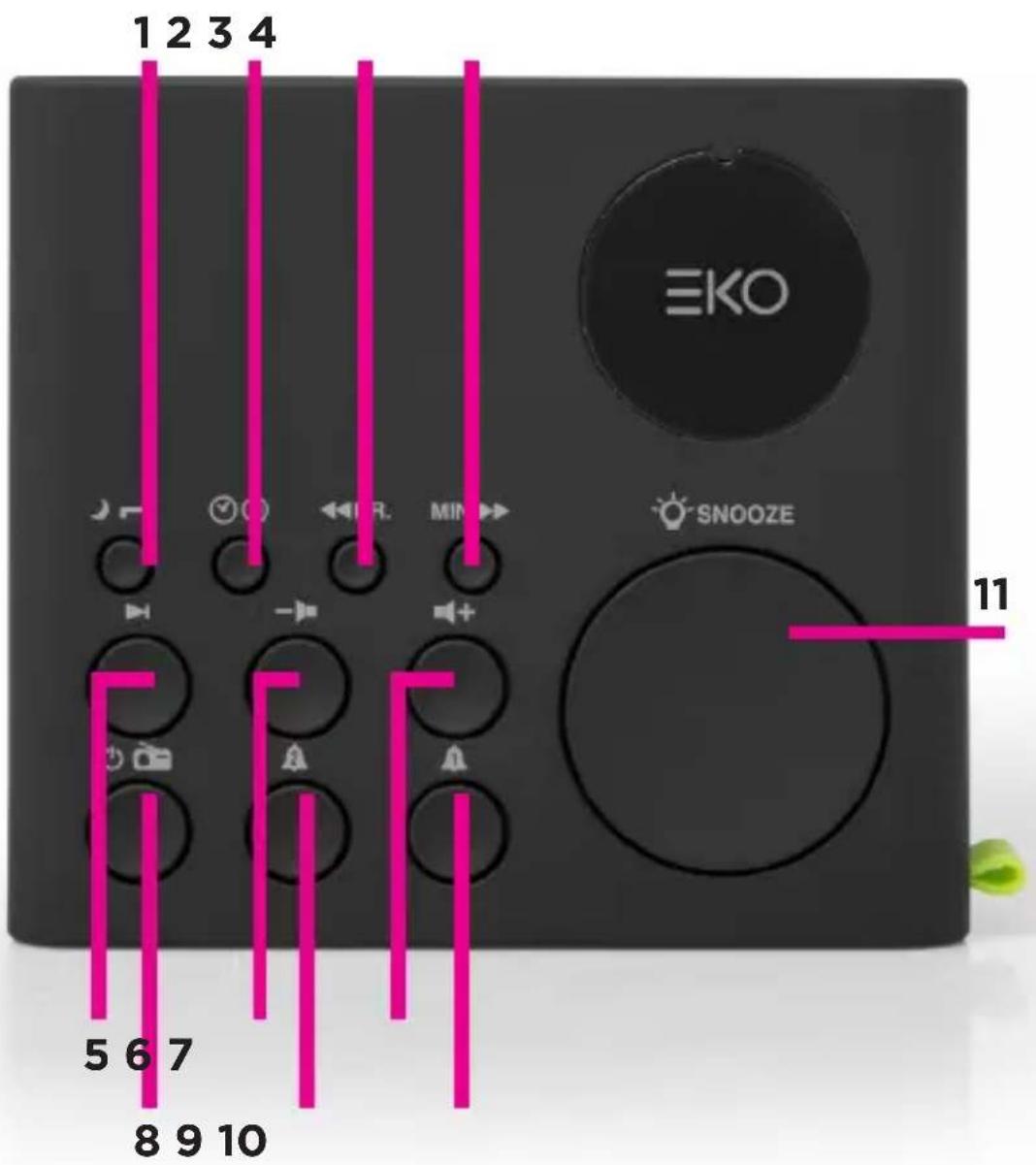
1 NAP (Wakeup) / SLEEP Function
2 Clock Setting / Memorisation
3 Setting Down / Hour Setting
4 Minute Setting / Setting Up
5 Auto Scan / Preset Stations
6 Volume Down
7 Volume Up
8 Standby (power) /
Mode Selector (FM / AM / AUX)
9 ALARM 2
10 ALARM 1
11 Snooze Button
BASIC OPERATION
ANTENNA
- Unwind and extend FM/AM wire antenna to its full length for FM/AM reception and place it in the position. Which permits best reception.
- If FM/AM reception is weak, slightly rotate or re-position the unit to get the best possible reception.
BACKUP SYSTEM: All settings are memorized, however, the clock time could occasionally need to be readjusted. In case of power failure, if backup batteries are not installed, the screen will flash to indicate this power failure and the necessity to redo your settings.
POWER ON/OFF
1 Press once to turn on the unit.
2 Press and hold for Standby ⏻ (8) button2 seconds to turn off the unit.
SELECTING MODE (FUNCTION)
When unit is Powered ON after pressing Standby button.
Press the Standby (1) (8) button to cycle through modes:
FM / AM / AUX
SETTING THE CLOCK
1 In standby mode, Press and hold the ⏻ (2) button and the display will flash.
2 Then set the time by pressing the HR. (3) and MIN (4) buttons to set the Hour and Minute time.
3 Press the ⏻ (2) button to confirm time.
1 When unit is powered on repeatedly press the select AM or FM band
(8) button to
2 Press and hold the ◀◀(3) or ▶▶(4) button to start the auto scan process. MANUAL SEARCH - Press once to manually scan through radio stations.

PRESET - You can store up to 10 FM and 10 AM Stations.
AUTOMATICALLY STORE RADIO STATIONS
In FM mode, press and hold ▶ (5) button for few seconds and the unit will automatically save the first 10 FM stations. When you store on a channel already been preset, the previous station will automatically be cleared and replaced by the new station. Note: same procedure applies for AM automatic storage when in AM mode.
MANUALLY STORE RADIO STATIONS
- Repeatedly press 📄 (8) button to select FM or AM band.
- Select a radio station manually or in automatic search.
- Press (2) "P 01" blinks on the screen.
- Press ◀◀(3) or ▶▶(4) button to select a channel.
- Press (2) to save it.
- Repeat steps 1-5 to store other stations.
LISTENING TO STATION PRESETS
Press (8) button to select FM or AM band. Then press (5) and repeat the operation as many times as necessary to select your station. Press (6) or (7) to adjust the sound level.
SETTING THE ALARM AND THE ALARM MODE
- In standby mode, press and hold ⏻ (10) button for a few seconds the display blinks.
- Press ←(3) or ▶→(4) button to select the source of wake up [BB] buzzer, or [F] radio.
- Press 🔒 (10) button then Press HR. (3) and / or MIN. (4) button to set the time of wake up.
- Press ⚠(10) to confirm, the alarm 1 indicator lights up.
NOTE:
- Same procedure applies for alarm 2 with ⚠ (9) button.
- If you wake up with the radio, select your desired station, then long press button to turn off the radio before the alarm time reaches. For the station selecting, please refer to “LISTENING TO RADIO”.
- The previous level of listening is stored, the volume of the alarm will be identical. If you wake up with the radio, do not forget to check the volume level. Press (8) and - (6) or + (7) then press (8) again.
- If you use the sleep mode with low sound level, you should use the buzzer to wake you up.
STOPPING THE ALARM
1 ALARM REPETITION
Press SNOOZE (11) button. The alarm stops and will sound again 9 minutes later.
2 ALARM STOP
Press ⏻ (8) or ⚠ (10) button. The alarm 1 will sound again the next day at the same time.
3 ALARM CANCELLATION
In Standby mode, press 🔒 (10) button to cancel the alarm 1 permanently. The alarm 1 indicator lights off.
Note: Same procedure applies for Alarm 2 with 🔒 (9) button.
To fall asleep with the radio, Press ⏻ (8) button then 📄 (1) button to select 120-90-60-30-15-10 or 5 minutes of listening. Indicator lights up. The unit will automatically turn off after the specified time. To cancel the sleep function, repeatedly press 📄 (1) button until “OFF” display or Long press ⏻ (8) button until indicator lights off.
NAP FUNCTION
This function wakes you up after a short period of time. Only the buzzer may be selected.
- In standby mode, press 📋 (1) button to select 120-90-60-30-15-10 or 5 minutes for your nap. The indicator lights nap.
- To stop the alarm, press ⏻ (1) or ⏻ (8).
- To cancel the function, presss 🎉 (1) button repeatedly until OFF is displayed.
CONNECTING AUXILIARY SOURCE
- Connect your auxiliary source (e.g. mp3 player) to the AUX IN jack on the back of unit (cable not included).
- When the unit is on, press ⏻(8) button on unit repeatedly to select AUX mode. The display will show "AU" for a few seconds and change to clock time.
- Start playback from your auxiliary source.
- Adjust the volume to desired level.
- To stop playback, disconnect your auxiliary source from the AUX IN jack.
DIMMER
Press 🎨 (11) button to select the brightness of the screen: high, low or off.
TROUBLESHOOTING
In the unlikely event of difficulties with your appliance please follow the trouble shooting guide below.
| Problem | Reason(s) | Solution(s) |
| No Power | Power cable not connected to wall socket.Power socket is not switched | Make sure the plug is connected.Make sure that there is power at the AC outlet. |
| Radio reception weak | Extend or re-position the FM pig-tail antenna.Re-position the main unit for FM reception.Keep the clock radio away from other electronic devices to avoid radio interference. | |
| No sound | Volume control set to minimum.Device volume set to minimum | Increase the volume levelAdjust volume on the Bluetooth- connected device. |
| Time reset to 12:00 | Backup batteries exhaustedClock not set | Replace the batteriesSet the clock following steps on page 10 |
| Alarm does not sound | Alarm mode not activeClock not setAlarm not set | Activate the alarm following steps on page 10Set the clock following steps on page 10 |
| Clock/alarm setting erased | Power has been interruptedPower plug has disconnected. | Make sure the plug is connected.Reset the clock/alarm |
SPECIFICATIONS
| Power Supply Input: 2 | 30-240V ~ 50Hz |
| Power Consumption 4W | |
| Speaker Driver 1 x 2.25” | |
| BACKUP CLOCK - Batteries | 3V === BACKUP(2x AAA, Not included) |
| Frequency | |
| FM 87.5 - 108 MHz | |
| AM 522 KHz - 1620 KHz | |
EKO
CUSTOMER HELPLINE:
help@eko-entertainment.com.au
DISTRIBUTED BY:
Ayonz Pty Ltd
- CONTENTS
- GENERAL SAFETY
- IMPORTANT INFORMATION
- GENERAL SAFETY (CONT.)
- Please make sure upon positioning this product, the place is:
- BASIC OPERATION
- ANTENNA
- POWER ON/OFF
- SELECTING MODE (FUNCTION)
- SETTING THE CLOCK
- AUTOMATICALLY STORE RADIO STATIONS
- MANUALLY STORE RADIO STATIONS
- LISTENING TO STATION PRESETS
- SETTING THE ALARM AND THE ALARM MODE
- NOTE:
- STOPPING THE ALARM
- ALARM REPETITION
- ALARM STOP
- ALARM CANCELLATION
- NAP FUNCTION
- CONNECTING AUXILIARY SOURCE
- DIMMER
- TROUBLESHOOTING
- SPECIFICATIONS
- EKO
Brand : EKO
Model : KAC7
Category : Radio