
DS-PDCL12-EG2-WB - Motion detector Hikvision - Free user manual and instructions
Find the device manual for free DS-PDCL12-EG2-WB Hikvision in PDF.


| Product Type | Passive Infrared Motion Detector |
| Model | DS-PDCL12-EG2-WB |
| Detection Method | Passive Infrared (PIR) |
| Detection Range | 12 m (39 ft) |
| Detection Angle | 360° |
| Number of Detection Zones | 172 |
| Detectable Speed | 0.3 – 2 m/s |
| Sensitivity | Auto / Low |
| White Light Filter | 6500 lux |
| Digital Temperature Compensation | Supported |
| Digital Processing | Supported |
| Tamper Protection | Front & Rear |
| Signal Strength Indicator | Supported (LED: Green/Orange/Red/Flashing Red) |
| Transmission Technology | Tri-X Wireless (Two-Way RF) |
| Transmission Frequency | 868 MHz / 433 MHz |
| Transmission Security | AES-128 Encryption |
| Transmission Range (Open Area) | 1600 m (868 MHz) / 800 m (433 MHz) |
| Enrollment Methods | Power Up, Remote ID, QR Code |
| Power Supply | Battery-powered (1 x CR123A, 3 V) |
| Battery Life | 5 years (20 triggers/day) |
| Low Voltage Warning | At least 30 days of use remaining |
| LED Indicator | Blue (alarm), multi-color for signal strength |
| Operating Temperature | -10 °C to 55 °C (14 °F to 131 °F) |
| Storage Temperature | -20 °C to 60 °C (-4 °F to 140 °F) |
| Operating Humidity | 10% to 90% |
| Dimensions (Diameter × Height) | 101.2 mm × 32.9 mm |
| Weight | 109.5 g |
| Mounting Height | 2.4 to 4 m (ceiling mount) |
| Application Scenario | Indoor |
| Mounting Method | Screws or Sponge Tape (sponge tape not EN compliant) |
| Maintenance | Keep dry; avoid extreme temperatures, shocks, and high electromagnetic radiation; clean with soft dry cloth |
| Safety Precautions | Do not swallow battery; keep away from children; replace only with same type; dispose of batteries according to local regulations |
| Spare Parts & Repairability | Battery replacement (CR123A); no user-serviceable parts; contact service center for repairs |
Frequently Asked Questions - DS-PDCL12-EG2-WB Hikvision
User questions about DS-PDCL12-EG2-WB Hikvision
0 question about this device. Answer the ones you know or ask your own.
Ask a new question about this device
Download the instructions for your Motion detector in PDF format for free! Find your manual DS-PDCL12-EG2-WB - Hikvision and take your electronic device back in hand. On this page are published all the documents necessary for the use of your device. DS-PDCL12-EG2-WB by Hikvision.
USER MANUAL DS-PDCL12-EG2-WB Hikvision
©2020 Hangzhou Hikvision Digital Technology Co., Ltd. All rights reserved.
About this Manual
The Manual Includes Instructions for using and managing the Product. Pictures, charts, images and all other Information hereinafter are for description and explanation only. The Information contained in the Manual is subject to change,
without notice, due to firmware updates or other reasons. Please find the latest version of this Manual at the Hikvision website (https://www.hikvision.com/).
Please use this Manual with the guidance and assistance of professionals trained in supporting the Product.
HIKVISION and other Hikvision's trademarks and logos are the properties of Hikvision in various jurisdictions. Other trademarks and logos mentioned are the properties of their respective owners.
Disclaimer
TO THE MAXIMUM EXTENT PERMITTED BY APPLICABLE LAW, THIS MANUAL AND THE PRODUCT DESCRIBED, WITH ITS HARDWARE, SOFTWARE AND FIRMWARE, ARE PROVIDED "AS IS" AND "WITH ALL FAULTS AND ERRORS". HIKVISION MAKES NO WARRANTIES, EXPRESS OR IMPLIED, INCLUDING WITHOUT LIMITATION, MERCHANTABILITY, SATISFACTORY QUALITY, OR FITNESS FOR A PARTICULAR PURPOSE. THE USE OF THE PRODUCT BY YOU IS AT YOUR OWN RISK. IN NO EVENT WILL HIKVISION BE LIABLE TO YOU FOR ANY SPECIAL, CONSEQUENTIAL, INCIDENTAL, OR INDIRECT DAMAGES, INCLUDING, AMONG OTHERS, DAMAGES FOR LOSS OF BUSINESS PROFITS, BUSINESS INTERRUPTION, OR LOSS OF DATA, CORRUPTION OF SYSTEMS, OR LOSS OF DOCUMENTATION, WHETHER BASED ON BREACH OF CONTRACT, TORT (INCLUDING NEGLIGENCE), PRODUCT LIABILITY, OR OTHERWISE, IN CONNECTION WITH THE USE OF THE PRODUCT, EVEN IF HIKVISION HAS BEEN ADVISED OF THE POSSIBILITY OF SUCH DAMAGES OR LOSS.
YOU ACKNOWLEDGE THAT THE NATURE OF INTERNET PROVIDES FOR INHERENT SECURITY RISKS, AND HIKVISION SHALL NOT TAKE ANY RESPONSIBILITIES FOR ABNORMAL OPERATION, PRIVACY LEAKAGE OR OTHER DAMAGES RESULTING FROM CYBER-ATTACK, HACKER ATTACK, VIRUS INSPECTION, OR OTHER INTERNET SECURITY RISKS; HOWEVER, HIKVISION WILL PROVIDE TIMELY TECHNICAL SUPPORT IF REQUIRED.
YOU AGREE TO USE THIS PRODUCT IN COMPLIANCE WITH ALL APPLICABLE LAWS, AND YOU ARE SOLELY RESPONSIBLE FOR ENSURING THAT YOUR USE CONFORMS TO THE APPLICABLE LAW. ESPECIALLY, YOU ARE RESPONSIBLE, FOR USING THIS PRODUCT IN A MANNER THAT DOES NOT INFRINGE ON THE RIGHTS OF THIRD PARTIES, INCLUDING WITHOUT LIMITATION, RIGHTS OF PUBLICITY, INTELLECTUAL PROPERTY RIGHTS, OR DATA PROTECTION AND OTHER PRIVACY RIGHTS. YOU SHALL NOT USE THIS PRODUCT FOR ANY PROHIBITED END-USES, INCLUDING THE DEVELOPMENT OR PRODUCTION OF WEAPONS OF MASS DESTRUCTION, THE DEVELOPMENT OR PRODUCTION OF CHEMICAL OR BIOLOGICAL WEAPONS, ANY ACTIVITIES IN THE CONTEXT BEARLY TO ANY NUCLEAR EXPOSING OR UNSAFE NUCLEAR FUEL-CYCLE OR UN SUPPORT OF HUMAN/RIGHTS BRUSES.
IN THE EVENT OF ANY CONFLICTS BETWEEN THIS MANUAL AND THE APPLICABLE LAW, THE LATER PREVAILS.

This product and - if applicable - the supplied accessories too are marked with "CE" and comply therefore with the applicable harmonized European standards listed under the EMC Directive 2014/30/EU, RE Directive 2014/53/EU, the RoHS Directive 2011/65/EU.

2012/19/EU (WEEE directive): Products marked with this symbol cannot be disposed of as unsorted municipal waste in the European Union. For proper recycling, return this product to your local supplier upon the purchase of equivalent new equipment, or dispose of it at designated collection points. For more information see: www.recyclethis.info


replacement of a battery with an incorrect type that can defeat a safeguard (for example, in the case of some lithium battery types):
- disposal of a battery into fire or a hot oven, or mechanically crushing or cutting of a battery, that can result in an explosion:
– leaving a battery in an extremely high temperature surrounding environment that can
result in an explosion or the leakage of flammable liquid or gas; and -a battery subjected to extremely low air pressure that may result in an explosion or the leakage of flammable liquid or gas
2006/66/EC (battery directive): This product contains a battery that cannot be disposed of as unsorted municipal waste in the European Union. See the product documentation for specific battery information. The battery is marked with this symbol, which may include lettering to indicate cadmium (Cd), lead (Pb), or mercury (Hg). For proper recycling, return the battery to your supplier or to a designated collection point. For more information see: www.recyclethis.info
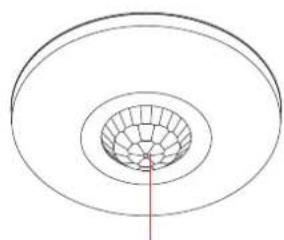
1 Appearance
CAUTION
IF THE BATTERY COMPARTMENT DOES NOT CLOSE SECURELY, STOP USING THE PRODUCT AND KEEP IT AWAY FROM CHILDREN.
CAUTION
CHEMICAL BURNING DANGER DO NOT SWALLOW THE BATTERY KEEP NEW AND USED BATTERIES AWAY FROM THE CHILDREN.
IF YOU THINK BATTERIES MIGHT HAVE BEEN SWALLOWED OR PLACED INSIDE ANY PART OF THE BODY, SEEK IMMEDIATE MEDICAL ATTENTION.
natural_image
Pure concentric circular diagram with a central grid pattern and a red vertical line (no text or symbols)Indicator
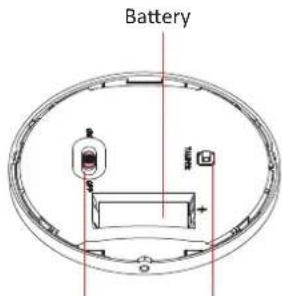
Power Switch
Tamper Button
+ identifies the positive terminal(s) of equipment which is used with, or generates direct current. - identifies the negative terminal(s) of equipment which is used with, or generates direct current.
CAUTION
RISK OF EXPLOSION IF BATTERY IS REPLACED BY AN INCORRECT TYPE.
REPLACEMENT OF A BATTERY WITH AN INCORRECT TYPE THAT CAN DEFEAT A SAFEGUARD.
CAUTION
DISPOSE OF USED BATTERIES ACCORDING TO THE INSTRUCTIONS AND LOCAL REGULATION.
2 Enrollment
Note: The enrollment progress will be completed in 3 to 10 seconds normally, and the maximum enrollment duration is 3 minutes.
- Log in to the APP Store, download and install Hik-Pro.
- Power on the security control panel.
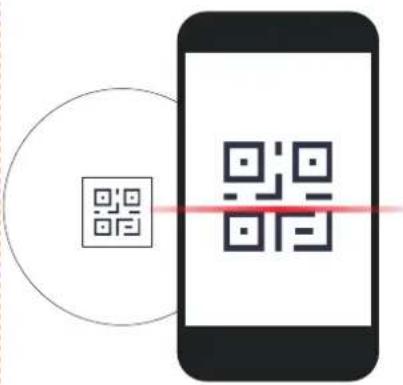
- Log in the APP and tap the icon "+" . Scan the QR code or input the control panel serial No. to add the control panel.
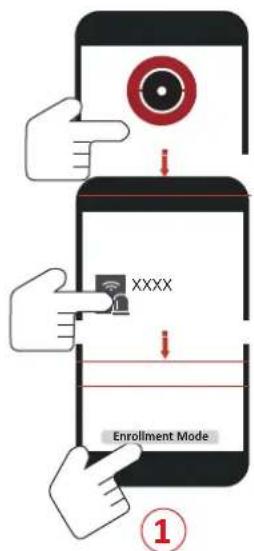
① Enroll the Peripheral Locally
- In the APP, tap the "Enrollment Mode" button on the control panel page to make the control panel enter the enrollment status.
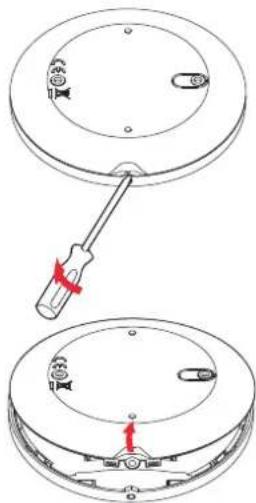
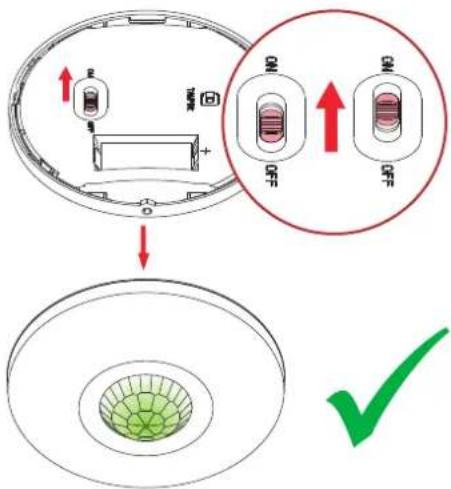
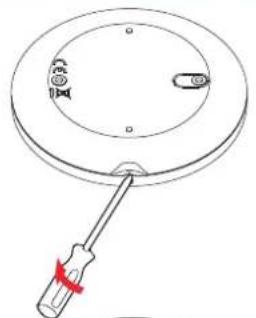
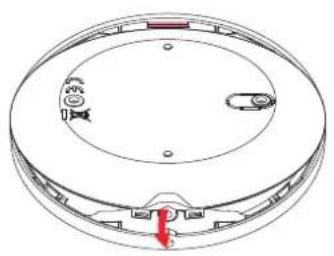
- Remove rear panel.
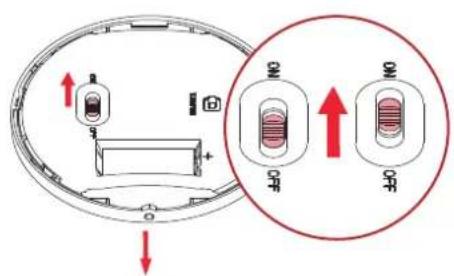
- Power on the peripheral, and it will be automatically enrolled to the control panel.
2
3
2 Enroll the Peripheral with QR and serial No.
- In the APP, tap the icon "+" and scan the QR code or serial No. on the peripheral.
- Remove rear panel.
- Power on the peripheral, and it will be automatically enrolled to the control panel.
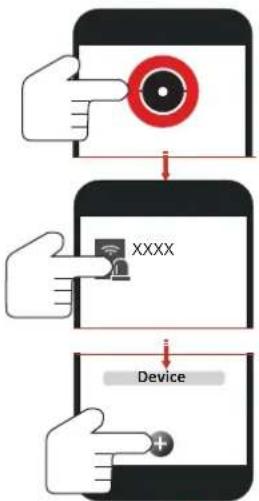
flowchart
graph TD
    A["Hand pointing at target"] --> B["Device with 'XXXX' icon"]
    B --> C["Device with plus button"]
1
2
natural_image
Simple line drawing of a screwdriver holding a circular component with a dial indicator (no text or symbols)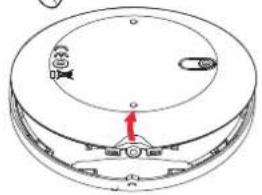
natural_image
Diagram of a circular device with internal components and a red arrow pointing to a central component (no text or symbols)3
natural_image
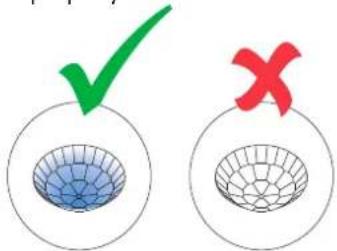
Simple line drawing of concentric circles with a green mesh pattern and a green checkmark (no text or symbols)4
Note: Hold the tamper button, and make the device power off and then power on for re-enrollment.
3 Installation
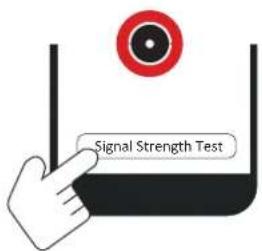
- Check Signal Strength
Enter the signal checking mode by operating on the control panel. Trigger the detector.
Solid Green for 3 s - Strong Signal
Solid Orange for 3 s - Medium Signal
Solid Red for 3 s - Weak Signal
Red light flashes for 3S - Failure
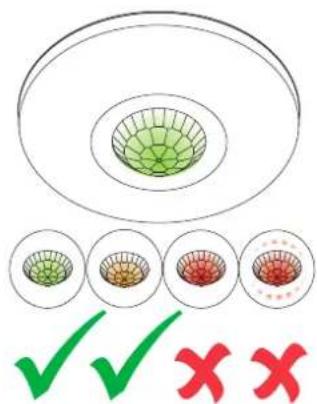
2. Install the Detector
Note: The additional force shall be equal to three times the weight of the equipment but not less than 50N. The equipment and its associated mounting means shall remain secure during the installation. After the installation, the equipment, including any associated mounting plate, shall not be damaged.
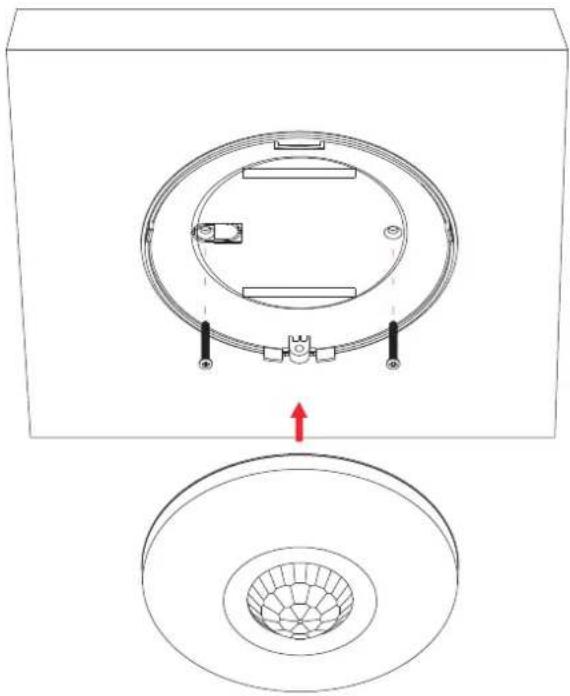
with Screws
Secure the rear panel on the wall with four screws.
natural_image
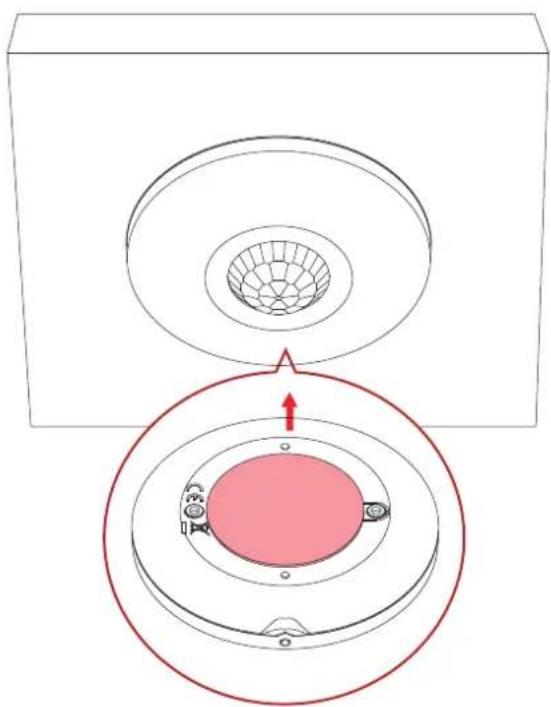
Technical diagram showing a circular component with internal components and a magnified view of its top circular structure (no text or symbols)with the Sponge Tape
Paste the device on the wall with sponge tape.
natural_image
Diagram showing a circular component with a meshed center and a red arrow pointing to a central pink oval, enclosed in a red circle (no text or symbols)Note: Installing with sponge tape is non EN compliant.
natural_image
Technical line drawing of a circular mechanical component with internal features and a red arrow indicating a specific part (no text or symbols present)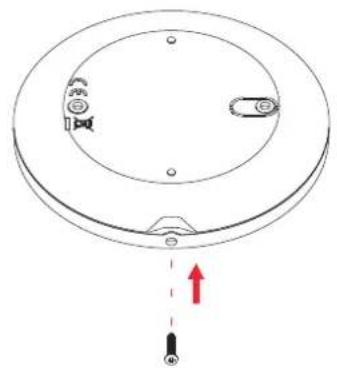
natural_image
Diagram of a circular mechanical component with a central knob and a red upward arrow indicating motion (no text or symbols)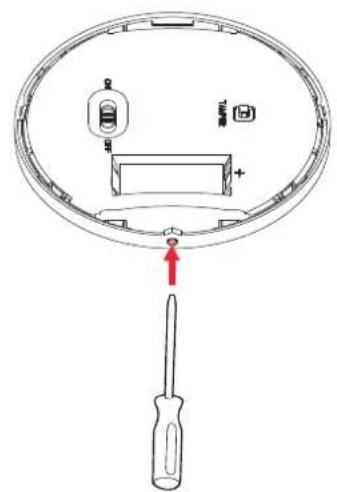
4 Test
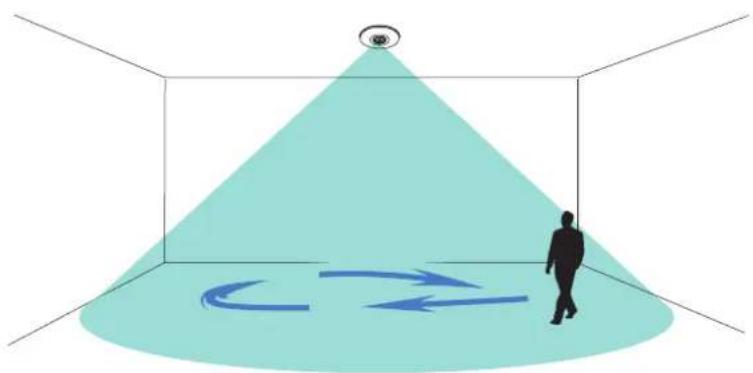
Detector zones and planes
The zones and plans of the detector are shown below.
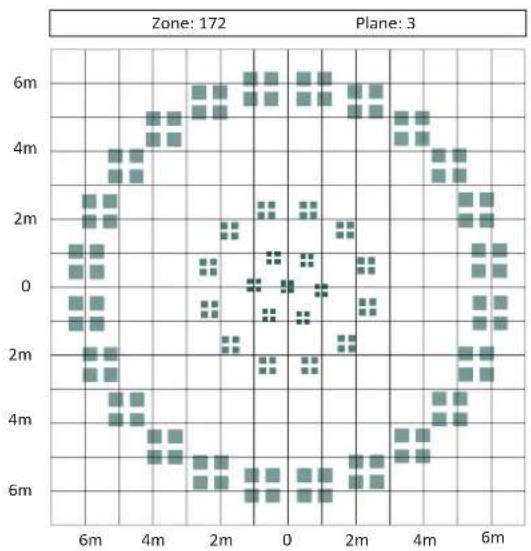
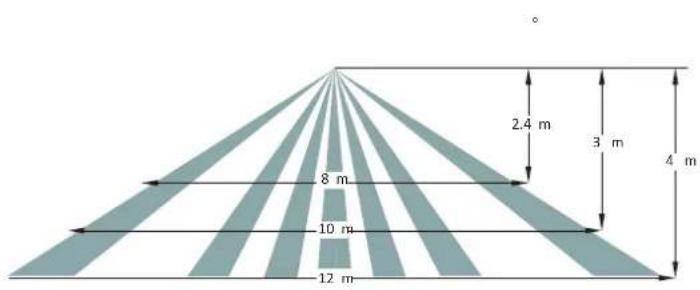
geo
| Dimension | Value (m) | | --------- | --------- | | Top Left | 2.4 | | Top Right | 3 | | Bottom Left| 4 | | Bottom Right| 8 | | Bottom Right| 10 | | Bottom Right| 12 |The detector will enter the walk test mode (3 minutes) after being enrolled.
Trigger the detector within the detection range.
If the LED indicator turns blue, the installation position is properly. If the LED indicator is still off, adjust the position of the detector.
3min
natural_image
Silhouette of a person walking toward a 3D cone with a circular eye symbol at the apex (no text or labels)5 Formatting
Hold the tamper switch for 8 s and power the device on at the same time. The red LED flashes 3 times when the formatting operation is completed.
6 Set up with App
You can view the device status including temperature, signal intensity, battery level, lid, arming/disarming, etc., on the device page. Tap the button to enter the settings page.
| Function | Description |
| Zone Type | Select the zone type of the detector. |
| Stay Arm Bypass | Slide to green to bypass the zone from stay arming. |
| Chime | Slide to green to enable the chime. |
| Enable Silent Zone | Slide to green to make the zone keep silent while alarm is triggered. |
| Sounder Delay Time | Set he sounder delay time up to |
| Double Knock | Slide to green to make the zone alarm with double knock. |
| Cross Zone | If the alarm triggered in both of the linked zones within the set time, two alarm messages will be reported. |
| Link Camera | Link with a camera for intruder |
| Sensitivity | Set the sensitivity of the detector.Higher sensitivity makes the intruder easier to be detected. |
| Swinger limit activation | Set the limit times of swinger activation . |
| LED | Turn On/Off the LED. |
| Polling Rate | Set the interval of heartbeat. |
| Signal Strength Test | Enter the test mode, and view the LED indication. |
| Detection Zone Test | Enter the test mode, and start walk test. |
| Find Me | Tap to enter the page and tap Start. The indicator of the device will then flashes. |
| Zone Bypass | By pass the zone. |
6 Operation Caution and Device Maintenance
- All the electronic operation should be strictly compliance with the electrical safety regulations, fire prevention regulations and other related regulations in your local region.
- Do not drop the device or subject it to physical shock, and do not expose it to high electromagnetism radiation. Avoid the equipment installation on vibrations surface or places subject to shock (ignorance can cause equipment damage).
- Please make sure that the power has been disconnected before you wire, install or dismantle the device.
- If smoke, odors or noise rise from the device, turn off the power at once and unplug the power cable, and then please contact the service center.
- Do not drop the device or subject it to physical shock, and do not expose it to high electromagnetism radiation. Avoid the equipment installation on vibrations surface or places subject to shock (ignorance can cause equipment damage).
- Do not place the device in extremely hot (refer to the specification of the device for the detailed operation temperature), cold, dusty or damp locations, and do not expose it to high electromagnetic radiation.
- The device for indoor use shall be kept from rain and moisture.
Exposing the equipment to direct sun light, low ventilation or heat source such as heater or radiator is forbidden (ignorance can cause fire danger).
- Do not aim the device at the sun or extra bright places. A blooming or smear may occur otherwise (which is not a malfunction however), and affecting the endurance of sensor at the same time.
- Improper use or replacement of the battery may result in hazard of explosion. Replace with the same or equivalent type only. Dispose of used batteries according to the instructions provided by the battery manufacturer.
- Do not expose the device to the corrosive gas. Otherwise the equipment damage may occur.
- Do not expose the device to the explosive situation.
7 Specification
| DS-PDCL12-EG2-WE/WB | |
| Detection Method | Passive Infrared |
| Sensor Model SBG4L46-711 | |
| Detection Range | 12m |
| Detection Angle | 360° |
| Detection Zones | 172 |
| Detectable Speed | 0.3 ~ 2m/s |
| Sensitivity | Auto,Low |
| White Light Filter | 6500lux |
| Digital Temperature Compensation | Support |
| Digital Processing | Support |
| Sealed Optics Support | |
| Tamper Protection | Front,Rear |
| Environment Temperature Indicator | Support |
| Signal Strength Indicator | Support |
| Power Switch | Power Up Enrolling |
| LED Indicator | Blue(Alarm) |
| Transmission Technology | Tri-X Wireless |
| Transmission Method | Two-Way RF Wireless |
| Transmission Frequency | 868 MHz/433 MHz |
| Transmission Security | AES-128 Encryption |
| Transmission Range (Open area) | 1600 m (868 MHz)/800 m (433 MHz) |
| Frequency Hopping | Support |
| Enrolling Method | Power up,Remote ID,QR Code |
| Power Supply | Battery Powered |
| Battery Type | CR123A × 1 |
| Typical Voltage | 3V |
| Standard Battery Life | 5 years in work status (being triggered 20 times per day) |
| Operation Temperature | -10 °C to 55 °C (14 °F to 131 °F) |
| Storage Temperature | -20 °C to 60 °C (-4 °F to 140 °F) |
| Operation Humidity | 10% to 90% |
| Dimension (D × D) | 101.2 mm x 32.9 mm |
| Weight | 109.5 g |
| Mounting Height | 2.4 to 4m |
| Mounting Method | Ceiling |
| Application Scenario | Indoor |
Note: when the low voltage message appears there will be at least 30 days of use.
Brand : Hikvision
Model : DS-PDCL12-EG2-WB
Category : Motion detector