
GWS2V1 - Scale GEMINI - Free user manual and instructions
Find the device manual for free GWS2V1 GEMINI in PDF.


| Product Type | Digital Bathroom Scale |
| Brand | Gemini |
| Model | GWS2V1 |
| Capacity | 180 kg / 400 lb |
| Division | 100 g / 0.2 lb |
| Display | LCD, 4-digit |
| Power Source | 2 x AAA batteries (included) |
| Auto-Off | After approximately 10 seconds of inactivity |
| Platform Material | Reinforced glass with anti-slip feet |
| Unit Conversion | kg / lb / st |
| Tare Function | Yes (zero reset) |
| Overload Indicator | Displays "Err" |
| Low Battery Indicator | Battery symbol on display |
| Dimensions | 30 x 30 x 2.5 cm |
| Weight | Approximately 2.1 kg |
| Cleaning | Wipe with a damp cloth; do not immerse |
| Safety | Overload protection; step on gently |
| Warranty | 1 year manufacturer warranty |
Frequently Asked Questions - GWS2V1 GEMINI
User questions about GWS2V1 GEMINI
0 question about this device. Answer the ones you know or ask your own.
Ask a new question about this device
Download the instructions for your Scale in PDF format for free! Find your manual GWS2V1 - GEMINI and take your electronic device back in hand. On this page are published all the documents necessary for the use of your device. GWS2V1 by GEMINI.
USER MANUAL GWS2V1 GEMINI
- READ ALL INSTRUCTIONS BEFORE USE
- PREGNANT WOMAN AND USERS WITH A PACEMAKER OR ELECTRIC EQUIPMENT INSIDE THE BODY SHALL NOT USE THE SCALE.
- The glass surface of the scale should be kept dry to prevent slipping.
- The scale can only bear normal static pressure when it is weighing. Under abnormal use or impact, there maybe risk of damage to the scale.
- Clean the scale with a damp cloth but do not allow water to go inside the scale and do not use any chemical cleaning agents.
- Do not store the scale in an upright position when it is not in use as this will drain the batteries.
- Remove the batteries if the scale is not being used for a long time.
- The scale is for family use to measure weight, body fat, water mass, muscle mass, bone mass, calorie, BMI. It is not used for commercial or other weighing purpose.
- The body fat parameter is only for your reference. If you target to loss or gain weight, consult your doctor for medical advice.
- In order to get the accurate parameter, please make sure the surrounding area of scale has no electromagnetic objects to avoid interference.
- Please do not repair this scale by yourself. If the scale does not operate normally, check the batteries condition and if the connection direction is right. If the problem cannot be solved, please contact our after-sales service center for assistance.
PARTS IDENTIFICATION
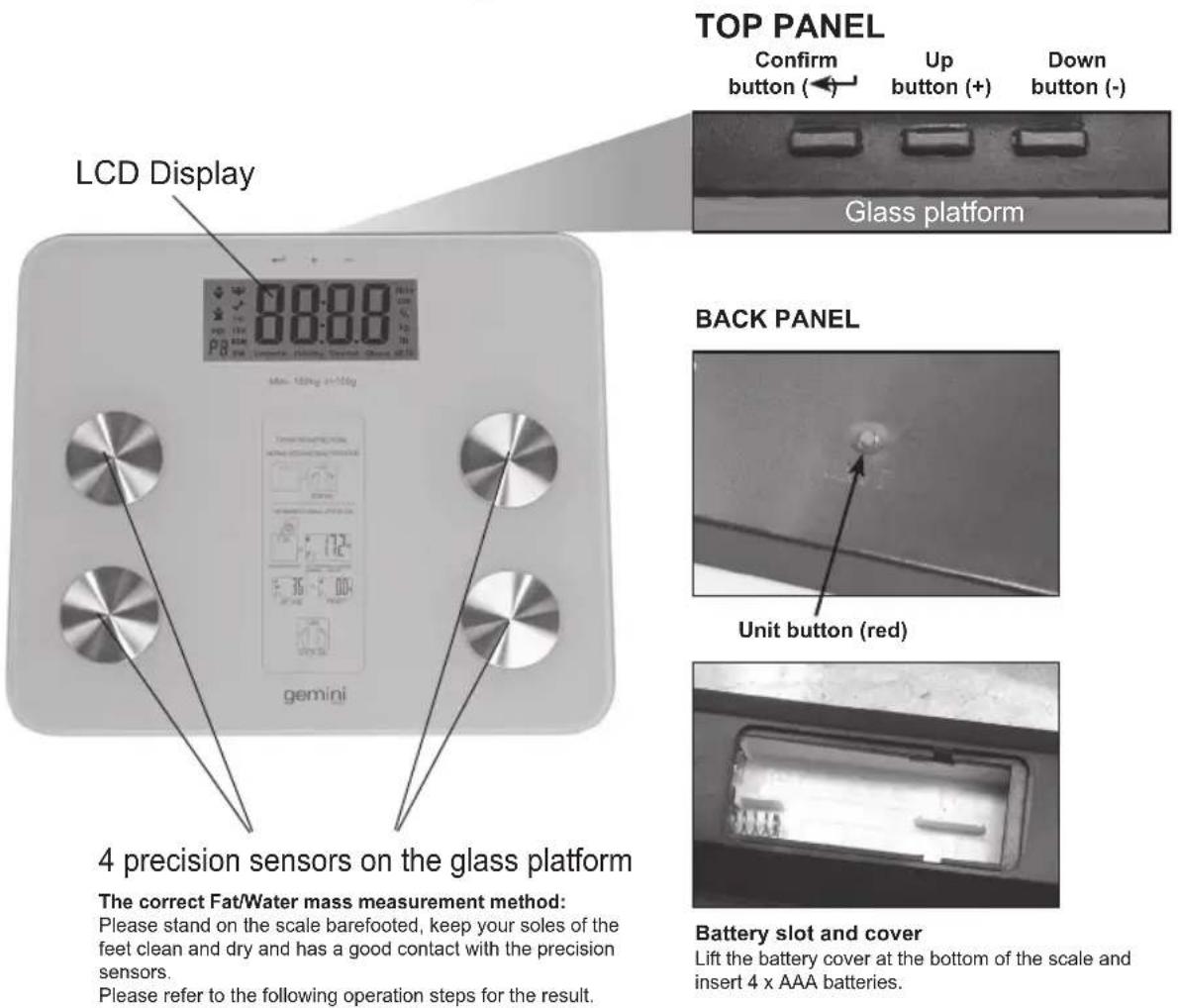
Before using the scale for the first time, please be familiar with all of the parts. Read all Instructions and Safeguards carefully.
USING THE APPLIANCE
- Put the scale on a hard and flat floor, avoid to use it on carpet or other soft surface, otherwise it will influence the accuracy.
- To select the measuring unit at the beginning, press the "Unit" button (red) which is located at the scale's base, the corresponding unit can be selected on the LCD screen, i.e. Kilograms (kg), Stone (st) or Pounds (lb). Choose the desired "Unit" to start the measurement.
- Stand on the scale directly when using the weight function only.
- Stand static and put your feet evenly on the glass platform of the scale and wait for the weight calculating result, the correct weight will be displayed on the LCD screen.
Tips: The automatic switch on function is only activated for weight function only. You have to input your personal parameters to measure the weight, body fat, water mass, muscle mass, bone mass, calorie and BMI.
MEASURING WEIGHT, BODY FAT, WATER MASS, MUSCLE MASS, BONE MASS, CALORIE AND BMI
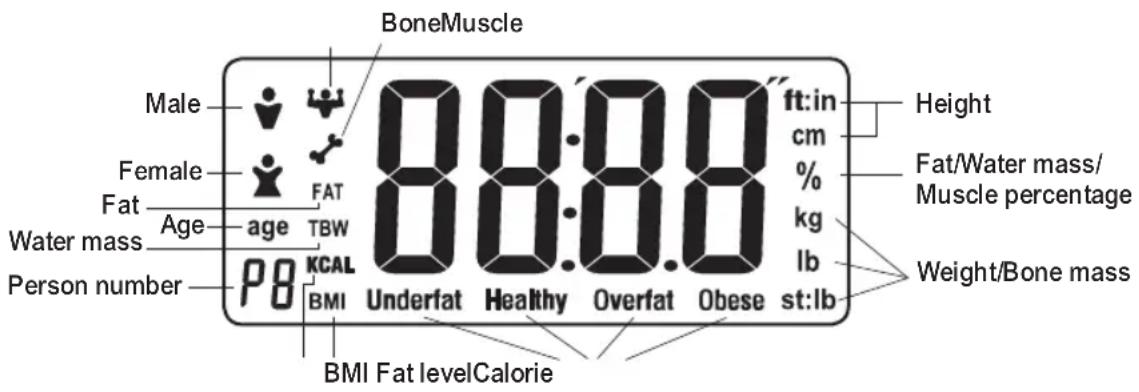
LCD DISPLAY DETAILS
- Put the scale on a hard and flat floor, avoid to use it on carpet or other soft surface, otherwise it will influence the accuracy.
- Press the "Unit" button (red) at the back of scale, the desired weight unit can be selected, i.e. Kilograms (kg), Stone (st) or Pounds (lb). The corresponding unit will be displayed on the right side of the LCD.
3.
a. Press the "Confirm (←)" button to switch on the screen and wait for "0.0" to appear in display window.
b. Select a user number and then input your personal data.
Enter User Number
- P0 will flash on the LCD display window.
- Press "UP(+)" or "DOWN(-)" button to select your individual user number. (Total 10 users from P0-P9)
- When the selected user number appears on display, press "Confirm(←)" button to save user number.
Set Gender
- The gender icon will flash on the LCD display.
- Press "UP(+) or "DOWN(-)" button to select male (💡) or female ()icon.
- Press "Confirm (←)" button to save gender information.
Set Height
- The height setting will flash on the LCD display.
- Press "UP(+) or DOWN(-)" button to scroll to your height measurement.
- Press "Confirm (←)" button to save height information.
- The scale is now ready for you to enter your age.
Set Age
- The "Age" icon will flash on the LCD display.
- Press "UP(+) or DOWN(-)" button to scroll to your age.
- Press "Confirm (←)" button to save age information.
-
After the setting, the display will show 0:0 under the preset user number, it is ready to weight.
-
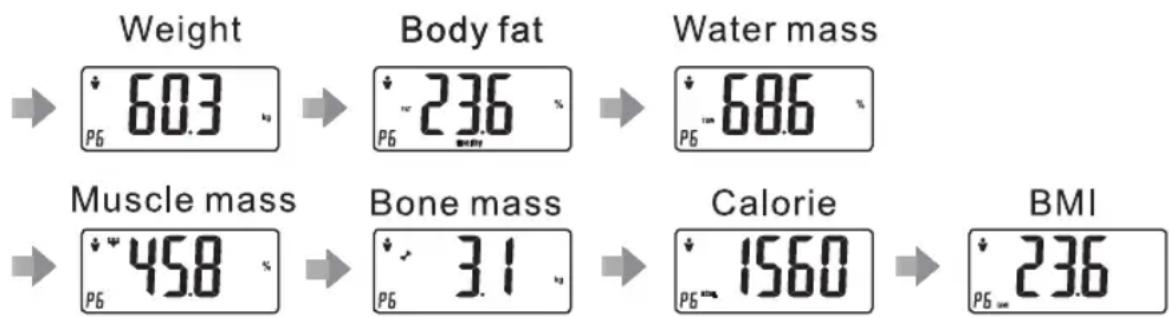
Please make sure your feet are dry and clean when stand on the glass platform, and step on the 4 precision sensors on the glass platform to start weighing, the display will show your weight, body fat, water mass, muscle mass, bone mass, calorie and BMI. These data will be displayed respectively for three times. Each data will display for 2 seconds and then the scale will be switched off automatically.
Example:
other
| Metric | Value (%) | | :--- | :--- | | Weight | 603 | | Body fat | 236 | | Water mass | 686 | | Muscle mass | 458 | | Bone mass | 31 | | Calorie | 1560 | | BMI | 236 |- Please remember your User Number which was set in the beginning. When you use the scale next time, you just need to select your User Number and wait for about 7 seconds, it will display 0.0 on screen. Then stand on the scale to measure your weight, body fat, water mass, muscle mass, bone mass, calorie and BMI.
Tips: Please make sure your shoes and socks are taken off before standing on the scale.
Tips: When input the data, please do not stand on the glass platform.
OTHER OPERATION INSTRUCTIONS
- Fat percentage error indication is FErr on screen.
- Fat percentage lower than 5%, will show Flo on screen.
- Fat percentage higher than 50%, will show FH on screen.
- Low battery indication is Lo on screen.
* If you see any of the above error codes, step down from the scale and let the scale off. Try again after 30 seconds.
INTERPRETING THE MEASUREMENT DATA
| Age | Level of Fat | Male | Female | ||||||||
| Body fat (%) | Water mass (%) | Muscle mass (%) | Calorie mass | Bone mass (%) | Body fat (%) | Water mass (%) | Muscle mass (%) | Calorie mass | Bone mass (%) | ||
| <20 | Underfat | <12 | <17 | ||||||||
| Healthy | 12-20 | 46-69 | 38-56 | 1200-2600 | 2.0-4.1 | 17-25 | 43-68 | 35-56 | 1100-2400 | 1.8-3.9 | |
| Overfat | 21-29 | 26-34 | |||||||||
| Obese | >29 | >34 | |||||||||
| 20-30 | Underfat | <13 | <17 | ||||||||
| Healthy | 13-21 | 48-69 | 43-64 | 1150-2800 | 2.1-4.0 | 17-25 | 43-67 | 38-58 | 1050-2600 | 1.8-3.8 | |
| Overfat | 22-30 | 26-34 | |||||||||
| Obese | >30 | >34 | |||||||||
| 31-40 | Underfat | <15 | <19 | ||||||||
| Healthy | 15-23 | 45-68 | 48-69 | 1100-2400 | 1.8-4.0 | 19-27 | 40-69 | 42-58 | 1000-2200 | 1.5-3.8 | |
| Overfat | 24-32 | 28-36 | |||||||||
| Obese | >32 | >36 | |||||||||
| 41-50 | Underfat | <16 | <20 | ||||||||
| Healthy | 16-24 | 43-69 | 46-62 | 1030-2150 | 1.9-3.8 | 20-28 | 42-68 | 40-56 | 950-2050 | 1.6-3.7 | |
| Overfat | 25-33 | 29-37 | |||||||||
| Obese | >33 | >37 | |||||||||
| 51-60 | Underfat | <17 | <21 | ||||||||
| Healthy | 17-25 | 43-65 | 44-59 | 980-2060 | 1.9-3.7 | 21-29 | 42-65 | 39-55 | 950-2000 | 1.5-3.6 | |
| Overfat | 26-34 | 30-38 | |||||||||
| Obese | >34 | >38 | |||||||||
| >60 | Underfat | <18 | <21 | ||||||||
| Healthy | 18-26 | 42-68 | 41-58 | 720-1750 | 1.6-3.7 | 21-29 | 41-64 | 35-51 | 600-1500 | 1.3-3.5 | |
| Overfat | 27-35 | 30-38 | |||||||||
| Obese | >35 | >38 | |||||||||
The above level of fat is calculated based on the result of body fat (%) and can be seen on screen. The above Water mass / Muscle mass / Bone mass (%) and Calorie show the general range of a Healthy level of fat in terms of Male and Female.
(The above information is for reference only. Please consult your doctor for details and professional advice.)
BMI STANDARD INDEX FOR DIFFERENT GENDER
- The BMI (Body Mass Index) is defined as the body weight divided by the square of the body height, and is universally expressed in units of kg/m ^2 , resulting from weight in kilograms and height in metres.
$$ \mathrm{BMI} = \frac {\mathrm{w}}{\mathrm{h} ^ {2}} $$
w= weight; unit: kilogram
h= height; unit: metre
| Gender\BMI | Under weight | Normal weight Over weight Obese | |
| Male <20 20-25 26-30 >31 | |||
| Female <19 19-24 25-29 >30 | |||
- Since BMI does not consider body fat content and other body composition ratios, the BMI range is only a reference based on body weight & height.
TECHNICAL DATA
Item no: GWS2V1
Power: 4 x AAA batteries (Included)
Product Dimension: 300(W) x 260(D) x 25(H)mm
Maximum Capacity: 396 lb / 180 kg / 28.34 ST
重要事項
使用前請仔細閱讀本說明書。
Proudly Serviced by:
a Gilman Group Company
太平家庭電器
Brand : GEMINI
Model : GWS2V1
Category : Scale