SCALE2 - Scale Simplified MFG - Free user manual and instructions
Find the device manual for free SCALE2 Simplified MFG in PDF.


| Product Type | Digital Scale |
| Brand | Simplified MFG |
| Model | SCALE2 |
| Category | Balance / Kitchen Scale |
| Weight Capacity | 5 kg (11 lb) |
| Graduation | 1 g (0.04 oz) |
| Dimensions | 20 x 15 x 2 cm (7.9 x 5.9 x 0.8 in) |
| Product Weight | 350 g (12.3 oz) |
| Power Supply | 2 x AAA batteries (included) |
| Display | LCD screen, white backlight |
| Weighing Units | g, kg, oz, lb:oz, ml, fl.oz |
| Tare Function | Yes (zero out containers) |
| Auto-Off | After 2 minutes of inactivity |
| Overload Indicator | Yes ("EEEE" displayed) |
| Low Battery Indicator | Yes (battery icon) |
| Platform Material | Tempered glass |
| Housing Material | ABS plastic |
| Cleaning Instructions | Wipe with a damp cloth; do not immerse |
| Safety Precautions | Do not exceed max capacity; keep away from water |
| Battery Replacement | Open compartment on bottom; replace with AAA |
| Calibration | Auto-calibration on startup |
| Warranty | 1 year limited warranty |
Frequently Asked Questions - SCALE2 Simplified MFG
User questions about SCALE2 Simplified MFG
0 question about this device. Answer the ones you know or ask your own.
Ask a new question about this device
Download the instructions for your Scale in PDF format for free! Find your manual SCALE2 - Simplified MFG and take your electronic device back in hand. On this page are published all the documents necessary for the use of your device. SCALE2 by Simplified MFG.
USER MANUAL SCALE2 Simplified MFG
Thank you for purchasing this device
The Simplified Manufacturing SCALE2 is designed to provide years of reliable service. At Simplified MFG, we want the experience with this device to be the best possible and are committed to helping achieve that experience.
Surge protection device recommended
This product contains sensitive electrical components that may be damaged by electrical spikes, surges, electric shock, lighting strikes, etc. Use of surge protection systems is highly recommended in order to protect and extend the life of your equipment.
Table of Contents
- Introduction. 2
- Features.... 2
- Package Contents.... 2
- Specifications. 3
- Operation Controls and Functions.... 4
- Connection Diagram.... 6
- Software update process....7
- Warranty Information......7
- Contact......8
1. Introduction
The SCALE2 scaler is a high performance, HDMI 2.0b,HDCP2.2 compliant scaler capable upscaling and downscaling up to Ultra HD/4K, Full HD, and HD resolutions with frame rate conversion (4K 30Hz.). The SCALE2 accepts wide range of resolutions from 480i up to 4K@60Hz4:4:4 and output resolutions up to 4K@60Hz4:4:4 with digital and analog audio extraction. It provides one HDMI input and one HDMI output. The SCALE2 will automatically scale any input signal to match native resolution of the display or any connected HDMI device. Or the output can be set to specific resolution (from 4801 to 4K 30/60Hz.). Adjustments can be made via the front panel buttons or via RS232 commands. The SCALE2 features an onscreen menu to show the adjustments in real time. This device is good for fixing scaling issues, frame rate issues and can be used to adjust brightness on displays.
2. Features
• HDMI 2.0b (18Gbps), HDCP 2.2 compliant
- Up scaling video resolutions up to 4K2K@50/60Hz (YUV444) and downscaling video resolutions to 1024x768@60Hz
• Frame-rate conversion will take any signal and output to 4K 30Hz.
• Extracts HDMI audio to multi-channel optical (SPDIF) or L/R analog audio with volume control
• Supports Dolby True HD, Dolby Digital Plus and DTS -HD Master Audio plus LPCM (up to 192kHz)
- Has the ability to adjust the picture including brightness
• Front panel buttons, OSD and RS-232 Control
3. Package Contents
• 1× HDMI 4K Ultra HD Scaler
• 1× 12V/1A Power Adapter
• 1× Phoenix connector
- 1× User Manual
4. Specifications
| Technical | |
| HDMI Compliance | HDMI 2.0b |
| HDCP Compliance | HDCP 1.4 and HDCP 2.2 |
| Video Bandwidth | 18 Gbps |
| Video Resolutions | Ultra HD/4K up to 4096 x 2160 @50/60Hz |
| Color Depth | 10-bit, 12-bit |
| Color Space | RGB, YcbCr 4:4:4, YcbCr 4:2:2YcbCr 4:2:0 |
| HDMI Audio Formats | LPCM 2/5.1/7.1CH, Dolby Digital, DTS 5.1, Dolby Digital+, Dolby True HD, DTS-HD Master Audio, Dolby Atmos, DTS:X |
| Optical Audio Formats | LPCM 2CH, Dolby Digital 2/5.1CH, DTS2/5.1CH |
| L/R Audio Formats | Analog Stereo 2CH |
| ESD Protection | Human-body Model: ±8kV (Air-gap discharge), ±4kV (Contact discharge) |
| Connections | |
| Inputs | 1x HDMI Type A [19-pin female]1 x RS232 [Phoenix connector]1 x Firmware [USB] |
| Outputs | 1x HDMI Type A [19-pin female]1x L/R Audio Out [3.5mm Stereo Mini-jack]1x Optical Out [S/PDIF] |
| Mechanical | |
| Housing | Metal Enclosure |
| Color | Black |
| Dimensions | 115mm(W)×100mm(D)×25mm(H) |
| Weight | 450g |
| Power Supply | Input: AC100~240V 50/60Hz, Output: DC 12V/1A (US/EU standards CE/FCC/UL certified) |
| Power Consumption | 8W (max) |
| Operating Temperature | 0°C ~ 40°C / 32°F ~ 104°F |
| Storage Temperature | -20°C ~ 60°C / -4°F ~ 140°F |
| Relative Humidity | 20~90% RH (non-condensing) |
* Input resolutions that are supported
| 640x480@60Hz | 720x480i@60Hz | 720x480p@60Hz |
| 720x576i@50Hz | 720x576p@50Hz | 800x600@60Hz |
| 1024x768@60Hz | 1152x864@75Hz | 1024x768@75Hz |
| 1280x768@60Hz | 1280x960@60Hz | 1280x1024X60Hz |
| 1365x1024@60Hz | 1600x1200@60Hz | 1680x1050@60Hz |
| 1856x1392@60Hz | 1920x1080@60Hz | 1920x1200@60Hz |
| 1920x1440@60Hz | 3840x2160@24Hz | 3840x2160@30Hz |
| 3840x2160@25Hz | 4096x2160@24Hz | 4096x2160@25Hz |
| 4096x2160@30Hz | 3840x2160@50Hz | 3840x2160@60Hz |
| 4096x2160@50Hz 4096x2160@60Hz | ||
* Output resolutions that are supported *New*
| 1024x768@60Hz | 1280x720@50Hz | 1280x720@60Hz |
| 1280x800@60Hz | 1360x768@60Hz | 1400x1050@60Hz |
| 1600x1200@60Hz | 1680x1050@60Hz | 1920x1200@60Hz |
| 1920x1080@50Hz | 1920x1080@60Hz | 3840x2160@30Hz |
| 3840x2160@50Hz | 3840x2160@60Hz | 1920x1080@30Hz. |
5. Operation Controls and Functions
- Front Panel
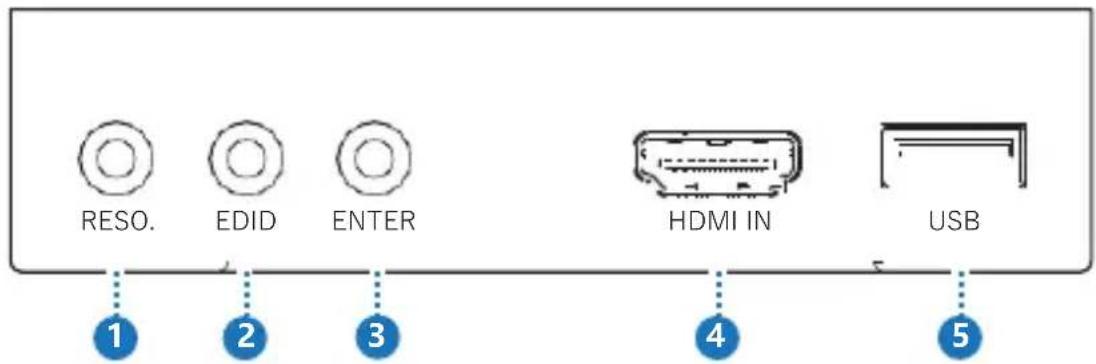
| Number | Name | Function description |
| 1 RESOLUTION | Output resolution list menu. Press the button to switch output resolution. By holding the button for 5 seconds, the output resolution will be set to 720p@60Hz. | |
| 2 EDID | Press the button to change EDID value. Long press for 5 seconds, the scaler will back to factory default setting. | |
| 3 ENTER | Press the button to save setting, Press the button for 5 seconds and it will do a software update for the scaler. (The update process in last page) | |
| 4 | HDMI IN | HDMI input port |
| 5 | USB | Firmware update port |
- Rear Panel
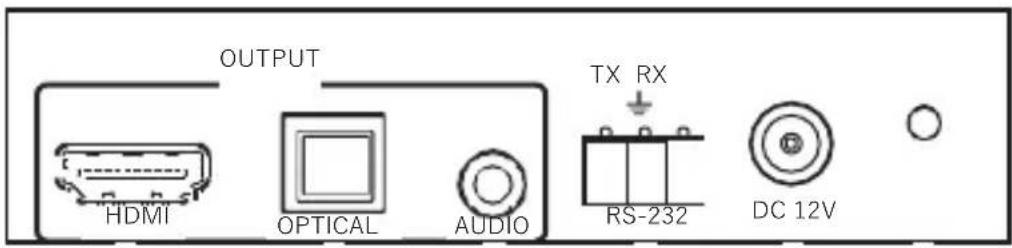
1
2
3
4
5
6
| Number | Name | Function description |
| 1 | HDMI OUTPUT | HDMI output port |
| 2 | OPTICAL OUTPUT | OPTICAL digital audio output port |
| 3 | AUDIO OUTPUT | 3.5mm analog audio output port |
| 4 | RS-232 | RS-232 control port |
| 5 | DC 12V | DV 12V power supply unit input connector |
| 6 | POWER LED | System power indicator |
6. Connection diagram
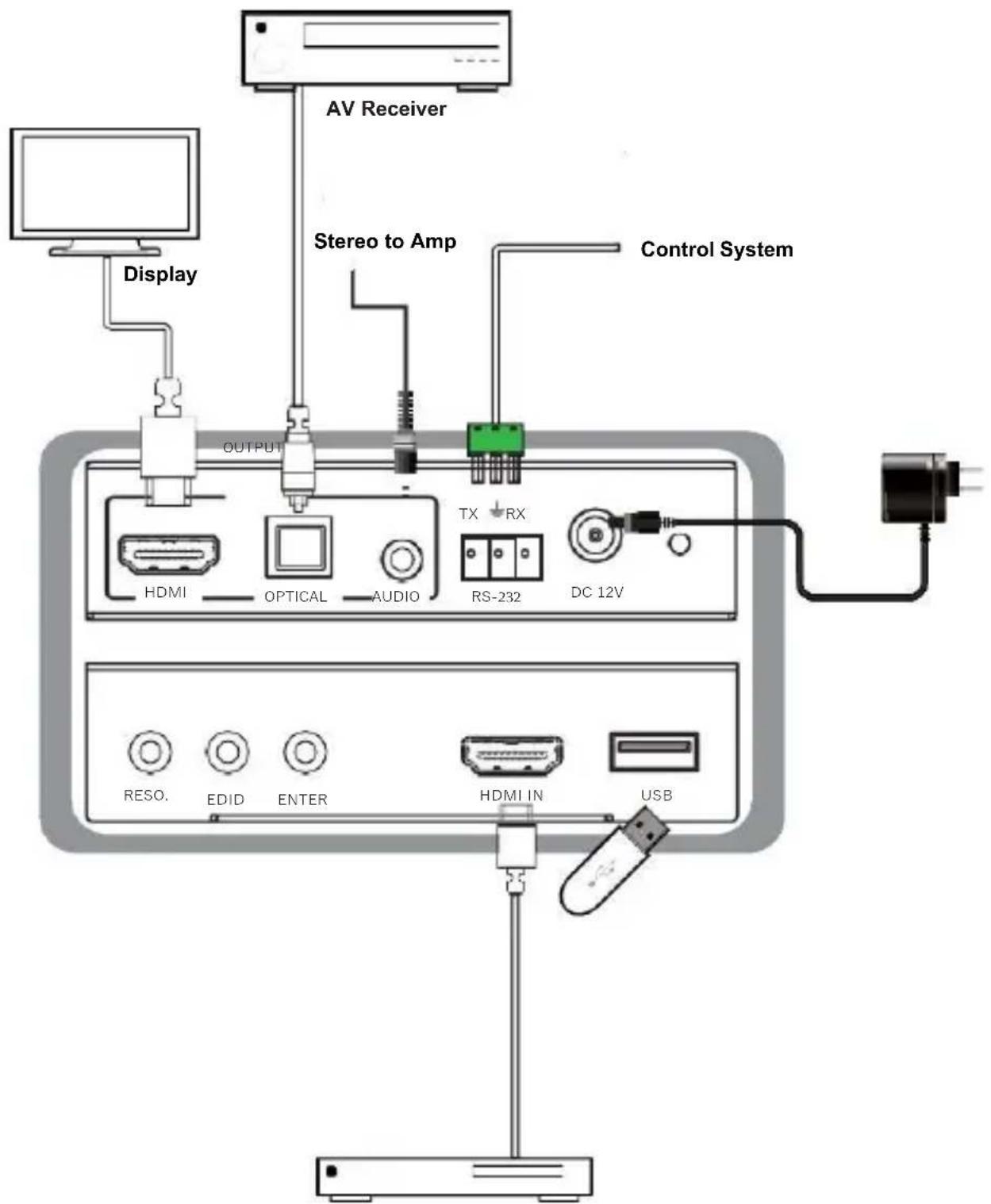
DVD or Blu-ray Player
7. Software update process
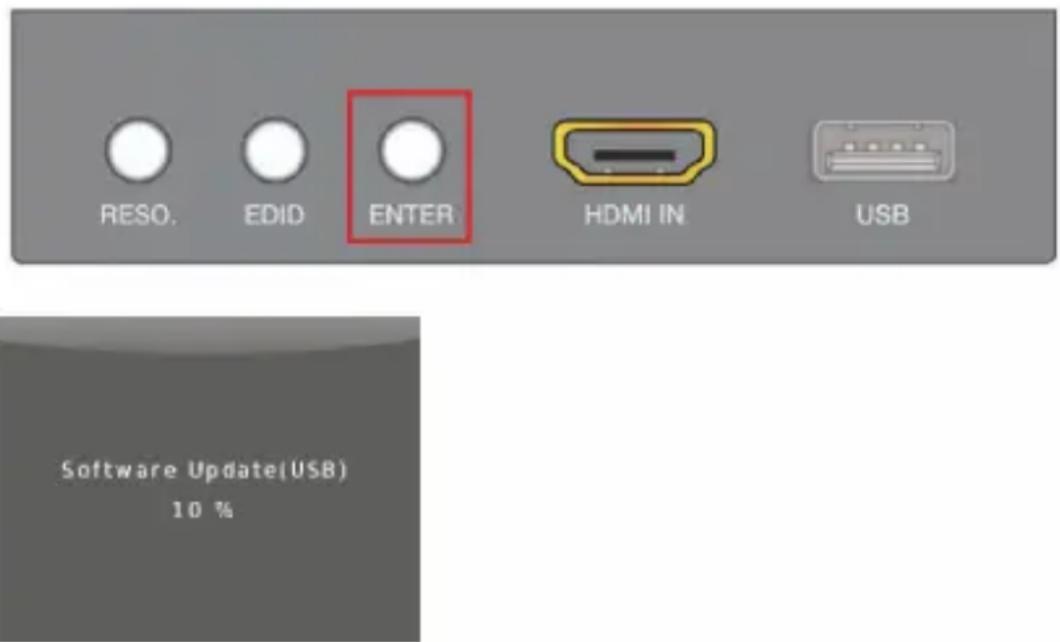
The SCALE2 can be firmware updated via USB flash disk. The procedure is as follows:
1) Copy the file "MERGE.bin" to the root directory of a USB flash disk. Make sure that the file is copied to the root directory. The "MERGE.bin" file is provided/ authorized by our engineering department.
2) Plug the USB flash disk to the scaler USB port on its rear panel.
3) Press the ENTER KEY (hold the KEY about 5 seconds) to start the update. when the OSD display the update process then release the KEY. Update completed, the SCALE2 will reboot.
8. Warranty
Should you feel that this product does not function adequately due to defects in materials or workmanship, we (referred to as “the warrantor”) will, for the length of the period indicated below (starting from the original date of the purchase) either a) repair the product with new or refurbished parts. Or b) Replace the product with new or refurbished product.
All Simplified MFG products are covered by a 3-year PARTS and LABOR warranty. During this period there will be no charge for unit repair, replacement of unit components or replacement of the product if deemed necessary. The decision to repair or replace is made by the warrantor. The purchaser must mail in the product during the warranty period. This limited warranty only covers the product purchased as new and is extended to the original purchaser only. It is non-transferrable to subsequent owners, even during the warranty period. A purchase receipt or other proof of purchase date is required for the limited warranty service.
9. Contact
Sales and tech support;
P. 833-HDMI-411 (833-436-4411)
E. info@simplifiedmfg.com

Simplified MFG • 550 W Baseline Rd Ste 102-121 • Mesa, AZ 85210
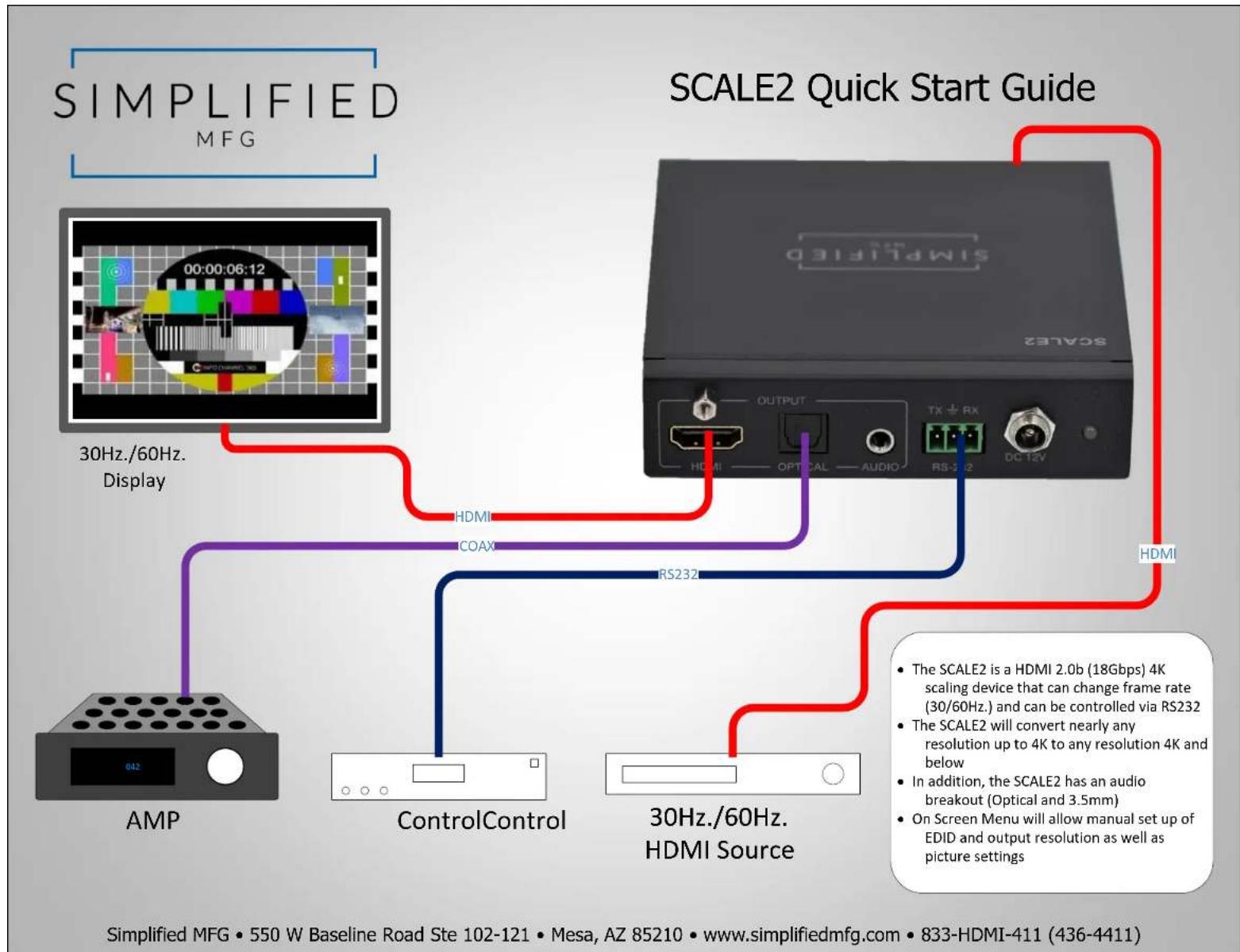
flowchart
graph TD
    A["AMP"] -->|30Hz./60Hz. Display| B["30Hz./60Hz. HDMI Source"]
    C["ControlControl"] -->|HDMI| B
    D["ControlControl"] -->|COAX| B
    E["Simplified MFG • 550 W Baseline Road Ste 102-121 • Mesa, AZ 85210 • www.simplifiedmfg.com • 833-HDMI-411 (436-4411)"]
    B -->|HDMI| F["Output"]
    B -->|RS232| G["Radio"]
    B -->|TX + RX| H["Radio"]
    B -->|DC 12V| I["Radio"]
    style A fill:#f9f,stroke:#333
    style C fill:#f9f,stroke:#333
    style D fill:#f9f,stroke:#333
    style E fill:#f9f,stroke:#333
    style F fill:#ccf,stroke:#333
    style G fill:#ccf,stroke:#333
    style H fill:#ccf,stroke:#333
    style I fill:#ccf,stroke:#333
Simplified MFG • 550 W Baseline Road Ste 102-121 • Mesa, AZ 85210 • www.simplifiedmfg.com • 833-HDMI-411 (436-4411)
Brand : Simplified MFG
Model : SCALE2
Category : Scale