
EXEARC1 - Unspecified Simplified MFG - Free user manual and instructions
Find the device manual for free EXEARC1 Simplified MFG in PDF.


| Product Type | HDMI eARC Extender Kit over Category Cable |
| Brand | Simplified MFG |
| Model | EXeARC1 |
| Transmission Technology | Over Cat5e/6/6a cable |
| Maximum Transmission Distance (4K) | 50m (164ft) |
| Video Resolution Support | Up to 4K2K@50/60Hz 4:4:4 |
| HDMI Standard | HDMI 2.0b |
| HDCP Compliance | HDCP 2.2 / 1.4 |
| Audio Return Support | eARC and ARC |
| Audio Formats (eARC) | LPCM, Dolby Digital/Plus/EX, Dolby True HD, DTS, DTS-EX, DTS-96/24, DTS High Res, DTS-HD Master Audio, DSD |
| Audio Formats (ARC) | PCM 2.0, DTS 5.1, Dolby 5.1 |
| Control Interfaces | RS-232, 2-Way 12V IR, CEC |
| Power Supply | DC 24V/1A (single end powered) |
| Power Consumption | 12W |
| Dimensions (each unit) | 150mm x 105.7mm x 20mm (6" x 4.26" x 0.79") |
| Weight (Transmitter) | 428g (15oz) |
| Weight (Receiver) | 424g (15oz) |
| Housing Material | Metal Enclosure |
| Color | Black |
| ESD Protection | ±8kV Air-gap / ±4kV Contact |
| Operating Temperature | 0-40°C (32-104°F) |
| Storage Temperature | -20-60°C (-4-140°F) |
| Relative Humidity | 20-90% RH (non-condensing) |
| Package Contents | 1x Transmitter, 1x Receiver, 2x IR Blaster Cables, 2x IR Receiver Cables, 4x Mounting Ears, 2x 3-pin Phoenix Connectors, 1x 24V/1A Power Supply, 1x User Manual |
| Warranty | 3 Years Parts and Labor |
| Recommended HDMI Cable | Premium High Speed HDMI Cable |
Frequently Asked Questions - EXEARC1 Simplified MFG
User questions about EXEARC1 Simplified MFG
0 question about this device. Answer the ones you know or ask your own.
Ask a new question about this device
Download the instructions for your Unspecified in PDF format for free! Find your manual EXEARC1 - Simplified MFG and take your electronic device back in hand. On this page are published all the documents necessary for the use of your device. EXEARC1 by Simplified MFG.
USER MANUAL EXEARC1 Simplified MFG
Extender set with eARC/ARC
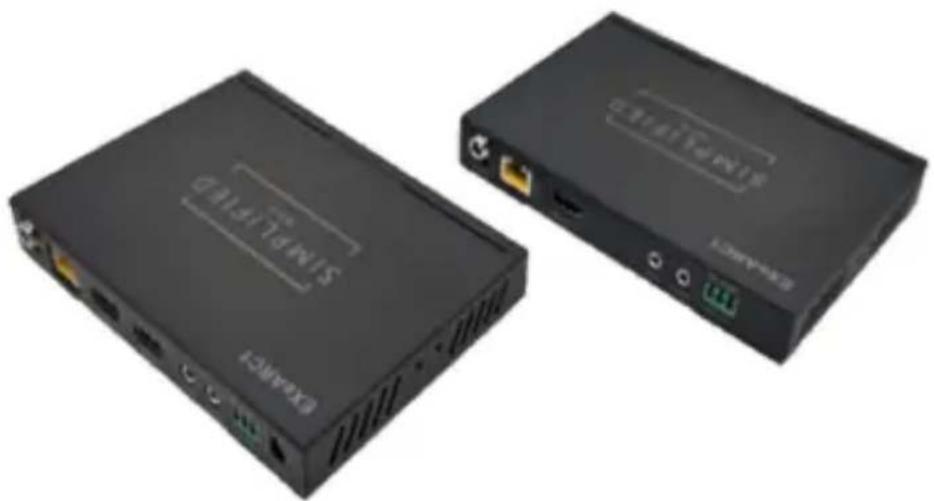
User Manual
VER 1.0
Thank you for purchasing the EXeARC1
At Simplified MFG, we strive to make reliable cutting-edge devices and the EXeARC1 is the result of a commitment to deliver cutting-edge devices first. First means nothing if it is not reliable. The EXeARC1 was constructed with the highest grade components available and should provide years of reliable service. Please keep this manual for future reference.
Surge protection device recommended
The EXeARC1 is designed to operate in the HDMI realm with an external 24V supply at one end. The supply is very robust, but a surge device is always good insurance in electrically active storms or areas where the power grid is unreliable. If connected to satellite or cable boxes, the HDSURGE is recommended to prevent surges through the HDMI cable.
Table of Contents
- Introduction......1
- Features....1
- Package Contents....2
- Specifications....2
- Operation Controls and Functions....4
5.1 Transmitter Panel....4
5.2 Receiver Panel....5
5.3 IR Pin Definition....6 - Application Example....8
- Warranty....9
- Contact....9
1. Introduction
The EXeARC1 is the world's first eARC HDMI extender kit on category cable. It is designed to return eARC or ARC via the HDMI cable plugged into the TX portion of the extender set. The EXeARC1 supports the HDMI2.0b format (18Gbps) HDR/HDR+/DolbyVision® You can now return Dolby+/Atmos to the AVR from the display. The EXeARC1 also transmits RS232 and 2-Way 12V IR signals as well. The device is powered on a single end (either TX or RX) with a 24V 1A supply.
2. Features
• eARC and ARC is fully supported
• HDMI 2.0b (18Gbps)
• HDCP 2.2 / 1.4 compliant
• Video resolution up to 4K2K@50/60Hz4:4:4
• HDR, HDR10+, Dolby Vision®, HLG are supported
• 50m (165ft) of transmission distance on single Cat5e/6/6a
- eARC supports audio formats: LPCM, Dolby Digital/Plus/EX, Dolby True HD, DTS, DTS-EX, DTS-96/24, DTS High Res, DTS-HD master audio, DSD
- ARC supports PCM2.0- 32K,44.1K, 48K. DTS5.1- 32K, 44.1K, 48K. Dolby 5.1- 32K,44.1K, 48K
• 2-Way 12V IR, RS232, & CEC
• 24V Single end power (either RX or TX)
3. Package Contents
| Qty | Item |
| 1 | 18Gbps 50M /W eARC Extender (Transmitter) |
| 1 | 18Gbps 50M /W eARC Extender (Receiver) |
| 2 | IR Blaster Cable (1.5 meters) |
| 2 | 20~60KHz IR Receiver Cable (1.5 meters) |
| 4 | Mounting Ears |
| 2 | 3-pin Phoenix Connector |
| 1 | 24V/1A Locking Power Supply |
| 1 | User Manual |
4. Specifications
| Technical | |
| HDMI Compliance | HDMI 2.0b |
| HDCP Compliance | HDCP 2.2 / HDCP 1.4 |
| Video Bandwidth | 18Gbps |
| Video Resolution | 480i ~1080p50/60Hz, 4Kx2K@24/30Hz, 4k2k@60Hz |
| Color Space | RGB, YCbCr 4:4:4 / 4:2:2. YUV 4:2:0 |
| Color Depth | 8/10/12-bit (1080P60Hz)8-bit (4K60Hz) |
| Audio Formats supported by HDMI OUT port | PCM2.0 32K,44.1K,48K.DTS 5.1 32K, 44.K,48KDolby 5.1 32K, 44.1K 48K |
| Audio Formats supported by Audio OUT port | LPCM, Dolby Digital/Plus/EX, Dolby True HD, DTS, DTS-EX, DTS-96/24, DTS High Res, DTS-HDMaster Audio, DSD |
| ESD Protection | Human body model — ±8kV (Air-gap discharge) & ±4kV (Contact discharge) |
| Connection | |||
| Transmitter | Input: 1x HDMI Type A [19-pin female]Output: 1x HDMI Type A [19-pin female]1x CAT OUT [RJ45, 8-pin female]Control: 1x IR IN [3.5mm Stereo Mini-jack]1x IR OUT [3.5mm Stereo Mini-jack]1x RS-232 [Phoenix jack]1x SERVICE [Micro USB, Update port] | ||
| Receiver | Input: 1x CAT IN [RJ45, 8-pin female]Output: 1x HDMI Type A [19-pin female]Control: 1x IR IN [3.5mm Stereo Mini-jack]1x IR OUT [3.5mm Stereo Mini-jack]1x RS-232 [Phoenix jack]1x SERVICE [Micro USB, Update port] | ||
| Mechanical | |||
| Housing | Metal Enclosure | ||
| Color | Black | ||
| Dimensions | Transmitter / Receiver:150mm (6") [W] x 105.7mm (4.26") [D] x 20mm (.79") [H] | ||
| Weight | Transmitter: 428g (15oz.), Receiver: 424g (15oz.) | ||
| Power Supply | Input: AC100~240V 50/60Hz, Output: DC 24V/1A (US/EU standards CE/FCC/UL certified) | ||
| Power Consumption | 12 W | ||
| Oper.Temperature | 32 - 104°F / 0 - 40°C | ||
| Storage Temperature | -4 - 140°F / -20 - 60°C | ||
| Relative Humidity | 20 - 90% RH (no condensation) | ||
| Resolution / Distance | |||
| 4K2K | 164ft / 50M | ||
| Resolution / Cable Length | 4K60 - Feet / Meters | 4K30 - Feet / Meters | 1080P60 - Feet / Meters |
| HDMI IN / OUT | 16ft / 5M | 32ft / 10M | 50ft / 15M |
| The use of "PremiumHigh Speed HDMI" cable is highly recommended. | |||
5. Operation Controls and Functions
5.1 Transmitter Panel
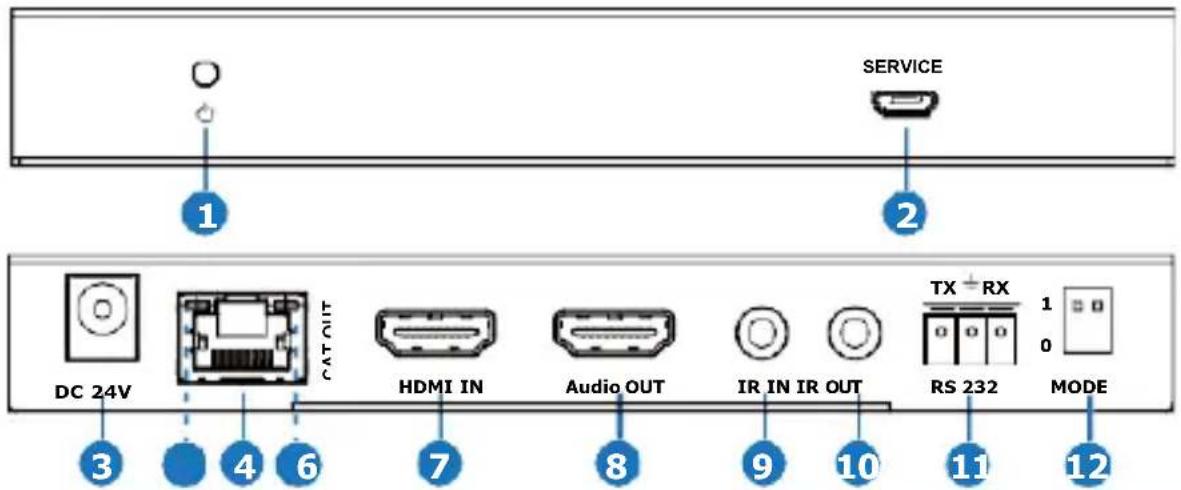
| No. | Name | Function Description |
| 1 | Power LED | Illuminated Red when power is applied |
| 2 | SERVICE port | Firmware update port. |
| 3 | DC 24V | DC 24V/1A power supply input port.Note that the extender supports POC function, it means that either transmitter or receiver is powered on by 24V/1A power adapter, only one end needs a power supply. |
| 4 | CAT OUT | RJ45 connector for connecting the CAT IN port of receiver with a CAT 5e/6/6A cable. |
| 5 | Connection Signal Indicator LED (Green) | · Illuminated: Transmitter and Receiver are connected.· Flashing: Transmitter and Receiver are not connected well.· Dark: Transmitter and Receiver are not connected. |
| 6 | Data Signal Indicator LED (Yellow) | · Illuminated: HDMI signal with HDCP.· Flashing: HDMI signal without HDCP.· Dark: No HDMI signal. |
| 7 | HDMI IN | Connect HDMI source to this input port. |
| 8 | Audio OUT | Audio output port, connect to amplifier, monitor or TV.· When eARC/ARC function is turned on, Audio OUT outputs the audio returned from the HDMI OUT port of the receiver;· When eARC/ARC function is turned off, Audio OUT outputs the audio extracted from the HDMI IN port of the transmitter. |





| No. | Name | Function Description |
| 1 | Power LED | Illuminated Red when power is applied |
| 2 | SERVICE port | Firmware update port. |
| 3 | DC 24V | DC 24V/1A power supply input port.Note that the extender supports POC function, it means that either transmitter or receiver is powered on by 24V/1A power adapter, only one end needs a power supply. |
| 4 | CAT OUT | RJ45 connector for connecting the CAT IN port of receiver with a CAT 5e/6/6A cable. |
| 5 | Connection Signal Indicator LED (Green) | Illuminated: Transmitter and Receiver are connected.Flashing: Transmitter and Receiver are not connected well.Dark: Transmitter and Receiver are not connected. |
| 6 | Data Signal Indicator LED (Yellow) | Illuminated: HDMI signal with HDCP.Flashing: HDMI signal without HDCP.Dark: No HDMI signal. |
| 7 | HDMI IN | Connect HDMI source to this input port. |
| 8 | Audio OUT | Audio output port, connect to amplifier, monitor or TV.When eARC/ARC function is turned on, Audio OUT outputs the audio returned from the HDMI OUT port of the receiver;When eARC/ARC function is turned off, Audio OUT outputs the audio extracted from the HDMI IN port of the transmitter. |
| 9 | IR IN | IR input port for receiving the signal of IR remote. |
| 10 | IR OUT | IR output port for control of source device. This IR output signal is from the IR IN port of the receiver. |
| 11 | RS-232 | 3-pin Phoenix connector, connect to a PC or control system for RS-232 command pass-through. |
| 12 | MODE switch | Use the switch to set different application scenarios:11: eARC mode under amplifier control, the TV connected to the receiver supports CEC control, but the Audio OUT doesn't support CEC control.01: eARC/ARC mode under extender control, both the TV connected to the receiver and the Audio OUT support CEC control.00: ARC mode under amplifier control, the TV connected to the receiver supports CEC control, but the Audio OUT doesn't support CEC control.10: eARC/ARC is unsupported. |
5.2 Receiver Panel

| No. | Name | Function Description |
| 1 | Power LED | Red LED will be on when the receiver is powered on. |
| 2 | SERVICE port | Firmware update port. |
| 3 | DC 24V | DC 24V/1A power supply input port.Note that the extender supports POC function, it means that either transmitter or receiver is powered on by 24V/1A power adapter, the other one doesn’t need power supply. |
| 4 | CAT IN | RJ45 connector for connecting the CAT OUT port of transmitter with a CAT 5e/6 cable. |
| 5 | Connection Signal Indicator LED (Green) | ·Illuminated: Transmitter and Receiver are connected ·Flashing: Transmitter and Receiver are not connected well. ·Dark: Transmitter and Receiver are not connected. |
| 6 | Data Signal Indicator LED (Yellow) | ·Illuminated: HDMI signal with HDCP. ·Flashing: HDMI signal without HDCP. ·Dark: No HDMI signal. |
| 7 | HDMI OUT | HDMI signal output port. Connect to TV or amplifier. |
| 8 | IR IN | IR input port for receiving the signal of IR remote. |
| 9 | IR OUT | IR output port for control of source device. This IR output signal is from the IR IN port of the transmitter. |
| 10 | RS-232 | 3-pin Phoenix connector, connect to a PC or control system for RS-232 command pass-through. |
5.3 IR Pin Definition
IR Receiver and Blaster pin's definition is as below:

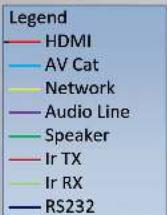
The following is IR system diagram about IR cable use method.
![graph TD A["4K Source"] --> B["Transmitter Receiver"] B --> C["CAT 5e/6 cable"] C --> D["IR Remote"] D --> E["Display"] F["IR Blaster cable"] --> G["IR Receiver cable"] G --> H["Display"]](/content/2026/06/1213953/images/0b59121d081801fea0edf77545328a00ddbdc83415fafd6a0f2035867bd19c4f.jpg)
Note: When the angle between the IR receiver and the remote control is ± 45° , the transmission distance is 0-5 meters; when the angle between the IR receiver and the remote control is ± 90° , the transmission distance is 0-8 meters.
6. Application Example
Transmitter
![graph TD A["Control System"] --> B["IR Blaster"] B --> C["IR Receiver"] C --> D["IR Receiver"] D --> E["IR Blaster"] E --> F["TX + RX"] F --> G["RS-232"] G --> H["Mode"] I["DC 24V"] --> J["LAN"] J --> K["CAT"] K --> L["HDMI IN"] L --> M["AVR"] M --> N["UHDTV"] O["Power Supply"] --> P["Power Supply"]…](/content/2026/06/1213953/images/4e6e46babcc9ae5d4d65a4c36035db34c672e574e4dd89373457829ce6ef4442.jpg)
7. Warranty
Should you feel that this product does not function adequately due to defects in materials or workmanship, we (referred to as "the warrantor") will, for the length of the period indicated below (starting from the original date of the purchase) either a) repair the product with new or refurbished parts. Or b) Replace the product with new or refurbished product. All Simplified MFG products are covered by a 3-year PARTS and LABOR warranty. During this period there will be no charge for unit repair, replacement of unit components or replacement of the product if deemed necessary. The decision to repair or replace is made by the warrantor. The purchaser must mail in the product during the warranty period. This limited warranty only covers the product purchased as new and is extended to the original purchaser only. It is non-transferrable to subsequent owners, even during the warranty period. A purchase receipt or other proof of purchase date is required for the limited warranty service.
8. Contact
Sales and tech support;
P. 833 -HDMI-411 (833-436-4411)
E. info@simplifiedmfg.com

Simplified MFG • 550 W Baseline Rd Ste 102-121 • Mesa, AZ 85210
SIMPLIFIED
MFG
EXeARC1 Quick Start Guide
![graph TD A["EXARCT"] -->|Dolby+/Atmos| B["AVR with eARC"] C["CAT6/6A/7/8"] -->|Up to 50m/164ft @4K| D["RS232"] D -->|Dolby+/Atmos| B B -->|HDMI| E["User Interface"]](/content/2026/06/1213953/images/1cc191866fdda435e1a07232636269899bd979931261e016ec98adbd89701430.jpg)

Display with eARC
- The EXeARC1 is the world's first HDMI2.0b (18Gbps) 4K HDR extender that supports eARC audio return on the HDMI input for seamless "HDMI cable" type of use.
• Backwards compatible with ARC - Only one power supply is needed and either end can be powered
• The EXeARC1 supports RS232 and 2-Way 12V IR for control as well
Simplified MFG • 550 W Baseline Road Ste 102-121 • Mesa, AZ 85210 • www.simplifiedmfg.com • 833-HDMI-411 (436-4411)

How to extract audio from HDMI
- Audio Extraction with no conversion. AUDEX1 extracts the audio in the format sent up to 5.1
![graph LR A["DACT1"] -->|HDMI Cable or Extender Stereo or up to 5.1 Audio| B["AUDEX1 HDMI"] B --> C["Optical or Stereo"] B --> D["Sound Bar"]](/content/2026/06/1213953/images/9b495fc46009b19901aaff21b9733f4f4f438bfc5e5079cd231dead4adc111cc.jpg)
![graph LR A["Audio Input"] --> B["HDMI Cable or Extender with any audio format"] B --> C["DAC1 HDMI"] C --> D["Optical or Stereo"] C --> E["Sound Bar"] style A fill:#f9f,stroke:#333 style D fill:#ccf,stroke:#333 style E fill:#cfc,stroke:#333](/content/2026/06/1213953/images/fdd009f32634184da138ec08c7b11d57ebd620b93606200d1bc52368123cae8a.jpg)
![graph LR A["Audio Analyzer"] -->|HDMI| B["EX1L RX"] B -->|Category cable| C["EX1L RX"] C -->|HDMI| D["Image Display"] C -->|Optical or Stereo| E["Sound Bar"]](/content/2026/06/1213953/images/e314aa1f91f1aa7133d6dd590e59660aab4cf20c6b27ee7e8ae03e6a1d83f28c.jpg)
![graph LR A["Device with LCD panel"] -->|HDMI| B["EXeARC1 TX"] B --> C["Category cable full uncompressed audio returns from display"] C --> D["EXeARC1 RX"] D -->|HDMI| E["Video monitor with color-coded spectrum"]](/content/2026/06/1213953/images/b6f41d3c2f36874c753242ca209566c8ca76adb4680ae0a951d96489a480c6ac.jpg)
- Several sources, no AVR audio extraction at display to soundbar via SW4:1
![graph LR A["STBSTB"] --> B["Blu-Ray Blu-Ray"] B --> C["SW4:1 Up to 4 inputs"] C --> D["HDMI"] C --> E["Optical or Stereo"] D --> F["Sound Bar"] E --> F style A fill:#f9f,stroke:#333 style B fill:#ccf,stroke:#333 style C fill:#cfc,stroke:#333 style D fill:#fcc,stroke:#333 style E fill:#cff,stroke:#33…](/content/2026/06/1213953/images/cc510dba099f64b39b8ed644b8aee3adebfd824e61122293e94112312f188083.jpg)
EXeARC1
HDMI 2.0b (18Gbps) Extender over Category cable with ARC/eARC

The EXeARC1 is the first HDMI over category cable extender that supports both eARC and ARC through the HDMI port. The EXeARC1 supports all versions of HDR, WCG, and the entire HDMI 2.0b (18Gbps) format. Dolby+ and Atmos™ are supported from the display's eARC output to the HDMI input of the TX (works like an HDMI cable would). Other features include single ended power (either end), Bi-Directional 12V IR, & RS232.
Features:
• HDMI 2.0b (18Gbps)
• HDR 8/10/10+ & Dolby Vision™ Support
• eARC/ARC through HDMI
• Single power supply (either end)
- RS232
• 2-Way 12V IR (kit included)
• 50m (164ft) Transmission distance
• Supports HBR (High Bit Rate Audio)
• Supports all versions of Multi-Channel Audio
SIMPLIFIED
MFG
Specifications:
| Technical | |
| HDMI Compliance | HDMI 2.0b |
| HDCP Compliance | HDCP 2.2 and HDCP 1.4 |
| Video Bandwidth | 18 Gbps |
| Video Resolutions | up to 4K2K@50/60Hz(YUV4:4:4),4K2K@30Hz,1080P@120Hz, and 1080P3D@60Hz |
| Color Space RGB, YCbCr 4:4:4, YCbCr 4:2:2 | |
| Color Depth | 10-bit, 12-bit |
| HDMI Audio Formats(Pass-through) | LPCM 2/5.1/7.1CH, Dolby Digital, DTS 5.1, Dolby Digi-tal+, Dolby TrueHD, DTS-HD Master Audio, Dolby Atmos, DTS:X |
| ESD Protection | Human body model — ±8kV (air-gap discharge) & ±4kV(contact discharge) |
| Connections | |
| Inputs | TX: 1x HDMI Type A [19-pin female]1x IR INPUT [3.5mm Stereo Mini-jack]1x RS232 [Phoenix jack]1x Service [Mini-USB jackRX: 1x HDBaseT In [RJ45]1x IR INPUT [3.5mm Stereo Mini-jack]1x RS232 [Phoenix jack]1x Service [Mini-USB jack] |
| Outputs | TX: 1x HDMI Type A [19 pin female]1x HDBaseT Out [RJ45]1x IR OUTPUT [3.5mm Stereo Mini-jack]RX: 1x HDMI Type A [19-pin female]1x IR INPUT [3.5mm Stereo Mini-jack] |
| Mechanical | |
| Housing Metal Enclosure | |
| Color Black | |
| Dimensions | 150mm [5.875"] x 107mm [4.25"] x 19mm [0/75"] |
| Weight Combined 849g (1lb, 14oz.) | |
| Power Supply | Input: AC100 - 240V 50/60HzOutput: DC 24V/1A (US/EU standards, CE/FCC/UL certified) |
| Power Consumption | 18W (Max) |
| Operation Temperature | 32 - 104°F / 0 - 40°C |
| Storage Temperature | -4 - 140°F / -20 - 60°C |
| Relative Humidity | 20 - 90% RH (no condensation) |


- EXTENDER SET WITH EARC/ARC
- USER MANUAL
- THANK YOU FOR PURCHASING THE EXEARC1
- SURGE PROTECTION DEVICE RECOMMENDED
- TABLE OF CONTENTS
- INTRODUCTION
- FEATURES
- PACKAGE CONTENTS
- SPECIFICATIONS
- OPERATION CONTROLS AND FUNCTIONS
- 5.2 RECEIVER PANEL
- 5.3 IR PIN DEFINITION
- APPLICATION EXAMPLE
- WARRANTY
- CONTACT
- SIMPLIFIED
- HOW TO EXTRACT AUDIO FROM HDMI
- EXEARC1
Brand : Simplified MFG
Model : EXEARC1
Category : Unspecified