
ODL 43850UV-TFB - Television OK - Free user manual and instructions
Find the device manual for free ODL 43850UV-TFB OK in PDF.


| Product Type | LED Television |
| Screen Size | 43 inches (109 cm) |
| Resolution | 1920 x 1080 (Full HD) |
| Refresh Rate | 60 Hz |
| Dimensions (with stand) | 968 x 614 x 215 mm |
| Dimensions (without stand) | 968 x 565 x 85 mm |
| Weight (with stand) | 10.5 kg |
| Weight (without stand) | 10.0 kg |
| Power Consumption (typical) | 75 W |
| Standby Power Consumption | < 0.5 W |
| Input Voltage | 100-240 V, 50/60 Hz |
| Connectivity | 2 x HDMI, 1 x USB, 1 x VGA, 1 x AV, 1 x Antenna, 1 x Headphone |
| Built-in Tuner | DVB-T/T2/C, DVB-S/S2 |
| Audio Power | 2 x 8 W |
| Operating System | Linux-based Smart TV (custom UI) |
| Control | Remote control included |
| VESA Mount Compatible | 200 x 200 mm |
| Care and Cleaning | Wipe with a soft, dry cloth. Do not use liquid cleaners. |
| Safety | Keep away from water and heat sources. Use only provided stand or wall mount. |
| Spare Parts and Reparability | Contact authorized service center for repairs. Spare parts available for 7 years after discontinuation. |
Frequently Asked Questions - ODL 43850UV-TFB OK
User questions about ODL 43850UV-TFB OK
0 question about this device. Answer the ones you know or ask your own.
Ask a new question about this device
Download the instructions for your Television in PDF format for free! Find your manual ODL 43850UV-TFB - OK and take your electronic device back in hand. On this page are published all the documents necessary for the use of your device. ODL 43850UV-TFB by OK.
USER MANUAL ODL 43850UV-TFB OK
natural_image
Simple diagram showing a circular object and a rectangular shape with curved lines, no text or symbols present.natural_image
Illustration of a network device with wireless signal waves and a globe icon, connected to a monitor (no text or symbols)EN: Hereby, Imtron GmbH, declares that the radio equipment type ODL 43850UV-TFB is in compliance with Directive 2014/53/EU. The full text of the EU declaration of conformity is available at the following internet address: http://de.ok-online.com/nc/de/service/downloads.html
Safety Information....33
IMPORTANT - Please read these instructions fully
before installing or operating....33
Introduction 35
Accessories Included 35
Features......35
Stand Installation & Wall Mounting ....36
Antenna Connection....36
Other Connections 37
Turning On/Off the TV....38
TV Control & Operation....38
Remote Control....39
Initial Setup Wizard 40
Main Screen....41
Live TV....41
Customising TV Settings....41
Adjusting the Picture Settings....41
Picture Menu Content......42
Adjusting the Sound Settings ....42
Sound Menu Content......43
Settings 43
Inputs......43
Notifications....44
Network 44
Display & Sound....45
Applications 46
Equipment Control 47
Live TV 47
Remotes & Bluetooth Devices....48
Alexa....49
Preferences 49
Sleep Timer 51
Device & Software ....51
Accessibility....52
Help 52
My Account....52
Channel List....53
Channel Guide 53
Connecting to the Internet....53
Specification....55
Licences....56
Disposal Information ....57
Safety Information

CAUTION
RISK OF ELECTRIC SHOCK DO NOT OPEN

CAUTION: TO REDUCE THE RISK OF ELECTRIC SHOCK DO NOT REMOVE COVER (OR BACK). NO USER-SERVICEABLE PARTS INSIDE. REFER SERVICING TO QUALIFIED SERVICE PERSONNEL.
In extreme weather conditions (storms, lightning) and long inactivity periods (going on holiday) disconnect the TV set from the Main Power Supply.
The main power connector must remain accessible on installation to unplug the device if needed. The device will still draw power in standby mode.
Note: Follow the on screen instructions for operating the related features.
IMPORTANT - Please read these instructions fully before installing or operating
WARNING: This device is intended to be used by persons (including children) who are capable / experienced of operating such a device unsupervised, unless they have been given supervision or instruction concerning the use of the device by a person responsible for their safety.
- Use this TV set at an altitude of less than 2000 meters above the sea level, in dry locations and in regions with moderate or tropical climates.
- The TV set is intended for household and similar general use but may also be used in public places.
- For ventilation purposes, leave at least 5cm of free space around the TV.
- The ventilation should not be impeded by covering or blocking the ventilation openings with items, such as newspapers, table-cloths, curtains, etc.
- The power cord plug should be easily accessible. Do not place the TV, furniture, etc. on the power cord. A damaged power cord/plug can cause fire or give you an electric shock. Handle the power cord by the plug, do not unplug the TV by pulling the power cord. Never touch the power cord/plug with wet hands as this could cause a short circuit or electric shock. Never make a knot in the power cord or tie it with other cords. When damaged it must be replaced, this should only be done by qualified personnel.
-
Do not expose the TV to dripping or splashing of liquids and do not place objects filled with liquids, such as vases, cups, etc. on or over the TV (e.g., on shelves above the unit).
-
Do not expose the TV to direct sunlight or do not place open flames such as lit candles on the top of or near the TV.
- Do not place any heat sources such as electric heaters, radiators, etc. near the TV set.
- Do not place the TV on the floor and inclined surfaces.
- To avoid danger of suffocation, keep plastic bags out of the reach of the babies, children and domestic animals.
- Carefully attach the stand to the TV. If the stand is provided with screws, tighten the screws firmly to prevent the TV from tilting. Do not over-tighten the screws and mount the stand rubbers properly.
- Do not dispose of the batteries in fire or with hazardous or flammable materials.
WARNING
- Batteries must not be exposed to excessive heat such as sunshine, fire or the like.
- Excessive sound pressure from earphones or headphones can cause hearing loss.
ABOVE ALL - NEVER let anyone, especially children, push or hit the screen, push anything into holes, slots or any other openings in the case.
 Caution Caution | Serious injury or death risk |
 Risk of electric shock Risk of electric shock | Dangerous voltage risk |
 Maintenance Maintenance | Important maintenance component |
Markings on the Product
The following symbols are used on the product as a marker for restrictions and precautions and safety instructions. Each explanation shall be considered where the product bears related marking only. Note such information for security reasons.

Class II Equipment: This appliance is designed in such a way that it does not require a safety connection to electrical earth.

Hazardous Live Terminal: The marked terminal(s) is/are hazardous live under normal operating conditions.

Caution, See Operating Instructions: The marked area(s) contain(s) user replaceable coin or button cell batteries.

Class 1 Laser Product: This product contains Class 1 laser source that is safe under reasonably foreseeable conditions of operation.
WARNING
Do not swallow the battery, Chemical Burn Hazard
This product or the accessories supplied with the product may contain a coin/button cell battery. If the coin/button cell battery is swallowed, it can cause severe internal burns in just 2 hours and can lead to death.
Keep new and used batteries away from children.
If the battery compartment does not close securely, stop using the product and keep it away from children.
If you think batteries might have been swallowed or placed inside any part of the body, seek immediate medical attention.
A television may fall, causing serious personal injury or death. Many injuries, particularly to children, can be avoided by taking simple precautions such as:
- ALWAYS use cabinets or stands or mounting methods recommended by the manufacturer of the television set.
- ALWAYS use furniture that can safely support the television set.
- ALWAYS ensure the television set is not overhanging the edge of the supporting furniture.
- ALWAYS educate children about the dangers of climbing on furniture to reach the television set or its controls.
- ALWAYS route cords and cables connected to your television so they cannot be tripped over, pulled or grabbed.
- NEVER place a television set in an unstable location.
- NEVER place the television set on tall furniture (for example, cupboards or bookcases) without anchoring both the furniture and the television set to a suitable support.
- NEVER place the television set on cloth or other materials that may be located between the television set and supporting furniture.
- NEVER place items that might tempt children to climb, such as toys and remote controls, on the top of the television or furniture on which the television is placed.
- The equipment is only suitable for mounting at heights ≤ 2 m.
If the existing television set is going to be retained and relocated, the same considerations as above should be applied.
Apparatus connected to the protective earthing of the building installation through the MAINS connection or through other apparatus with a connection to protective earthing – and to a television distribution system using
coaxial cable, may in some circumstances create a fire hazard. Connection to a television distribution system has therefore to be provided through a device providing electrical isolation below a certain frequency range (galvanic isolator).
WALL MOUNTING WARNINGS
- Read the instructions before mounting your TV on the wall.
- The wall mount kit is optional. You can obtain from your local dealer, if not supplied with your TV.
- Do not install the TV on a ceiling or on an inclined wall.
- Use the specified wall mounting screws and other accessories.
- Tighten the wall mounting screws firmly to prevent the TV from fall. Do not over-tighten the screws.
Figures and illustrations in this user manual are provided for reference only and may differ from the actual product appearance. Product design and specifications may be changed without notice.
Introduction
Thank you for choosing our product. You'll soon be enjoying your new TV. Please read these instructions carefully. They contain important information which will help you get the best from your TV and ensure safe and correct installation and operation.
Accessories Included
- Remote Control
- Batteries: 2 x AAA
- Manual
Features
Ultra HD (UHD)
TV supports Ultra HD (Ultra High Definition - also known as 4K) which provides resolution of 3840 x 2160 (4K:2K). It equals 4 times the resolution of Full HD TV by doubling the pixel count of the Full HD TV both horizontally and vertically. Ultra HD content is supported from HDMI, some of the streaming services, USB inputs and over DVB-T2 and DVB-S2 broadcasts.
High Dynamic Range (HDR) / Hybrid Log-Gamma (HLG)
Using this feature the TV can reproduce greater dynamic range of luminosity by capturing and then combining several different exposures. HDR/HLG promises better picture quality thanks to brighter, more realistic highlights, more realistic colour and other improvements. It delivers the look that filmmakers intended to achieve, showing the hidden areas of dark shadows and sunlight with full clarity, colour and detail. HDR/HLG content is supported via native and market applications, HDMI, USB inputs and over DVB-S broadcasts. When the input source is set to the related HDMI input, highlight the related HDMI option in the Home > Settings > Display & Sounds > Picture Settings menu and press Select to display setting options. Set the HDMI Input Mode option in the Advanced Settings menu as Mode 2 (2.0) or Auto in order to watch HDR/HLG content, if the HDR/HLG content is received through an HDMI input. The source device should also be at least HDMI 2.0a compatible in this case.
Dolby Vision
Dolby Vision™ delivers a dramatic visual experience, astonishing brightness, exceptional contrast, and vivid colour, that brings entertainment to life. It achieves this stunning image quality by combining HDR and wide colour gamut imaging technologies. By increasing the brightness of the original signal and using a higher dynamic colour and contrast range, Dolby Vision presents amazing true-to-life images with stunning detail that other post-processing technologies in the TV aren't
able to produce. Dolby Vision is supported via native and market applications, HDMI and USB inputs. When the input source is set to the related HDMI input, highlight the related HDMI option in the Home > Settings > Display & Sounds > Picture Settings menu and press Select to display setting options. Set the HDMI Input Mode option in the Advanced Settings menu as Mode 2 (2.0) or Auto in order to watch Dolby Vision content, if the Dolby Vision content is received through an HDMI input. The source device should also be at least HDMI 2.0a compatible in this case. In the Picture Mode menu two predefined picture modes will be available if Dolby Vision content is detected: Dolby Vision Bright and Dolby Vision Dark. Both allow the user to experience the content in the way the creator originally intended with different ambient lighting conditions. To change the Picture Mode setting press and hold the Home button while watching the Dolby Vision content and go to Picture menu. While watching Dolby Vision content via an application, except YouTube, Netflix and Multi Media Player, you will not be able to access the Picture menu and set the Picture Mode.
Certain services are subject to change or withdrawal at any time, may not be available in all areas, or in 4K, HDR, DOLBY VISION or DOLBY ATMOS and may require separate subscriptions.
Stand Installation & Wall Mounting
Assembling / Removing the stand
Preparations
Take out the stand(s) and the TV from the packing case and put the TV onto a work table with the screen panel facing down on the clean and soft cloth (blanket, etc.)
- Use a flat and firm table bigger than the TV.
- Do not hold the screen panel part.
• Make sure not to scratch or break the TV.
Assembling the stand
- Place the stand(s) on the stand mounting pattern(s) on the rear side of the TV.
- Insert the screws provided and tighten them gently until the stand is properly fitted.
Removing the stand from the TV
Be sure to remove the stand in the following way when using the wall-hanging bracket or repacking the TV.
- Put the TV onto a work table with the screen panel down on the clean and soft cloth. Leave the stand(s) protruding over the edge of the surface.
- Unscrew the screws that fixing the stand(s).
- Remove the stand(s).
When using the wall mount bracket
Your TV is also prepared for a VESA-compliant wall mount bracket. If it is not supplied with your TV, contact your local dealer to purchase the recommended wall-hanging bracket.
Holes and measurements for wall mount bracket installation;
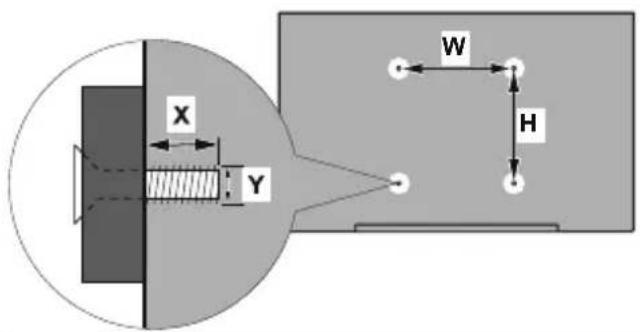
| VESA WALL MOUNT MEASUREMENTS | ||
| Hole Pattern Sizes (mm) | W | H |
| 100 100 | ||
| Screw Sizes | ||
| Length (X) | min. (mm) 7 | |
| max. (mm) 8 | ||
| Thread (Y) M4 | ||
Antenna Connection
Connect the aerial or cable TV plug to the AERIAL INPUT (ANT) socket or satellite plug to the SATELLITE INPUT (LNB) socket located on the rear side of the TV.
Rear side of the TV

1. Satellite
2. Aerial or cable

If you want to connect a device to the TV, make sure that both the TV and the device are turned off before making any connection. After the connection is done, you can turn on the units and use them.
Other Connections

If you want to connect an external device to the TV, make sure that both the TV and the device are turned off before making any connection. After the connection is done, you can turn on the units and use them.
| Connector Type Cables Device | |||
 | Component Video Connection (back) |  VGA to Component Connection Cable VGA to Component Connection Cable |  |
 | HDMI Connection (back&side) |  | |
 | VGA Connection (back) |  |  |
 | VGA/ Component Audio Connection (back) |  Component/VGA Audio Cable Component/VGA Audio Cable | |
 | SPDIF (Optical Out) Connection (back) |  |  |
| Composite (Audio/Video) Connection (back) |  Audio Video Cable Audio Video Cable |  | |
 | Headphone Connection (side) | [6XDD] | |
| [02HA] | USB Connection (side) |  |  |
 | CI Connection (side) |  |  |
 | Ethernet Connection (back) |  LAN / Ethernet Cable LAN / Ethernet Cable | [XHT2] |
Turning On/Off the TV
Connect power
IMPORTANT: The TV set is designed to operate on 220-240V AC, 50 Hz socket.
After unpacking, allow the TV set to reach the ambient room temperature before you connect the set to the mains.
Plug the power cable to the mains socket outlet. The TV will switch to standby mode.
To switch on the TV from standby
If the TV is in standby mode the standby LED lights up. To switch on the TV from standby mode either:
- Press the Standby button on the remote control.
- Press the control button on the TV.
The TV will then switch on.
To switch the TV into standby
- Press the Standby button on the remote control.
- Press the control button on the TV, the function options menu will be displayed. The focus will be on the Inputs option. Press the button consecutively until the Power Off option is highlighted. Press and hold the button for about 2 seconds, the TV will switch into standby mode.
To switch off the TV
To power down the TV completely, unplug the power cord from the mains socket.
TV Control & Operation

natural_image
Simple diagram showing a gray rectangular shape with a small circular element below, no text or symbols present.Your TV has a single control button. This button allows you to control the Inputs / Volume Up-Down / Channel Up-Down / Standby-On functions of the TV.
Note: The position of the control button may differ depending on the model.
Operating with the Control Button
- Press the control button to display the function options menu.
- Then press the button consecutively to move the focus to the desired option if needed.
- Press and hold the button for about 2 seconds to use the function, enter the sub menu or select the option.
To turn the TV off: Press the control button to display the function options menu, the focus will be on the Inputs option. Press the button consecutively until the Power Off option is highlighted. Press and hold the button for about 2 seconds to turn the TV off (standby mode).
To turn on the TV: Press the control button, the TV will turn on.
To change volume: Press the control button to display the function options menu and then press the button consecutively to move the focus to Volume Up or Volume Down option. Press and hold the button to increase or decrease the volume.
To change channel (in Live TV mode): Press the control button to display the function options menu and then press the button consecutively to move the focus to Channel Up or Channel Down option. Press and hold the button to switch to the next or previous channel in the channel list.
To change input: Press the control button to display the function options menu, the focus will be on the Inputs option. Press and hold the button for about 2 seconds to display the inputs list. Scroll through the available input options by pressing the button. Press and hold the button for about 2 seconds to switch to the highlighted input option.
Note: Live TV settings menu OSD in Live TV mode cannot be displayed via the control button.
Operation with the Remote Control
Press and hold the Home button on your remote control to display available quick settings menu options when in Live TV mode. Press Home button to display or return to the Home screen of your Fire TV. Use the directional buttons to move the focus, proceed, adjust some settings and press Select to make selections in order to make changes, set your preferences, enter a sub-menu, launch an application etc. Press Return/Back to return to the previous menu screen.
Input Selection
Once you have connected external systems to your TV, you can switch to different input sources. Press and hold the Home button on your remote control to display available quick settings menu options. Then highlight the Inputs option and press the Select button to display the list of available input options. Use the directional buttons to highlight the option of your choice and then press the Select button to switch to the selected input. Or select the desired input from the Inputs row on the Home screen and press Select.
Changing Channels and Volume
You can adjust the volume by using the Volume +/- buttons and change the channel in Live TV mode by using the Programme +/- buttons on the remote.
Remote Control

Inserting the Batteries into the Remote
Remove the back cover to reveal the battery compartment on the back side of the remote control first. Insert two 1.5V - size AAA batteries. Make sure the (+) and (-) signs match (observe correct polarity). Do not mix old and new batteries. Replace only with same or equivalent type. Place the cover back on.
To pair remote with the TV
When TV is turned on for the first time, a pairing process for your remote will be performed during the initial setup. Your remote control should automatically pair with your TV at this point, but if it didn't, follow the on screen instructions to pair it. If you experience difficulties pairing your remote with your TV you can turn off other wireless devices and try again.
- Standby: Standby / On
- Voice button: Activates the microphone on the remote
- Up Directional button (*)
- Left Directional button (*)
-
Home: Opens the Home screen. Press and hold or press twice to display quick settings menu
-
Back/Return: Returns to previous menu screen, goes one step back, closes open windows, closes teletext (in Live TV-Teletext mode), returns to main screen or Home tab
-
Play/Pause
Pause: Pauses the media being played Play: Starts to play selected media
-
Rewind: Moves frames backwards in media such as movies, scrolls back a day in the channel guide
-
Volume +/-: Increases/decreases the volume level
-
Mute: Completely turns off the volume of the TV
-
Numeric buttons: Switches the channel in Live TV mode, enters a number or a letter in the text box on the screen
-
Subtitle: Displays audio and subtitle options, where you can change the language, size and style preference (where available)
-
Prime Video: Opens Prime Video screen
-
DAZN: Launches the DAZN application
-
Coloured Buttons: Follow the on-screen instructions for coloured button functions
-
TVNOW: Launches the TVNOW application
-
Netflix: Launches the Netflix application
-
Text: Opens and closes teletext or interactive services (where available in Live TV mode)
-
Programme +/-: Increases/Decreases channel number in Live TV mode
-
Guide: Displays the channel guide
-
Fast forward: Moves frames forward in media such as movies, scrolls forward a day in the channel guide
-
Options: Displays setting options (where available)
-
Down Directional button (*)
-
Right Directional button (*)
-
Select: Confirms selections, enters sub-menus
-
Alexa LED: Illuminates when the Voice button is pressed and during pairing process
-
Microphone opening: Speak into the microphone when using Alexa or voice search.
(*) Directional buttons: Navigates menus, setting options, moves the focus or cursor etc. Follow the on-screen instructions.
Initial Setup Wizard
Note: Follow the on-screen instructions to complete the initial setup process. Use the directional buttons and the Select button on the remote to select, set, confirm and proceed.
1. Choose Your Language
The language selection options will be listed on the screen. Select the desired language from the list and press Select to continue.
2. Select TV Mode
In the following step of the initial setup, you can set the TV's operation mode. Store Use option will configure your TV's settings for store environment. This option is intended only for store use. It is recommended to select Continue for home use.
3. Pair Your Remote with your TV
If your remote does pair with your TV automatically or if you have paired your remote with your TV once previously, this step will be skipped. If this is not the case, a search for your remote will be performed. Follow the on-screen instructions to pair your remote control (depends on the model of the remote control).
4. Connect to your network
If you did connect your TV to internet via an Ethernet cable before the initial setup begins this step will be skipped. If you didn't, your TV will search and list available wireless networks at this point. Select your network and press Select to connect to it. Refer to the Connecting to the Internet section if you need further information. Press Fast Forward button on your remote to skip.
After the internet connection is established, the TV will check for the software updates and download the latest software next, if any available. Please notice that this will take some time.
5. Sign In with Your Amazon Account
You can sign in to your Amazon account on the next screen. You need to be signed in to an Amazon account in order to use Amazon services. This step will be skipped if no internet connection has been established in the previous step. If you don't already have an Amazon account you can set up an account by choosing 'I am new to Amazon' option. You can press the Fast Forward button to skip this step. A dialogue will be displayed for confirmation. Highlight Do this later and press Select to continue. If you skip this step some of the following steps may differ or be skipped as well.
Once the account has been registered, you will be asked whether you want to use the account you signed in. You can choose to change the account, read the terms and conditions, which will be accepted if you continue, at this point. Highlight the symbol with three dots next to the texts at the bottom side of the screen and press Select to read and learn more about the related subject. Highlight Continue and press Select button to proceed without changing the account.
If you have connected your TV to internet via a WLAN network a dialogue will be displayed at this point, asking if you want to save your WLAN password to Amazon. Highlight Yes and press Select to confirm and proceed. Select No to proceed without confirmation.
6. Parental Controls
You can enable Parental Controls at this point or you can do it later.
Note that, if you choose No Parental Controls, purchasing and video playback without PIN will be allowed.
If you choose Enable Parental Controls option, you will be asked to create a PIN next. Use the buttons on your remote as shown on the screen to enter the PIN twice for confirmation. You will have to enter it to access some menus, services, content etc. protected by this PIN.
You will be informed about the feature on the next screen. Press Select to continue.
You can review or change the parental control settings later using the Parental Controls option in the Settings > Preferences menu.
7. Prime Video
A brief information on the prime video services will be displayed next. Press Select button to proceed.
8. Select Apps
In the next step you can select the apps you want to download. Highlight Choose Apps and press Select to proceed. The apps are free to download but some of them may require payment for full access. Highlight No Thanks and press Select to skip.
9. Scan for TV channels
You will be asked whether you want to scan for channels in the next step. Highlight Yes and press Select button to start the scan process. Highlight No and press Select button to scan later.
Before the scan starts, you will be asked to check if your antenna cable is plugged properly into the antenna socket on your TV. Press Select to proceed.
10. Country
In the next step select your Country from the list and press Select to continue.
11. Channel Type
The next step is the selection of the channel type. Select your scanning preference to install channels for Live TV function. Cable/TV and Satellite options will be available.
If the Cable/TV option is selected, the TV will search for digital terrestrial and digital cable broadcasts. Select
the searching method on the next screen and press Select to start search.
If the Satellite option is selected, you can choose an operator on the next step, if available. You can also choose to perform full or manual scan. Highlight the operator option you prefer and press Select button to proceed. Satellite Connection screen will be displayed next. Depending on your previous selections some options may be preset automatically. Change if necessary and proceed.
If you select Manual or Full option, you will have to select the satellite in the next step. Then Satellite Connection screen will be displayed. Set the LNB Type, LNB Power, DiSEqC setup, Single Cable and Scan Mode options manually corresponding to your environment on the next screen. If you select Manual, you will need to configure the Frequency, Polarisation and Symbol Rate options additionally before the scan starts.
When complete press the Play/Pause button. The TV will start to search available broadcasts. While the search continues you can press the Select button to cancel. A dialogue will be displayed for confirmation. Highlight Yes and press Select to cancel.
When the initial setup is completed "Channel Scan Complete" message will be displayed. You can choose to make changes on the channel list or rescan on this point. Highlight Done and press Select to finish the setup.
Home screen will be displayed. In order to switch to Live TV mode and watch TV channels highlight a channel from the On Now row on the Home screen or from the Antenna Channels row on the Live screen and press Select to start watching.
Main Screen
To enjoy the benefits of your Fire TV television, your TV must be connected to the Internet. Connect the TV to a home network with a high-speed Internet connection. You can connect your TV wirelessly or wired to your modem/router. Refer to the Network Menu and Connecting to the Internet sections for further information on how to connect your TV to the internet.
The main screen is the centre of your TV. Press the Home button on your remote to display the main screen. From the main screen you can start any application, switch to a TV channel, watch a movie or switch to a connected device, or manage the settings. Depending on your TV setup and your country selection in the initial setup the main screen may contain different items.
The main screen is organized into several tabs. Home, Live, Your Videos, Movies, TV Shows, Apps and Settings tabs will be available. You can scroll through them using the directional buttons. Available tabs may differ depending on the network connection status of your TV and whether you signed in to your Amazon account. Move the focus to the desired tab option to display the content. Available options of the highlighted tab will be positioned in rows generally. To navigate through the options use the directional buttons on the remote. Select a row then move the focus to the desired item in the row. Press Select button to make a selection or to enter a sub-menu.
The main screen will be opened with the Home tab. On the upper side of the screen, search tool will be located along with other tab options. You can choose either to type a word to start a search via the virtual keyboard or try voice search option (if your remote has a built-in microphone). Press and hold the Voice button on your remote (if available) and speak to perform a search.
Live TV
Live TV refers to channels that have been tuned in via an aerial, cable and satellite connection. There are several ways to watch Live TV channels. You can highlight the Aerial or Satellite option from the Inputs row on the Home screen and press Select to switch to Live TV mode and watch TV channels. You can also highlight a channel from the Recent or On Now row on the Home screen and press Select to start watching.
Customising TV Settings
Adjusting the Picture Settings
Allows you to set your preferred picture settings. You can access the picture settings menu via the Settings menu on the main screen or by pressing and holding the Home button for about 2 seconds while viewing any input.
Accessing Picture Settings via Settings Menu
Press the Home button, scroll to Settings tab and press the Select button. Scroll to Display & Sound option and press the Select button. Scroll down to Picture Settings option and press the Select button. Scroll down to select the input that you want to adjust the picture setting of and press Select button. The TV will now change to the selected input. The Picture Settings menu will appear on the right hand side of the screen.
Accessing Picture Settings while watching the TV
While watching the input that you would like to adjust press and hold the Home button for 2 seconds. The quick settings menu will appear on the right hand side of the screen. Scroll down and highlight Picture then press Select. The picture setting options will appear on the right hand side of the screen.
Picture Menu Content
The following options show all the available picture setting adjustment on your TV.
Picture settings are input-specific and all of these settings will not apply to all Inputs. Some options may not be available depending on the input source.
Picture Mode: Set the picture mode to suit your preference or requirements. Picture mode can be set to one of these options: Standard, Vivid, Sport, Film and Game. You can also manually adjust each mode. Available options may differ depending on the currently set input source.
Auto Backlight: Set the Auto backlight to Off, Low, Medium, High.
Brightness: Increases or decreases the picture brightness from 0 - 100.
Contrast: Adjusts the difference between light and dark levels in the picture. The range is from 0-100.
Colour: Adjusts the difference between light and dark levels in the picture. The range is from 0-100.
Sharpness: Adjusts the level of crispness in the edges between light and dark areas of the picture. Range is from 0-20.
Colour Temperature: The colour temperature setting has 4 preset settings: User, Cool, Standard, Warm, When selected each of these settings has individual adjustments. Red, Green and Blue gain can all be adjusted from -20 to 20.
Picture Format: The picture format can be set to Automatic, Superzoom, 4:3, Film Expand 14:9, Film Expand 16:9, Wide Screen and Full.
Advanced Picture Settings
Hue: Increases or decreases the picture hue from -50 (reds) to 50 (greens).
Gamma: Choose from Middle, Bright (standard) or Dark (film). Highlight your desired setting then press Select.
Colour Tuner: Colour Tuner can be switched on and off by selecting Enable option On or Off. Then you have 5 separate setting that can be individually adjusted. Hue, Saturation, Brightness, Offset, Gain.
11 Point White Balance Correction: Sets white balance of input image between cool or warm. 11 Point White Balance Correction can be switched on and off by selecting Enable option On or Off. Then you have 4 separate setting that can be individually adjusted. Gain, Red, Green, Blue. Gain can be adjusted from 5% to 100%, highlight your desired setting then press Select. Red, Green and Blue can be adjusted from 0 - 100, the default setting is 50.
Dynamic Noise Reduction: Dynamic Noise Reduction has 5 different setting Off, Low, Medium, Strong, Auto. The default setting is Medium. Highlight your desired setting then press Select.
MPEG Noise Reduction: MPEG Noise Reduction has 4 different setting Off, Low, Medium, Strong. The default setting is Medium. Highlight your desired setting then press Select.
Adaptive Luma Control: Makes higher depth impression by enhancing dark and bright areas. Adaptive Luma Control has 4 different setting Off, Low, Medium, Strong. The default setting is Low. Highlight your desired setting then press Select.
Local Contrast Control: Divides each frame to small regions and applies independent contrast curves for every distinct region. Local Contrast Control has 4 different setting Off, Low, Medium, High. The default setting is Low. Highlight your desired setting then press Select.
DI Film Mode: Compensates interlaced inputs for best image and motion quality. DI Film mode has 2 setting Auto and Off. The default setting is Off. Highlight your desired setting then press Select.
Blue Stretch: Changes white balance of mid-high gray levels to cooler colour temperature. Blue Stretch can be switched On or Off.
Game Mode: Game Mode can be switched On or Off.
PC Mode: PC Mode can be switched On or Off.
HDMI RGB Range (HDMI input only): Sets correct interpolation method for HDMI input signals. HDMI RGB Range has 3 different settings; Auto, Full, Limit. The default setting is Auto. Highlight your desired setting then press Select.
HDMI Input Mode (HDMI input only): HDMI Input Mode has 4 different settings; Mode 1 (1.4), Mode 2 (2.0), Auto, Reset. The default setting is Auto. Highlight your desired setting then press Select.
Dolby Vision Notification: Dolby Vision notifications can be switched On or Off. Notifications are switch on as default.
Reset to Default: Resets all setting to factory default settings.
Adjusting the Sound Settings
Allows you to adjust the sound settings on your TV. You can access the sound settings menu via the Settings menu on the main screen or by pressing and holding the Home button for 2 seconds while viewing any input.
Accessing Sound Settings via Settings Menu
Press the Home button, scroll to Settings tab and press the Select button. Scroll to Display & Sound option and press the Select button. Scroll down to Sound Settings option and press the Select button.
The sound setting options will appear on the right hand side of the screen.
Accessing Sound Settings while watching the TV
While watching the input that you would like to adjust press and hold the Home button for 2 seconds. The quick settings menu will appear on the right hand side of the screen. Scroll down and highlight Sound then press Select. The sound setting options will appear on the right hand side of the screen.
Sound Menu Content
The following options show all the available sound setting adjustment on your TV.
Dolby Audio: Dolby Audio has preset sound settings. The default setting is Smart. The setting are Film, News, Music, Smart and Off. They are designed to give you the best sound quality for the content that you are viewing. If you select Smart this will automatically detect the content you're watching and adjust the audio settings accordingly. Highlight your desired setting then press Select.
Sound Mode: Sound Mode can only be accessed if you have switched off Dolby Audio. Sound Mode has 6 different settings: Standard, Music, Film, Clear Voice, Enhanced Bass, Flat. The default setting is Standard. Highlight your desired setting then press Select.
Equaliser: This setting can only be accessed once Dolby Audio has been switched off. Equaliser has 5 different settings: 100Hz, 500Hz, 1.5kHz, 5kHz, 10kHz. Each setting can be adjusted from -10 to 10, the default setting is 0 for all.
Balance: Adjusts the sound level from the left and right speakers and can be adjusted from -25 to 25. The default setting is 0.
Advanced Settings: Advanced Settings can only be accessed if you have switched off Dolby Audio. Here you will be able to switch Dialog Clarity, DTS Virtual:X, TruVolume and TruBass on or off. Highlight the desired option and press Select to switch on or off.
Dialog Clarity: Enhances signal clarity for clear dialogue that is audible above background sound effects.
DTS Virtual:X: Reproduces elevated sounds and a cinematic surround sound image without surround speakers.
TruVolume: Provides a consistent and comfortable volume level across content.
TruBass: Manages and enhances bass sound.
TV Speakers: Press Select to switch the TV speaker On or Off.
Reset: Resets all setting to factory default settings.
Settings
If you need to change or adjust anything on your TV you'll be able to find the required setting in the Settings menu. You can access the Settings menu from the main screen of the TV. Press Home button and scroll across to Settings. The settings menu is split into separate menus to make it easy for you to find what you're looking for.
Inputs
Use the Inputs menu to change between inputs and also select the Media Player from here if you have a USB Drive connected to one of the USB sockets.
Accessing the Inputs Menu
You can access the Inputs menu through the Settings menu on the main screen. Press the Home button to select the home screen, then scroll across to Settings. Press the down directional button to highlight Inputs and press Select.
You can also access to input options from the Inputs row on the Home screen.
Selecting an Input
Press the left/right directional buttons to highlight your desired input then press Select. Your TV will now switch to that input.
Changing an Inputs Name
The input name can be changed for HDMI, Composite and VGA inputs. Highlight the input that you want to rename and press the Options button. Highlight Change Device Name and press Select. You'll now see a list of devices, highlight the one that you have connected and press Select. Then select Next.
If you want to set the inputs back to their original names, highlight the input, press Option and select Reset Input.
Media Player
If you have a USB storage device plugged into one of the USB sockets or you have files in Gallery you can access them and display them in the Media Player. The Media player allows you to display images, or play videos and audio files.
In the Inputs menu highlight Media Player and press Select. If this is the first time you have used the Media Player, you may be asked whether you want to allow gallery to access photos, media and files on your device. Gallery is the name used for your TV so highlight Allow and press Select.
With Media Player open you'll see 4 tabs at the top of the screen, highlight Your Files to see all the files, Videos to see all videos, Images to see all images and Audio to see all audio files.
Under these tabs view options will be available. View All option and the folders which include media files will be listed. When you scroll across an option, only the media files in the highlighted folder will be displayed on the screen. Highlight the View All option to see all files.
Press Options button, highlight Sort and press Select to see available options to sort the files displayed on the screen.
If you have multiple images on your USB Drive you can create a slide show using your images. Highlight the Images tab at the top of the screen then press the Options button. From the Options menu highlight Multi-select Images and press Select. Now select the images that you would like to add into the slide show by highlighting each image and pressing Select. Once you have selected all the images press the Play/Pause button to start the slide show.
Once you have a slide show running you can change the setting of the slide show. Press Options button to see available options. You can set the Album, Slide Style, Slide Speed and Shuffle options according to your preferences. Adjust the settings then press the Play/Pause button to view your slide show.
Supported file Video formats: MPG, MPEG, DAT, VOB, MKV, MP4, MOV, FLV, 3GP and AVI
Supported file Picture formats: JPEG, JPG, BMP and PNG
Supported file Music formats: MP3
Notifications
The notifications menu shows you all the notifications about your TV. The notification symbol (a small bell) will be displayed next to the word Settings on the Home screen to indicate that you have notifications. A small number next to the notifications symbol indicates how many notification you have.
Reading Notifications
Highlight Notifications in the Settings menu and press Select. All the available notifications will be displayed. Scroll across and highlight the notification that you want to read, then press Select. The notification message will be displayed on the screen.
Clearing Notifications
You can clear individual notifications or clear all of them. To clear an individual notification highlight the notification then press the Options button. In the Options menu highlight Dismiss and press Select. The notification will be deleted. To clear all the notifications press the Options button, highlight Dismiss All and press Select. All of the notifications will be deleted.
Managing Notifications
For the Appstore related notifications Manage option may be available. Highlight the notification and press the Options button. Highlight Manage and press Select. You will be directed to the Notifications setting option in the Settings>Applications>Appstore menu. Press Select to turn off the notifications related to Appstore.
Notification Settings
In order to configure the notification settings clear all notifications first. Press the Options button while "No new notifications" message is displayed on the screen, then highlight Settings and press Select to see available options. 2 options will be available. Use the Do Not Interrupt option to hide or show all application notification pop-ups. Use the App Notifications option to block or unblock notifications from individual apps.
Network
The Network menu has all the settings for connecting your TV to the internet. All the available networks will be shown here and this is where you can configure your network.
If you have connected your TV via an Ethernet cable or the Wi-Fi option is not set to ON, wireless networks will not be listed and wireless network related options will not be available.
Checking Network Status
Highlight Network in the Settings menu and press Select.
The Network menu will display the strongest 3 wireless networks your TV can find, your network is the one with the word ‘Connected’ written under it.
Highlight your network, if you're connected it will show Connected under the Network name. On the right of the screen it will show the Signal Strength and Security of your connection. With your network highlighted press the Play/Pause button to check your network. You will see connection status of your network. Press the Back button to exit this screen. If you want to forget the network press the Options button while your network is highlighted.
Seeing All Networks
If you want to search for more networks, highlight See All Networks and press Select. You will now see a list of all the networks that your TV can find. If you scroll down to the bottom of the list you also have the option to rescan for networks.
Joining a Network Using WPS Button or PIN
If you can't remember your WLAN password using the WPS option temporarily disables your routers password and allows you to connect to it without it.
Highlight your preferred WPS connection option and press Select, then follow the on-screen instructions.
Advanced Network Settings
If you are confident in using network setting you can manually setup a network by highlighting Join Other Network and pressing Select. You will have to manually type in all your desired network settings using the on-screen keyboard.
If you have connected your TV via an Ethernet cable you can also configure your network setting. This is also a more advanced setting for user that are confident in setting up networks.
Saving your WLAN Password to your Amazon Account
Your WLAN password can be saved to your Amazon Account, this can be helpful if you would like to connect other devices to the same network. The default setting is Off.
Highlight Save Wi-Fi Password To Amazon and press Select. Your WLAN password will now be saved in your account. It can be deleted at any time by selecting Off.
Display & Sound
This menu houses all the settings and adjustments for your picture and sound as well as other settings such as, how your TV powers on, screen mirroring, screen saver setting and HDMI CEC device control.
Highlight Display & Sound in the Settings menu and press Select.
Picture Settings
Picture settings can be adjusted on each input, so each input can be set to have its own picture settings. For information on adjusting each setting refer to the Customising TV Settings section of this manual.
For adjusting picture setting while viewing your TV, press and hold the Home button and select Picture in the menu on the right hand side of the screen.
Sound Settings
Sound settings can be adjusted here, for information on adjusting each setting refer to the Customising TV Settings section of this manual.
For adjusting sound settings while viewing your TV, press and hold the Home button and select Sound in the menu on the right hand side of the screen.
Power On
The Power On setting allows you to choose which state you want your TV to switch on in, either the last input that you were watching or the Home screen. Highlight Power On and press Select. Highlight Home or Last Input and press Select.
A tick will appear next to your choice.
Audio Output
The Audio Output menu has 5 options: TV Speakers, Digital Audio Format, DTS DRC, AC4 Dialogue Enhancer and Bluetooth Audio Sync.
Highlight Audio Output and press Select.
TV Speakers: In the TV Speakers menu you can switch your TV's built-in speakers on or off. You may wish to switch them off if you have connected a soundbar.
Highlight TV Speakers and press Select to switch the TV Speakers on or off.
Digital Audio Format: Depending on the type of audio device you have connected you may need to adjust the audio format that your TV outputs. The audio format can be changed here.
Highlight Digital Audio Format and press Select.
Highlight your desired audio format PCM, Dolby Digital, Auto, Pass-through then press Select. The default setting is Auto.
DTS DRC: The DTS DRC menu enables DTS DRC to be switched on or off.
Highlight DTS DRC and press Select to switch the DTS DRC to on or off.
AC4 Dialogue Enhancer: AC-4 Dialogue Enhancer increases the clarity of the dialogue, even with older, previously recorded stereo and surround content.
Highlight AC4 Dialogue Enhancer and press Select.
Off, Low, Medium and High options will be available. Highlight your desired option then press Select. The default setting is Off.
Bluetooth Audio Sync: If you have a Bluetooth speaker or headphones connected to your TV you might need to sync the audio to your device. Selecting this option will do this for you.
With your Bluetooth device connected to your TV highlight Bluetooth Audio Sync and press Select.
Enable Display Mirroring
Enable mobile devices to temporarily mirror their display to your TV, by making it discoverable. This referred to as Display Mirroring or Miracast on your device.
Highlight Enable Display Mirroring and press Select. Display Mirroring screen will be displayed. Your TV is ready now for display mirroring.
Navigation Sounds
While navigating menus and selecting items your TV will make a sound, this can be switched on and off here.
Highlight Navigation Sounds and press Select to switch them on or off.
Screen Saver
When your TV is inactive for a few minutes the screen saver will activate. Pictures from the Amazon Collection will play. The screen saver menu gives you many options to change so that you can customise your screen saver. If your TV is not connected to the internet Screen Saver option will not be available.
Highlight Screen Saver and press Select.
The Screensaver Settings menu will appear.
Current Screensaver - Here you can change the screen saver album so it shows your pictures.
Slide Style - Change the way the pictures transition. Choose from Pan & Zoom, Dissolve or Mosaic.
Slide Speed - Adjust the time taken to change pictures. Choose from Slow, Medium or Fast.
Start Time - Set the time taken before the Screen Saver starts. Choose from 5, 10, 15 minutes or Never.
Display Info - Switch the picture information on or off.
Shuffle - Switch this option on if you want to display pictures in a random order.
HDMI CEC Device Control
If you have a CEC enabled device connected to your TV via a HDMI cable, this setting allows your TV remote control to also control selected functions of your connected device. For example the Standby button on your TV remote will also switch on your CEC enabled device. The default setting is ON.
Highlight HDMI CEC Device Control and press Select to switch on or off.
Applications
The applications menu lets you manage all your apps.
Highlight Applications and press Select.
Amazon Photos Settings
Here you can change the Amazon photos app settings, you can allow others to cast photos from their Amazon Photos accounts to your TV, and you can also disable your account so it can't be viewed on your TV.
Highlight Amazon Photos and press Select.
Allow Guest Connections is switched on as default, if you don't want to allow other users to cast photos from their Amazon Photo accounts you can switch this feature off. Highlight Allow Guest Connections and press Select to switch the feature on and off.
If you want to stop seeing your photos from your Amazon Photos account you can disable the feature here. Access is enabled as default. Highlight Access Amazon Photos and press Select. Highlight Disable Amazon Photos and press Select. Your photos will now not be viewable on your TV. Don't worry your photos will not be deleted they will remain in your account.
Saving Gaming Progress
In some gaming apps your progress can be saved on the cloud by Whispersync, you can switch this on or off using the GameCircle option.
Highlight GameCircle and press Select.
Highlight Whispersync for Games and press Select to switch on or off. The default setting is ON.
Appstore
This menu allows you to control your app setting such as auto updates, in-app purchases and how to open external market links.
Highlight Appstore and press Select.
The Appstore menu will be displayed where you can select the following:
Automatic Updates: When automatic updates are enabled Appstore will automatically update your apps to the latest versions. If the permissions of the app are altered they will not be automatically update, so you will review any changes before agreeing and updating. Press Select to switch on or off.
External Market Links: Gives you the choice of how you want external links to open. Press Select to see the available options: Open with the Amazon Appstore, Don't Open and Ask Before Opening. Highlight the option you prefer and press Select. A tick will appear next to your choice.
In-App Purchases: Some apps have in-apps purchases that can be made, this setting lets you choose if you want to allow them or not.
Press Select to switch on or off.
Manage My Subscriptions: You can manage your subscriptions online.
Follow the link shown on the screen.
Notifications: Set to ON to display notifications relating to Appstore. Press Select to switch on or off.
Hide Cloud Apps: In your app library you can hide Apps that you own but are not installed. This will make it easier to browse your installed apps. Press Select to switch on or off.
Manage Installed Applications
Here you can manage all the apps on your TV. It will also show you the amount of available memory left on your TV. Highlight Manage Installed Applications and press Select.
The default setting is for it to show all apps, however if you highlight Show and press Select you get the options to show All Applications, Internal Only or USB Only.
A list of apps will be displayed, highlight the app that you'd like to manage and press Select.
Pre-installed apps have 3 options, apps that you have downloaded and installed have more options. If you uninstall an app it will still be available for you to download and re-install again in the future.
Pre-installed apps
You will have 3 options Force stop, Clear data, and Clear cache.
Installed apps
You will have two additional options: Launch application and Uninstall.
Equipment Control
Soundbars and receivers can be connected to your TV and here they can be setup so that you can control compatible devices by using your Voice Remote with Alexa no matter how you connected it to your TV. This process will take a while to setup so please be patient.
Adding a Soundbar or Receiver
Highlight Add Equipment and press Select.
Highlight either Soundbar or Receiver depending on the product that you have connected then press Select.
Note: Make sure your soundbar or receiver is connected to your TV and switched on.
The following example shows how to setup a soundbar. Now you need to select the brand of your soundbar. Highlight the brand then press Select.
Make sure your soundbar is switched on and the volume is up then press Select.
Press Standby on your TV remote control, wait 10 seconds then press the Standby button again.
You'll now be asked 'Did your soundbar turn off and then back on when you pressed Standby'. If it did highlight Yes and press Select, if it didn't highlight No and press Select. You may need to repeat this process multiple times.
When your soundbar eventually turns off and on, you will be asked to press the volume up and down buttons. Press the Volume + and - buttons.
If your volume level adjusted as expected highlight Yes and press Select. If not select No and continue until the volume level changes.
Your Voice Remote with Alexa has now been setup, it will now switch your soundbar on and off and adjust the volume level.
Now when you switch your TV on your soundbar will also switch on. The TV speakers will be automatically switched off.
Soundbar/Receiver Settings
Once you have setup your soundbar or receiver you will now see either Soundbar or Receiver in the Equipment Control menu. This will show you all the settings for your device.
Highlight Soundbar or Receiver and press Select. You will now see a list of settings.
Highlight the setting that you wish to adjust and press Select.
Volume Increments: Set the amount the volume increases or decreases when you ask Alexa to change the volume. The default increment is set to 4.
Press Rewind or Fast Forward to increase or decrease the increments. Press Option to restore back to default settings.
Infrared Options: Changes the infrared options. IR Profile, Timing and Repetition options will be available.
Power Controls: Adjusts the power on/off settings for your soundbar. Power On Delay and Power Control options will be available.
Fire TV Input: Change the input, to which your soundbar will switch for watching Fire TV.
Change Soundbar: If you would like to change the soundbar that's connected to your TV select Change Soundbar.
Restore Soundbar Defaults: Restores all the settings that you may have changed back to factory defaults. This option will be available if you change the default settings.
Advanced Settings
Adjust the power timing if your soundbar does not switch on/off.
Press Rewind or Fast Forward to increase or decrease the increments.
Press Option to restore back to default settings.
Live TV
This menu allows you to tune in your TV, manage the channels, set up a CI card and set parental controls.
Highlight Live TV and press Select.
Tuning in your TV
You should have already tuned in your TV during the initial setup process. But if you skipped the channel scan step or if you need to retune your TV follow these instructions.
Highlight Channel Scan and press Select.
You will be asked to check if your antenna cable is plugged properly into the antenna input socket on your TV. Press Select to proceed.
Highlight the country that you are in and press Select.
Select your scanning preference to install channels. Cable/TV and Satellite options will be available. Refer to the Channel Type section under the title Initial Setup Wizard for further information.
Automatic Service Update
You can allow your TV to automatically scan for network operator changes when TV enters standby mode. Press Select to turn this feature on and off.
Channel Management
Manage your favourite channels and select the channels you want to display.
Highlight Channel Management and press Select. Then select the channel type. Satellite Channels, Terrestrial Channels and Cable Channels options will be available. Available options may differ depending on the currently installed channel types.
You will now see the channel list with 3 tabs: All, Favourites and Hidden.
All will show all the channels, Favourites will show all the channels you marked as favourite channels and Hidden will show all the hidden channels.
In the All tab you can choose to add a channel to the favourites list by pressing Select or you can hide a channel by pressing Play/Pause.
Live TV Sources
Manage your Live TV sources. For instance, you can start channel scan for broadcast channels source.
CI Card
Access your CI Card settings and information. Menu content will not be available if no CI Card is inserted into the CI slot. The content of this menu will differ depending on the service provider.
Parental Controls
Restrict over-the-air films, TV shows, purchasing and certain types of content.
Highlight Parental Controls and press Select.
The default setting is OFF so press Select to switch on.
Note: You will be asked to enter a PIN to turn the parental controls on or off. This is the Prime Video PIN and it is related to your Amazon account. If you have forgotten your PIN follow the link shown on the screen to reset your PIN.
The first time you enable Parental Controls you'll see some brief information about the settings. Press Select to continue.
You'll now see all the settings that can be adjusted. Highlight your desired setting and press Select.
Parental Controls: Press Select to switch parental controls on or off.
PIN-Protect Purchases: Asks for a PIN before any video, apps or games purchases. Press Select to turn on or off.
Prime Video Ratings: Restricts viewing of videos based on ratings. The default setting for General and Family rating is On, for Teen, Young Adults and Mature ratings is Off. Highlight the desired rating option and press Select to change the setting.
Note: These settings apply to Prime Videos (including Amazon Channels). Videos from other service providers may have their own restriction settings.
Broadcast Ratings: Use ratings to restrict the viewing of Live TV programmes from over-the-air broadcast TV accessed directly from the Fire TV user interface, such as Guide or On Now row. Visit third-party apps to manage settings for content accessed within those apps.
• DVB 4 (Child) - DVB 18 (Adult)
- All setting are switch on as default
PIN-Protect App Launches: Asks for a PIN before launching apps and games. This setting will not apply to the content accessed directly from the Fire TV user interface, such as the Guide or On Now row. Press Select to turn on or off.
PIN-Protect Amazon Photo Apps: Asks for a PIN before launching Amazon Photos. This setting will be ignored if you have already set PIN-Protection App Launches to ON. Press Select to turn on or off.
Change PIN: Change the Prime Video PIN. First enter your current PIN, then enter your new PIN.
If you have forgotten your PIN follow the link shown on the screen to reset your PIN.
Remotes & Bluetooth Devices
You can add extra voice remote to your TV, or you may also need to replace one if your old one broke. Other bluetooth devices like speakers, games controllers, mice and keyboards can also be connected via bluetooth.
Adding or Viewing Status of Voice Remotes with Alexa
Check the status of your current Voice Remote with Alexa or add a new one.
Highlight Voice Remotes with Alexa and press Select.
Remote Status
To see the status of your current voice remote highlight the remote option and look at the right hand side of the screen. You will see the type of remote control, the battery status, the version number and its serial number.
To unpair the remote press the Options button while the remote option is highlighted then press Select to
confirm. Options button will have no function if only one remote is paired.
Adding New Remote
Highlight Add New Remote and press Select.
You'll see the word 'Searching' appear, press and hold the Home button on the new remote control for 10 seconds. When the remote has been discovered it will appear in the list.
Adding a Bluetooth Game Controller
Bluetooth gaming controllers can be connected to your TV which can be used to enjoy all the gaming apps on your TV.
Highlight Game Controllers and press Select.
Highlight Add New Game Controller and press Select to search for new controllers.
You'll see the word 'Searching for Controllers' appear on the right hand side of the screen. Make sure your controller is discoverable and ready to pair. Follow the on-screen instructions. When the controller has been discovered it will appear in the list. Select your controller from the list.
Adding a Bluetooth Device
You can connect other bluetooth devices such as a mouse or a keyboard, which can be handy when using the internet browser.
Highlight Other Bluetooth Devices and press Select.
Make sure your bluetooth device is in pairing mode and then highlight Add Bluetooth Devices and press Select.
Your device will appear in the list, this could take a minute or so. Then highlight the device and press Select to connect the device.
Alexa
This menu has more information about the Alexa app, examples of things to try, and you can also allow your TV to be switched on by your Amazon Echo speakers.
Highlight Alexa and press Select.
Alexa app
To find out more information about the Alexa application and where to download it select Alexa app. You will need this app if you want to let your Amazon Echo speakers control your TV. The app is the place where you'll be able to connect all your Amazon devices together.
Highlight Alexa app then press Select, you will now see information about the application and where to download it.
Things to Try
For lots of examples of what you can use Alexa for, look in this section. You will find many ideas.
Highlight Things to Try then press Select, you will see a list of things to try.
Highlight something in the list and then press Select to see more information.
Turn on TV with Alexa
If you have another Alexa Enabled device it can be allowed to be used to control your TV. You will need to set Turn on TV with Alexa option to ON and also make some other adjustments in the Alexa app.
Highlight Turn on TV with Alexa then press Select to switch the feature on. A confirmation dialogue will be displayed on the screen. Highlight Yes and press Select to proceed.
Note: Enabling this setting may increase your TV's power consumption in standby mode.
Preferences
The preferences menu is where you'll find adjustment to lots of the settings on your TV. Things like parental controls, privacy and data setting and restricting access to certain content and purchases.
Highlight Preferences and press Select.
Setting Parental Controls
Your TV has some default protections which when enabled will require a PIN code to be entered for purchases, app launches and it will also restrict viewing of content rated Teen and above. Parental controls are set to OFF as default.
Highlight Parental Controls and press Select to switch parental controls on.
Note: You will be asked to enter a PIN to turn the parental controls on or off. This is the Prime Video PIN and it is related to your Amazon account. If you have forgotten your PIN follow the link shown on the screen to reset your PIN.
Refer to Parental Controls section under the Live TV Menu title for more information.
Privacy Settings
You can manage all of your TV's privacy settings here. Highlight Privacy Settings and press Select.
You will now see a list of all the settings that can be adjusted, highlight the setting that you would like to adjust and press Select. The possible settings are as follows.
Device Usage Data: Allows use of personal data collected by operating system of this TV for marketing and product improvement purposes. The default setting is ON (Allow). Highlight and press Select. You will be informed about this feature. Use directional
buttons to read the entire text. To turn this feature off highlight Turn Off and press Select.
Collect App and Broadcast Usage Data: Allows Amazon to collect information relating to your use of broadcast TV content, as well as the frequency and duration of your use of third-party apps. The default setting is ON (Allow). Highlight and press Select. You will be informed about this feature. To turn this feature off highlight Turn Off and press Select.
Interest-based Ads: If you opt out of interest-based ads on your TV, apps will be instructed not to use the advertising ID to build profiles for advertising purposes or target you with interest-based ads on your TV. The advertising ID is a resettable identifier that can be used to build profiles or show you interest-based ads. The default setting is ON (Allow). Press Select to turn off.
Your Advertising ID: Shows your Advertising ID on the right hand side of the screen. Press Options button to reset your ID. A confirmation dialogue will be displayed. Highlight OK and press Select to reset. This option will be available if the Interest-based Ads option is set to ON.
Data Monitoring
You can manage all your data usage here.
Data Monitoring: Switching on allows you to monitor your data consumption and adjust any settings. The default setting is OFF.
Set Video Quality: This allows you to choose the video quality on Amazon Video. The default setting is Best. Available options are Good (least amount of data used), Better and Best (most amount of data used). This can be useful if you want to have a stable video stream in weak internet connections or to reduce data traffic for data-volume based internet connections.
Set Data Alert: Set a data limit and receive on-screen alerts when consumption reaches 90% and 100% of the limit. This is just an alert and will not block data consumption.
Monthly Top Data Usage: Displays a list of your apps and shows individual data usage for the monthly billing cycle specified in the Set Data Alert option.
Notification Settings
You can manage all your notifications here, turn off all notification pop-ups or block/unblock notifications from specific apps.
Highlight Notification Settings and press Select.
To switch on/off notification pop-ups highlight Do Not Interrupt and press Select.
To block or unblock notifications from individual apps, highlight App Notifications and press Select. You'll see a list of your apps, it will show if notifications are ON or OFF. To adjust this highlight an app and press Select to switch between ON and OFF.
Featured Content
The Home screen has featured content at the top, when you select this content it will play a preview of the content. In this menu you can choose if the content plays or not and also switch the audio of this content on and off.
Highlight Featured Content and press Select.
Highlight either Allow Video Autoplay or Allow Audio Autoplay and press Select to switch the feature on or off. The default setting is ON for both.
Allow video autoplay
ON - The video will automatically play.
OFF - A still image will appear and no audio will be heard.
Allow audio autoplay
ON - Audio will be heard when the video plays.
OFF - No audio will be heard when the video plays.
Auto Power Off
By default, your TV will automatically switch off after 4 hours of no activity. This feature is to help save energy if your TV was accidentally left on. If you have been watching TV for 4 hours without pressing any buttons, a warning will appear telling you its about to turn off. If you wish to continue watching at this stage highlight OK and press Select.
To switch off this feature, highlight Auto Power Off and press Select. Your TV will now not switch off after 4 hours of inactivity.
Location
Its handy that your TV knows where it is in the world so when you ask Alexa a question like 'Alexa, what's the weather outside?' it can tell you the weather in your location.
Highlight Location and press Select.
Enter your Postcode using the onscreen keyboard then select Next and press Select. Your location will now be saved.
Time Zone
In this menu you can set your clock to display as a 24 hour clock and you can also change your time zone.
Highlight Time Zone and press Select.
To switch 24 hour time format on/off highlight 24-Hour Time and press Select.
To change your time zone, highlight Time Zone and press Select.
Sync Date and Time
Your TV will automatically synchronise date and time with an internet time server. If you switch this feature off your TV will sync with broadcast time. This may result
in network connection and playback issues. You must restart your Fire TV smart TV if you choose to switch this feature on again.
Highlight Sync Date And Time and press Select to switch it on or off.
Language
You can change the system language.
Highlight Language and press Select.
Choose your desired language from the list of languages and press Select.
Metric Units
This option will be set to ON by default. Temperatures and distances will be displayed in metric units.
Highlight Metric Units and press Select to switch to imperial units.
Sleep Timer
The sleep timer function lets you set a countdown to when your TV will switch off, so that you can fall asleep while watching TV knowing it will automatically switch off. You can set a countdown from 5 - 240 minutes.
Highlight Sleep Timer and press Select.
Highlight the amount of time you want until your TV switches off and then press Select.
A countdown will start in the bottom corner of the screen. You can also switch off the countdown by highlighting Off and pressing Select.
Note: The TV will switch off once the sleep time has elapsed, no warning will be shown.
Device & Software
This menu will give you information about your TV, show you legal and compliance documents. You can also restart or reset your TV back to factory defaults.
Highlight Device & Software and press Select.
About
If you need to find out any information about your TV it should be displayed here. You'll also see storage and network information and you will also be able to check for any available software updates.
Highlight About and press Select.
Your TV: Displays information related to your TV.
Storage: Show the available storage space on your TV and on any external device that's connected.
Network: Displays all the information related to network setting.
Check for Updates: Displays your current software version and when it was last updated. Press Select to check for any new updates.
USB Drive
This menu will show you the available space on your drive. You will also be able to eject or format the drive. This menu will only appear if you have a USB drive connected.
Highlight USB Drive the space available will be shown on the right hand side of the screen.
Ejecting a USB Drive
Highlight USB Drive and press Select.
Then highlight Eject USB Drive and press Select. Now remove your drive from the USB socket. The menu will return back to the Device & Software root menu.
Formatting a USB Drive
Important: Formatting the USB drive will erase all information on the USB drive. Once formatted this USB drive can only be used by this TV.
Select this option if you intend your TV to use apps stored on this drive.
Highlight Format to Internal Storage then press Select.
When formatting is complete select OK.
Developer Options
Enable ADB connections over the network.
ADB Debugging: Press Select to turn on and off. Turn on to enable ADB connections over the network.
Note that, turning this feature on will allow anyone on your network to install applications from untrusted sources.
USB Debugging: Press Select to turn on and off. Turn on to enable ADB connections over USB for this power cycle. This option will not be available if ADB Debugging is set to OFF.
Note that, turning this feature on will make USB accessories unavailable.
Install unknown apps: If you have installed an application that requests permission to install other applications and you want to grant permission, you can do this using this option.
Legal & Compliance
To read all the legal and compliances notices regarding your TV select this menu.
Highlight Legal & Compliance then press Select.
Note: Your TV will need to be connected to the internet to access Legal & Compliance information.
Sleep
Your TV can be put to sleep.
Highlight Sleep then press Select. Your TV will go to sleep. You can wake it up again by pressing the Standby or Select button.
Restart
If for some reason your TV is slow or locking up you may want to restart it. This will re-boot your TV.
Highlight Restart then press Select. Confirm you want to restart by selecting Restart and then press Select. Your TV will now restart, this will take a few seconds.
Reset to Factory Defaults
If you want to totally reset your TV select Reset to Factory Defaults. This will remove all personal data and downloaded content from your TV. You should do this if you sell your TV or give it to someone.
Highlight Reset to Factory Defaults then press Select. Confirm you want to reset by selecting Reset and then press Select. Your TV will now reset itself back to the state it left the factory. This process will take a few minutes.
Accessibility
This menu has accessibility options where you can switch on Subtitles, VoiceView, Screen Magnifier, High-Contrast Text and Audio Description.
Subtitles
Displays subtitles on all content when available. Press Select to switch subtitles on and see more options.
VoiceView
Provides spoken feedback as you navigate items on the screen. Manage voice guidance settings including turning VoiceView on and off, reading speed and volume.
Screen Magnifier
Enables the use of button combinations to magnify the screen. Only for use when viewing the Home screen or menus.
Highlight Screen Magnifier and press Select.
The button combinations will be displayed. Highlight OK and press Select to continue. Highlight TURN OFF MAGNIFIER and press Select to turn it off.
You can also press and hold the Back and Fast Forward buttons to activate/deactivate screen magnifier.
Once the magnifier is activated you will see a yellow box at the top of the screen. Press Options button and a directional button at the same time to pan around the screen.
High-Contrast Text
Changes text to black or white and adds a border.
Audio Description
This setting controls the volume of the descriptive track related to the normal track for over-the-air channels and Prime Video content.
Highlight Audio Description and press Select.
Highlight the option you want and press Select to set. You can set Over-the-Air Channels option can be set to Off, Low, Medium or High and the Prime Video option to ON or OFF.
Help
If you need a little help using your TV then you should take a look at this menu. It will show you helpful videos and quick tips about your TV. It will also give you contact details for getting support about any issue you have.
Highlight Help then press Select.
Help Videos
Your TV has helpful videos that you can watch to help you understand how to use your TV.
Note: New helpful video will be added every time your TV updates, so the amount of content here will change from time to time.
Quick Tips
Your TV has a list of quick tips that you can read to understand how to use your TV or to solve a problem you may have encountered.
Contact Us
If you feel you need more help with your TV, select the related section where you will find details of how to get in touch with a support team.
Highlight Contact Us and press Select.
Feedback
Highlight Feedback to display information on where you can send us feedback about your Fire TV experience.
My Account
Here you can deregister your account or synchronise your purchased Amazon content.
Highlight My Account and press Select.
Amazon Account
If you wish to remove your Amazon account from the TV you will need to deregister it. This will not delete your Amazon account it will just remove it from this TV. After deregistering your account this will remove content from your TV and many features will not work, until a new account is registered.
Highlight Amazon Account and press Select.
Then highlight Deregister and press Select to deregister your account. This will take a few seconds.
Important: Deregistering an account will NOT remove all personal data. To remove all personal data you will
need to factory reset your TV. To do this go to Settings > Device & Software > Reset to Factory Defaults.
Once the account has been deregistered the Sign In with Your Amazon Account screen will be displayed so you can sign in using another account.
Sync Amazon Content
If you have purchased content such as movies, these can be viewed on other devices by synchronising Amazon content.
Highlight Sync Amazon Content and press Select. The word 'Synchronising' will appear. Your purchased content will now be viewable on other devices.
Prime Video
Information on where you can manage your subscriptions and transactions will be displayed.
Channel List
The TV stores and shows all channels in the channel list. Press the Down direction button to see the channel list in Live TV mode. You can press the Left and Right directional buttons to scroll through the list.
Press the Options button while the channel list is displayed to see the options menu. You can set the subtitle and audio preferences and access the channel guide using the related options of this menu.
Refer to Channel Guide section for information on managing channels.
Channel Guide
This feature presents an overview of installed channels and the corresponding programming. It depends on the related broadcast whether this feature is supported or not.
In order to access the channel guide press the Guide button on the remote.
Use the directional buttons to navigate through the channel guide. You can use the Up/Down directional buttons to switch to previous/next channel on the list and Right/Left directional buttons to select a desired event of the currently highlighted channel. If available, the full name, start-end time and date of the highlighted event and a brief information about it will be displayed on the screen.
Guide Options
Press the Options button to display available options in the channel guide. You can filter channels, add channels to your favourite channel list or open the channel management menu using these options. Highlight the one you want to use and press Select.
Filter Channels
If you receive channels via multiple broadcast methods such as Terrestrial or Cable you will have the choice here to filter via one of these options. For example if you select Terrestrial than you'll only see Terrestrial channels in the guide. Highlight the option you want and press Select.
After filtering channels Show All Channels option will be available in the options menu instead of Filter Channels option. You can use this option to cancel filtering in the channel list.
Add to Favourite Channels
Channels can be added to your favourite channel list so you can quickly and easily view your favourite channels without scrolling through the whole list of channels. You will see a heart symbol next to the channel which is added to your favourite channel list.
If a channel is already added to the favourites previously Remove from Favourite Channels option will be available in the options menu instead of Add to Favourite Channels option. You can use this option to remove the channel from favourite channel list.
Channel Management
You can see all your channels, create favourite channels or hide channels that you don't want to appear in the guide. The channels will be listed in 3 tabs; All, Favourites and Hidden.
In the All tab highlight a channel in the list and press the Select button to add it to favourites. Favourite channels will be listed in the Favourites tab. If the channel is already in the favourites list, it will be removed from the list when the Select button pressed.
In the All tab highlight a channel in the list and press Play/Pause button to hide it. Hidden channels will be listed in the Hidden tab. If the channel is already hidden, it will be visible again in the guide when the Select button pressed.
Connecting to the Internet
You can access the Internet via your TV, by connecting it to a broadband system. It is necessary to configure the network settings in order to enjoy a variety of streaming content and internet applications. These settings can be configured from Settings>Network menu.
Wired Connection
Connect your TV to your modem/router via an Ethernet cable. There is a LAN port on the rear side of your TV. Your TV will automatically connect to the network.
You can check the status of the connection using the Ethernet Configuration option in the Network menu. Highlight this option and press Play/Pause button on the remote to see the network status.
To configure your wired connection settings manually highlight Ethernet Configuration and press the Select button. Follow the on-screen dialogues to proceed and enter the required values respectively.
If the Ethernet cable is not connected, depending on the current connection status, Configure Ethernet Connection or Configure Network option will be available instead of Ethernet Configuration option.

- Broadband ISP connection
- LAN (Ethernet) cable
- LAN input on the rear side of the TV
You might be able to connect your TV to a network wall socket depending on your network's configuration. In that case, you can connect your TV directly to the network using an Ethernet cable.

- Network wall socket
- LAN input on the rear side of the TV
Wireless Connection
A wireless LAN modem/router is required to connect the TV to the Internet via wireless LAN.
Highlight Wi-Fi option in the Network menu and press Select to enable wireless connection. Then disconnect the Ethernet cable, if connected priorly. Some of the available networks will be listed. Highlight See All Networks and press Select to see the complete list.
If you prefer to connect your TV to your network via WLAN you have 3 ways to do this.
- Highlight one of the listed available wireless networks and press Select. Then enter the password if the network is password protected.
- Use the WPS button on your router. Highlight Join Network Using WPS (Button) option and press Select. Press the WPS button on your router. Your TV will connect to your router, without the use of a password.
Note: During the initial setup process Connect using WPS Push Button option will be available instead of Join Network Using WPS (Button) option.
- Enter WPS PIN on your router. Highlight Join Network Using WPS (PIN) option and press Select. A code will be created and displayed on the screen. Enter this code on your router. Your TV will connect to your router, without the use of a password.
Note: During the initial setup process Connect using WPS PIN option will be available instead of Join Network Using WPS (PIN) option.

natural_image
Illustration of a network device with wireless signal waves and a globe icon, connected to a monitor (no text or symbols)1. Broadband ISP connection
A network with hidden SSID can not be detected by other devices. If you want to connect to a network with hidden SSID, highlight the Join Other Network option under the Network menu and press Select. Add the network by entering its name, security type and password manually. If you want to configure additional settings of the network manually, highlight Advanced when prompted and press Select. Follow the on-screen instructions to proceed and enter the required values respectively.
If you want to save the wireless network passwords to Amazon you can use the Save Wi-Fi Passwords to Amazon option. To delete saved passwords turn this option off.
A Wireless-N router (IEEE 802.11a/b/g/n/ac) with 2.4 and 5 GHz bands is designed to increase bandwidth. These are optimized for smoother and faster HD video streaming, file transfers and wireless gaming.
Use a LAN connection for quicker data transfer between other devices like computers.
The transmission speed differs depending on the distance and number of obstructions between the
transmission products, the configuration of these products, the radio wave conditions, the line traffic and the products that you use. The transmission may also be cut off or may get disconnected depending on the radio wave conditions, DECT phones or any other WLAN 11b appliances. The standard values of the transmission speed are the theoretical maximum values for the wireless standards. They are not the actual speeds of data transmission.
The location where the transmission is most effective differs depending on the usage environment.
The Wireless feature of the TV supports 802.11 a,b,g,n & ac type modems. It is highly recommended that you should use the IEEE 802.11ac communication protocol in order to avoid any possible problems while watching videos.
You must change your modem's SSID when there are any other modems around with the same SSID. You can encounter connection problems otherwise. Use a wired connection if you experience problems with a wireless connection.
A stable connection speed is required to play back streaming content. Use an Ethernet connection if the wireless LAN speed is unstable.
Specification
| Digital Reception | Fully integrated digital terrestrial-cable-satellite TV(DVB-T-C-S) (DVB-T2, DVB-S2 compliant) |
| Number of Preset Channels | 12 000 |
| Channel Indicator On Screen Display | |
| RF Aerial Input 75 Ohm (unbalanced) | |
| Operating Voltage 220-240V AC, 50Hz. | |
| Audio | DTS HDDTS VIRTUAL:X |
| Audio Output Power (WRMS.) (10% THD) | 2 x 10 |
| Power Consumption (W) 120 W | |
| Networked Standby Power Consumption (W) | < 2 |
| TV Dimensions DxLxH (with foot) (mm) | 235 x 973 x 619 |
| TV Dimensions DxLxH (without foot) (mm) | 56/81 x 973 x 567 |
| Display 43" | |
| Operation temperature and operation humidity | 0°C up to 40°C, 85% humidity max |
Wireless LAN Transmitter Specifications
| Frequency Ranges | Max Output Power |
| 2400 - 2483,5 MHz (CH1-CH13) < 100 mW | |
| 5150 - 5250 MHz (CH36 - CH48) < 200 mW | |
| 5250 - 5350 MHz (CH52 - CH64) < 200 mW | |
| 5470 - 5725 MHz (CH100 - CH140) < 200 mW |
Country Restrictions
This device is intended for home and office use in all EU countries (and other countries following the relevant EU directive) without any limitation except for the countries mentioned below.
| Country Restriction | |
| Bulgaria | General authorization required for outdoor use and public service |
| Italy | If used outside of own premises, general authorization is required |
| Greece | In-door use only for 5470 MHz to 5725 MHz band |
| Luxembourg | General authorization required for network and service supply(not for spectrum) |
| Norway | Radio transmission is prohibited for the geographical area within a radius of 20 km from the centre of Ny-Ålesund |
| Russian Federation | In-door use only |
| Israel | 5 GHz band only for 5180 MHz-5320 MHz range |
The requirements for any country may change at any time. It's recommended that user checks with local authorities for the current status of their national regulations for 5 GHz wireless LAN's.
Licences
The terms HDMI, HDMI High-Definition Multimedia Interface, and the HDMI Logo are trademarks or registered trademarks of HDMI Licensing Administrator, Inc.

Dolby, Dolby Vision, Dolby Audio, and the double-D symbol are trademarks of Dolby Laboratories Licensing Corporation. Manufactured under license from Dolby Laboratories. Confidential unpublished works. Copyright © 1992-2020 Dolby Laboratories. All rights reserved.
Dolby Vision
Dolby Audio
For DTS patents, see http://patents.dts.com. Manufactured under license from DTS Licensing Limited. DTS, the Symbol, DTS and the Symbol together, DTS-HD, and the DTS-HD logo are registered trademarks or trademarks of DTS, Inc. in the United States and/or other countries. © DTS, Inc. All Rights Reserved.

dts-HD
For DTS patents, see http://patents.dts.com. Manufactured under license from DTS Licensing Limited. DTS, the Symbol, DTS and the Symbol together, Virtual:X, and the DTS Virtual:X logo are registered trademarks or trademarks of DTS, Inc. in the United States and/or other countries. © DTS, Inc. All Rights Reserved.

This product contains technology subject to certain intellectual property rights of Microsoft. Use or distribution of this technology outside of this product is prohibited without the appropriate license(s) from Microsoft.
Content owners use Microsoft PlayReady™ content access technology to protect their intellectual property, including copyrighted content. This device uses PlayReady technology to access PlayReady-protected content and/or WMDRM-protected content. If the device fails to properly enforce restrictions on content usage, content owners may require Microsoft to revoke the device's ability to consume PlayReady-protected content. Revocation should not affect unprotected content or content protected by other content access
technologies. Content owners may require you to upgrade PlayReady to access their content. If you decline an upgrade, you will not be able to access content that requires the upgrade.
The "CI Plus" Logo is a trademark of CI Plus LLP.
This product is protected by certain intellectual property rights of Microsoft Corporation. Use or distribution of such technology outside of this product is prohibited without a license from Microsoft or an authorized Microsoft subsidiary.
The Bluetooth ® word mark and logos are registered trademarks owned by the Bluetooth SIG, Inc. and any use of such marks by Vestel Elektronik Sanayi ve Ticaret A.S. is under license. Other trademarks and trade names are those of their respective owners.
Amazon, Alexa, Fire, Prime Video and all related logos are trademarks of Amazon.com, Inc. or its affiliates.
Disposal Information
[European Union]
These symbols indicate that the electrical and electronic equipment and the battery with this symbol should not be disposed of as general household waste at its end-of-life. Instead, the products should be handed over to the applicable collection points for the recycling of electrical and electronic equipment as well as batteries for proper treatment, recovery and recycling in accordance with your national legislation and the Directive 2012/19/EU and 2013/56/EU.
By disposing of these products correctly, you will help to conserve natural resources and will help to prevent potential negative effects on the environment and human health which could otherwise be caused by inappropriate waste handling of these products.
For more information about collection points and recycling of these products, please contact your local municipal office, your household waste disposal service or the shop where you purchased the product.
Penalties may be applicable for incorrect disposal of this waste, in accordance with national legislation.
[Business users]
If you wish to dispose of this product, please contact your supplier and check the terms and conditions of the purchase contract.
[Other Countries outside the European Union]
These symbols are only valid in the European Union.
Contact your local authority to learn about disposal and recycling.
The product and packaging should be taken to your local collection point for recycling.
Some collection points accept products free of charge.
Note: The sign Pb below the symbol for batteries indicates that this battery contains lead.

-
Products
-
Battery
EN: Hereby, Imtron GmbH, declares that the radio equipment type ODL 43850UV-TFB is in compliance with Directive 2014/53/EU. The full text of the EU declaration of conformity is available at the following internet address: http://de.ok-online.com/nc/de/service/downloads.html
This television is a product of IMTRON GmbH, which is not affiliated with Amazon.com, Inc. or any Amazon affiliate.
Warranty and spare parts
The warranty period of the product, as well as the applicable conditions of the warranty can be found in the warranty card provided with the product. The spare parts, which are listed in the corresponding ecodesign directive, can be obtained by contacting the customer service center, for a period of at least 7 years. The respective hotlines can be found in the provided warranty card.
EN: Use the link https://eprel.ec.europa.eu/ to access the European product database (EPREL), in which more information about the product is saved. Type in the EPREL registration number 438984, or simply scan the QR-code on the energy label to access the model information.
- Safety Information
- CAUTION
- RISK OF ELECTRIC SHOCK DO NOT OPEN
- IMPORTANT - Please read these instructions fully before installing or operating
- WARNING
- Markings on the Product
- WALL MOUNTING WARNINGS
- Introduction
- Accessories Included
- Features
- Ultra HD (UHD)
- High Dynamic Range (HDR) / Hybrid Log-Gamma (HLG)
- Dolby Vision
- Stand Installation & Wall Mounting
- Assembling / Removing the stand
- Preparations
- Assembling the stand
- Removing the stand from the TV
- When using the wall mount bracket
- Antenna Connection
- Rear side of the TV
- Satellite
- Aerial or cable
- Other Connections
- Turning On/Off the TV
- Connect power
- To switch on the TV from standby
- To switch the TV into standby
- To switch off the TV
- TV Control & Operation
- Operating with the Control Button
- Operation with the Remote Control
- Input Selection
- Changing Channels and Volume
- Remote Control
- Inserting the Batteries into the Remote
- To pair remote with the TV
- Initial Setup Wizard
- Choose Your Language
- Select TV Mode
- Pair Your Remote with your TV
- Connect to your network
- Sign In with Your Amazon Account
- Parental Controls
- Prime Video
- Select Apps
- Scan for TV channels
- Country
- Channel Type
- Main Screen
- Live TV
- Customising TV Settings
- Adjusting the Picture Settings
- Accessing Picture Settings via Settings Menu
- Accessing Picture Settings while watching the TV
- Picture Menu Content
- Advanced Picture Settings
- Adjusting the Sound Settings
- Accessing Sound Settings via Settings Menu
- Accessing Sound Settings while watching the TV
- Sound Menu Content
- Settings
- Inputs
- Accessing the Inputs Menu
- Selecting an Input
- Changing an Inputs Name
- Media Player
- Notifications
- Reading Notifications
- Clearing Notifications
- Managing Notifications
- Notification Settings
- Network
- Checking Network Status
- Seeing All Networks
- Joining a Network Using WPS Button or PIN
- Advanced Network Settings
- Saving your WLAN Password to your Amazon Account
- Display & Sound
- Picture Settings
- Sound Settings
- Power On
- Audio Output
- Enable Display Mirroring
- Navigation Sounds
- Screen Saver
- HDMI CEC Device Control
- Applications
- Amazon Photos Settings
- Saving Gaming Progress
- Appstore
- Manage Installed Applications
- Pre-installed apps
- Installed apps
- Equipment Control
- Adding a Soundbar or Receiver
- Soundbar/Receiver Settings
- Advanced Settings
- Tuning in your TV
- Automatic Service Update
- Channel Management
- Live TV Sources
- CI Card
- Parental Controls
- Remotes & Bluetooth Devices
- Adding or Viewing Status of Voice Remotes with Alexa
- Remote Status
- Adding New Remote
- Adding a Bluetooth Game Controller
- Adding a Bluetooth Device
- Alexa
- Alexa app
- Things to Try
- Turn on TV with Alexa
- Preferences
- Setting Parental Controls
- Privacy Settings
- Data Monitoring
- Featured Content
- Allow video autoplay
- Allow audio autoplay
- Auto Power Off
- Location
- Time Zone
- Sync Date and Time
- Language
- Metric Units
- Sleep Timer
- Device & Software
- About
- USB Drive
- Ejecting a USB Drive
- Formatting a USB Drive
- Developer Options
- Legal & Compliance
- Sleep
- Restart
- Reset to Factory Defaults
- Accessibility
- Subtitles
- VoiceView
- Screen Magnifier
- High-Contrast Text
- Audio Description
- Help
- Help Videos
- Quick Tips
- Contact Us
- Feedback
- My Account
- Amazon Account
- Sync Amazon Content
- Prime Video
- Channel List
- Channel Guide
- Guide Options
- Filter Channels
- Add to Favourite Channels
- Connecting to the Internet
- Wired Connection
- Wireless Connection
- Broadband ISP connection
- Country Restrictions
- Licences
- Disposal Information
- [European Union]
- [Business users]
- [Other Countries outside the European Union]
- Warranty and spare parts
Brand : OK
Model : ODL 43850UV-TFB
Category : Television