Atlas Ceramic 2200 IZ-1104 - Iron Izzy - Free user manual and instructions
Find the device manual for free Atlas Ceramic 2200 IZ-1104 Izzy in PDF.


| Product Type | Steam Iron |
| Model | Atlas Ceramic 2200 IZ-1104 |
| Brand | Izzy |
| Power | 2200 W |
| Water Tank Capacity | 350 ml |
| Soleplate Material | Ceramic |
| Anti-Drip System | Yes |
| Self-Cleaning Function | Yes |
| Vertical Steam Function | Yes |
| Spray Function | Yes |
| Steam Control | Adjustable (sliding switch) |
| Temperature Control | Adjustable dial with indicator light |
| Water Level Indicator | Visible tank (transparent) |
| Anti-Calc Filter | Yes |
| Power Cord Length | Approx. 1.8 m |
| Safety Features | Auto shut-off (if applicable not specified but typical), overheat protection, non-slip handle |
| Weight | Approx. 1.2 kg |
| Dimensions (L x W x H) | Approx. 30 x 13 x 15 cm |
| Color | White and black |
| Guarantee | 2 years (manufacturing defects) |
| Compliance | EU directives (EMC, LVD, RoHS, Eco-design) |
Frequently Asked Questions - Atlas Ceramic 2200 IZ-1104 Izzy
User questions about Atlas Ceramic 2200 IZ-1104 Izzy
0 question about this device. Answer the ones you know or ask your own.
Ask a new question about this device
Download the instructions for your Iron in PDF format for free! Find your manual Atlas Ceramic 2200 IZ-1104 - Izzy and take your electronic device back in hand. On this page are published all the documents necessary for the use of your device. Atlas Ceramic 2200 IZ-1104 by Izzy.
USER MANUAL Atlas Ceramic 2200 IZ-1104 Izzy
natural_image
White and black electric iron with visible branding (no text or symbols on body)Thank you for having chosen an appliance from the IZZY range.
Safety interlocks

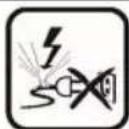
Please read these instructions carefully before using the appliance and save them for future reference. Please keep the sales receipt for guarantee purposes (pls see below “Guarantee and Customer Service”) Any use which does not conform to the instructions will absolve IZZY from any liability.
- Make sure your electricity supply is the same as the one shown on the underside of the device.
• Always plug your device into an outlet that is earthed. Failure to comply with this requirement may result in electric shock and possible serious injury.
- Never leave the appliance unattended when it is operating.
- Close supervision is necessary when your device is being used near children or infirm people. Ensure that they do not play with the device.
- This device is not intended for use by people with reduced physical, sensory or mental capabilities, children or those with lack of experience and knowledge, unless they have been given supervision or instruction concerning use of the device by a person responsible for their safety.
- Switch off and unplug:
- After each use
- If a disturbance occurs
- Before cleaning or maintenance
- When filling the water tank
- When you do not use the appliance
- Never use the device for any other use than indicated.
- The device is intended only for domestic use. Any other use will cancel the warranty.
- Do not use the appliance outdoors or in the bathroom.
- Do not operate or place the appliance or parts in places of high humidity or where it may get wet.
- Do not immerse the appliance in water or any other liquid.
- Check the power cord periodically for possible damages. If the power cord or the plug of the device has been damaged, do not use the device and contact an authorized BENRUBI Service Center.
- Make sure that the power cord does not come into contact with the hot parts of the appliance.
- Always use the appliance on a dry, flat surface, resistant to hig temperatures.
- Do not place the appliance near heat sources, on or next gas or electric hobs or over hot oven.
- Do not let the power cord of the appliance hang over the edge of a table or bench top or where a child could grab it. Do not let the power cord to touch any hot surface.
- Never leave the power cable wrapped during use. Unwind it completely.
- Do not touch the hot surfaces of the appliance. High temperatures are generated during use which could cause burns. Always use the handle and warn others (especially children) of the possible dangers of burns from steam, hot water or the soleplate.
- The appliance gives off steam which can cause burns. Handle your iron carefully, particularly when using the vertical steam function. Never direct the steam towards persons or animals.
- Make sure to keep the sole plate of the iron very smooth. Do not run it over metal objects like buttons, zips etc.
- Never dampen or iron cloths while wearing them.
• Always place the iron on a firm surface when not in use. - Make sure the water does not exceed the MAX indication on the water tank.
- Do not put any detergents or chemical substances in the water tank.
- Do not move the device by pulling it off the power cord. Ensure that the power cord is not blocked in any way. Do not wrap the cable around the body of the device or rotate it.
- Do not use an extension cord or voltage converter with this device.
- Never disconnect the device from the mains by pulling the cord. Disconnect always by pulling the plug.
- If the appliance does get wet, immediately remove the power cord from the wall outlet and contact one of the authorized BENRUBI servic centers.
- Do not use corrosive, abrasive detergents or hard brushes as they can scratch and cause damage to the appliance.
-
Do not move the appliance when it is in operation.
-
Do not touch the appliance with wet or damp hands or feet.
- In case of a possible damage, do not attempt to repair the device by yourself. Please contact one of the authorized BENRUBI service centers. Any repair made by an unauthorized BENRUBI Service Center CANCELS THE GUARANTEE.
- Any misuse of the device cancels the warranty.
- Use only original spare parts.
• The device conforms to EU directive 2014/30/EU on Electromagnetic Compatibility, the 2014/35/EU Low Voltage Directive, the 2011/65/E RoHS Directive, and the directive 2009/125/EC for eco-design.
SAVE THESE INSTRUCTIONS
Parts of the Appliance
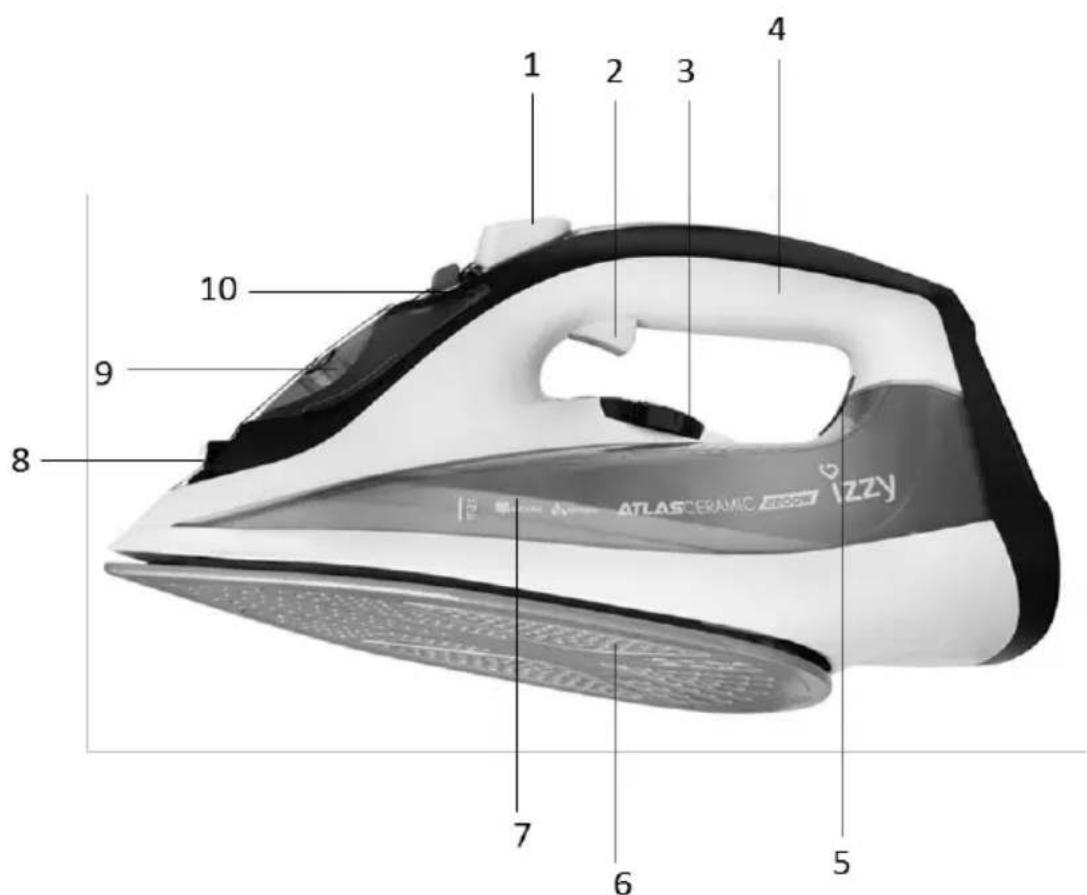
- Spray button
- Steam button
- Temperature control switch
- Handle
- Temperature indicator light
- Ceramic plate
- Water tank 350ml
- Spray nozzle
- Water tank lid
- Steam control switch
Before the Fist Use
- Remove any sticker or protective cover from the soleplate before using the appliance.
- Clean the sole with a soft cloth.
- Unwind and straighten the power cord.
- Fill with water as described in the section "How to fill water".
- Plug in. The temperature indicator light (5) will turn on.
-
Turn the temperature control switch (3) to "MAX" position.
-
Move the steam control switch (10) to “☐” position. When the temperature indicator light (5) turns off, the appliance is ready for ironing.
Steam starts to come out from the vents on the sole plate.
-
Begin ironing for the first time by ironing an old towel.
-
When the water tank is empty and no more steam is produced, the preparation work completed. Now re-fill the iron with water and start ironing.
How to Fill Water
Always disconnect the iron from main supply outlet before filling with water.
- Move the steam control switch (10) to "SIP" position and the temperature control switch (3) to "MIN" position.
- Open the water tank lid (9) and turn the iron at a 45^ angle to a flat, dry surface. Fill the water tank (7) with water to "MAX".
- Push the water filling cover to close it.
Notes:
• Always check that there is enough water in the water tank during ironing.
- Do not store the iron with water in the water tank.
Draining Water
Always disconnect the iron from main supply outlet before draining the water.
- Move the steam control switch (10) to “” and the temperature control switch (3) to the "MIN" position.
- Open the water tank lid (9) and remove the water from the water tank by holding the iron in a vertical position on the sink.
- Shake to drain all the water from the pot.
Suitable Water for Your Iron
- The iron has an anti-calc filter that reduces the accumulation of scales on the plate. I recommended to use tap water, unless the tap water is too hard. If your area's water is too hard and contains many salts, use deionized water.
- Do not use water of any chemical composition, water from refrigerators, clothes dryers,
batteries, air conditioners, scented water, softener water, and rain water. In these cases, the water contains organic waste or metallic elements that accumulate during heating, causing stains on clothes and help reduce the shelf life of the device.
- The use of water of any chemical composition in accordance with the above cancels the warranty.
- Water containing sediments and salts will cause damage to the plate holes as well as to the internal operation of the iron.
• To ensure maximum appliance life: - Do not use chemical composition water.
- The harder the water is, the more often you need to descale the appliance.
Tips for Better Results
- Divide the washing according to the correct ironing temperatures and in accordance with the International Fabric Care Code, which is on the labels label.
- If you do not know what fabric is made of fabric, determine the appropriate ironing temperature by ironing a point on the fabric that is not apparent when wearing it or using it.
- Silk, woolen and synthetic fabrics should be ironed from the riverside so as not to create shiny patches.
- Wait about 3 minutes before ironing fabrics that are sensitive to heat. Temperature setting takes a certain amount of time to reach the required level, regardless of whether it is higher or lower.
- First iron the fabrics that require the lowest temperature and then the fabrics that require a higher temperature.
- Do not iron metal objects such as zippers, hooks, rings, etc. as these may scratch the plate.
- Fabrics such as velvet and wool and accessories such as gloves, bags, etc. They will recover the brand new look and texture by simply passing the iron near the surface of the cloth and pressing the steam button.
- Fabrics that have some kind of finishing (glossy surfaces, wrinkles, etc.) can be ironed at low temperatures.
- For fabrics containing different fibers in their composition, always choose the appropriate temperature for ironing, which corresponds to the highest percentage of fabric. For example, if a fabric contains 60% polyester and 40% cotton, you should choose the appropriate temperature for the polyester and iron the fabric without steam.
- For woolen fabrics, select the middle temperature and press the steam button intermittently to achieve small steam emissions without touching the iron on the cloth.
Use of the Appliance – Steam Ironing
Before starting the ironing process, make sure that the iron is not plugged in, that the steam control switch (10) is in the " ” position and the temperature control switch (3) in the "OFF" position.
- Fill the water tank (7) with water as described in "Filling with water".
- Plug in. The temperature indicator light (5) will turn on.
- Turn the temperature control switch (3) to the "MAX" position. Do not turn the switch to "●" or "●●" for steam ironing.
- When the iron reaches the required temperature, the temperature indicator light (5) will turn off.
-
Adjust the steaming by moving the steam control switch (10) to the desired position.
-
After use, turn the temperature control switch (3) to the "MIN" position.
- Remove the plug from the wall socket.
- After each use, make sure that the water tank (7) is empty.
CAUTION: Do not steam ironing synthetic fabrics, nylon, synthetic silk or silk fabrics. Steam can ruin the texture of the fabric.
Notes:
Steam button: For very wrinkled or heavy fabrics. By pressing the steam button (2), additional steam comes out of the plate. The steam button can only be used if the temperature is in the "MAX" position. For best results, you need to press the steam button at 5 second intervals. To avoid leaking water from the plate, do not press the steam button continuously for more than 5 seconds.
Water Spray Button: Use the water spray button (1) to moisten the clothes. You can use it at any temperature. Make sure there is enough water in the water tank.
Use of the Appliance – Dry Ironing
- Connect the cable of the appliance to the wall outlet.
- Turn the temperature control switch (3) to the desired temperature depending on the type of fabric you want to iron. Make sure that the steam control switch (10) is in the " ” position.
- When the iron reaches the required temperature, the temperature indicator light (5) will turn off.
- After use, turn the temperature control switch (3) to the "MIN" position.
- Remove the plug from the wall socket.
Use of The Appliance – Vertical Steam Ironing
The vertical steam ironing system allows you to use the iron for vertical ironing. This is especially useful for getting wrinkles out of hanging clothes, curtains etc.
- Fill the water tank (7) with water as described in "Filling with water".
- Plug in. The temperature indicator light (5) will turn on.
- Turn the temperature control switch (3) clockwise to the "MAX" position. Do not turn the switch to "●" or "●●" for steam ironing.
- When the iron reaches the required temperature, the temperature indicator light (5) will turn off.
- Adjust the steaming by moving the steam control switch (10).
- Hang the garment on a clothes' hanger and pull the garment tight with one hand.
- Hold the iron in vertical position with the other hand and press the steam button (2) to iron the garment. Touch the garment lightly with the soleplate of the iron to remove creases.
- After use, turn the temperature control switch (3) to the "OFF" position.
- Remove the plug from the wall socket.
- After each use, make sure that the water tank (7) is empty.
Caution: Do not use steam ironing on clothes or fabrics that are wearing people of animals. The temperature is too high.
Recommended Temperature Table
| Type of fabric | Temperature setting | Ironing instructions |
| AcetateAcrylicNylon | ● | Dry ironingFollow the instructions on the label of the garment.This type of fabric generally requires very light ironing. |
| PollyesterRayon | ● | Dry ironingIron inside out. When ironing mixed fabrics.Select the Lowest recommended temperature. |
| Silk | ●●● | Dry ironingIron inside out. |
| WoolLight cottonLight linen | ●●● | Steam ironingIron inside out. Place a thin cloth over the fabric in order to avoid a shiny finish |
| CottonFine linenStarched fabrics | ●●●● | Steam ironingDampen the fabric before ironing.Heavier fabrics and tarched fabrics can be ironed on the front; darker colours and embroidered garments should be ironed inside out. |
| Linen | ●●●● | Steam ironingUse plenty of steam and iron dark fabrics inside out in order to avoid a shiny finish, Iron lapels and cuffs on the right side for better finish. |
Anti-Drip System
- With the anti-drip system, you can perfectly iron even the most sensitive fabrics that need a low temperature.
- The anti-drip system prevents water from dripping through the holes in the iron plate when it is cold or at low temperature.
- During use, this system can produce a loud "click" sound, especially when it is warming up or when it cools down the iron. This is perfectly normal and indicates that the system is working properly.
Self-Cleaning
This function removes the scales and minerals built up in the steam chamber. The iron remain in the best condition if this function is performed at least every two weeks or m
regularly depending on the hardness of the water used.
Before you start the self-cleaning procedure, make sure the iron is not plugged in and the steam control switch (10) is in the "position.
- Fill the half of the water tank (7). Do not use vinegar or other descaling liquids in the water tank.
NOTE: For the self-cleaning process, use only tap water.
-
Plug in and turn the temperature control switch (3) to the "MAX" position. The temperature indicator light (5) will turn on.
-
When the temperature indicator light (5) turns off, unplug.
-
Hold the iron in a horizontal position above the sink and keep pressing the steam control
switch (10) toward the last position “ ”
-
Steam and boiling water will start to come out of the iron plate holes, which contain salts and minerals that have been accumulated in the steam chamber from previous uses.
-
Gently move the iron back and forth by pressing the steam control switch (10) until the water tank is empty.
Caution: The water that comes out during self-cleaning is very hot. Be very careful not to fall on you.
- When the water tank is empty, release the steam control switch (10) and move it in the "s" position.
8 Allow the iron to cool down completely.
- Wipe the soleplate with a cold damp cloth.
Care and Cleaning
CAUTION: Before cleaning, ensure that the steam generator iron is unplugged and the unit has cooled down completely.
- Do not use abrasives or abrasive cleaners and wire to clean the plate or body.
- Keep the soleplate smooth. Avoid contact with hard, metal objects. Do not scratch or damage the surface of the soleplate.
- Do not place the iron on any metal base as this could damage it.
- Wipe the body of the appliance with a damp cloth. Do not use abrasives or harsh cleaners as they may damage the surface of the appliance.
- Never immerse the appliance in water or nay other liquid. Never hold the iron or the base unit under the tap.
- To clean the steam holes simply use a damp cloth to wipe away any build up of lint or starch from inside the steam holes.
Storage
- Allow the appliance to cool down completely before storing.
- Empty the water container before each use and before storing.
- Store in a place without humidity, where it is not reachable by children.
Trouble-Shooting
| Problem | Possible cause | Solution |
| Not enough heat or too much heat | Rotate temperature control switch improperly or unplugging | Set temperature control switch in correct position and check if the iron is plugged. |
| No steam or leakage | The temperature control switch has been set to “MIN”. | Set temperature control switch in correct position. |
| No burst of steam or no vertical steam | The (vertical) burst of steam function has been used too often within a very short period. The iron is not hot enough. | Continue ironing in horizontal position and wait a while before using the (vertical) burst of steam function again. |
| Leaking water from soleplate | Set the temperature control switch out of steam range.The heat is still not enough.The water is over the “MAX” position. | Set temperature control switch as per steam range.Open steam button only after the indicator light turns off.Pour out the extra water. |
| Little steam | Check if the steam selector is in proper location.Steam hole is blocked.Not enough water in the water tank. | Set the steam selector to the proper position.Clean the steam hole.Fill the water tank with water. |
| No spraying | Not enough pressure or air inside | Press the spray nozzle by hand and push the spray button several times continuously. |
Technical Characteristics
Model: Steam iron ATLAS CERAMIC IZ-1104
Power: 2200W
Water tank capacity: 350ml
Safe Appliance Disposal
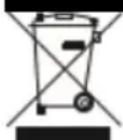
At the end of its working life, the product must not be disposed of as urban waste. It must be taken to a special local authority differentiated waste collection centre or to a dealer providing this service. Disposing of a household device separately avoids possible negative consequences for the environment and health deriving from inappropriate disposal and enables the constituent materials to be recovered to obtain significant savings in energy and resources.
As a reminder of the need to dispose of household devices separately, the product is marked with a crossed-out wheeled dustbin.
Guarantee & Customer Service
- BENRUBI Company guarantees its products for any manufacturing defect or defective materials for a period of two (2) years from the date of purchase or delivery by present purchase receipt. If your product malfunctions or you find any defects, please revert to the retail location you have purchased it from or contact an authorized BENRUBI Service Centre. To find the nearest authorized BENRUBI Service Centre, visit our website www.benrubi.gr. It is in the discretion of BENRUBI Company to replace or repair the defective product.
- The warranty does not cover damages resulting from normal wear, breakage, scaling, improve installation or maintenance of the product, mishandling, abnormal working conditions, failure to implement the instructions, conversion or repair of the product by an unauthorized technician who does not belong to the BENRUBI Service Centers.
Also, the warranty does not cover the following indicative factors:
• Stains, discoloration or scratches.
- Burns due to exposure to heat or flame.
- Damage from thermal shock (sudden temperature change or change of voltage).
FOR MORE INFORMATION PLEASE CONTACT:
(NEW) H. BENRUBI & FILS SA
27 Aghiou Thoma str, GR15124, Maroussi – Athens,
Tel.: 210 6156400
e-mail: benrubi-sda@benrubi.gr


- Safety interlocks
- SAVE THESE INSTRUCTIONS
- Before the Fist Use
- How to Fill Water
- Always disconnect the iron from main supply outlet before filling with water.
- Notes:
- Draining Water
- Always disconnect the iron from main supply outlet before draining the water.
- Suitable Water for Your Iron
- Tips for Better Results
- Use of the Appliance – Steam Ironing
- Use of the Appliance – Dry Ironing
- Use of The Appliance – Vertical Steam Ironing
- Anti-Drip System
- Self-Cleaning
- Care and Cleaning
- Storage
- Technical Characteristics
- Safe Appliance Disposal
- Guarantee & Customer Service
- FOR MORE INFORMATION PLEASE CONTACT:
- (NEW) H. BENRUBI & FILS SA
Brand : Izzy
Model : Atlas Ceramic 2200 IZ-1104
Category : Iron