
BH60 - Loudspeaker ACME - Free user manual and instructions
Find the device manual for free BH60 ACME in PDF.


| Product Type | Bluetooth Headphones |
| Model | BH60 |
| Brand | ACME |
| Connectivity | Bluetooth with A2DP profile |
| Battery Type | Built-in rechargeable Li-Ion/Pi-Po |
| Charging Time | Up to 2.5 hours |
| Charging Port | Micro USB |
| Power Button | Press 5 seconds to turn on/off; 10 seconds for pairing |
| Touch Controls | Volume up/down touch-sensitive areas |
| Microphone | Yes, for voice communication |
| LED Indicators | Red (charging), Blue (charged/paired), Blue blink (playing), Red/Blue fast blink (pairing) |
| Automatic Power Off | After 5 minutes of disconnection and inactivity |
| Compliance | R&TTE 1999/5/EC, RoHS 2011/65/EU |
| Designed In | EU by ACME Europe UAB |
| Country of Origin | Printed in China |
| Warranty | As per warranty card (period indicated on package) |
| Care | Avoid abrasive cleaners, extreme temperatures, sharp objects, and drops |
| Disposal | WEEE symbol - do not dispose as household waste; recycle properly |
Frequently Asked Questions - BH60 ACME
User questions about BH60 ACME
0 question about this device. Answer the ones you know or ask your own.
Ask a new question about this device
Download the instructions for your Loudspeaker in PDF format for free! Find your manual BH60 - ACME and take your electronic device back in hand. On this page are published all the documents necessary for the use of your device. BH60 by ACME.
USER MANUAL BH60 ACME
natural_image
Line drawing of a pair of hardcover headphones with earbuds and mounting brackets (no text or symbols)acme®
4 GB User's manual
8 LT Vartotojo gidas
12 LV Lietošanas instrukcija
16 EE Kasutusjuhend
20 PL Instrukcja obsługi
24 RU Инструкция пользователя
29 DE Bedienungsanleitung
34 UA Інструкція
39 RO Manual de utilizare
43 BG Ръководство за употреба
48 HU Használati utasítás
52 HR Korisnički priručnik
56 SI Uporabniški priročnik
60 ES Manual de usuario
64 EU Declarations
71 Warranty card
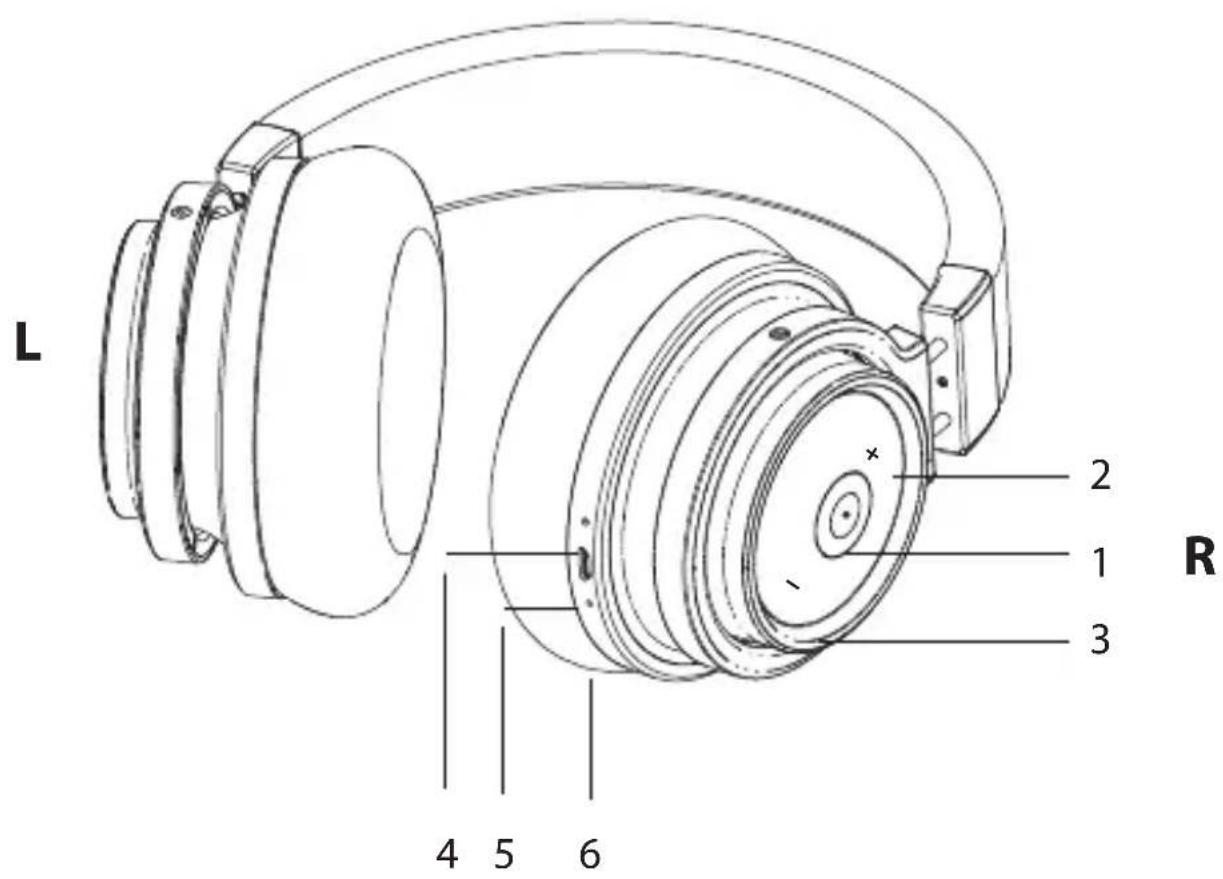
Bluetooth headphones
Product overview
| 1. Power button | Turn on: Press the key for 5 seconds.Turn off: Press the key for 5 seconds to switch off.Answer phone call: Press the key once.End call: During a phone call press the key once.Redial last phone number: Press the key twice.Reject phone call: Press and hold the key for 2 seconds.Play/pause music (in music mode): Press the key once to pause the music; press again to resume. |
| 2. Touch sensitive VOLUME UP area* | Touch this area to increase the volume. When the max. volume is reached, an indication sound will be heard. |
| 3. Touch sensitive VOLUME DOWN area* | Touch this area to decrease the volume. |
| 4. LED indicator Shows the status of the headphones. | |
| 5. Micro USB charging port | To charge the battery, use the charger with a USB port and Micro USB cable. |
| 6. Microphone For voice communication. | |
*Pressing gestures and touching the correct area will offer fluent functioning of the touch sensitive area.

WARNING: Listening at a high volume for a long time may damage your hearing.
Charging

These headphones are equipped with a built-in non-detachable rechargeable battery. Please ensure that the battery is fully charged before using the headphones for the first time.
A solid red LED light indicates when the battery is charging. When the charging is complete, the LED light will turn blue. The typical charge time for an empty battery takes up to 2.5 hours.

Li-Ion/Pi-Po batteries exhibit a gradual decrease in performance over their service life, so a reduction in the initial battery capacity is not an indication of a faulty battery or device.
Pairing process and LED indications
- Power on your headphones by pressing Power button for 10 seconds. A fast blinking red/blue LED will indicate that the headphones are ready to pair.
- Turn on the Bluetooth function on your device, select BH60 from the list headphones.
- A continuously glowing blue LED will indicate that your device has been successfully paired and the headphones are ready to use.
- When sound is being played through headset – a blue LED blinks every 5 seconds.
- If the headphones are disconnected and not used for 5 minutes, the head automatically turn off.
Troubleshooting
| The headphones cannot be turned on | Recharge your headphones |
| Music is not playing | Make sure that both devices are paired and connected and that “Media playback” is enabled in your Bluetooth settings.Make sure your device has an “A2DP” Bluetooth profile. |
| Bluetooth device will not reconnect/pair with the headphones | 1. Open the Bluetooth settings on your device, tap “BH60” and select “Forget”. Now you can try the pairing operation again.2. It is possible that you are not able to connect because the Headphones are paired with another nearby device. You will have to disconnect the other device, or even turn off its Bluetooth function. Now you can try again to pair or reconnect.3. Turn on/off the Bluetooth function in your device or restart the device itself (not the headphones). |
Care and maintenance
- Don't use abrasive cleaning solvents to clean the headset.
- Do not expose the headset to extremely high or low temperature as this will shorten the life of electronic devices, destroy the battery or distort certain plastic parts.
- Don't dispose of the headset in a fire as it will result in an explosion.
- Don't expose the headset to contact with sharp objects as this will cause damage.
- Don't let the headset fall down onto the floor. The internal circuit might get damaged.
Waste Electrical and Electronic Equipment (WEEE) Symbol

The use of the WEEE symbol indicates that this product may not be treated as household waste. By ensuring this product is disposed of correctly, you will help protect the environment. For more detailed information about the recycling of this product, please contact your local authority, your household waste disposal service provider or the shop where you purchased the product.
"Bluetooth" ausinès

Gaminio apžvalga
Auricular "Bluetooth"
ACME Europe hereby declares that this equipment is in compliance with the essential requirements and other relevant provisions of:
"R&TTE 1999/5/EC" Directive;
"RoHS 2011/65/EU" Directive.
The declaration of conformity can be accessed at:
http://www.acme.eu/en-us/declarations-conformity
LT ES atitikties deklaracija
| Product Product model | |
| Product purchase date Seller name, address | |
| Failures (date, description, position of the person who accepts the product, first name, last name and signature) | |
1. Warranty period
Warranty enters into force starting with the day when the buyer acquires the product from the seller. Warranty period is indicated on the package of the product.
2. Warranty conditions
The warranty is valid only by providing an original document of the product acquisition and this warranty sheet, which includes name of the product model, product purchase date, name and address of the seller.
If it is noticed during the warranty period that the product has faults and these faults where not caused by any of the reasons when the warranty is not applied as indicated in the paragraphs below, manufacturer undertakes to replace the product.
The warranty is not applied to regular testing, maintenance and repair or replacement of the parts which are worn out naturally.
The warranty is not applied if damage or failures occurred due to the following reasons:
• Inappropriate installation of the product, ina
usage and/or operating the product without following the manual, technical requirements and safety standards as provided by the manufacturer, and additionally, inappropriate warehousing, falling from heights as well as hard strikes.
• Corrosion, mud, water and sand.
• Repair works, modifications or cleaning, which were performed by a service not authorised by the manufacturer.
• Usage of the spare parts, software or consumptive materials which do not apply to the product.
- Accidents or events or any other reasons which depend on the manufacturer, which includes lightning, water, fire, magnetic field and inappropriate ventilation.
- If the product does not meet standards and specifications of a particular country, in which it was not bought. Any attempt to adjust the product in order to meet technical and safety requirements such as those in the other countries withdraws all the rights to the warranty service.
If no failures are detected in the product, all the expenses in relation to the service are covered by the buyer.
EAC
CE

Designed in EU by ACME Europe UAB,
Raudondvario pl. 131B, LT-47191, Kaunas, Lithuania
E-mail: support@acme.eu
Rev. 1.0 Printed in China
Model: BH60
acme®


Brand : ACME
Model : BH60
Category : Loudspeaker