
TS-80R BT - Loudspeaker MAJESTIC - Free user manual and instructions
Find the device manual for free TS-80R BT MAJESTIC in PDF.


| Product Type | Portable Bluetooth Speaker |
| Model | TS-80R BT |
| Brand | Majestic |
| Power Output (RMS) | 30W x 2 |
| Max Output Power | 120W |
| Power Supply | AC 100-240V ~50/60Hz, 33W |
| Rechargeable Battery | 4000mAh, up to 4-5 hours playback at medium volume |
| Bluetooth Version | 2.1+EDR, range up to 10m |
| Bluetooth Profiles | A2DP |
| USB Ports | 2 USB ports for music playback (up to 32GB) |
| AUX Input | 3.5mm jack |
| Microphone Inputs | 2 x 6.3mm jacks |
| Disco LED Lights | 5 modes for disco light, 3 modes for decoration lights |
| Equalizer Modes | Flat, Classic, Rock (default), Pop, Jazz |
| Super Bass Function | Yes |
| Microphone Echo Effect | On/Off via ECHO button |
| Driver Units | 6.5" woofer, 2" tweeters |
| Care and Cleaning | Unplug before cleaning, use dry cloth only |
| Safety | Do not expose to water, avoid high temperatures (>35°C), no user-serviceable parts |
| Repairability | No user-serviceable parts; refer to qualified service personnel |
| Manufacturer | New Majestic S.p.A., Italy |
| Country of Origin | China |
Frequently Asked Questions - TS-80R BT MAJESTIC
User questions about TS-80R BT MAJESTIC
0 question about this device. Answer the ones you know or ask your own.
Ask a new question about this device
Download the instructions for your Loudspeaker in PDF format for free! Find your manual TS-80R BT - MAJESTIC and take your electronic device back in hand. On this page are published all the documents necessary for the use of your device. TS-80R BT by MAJESTIC.
USER MANUAL TS-80R BT MAJESTIC
natural_image
Black rectangular electronic device with dual speakers and a central knob (no visible text or symbols)Importato da:
New Majestic S.p.A.
Via Rossi Martini, 41
26013 Crema (CR)- Italy
www.newmajestic.com
MADE IN CHINA

Fronte e Retro
- IMPUGNATURA
- WOOFER 6,5"
- LUCI DIFFUSORI
- TWEETERS 2"
- FORI DI VENTILAZIONE
- PRESA AC
- LUCI DISCO LED

INTRODUZIONE
ALIMENTAZIONE
DeanLacchinelli–Presidente

DATAPRODUZIONE:MARZO2019
19
TS 80R BT/USB/AX – PARTY SPEAKER– 120W
User Manual
PORTABLE BLUETOOTH SPEAKER
RECHARGEABLE BATTERY – DUAL USB INPUT
DISCO LIGHT

natural_image
Black rectangular electronic device with dual speakers and a central knob (no visible text or symbols)Imported by:
New Majestic S.p.A.
Via Rossi Martini, 41
26013 Crema (CR)- Italy
www.newmajestic.com
MADE IN CHINA
CE

Read this booklet thoroughly before using and save it for future reference

Unit must be fully charged before use
Safety information and Warnings
CAUTION:

The lightning flash with arrowhead symbol, within an equilateral triangle is intended to alert the user to the presence of insulated ‘dangerous voltage’ within the product’s enclosure that may be of sufficient magnitude to constitute a risk of electric shock to persons.

WARNING: TO REDUCE THE RISK OF ELECTRIC SHOCK DO NOT REMOVE COVER (OR BACK), NO USER SERVICEABLE PARTS INSIDE REFER SERVICING TO QUALIFIED SERVICE PERSONNEL

The exclamation point within an equilateral triangle is intended to alert the user to the presence of important operating and maintenance (servicing) instructions in the literature accompanying the appliance.
READ ALL INSTRUCTIONS BEFORE USE

Always follow basic safety precautions when using this Bluetooth speaker system.
SAFETY INSTRUCTIONS
1) Read this Instruction Manual before you attempt to connect or operate the appliance.
2) Keep these instructions in good condition. Heed all warnings. Follow all instructions.
3) The apparatus shall not be exposed to dripping or splashing and no objects filled with liquids, such as vases, shall be placed on the product.
4) No naked flame sources, such as candles, should be placed on the product.
5) Children should be supervised to ensure that they do not play with the appliance.
6) Ventilation should not be impeded by covering the ventilation openings.
7) Ensure that the unit is plugged into an AC 100-240V 60/50Hz power outlet. Using higher voltage may cause the unit to malfunction or even fire catching. Turn off the unit before unplugging it from power source to completely switch it off.
8) Do not plug/ unplug the power plug into/from an electrical outlet with wet hands.
9) If the power plug does not fit into your outlet, do not force the plug into an electrical socket.
10) Place the unit where there is good ventilation. Place the system on a flat, hard and stable surface. Do not expose to temperatures above 35irc C. Allow at least 30 cm clearance from the rear and the top of the unit and 5 cm from each side.
11) Press the buttons of the unit gently. Pressing them too hard can damage the unit.
12) Dispose of used batteries in an environmental-responsible manner.
13) Always ensure that the product is unplugged from the electrical outlet before moving or cleaning. Clean it with dry cloth only.
14) Unplug the product during lightning, storms or when it will not be used for long periods of
time.
15) This product has no user-serviceable parts. Do not attempt to repair this product yourself. Only qualified service personnel should perform servicing. Take the product to the electronics repair shop of your choice for inspection and repair.
16) Don't mount this product on a wall or ceiling.
17) Do not place the unit near TVs, speakers and other objects that generate strong magnetic fields.
18) Do not leave the unit unattended when it is in use.
Guide to the Appliance
Top View
- 3.5mm AUX IN JACK
- 6.3mm MIC JACK 1
- 6.3mm MIC JACK 2
- USB PORT 1
- USB PORT 2
6.10/FOLD.+ BUTTON - LIGHT BUTTON (ON/OFF)
- 10/FOLD.- BUTTON
- ECHO BUTTON
- EQ BUTTON
- FUNCTION/ BUTTON
- BUTTON
- BUTTON
- P-MODE BUTTON
- /PAIR BUTTON
- LCD DISPLAY
- PAIR INDICATOR
- SUPER BASS BUTTON
- POWER ON/OFF BUTTON
- CHARGE INDICATOR
- MIC VOL. CONTROL
- VOLUME CONTROL

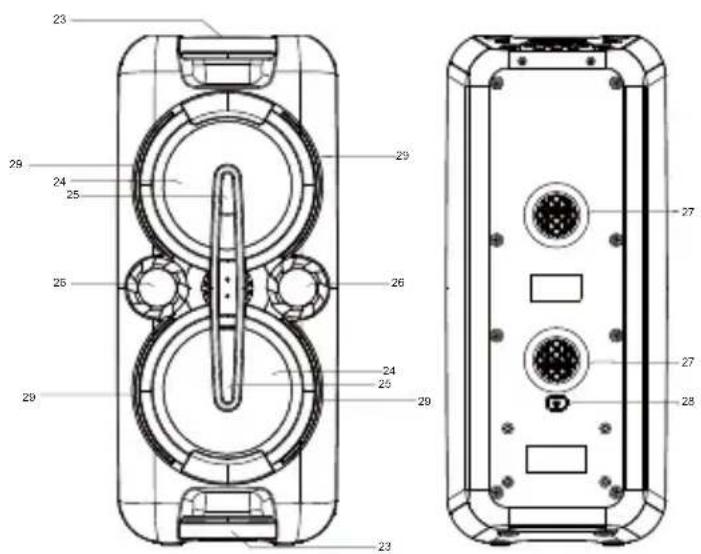
Front and Back view
- HANDLE
- 6.5" WOOFER
- DISCO LED LIGHT
- 2" TWEETERS
- VENTILATION HOLES
- AC SOCKET
- DECORATION LEDS
Getting Started POWER SOURCE
This unit works with rechargeable battery (the battery capacity 4000mAh). Fully charge the unit (around 6/8 hours) before using the product for the first time. The playback time has about 4/5 hours after full charging and at medium volume. Plugging the AC Power cord while the battery pack is attached initiates the charging of this battery, the charge LED indicator lights red during charging, when the battery is fully charged the indicator will turn to green. When the unit is with low battery, the LED indicator will flash in red. Warning: Do not change the battery, only high-qualified personnel can perform this operation.
OPERATION INSTRUCTIONS BASIC FUNCTIONS
Press the power ON/OFF button to switch the unit on/off.
NOTE: In USB/BT/AUX mode, when the unit is not providing the main function for around 15 minutes, the unit will automatically switch into standby mode. Press the Function/ ⏻ button again to turn on the unit again.
Please note that low volume setting in the audio source may be recognized as “no audio signal”, this will affect the capability of signal detection from the device and can also originate an automatic switch into standby mode. If this happens please reactive the audio signal transmission or increase the volume setting on the audio source player in order to resume playback.
SETTING THE FUNCTION MODES
To change the function modes, press the FUNCTION/ ⏻ button repeatedly to choose USB1/USB2/BLUETOOTH/AUX function.
ADJUSTING THE VOLUME
- Rotate the VOLUME knob on the unit to increase or decrease the music volume.
- Rotate the MIC VOL. knob on the unit to increase or decrease the microphone volume.
SUPER BASS
Press the SUPER BASS button on unit to increase the bass effect.
This unit has a built-in equalizer system, Press the EQ button on unit to select a setting that best matches the music style: FLAT, CLASSIC, ROCK(default), POP and JAZZ.
MICROPHONE ECHO ADJUSTMENT
Press the ECHO button on unit turn on or off the microphone echo effect.
FLASHING LIGHT
There are 5 modes for the DISCO LED lighting. Press the LIGHT button to choose the light modes.
L-1: By default mode, blue LED will be on constantly when it is selected.
L-2: Blue LED will be on flashing mode.
L-3: Red LED will be on constantly.
L-4: Red LED will be on flashing mode.
L-5: 7 colors LED will be on flashing mode (red, blue, green, purple, light blue, yellow, white)
Press one more time to turn off.
There are 3 modes for the decoration LED lighting around the speakers. Press and hold the LIGHT button to choose the light modes.
E-1: By default mode, blue LED will be on constantly when it is selected.
E-2: Red LED will be on constantly.
E-3: Blue and red LED flashing alternatively.
Press one more time to turn off.
USB OPERATION
This unit provides two USB ports for music playback.
-
Press the FUNCTION/ ⏻ button on unit to select "USB1" or "USB2" mode.
-
Plug the USB memory stick to the USB port on top of the unit. Playback will start automatically from Track 1.
-
To pause playback, press the PLAY/PAUSE/PAIR button on unit.
-
To resume playback, press the PLAY/PAUSE/PAIR button again.
-
To select a desired track, press the ▶ or ◀ button respectively during playing until the desired track appears on the display. The unit will start play automatically.
-
To select a song which track number exceeds 10, press the 10/FOLD.+ or 10/FOLD.-button each time to skip forward/backward 10 tracks, then press the ▶▶ or ◀◀ button to select desired track.
Important: The use of USB extension cords is not recommended. Don't unplug the USB from the unit when playing.
REPEAT PLAY
You can play one track or all tracks on the USB repeatedly.
To Repeat a Single Track
-
Press P-MODE button on unit during play, the display will show "☐" and the current track will be played over an over again.
-
To cancel repeat play, press P-MODE button on unit until "☐" disappears from the display.
To repeat all the Tracks
-
Press P-MODE button on unit until the "⊂⊃" shows steadily on the display, all tracks on the USB will be played over and over again.
-
To cancel repeat play, press the P-MODE button on unit until "⊂⊃" disappears from the display.
To repeat the folder (only for USB which contains more than one folder)
-
Press the P-MODE button on unit until "☐ FOLDER" shows steadily on the display, the current folder will be repeated over and over again.
-
To cancel repeat play, press the P-MODE button on unit until "⊂⊃ FOLDER" disappears from the display.
RANDOM PLAY
Press the P-MODE button on unit in play mode till the "RAND" shows steadily on the display, the random play will start from next track automatically. Press the P-MODE button on unit again until the "RAND" disappears from the display to cancel.
NOTE: The player could not be compatible with some USB devices (32GB max). This could be due to incompatibility of some processors.
BLUETOOTH OPERATION
- Press the FUNCTION/ ⏻ button on unit to switch to BLUETOOTH function, the LCD will display "BT" and the pair indicator will flash at high speed.
- Turn on the Bluetooth function on the device.
- Scan the unit "TS 80BT USB/AX" and connect.
- Input the password 0000 if required, the pair indicator keep light up to indicate connection done.
- Press Play on device to start playback. Press the ▶ or ◀ button for the track selection.
- Press and hold the PLAY/PAUSE/PAIR button to disconnect the Bluetooth.
Note: The Bluetooth works best within 10 meters in open air.
AUX-IN OPERATION
- Press the FUNCTION/ ⏻ button on unit to select the "AUX" mode.
- Connect your audio device to the AUX IN jack on the top panel of the unit with a 3.5mm AUX IN cable.(audio cable is not included)
- Press PLAY button on your external device to start playback.
MIC JACK OPERATION
- Connect your microphone (not included) to the 6.3mm MIC JACK found on the top panel of the unit.
- Rotate the MIC VOL. knob on the unit to increase or decrease the microphone volume.
- Press the ECHO Button to turn on or off the echo effect of the microphone.
NOTE: it is possible to use 2 microphones together at the same time.
Technical Specifications
GENERAL
Power Requirements AC100-240V\~50/60Hz
Power consumption 33W
Power output in RMS 30W X 2
Max output power 120W
AUX in jack 3.5mm
Microphone jack 6.3mm
Work temperature 5irc C - +35°C
Bluetooth
Communication system Bluetooth Standard version 2.1+EDR
Reception Range 10 meter (line-of-sight distance)
Compatible Bluetooth profiles Advanced Audio Distribution Profile (A2DP)
ACCESSORIES
Instruction Manual....x1
AC Cord....x1
Note: Specifications are subject to change for continuous improvement without prior notice.

MAJESTIC
Modello: TS 80R BT/USB/AX
NEW MAJESTIC S.P.A. Via Rossi Martini, 41 26013 CREMA(CR)-Italia
www.newmajestic.com
Alimentazione:
AC 100\~240V 50/60 Hz
Consumo: 33W
DC: 12V—4.0Ah
USB1/USB2: 5V---200mA
MADE IN CHINA


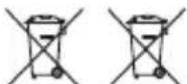

WEEE Logo (Waste electrical and electronic equipment).

Battery disposal

CLASS II, double isolation
INFORMATION TO USERS OF DOMESTIC EQUIPMENTS

Pursuant to Art. 25, Paragraph 1 of the Legislative Act N. 49 14th March 2014, "Implement of the Directives 2011/65 / EU and 2012/19 / EU concerning the reduction of the use of hazardous substances in electrical and electronic equipment, as well as waste disposal".
The crossed bin symbol on the appliance or on its packaging indicates that the product at the end of its useful life must be collected separately from other waste. The user must, therefore, dispose the equipment at the end of its life to the appropriate electronic and electro technical waste centers, or return it to the retailer at the time of purchase of a new type of equivalent equipment, one by one.
Appropriate separate disposal for the subsequent start-up of the disused equipment for recycling, treatment and compatible environmental disposal helps to avoid possible negative effects on the environment and health and favors the re-use and / or recycling of the materials it is composed the equipment.
The illegal disposal of the product by the user involves the application of the penalties referred to in current laws.
Any rechargeable batteries or rechargeable batteries contained in the device must be disposed separately in the appropriate expired batteries bins.
Battery disposal
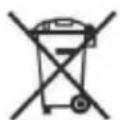
Disposal of expired batteries must take place at the appropriate recycling centers or according to local authority. Batteries in compliance with the 2013/56 / EC directive.

- Fronte e Retro
- INTRODUZIONE
- ALIMENTAZIONE
- TS 80R BT/USB/AX – PARTY SPEAKER– 120W
- User Manual
- Safety information and Warnings
- CAUTION:
- READ ALL INSTRUCTIONS BEFORE USE
- SAFETY INSTRUCTIONS
- Guide to the Appliance
- Top View
- Front and Back view
- Getting Started POWER SOURCE
- OPERATION INSTRUCTIONS BASIC FUNCTIONS
- SETTING THE FUNCTION MODES
- ADJUSTING THE VOLUME
- SUPER BASS
- MICROPHONE ECHO ADJUSTMENT
- FLASHING LIGHT
- USB OPERATION
- This unit provides two USB ports for music playback.
- REPEAT PLAY
- To Repeat a Single Track
- To repeat all the Tracks
- To repeat the folder (only for USB which contains more than one folder)
- RANDOM PLAY
- BLUETOOTH OPERATION
- AUX-IN OPERATION
- MIC JACK OPERATION
- Technical Specifications
- GENERAL
- Bluetooth
- ACCESSORIES
- MAJESTIC
- INFORMATION TO USERS OF DOMESTIC EQUIPMENTS
- Battery disposal
Brand : MAJESTIC
Model : TS-80R BT
Category : Loudspeaker