
RolaChem RP9 - Detector ASTRALPOOL - Free user manual and instructions
Find the device manual for free RolaChem RP9 ASTRALPOOL in PDF.


| Product Type | Pool Water Chemistry Detector |
| Brand | AstralPool |
| Model | RolaChem RP9 |
| Dimensions (L x W x H) | 150 x 80 x 30 mm |
| Weight | 200 g |
| Power Supply | 2 x AAA batteries (not included) |
| Battery Life | Approximately 100 tests |
| Measurement Parameters | Free Chlorine, Total Chlorine, pH, Alkalinity, Cyanuric Acid |
| Measurement Method | Photometric (colorimetric) |
| Display | LCD screen with backlight |
| Waterproof Rating | IP67 |
| Operating Temperature | 5°C to 40°C |
| Calibration | Automatic calibration with included standards |
| Data Storage | Up to 500 test results with date and time |
| Connectivity | Bluetooth for data transfer to mobile app |
| Maintenance | Clean cuvette after each use; replace batteries as needed |
| Safety Features | Auto-off after 5 minutes; low battery indicator |
| Spare Parts / Repairability | Replacement cuvettes and batteries available; professional repair service recommended |
| Certifications | CE, FCC, RoHS |
Frequently Asked Questions - RolaChem RP9 ASTRALPOOL
User questions about RolaChem RP9 ASTRALPOOL
0 question about this device. Answer the ones you know or ask your own.
Ask a new question about this device
Download the instructions for your Detector in PDF format for free! Find your manual RolaChem RP9 - ASTRALPOOL and take your electronic device back in hand. On this page are published all the documents necessary for the use of your device. RolaChem RP9 by ASTRALPOOL.
USER MANUAL RolaChem RP9 ASTRALPOOL
RolaChem Models
RP 9 pH only
RO g ORP only
RC 9 ORP and pH Combined
INSTALLATION AND
OPERATING INSTRUCTIONS
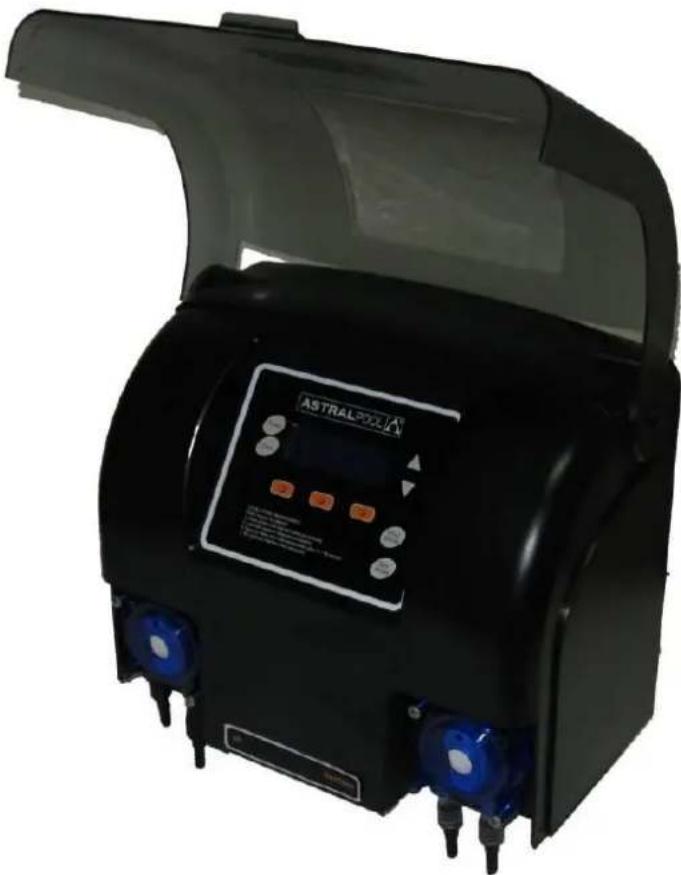
natural_image
Exterior view of a black industrial device with blue warning lights and a digital display (no visible text or symbols)INTENTIONALLY BLANK
Dear Customer,
Congratulations, you have made a great choice in purchasing a RolaChem controller by AstralPool. Your RolaChem dosing system will monitor and control the pH and/or ORP level in your swimming pool to give you the most crystal clear water possible. These instructions cover the following models:
RC 9 pH and ORP (acid and sanitiser sensing and dosing)
RP 9 pH only (acid sensing and dosing only)
RO 9 ORP (sanitiser sensing and dosing only)
Please ignore reference to pH or ORP if it is not fitted to your unit.
Swimming pool chemistry is quite interesting and dynamic. There is no one setting that is right for every swimming pool or spa. After installation, let the Rola Chem machine settle down over a couple of days and then if necessary alter the setting to suit your pool or spa.
In the automatic models, the chlorine level is controlled using the ORP principle (which is a better measure of the sanitising ability of chlorine).
• ORP (Redox) measures ACTIVITY in millivolts (mV) of all oxidising chemicals. Test Kits and strips measure the QUANTITY of Chlorine/Bromine in PPM only.
- ORP of 650mV or above means water is clean and safe, regardless of qty. of chlorine/bromine, provided ORP sensor is clean, calibrated and functioning OK.
- ORP readings can vary depending upon water chemistry like pH, TDS. T.A. and stabiliser levels. Ensure that these levels are correct. Consult your shop/technician.
If large quantities of chemicals are dumped in the pool water, this excess quantity should be circulated well and then, allowed to settle down before this machine starts to give true readings.
If you have any questions please contact your AstralPool Supplier or us directly.

Product is designed to run with ACID diluted to water to acid ratio of 2:1 should always be followed as the hines dosing rate is formulated around the diluted solution. Using neat acid can lead to overdosing the pH level.
Note: The RolaChem dosing unit is not intended for use by young children or infirm persons without supervision. Please ensure that young children are supervised to ensure that they do not play with the Chlorinator.

For full warranty terms and conditions and to register your warranty, simply visit www.astralpool.com.au/warranty and complete your details. Or scan the QR code and be taken directly to the registration page.
Record your equipment details here for quick reference:
Model No.:
Serial No.:
INDEX
INDEX......4
RC9 - INTRODUCTION....5
RC9 – PLACEMENT OF CHEMICALS, ROLACHEM AND CONNECTIONS. 6
RC9 - INSTALLATION SET UP 7
RC9 - TIMER SET UP (ONLY IF TIMER SELECTED) 12
RC9 - ORP AND/OR PH SET POINT ADJUSTMENT 13
RC9 – ORP AND/OR PH MANUAL DOSING 13
RC9 – ORP AND/OR PH PROBE CALIBRATION ...... 15
RC9 – ORP AND/OR PH FAULT WARNING INDICATORS 16
RC9 - MAINTENANCE....17
RC9 -TROUBLE SHOOTING GUIDE.... 18
RC9 - MAINTENANCE SCHEDULE 19
Before starting up your RolaChem controller, pool and spa water must be balanced correctly. The correct levels can be seen below. This appliance is not designed to bring a pool into balance; it is designed to maintain a balanced pool.
Allow 24-48 hours after switching on unit for sensing and dosing to be 100% accurate, the inbuilt fuzzy logic controller bases its precision dosing of chemicals by looking at historical dosing rates. After 24-48 hours, unit should be work at its optimum performance.
Recommended chemical ranges (depending on pool location and pool surface) are:
CHLORINE: 1 - 3ppm pH 7.2 - 7.8
TOTAL ALKALINITY: 80 - 150 mg/L
PHOSPHATES FREE
STABILISER: 30 - 50 mg/L
CALCIUM HARDNESS: 90 - 300 mg/L
PLEASE READ ALL THESE INSTRUCTIONS CAREFULLY BEFORE INSTALLING & OPERATING THE UNIT AND LEAVE THE MANUAL ON SITE FOR OWNER/OPERATOR'S USE.
RolaChem dosing systems should operate only when the pool filtration system is running. The unit must not be connected without adequate earth connections and a voltage other than 230-240V (unless specified otherwise)
Before installing the unit in position on the wall or post, the length of the PVC tubing provided should be measured and taken into consideration. To avoid loss of water from the system, close all stop valves before cutting any lines.
Connection of lines (see illustration page 5)
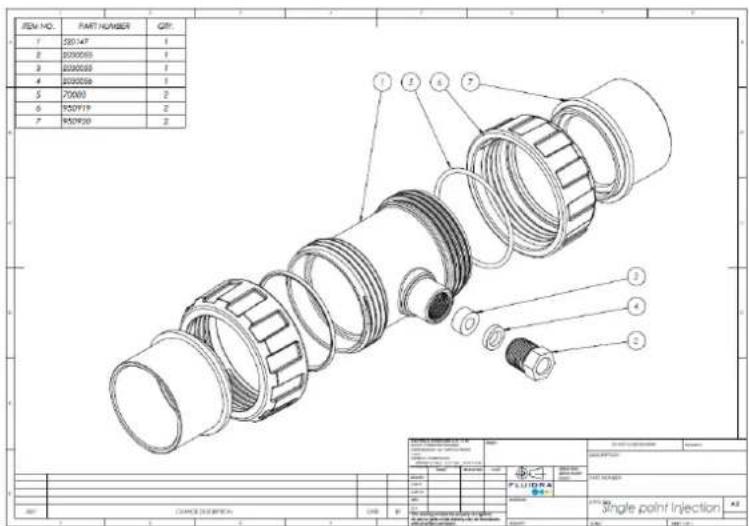
Install the Inline Mixing Chamber into the "return" line. Cut an appropriate piece out of this line and glue the mixing chamber in position, using a PVC adhesive. Thread the PVC tube through the hole in the cap or shoulder of the chemical container and fit the non-return or check valve and the weight. Ensure that the non-return valve is fitted correctly (arrow indicates the direction of flow) Drop the weight, with the non-return valve into the bottom of the container.
TIP: Soaking the ends of the PVC tubing in hot water or gentle heating with a lighter makes it easier to push onto the barb. When installing chemical containers (especially acid), in filter enclosures, which have no ventilation, it is recommended that the hole in the cap of the container is cut to fit tightly around the tubing, so that fumes from the acid or chlorine will not corrode the equipment. It will be necessary to drill a second hole in the cap fitted tightly with a length of tubing which should then be vented outside the filter enclosure. This procedure is recommended only where the filter enclosure has no ventilation and is to protect the equipment.
Note:
The appliance is not intended for use by young children or infirm person without supervision. Please ensure that young children are supervised to ensure that they do not play with the appliance.
If the supply cord is damaged, it must be replaced by the manufacturer or its service agent or a similarly qualified person in order to avoid a hazard.
Power to this controller must be either;
• Supplied by an isolating transformer
• Supplied through a residual current device (RCD) with a rated residual operating current not exceeding 30Ma
IMPORTANT: RolaChem pumps dose against a maximum pressure of 150-175 kPA (20-25 psi), avoid excessive pressure situations such as:
In-floor cleaners (when using for pool applications): The recommended position of the injection point and probe is on the suction line.
• ACID SHOULD BE DILUTED MINIMUM 1:2, MORE DILUTION IS OK
• ALWAYS ADD ACID TO WATER (NOT WATER TO ACID)
• NEVER MIX CHEMICALS
- CHEMICALS MUST BE STORED IN ACCORDANCE WITH RELEVANT STANDARDS AND DANGEROUS GOODS CODES. CONSULT YOUR AUTHORISED BUILDER OR POOL SHOP TECHNICIAN FOR ADVICE.
Placement of Chemicals
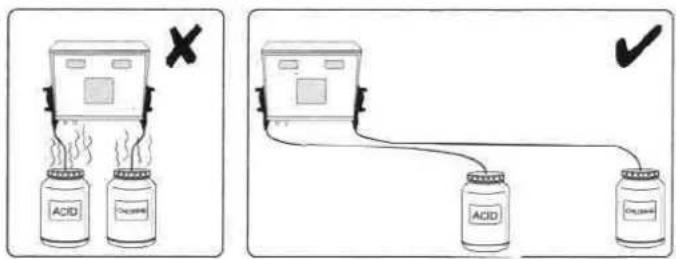
***Chemicals MUST be stored apart in accordance with Relevant Standards and Dangerous Goods Codes. Consult your authorized builder or pool shop technician for advice. Chemicals must be at least 1 metre horizontally from control unit in a well ventilated area to avoid corrosive damage.
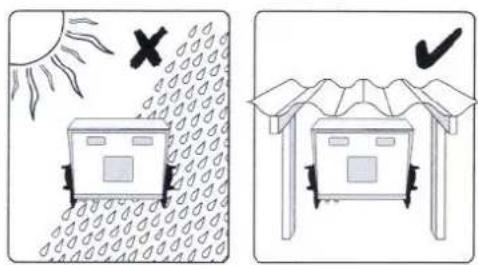
Placement of Rola Chem Unit
Connection of Lines
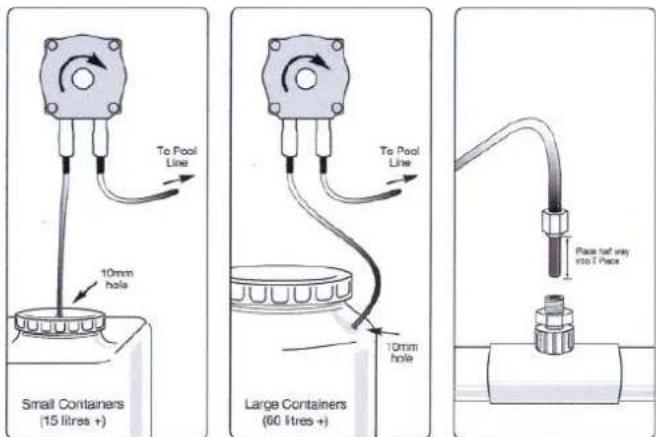
When inserting chlorine and acid tubes into dosing cell, tubes should penetrate approximately 50mm or half way into the depth of the mixing chamber. If the tube has a radius formed which is caused by the memory of the material, it is important that the tube point in the direction of the water flow.
Product is designed to run with ACID diluted to water to acid ratio of 2:1 should always be followed as the machines dosing rate is formulated around the diluted solution. Using neat acid can lead to overdosing the pH level.

natural_image
3D rendering of a room with industrial equipment and a brick wall, no visible text or symbols
Packed inside your controller there will be a combination of the following items depending on the model of controller ordered;
a. RC9 Controller
b. RC9 mounting plate
c. Intelligent pH probe (if pH model)
d. Intelligent ORP probe (if ORP model)
e. Mixing chamber – for installation of feed tubes and probes
f. Clear supply tube
g. Non return valve(s)
h. Hose weight(s)
i. Alligator clamps
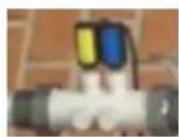
- Begin installation by plumbing the mixing chamber into the return line of the swimming pool. The mixing chamber should be installed after gas heaters and solar take offs and returns but before any other sanitising device such as salt chlorinators or erosion feeders. When installing the mixing chamber, it is essential the probes are horizontal to the water flow. This ensures the probes are constantly submerged even when water flow is restricted.

√
X
- Locate position for mounting plate where equipment will receive greatest protection from direct sunlight and rain. Ensuring plate is level, screw into a solid wall or post using 4 holes provided.

- Once mounting plate is secure, locate RC9 control box onto the 2 locating tabs at the top. The bottom of the control box should then "snap" into place with light pressure on the locking device of the mounting plate.
- Connect power cable from RC9 control box to GPO or pool and spa controller if applicable.
- Raise front cover of RC9 controller to expose dosing pumps.
- Measure required length of clear supply tubing to reach from dosing pump to mixing chamber. Be sure to allow an additional 100mm of tubing so it can be fed into the return pipe work downstream of the mixing chamber.
- Measure required length of clear supply tubing to reach from dosing pump to chemical supply drum. Be sure to allow enough tubing so it can reach to the bottom of the drum / container.
- Attach tubing for the mixing chamber to the outlet (right hand) barb fitting of the dosing pump squeeze tube. Attach the tubing for the supply drum / container to the inlet (left hand) barb fitting. Once tubes are fitted to barbs, attach alligator clamps to hose to secure it to the barb.
From chemical drum / container

natural_image
Blue plastic mechanical component with two threaded ports and a central hole, shown with directional arrows (no text or symbols)To mixing chamber and pool return
Tip – to allow for easier fitting of tubes to pump barbs, soak end of clear supply hose in hot water for 30 seconds.
- Remove probe(s) (if model applicable) from carton and carefully take off rubber protective cover from the tip. Insert probe into mixing chamber and finger tighten only. DO NOT OVER TIGHTEN.
- Fit chemical feed tube(s) to mixing cell though glands provided, feeding approx 50mm of tube down return to pool pipe work.
- Fit chemical feed tube(s) to supply drums/containers. This should be done by feeding the tube through a tight fitting hole in the lid of the container. Once fed through, fit hose weight and non return valve to the end of the tube. A breather hole should also be made in the chemical container. If being stores in a plant room or similar enclosed area, an additional tube should be run from the breather hole to outside of the equipment/plant room.

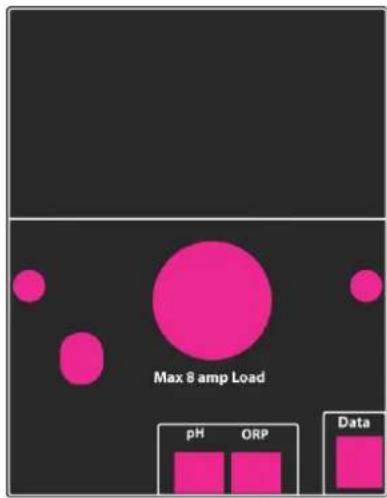
- Connect cable from pH and/or ORP probe to socket on underside of RCg controller.
- Turn power on to the RC9 controller. The main screen will be shown after a short period.

flowchart
graph TD
    Timer --> PH_SET["PH SET 7.6"]
    Clock --> PH_SET
    PH_SET --> MAINT
    MAINT --> Pool_Mode
    Pool_Mode --> Spa_Mode
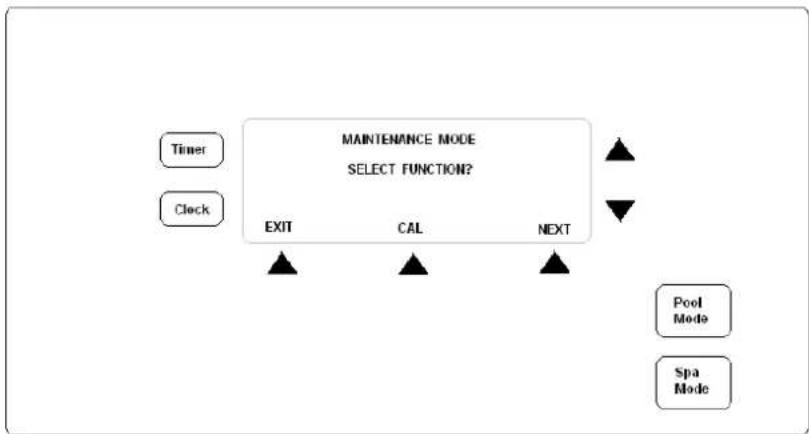
- Press button located under the "MAINT" option and the following screen will be displayed;
flowchart
graph TD
    A["Timer"] --> B["EXIT"]
    C["Clock"] --> B
    B --> D["CAL"]
    B --> E["NEXT"]
    D --> F["MAINTENANCE MODE SELECT FUNCTION?"]
    E --> F
    F --> G["Pool Mode"]
    F --> H["Spa Mode"]
Select the "NEXT" option and the following screen will be shown;
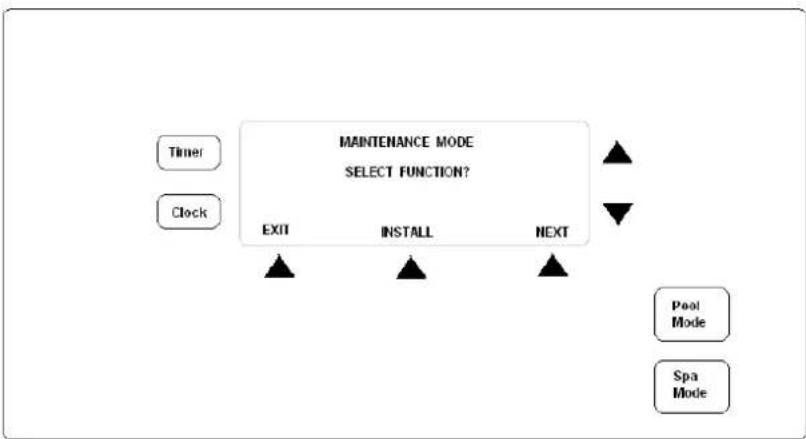
flowchart
graph TD
    A["Timer"] --> B["EXIT"]
    C["Clock"] --> B
    B --> D["INSTALL"]
    B --> E["NEXT"]
    D --> F["Pool Mode"]
    E --> G["Spa Mode"]
    style A fill:#f9f,stroke:#333
    style C fill:#f9f,stroke:#333
    style B fill:#ccf,stroke:#333
    style D fill:#ccf,stroke:#333
    style E fill:#ccf,stroke:#333
    style F fill:#dfd,stroke:#333
    style G fill:#dfd,stroke:#333
Select the "INSTALL" option
-
"SET WATER VOLUME" will be shown, select YES and adjust volume to match pool. You will need to set levels for both Pool and Spa. If no spa is attached, just leave spa volume on default size. Press ACCEPT.
-
"CHLORINE SENSOR" (if a chlorine dosing unit) will be shown. You can select either ORP or OPTO-MIZER using the arrows to the right of the screen.
-
"ENABLE ALARM" allows you to select if an audible alarm will sound if either the ORP, PPM or pH readings go outside of the minimum or maximum set levels. Choose YES or NO. If YES is selected, you will need to set maximum and minimum levels before the alarm will sound.
-
If Optimizer option is selected and fitted, you can change the Optimizer measure cycle time. This can be set between 6 – 40 minutes. The lower this is set the more often the unit will measure and dose your pool water.
-
"TIMER" is set default to ENABLED. If you are using an AstralPool controller or similar, change this to NOT ENABLED. If NOT ENABLED is selected, you will be asked if a G4 system is installed. Select installed for all compatible AstralPool controllers including Viron Connect, Genus 4 and Genus 3 controller. For all non AstralPool controllers, select NOT INSTALLED to this option.
-
"FAST COMMS" is only used when a Viron Connect touch screen controller is connected to the RCg dosing system. If a Viron Connect system is connected, change this option to ENABLED. For all other controllers, this option needs to be changed to NOT ENABLED.
-
"FLUSH AFTER TIMER" will bring the filtration pump on momentarily to flush out any residual chemicals from the mixing cell. This will occur approximately 30 minutes after the timer period has finished. This should be left YES (this option is only shown where the TIMER has been enabled)
-
"RESET SYSTEM" select NO
The installation set up is now complete.
- Using the POOL MODE button, switch the RC9 to manually off.
- Press the CLOCK button to the left of the screen and you will have the following options;

flowchart
graph TD
    A["Day: MONDAY\nTIME: 00:00"] --> B["DAY"]
    A --> C["HOUR"]
    A --> D["MIN"]
    B --> E["Pool Mode"]
    C --> F["Spa Mode"]
    D --> G["Clock"]
    H["Timer"] --> A
- To change the day, press the DAY button first then use the up and down arrows. Repeat for the HOUR and MIN settings. Once complete, press the CLOCK button.
- Press the TIMER button to the left of the screen and you will have the following options;

flowchart
graph TD
    A["Timer"] --> B["MONDAY - FRIDAY TIMER 1 START AT 08:00"]
    C["Clock"] --> B
    B --> D["NEXT"]
    B --> E["HOUR"]
    B --> F["MIN"]
    D --> G["Pool Mode"]
    E --> H["Spa Mode"]
- Using the up and down arrows in conjunction with the HOUR and MIN buttons, set the time you want the filtration pump to start at. Press NEXT when done.
- Using the up and down arrows in conjunction with the HOUR and MIN buttons, set the amount of time you want the filtration pump to run for. (Note: You are not setting an off time, you are setting a run period). Press NEXT when done.
- Repeat steps 5 & 6 for timer period 2 and for Saturday-Sunday periods.
Note: In the event you cannot increase the start time for the period, it will most likely be caused by the set run time going beyond midnight. When setting timers, you cannot set period to run past midnight as this will cause conflict between Mon-Fri settings and Sat-Sun settings. For night time running, set your first period to run up until 23:59 and your second period to start at 00:01.
PLEASE NOTE:
Each time RC9 starts up in Automatic, it will be on pre-purge for 5 minutes. The display shows:
PRE\_PURGE
This allows time for accurate sensing and proper mixing before dosing commences. For service needs, press Pool Mode to get to Manual On and there will be no Pre-purge
- The factory default set points are;
i. pH - 7.6
ii. ORP - 700mV
As all pools are different in construction, it may be necessary to change the set points. To ensure warranty on your pool shell /surface, the required levels should be set under guidance from your pool builder or other pool professional
- To change the settings for either ORP or pH, switch the controller into the manually off position using the POOL MODE button, then select the SET button from the main screen.

flowchart
graph TD
    A["Timer"] --> B["SET"]
    C["Clock"] --> B
    B --> D["MAINT"]
    E["Pool Mode"] --> D
    F["Spa Mode"] --> D
    B --> G["MONDAY 16:24 SANITISING POOL MANUALLY OFF"]
-
The screen will display "Change pH Set Point?" Select Yes or No.
-
Using the Up and Down arrows to the right of the screen change set point if required. Select ACCEPT when done.
-
Repeat process for ORP setting also.
RC9 – ORP AND/OR PH MANUAL DOSING
- Using the POOL MODE button, switch the RC9 to manually off.
- Select the MAINT option and the following screen will be shown;
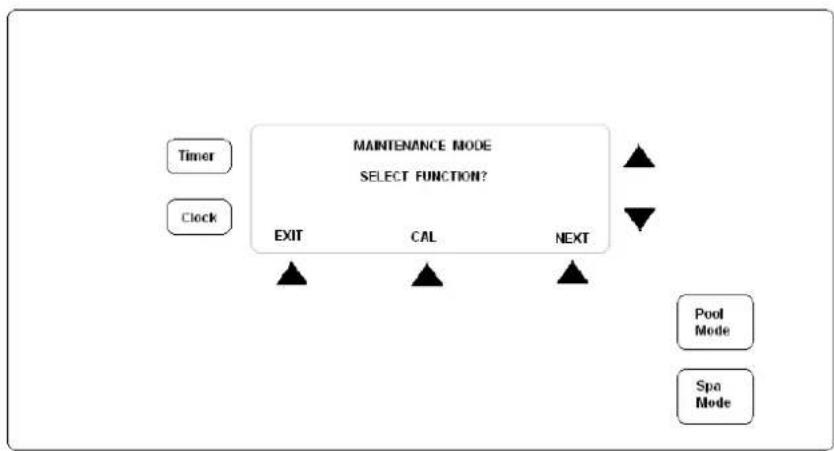
flowchart
graph TD
    A["Timer"] --> B["EXIT"]
    C["Clock"] --> B
    B --> D["CAL"]
    B --> E["NEXT"]
    D --> F["MAINTENANCE MODE SELECT FUNCTION?"]
    E --> F
    F --> G["Pool Mode"]
    F --> H["Spa Mode"]
- Press NEXT button twice so that the middle button displays DOSE. Press DOSE button.
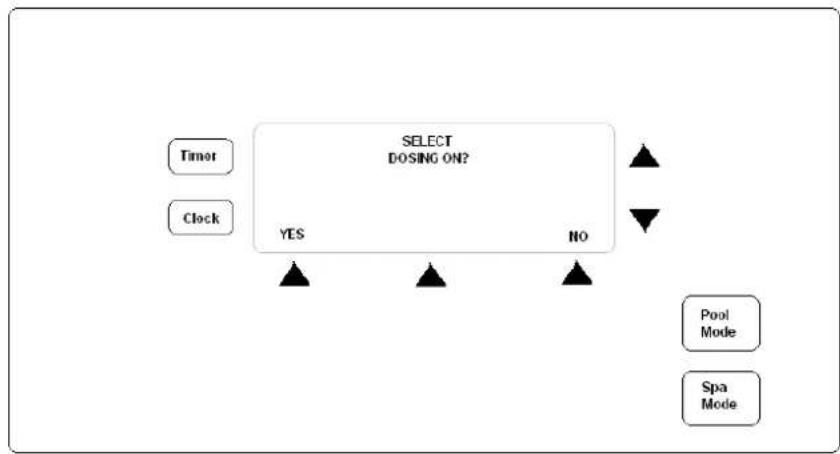
flowchart
graph TD
    A["Timer"] --> B["SELECT DOISING ON?"]
    C["Clock"] --> B
    B --> D["YES"]
    B --> E["NO"]
    D --> F["Pool Mode"]
    E --> G["Spa Mode"]
-
Select YES. You will be give the option to dose either Acid or Chlorine, pick the one you are wishing to dose. You will then need to set the dosing time/quantity using the up and down arrows to the right of the screen. You can choose to dose by volume of liquid or time period. Once you have set the volume/time to be dosed, select ACCEPT.
-
You will be prompted to select the mode of the controller after the manual dosing has completed.
i. AUTO - will switch the controller back to Auto/Timer mode after dosing has completed
ii. ON - Controller will switch to manually on and continue to operate until switched off or back to Auto
iii. OFF - Controller will switch Off and remain Off.
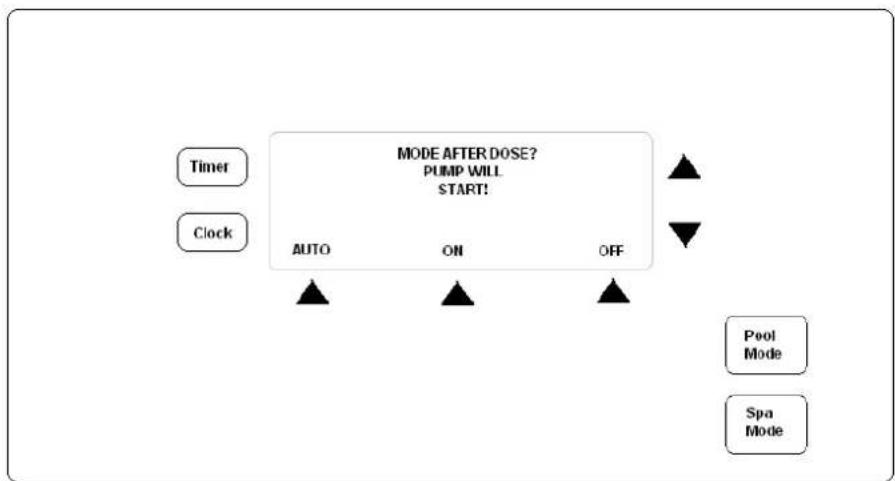
flowchart
graph TD
    A["Timer"] --> B["AUTO"]
    C["Clock"] --> B
    B --> D["ON"]
    B --> E["OFF"]
    D --> F["MODE AFTER DOSE? PUMP WILL START!"]
    E --> F
    F --> G["Pool Mode"]
    F --> H["Spa Mode"]
-
Using the POOL MODE button, switch the RC9 to manually off. Before proceeding, clean the probe to be calibrated with an abrasive crème cleanser such as Jiff. DO NOT USE ACID. Once cleaned, flush with water and allow to sit for 4 – 5 minutes before continuing with calibration.
-
Select the MAINT option and the following screen will be shown;

flowchart
graph TD
    A["Timer"] --> B["MAINTENANCE MODE SELECT FUNCTION?"]
    C["Clock"] --> B
    B --> D["EXIT"]
    B --> E["CAL"]
    B --> F["NEXT"]
    D --> G["->"]
    E --> H["->"]
    F --> I["->"]
    G --> J["Pool Mode"]
    H --> K["Spa Mode"]
- Select CAL option. Then select either PH or ORP calibration based on the option provided.
- Once you have selected which probe you wish to calibrate you will be asked "Select Filter Pump On?" This option decides if the filtration pump is to be running during the calibration process.
i. If you are calibrating by leaving the probes in the mixing cell and using the pool water for reference, select YES.
ii. If you are using a calibration solution (available from AstralPool dealers) select NO.
-
Once you have selected Yes or No, the display will indicate the unit is measuring the current level. Once the reading is completed, the current pH or ORP reading will be displayed on the screen. Using the Up and Down arrows, change the reading to reflect the calibration solution level or the tested water level. Press ACCEPT.
-
Repeat if required on other probe.
Alarm messages are displayed on the LCD display and more information can be obtained by pressing the INFO button which appears when an error occurs. The info button also mutes the audible alarm. The Error message will continue to flash on the screen until the fault(s) are rectified. Typical faults are:
a) High or low chemical levels: This indicates that the pH or ORP are outside set limits
b) SENSOR FAULT: This indicates that there is a problem with the pH or ORP sensing system. Potential issues could be that the sensor is not connected or that the sensor requires cleaning.
Possible causes for faults
| Low Chlorine• Chlorine drum is empty• Filter: run timing is not sufficient or requires back washing• Stabiliser level is low (outdoor pools)• pH is too high• Poor water circulation• Injection point at delivery end is blocked• Dosing pump is undersized• Probe malfunction | High Chlorine• pH is too high• High total dissolved solids (TDS)• Excess stabiliser level (outdoor pools)• Oversized dosing pump• Probe malfunction |
| Low pH• Poor water circulation• Excessive rainfall (neutralising TA)• Faulty dosing pump• Probe malfunction | High pH• Acid drum is empty• Acid is over-diluted• Filter: run timing is not sufficient or requires back washing• Probe malfunction |
- Lubricate the squeeze (pump) tube every 6 months, more often in commercial applications. Use only the recommended lubricant "RC Tube Lube" available from AstralPool dealers or any other compatible silicone lubricant, otherwise damage to the tube is possible. Do not use any petroleum based lubricants.
- Depending upon usage, the squeeze tube may need replacement after 12 months on a domestic installation, and earlier on a commercial installation. Before replacing the tube make sure that any stop valves in the filter system are closed. Otherwise water loss may occur.
a. To replace the tubes, remove the retaining screws and the pump head and pull the tube free. Disconnect the squeeze tube from the barbs and fit the new squeeze tube. Ensure the new tube has sufficient lubrication. Make sure that the new tube is correctly connected to the PVC tubing as per instructions. Reposition the squeeze tube in the unit as before, replace the pump head and retaining screws. PLEASE DO NOT OVERTIGHTEN THE RETAINING SCREWS - The Injection Point through which the chemical discharges into the pipeline should be checked periodically for any build up of solid matter in the end of the PVC tubing and kept clean. Blockages can be caused by stale or poor quality chlorine or improper water chemistry. This may cause blockages and not allow the chemical to pass through the line and will alter the pH or ORP levels and may cause the squeeze tube to come off the barbs
- The probes/sensors are sensitive instruments. To maintain their accuracy they should be cleaned periodically by household detergent abrasive like Jiff. Jiff is the preferred option. The ORP probe tip can be contaminated (generally observed by a copper or brownish coating – this should always look shiny silver) which will give a false reading to the Controller causing no dosing/over dosing of chemical. As the pH sensor tip is made of glass, please take care, for even a hair line crack can cause the sensor to read incorrectly causing malfunction.
- After cleaning the sensors/probes, wash with water, allow 5-10min. to settle and check calibration or re-calibrate if necessary. Copper based algaecides should be avoided, but if used the cleaning procedure for the ORP sensor can be more frequent, as copper will coat the sensor tip (made of platinum) more rapidly. USE OF A SUN SCREEN CHEMICAL (CYANURIC ACID) FOR OUTDOOR POOLS IS RECOMMENDED.
CHECK WITH YOUR LOCAL POOL SHOP AND USE THE CORRECT DOSAGE. MAKE SURE YOUR POOL WATER IS WELL BALANCED WITH THE CORRECT pH, TDS, TA AND STABILISER LEVELS AND FREE FROM PHOSPHATES.
| TROUBLEpH reading incorrect | POSSIBLE CAUSE/SOLUTION* Clean the sensor.* Check calibration of sensor in the pH cal. sol.* Check water balance & correct if reqd. |
| ORP reading incorrect | * Clean sensor.* Check calibration of sensor in ORP Cal. sol.* Check water balance, especially pH. |
| Dosing pump does not operate as it should | * Is Setpoint level altered? |
| The Roller (H) Block on the inside of the unit does not dispense chemicals | * No chemicals in the tank.* Injection point blocked.* Air leak at the connection where the tube from the drum connects onto the pump tube.* Chemical container airtight.* Roller or H block broken.* Pump head cracked.* Squeeze tube needs replacement. |
| Water returns to the chemical drum | * Check last 3 points above. Replace non-return Valve if fitted. If not please fit. |
| Numbers not appearing on display panel, no lights or power | * Turn off for 15 minutes, and then restart. If still no response, contact AstralPool Service. |
IMPORTANT: ELECTRICAL SPIKES/SURGES OR SIMILAR SITUATIONS CAN AFFECT THE ELECTRONICS & SENSORS AND CAUSE THE MACHINE TO MALFUNCTION. IT IS NECESSARY TO CHECK THE WATER CHEMISTRY, ESPECIALLY PH AND CHLORINE LEVELS REGULARLY WITH A GOOD QUALITY TEST KIT AND LOOK OUT FOR ANY MALFUNCTIONS. IF THE PH AND/OR ORP READING ON THE RC MACHINE ARE OUT OF NORMAL RANGE PLEASE TURN THE MACHINE OFF AND CALL A POOL TECHNICIAN OR ASTRALPOOL
ALWAYS USE GENUINE ROLA CHEM PARTS.
AstralPool reserves to change product specifications without notice.
Please check AstralPool web site at www.astralpool.com.au for updates before installing or servicing Rola Chem units.
You new product incorporates moving parts and withstands high velocity water with chemicals in it. Some of these parts will wear in the normal course of use and require regular checks and maintenance. Performing these checks and maintenance will identify parts that have worn and require repair/replacement before further serious damage is sustained. A small amount of regular care and attention to your pool equipment will help ensure long life and trouble free performance.
| Timing | Maintenance Check | Service action (if required) |
| Fortnightly | Check acid / chlorine drums | Fill drums, use a 2:1 mixture for acid |
| Three Monthly | Check supply tubes for blockages | Cut ends off supply tubes if build up of scale and reconnect |
| Check pH and ORP probes | Clean with abrasive crème cleanser (do not use acids), reassembly and allow at least 1 hour for sensing to return to normalReplace if required | |
| Check non return valves in drums | ||
| Six Monthly | Check output settings and adjust | Adjust timer / output settings based on season, weather and pool usage |
| Check squeeze tubes | Apply grease if required, replace if leaking | |
| Spray around equipment for insects | Spray on surrounding walls, do not spray directly into appliance | |
| Recalibrate sensors | Follow instructions in this manual | |
| Annually | Check all connections, o'rings and tubing | Call Service technician to perform annual checks and routine maintenance |
Important note: Regular maintenance is important to ensure long life and trouble free performance of your pool equipment. If unable to perform the maintenance yourself, contact your local AstralPool office who will arrange a trained service technician to perform the maintenance for you.
Record your Equipment details here for quick reference:
Model No.:
Serial No.: ____

INST291

sales@astralpool.com.au
www.astralpool.com.au
Fluidra Group Australia Pty Ltd,
ABN 87 002 641 965
219 Woodpark Road Smithfield NSW 2164
AU 1300 763 021
Brand : ASTRALPOOL
Model : RolaChem RP9
Category : Detector