
LIVA Q1D - Desktop computer ECS - Free user manual and instructions
Find the device manual for free LIVA Q1D ECS in PDF.


| Product Type | Mini Desktop Computer |
| Model | LIVA Q1D |
| Brand | ECS (Elitegroup Computer Systems) |
| Processor | Intel Celeron N3350 (dual-core, 1.1 GHz, burst up to 2.4 GHz) |
| RAM | 4GB LPDDR4 (onboard, non-upgradable) |
| Storage | 32GB eMMC (onboard, non-upgradable) |
| Operating System | Windows 10 Pro (pre-installed) or Windows 11 compatible |
| Graphics | Intel HD Graphics 500 |
| Dimensions (W x D x H) | 118 x 70 x 56 mm (4.65 x 2.76 x 2.20 inches) |
| Weight | Approx. 0.45 kg (1.0 lb) |
| Power Supply | DC 12V, 2.5A (external AC adapter, 30W) |
| Connectivity | Wi-Fi 802.11ac, Bluetooth 4.2, Gigabit Ethernet |
| Ports | 2x USB 3.0, 1x USB 2.0, 1x HDMI, 1x VGA, 1x RJ45, 1x Audio combo jack |
| Storage Expansion | MicroSD card slot (up to 128GB) |
| Cooling | Passive (fanless) design |
| VESA Mount | Supports VESA mount (75x75mm or 100x100mm, bracket included) |
| Main Functions | Office productivity, web browsing, media streaming, light computing tasks |
| Maintenance & Cleaning | Wipe with dry soft cloth; do not use liquids or solvents. Keep ventilation slots clear. |
| Safety | Use only provided adapter. Avoid exposure to moisture or extreme temperatures. |
| Spare Parts & Repairability | No user-serviceable parts inside. Contact ECS support for replacement. |
| General Information | Compact and energy-efficient desktop for basic computing needs. Suitable for digital signage, thin client, or home server. |
Frequently Asked Questions - LIVA Q1D ECS
User questions about LIVA Q1D ECS
0 question about this device. Answer the ones you know or ask your own.
Ask a new question about this device
Download the instructions for your Desktop computer in PDF format for free! Find your manual LIVA Q1D - ECS and take your electronic device back in hand. On this page are published all the documents necessary for the use of your device. LIVA Q1D by ECS.
USER MANUAL LIVA Q1D ECS
natural_image
Black rectangular electronic device with ventilation slots and ports, no visible text or symbols on body
ELITEGROUP
Preface
Copyright
This publication, including all photographs, illustrations and software, is protected under international copyright laws, with all rights reserved. Neither this manual, nor any of the material contained herein, may be reproduced without written consent of the author.
Version 1.0
Disclaimer
The information in this document is subject to change without notice. The manufacturer makes no representations or warranties with respect to the contents hereof and specifically disclaims any implied warranties of merchantability or fitness for any particular purpose. The manufacturer reserves the right to revise this publication and to make changes from time to time in the content hereof without obligation of the manufacturer to notify any person of such revision or changes.
Trademark Recognition
Windows 10 is a registered trademark of Microsoft Corp.
Other product names used in this manual are the properties of their respective owners and are acknowledged.
Federal Communications Commission (FCC)
This equipment has been tested and found to comply with the limits for a Class B digital device, pursuant to Part 15 of the FCC Rules. These limits are designed to provide reasonable protection against harmful interference in a residential installation. This equipment generates, uses, and can radiate radio frequency energy and, if not installed and used in accordance with the instructions, may cause harmful interference to radio communications. However, there is no guarantee that interference will not occur in a particular installation. If this equipment does cause harmful interference to radio or television reception, which can be determined by turning the equipment off and on, the user is encouraged to try to correct the interference by one or more of the following measures:
- Reorient or relocate the receiving antenna
- Increase the separation between the equipment and the receiver
- Connect the equipment onto an outlet on a circuit different from that to which the receiver is connected
- Consult the dealer or an experienced radio/TV technician for help
Shielded interconnect cables and a shielded AC power cable must be employed with this equipment to ensure compliance with the pertinent RF emission limits governing this device. Changes or modifications not expressly approved by the system’s manufacturer could void the user’s authority to operate the equipment.
Declaration of Conformity
This device complies with part 15 of the FCC rules. Operation is subject to the following conditions:
- This device may not cause harmful interference.
- This device must accept any interference received, including interference that may cause undesired operation.
This device is in conformity with the following EC/EMC directives:
EN 55032
Electromagnetic compatibility of multimedia equipment - Emission requirements
EN 61000-3-2
Electromagnetic Compatibility(EMC)
Part 3-2: Limits-Limits for harmonic current emissions (equipment input current ≤16A per phase)
EN 61000-3-3
Electromagnetic Compatibility(EMC)
Part 3-3: Limits-Limitation of voltage changes, voltage fluctuations and flicker in public low-voltage supply systems, for equipment with rated current ≤slant 16A per phase and not subject to conditional connection
EN 55024
Information technology equipment-Immunity characteristics-Limits and methods of measurement
EN 60950
Safety for information technology equipment including electrical business equipment
EN 62368
Safety for information technology equipment including electrical business equipment
□ CE marking

Safety Instructions
Your system is designed and tested to meet the latest standards of safety for information technology equipment. However, to ensure your safety, it is important that you read the following safety instructions.
Setting up your system
- Read and follow all instructions in the documentation before you operate your system.
- Do not use this product near water or a heated source such as a radiator.
- Set up the system on a stable surface.
- Openings on the chassis are for ventilation. Do not block or cover these openings. Make sure you leave plenty of space around the system for ventilation. Never insert objects of any kind into the ventilation openings.
- Use this product in environments with ambient temperatures between 0^ and 40^ .
- If you use an extension cord, make sure that the total ampere rating of the devices plugged into the extension cord does not exceed its ampere rating.
Attention during use
- Do not step on the power cord or let anything rest on top of it.
- Do not spill water or any other liquid on your system.
- When the system is turned OFF, a small amount of electrical current still flows. Always unplug all power, modem, and network cables from the power outlets before cleaning the system.
- If you encounter the following technical problems with the product, unplug the power cord and contact a qualified service technician or your retailer.
- The power cord or plug is damaged.
- Liquid has been spilled into the system.
- The system does not function properly even if you follow the operating instructions.
- The system was dropped or the cabinet is damaged.
- The system performance changes.

The warranty does not apply to products that have been disassembled by users.
Safety cautions and warnings
Product disposal notice

IMPORTANT:
This symbol if the crossed out wheeled bin indicates that the product (electrical and electronic equipment) should not be placed in municipal waste. Check local regulations for disposal of electronic products.
Nordic Lithium Cautions (for lithium-ion batteries)

CAUTION:
Danger of explosoin if battery is incorrectly replace only with the same or equivalent type recommended by the manufacturer. Dispose of used batteries according to the manufacturer's instructions.
Product disposal notice

- Do not place this product underneath heavy loads or in an unstable position.
- Do not use or expose this product around magnetic fields as magnetic interference may affect the performance of the product.
- Do not expose this product to high levels of direct sunlight, high-humidity or wet conditions.
- Do not block the air vents to this product or impede the airflow in any way.
Canadian Department of Communications
This class B digital apparatus meets all requirements of the Canadian Interference-causing Equipment Regulations.
Introducing the PC 1
Introduction......1
Specifications....2
Front and Rear I/O......4
Side I/O....6
Install the VESA Mount......7
Motherboard Components......9
Memo
Introduction
Thank you for choosing LIVA Q1D / PB01D Mini PC featuring Intel® Apollo Lake of great performance and with stylish and flexible design.
This mini PC is based on Intel ^® Dual Core Celeron ^® N3350 /Intel ^® Quad Core Pentium ^® N4200 Mobile platform. This latest Core-M processor is a multi-core system-on-a-chip (SoC) that integrates the next generation Intel ^® processor core, graphics, memory, and I/O interfaces into one solution.
It supports LPDDR4 (2400) up to 2GB / 4GB memory, It also can add additional storage from USB Flash Drive.
The system is equipped with a set of I/O ports at the front/rear panel, including one USB 2.0 port, two USB 3.2 Gen 1x1 ports, one Giga LAN connector, one HDMI 2.0 port, one DP 1.2 port, one Micro SD card slot, one DC port, one power button.

natural_image
Black rectangular electronic device with ventilation slots and ports, no visible text or symbolsNote:
ID design and specification may vary, please refer to actual goods you purchase.
Specifications
| CPU/Chipset | I®Dual Core Celeroh®N3350 / Intel® Quad Core Pentium® N4200 |
| Memory | Support LPDDR4 (2400Mhz) up to 2GB / 4GB |
| Storage | Support eMMC 32 GB/64 GB |
| Rear Panel I/O | 1 x USB 2.0 port2 x USB 3.2 Gen 1x1 ports1 x Giga LAN connector (10/100/1000Mbps)1 x HDMI 2.0 port1 x DP 1.2 port1 x Micro SD card slot1 x DC port |
| Button and LED Light | Power buttonPower LED Light |
| LAN | 802.11 ac/b/g/n WiFiBluetooth 4.1 supports BT peripheral device |
| Power Supply | ASIAN POWER DEVICES INC.WB-24J12R |
| System BIOS | AMI BIOS with 128Mb SPI Flash ROMSupports dual display |
| Operation System | Windows 10 Pro 64bit |
| Heatsink Design | Heatsink and cooling fan |
| Operation Temp | 0~+40 °C |
| Dimension | 74mm x 74mm x 34.6mm |
| Color | Black/Blue |
Front and Rear I/O
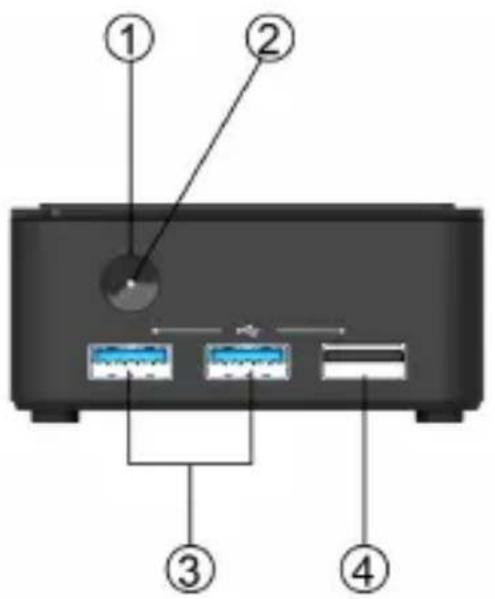
Note:
ID design and specification may vary, please refer to actual goods you purchase.
- Power Button
Use this button to power on/off the system. - Power State LED
This is power state LED light. - USB 3.2 Gen 1x1 Ports
Connect USB 3.2 Gen 1x1 ports compatible devices. - USB 2.0 Port
Connect your USB 2.0 device to this port.

- HDMI Port
You can connect the display device to the HDMI port.
- Giga LAN Port (10/100/1000Mbps)
Connect the RJ-45 jack to the LAN ports for Network connecting.
- DP Port
You can connect the display device to the DP port.
- 12V DC_IN Port
Connect the DC_IN port to the power adapter.
Side I/O

natural_image
Back view of a portable electronic device with ventilation grille and indicator lights, labeled with number 9 (no text or symbols on the device itself)This is Micro SD card slot.9. Micro SD card s
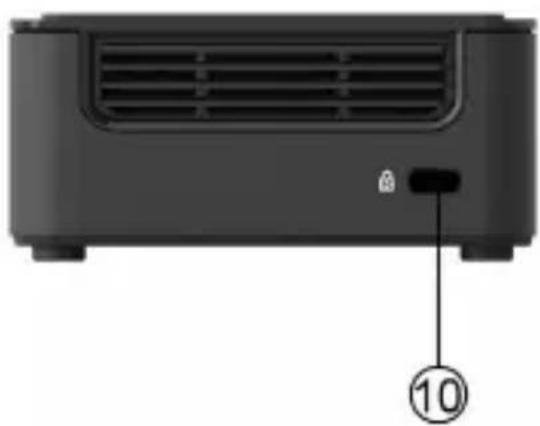
natural_image
Front view of a black electronic device with ventilation grille and a labeled button (no text or symbols beyond the number 10)This is security key hole.10. Security Key ho
Install the VESA Mount
- Mount 4 screws on VESA bracket.

- Fasten 2 screws under the case.

natural_image
Black rectangular electronic device with four mounting holes and a small cylindrical component on top (no visible text or symbols)LIVA Q1D / PB01D MINI PC USER MANUAL
- Hold the case towards the VESA bracket and insert the screws into the holes.

- Slide the case down until it fixed.

natural_image
Close-up of a black LIVA device panel with mounting holes and a white logo (no readable text or symbols beyond branding)Motherboard Components


Note:
Find AJ1\~2 and SCN4\~5 on the two motherboards, insert SCN4\~5 into AJ1\~2 correctly after their alignment.
Table of Motherboard Components
Chapter 1
| LABEL COMPONENTS | |
| 1. SoC Intel® Dual | Core Celeron® N3350 /Intel® Quad Core Pentium® N4200 |
| 2. DC_IN Power input port | |
| 3. LED1 Power state LED | |
| 4. PWR_BTN1 Power On/Off button | |
| 5. SCN4 Motherboard connector | |
| 6. SPWR_ON External power on header | |
| 7. SBAT1 Battery connector | |
| 8. SCN5 Motherboard connector | |
| 9. AUSB3~4 USB 3.2 Gen 1x1 ports | |
| 10. ASUSB2 Standard USB 2.0 port | |
| 11. ASHDMI HDMI connector | |
| 12. ASLAN Network connector (10/100/1000Mbps) | |
| 13. ASDP1 DP connector | |
| 14. ASD Micro SD card slot | |
| 15. AJ1 IO board connector | |
| 16. AJ2 IO board connector | |
- Preface
- Copyright
- Disclaimer
- Trademark Recognition
- Federal Communications Commission (FCC)
- Declaration of Conformity
- Safety Instructions
- Setting up your system
- Attention during use
- Safety cautions and warnings
- Product disposal notice
- Nordic Lithium Cautions (for lithium-ion batteries)
- Canadian Department of Communications
- Introducing the PC 1
- Introduction
- Front and Rear I/O
- Side I/O
- Install the VESA Mount
Brand : ECS
Model : LIVA Q1D
Category : Desktop computer