HER-440 - Anemometer Steren - Free user manual and instructions
Find the device manual for free HER-440 Steren in PDF.


| Product Type | Air Flow Digital Anemometer |
| Brand | Steren |
| Model | HER-440 |
| Power Supply | 9V square battery (PP3) |
| Measurement Range (Velocity) | 0.8 to 40 m/s |
| Accuracy (Velocity) | ±(2.0% + 50D) from 0.80 to 30.00 m/s |
| Resolution | 0.01 m/s, 0.01 km/h, 0.01 ft/s, 0.01 knots, 0.01 mile/h, 1 ft/m |
| Sampling Time | 0.4 seconds |
| Auto-Off | After 10 minutes (adjustable) |
| Low Battery Indicator | < 7V |
| Operating Temperature | -20°C to 80°C |
| Humidity Range | < 95% RH (non-condensing) |
| Functions | Velocity, Flow, Area input, Hold, Max/Min, Backlight |
| Velocity Units | m/s, km/h, mil/h, ft/s, ft/min, knots |
| Flow Units | CMM, CMS, CFM |
| Area Units | m², ft² |
| Display | LCD with backlight |
| Safety Precautions | Keep away from children; do not disassemble; avoid wet places; do not use solvents |
| Maintenance | Clean with dry cloth; remove battery when not in use |
| Warranty | 1 year from date of purchase |
Frequently Asked Questions - HER-440 Steren
User questions about HER-440 Steren
0 question about this device. Answer the ones you know or ask your own.
Ask a new question about this device
Download the instructions for your Anemometer in PDF format for free! Find your manual HER-440 - Steren and take your electronic device back in hand. On this page are published all the documents necessary for the use of your device. HER-440 by Steren.
USER MANUAL HER-440 Steren
natural_image
Line drawing of a handheld electronic device with a circular fan and control panel (no text or symbols)CARACTERÍSTICAS
natural_image
Line drawing of a handheld device emitting smoke or vapor (no text or symbols)
STEREN
Medición de fl ujo
ELECTRÓNICA STEREN S.A. DE C.V.
Camarones 112, Obrero Popular, 02840,
Del. Azcapotzalco, México, D.F. RFC: EST850628-K51
STEREN PRODUCTO EMPACADO S.A. DE C.V.
Biólogo Maximino Martinez No. 3408 Int. 2, 3 y 4, San Salvador Xochimanca, México, D.F. 02870,
Del. Azcapotzalco, RFC: SPE941215H43
ELECTRÓNICA STEREN DEL CENTRO, S.A. DE C.V.
Rep. del Salvador 20 A y B, Centro, 06000,
Del. Cuauhtémoc, México, D.F. RFC: ESC9610259N4
ELECTRÓNICA STEREN DE GUADALAJARA, S.A.
López Colilla No. 51, Centro, 44100, Guadalajara, Jal. RFC: ESG810511HT6
ELECTRÓNICA STEREN DE MONTERREY, S.A.
Colón 130 Pte., Centro, 64000. Monterrey, N.L. RFC: ESM830202MF8
ELECTRÓNICA STEREN DE TIJUANA, S.A. de C.V.
Calle 2a, Juárez 7636, Centro, 22000, Tijuana, B.C.N. RFC: EST980909NU5
natural_image
Line drawing of a handheld electronic device with a circular fan and control panel (no text or symbols)Air flow digital anemometer / HER-440
V0.0 / 0316v
Air flow digital anemometer
Thank You on purchasing your new Steren product.
This manual includes all the feature operations and troubleshooting necessary to install and operate your Air flow digital anemometer.
Please review this manual thoroughly to ensure proper installation and operation of this product. For support, shopping, and everything new at Steren, visit our website:
www.steren.com

HIGHLIGHTS
Use this anemometer anytime you need to measure accurately and have the control of air flow and speed, like air extractor installation, vent systems or air conditioner systems.
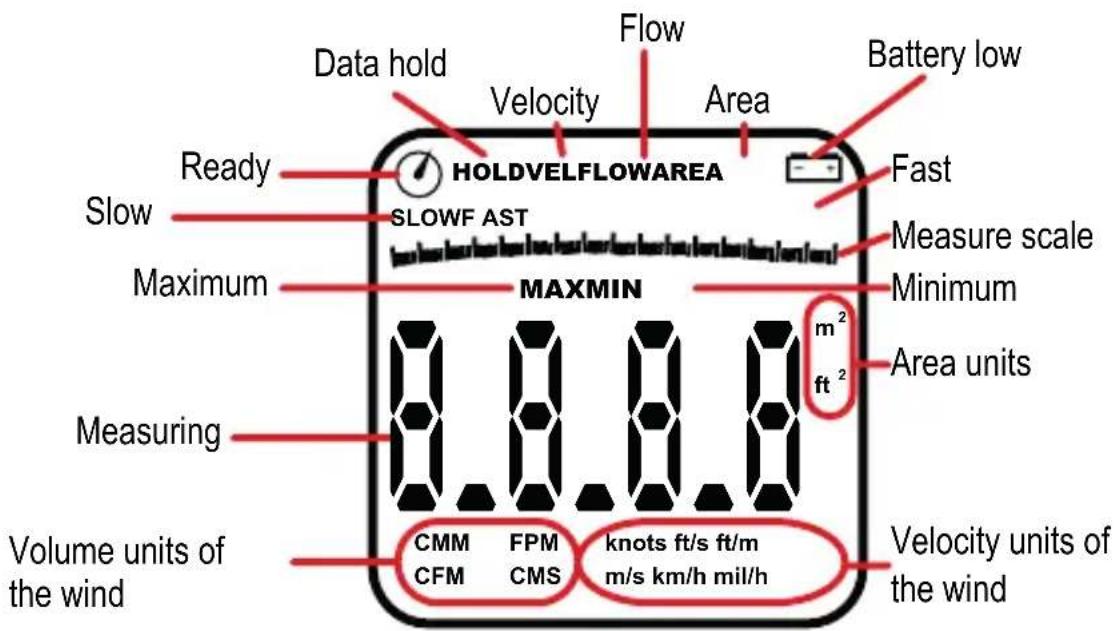
This device shows measuring in real time; it has a Hold button to keep the reading on screen if you need it. It also has the function of maximum and minimum reading.
To measure air speed you will have next units: m/s, km/h, mil/h, ft/s, ft/min and knots; this is very useful in nautical or aeronautics.
The air flow can be measured in the required area (from .001 up to 9.999 m2 or ft2) in CMM, CMS or CFM.
The display can be illuminated if you need it in low light conditions. Besides, it has a battery indicator and auto off function.

IMPORTANT

• This product is NOT a toy; keep it away from kids.

- Do not try to open the device, may cause damages and warranty will be void.

- Do not use or store the equipment near wet places. May cause malfunction or shock hazard.

- Do not use solvents or other chemicals to clean the exterior of the device.

- When is not in use, remove the battery.
PARTS
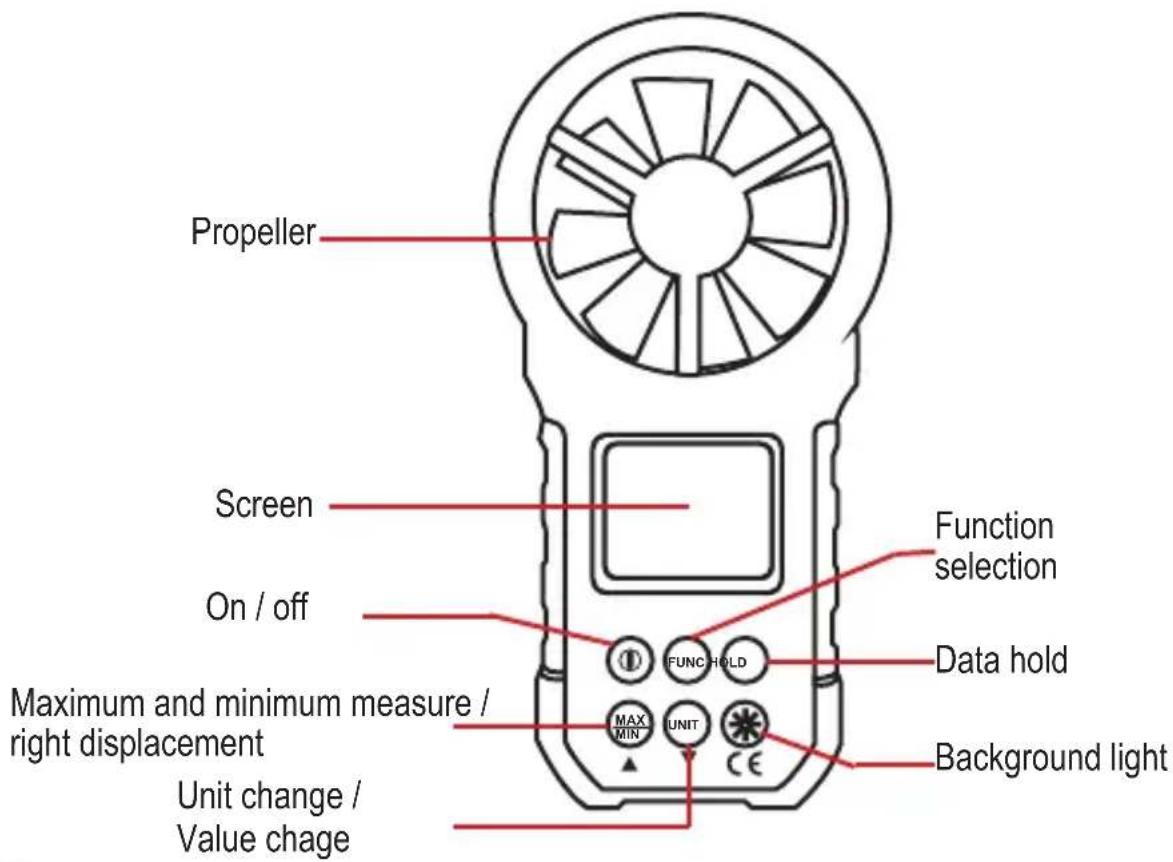
ICONS IN THE SCREEN
Keyboard description
| 1 | On / off |
| FUNC | Press to select: VELOCITY, AREA or FLOW. |
| HOLD | Press to stop the measuring. To deactivate, press again. |
| MAXMIN | Press to hold the highest or lowest measuring. |
| UNIT | Once selected the function, press repeatedly this button to choose the measure unit.Note: To change the unit in the AREA function, press ▲ several times until the unit (m2) start to fl ashing. Then press UNIT |
| Press to turn on the background light of the screen. Automatically, turns off after few seconds. |
INSTRUCTIONS
Battery placement
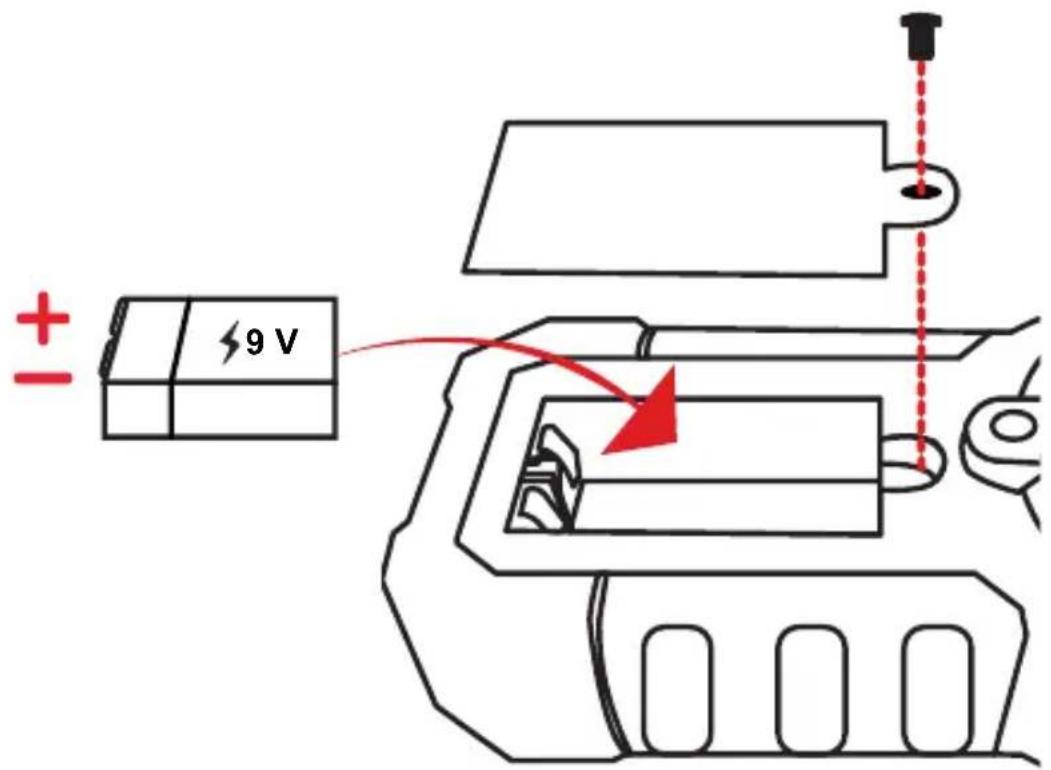

STEREN
HOW TO USE
This device have 2 basic functions: measure the velocity and the flow of the wind. First, identify the area of measure to place the anemometer.
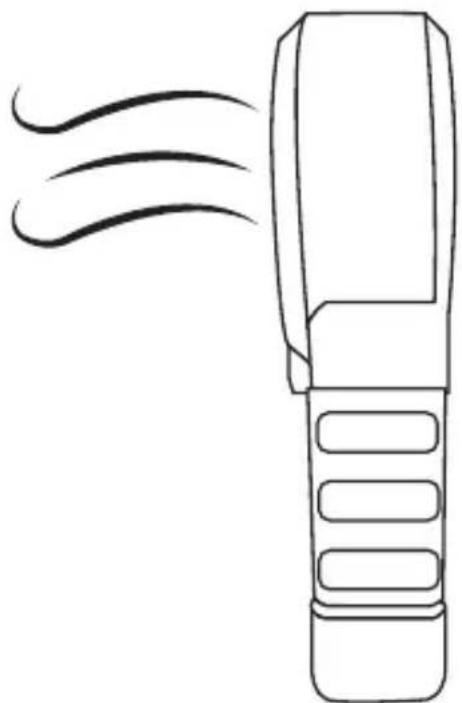
Always aim the device into the wind flow, the air must enter behind of the propeller.
Velocity measuring
- Turn on the equipment. Will start by default in VELOCITY function
- Press UNIT to select the measure unit (m/s, km/, mil/h, ft/s, ft/m or knots).
- Place the anemometer into the measuring area and wait until take a reading.
natural_image
Line drawing of a handheld device emitting smoke or vapor (no text or symbols)Flow mesuring
Is necessary that previously you know the values of the area where you want to measure the flow of the air.
a) Enter the area
Enter manually the values of the area as indicated in the next steps:
- Turn on the device and press Ⓗ until select the AREA function
- In the screen appears: 1.000. The first digit flashing means that is editable. Press (UNIT) to change the value between 0 and 9.
- Press MAX to edit the next number and change it with UNIT
- Make the same with the others digits.
- Change the measure unit (m2 or ft2) with UNIT (if is necessary).
- To save the changes press MAX (the measure unit remains fixed)
b) Air flow measuring
Once you've entered the area, continue with the measuring:
- Press FUNC until locate in the FLOW function.
- Press UNIT to select the measure unit (CMS, CMM or CFM).
- Place the anemometer into the measuring area and wait until take a reading.
MEASURING UNITS
| CFM Cubic foot of air per minute | |
| CMM Square meters of air per minute | |
| CMS Square meters of air per seconds | |
| ft/m Foot per meter | |
| ft/s Foots per seconds | |
| ft Square foot | |
| km/h Kilometers per hour | |
| knots Knots | |
| m^2 Square meters | |
| m/s Meters per second | |
| mil/h Miles per hour | |
SPECIFICATIONS
Input: 9 V --- (square battery)
Measuring reading: 0.8\~40 m/s
Accuracy: 0.80 - 30.00 m/s ± (2.0% + 50D)
Resolution: 0.01 m/s, 0.01 km/h, 0.01 ft/s, 0.01 knots, 0.01 mile/h, 1 ft/m
Sampling time: 0.4 s
Auto off function: 10 minutes (adjustable)
Low battery indicator: <7V
RH: <95% (Non condensing)
Operating temperature: -20°C - 80°C
Max operating altitude: 2 000 m

STEREN
Product: Air flow digital anemometer
Part number: HER-440
Brand: Steren
WARRANTY
This Steren product is warranted under normal usage against defects in workmanship and materials to the original purchaser for one year from the date of purchase.
CONDITIONS
1.- This warranty card with all the required information, invoice, product box or package, and product, must be presented when warranty service is required.
2.- If the product stills on the warranty time, the company will repair it free of charge.
3.- The repairing time will not exceed 30 natural days, from the day the claim was received.
4.- Steren sell parts, components, consumables and accessories to customer, as well as warranty service, at any of the addresses mentioned later.
THIS WARRANTY IS VOID IN THE NEXT CASES:
If the product has been damaged by an accident, acts of God, mishandling, leaky batteries, failure to follow enclosed instructions, improper repair by unauthorized personnel, improper safe keeping, among others.
a) The consumer can also claim the warranty service in the purchase establishment.
b) If you lose the warranty card, we can reissue it, if you show the invoice or purchase ticket.
RETAILER INFORMATION
Name of the retailer
Address
Product
Brand
Part number
Serial number
Date of delivery

In case your product fails or have questions, please contact your nearest dealer. If you are in Mexico, please give a call to our Call Center.
01 800 500 9000
www.steren.com


STEREN®
Help us to improve this instruction manual, call us to:
01 800 500 9000
Customer Service Center
- CARACTERÍSTICAS
- STEREN
- Medición de fl ujo
- Air flow digital anemometer
- HIGHLIGHTS
- IMPORTANT
- PARTS
- ICONS IN THE SCREEN
- INSTRUCTIONS
- HOW TO USE
- Velocity measuring
- Flow mesuring
- a) Enter the area
- b) Air flow measuring
- SPECIFICATIONS
- WARRANTY
- CONDITIONS
- THIS WARRANTY IS VOID IN THE NEXT CASES:
- RETAILER INFORMATION
- STEREN®
Brand : Steren
Model : HER-440
Category : Anemometer