
GVC90UV - Vacuum Cleaner GEMINI - Free user manual and instructions
Find the device manual for free GVC90UV GEMINI in PDF.


| Product Type | Upright Vacuum Cleaner |
| Brand | Gemini |
| Model | GVC90UV |
| Dimensions (L x W x H) | 300 x 250 x 400 mm |
| Weight | 5 kg |
| Power Consumption | 1200 W |
| Dust Capacity | 1.5 L |
| Filtration System | HEPA filter |
| Cleaning Type | Bagless, Cyclonic |
| Cord Length | 6 m |
| Noise Level | 75 dB |
| Main Functions | Carpet & hard floor cleaning, crevice tool, brush tool |
| Maintenance | Empty dust cup after each use, wash filter monthly |
| Safety Features | Automatic shut-off when overheated |
| Spare Parts | Filters, brushes, belts available separately |
| Repairability | User-replaceable parts; service centers available |
| Certifications | CE, RoHS |
| Color | Black/Blue |
Frequently Asked Questions - GVC90UV GEMINI
User questions about GVC90UV GEMINI
0 question about this device. Answer the ones you know or ask your own.
Ask a new question about this device
Download the instructions for your Vacuum Cleaner in PDF format for free! Find your manual GVC90UV - GEMINI and take your electronic device back in hand. On this page are published all the documents necessary for the use of your device. GVC90UV by GEMINI.
USER MANUAL GVC90UV GEMINI
When using an electrical appliance, basic safety precautions should always be observed, including the following
READ ALL INSTRUCTIONS BEFORE USING YOUR VACUUM CLEANER
WARNING: To reduce the risk of fire, electrical shock, or injury, please pay attention to the followings:
- The appliance can be used by children aged from 8 years and above and persons with reduced physical, sensory or metal capabilities or lack of experience and knowledge if they have been given supervision or instruction concerning used of the appliance in a safe way and understand the hazards involved. Children shall not play with the appliance. Cleaning and user maintenance shall not be made by children unless they are older than 8 and supervised.
- Do not leave appliance when plugged in. Unplug from power socket when not in use.
- Do not use outdoors or on wet surfaces.
- Children should be supervised to ensure that they do not play with this appliance.
- Using the vacuum cleaner according to this instruction manual. Do not use other parts which are not provided by manufacturer.
- Do not use the appliance with damaged cord or plug. Do not use vacuum if it has been dropped, damaged, left outdoors, or dropped in water. Please contact our after sales service center for repair.
- Do not pull or carry the cord, use cord as a handle, or pull the cord around sharp edges or corners
- Do not damage the power cord of appliance. Keep the cord away from all heat surfaces.
- Do not unplug the machine by pulling out the cord. To unplug, please grasp the plug instead of the cord.
- Do not handle plug or appliance with wet hands
- Do not put any object into the unit's inlet. Avoid to block the unit's inlet; keep free of dust, lint, hair and anything that may reduce air flow.
- Keep hair, loose clothing, fingers, and all parts of body away from unit's inlet and moving parts
- Do not use the vacuum cleaner for vacuuming the things that is burning or smoking, such as cigarettes and ashes.
- Switch off all function button before unplug the machine.
- Pay attention when it used to clean on stairs.
- Do not use the vacuum cleaner for vacuuming the flammable or combustible liquids such as gasoline or use in areas where they may be present.
- Look on your vacuum and follow all label and marking instructions.
- Do not exposure to eyes of human and animals when the UV light is on.
- Assembly the telescopic extension tube and main unit with care, to avoid get hurt human face and body.
- Do not use the vacuum cleaner without dust tank and filter in place.
-
Always unplug this appliance before connecting or disconnecting vacuum tube or accessories.
-
Store the vacuum cleaner indoors.
- Using improper voltage may result in damage to the motor and possible injury to the user. Correct voltage is listed on the rating label.
- Use only on dry, indoor surfaces.
- Do not use for any purpose other than described in this user's guide.
- If the supply cord is damaged, it must be replaced by the manufacturer, its service agent or similarly qualified persons in order to avoid a hazard.
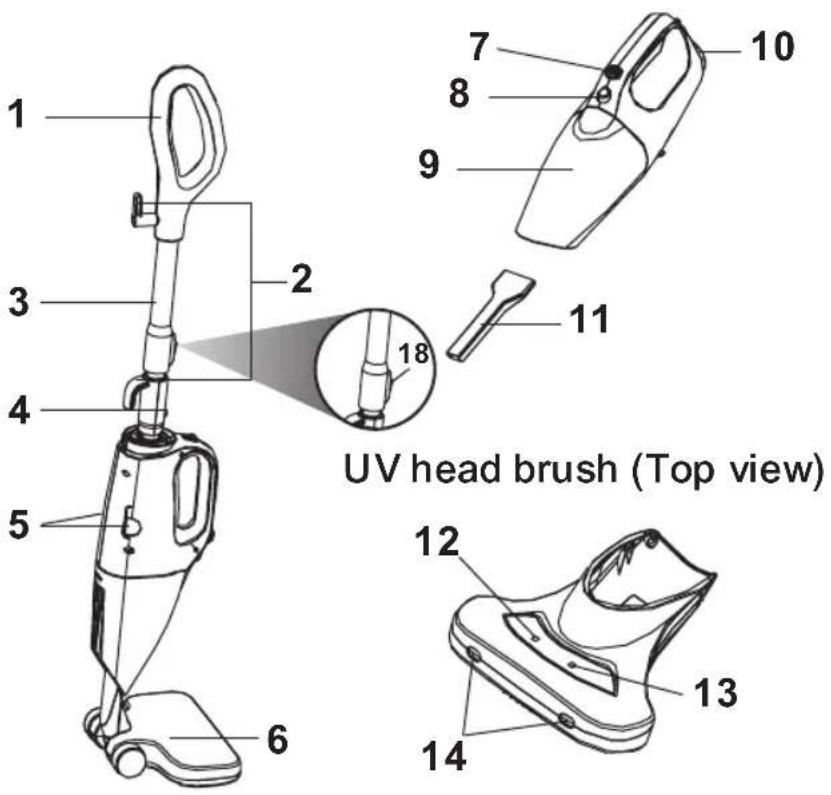
PARTS
- Handle
- Wire hook
- Telescopic extension tube
- Release button of telescopic extension tube
- UV head brush release button (Left & Right)
- Floor brush
- ON/OFF button
- Dust tank lock
- Dust tank
- Air outlet
- Crevice tool
- Vibration button
- UV Sterilization button
- LED head lights
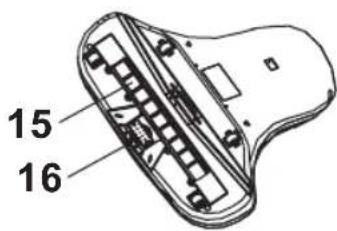
- UV lamp
- Vibration device
- Filter
- Extension button of telescropic tube
HandheldStick vacuum
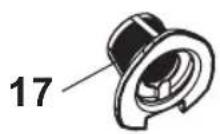
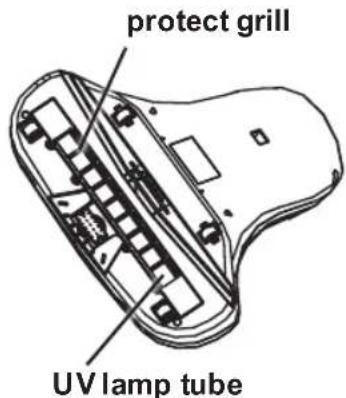
UV head brush (Bottom view)
ASSEMBLE THE VACUUM CLEANER
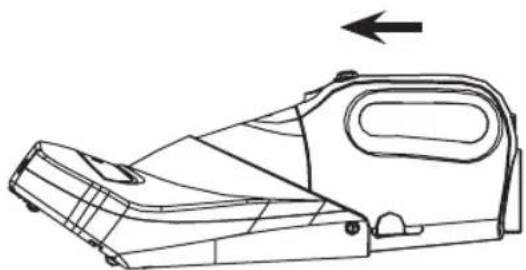
Handheld unit and UV head brush assembly
The unit and UV head brush assembly
natural_image
Technical line drawing of a mechanical device with an arrow indicating direction (no text or symbols present)Push the unit into UV head brush until hearing a "CLICK" sound.
Remove the UV head brush
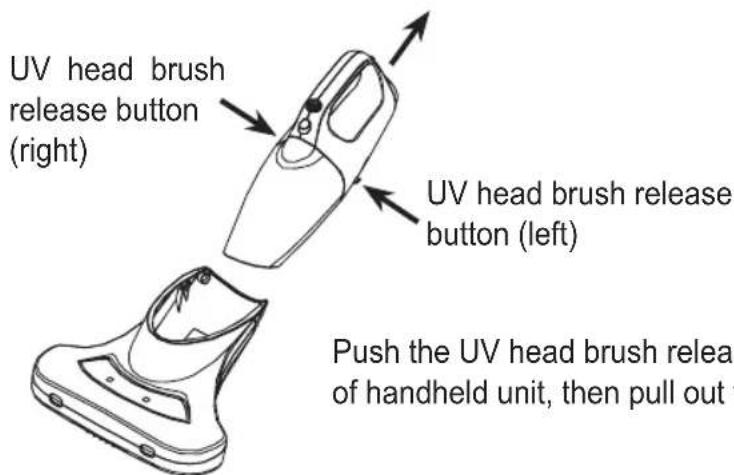
Push the UV head brush release buttons together at the back of handheld unit, then pull out the handheld unit gently.
Operation with UV head brush
- Connect the power plug to the supply socket.
- Press the ON/OFF button of handheld unit to turn on the machine.
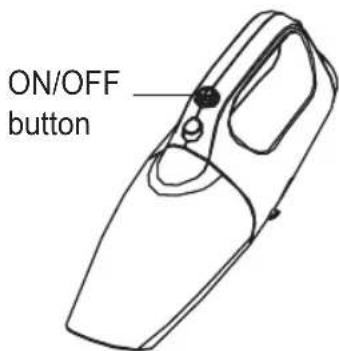
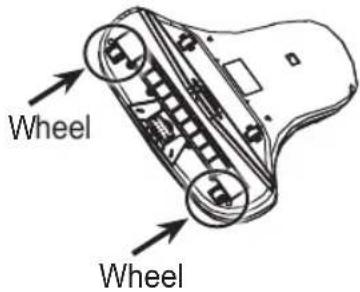
To activate the functions of UV sterilization and LED head lights, please make sure to fulfill both of the TWO conditions as follow.
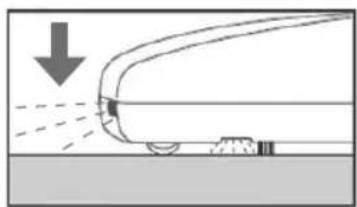
a. When the machine is placed on top of the object, the wheels will be pressed inward automatically (Fig 1); b. The machine must be used horizontally and level to the ground.
NOTE: The UV sterilization function and LED head lights will not be lighted up for security reason. (Fig 2)
natural_image
Diagram showing airflow or spray over a vehicle surface with a downward arrow indicating motion (no text or symbols)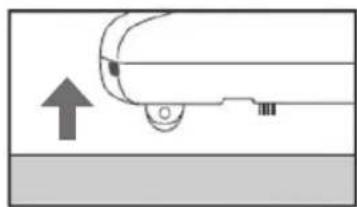
natural_image
Simple line drawing of a car with an upward arrow and a circular head, no text or symbols present.(Fig 1) (Fig 2)
- Press the function button to turn on UV Sterilization and/or Vibration modes.
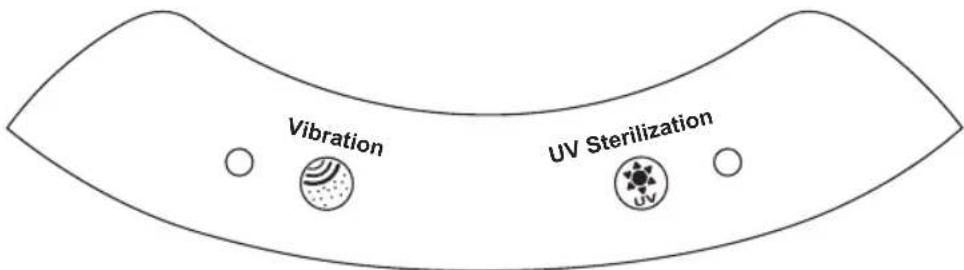
- When cleaning is finished, press the ON/OFF button again to switch off the machine. Unplug the machine.
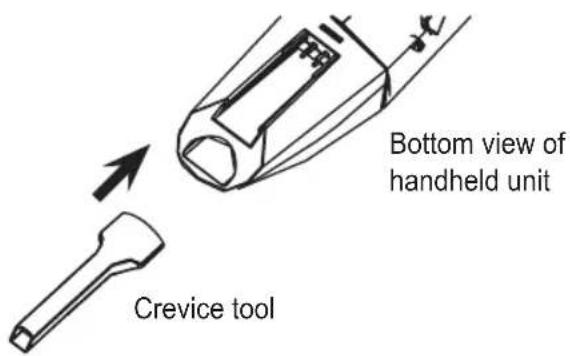
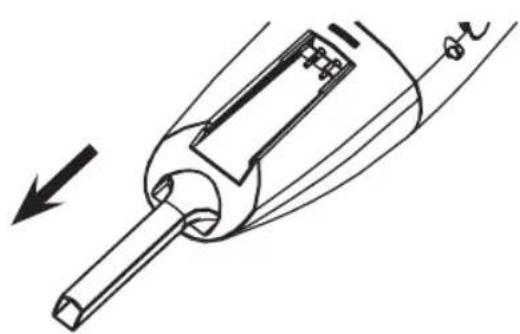
Handheld unit with crevice tool installation
Insert the crevice tool into the inlet of handheld unit.
Pull out the crevice tool after cleaning.
natural_image
Technical line drawing of a mechanical component with an arrow indicating direction (no text or symbols)Stick vacuum cleaner assembly
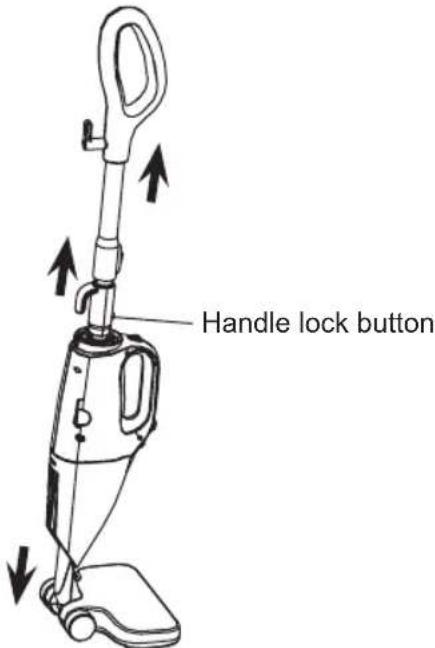
Insert the handle with telescopic extension tube to the end of handheld, then install the floor brush into the inlet to form the stick vacuum cleaner.
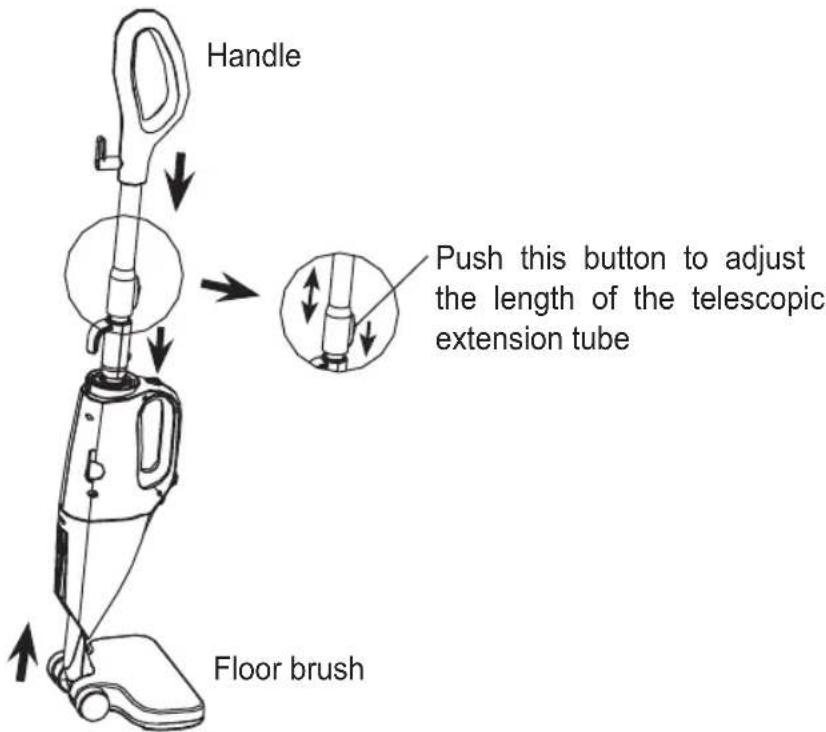
Press the handle lock button to take out the handle with telescopic extension tube. Take out the floor brush from the inlet of handheld unit.
Insert the plug to power supply socket. Press the ON/OFF button to turn on the stick vacuum cleaner.
CLEANING THE APPLIANCE
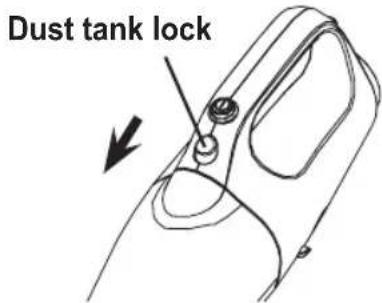
- Press the dust tank lock button on the handheld unit to remove the dust tank
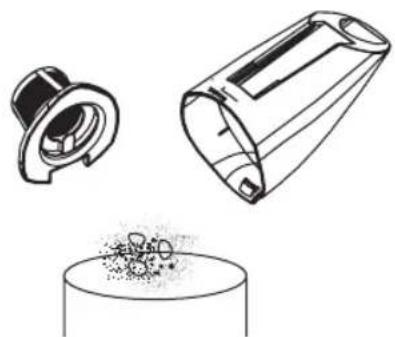
- Clean the dust tank and the filter by water. Make sure the filter and tank are completely dry before assembly
natural_image
Line drawings of a mechanical component and a cylindrical base with granular material (no text or symbols)- Take out the filter inside the dust tank
natural_image
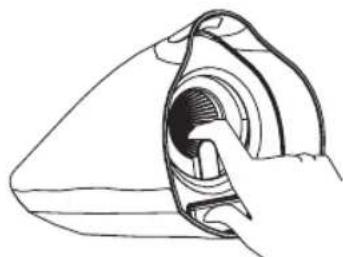
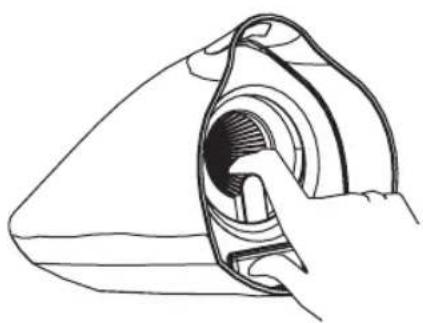
Line drawing of a hand holding a circular object with a textured interior (no text or symbols)- Assemble the dust tank and filter to the main unit in the right position until hearing a "CLICK" sound
natural_image
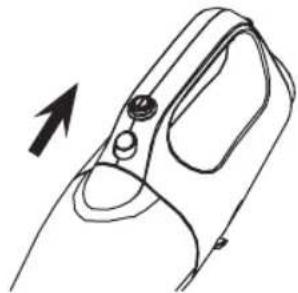
Line drawing of a hand holding a device with a knob and handle, showing an arrow indicating direction (no text or symbols)CLEANING THE UV LAMP TUBE & HEAD BRUSH
- Always turn off the power and disconnect the power cord from the power outlet before cleaning.
- Wipe off the dirt from the protect grill by using a dry and soft rag.
- Do not use soap powder, detergent, solvents and spray type cleaners to clean the UV lamp and the brush.
PRODUCT SPECIFICATION
Model No.: GVC90UV
Voltage: 220-240V
Frequency: 50/60Hz
Power: 450W
Suction power: 14 kPa
UV lamp power: 6W
UV radiation wave length: 253.7 nm (UV-C type)
安全使用指南
natural_image
Technical line drawing of a mechanical device with an arrow indicating direction (no text or symbols present)將手提式吸塵機插入UV吸扒直至聽到
“咔”一聲
手提式吸塵機與UV吸扒分離
UV吸扒釋放按鈕
(右方)
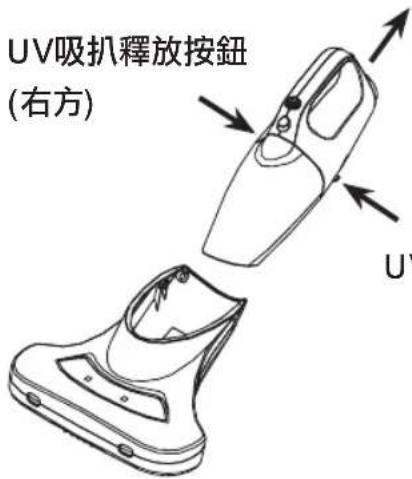
UV吸扒釋放按鈕(左方)
按下UV吸扒釋放按鈕(左及右一起按住)
後,將手提式吸塵機從UV吸扒輕輕拉出
UV吸扒操作
natural_image
Diagram showing a vehicle approaching a surface with a downward arrow indicating motion (no text or symbols)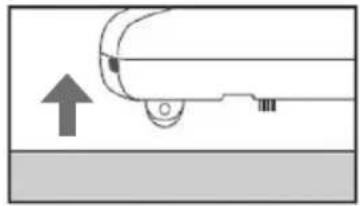
natural_image
Simple line drawing of a car with an upward arrow and a circular object, no text or symbols present.(圖 1) (圖 2)
natural_image
Technical line drawings of a mechanical component and a cylindrical base with granular material (no text or symbols)- 取出塵筒內的過濾網。
natural_image
Line drawing of a hand inserting a component into a device (no text or symbols)natural_image
Line drawing of a hand holding a device with a handle and belt, showing a curved handle and circular opening (no text or symbols)清潔UV燈管及吸扒
Proudly Serviced by:

Gilman
since 1841

a Gilman Group Company
太平家庭電器
2/F, Shing Dao Industrial Building, 232 Aberdeen Main Road, Hong Kong 香港香港仔大道232號城都工業大廈2樓
- READ ALL INSTRUCTIONS BEFORE USING YOUR VACUUM CLEANER
- PARTS
- ASSEMBLE THE VACUUM CLEANER
- Handheld unit and UV head brush assembly
- Operation with UV head brush
- Handheld unit with crevice tool installation
- Stick vacuum cleaner assembly
- CLEANING THE APPLIANCE
- CLEANING THE UV LAMP TUBE & HEAD BRUSH
- PRODUCT SPECIFICATION
- 安全使用指南
- UV吸扒操作
- 清潔UV燈管及吸扒
- 太平家庭電器
Brand : GEMINI
Model : GVC90UV
Category : Vacuum Cleaner