
GHWW063WB1 - Air Conditioning FRIGIDAIRE - Free user manual and instructions
Find the device manual for free GHWW063WB1 FRIGIDAIRE in PDF.


| Product Type | Window Air Conditioner |
| Brand | Frigidaire |
| Model | GHWW063WB1 |
| Cooling Capacity (BTU) | 6,000 BTU |
| Cooling Area | Up to 250 sq ft |
| Energy Star Certified | Yes |
| Voltage | 115 V |
| Amperage | 5.0 A |
| Dimensions (W x D x H) | 18.5 x 14 x 12 in |
| Weight | 50 lbs |
| Refrigerant Type | R-32 |
| Control Type | Mechanical rotary knobs |
| Fan Speeds | 2 (Low, High) |
| Operating Modes | Cool, Fan, Energy Saver |
| Filter | Washable mesh filter |
| Installation Kit Included | Yes (window mounting kit) |
| Noise Level | 52 dB |
| Power Cord Length | 6 ft |
| Warranty | 1 year parts and labor |
Frequently Asked Questions - GHWW063WB1 FRIGIDAIRE
User questions about GHWW063WB1 FRIGIDAIRE
0 question about this device. Answer the ones you know or ask your own.
Ask a new question about this device
Download the instructions for your Air Conditioning in PDF format for free! Find your manual GHWW063WB1 - FRIGIDAIRE and take your electronic device back in hand. On this page are published all the documents necessary for the use of your device. GHWW063WB1 by FRIGIDAIRE.
USER MANUAL GHWW063WB1 FRIGIDAIRE
natural_image
Five simple geometric diagrams with white outlines, no text or symbols presentTABLE OF CONTENTS
Important Safety Instructions 2-4 11-7 Operating Instructions
FCC Statement 5 Care and Cleaning 12
Product Registration 6 Energy Saving Ideas 12
Packaging 6 Before You Call 13
Normal Sounds 6 Major Appliance Limited Warranty 14
Air Conditioner Features 7

NOTE:
This USE & CARE MANUAL provides specific operating instructions for your model. Use the room air conditioner only as instructed in this USE & CARE MANUAL. These instructions are not meant to cover every possible condition and situation that may occur. Common sense and caution must be practiced when installing, operating, and maintaining any appliance.

NOTE:
The power supply cord with this air conditioner contains a current detection device designed to reduce the risk of fire.
Please refer to the section 'Operation of Current Device' for details. In the event that the power supply cord is damaged, it cannot be repaired. It must be replaced with a cord from the product manufacturer.

WARNING
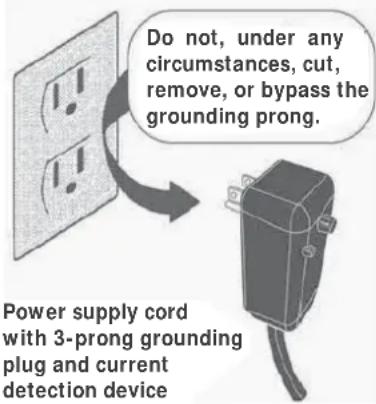
Avoid fire hazard or electric shock. Do not use an extension cord or an adaptor plug. Do not remove any prong from the power cord.
Grounding type wall receptacle

WARNING
For Your Safety
Do not store or use gasoline or other flammable vapors and liquids in the vicinity of this or any other appliance. Read product labels for flammability and other warnings.

WARNING
Prevent Accidents
To reduce the risk of fire, electrical shock, or injury to persons when using your air conditioner, follow basic precautions, including the following:
- Be sure the electrical service is adequate for the model you have chosen. This information can be found on the serial plate, which is located on the side of the cabinet and behind the grille.
- If the air conditioner is to be installed in a window, you will probably want to clean both sides of the glass first. If the window is a triple-track type with a screen panel included, remove the screen completely before installation.
- Be sure the air conditioner has been securely and correctly installed according to the separate installation instructions provided with this manual. Save this manual and the installation instructions for possible future use in removing or reinstalling this unit.
- When handling the air conditioner, be careful to avoid cuts from sharp metal fins on front and rear coils.

WARNING
Electrical Information
The complete electrical rating of your new room air conditioner is stated on the serial plate. Refer to the rating when checking the electrical requirements.
- Be sure the air conditioner is properly grounded. To minimize shock and fire hazards, proper grounding is important. The power cord is equipped with a three-prong grounding plug for protection against shock hazards.
- Your air conditioner must be used in a properly grounded wall receptacle. If the wall receptacle you intend to use is not adequately grounded or protected by a time delay fuse or circuit breaker, have a qualified electrician install the proper receptacle.
- Do not run air conditioner without outside protective cover in place. This could result in mechanical damage within the air conditioner.
- Do not use an extension cord or an adapter plug.

SAFETY PRECAUTIONS
DANGER! Avoid Serious Injury or Death
• This air conditioner contains no user-serviceable parts. Always call an authorized Electrolux servicer for repairs.
- Do not insert or place fingers or objects into the air discharge area in the front of the unit.
- Do not start or stop the air conditioner by unplugging the power cord or turning off the power at the electrical box.
- Do not cut or damage the power cord.
• If the power cord is damaged, it should only be replaced by an authorized Electrolux servicer.
- In the event of a malfunction (sparks, burning smell, etc.), immediately stop the operation, disconnect the power cord, and call an authorized Electrolux servicer.
- Do not operate the air conditioner with wet hands.
- Do not pull on the power cord.
- Do not drink any water that is drained from the air conditioner.

SAFETY PRECAUTIONS
CAUTION! Avoid Injury or damage to the unit or other property
- Provide ventilation per installation instructions.
• Do not direct airflow at fireplaces or other heat related sources as this could cause flare ups or make units run excessively. - Do not climb on or place objects on outdoor part of the unit.
- Do not hang objects off the unit.
- Do not place containers with liquids on the unit.
- Turn off the air conditioner at the power source when it will not be used for an extended period of time.
- Periodically check the condition of the unit's installation accessories for any damage.
- Do not apply heavy pressure to the radiator fins of the unit.
- Operate the unit with air filter in place.
• Do not block or cover the intake grille, discharge area and outlet ports. - Ensure that any electrical/electronic equipment is one yard away from the unit.
- Do not use or store flammable gases near the unit.
- Do not touch the metal parts of the unit when removing the filter. Injuries can occur when handling sharp metal edges.
- Do not use water to clean inside the air conditioner. Exposure to water can destroy the insulation, leading to possible electric shock.
- When cleaning the unit, first make sure that the power and circuit breaker are turned off.
READ THIS SECTION BEFORE ATTEMPTING TO OPERATE AIR CONDITIONER. Unit must be upright for one hour prior to operating.
Operation of Current Device
Plug in & press RESET

Remark: The appearance of actual plug may be slightly different from the line drawing shown in the figure. The line drawing is for reference only.
The power supply cord contains a current device that senses damage to the power cord. To test your power supply cord do the following:
- Plug in the Air Conditioner.
- The power supply cord will have TWO buttons on the plug head. Press the TEST button. You will notice a click as the RESET button pops out.
- Press the RESET button. Again you will notice a click as the button engages.
- The power supply cord is now supplying electricity to the unit. (This is also indicated by a light on the plug head).

NOTE:
- Do not use this device to turn the unit on or off.
• Always make sure the RESET button is pushed in for correct operation. - The power supply cord must be replaced if it fails to reset when either the TEST button is pushed, or it cannot be reset. A new one can be obtained from the product manufacturer.
- If power supply cord is damaged, it CANNOT be repaired. It MUST be replaced by one obtained from the product manufacturer.
Explanation of symbols displayed on the unit
 | WARNING | This symbol shows that this appliance used a flammable refrigerant. If the refrigerant is leaked and exposed to an external ignition source, there is a risk of fire. |
 | CAUTION | This symbol shows that the operation manual should be read carefully. |
 | CAUTION | This symbol shows that a service personnel should be handling this equipment with reference to the installation manual. |
 | CAUTION | This symbol shows that information is available such as the operating manual or installation manual. |

WARNING FOR FLAMMABLE REFRI GERANT
- Do not use means to accelerate the defrosting process or to clean, other than those recommended by the manufacturer.
- The appliance shall be stored in a room without continuously operating ignition sources (for example: open flames, an operating gas appliance) and ignition sourcesor (for example: an operating electric heater) close to the appliance. The appliance shall be stored in a room without continuously operating ignition sources (for example: open flames, an operating gas appliance or an operating electric heater).
- Do not pierce or burn.
- Be aware that the refrigerants may not contain an odour.
- Compliance with national gas regulations shall be observed.
- Keep ventilation openings clear of obstruction.
- The appliance shall be stored so as to prevent mechanical damage from occurring.
- A warning that the appliance shall be stored in a well-ventilated area where the room size corresponds to the room area as specified for operation.
- Any person who is involved with working on or breaking into a refrigerant circuit should hold a current valid certificate from an industry-accredited assessment authority, which authorises their competence to handle refrigerants safely in accordance with an industry recognised assessment specification.
- Servicing shall only be performed as recommended by the equipment manufacturer. Maintenance and repair requiring the assistance of other skilled personnel shall be carried out under the supervision of the person competent in the use of flammable refrigerants.
- DO NOT modify the length of the power cord or use an extension cord to power the unit.
- DO NOT share a single outlet with other electrical appliances. Improper power supply can cause fire or electrical shock.
- Please follow the instruction carefully to handle, install, clear, service the air conditioner to avoid any damage or hazard. Flammable Refrigerant R32 is used within air conditioner. When maintaining or disposing the air conditioner, the refrigerant (R32 or R290) shall be recovered properly, shall not discharge to air directly.
- No any open fire or device like switch which may generate spark/arcing shall be around air conditioner to avoid causing ignition of the flammable refrigerant used. Please follow the instruction carefully to store or maintain the air conditioner to prevent mechanical damage from occurring.
- Flammable refrigerant - R32 is used in air conditioner. Please follow the instruction carefully to avoid any hazard.

CAUTION
- This appliance is not intended for use by persons (including children) with reduced physical, sensory or mental capabilities or lack of experience and knowledge, unless they have been given supervision or instruction concerning use of the appliance by a person responsible for their safety.
- Children should be supervised to ensure that they do not play with the appliance.
- If the supply cord is damaged, it must be replaced by the manufacturer, its service agent or similarly qualified persons in order to avoid a hazard.
- The appliance shall be installed in accordance with national wiring regulations.
FCC Interference Statement
This equipment has been tested and found to comply with the limits for a Class B digital device, pursuant to part 15 of the FCC Rules. These limits are designed to provide reasonable protection against harmful interference in a residential environment. This equipment generates, uses, and can radiate radio frequency energy and, if not installed and used in accordance with the instructions, may cause harmful interference to radio communications. However, there is no guarantee that interference will not occur in a particular installation. If this equipment does cause harmful interference to radio or television reception, which can be determined by tuning the device off and on, the user is encouraged to try to correct the interference by one or more of the following measures:
• Reorient or relocate the receiving antenna.
- Increase the separation between the device and receiver.
- Connect the equipment into an outlet other than the one used for the receiver.
- Consult the dealer or an experienced radio/TV technician for assistance.
This device complies with Part 15 of the FCC Rules. Operation is subject to the following two conditions: (1) This device may not cause harmful interference, and (2) This device must accept any interference received, including interference that may cause undesired operation.
FCC CAUTION: Any changes or modifications not expressly approved by the party responsible for compliance could void the user's authority to operate the equipment.
Host device Labeling
This device includes the following module.
Contains FCC ID: 2AIBX-NIU5L
RF exposure statement
This equipment complies with FCC radiation exposure limits set forth for an uncontrolled environment. This equipment should be installed and operated with minimum 20 cm between the radiator and your body. This transmitter must not be collocated or operating in conjunction with any other antenna or transmitter unless authorized to do so by the FCC.
INDUSTRY CANADA (IC) STATEMENT
This Class B digital apparatus complies with Canadian ICES-003.
This device complies with Industry Canada license-exempt RSS standard(s). Operation is subject to the following two conditions: (1) this device may not cause interference, and (2) this device must accept any interference, including interference that may cause undesired operation of the device.
The antenna (or antennas) must be installed so as to maintain at all times a distance minimum of at least 20 cm between the radiation source (antenna) and any individual. This device may not be installed or used in conjunction with any other antenna or transmitter.
l'exposition aux RF
Host device Labeling
This device includes the following module.
Contains IC: 21700-NIU5L
natural_image
Technical line drawing of a vehicle front view showing grille, roof, and side panel layout (no text or symbols)This is the location of the module.
Product Registration, Packaging & Normal Sounds
Product Registration
Record Your Model and Serial Numbers
Record in the space provided below the model and serial numbers. On all models, the serial plate is located on the outside of the cabinet.
Model No. ____
Serial No. ____
Register Your Product
The self-addressed PRODUCT REGISTRATION CARD should be filled in completely, signed and returned to the Frigidaire Company.
Packaging
Remove all packaging from inside the carton, along with any inserts placed into the side louvers.
PACKAGING INSERTS

natural_image
Technical line drawing of two views of a mechanical component with internal channels and mounting holes (no text or symbols)Normal Sounds
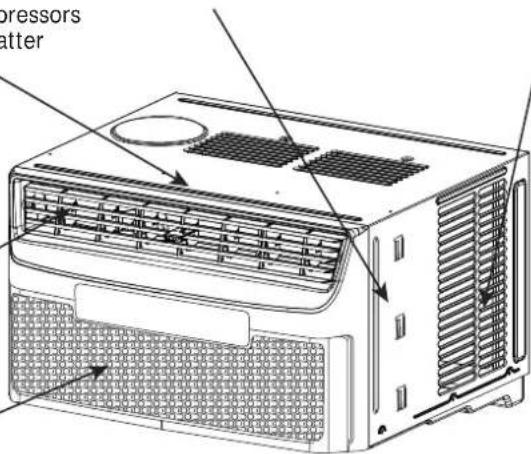
High pitched Chatter
Today's high efficiency compressors may have a high pitched chatter during the cooling cycle.
Sound of Rushing Air
At the front of the unit, you may hear the sound of rushing air being moved by the fan.
Gurgle/Hiss
"Gurgling or hissing" noise may be heard due to refrigerant passing through evaporator during normal operation.
Vibration
Unit may vibrate and make noise because of poor wall or window construction or incorrect installation.
Pinging or Swishing
Droplets of water hitting condenser during normal operation may cause "pinging or swishing" sounds. This noise can be reduce by removing the water plug at the bottom of unit's rear as shown below. Removing this plug will lower the Energy Efficiency of your unit. Note: Don't try to drill any holes on the base pan to eliminate the normal sounds, otherwise it will void the warranty.

All rights reserved.© 2009 E
Air Conditioner Features & Operating Instructions
Air Conditioner Features
ELECTRONIC CONTROL
Before you begin, thoroughly familiarize yourself with the control panel and remote control and all its functions (as shown below). The unit can be controlled by the touch pad alone, with the remote control, or with the Frigidaire app*.

flowchart
graph LR
    A["Connect"] --> B["WIFI"]
    B --> C["Mode"]
    C --> D["SET MODE"]
    D --> E["ADJUSTS TEMPERATURE"]
    E --> F["°F"]
    F --> G["DISPLAY S TEMPERATURE"]
    G --> H["Auto o Hi o Med o Lo o"]
    H --> I["SCHEDULE INDICATOR"]
    I --> J["Scheduler"]
    J --> K["Filter Reset"]
    K --> L["CHECK FILTER RESET BUTTON"]
    style A fill:#f9f,stroke:#333
    style B fill:#ccf,stroke:#333
    style C fill:#cfc,stroke:#333
    style D fill:#fcc,stroke:#333
    style E fill:#cff,stroke:#333
    style F fill:#ffc,stroke:#333
    style G fill:#cfc,stroke:#333
    style H fill:#fcc,stroke:#333
    style I fill:#ffc,stroke:#333
    style J fill:#cfc,stroke:#333
    style K fill:#fcc,stroke:#333
    style L fill:#cfc,stroke:#333
* Refer to the Quick Start Guide that came with your Smart Air Conditioner for detailed instructions on setting up your air conditioner for connected operation from your smart phone or tablet.
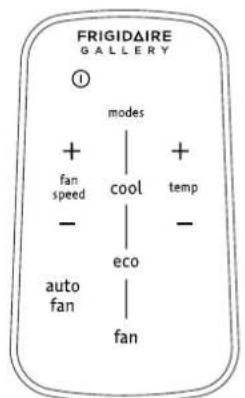
Battery Size: CR2025
Turn Remote Control upside down. Squeeze tab and pull to remove battery tray. Place battery in tray with POSITIVE("+" ) side facing UP, according to diagram. Re-insert battery tray.

WARNING: Chemical Burn Hazard. Keep batteries away from children.
This product contains a lithium button/coin cell battery. If a new or used lithium button/coin cell battery is swallowed or enters the body, it can cause severe internal burns and can lead to death in as little as 2 hours. Always completely secure the battery compartment. If the battery compartment does not close securely, stop using the product, remove the batteries, and keep it away from children. If you think batteries might have been swallowed or placed inside any part of the body, seek immediate medical attention. The cells shall be disposed of properly, including keeping them away from children; Even used cells may cause injury.
Operating Instructions

NOTE
The following instructions represent the touch pad. The same instructions can be used for the remote control.

YOU WILL SEE: TO TURN UNIT ON:

NOTE: The unit will run in energy saver(econ) mode when powered on each time, if last shutdown is in cool or energy saver(econ) mode. In this mode, the fan will continue to run for 3 minutes after the compressor shuts off. The fan then cycles on for 90 seconds at 10 minute intervals until the room temperature is above the set temperature, at which time the compressor turns back on.
Operating Instructions (continued)
TO CHANGE TEMPERATURE SETTING:


YOU WILL SEE:

Note: The display will show the actual room temperature during normal operation, press either up (+) or down (-) button once to show the set temperature, press either the button again to adjust the set temperature to the desired setting. The unit will beep twice if the temperature up (+) or down (-) button is pressed continuously when the set temperature reaches the upper/lower limits 90°F or 60°F.
YOU WILL SEE: TO ADJUST FAN SPEEDS:
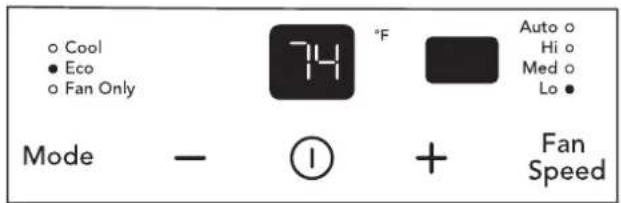
YOU WILL SEE: TO USE AUTO FAN FEATURE:
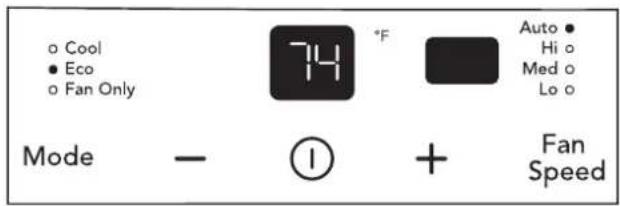
Note: Fan starts at High Speed and adjusts to a slower speeds the room temperature dictates. For example, if the room doesn't get too warm, it will stay at the slowest speed. If the room temperature rises quickly, such as a door being opened, it will automatically go to the highest speed. The fan speeds will re-adjust back to the slowest speed as the room returns to the original set temperature. Press either the fan slower or fan faster button to adjust the fan speed manually.
Operating Instructions (continued)

COOL FEATURE:
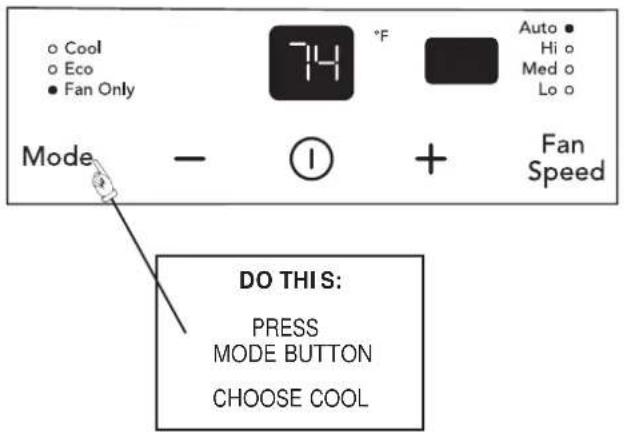
ECO (ENERGY SAVER) MODE:

YOU WILL SEE: TO OPERATE ON FAN ONLY:
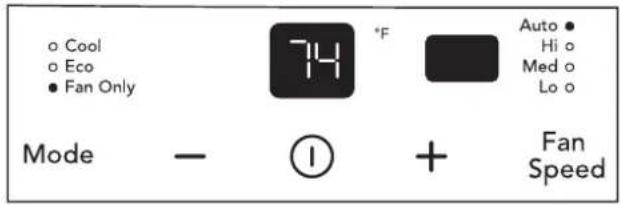
Note: Use this function only when cooling is not desired, such as for room air circulation or to exhaust stale air on some models. You can choose any fan speed you prefer. (Except "Auto Fan").
During this function, display will only show the actual room temperature and the set temperature can not be changed.
YOU WILL SEE:

Note: In this mode, the fan remains on all the time with the compressor cycling on and off when room temperature is reached.

The unit is factory set to run in eco (energy saver) mode. We recommend leaving the unit in eco mode to help save energy and money. However, if you would like to switch out of eco mode, touch the button until another mode is selected.
In eco mode, the fan will continue to run for 3 minute after the compressor shuts off. The fan then cycles on for 90 seconds at 10 minute intervals until the room temperature is above the set temperature, at which time the compressor turns back on.

NOTE:
Please note, that if the unit is changed to 'cool' or 'fan only' mode then shut off, the unit will turn back on in eco mode. This is mandatory per government regulations. If the unit is changed to 'cool' or 'fan only' mode and a power failure occurs, once the power is restored the unit will return to 'cool' or 'fan only' mode.
Operating Instructions (continued)
CHECK FILTER FEATURE, YOU WILL SEE:

Note: This feature is a reminder to clean the Air Filter (See Care and Cleaning) for more efficient operation. The LED (light) will illuminate after 250 hours of operation. To reset after cleaning the filter, hold the "filter reset" button 3 seconds and the light will go off.
FAULT CODES:
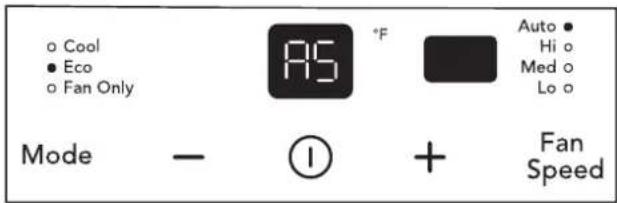
If the display reads "AS", a sensor has failed. Contact your Authorized Frigidaire Service Center.
TO CHANGE TEMPERATURE DISPLAY:


FAULT CODES:
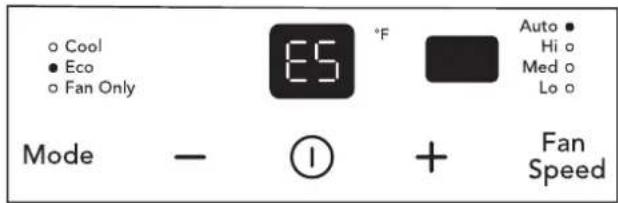
If the display reads "ES", a sensor has failed. Contact your Authorized Frigidaire Service Center.
YOU WILL SEE:
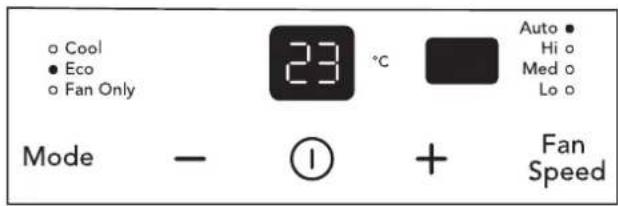
Note: The control is capable of displaying temperature in degrees Fahrenheit or degrees Celsius.
DIMMING DISPLAY:

After 60 seconds of control inactivity the display and indicator lights will turn off. Press any button on the control panel or remote control and the display will resume. Please note that if the unit is in eco mode and the set temperature has been reached the unit may appear off. However, the unit is on and will continue to sample the air every 10 minutes. To confirm, press any button on the control panel or remote control to illuminate the display to show unit in eco mode.
Operating Instructions (continued)
TO TURN UNIT OFF:

YOU WILL SEE:
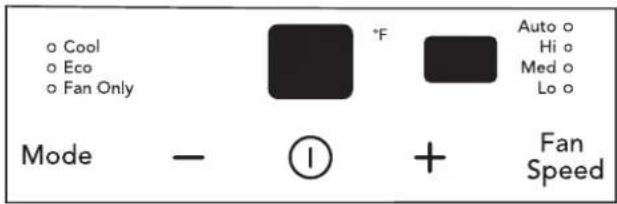
Note: After the unit is turned off, the light on the display will gradually fade away in 3 seconds. The unit will always return to "eco" mode and "auto" fan speed setting when it is turned on again.
ADDITIONAL THINGS YOU SHOULD KNOW
Now that you have mastered the operating procedure, here are more features in your control that you should become familiar with.

- The "Cool" circuit has an automatic 3 minute time delayed start if the unit is turned off and on quickly. This prevents overheating of the compressor and possible circuit breaker tripping. The fan will continue to run during this time.

- There is a 2-Second delay for the compressor shutting down when selecting FAN ONLY. This is to cover the possibility of having to roll through to select another mode.
- The control will maintain the set temperature within 2 degrees Fahrenheit, between 60^ and 90^ degrees.
• After a power outage, the unit will memorize the last setting and return the unit to the same setting once power is restored.

(6-WAY)
Air Directional Louvers
Air directional louvers control air flow direction. Your air conditioner has the louver type described below.
Slider Type
The louvers will allow you to direct the air flow Up or Down and Left or Right throughout the room as needed. Drag the adjuster tablet until the desired Left/Right direction is obtained. Pivot horizontal louvers until the desired Up/Down direction is obtained.
Care and Cleaning

Remark: The appearance of actual air filter may be slightly different from the line drawing shown in the figure. The line drawing is for reference only.
Clean your air conditioner occasionally to keep it looking new. Be sure to unplug the unit before cleaning to prevent shock or fire hazards.
Air Filter Cleaning
The air filter should be checked at least once a month to see if cleaning is necessary. Trapped particles in the filter can build up and cause an accumulation of frost on the cooling coils.
- Push the vent handle to the Vent Closed position(where applicable).
- Open the front panel.
- Grasp the filter by the center and pull up and out.
- Wash the filter using liquid dishwashing detergent and warm water. Rinse filter thoroughly. Gently shake excess water from the filter. Be sure filter is thoroughly dry before replacing
- Or instead of washing, you may vacuum the filter clean.
NOTE: When replacing the air filter after cleaning, make sure the tabs on the air filter are on the upper part of filter, and placed outward as shown in the drawing on the left side.
Cabinet Cleaning
- Be sure to unplug the air conditioner to prevent shock or fire hazard. The cabinet and front may be dusted with an oil-free cloth or washed with a cloth dampened in a solution of warm water and mild liquid dishwashing detergent. Rinse thoroughly and wipe dry.
- Never use harsh cleaners, wax or polish on the cabinet front.
- Be sure to wring excess water from the cloth before wiping around the controls. Excess water in or around the controls may cause damage to the air conditioner.
- Plug in air conditioner.
Winter Storage
If you plan to store the air conditioner during the winter, remove it carefully from the window according to the installation instructions. Cover it with plastic or return it to the original carton.
Energy Saving Ideas

- Do not block air flow inside with blinds, curtains or furniture; or outside with shrubs, enclosures, or other buildings.
- The capacity of the room air conditioner must fit the room size for efficient and satisfactory operation.
• Install the room air conditioner on the shady side of your home. A window that faces north is best because it is shaded most of the day. - Close the fireplace damper, floor and wall registers so cool air does not escape up the chimney and into the duct work.
- Keep blinds and drapes in other windows closed during the sunniest part of the day.
- Clean the air filter as recommended in the section "Care and Cleaning".
- Proper insulation and weather stripping in your home will help keep warm air out and cool air in.
- External house shading with trees, plants or awnings will help reduce the air conditioner's work load.
- Operate heat producing appliances such as ranges, washers, dryers and dishwashers during the coolest part of the day.
Before calling for service, review this list. It may save you time and expense. This list includes common occurrences that are not the result of defective workmanship or materials in this appliance.
OCCURRENCE SOLUTION
| Air conditioner will not operate. | Wall plug disconnected. Push plug firmly into wall outlet. |
| Plug Current Device Tripped. Press the RESET button. | |
| House fuse blown or circuit breaker tripped. Replace fuse with time delay type or reset circuit breaker. | |
| Control is OFF. Turn Control ON and set to desired setting. | |
| Air from unit does not feel cold enough. | Room temperature below 60°F (16°C). Cooling may not occur until room temperature rises above 60°F (16°C). |
| Temperature sensing element touching cold coil, located behind air filter. Straighten away from coil. | |
| Reset to a lower temperature. | |
| Compressor shut-off by changing modes. Wait approximately 3 minutes and listen for compressor to restart when set in the COOL mode. | |
| Air conditioner cooling, but room is too warm - ice forming on cooling coil behind decorative front | Outdoor temperature below 60°F (16°C). To defrost the coil, set FAN ONLY mode. |
| Air filter may be dirty. Clean filter. Refer to Care and Cleaning section. To defrost, set to FAN ONLY mode. | |
| Temperature is set too low for night-time cooling. To defrost the coil, set to FAN ONLY mode. Then, set temperature to a higher setting. | |
| Air conditioner cooling, but room is too warm - NO ice forming on cooling coil behind decorative front. | Dirty air filter - air restricted. Clean air filter. Refer to Care and Cleaning section. |
| Temperature is set too high. Set temperature to a lower setting. | |
| Air directional louvers positioned improperly. Position louvers for better air distribution. | |
| Front of unit is blocked by drapes, blinds, furniture, etc. - restricts air distribution. Clear blockage in front of unit. | |
| Doors, windows, registers, etc. open - cool air escapes. Close doors, windows, registers, etc. | |
| Unit recently turned on in hot room. Allow additional time to remove “stored heat” from walls, ceiling, floor and furniture. | |
| Air conditioner turns on and off rapidly. | Dirty air filter - air restricted. Clean air filter. |
| Outside temperature extremely hot. Set FAN speed to a faster setting to bring air through cooling coils more frequently. | |
| Noise when unit is cooling. | Air movement sound. This is normal. If too loud, set to lower FAN setting. |
| Window vibration - poor installation. Refer to installation instructions or check with installer. | |
| Water dripping INSIDE when unit is cooling. | Improper installation. Tilt air conditioner slightly to the outside to allow water drainage. Refer to installation instructions or check with installer. |
| Water dripping OUTSIDE when unit is cooling. | Unit removing large quantity of moisture from humid room. This is normal during excessively humid days. |
| Remote Sensing Deactivating Prematurely (some models). | Remote control not located within range. Place remote control within 20 feet & 120° radius of the front of the unit. |
| Remote control signal obstructed. Remove obstruction. | |
| Room too cold. | Set temperature too low. Increase set temperature. |
| Remote Sensing activated (on some models) and remote control located in Hot Spot - Relocate remote control or deactivate remote sensing. | |
| Trouble connecting the smart appliance to your wifi network or experiencing an issue with the app. | Please visit Frigidaire.com and select the Owner Support section to view Frequently Asked Questions. |
If These Solutions Fail, Call 1-800-944-9044(US)/1-800-265-8352(Canada) For Frigidaire Service.
Major Appliance Limited Warranty
Your appliance is covered by a limited one-year warranty for functional repairs only. For one year from your original date of purchase, Electrolux will pay all costs for repairing or replacing any parts of this appliance that prove to be defective in materials or workmanship when such appliance is installed, used and maintained in accordance with the provided instructions. After one year from your original date of purchase, the consumer will be responsible for diagnostic, labor and parts costs as well as any removal, transportation and reinstallation expenses which are incurred during service on components.
Exclusions This warranty does not cover the following:
- Products with original serial numbers that have been removed, altered or cannot be readily determined.
- Product that has been transferred from its original owner to another party or removed outside the USA or Canada.
- Rust on the interior or exterior of the unit.
- Products purchased "as-is" are not covered by this warranty.
- Food loss due to any refrigerator or freezer failures.
- Products used in a commercial setting.
- Service calls which do not involve malfunction or defects in materials or workmanship, or for appliances not in ordinary household use or used other than in accordance with the provided instructions.
- Service calls to correct the installation of your appliance or to instruct you how to use your appliance.
- Expenses for making the appliance accessible for servicing, such as removal of trim, cupboards, shelves, etc., which are not a part of the appliance when it is shipped from the factory.
- Service calls to repair or replace appliance light bulbs, air filters, water filters, other consumables, or knobs, handles, or other cosmetic parts.
- Surcharges including, but not limited to, any after hour, weekend, or holiday service calls, tolls, ferry trip charges, or mileage expense for service calls to remote areas, including the state of Alaska.
- Damages to the finish of appliance or home incurred during installation, including but not limited to floors, cabinets, walls, etc.
- Damages caused by: services performed by unauthorized service companies; use of parts other than genuine Electrolux parts or parts obtained from persons other than authorized service companies; or external causes such as abuse, misuse, inadequate power supply, accidents, fires, or acts of God.
DISCLAIMER OF IMPLIED WARRANTIES; LIMITATION OF REMEDIES
CUSTOMER'S SOLE AND EXCLUSIVE REMEDY UNDER THIS LIMITED WARRANTY SHALL BE PRODUCT REPAIR OR REPLACEMENT AS PROVIDED HEREIN. CLAIMS BASED ON IMPLIED WARRANTIES, INCLUDING WARRANTIES OF MERCHANTABILITY OR FITNESS FOR A PARTICULAR PURPOSE, ARE LIMITED TO ONE YEAR OR THE SHORTEST PERIOD ALLOWED BY LAW, BUT NOT LESS THAN ONE YEAR. ELECTROLUX SHALL NOT BE LIABLE FOR CONSEQUENTIAL OR INCIDENTAL DAMAGES SUCH AS PROPERTY DAMAGE AND INCIDENTAL EXPENSES RESULTING FROM ANY BREACH OF THIS WRITTEN LIMITED WARRANTY OR ANY IMPLIED WARRANTY. SOME STATES AND PROVINCES DO NOT ALLOW THE EXCLUSION OR LIMITATION OF INCIDENTAL OR CONSEQUENTIAL DAMAGES, OR LIMITATIONS ON THE DURATION OF IMPLIED WARRANTIES, SO THESE LIMITATIONS OR EXCLUSIONS MAY NOT APPLY TO YOU. THIS WRITTEN WARRANTY GIVES YOU SPECIFIC LEGAL RIGHTS. YOU MAY ALSO HAVE OTHER RIGHTS THAT VARY FROM STATE TO STATE.
If You Need Service Keep your receipt, delivery slip, or some other appropriate payment record to establish the warranty period should service be required. If service is performed, it is in your best interest to obtain and keep all receipts. Service under this warranty must be obtained by contacting Electrolux at the addresses or phone numbers below.
This limited warranty only applies in the USA and Canada. In the USA, your appliance is warranted by Electrolux Major Appliances North America, a division of Electrolux Home Products, Inc. In Canada, your appliance is warranted by Electrolux Canada Corp. Electrolux authorizes no person to change or add to any obligations under this warranty. Obligations for service and parts under this warranty must be performed by Electrolux or an authorized service company. Product features or specifications as described or illustrated are subject to change without notice.
USA
1.800.944.9044
Electrolux Major Appliances
10200 David Taylor Drive
Charlotte, NC 28262

Electrolux
Canada
1.800.265.8352
Electrolux Canada Corp.
5855 Terry Fox Way
Mississauga, Ontario, Canada
L5V 3E4
- TABLE OF CONTENTS
- NOTE:
- WARNING
- For Your Safety
- Prevent Accidents
- Electrical Information
- SAFETY PRECAUTIONS
- DANGER! Avoid Serious Injury or Death
- CAUTION! Avoid Injury or damage to the unit or other property
- READ THIS SECTION BEFORE ATTEMPTING TO OPERATE AIR CONDITIONER. Unit must be upright for one hour prior to operating.
- Operation of Current Device
- WARNING FOR FLAMMABLE REFRI GERANT
- CAUTION
- FCC Interference Statement
- Host device Labeling
- RF exposure statement
- INDUSTRY CANADA (IC) STATEMENT
- l'exposition aux RF
- Product Registration, Packaging & Normal Sounds
- Product Registration
- Record Your Model and Serial Numbers
- Register Your Product
- Packaging
- Normal Sounds
- High pitched Chatter
- Sound of Rushing Air
- Gurgle/Hiss
- Vibration
- Pinging or Swishing
- Air Conditioner Features & Operating Instructions
- Air Conditioner Features
- ELECTRONIC CONTROL
- Operating Instructions
- NOTE
- YOU WILL SEE: TO TURN UNIT ON:
- Operating Instructions (continued)
- ADDITIONAL THINGS YOU SHOULD KNOW
- Air Directional Louvers
- Slider Type
- Care and Cleaning
- Air Filter Cleaning
- Cabinet Cleaning
- Winter Storage
- Energy Saving Ideas
- Major Appliance Limited Warranty
- Exclusions This warranty does not cover the following:
- DISCLAIMER OF IMPLIED WARRANTIES; LIMITATION OF REMEDIES
- USA
Brand : FRIGIDAIRE
Model : GHWW063WB1
Category : Air Conditioning