HRC 990 04 01 (04020) - Watering Hydro-Rain - Free user manual and instructions
Find the device manual for free HRC 990 04 01 (04020) Hydro-Rain in PDF.


| Product Type | Irrigation Controller |
| Brand | Hydro-Rain |
| Model | HRC 990 04 01 (04020) |
| Number of Zones | 9 |
| Power Supply | 24 VAC, 50/60 Hz |
| Programs | 3 independent programs (A, B, C) |
| Start Times per Program | 4 start times |
| Station Run Time | 1 minute to 4 hours |
| Weather Sensor Compatible | Yes (rain/freeze sensor input) |
| Manual Watering | Yes, keypad manual operation |
| Rain Delay | Up to 7 days |
| Seasonal Adjustment | Yes, 0% to 200% |
| Dimensions (W x H x D) | 8.5 x 5.5 x 1.5 inches |
| Weight | 1.2 lbs |
| Mounting | Indoor/outdoor wall-mount or pedestal |
| Display | Backlit LCD |
| Keypad | Membrane keypad with 14 keys |
| Protection Rating | NEMA 3R (rain-tight when installed with gasket) |
| Repair/Spare Parts | Replaceable transformer, terminal block, and keypad |
| Warranty | 3 years limited |
Frequently Asked Questions - HRC 990 04 01 (04020) Hydro-Rain
User questions about HRC 990 04 01 (04020) Hydro-Rain
0 question about this device. Answer the ones you know or ask your own.
Ask a new question about this device
Download the instructions for your Watering in PDF format for free! Find your manual HRC 990 04 01 (04020) - Hydro-Rain and take your electronic device back in hand. On this page are published all the documents necessary for the use of your device. HRC 990 04 01 (04020) by Hydro-Rain.
USER MANUAL HRC 990 04 01 (04020) Hydro-Rain
Battery-Powered Controller
HRC 990 04 01 (04020)
■ No external power source needed
■ Operates up to four sprinkler valves (sold separately)
■ IP 68 rated (submersible to 1.2 m)
■ Intuitive dial programming
MODEL 04020
PN 04020-24 rB

CE
TABLE OF CONTENTS
Buttons, Dial and Display ....4
Activate or Install Batteries....6
Programming your HRC 990....7
Additional Features....9
Connecting the HRC 990 to a Valve....10
Glossary of Terms....11
Troubleshooting 12
Help: For assistance with this controller, please contact your local authorized distributor, alternatively contact Hydro-Rain® USA +1-888-493-7672.
Notice: The information in this manual is primarily intended for the user who will establish a watering schedule and enter that schedule into the controller. This product is intended to be used as an automatic controller to be used near the valves, typically underground in a valve box, as described in this manual.

Buttons
A Toggle between Programs A and B
B Clear settings or cancel events
C Decrease value
D Increase value, select HOW OFTEN
setting or access RAIN DELAY mode
E Move cursor or toggle AM/PM
F Access MANUAL WATERING mode
G Reset all controller settings
Dial
OFF
All functions are OFF
RUN
Controller is set for automatic operation and will only water in this dial position
SET TIME
Set the current time of day
SET DATE
Set the current year, month and day
START TIMES
Set desired start times for Programs A and B
HOW OFTEN
Set the desired days or interval day you want to water
HOW LONG
Set station run times (0 to 240 minutes)
WATER BUDGET
Seasonal Adjustment - change program run times all at once - 10% to 200%
MOISTURE SENSOR
For use with programming moisture sensor module [sold separately #HRC 990 MS MD 104022]
Display

1 Shows current station while programming or watering
2 Shows current start time while programming
3 Displays active program(s) while programming or watering
4 Y=Year, M=Month, D=Day for setting date
5 Indicates low batteries (replace batteries if showing)
6 Indicates day of week and watering days selection
7 Indicates that more options are available for that dial position accessed by pressing the button
ACTIVATE OR INSTALL BATTERIES PROGRAMMING YOUR HRC 990

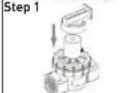
Step 1
Remove cap
Step 2
Separate program pod from base
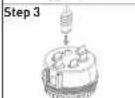
Step 3
Upon (initial) start up, remove the battery activation tab. When battery indicator suggests replacement, remove the three AAA batteries and replace. See + or - for correct orientation.
Step 4
Return program pod to base
Note: During battery changes, programming will be preserved for 30 seconds.
Step 1
Press "RESET" button.
Step 2 Set Current Time of Day
Turn the dial to SET TIME.
Press er to set the current time.
To quickly switch between
AM or PM press
Step 3 Set Today's Date
Turn the dial to SET DATE.
Press or to set the current year
then press
Press er to set the current month
then press .
Press or to set the current day.
Step 4 Set Watering Cycle Start Times
Turn the dial to START TIMES.
Press to select the desired program.
NOTE: Use program B only if you want to schedule watering independent of Program A.
Press or to set the desired start time.
If more cycles are desired then press and set another start time (up to 4).
To delete a start time press
NOTE: When program start times are inadvertently set to run at the same time by the programmer the HRC 990 will
readjust or "stack" the run times to run in sequence.
Step 5 Set How Often to Water
Turn the dial to HOW OFTEN.
Press to select the desired program.
PROGRAMMING YOUR HRC 990 ADDITIONAL FEATURES
Press to select the desired days to water: select either days of the week, interval (every 1 to 32 days), or odd/even days.
Press to highlight your option(s).
If INT is chosen press or to change interval.
Press or to deselect an option.
Step 6 Set How Long to Water
Turn the dial to HOW LONG.
Press to select the desired program.
Press to select the desired station (1, 2, 3 or 4).
Press or to set the run time (1 to 240).
Repeat for other stations if needed.
Step 7 Turn on Automatic Watering
Turn the dial to RUN.
The set program(s) will run automatically.
Manual Watering
To manually run a program independent of its current automatic schedule:
Press while dial is in the RUN position.
The HRC 990 will run all set programs, in succession and then return to the automatic program.
To manually run only the A or B program, or individual stations:
Press to select only A or B program.
Press again to set manual watering times for individual stations.
NOTE: Manual watering of a set program (A or B) will only work after programming has been set up.
Press Ⓞ cancel watering or turn dial to OFF.
Off
Turn dial to OFF.
No watering will occur while the programming dial is in the OFF position.
Water Budget
Turn dial to WATER BUDGET.
NOTE: This feature allows for seasonal watering duration adjustments without changing the primary programming schedule.
Set the value to 100% to water exactly as programmed.
For a 10 minute run time, 50% will reduce it to be 5 minutes and 200% will increase it to 20 minutes.
Press ☑ select the desired program.
Press or to set the budget value (10% - 200%).
Press Ⓞ reset the value to 100%.
NOTE: The % symbol will show on the screen when the value for A or B is anything other than 100%.
Moisture Sensor
A 24 hour calibration process and additional hardware (HRC 990 MS MD [04021]) are needed to activate this feature. If you have inadvertently activated the 24 hour calibration process, turn the dial to OFF to deactivate it. Refer to the HRC 990 MS MD [04021] manual for instructions on installation and calibration processes.
Rain Delay
NOTE: Rain Delay will cancel all scheduled
CONNECTING THE HRC 990 TO A VALVE GLOSSARY OF TERMS
watering for a 24hr, 48hr, or 72hr period.
Press while dial is in the RUN position.
Press until the desired delay is displayed.
Do not press any buttons for 3 seconds to start the delay.
Press to stop Rain Delay and return to scheduled watering, or turn the dial to any other position.
HRC 990 will operate multiple brand valves including Hydro-Rain HRV, HRB (adapter included), and HRJ series valves with the use of the HRC 990 SP MD (latching selenoid). It is also capable of actuating Rainbird® DV, and PEB series (adapter sold separately), and can be adapted for use with most brands 13V latching selenoids (pigtail adapter #04024 sold separately).
- Make sure the main HRC 990
programming pod is fully inserted into
its docking bay.


Connecting to Valve
- Replace the existing valve splenoid.
When using Hydro-Rain™ Series; HRV, HRJ, HRA, or Irrinol™ Series; 2500, 2700, 205, 200B, 2600, 2623DPR, or Weathermatic™ Series; 12000, 21000CR, N100, valve solenoid use the Hydro-Rain™ HRC 990 12V DC Solenoid [HRC 990 SD MD [04021]). For Hydro-Rain™ Series; HRB, or Rainbird™ Series; PEB also use adapter (04022). For Rainbird™ Series DV also use adapter (04023). For using the HRC 990 Controller with Rainbird™ TBOS latching solenoid, or Hunter™ SVC latching solenoid then use only Hydro-Rain™ Universal Pigtail Adapter (04024).
-
Remove the plug from re the HRC 990 base unit recepticle marked "1" [continue with #'s 2,3, and 4 when using additional valves].
-
Insert solenoid wire connector into the receptacle marked "1" on the HRC 990 base unit (continue with #'s 2,3, and 4
when using additional valves].
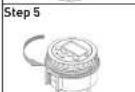
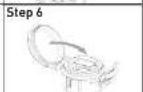
- Attach HRC 990 to solenoid clip and mount HRC 990 controller into position by orienting and sliding the grooved channel onto the clip.
- Rotate dial to OFF. Wait 60 seconds to allow the HRC 990 to close all valves.
- Rotate dial to RUN and replace cap.
Hardware Accessories
Connecting to Accessories
Solar Power Module (04011)- Refer to accessory manual
Rain/Freeze Module [04013] - Refer to accessory manual
Moisture Sensor Module (04014)- Refer to accessory manual
Solenoid Adapters
TROUBLESHOOTING
Universal Pigtail Adapter [HRC 990 UN
SD (#04024)]- Converts multiple brands 13 V DC Latching Solencids [Rainbird ® , Hunter ® , Toro ® , Irritrol ™ ] for use with Hydro-Rain ® HRC 990 Controller.
Solenoid Adapter (HRC 990 DV AD
[#04023] - Converts Hydro-Rain 9 13V DC Latching Solenoid for use with Rainbird DV ™ Series Valves.
Solenoid Adapter [HRC 990 PB SD
[#04022] - Converts Hydro-Rain HRC 990 13V DC Latching Solenoid for use with Hydro-rain HRB Series, and Rainbird PEB, PESB series Valves.
Solenoid Module (HRC 990 SD MD
(#04010))- 13V DC Latching Solenoid w/HRC 990 Plug Adapter for use when adapting multiple valves to the HRC 990 (up to 3 additional solenoids may be used beyond the single solenoid included in your original purchase.
One or more stations do not turn on:
- Make sure programming is correct.
- Make sure programming is not in OFF or Rain Delay mode.
- Remove jack, clean debris, re-plug jack.
- Clean debris from solenoid.
- Replace batteries.
- Replace solenoid.
Stations turn on when they are not
supposed to:
- Reduce water pressure.
- Check programming to make sure start times are correct. Check A and B programs and start times 1-4.
One station is stuck on and will not shut off:
- Make sure jack is plugged in.
- Replace valve.
- Clean any particles of dirt or debris
stuck in valve or solenoid.
4. Replace valve diaphragm.
5. Replace solenoid.
All stations do not turn on:
- Make sure programming is not in OFF or Rain Delay mode.
- Lack of power due to depleted batteries or faulty solar panel (optional).
- Programming is incorrect.
HRC 990 will not power up:
- Make sure batteries are installed correctly.
- Replace batteries.
Stations continue to turn on and off when they are not programmed to:
-
Make sure one start time is programmed with no overlapping schedules.
-
Turn down water pressure.
- Check A and B programs and start times 1-4.

CE
MODELO 04020
ÍNDICE DE MATERIAS
SET TIME (AJUSTAR HORA)
MOISTURE SENSOR [SENSOR DE HUMEDAD]
North Salt Lake, UT 84054 USA
www.hydrorain.com
1-800-488-6156
1-801-299-5555
- BATTERY-POWERED CONTROLLER
- TABLE OF CONTENTS
- BUTTONS
- DIAL
- OFF
- RUN
- SET TIME
- SET DATE
- START TIMES
- HOW OFTEN
- HOW LONG
- WATER BUDGET
- MOISTURE SENSOR
- DISPLAY
- ACTIVATE OR INSTALL BATTERIES PROGRAMMING YOUR HRC 990
- STEP 1
- STEP 2
- STEP 3
- STEP 4
- STEP 2 SET CURRENT TIME OF DAY
- STEP 3 SET TODAY'S DATE
- STEP 4 SET WATERING CYCLE START TIMES
- STEP 5 SET HOW OFTEN TO WATER
- PROGRAMMING YOUR HRC 990 ADDITIONAL FEATURES
- STEP 6 SET HOW LONG TO WATER
- STEP 7 TURN ON AUTOMATIC WATERING
- MANUAL WATERING
- RAIN DELAY
- CONNECTING THE HRC 990 TO A VALVE GLOSSARY OF TERMS
- CONNECTING TO VALVE
- HARDWARE ACCESSORIES
- CONNECTING TO ACCESSORIES
- SOLENOID ADAPTERS
- TROUBLESHOOTING
- UNIVERSAL PIGTAIL ADAPTER [HRC 990 UN
- SOLENOID ADAPTER (HRC 990 DV AD
- SOLENOID ADAPTER [HRC 990 PB SD
- SOLENOID MODULE (HRC 990 SD MD
- ONE OR MORE STATIONS DO NOT TURN ON
- STATIONS TURN ON WHEN THEY ARE NOT
- SUPPOSED TO
- ONE STATION IS STUCK ON AND WILL NOT SHUT OFF
- ALL STATIONS DO NOT TURN ON
- HRC 990 WILL NOT POWER UP
- STATIONS CONTINUE TO TURN ON AND OFF WHEN THEY ARE NOT PROGRAMMED TO
- ÍNDICE DE MATERIAS
- SET TIME (AJUSTAR HORA)
- MOISTURE SENSOR [SENSOR DE HUMEDAD]
Brand : Hydro-Rain
Model : HRC 990 04 01 (04020)
Category : Watering