
IPC-B120H-F - Security Camera HiLook - Free user manual and instructions
Find the device manual for free IPC-B120H-F HiLook in PDF.


| Product Type | Security Camera |
| Brand | HiLook |
| Model | IPC-B120H-F |
| Image Sensor | 1/2.7" Progressive Scan CMOS |
| Resolution | 2 MP (1920 × 1080) |
| Lens Type | Fixed focal, 2.8 mm / 4 mm (optional) |
| Night Vision | IR LED, up to 30 m (98 ft) |
| Video Compression | H.265+, H.265, H.264+, H.264 |
| Angle of View | 112° (horizontal) with 2.8 mm lens |
| Power Supply | 12 V DC ± 25% or PoE (802.3af) |
| Power Consumption | Max. 7 W |
| Dimensions (Ø × L) | 70 mm × 186 mm (2.8" × 7.3") |
| Weight | Approx. 450 g (15.9 oz) |
| Protection Rating | IP67 (weatherproof) |
| Operating Temperature | -30 °C to +60 °C (-22 °F to +140 °F) |
| Mounting Type | Wall or ceiling mount (bracket included) |
| Motion Detection | Yes, with alarm trigger |
| Storage | MicroSD card slot (up to 256 GB) or NVR |
| Network Interface | 1 × RJ45 10/100M Ethernet |
| Protocols | TCP/IP, UDP, HTTP, DHCP, NTP, ONVIF (Profile S/G) |
| Maintenance | Clean lens with a soft, dry cloth; avoid solvents |
| Security | Password protection, IP address filtering, HTTPS |
| Spare Parts & Repairability | No user-serviceable parts; contact authorized service center |
| General Information | Designed for indoor/outdoor surveillance; compatible with Hikvision NVRs and HiLookVision app |
Frequently Asked Questions - IPC-B120H-F HiLook
User questions about IPC-B120H-F HiLook
0 question about this device. Answer the ones you know or ask your own.
Ask a new question about this device
Download the instructions for your Security Camera in PDF format for free! Find your manual IPC-B120H-F - HiLook and take your electronic device back in hand. On this page are published all the documents necessary for the use of your device. IPC-B120H-F by HiLook.
USER MANUAL IPC-B120H-F HiLook
natural_image
Abstract geometric pattern with gray and blue diamond shapes (no text or symbols)
natural_image
Blue background with white globe and hand icon (no text or symbols)User Manual
COPYRIGHT ©2018 Hangzhou Hikvision Digital Technology Co., Ltd.
ALL RIGHTS RESERVED.
Any and all information, including, among others, wordings, pictures, graphs are the properties of Hangzhou Hikvision Digital Technology Co., Ltd. or its subsidiaries (hereinafter referred to be "Hikvision"). This user manual (hereinafter referred to be "the Manual") cannot be reproduced, changed, translated, or distributed, partially or wholly, by any means, without the prior written permission of Hikvision. Unless otherwise stipulated, Hikvision does not make any warranties, guarantees or representations, express or implied, regarding to the Manual.
About this Manual
This Manual is applicable to Network Camera.
The Manual includes instructions for using and managing the product. Pictures, charts, images and all other information hereinafter are for description and explanation only. The information contained in the Manual is subject to change, without notice, due to firmware updates or other reasons. Please find the latest version in the company website (http://overseas.hikvision.com/en/).
Dh... we think that the world's efforts are: £ ... £ are!
SATISFACTORY QUALITY, FITNESS FOR A PARTICULAR PURPOSE, AND NON-INFRINGEMENT OF THIRD PARTY. IN NO EVENT WILL OUR COMPANY, ITS DIRECTORS, OFFICERS, EMPLOYEES, OR AGENTS BE LIABLE TO YOU FOR ANY SPECIAL, CONSEQUENTIAL, INCIDENTAL, OR INDIRECT DAMAGES, INCLUDING, AMONG OTHERS, DAMAGES FOR LOSS OF BUSINESS PROFITS, BUSINESS INTERRUPTION, OR LOSS OF DATA OR DOCUMENTATION, IN CONNECTION WITH THE USE OF THIS PRODUCT, EVEN IF OUR COMPANY HAS BEEN ADVISED OF THE POSSIBILITY OF SUCH DAMAGES.
REGARDING TO THE PRODUCT WITH INTERNET ACCESS, THE USE OF PRODUCT SHALL BE WHOLLY AT YOUR OWN RISKS. OUR COMPANY SHALL NOT TAKE ANY RESPONSIBILITIES FOR ABNORMAL OPERATION, PRIVACY LEAKAGE OR OTHER DAMAGES RESULTING FROM CYBER ATTACK, HACKER ATTACK, VIRUS INSPECTION, OR OTHER INTERNET SECURITY RISKS; HOWEVER, OUR COMPANY WILL PROVIDE TIMELY TECHNICAL SUPPORT IF REQUIRED.
SURVEILLANCE LAWS VARY BY JURISDICTION. PLEASE CHECK ALL DELEVIANTS LAWS IN YOUR JURISDICTION BEFORE USING THIS PRODUCT
equipment is operated in a commercial environment. This equipment generates, uses, and can radiate radio frequency energy and, if not installed and used in accordance with the instruction manual, may cause harmful interference to radio communications. Operation of this equipment in a residential area is likely to cause harmful interference in which case the user will be required to correct the interference at his own expense.
FCC Conditions
This device complies with part 15 of the FCC Rules. Operation is subject to the following two conditions:
- This device may not cause harmful interference.
- This device must accept any interference received, including interference that may cause undesired operation.
EU Conformity Statement

This product and - if applicable - the supplied accessories too are marked with "CE" and comply therefore with the applicable harmonized European standards listed under the EMC Directive
2014/30/EU, the RoHS Directive 2011/65/EU.
2012/10/EU/AEEE
more information, see: www.recyclethis.info.
Industry Canada ICES-003 Compliance
This device meets the CAN ICES-3 (A)/NMB-3(A) standards requirements.
Safety Instruction
These instructions are intended to ensure that the user can use the product correctly to avoid danger or property loss.
The precaution measure is divided into 'Warnings' and 'Cautions':
Warnings: Serious injury or death may be caused if any of these warnings are neglected.
Cautions: Injury or equipment damage may be caused if any of these cautions are neglected.

Warnings Follow these safeguards to prevent serious injury or death.

Cautions Follow these precautions to prevent potential injury or material
supply interruption.
- Please make sure that the ceiling can support more than 50(N) Newton gravities if the camera is fixed to the ceiling.
- If the product does not work properly, please contact your dealer or the nearest service center. Never attempt to disassemble the camera yourself. (We shall not assume any responsibility for problems caused by unauthorized repair or maintenance.)

Cautions:
● Make sure the power supply voltage is correct before using the camera.
- Do not drop the camera or subject it to physical shock.
- Do not touch sensor modules with fingers. If cleaning is necessary, use a clean cloth with a bit of ethanol and wipe it gently. If the camera will not be used for an extended period of time, put on the lens cap to protect the sensor from dirt.
- Do not aim the camera lens at the strong light such as sun or incandescent lamp. The strong light can cause fatal damage to the camera.
● The sensor may be burned out by a laser beam, so when any laser equipment is
Please use the manufacturer recommended battery type.
Notes:
For the camera supports IR, you are required to pay attention to the following precautions to prevent IR reflection:
- Dust or grease on the dome cover will cause IR reflection. Please do not remove the dome cover film until the installation is finished. If there is dust or grease on the dome cover, clean the dome cover with clean soft cloth and isopropyl alcohol.
- Make certain the installation location does not have reflective surfaces of objects too close to the camera. The IR light from the camera may reflect back into the lens causing reflection.
- The foam ring around the lens must be seated flush against the inner surface of the bubble to isolate the lens from the IR LEDS. Fasten the dome cover to camera body so that the foam ring and the dome cover are attached seamlessly.
Table of Contents
Chapter 1 System Requirement....11
Chapter 2 Network Connection....12
2.1 Setng the Network Camera over the LAN 12
2.1.1 Wiring over the LAN 12
2.1.2 Acvang the Camera 13
2.2 Setng the Network Camera over the WAN 19
2.2.1 Stac IP Connecon....19
2.2.2 Dynamic IP Connecon....20
Chapter 3 Access to the Network Camera....23
3.1 Accessing by Web Browsers....23
3.2 Accessing by Client Soware 24
Chapter 4 Wi-Fi Settings 25
4.1 Conguring Wi-Fi Connecon in Manage and Ad-hoc Modes 25
4.2 Easy Wi-Fi Connecon with WPS funcon 30
4.3 IP Property Sengs for Wireless Network Connecon 32
Chapter 5 Live View ....34
5.1 Live View Page 34
5.2 Starna Live View 35
6.3.1 Upgrade & Maintenance....48
6.3.2 Log 49
6.3.3 System Service 50
6.4 Security Sengs 50
6.4.1 Authencaon 51
6.4.2 IP Address Filter 51
6.4.3 Security Service....53
6.5 User Management 53
6.5.1 User Management 53
6.5.2 Online Users....56
Chapter 7 Network Settings....58
7.1 Conguring Basic Sengs 58
7.1.1 Conguring TCP/IP Sengs 58
7.1.2 Conguring DDNS Sengs....60
7.1.3 Conguring PPPoE Sengs....62
7.1.4 Conguring Port Sengs....63
7.1.5 Congure NAT (Network Address Translaon) Sengs....64
7.2 Congure Advanced Sengs....64
7.2.1 Conguring SNMP Sengs 65
7.2.2 Conguring FTP Sengs 67
7.2.3 Conguring Email Sengs....69
7.2.4 Plaorm Access....71
7.2.5 HTTPS Sengs 72
7.2.6 Conguring QoS Sengs 75
Chapter 10 Event Settings....94
10.1 Basic Events 94
10.1.1 Conguring Moon Detecon....94
10.1.2 Conguring Video Tampering Alarm 100
10.1.3 Conguring Alarm Input 102
10.1.4 Conguring Alarm Output 103
10.1.5 Conguring PIR Alarm....104
10.1.6 Handling Excepon 105
10.2 Smart Events.... 106
10.2.7 Conguring Intrusion Detecon 106
10.2.8 Conguring Line Crossing Detecon....108
Chapter 11 Storage Settings....112
11.1 Conguring Record Schedule 112
11.2 Congure Capture Schedule 115
11.3 Conguring Net HDD.... 116
Chapter 12 Playback....119
Chapter 13 Picture ....121
Appendix 123
Appendix 1 SADP Software Introduction ...... 123
Appendix 2 Port Mapping .... 126
Chapter 1 System Requirement
Operating System: Microsoft Windows XP and above version
CPU: 3.0 GHz or higher
RAM: 1G or higher
Display: 1024×768 resolution or higher
Web Browser: Internet Explorer 8.0 and above version, Apple Safari 8.0 and above version, Mozilla Firefox 30.0-51, and Google Chrome 31.0-44.
Chapter 2 Network Connection
Note:
- You shall acknowledge that the use of the product with Internet access might be under network security risks. For avoidance of any network attacks and information leakage, please strengthen your own protection. If the product does not work properly, please contact with your dealer or the nearest service center.
- To ensure the network security of the network camera, we recommend you to have the network camera assessed and maintained termly. You can contact us if you need such service.
Before you start:
- If you want to set the network camera via a LAN (Local Area Network), please refer to Section 2.1 Setting the Network Camera over the LAN.
- If you want to set the network camera via a WAN (Wide Area Network), please refer to Section 2.2 Setting the Network Camera over the WAN.
2.1 Setting the Network Camera over the LAN
Purpose:
The following table provides the same information. The text is presented in a tabular format with two columns: "1" and "2".
- Refer to the Figure 2-2 to set network camera over the LAN via a switch or a router.

flowchart
graph LR
    A["or Network Camera"] --> B["Network Cable"]
    B --> C["Computer"]
Figure 2-1 Connecting Directly

flowchart
graph LR
    A["Network Camera"] -->|or| B["Cable"]
    B -->|or| C["Computer"]
    C -->|Network Cable| B
Figure 2-2 Connecting via a Switch or a Router
2.1.2 Activating the Camera
You are required to activate the camera first by setting a strong password for it before you can use the camera.
the following chapter for Activation via SADP.
![Activation User Name admin Password Valid password range [8-16]. You can use a combination of numbers, lowercase, uppercase and special character for your password with at least two kinds of them contained. Confirm OK](/content/2026/05/927029/images/cfcd1dc931ffc107ff6f06cc2237161bd3fd9a3d222769d20922da30e6b35c88.jpg)
Figure 2-3 Activation via Web Browser
- Create a password and input the password into the password field.

STRONG PASSWORD RECOMMENDED We highly recommend you
create a strong password of your own choosing (using a minimum of 8
characters, including at least three of the following categories: upper case letters,
Steps:
- Run the SADP software to search the online devices.
- Check the device status from the device list, and select the inactive device.
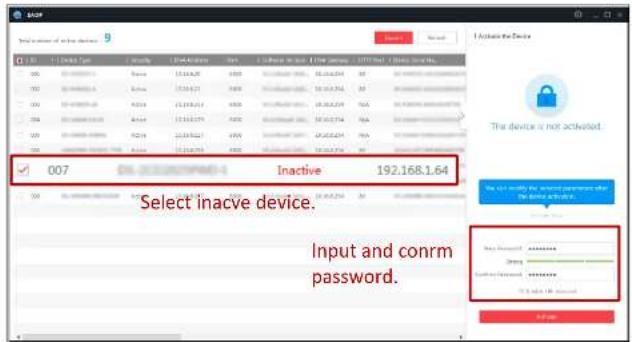
Figure 2-4 SADP Interface
- Create a password and input the password in the password field, and confirm the password.

STRONG PASSWORD RECOMMENDED We highly recommend you create a strong password of your own choosing (using a minimum
- 0.125000000000000000000000000000000000000000000

Figure 2-5 Modify the IP Address
- Input the password and click the Modify button to activate your IP address modification.

Figure 2-6 Control Panel
- Click the Device Management icon to enter the Device Management interface, as shown in the figure below.


STRONG PASSWORD RECOMMENDED We highly recommend you create a strong password of your own choosing (using a minimum of 8 characters, including at least three of the following categories: upper case letters, lower case letters, numbers, and special characters) in order to increase the security of your product. We recommend you reset your password regularly, especially in the high security system, resetting the password monthly or weekly can better protect your product.
![Activate User Name: admin Password: ••••••••• Str... Valid password range [8-16]. You can use a combination of numbers, lowercase, uppercase and special character for your password with at least two kinds of them contained. Confirm Passw... •••••••••• Enable HiLookVision OK Cancel](/content/2026/05/927029/images/4b9977cc4990a693bf16a757a8bbc3acc3a4ff5bd1734da9e0ad14e3a9e8e273.jpg)
Figure 2-8 Activation Interface (Client Software)
- Click OK button to start activation.

Figure 2-9 Modifying the Network Parameters
- Change the device IP address to the same subnet with your computer by either modifying the IP address manually or checking the checkbox of Enable DHCP.
- Input the password to activate your IP address modification.
2.2 Setting the Network Camera over the WAN
Purpose:
This section explains how to connect the network camera to the WAN with a static IP
- Assign a LAN IP address, the subnet mask and the gateway. Refer to Section 2.1.2 for detailed IP address configuration of the network camera.
- Save the static IP in the router.
- Set port mapping, e.g., 80, 8000, and 554 ports. The steps for port mapping vary according to the different routers. Please call the router manufacturer for assistance with port mapping.
Note: Refer to Appendix 2 for detailed information about port mapping.
- Visit the network camera through a web browser or the client software over the internet.

flowchart
graph LR
    A["or"] --> B["Network Camera"]
    B --> C["Network cable"]
    C --> D["Router with Static IP"]
    D --> E["Network cable"]
    E --> F["Internet"]
    F --> G["Network cable"]
    G --> H["Computer"]
Figure 2-10 Accessing the Camera through Router with Static IP
- Connecting the network camera with static IP directly
You can also save the static IP in the camera and directly connect it to the internet without using a router. Refer to Section 2.1.2 for detailed IP address configuration of the network camera.
- Connect the network camera to the router.
- In the camera, assign a LAN IP address, the subnet mask and the gateway. Refer to Section 2.1.2 for detailed IP address configuration of the network camera.
- In the router, set the PPPoE user name, password and confirm the password.
- Set port mapping. E.g. 80, 8000, and 554 ports. The steps for port mapping vary depending on different routers. Please call the router manufacturer for assistance with port mapping.
Note: Refer to Appendix 2 for detailed information about port mapping.
- Apply a domain name from a domain name provider.
- Configure the DDNS settings in the setting interface of the router.
- Visit the camera via the applied domain name.
- Connecting the network camera via a modem
Purpose:
This camera supports the PPPoE auto dial-up function. The camera gets a public IP address by ADSL dial-up after the camera is connected to a modem. You need to configure the PPPoE parameters of the network camera.


flowchart
graph LR
    A["or"] --> B["Network Camera"]
    B --> C["Network cable"]
    C --> D["Port Map"]
    D --> E["Router with Dynamic IP"]
    E --> F["Network cable"]
    F --> G["Internet"]
    G --> H["Network cable"]
    H --> I["Computer"]
    J["Domain Name Resolution Server"] --> G
Figure 2-13 Normal Domain Name Resolution
Steps:
- Apply a domain name from a domain name provider.
- Configure the DDNS settings in the DDNS Settings interface of the network camera. Refer to Section 7.1.2 Configuring DDNS Settings for detailed configuration.
- Visit the camera via the applied domain name.
◆ Private Domain Name Resolution

Chapter 3 Access to the Network Camera
3.1 Accessing by Web Browsers
Steps:
- Open the web browser.
- In the browser address bar, input the IP address of the network camera, and press the Enter key to enter the login interface.
- Activate the network camera for the first time using, refer to the Section 2.1.2 for details.
Note:
- The default IP address is 192.168.1.64.
- If the camera is not activated, please activate the camera first according to
Chapter 2.1.2.
- Select English as the interface language on the top-right of login interface.
- Input the user name and password and click Login.
The admin user should configure the device accounts and user/operator permissions
- Install the plug-in before viewing the live video and operating the camera. Please follow the installation prompts to install the plug-in.

Figure 3-2 Download and Install Plug-in
Note: You may have to close the web browser to install the plug-in. Please reopen the web browser and log in again after installing the plug-in.
3.2 Accessing by Client Software
The product CD contains the HiLookVision client software. You can view the live video and manage the camera with the software.
Follow the installation prompts to install the software. The control panel and live view interface of HiLookVision client software are shown as below.

Chapter 4 Wi-Fi Settings
Purpose:
By connecting to the wireless network, you don't need to use cable of any kind for network connection, which is very convenient for the actual surveillance application.
Note: This chapter is only applicable for the cameras with the built-in Wi-Fi module.
4.1 Configuring Wi-Fi Connection in Manage and Ad-hoc Modes
Purpose:
Two connection modes are supported. Choose a mode as desired and perform the steps to configure the Wi-Fi.
Wireless Connection in Manage Mode
Steps:
- Enter the Wi-Fi configuration interface.
Configuration > Network > Advanced Settings > Wi-Fi
- Click Search to search the online wireless connections.

- Click to choose a wireless connection on the list.

Figure 4-2 Wi-Fi Setting- Manage Mode
- Check the radio button to select the Network mode as Manage, and the Security mode of the network is automatically shown when you select the wireless network, please don't change it manually.
Note: These parameters are exactly identical with those of the router.
- Enter the key to connect the wireless network. The key should be that of the wireless network connection you set on the router.
Wireless Connection in Ad-hoc Mode
If you choose the Ad-hoc mode, you don't need to connect the wireless camera via a router. The scenario is the same as you connect the camera and the PC directly with a
- Customize a SSID for the camera.
- Choose the Security Mode of the wireless connection.
- Enable the wireless connection function for your PC.
- On the PC side, search the network and you can see the SSID of the camera listed.

Figure 4-4 Ad-hoc Connection Point
- Choose the SSID and connect.
Security Mode Description:


Figure 4-6 WEP Mode
- Authentication - Select Open or Shared Key System Authentication, depending on the method used by your access point. Not all access points have this option, in which case they probably use Open System, which is sometimes known as SSID Authentication.
- Key length - This sets the length of the key used for the wireless encryption, 64 or 128 bit. The encryption key length can sometimes be shown as 40/64 and 104/128.
- Key type - The key types available depend on the access point being used. The following options are available:
Choose the type of client/server authentication being used by the access point; EAP-TLS or EAP-PEAP.
EAP-TLS
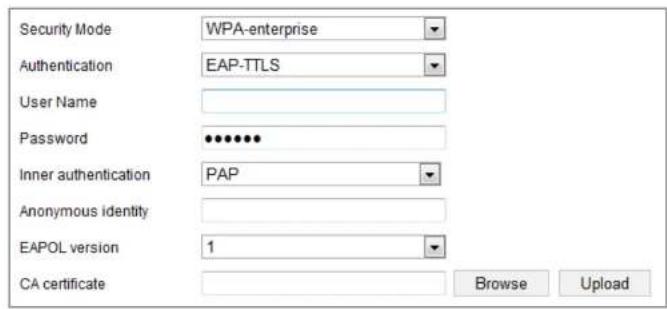
Figure 4-8 EAP-TLS
- Identity - Enter the user ID to present to the network.
- Private key password – Enter the password for your user ID.
- EAPOL version - Select the version used (1 or 2) in your access point.
- CA Certificates - Upload a CA certificate to present to the access point for authentication.
FAP-PEAP-
strongly recommend the use of strong passwords for all functions and network devices. The password should be something of your own choosing (using a minimum of 8 characters, including at least three of the following categories: upper case letters, lower case letters, numbers and special characters) in order to increase the security of your product.
- Proper configuration of all passwords and other security settings is the responsibility of the installer and/or end-user.
4.2 Easy Wi-Fi Connection with WPS function
Purpose:
The setting of the wireless network connection is never easy. To avoid the complex setting of the wireless connection you can enable the WPS function.
WPS (Wi-Fi Protected Setup) refers to the easy configuration of the encrypted connection between the device and the wireless router. The WPS makes it easy to add new devices to an existing network without entering long passphrases. There are two modes of the WPS connection, the PBC mode and the PIN mode.
Note: If you enable the WPS function, you do not need to configure the parameters such as the encryption type and you don't need to know the key of the wireless
PBC Mode:
PBC refers to the Push-Button-Configuration, in which the user simply has to push a button, either an actual or virtual one (as the button on the configuration interface of the IE browser), on both the Access Point (and a registrar of the network) and the new wireless client device.
- Check the checkbox of to enable WPS.
- Choose the connection mode as PBC.

Note: Support of this mode is mandatory for both the Access Points and the connecting devices.
- Check on the Wi-Fi router to see if there is a WPS button. If yes push the button and you can see the indicator near the button start flashing, which means the WPS function of the router is enabled. For detailed operation, please see the user guide of the router.
- Push the WPS button to enable the function on the camera.
If there is not a WPS button on the camera, you can also click the virtual button to enable the PBC function on the web interface.
- Clu: C-

Figure 4-10 Use PIN Code
If the PIN code is generated from the router side, you should enter the PIN code you get from the router side in the Router PIN code field.
3. Click Connect.
Or
You can generate the PIN code on the camera side. And the expired time for the PIN code is 120 seconds.
1. Click Generate.
| PIN Code | 12345678 | Generate |
- Enter the code to the router, in the example, enter 48167581 to the router.

Figure 4-11 Setting WLAN Parameters
- Customize the IPv4 address, the IPv4 Subnet Mask and the Default Gateway.
The setting procedure is the same with that of LAN.
If you want to be assigned the IP address you can check the checkbox to enable the DHCP.
Chapter 5 Live View
5.1 Live View Page
Purpose:
The live view page allows you to view the real-time video, capture images, realize PTZ control, set/call presets and configure video parameters.
Log in the network camera to enter the live view page, or you can click Live View on the menu bar of the main page to enter the live view page.
Descriptions of the live view page:
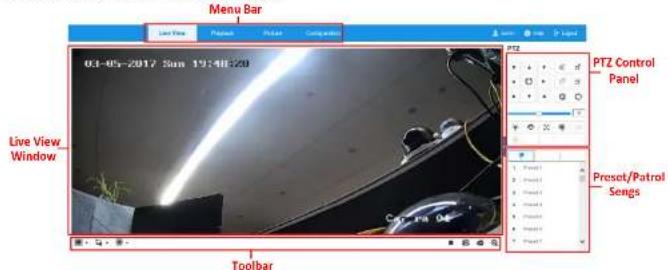
Figure 5-1 Live View Page
selectable if they are supported by the web browser.
PTZ Control:
Perform panning, tilting and zooming actions of the camera. Control the light and the
wiper. (Only available for cameras supporting PTZ function)
Preset/Patrol Settings:
Set/call/delete the presets or patrols for PTZ cameras.
5.2 Starting Live View
In the live view window as shown in Figure 4-2, click ▶ on the toolbar to start the live view of the camera.

Figure 5-2 Live View Toolbar
Table 5-1 Descriptions of the Toolbar
| Icon | Description |
| ▶/■ | Start/Stop live view. |
| 43 | The window size is 4:3. |
| 159 | The window size is 16:9. |
| 124 | The original widow size. |
5.3 Recording and Capturing Pictures Manually
In the live view interface, click 📷 on the toolbar to capture the live pictures or click
to record the live view. The saving paths of the captured pictures and clips can be set on the Configuration > Local page. To configure remote scheduled recording, please refer to Section 11.1.
Note: The captured image will be saved as JPEG file or BMP file in your computer.
5.4 Operating PTZ Control
Purpose:
In the live view interface, you can use the PTZ control buttons to realize pan/tilt/zoom control of the camera.
Note: To realize PTZ control, the camera connected to the network must support the PTZ function or have a pan/tilt unit installed to the camera.
5.4.1 PTZ Control Panel

Notes:
- There are eight direction arrows ( , , , , , , , ) in the control panel. Click the arrows to realize adjustment in the relative positions.
- For the cameras which support lens movements only, the direction buttons are invalid.
Table 5-2 Descriptions of PTZ Control Panel
| Icon | Description |
| Zoom in/out | |
| Focus near/far | |
| Iris +/- | |
| PTZ speed adjustment | |
| Light on/off | |
| Wiper on/off | |
| Auxiliary focus | |
| Initialize lens | |
| Start Manual Tracking | |
| Start 3D Zoom |
5.4.2 Setting/Calling a Preset
- Pan the camera to the right or left.
- Tilt the camera up or down.
- Zoom in or out.
-
Refocus the lens.
-
Click ⚙ to finish the setting of the current preset.
- You can click ✗ to delete the preset.
- Calling a Preset:
This feature enables the camera to point to a specified preset scene manually or when an event takes place.
For the defined preset, you can call it at any time to the desired preset scene.
In the PTZ control panel, select a defined preset from the list and click to call the preset.
Or you can place the mouse on the presets interface, and call the preset by typing the preset No. to call the corresponding presets.

- Click OK to save the first preset.
- Follow the steps above to add the other presets.

Figure 5-6 Add Patrol Path
- Click OK to save a patrol.
- Click ▶ to start the patrol, and click ■ to stop it.
- (Optional) Click ✗ to delete a patrol.
Chapter 6 Network Camera Configuration
6.1 Configuring Local Parameters
Purpose:
The local configuration refers to the parameters of the live view, record files and captured pictures. The record files and captured pictures are the ones you record and capture using the web browser and thus the saving paths of them are on the PC running the browser.
Steps:
- Enter the Local Configuration interface: Configuration > Local.
![Live View Parameters Protocol ● TCP ○ UDP ○ MULTICAST ○ HTTP Play Performance ○ Shortest Delay ● Balanced ○ Fluent Rules ○ Enable ● Disable Display POS Information ○ Enable ● Disable Imaga Format ● JPEG ○ BMP Record File Settings Record File Size ○ 258M ● 512M ○ 1G Show record file to [C:\Users\chthonian\Web\Brand] Return Close](/content/2026/05/927029/images/f84a41371096118b99362280145c2c4fca602ad4c6b0b3c0f67aaed11ad7374b.jpg)
UDP: Provides real-time audio and video streams.
HTTP: Allows the same quality as of TCP without setting specific ports for streaming under some network environments.
MULTICAST: It's recommended to select MCAST type when using the Multicast function. For detailed information about Multicast, refer to Section 7.1.1 Configuring TCP/IP Settings.
◆ Play Performance: Set the play performance to Shortest Delay or Auto.
Rules: It refers to the rules on your local browser, select enable or disable to display or not display the colored marks when the motion detection, face detection, or intrusion detection is triggered. E.g., enabled as the rules are, and the face detection is enabled as well, when a face is detected, it will be marked with a green rectangle on the live view.
◆ Display POS Information: Enable the function, feature information of the detected target is dynamically displayed near the target in the live image. The feature information of different functions is different. For example, ID and waiting time for Queue Management, height for People Counting, etc.
Note:
Display POS Information is only available for certain camera models.
pictures in live view mode.
◆ Save snapshots when playback to: Set the saving path of the captured pictures in playback mode.
◆ Save clips to: Set the saving path of the clipped video files in playback mode.
Note: You can click Browse to change the directory for saving the clips and pictures, and click Open to open the set folder of clips and picture saving.
- Click Save to save the settings.
6.2 Configure System Settings
Purpose:
Follow the instructions below to configure the system settings, include System Settings, Maintenance, Security, and User Management, etc.
6.2.1 Configuring Basic Information
Enter the Device Information interface: Configuration > System > System Settings > Basic Information.
In the Basic Information interface, you can edit the Device Name and Device No.

Figure 6-2 Basic Information
6.2.2 Configuring Time Settings
Purpose:
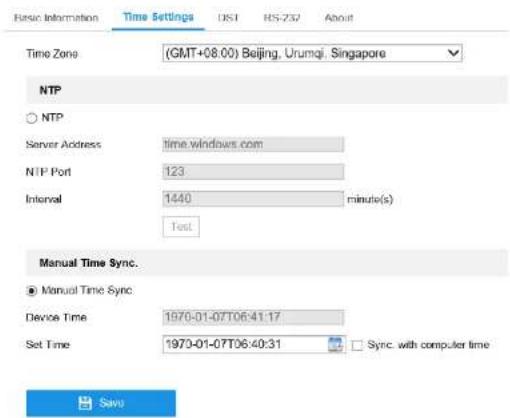
Figure 6-3 Time Settings
- Select the Time Zone of your location from the drop-down menu.
- Configure the NTP settings.
(1) Click to enable the NTP function.
(2) Configure the following settings:
Server Address: IP address of NTP server.
NTP Port: Port of NTP server.
that has a time synchronization function, such as the server at the National Time Center (IP Address: 210.72.145.44). If the camera is set in a customized network, NTP software can be used to establish a NTP server for time synchronization.
- Configure the manual time synchronization.
(1) Check the Manual Time Sync. item to enable the manual time synchronization function.
(2) Click the icon 📋 to select the date, time from the pop-up calendar.
(3) (Optional) You can check Sync. with computer time item to synchronize the time of the device with that of the local PC.
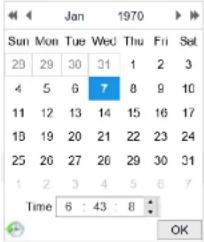
Figure 6-5 Time Sync Manually
- Click Save to save the settings.

Figure 6-6 DST Settings
- Select the start time and the end time.
- Select the DST Bias.
- Click Save to activate the settings.
6.2.4 Configuring RS232 Settings
The RS232 port can be used in two ways:
- Parameters Configuration: Connect a computer to the camera through the serial port. Device parameters can be configured by using software such as HyperTerminal. The serial port parameters must be the same as the serial port parameters of the camera.
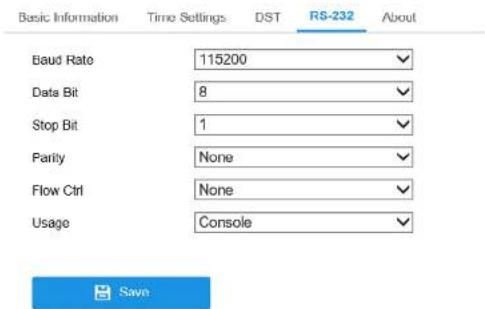
Figure 6-7 RS232 Settings
Note: If you want to connect the camera by the RS232 port, the parameters of the RS232 should be exactly the same with the parameters you configured here.
- Click Save to save the settings.
6.2.5 Viewing License
Purpose:
You can view the open source software licenses that are applied to the IP camera.
Steps:
6.3 Maintenance
6.3.1 Upgrade & Maintenance
Purpose:
The upgrade & maintenance interface allows you to process the operations, including reboot, partly restore, restore to default, export/import the configuration files, and upgrade the device.
Enter the Maintenance interface:
Configuration > System > Maintenance > Upgrade & Maintenance
- Reboot: Restart the device.
- Restore: Reset all the parameters, except the IP parameters and user information, to the default settings.
● Default: Restore all the parameters to the factory default.
Note: After restoring the default settings, the IP address is also restored to the default IP address, please be careful for this action.
- Export/Import Config. File: Configuration file is used for the batch configuration of the camera, which can simplify the configuration steps when then are a bit of corresponding configuration.
required.
- Click Browse to select the local upgrade file and then click Upgrade to start remote upgrade.
Note: The upgrading process will take 1 to 10 minutes. Please don't disconnect power of the camera during the process, and the camera reboots automatically after upgrade.
6.3.2 Log
Purpose:
The operation, alarm, exception and information of the camera can be stored in log files. You can also export the log files on your demand.
Before you start:
Please configure network storage for the camera or insert a SD card in the camera.
Steps:
- Enter log searching interface: Configuration > System > Maintenance > Log.


Figure 6-10 Log Searching
- To export the log files, click Export to save the log files.
6.3.3 System Service
Purpose:
System service settings refer to the hardware service the camera supports. Supported functions vary according to the different cameras. For the cameras support IR LED, ABF (Auto Back Focus), Auto Defog, or Status LED, you can select to enable or disable the corresponding service according to the actual demands.
Upgrade & Maintenance Log System Service
6.4.1 Authentication
Purpose:
You can specifically secure the stream data of live view.
Steps:
- Enter the Authentication interface: Configuration > System > Security > Authentication.

Figure 6-12 Authentication
- Set up authentication method for RTSP authentication and WEB authentication.
Caution:
Digest is the recommended authentication method for better data security. You must be aware of the risk if you adopt basic as the authentication method.
- Click Save to save the settings.

Figure 6-13 IP Address Filter Interface
- Check the checkbox of Enable IP Address Filter.
- Select the type of IP Address Filter in the drop-down list, Forbidden and Allowed are selectable.
- Set the IP Address Filter list.
- Add an IP Address
Steps:
(1) Click the Add to add an IP.
(2) Input the IP Adreess.
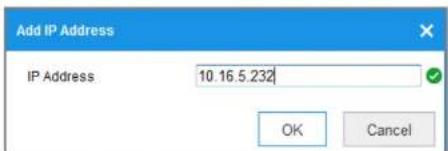
(3) Click the OK to finish modifying.
- Delete an IP Address or IP Addresses.
Select the IP address(es) and click Delete.
- Click Save to save the settings.
6.4.3 Security Service
To enable the remote login, and improve the data communication security, the camera provides the security service for better user experience.
Steps:
- Enter the security service configuration interface: Configuration > System >
Security > Security Service.

Figure 6-16 Security Service
- Check the checkbox of Enable Illegal Login Lock, and then the IP address will
properly.
Steps:
- Enter the User Management interface: Configuration >System >User
Management.

Figure 6-17 User Management Interface
- Adding a User
The admin user has all permissions by default and can create/modify/delete other accounts.
The admin user cannot be deleted and you can only change the admin password.
Steps:
-
Click Add to add a user.
-
Input the User Name, select Level, input Admin Password and Password.
Notes:
- Up to 31 user accounts can be created.
![Add user User Name Test Level Operator Admin Password ••••••••••••••• Password •••••••••••••••• Strong Valid password range [8-16]. You can use a combination of numbers, lowercase, uppercase and special character for your password with at least two kinds of them contained. Confirm The item cannot be empty. Select All Remote: Parameters Settings ✓ Remote: Log Search / Interrogate Wor... ✓ Remote: Upgrade / Format ✓ Remote: Two-way Audio ✓ Remote: Shutdown / Reboot ✓ Remote: Notify Surveillance Center / ✓ Remote: Video Output Control ✓ Remote: Serial Port Control ✓ Remote: Live View ✓ Remote: Manual Record](/content/2026/05/927029/images/3434176e76f2dc31dee1683a35fc9ec9e16c5a83e7c68dd885da41badded03d5.jpg)
Figure 6-18 Add a User
- You can check or uncheck the permissions.
- Click OK to finish the user modification.
![Modify user User Name 1 Level Operator Admin Password Password ••••••• Valid password range [8-16]. You can use a combination of numbers, lowercase, uppercase and special character for your password with at least two kinds of them contained. Confirm ••••••• Select All Remote: Parameters Settings ✓ Remote: Log Search / Interrogate Wor... ✓ Remote: Upgrade / Format ✓ Remote: Two-way Audio ✓ Remote: Shutdown / Reboot ✓ Remote: Notify Surveillance Center /... ✓ Remote: Video Output Control ✓ Remote: Serial Port Control ✓ Remote: Live View ✓ Remote: Manual Record](/content/2026/05/927029/images/4624b71e63b9db94c9da660b4fb4a4aa38e0d4d2dab1359d5671a79e90132f68.jpg)
the User List.
Click Refresh to refresh the list.

Figure 6-20 View the Online Users
Chapter 7 Network Settings
Purpose:
Follow the instructions in this chapter to configure the basic settings and advanced settings.
7.1 Configuring Basic Settings
Purpose:
You can configure the parameters, including TCP/IP, DDNS, PPPoE, Port, and NAT, etc., by following the instructions in this section.
7.1.1 Configuring TCP/IP Settings
Purpose:
TCP/IP settings must be properly configured before you operate the camera over network. The camera supports both the IPv4 and IPv6. Both versions can be configured simultaneously without conflicting to each other, and at least one IP version should be configured.
Steps:

Figure 7-1 TCP/IP Settings
clients to acquire the stream at the same time by requesting a copy from the multicast group address. Before utilizing this function, you have to enable the Multicast function of your router.
● A reboot is required for the settings to take effect.
7.1.2 Configuring DDNS Settings
Purpose:
If your camera is set to use PPPoE as its default network connection, you can use the Dynamic DNS (DDNS) for network access.
Before you start:
Registration on the DDNS server is required before configuring the DDNS settings of the camera.
Steps:
- Enter the DDNS Settings interface: Configuration > Network > Basic Settings > DDNS.
- Check the Enable DDNS checkbox to enable this feature.
- Select DDNS Type. Two DDNS types are selectable: DynDNS and NO-IP.
• DynDNS:

Figure 7-2 DynDNS Settings
- NO-IP:
Steps:
(1) Choose the DDNS Type as NO-IP.

√ Enable DDNS
(3) Enter the Domain name you registered.
(4) Enter the User Name and Password.
(5) Click Save and then you can view the camera with the domain name.
7.1.3 Configuring PPPoE Settings
Steps:
- Enter the PPPoE Settings interface: Configuration > Network > Basic Settings > PPPoE

Figure 7-4 PPPoE Settings
-
Check the Enable PPPoE checkbox to enable this feature.
-
Click Save to save and exit the interface.
Note: A reboot is required for the settings to take effect.
7.1.4 Configuring Port Settings
Purpose:
You can set the port No. of the camera, e.g., HTTP port, RTSP port and HTTPS port.
Steps:
- Enter the Port Settings interface, Configuration > Network > Basic Settings >
Port

Figure 7-5 Port Settings
7.1.5 Configure NAT (Network Address Translation) Settings
Purpose:
NAT interface allows you to configure the UPnP ^TM parameters.
Universal Plug and Play (UPnP ^TM ) is a networking architecture that provides compatibility among networking equipment, software and other hardware devices. The UPnP protocol allows devices to connect seamlessly and to simplify the implementation of networks in the home and corporate environments.
With the function enabled, you don't need to configure the port mapping for each port, and the camera is connected to the Wide Area Network via the router.
Steps:
- Enter the NAT settings interface. Configuration > Network > Basic Settings > NAT.
- Check the checkbox to enable the UPnPTM function.
- Choose a nickname for the camera, or you can use the default name.
- Select the port mapping mode. Manual and Auto are selectable. And for manual port mapping, you can customize the value of the external port.
- Click Save to save the settings.
802.1x, etc., by following the instructions in this section.
7.2.1 Configuring SNMP Settings
Purpose:
You can set the SNMP function to get camera status, parameters and alarm related information, and manage the camera remotely when it is connected to the network.
Before you start:
Before setting the SNMP, please download the SNMP software and manage to receive the camera information via SNMP port. By setting the Trap Address, the camera can send the alarm event and exception messages to the surveillance center.
Note: The SNMP version you select should be the same as that of the SNMP software.
And you also need to use the different version according to the security level you required. SNMP v1 provides no security and SNMP v2 requires password for access.
And SNMP v3 provides encryption and if you use the third version, HTTPS protocol must be enabled.

- For your privacy and to better protect your system against security risks, we should recommend how of service personnel for all functions and networks
SNMP
FTP
Platform Access
HTTPS
QoS
802.1x
Integration Protocol
SNMP v1/v2
□ Enable SNMPv1
Enable SNMP v2c
Read SNMP Community public
Write SNMP Community private
Trap Address
Trap Port 162
Trap Community public
SNMP v3
□ Enable SNMPv3
Read UserName
Security Level no auth, no priv
Authentication Algorithm MD5 SHA
Authentication Password
Private-key Algorithm DES AES
Private-key password
Write UserName
Security Level no auth, no priv
Authentication Algorithm • MD5 SHA
Authentication Password
- Click Save to save and finish the settings.
Notes:
- A reboot is required for the settings to take effect.
- To lower the risk of information leakage, you are suggested to enable SNMP v3 instead of SNMP v1 or v2.
7.2.2 Configuring FTP Settings
Purpose:
You can configure the FTP server related information to enable the uploading of the captured pictures to the FTP server. The captured pictures can be triggered by events or a timing snapshot task.
Steps:
- Enter the FTP Settings interface: Configuration > Network > Advanced
Settings > FTP.

FTP server login.

- For your privacy and to better protect your system against security risks, we strongly recommend the use of strong passwords for all functions and network devices. The password should be something of your own choosing (using a minimum of 8 characters, including at least three of the following categories: upper case letters, lower case letters, numbers and special characters) in order to increase the security of your product.
-
Proper configuration of all passwords and other security settings is the responsibility of the installer and/or end-user.
-
Set the directory structure and picture filing interval.
Directory: In the Directory Structure field, you can select the root directory, parent directory and child directory. When the parent directory is selected, you have the option to use the Device Name, Device Number or Device IP for the name of the directory; and when the Child Directory is selected, you can use the Camera Name or Camera No. as the name of the directory.
Picture Filing Interval: For better picture management, you can set the picture filing interval from 1 day to 30 days. Pictures captured in the same time interval
anonymous access to the FTP server.
Note: The anonymous access function must be supported by the FTP server.
- Click Save to save the settings.
7.2.3 Configuring Email Settings
Purpose:
The system can be configured to send an Email notification to all designated receivers if an alarm event is detected, e.g., motion detection event, video loss, video tampering, etc.
Before you start:
Please configure the DNS Server settings under Configuration > Network > Basic Settings > TCP/IP before using the Email function.
Steps:
- Enter the TCP/IP Settings (Configuration > Network > Basic Settings >
TCP/IP) to set the IPv4 Address, IPv4 Subnet Mask, IPv4 Default Gateway and the Preferred DNS Server.
Note: Please refer to Section 7.1.1 Configuring TCP/IP Settings for detailed information.
The SMTP port should be set as 465 for this encryption method. When you select SSL or TLS and enable STARTTLS, emails will be sent after encrypted by STARTTLS, and the SMTP port should be set as 25.
Note: If you want to use STARTTLS, make sure that the protocol is supported by your e-mail server. If you check the Enable STARTTLS checkbox when the protocol is not supported by your e-mail sever, your e-mail will not be encrypted.
Attached Image: Check the checkbox of Attached Image if you want to send emails with attached alarm images.
Interval: The interval refers to the time between two actions of sending attached pictures.
Authentication (optional): If your email server requires authentication, check this checkbox to use authentication to log in to this server and input the login user name and password.

- For your privacy and to better protect your system against security risks, we strongly recommend the use of strong passwords for all functions and network devices. The password should be something of your own choosing (using a minimum of 8 characters, including at least three of the following

Figure 7-9 Email Settings
- Click Save to save the settings.
7.2.4 Platform Access
Purpose:
Platform access provides you an option to manage the devices via platform.
Steps:

Figure 7-10 Platform Access Configuration
- Check the checkbox of Enable to enable the platform access function of the device. Then a pop-up window is displayed.
- Click and read Terms of Service and Privacy Policy in pop-up window.
- Create a verification code or change the verification code for the camera and then enter the confirmed verification code.
Note: The verification code is required when you add the camera to Hik-Connect app.
E.g., If you set the port number as 443 and the IP address is 192.168.1.64, you may access the device by inputting https://192.168.1.64:443 via the web browser.
Steps:
-
Enter the HTTPS settings interface. Configuration > Network > Advanced Settings > HTTPS.
-
Check the checkbox of Enable to enable the function.

Figure 7-11 HTTPS Configuration Interface
- Create the self-signed certificate or authorized certificate.
- Create the self-signed certificate
(1) Select Canada Gulf sinseed Certificates as the Installation Method
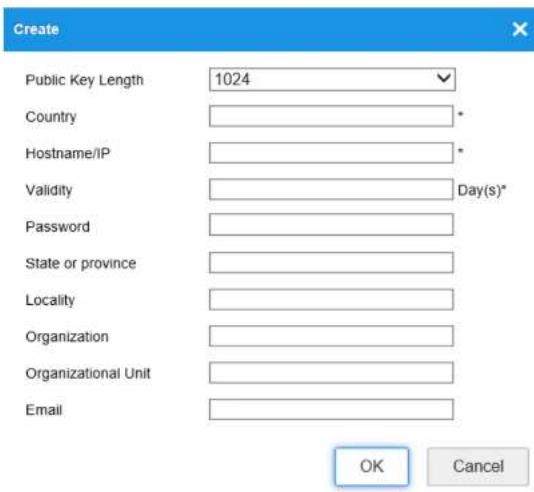
Figure 7-12 Create Self-signed Certificate
(3) Enter the country, host name/IP, validity and other information.
(4) Click OK to save the settings.
Note: If you already had a certificate installed, the Create Self-signed Certificate is grayed out.

Figure 7-13 Installed Certificate
- Click the Save button to save the settings.
7.2.6 Configuring QoS Settings
Purpose:
QoS (Quality of Service) can help solve the network delay and network congestion by configuring the priority of data sending.
Steps:
- Enter the QoS Settings interface: Configuration > Network > Advanced Settings > QoS
SNMP FTP Email Platform Access HTTPS QoS 802 1x Integration Protocol
is used in the IP header to indicate the priority of the data.
- Click Save to save the settings.
Note: A reboot is required for the settings to take effect.
7.2.7 Configuring 802.1X Settings
Purpose:
The IEEE 802.1X standard is supported by the network cameras, and when the feature is enabled, the camera data is secured and user authentication is needed when connecting the camera to the network protected by the IEEE 802.1X.
Before you start:
The authentication server must be configured. Please apply and register a user name and password for 802.1X in the server.

- For your privacy and to better protect your system against security risks, we strongly recommend the use of strong passwords for all functions and network devices. The password should be something of your own choosing (using a minimum of 8 characters, including at least three of the following categories:
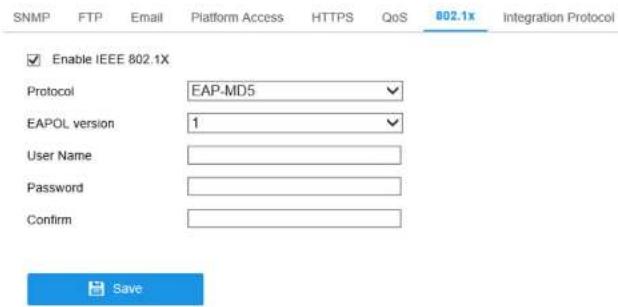
Figure 7-15 802.1X Settings
- Check the Enable IEEE 802.1X checkbox to enable the feature.
- Configure the 802.1X settings, including Protocol, EAPOL version, User Name,
Password and Confirm.
Note: The EAPOL version must be identical with that of the router or the switch. - Enter the user name and password to access the server.
- Click Save to finish the settings.
Note: A reboot is required for the settings to take effect.
7.2.8 Integration Protocol
Steps:
- Check the Enable ONVIF checkbox to enable the function.
- Add ONVIF users. Up to 32 users are allowed.
Set the user name and password, and confirm the password. You can set the user as media user, operator, and administrator.
Note: ONVIF user account is different from the camera user account. You have set ONVIF user account independently.
- Save the settings.
Note: User settings of ONVIF are cleared when you restore the camera.
Chapter 8 Video/Audio Settings
Purpose:
Follow the instructions below to configure the video setting, audio settings, ROI, and
Display info. on Stream.
8.1 Configuring Video Settings
Steps:
- Enter the Video Settings interface, Configuration > Video/Audio > Video
| Video | ROI |
| Stream Type | Main Stream(Normal) |
| Video Type | Video Stream |
| Resolution | 2560*1920 |
| Bitrate Type | Variable |
| Video Quality | Medium |
| Frame Rate | 12.5 fps |
| Max. Bitrate | 5530 Kbps |
| Video Encoding | H.264 |
| H.264+ | OFF |
| Profile | Main Profile |
Video Type:
Select the stream type to video stream, or video & audio composite stream. The audio signal will be recorded only when the Video Type is Video & Audio.
Resolution:
Select the resolution of the video output.
Bitrate Type:
Select the bitrate type to constant or variable.
Video Quality:
When bitrate type is selected as Variable, 6 levels of video quality are selectable.
Frame Rate:
Set the frame rate. The frame rate is to describe the frequency at which the video stream is updated and it is measured by frames per second (fps). A higher frame rate is advantageous when there is movement in the video stream, as it maintains image quality throughout.
Max. Bitrate:
Set the max. bitrate from 32 to 16384 Kbps. The higher value corresponds to the higher video quality, but the better bandwidth is required.
Note: The maximum limit of the max. bitrate value varies according to different
coding technology based on H.264. By enabling H.264+, users can estimate the HDD consumption by its maximum average bitrate. Compared to H.264, H.264+ reduces storage by up to 50% with the same maximum bitrate in most scenes.
- H.265+: If you set the main stream as the stream type, and H.265 as the video encoding, you can see H.265+ available. H.265+ is an improved compression coding technology based on H.265. By enabling H.265+, users can estimate the HDD consumption by its maximum average bitrate. Compared to H.265, H.265+ reduces storage by up to 50% with the same maximum bitrate in most scenes.
You need to reboot the camera if you want to turn on or turn off the H.264+/H.265+. If you switch from H.264+ to H.265+ directly, and vice versa, a reboot is not required by the system.
Notes:
- Upgrade your video player to the latest version if live view or playback does not work properly due to compatibility.
- With H.264+/H.265+ enabled, the parameters such as profile, I frame interval, video quality, and SVC are greyed out.
When you select H.264 or H.265 as video encoding, you can set the profile. Selectable profiles vary according to camera models.
• I Frame Interval:
Set I Frame Interval from 1 to 400.
• SVC:
Scalable Video Coding is an extension of the H.264/AVC and H.265 standard. Select OFF/ON to disable/enable the SVC function. Select Auto and the device will automatically extract frames from the original video when the network bandwidth is insufficient.
Smoothing:
It refers to the smoothness of the stream. The higher value of the smoothing is, the better fluency of the stream will be, though, the video quality may not be so satisfactory. The lower value of the smoothing is, the higher quality of the stream will be, though it may appear not fluent.
4. Click Save to save the settings.
Note:
The video parameters vary according to different camera models. Refer to the actual display page for camera functions.
- Configure the following settings.
Note: Audio settings vary according to different camera models.
Audio Encoding: G.722.1, G.711 ulaw, G.711 alaw, G.726, MP2L2 and PCM are selectable. For MP2L2, the Sampling Rate and Audio Stream Bitrate are configurable. For PCM, the Sampling Rate can be set.
Audio Input: MicIn and LineIn are selectable for the connected microphone and pickup respectively.
Input Volume: 0-100 adjustable.
Environmental Noise Filter: Set it as OFF or ON. When the function is enabled, the noise in the environment can be filtered to some extent.
- Click Save to save the settings.
8.3 Configuring ROI Encoding
Purpose:
ROI (Region of Interest) encoding helps to discriminate the ROI and background information in video compression, which means, the technology assigns more encoding resource to the region of interest, thus to increase the quality of the ROI whereas the background information is less focused.

rectangle as the ROI region. You can click Clear to cancel former drawing.
Click Stop Drawing when you finish.
(4) Select the ROI level.
(5) Enter a region name for the chosen region.
(6) Click Save the save the settings of ROI settings for chosen fixed region.
(7) Repeat steps (1) to (6) to setup other fixed regions.
8.4 Display Info. on Stream
Check the checkbox of Enable Dual-VCA, and the information of the objects (e.g. human, vehicle, etc.) will be marked in the video stream. Then, you can set rules on the connected rear-end device to detect the events including line crossing, intrusion, etc.

Figure 8-4 Display Info. on Stream
Chapter 9 Image Settings
Purpose:
Follow the instructions in this chapter to configure the image parameters, including display settings, OSD settings, privacy mask, and picture overlay.
9.1 Configuring Display Settings
Purpose:
Configure the image adjustment, exposure settings, day/night switch, backlight settings, white balance, image enhancement, video adjustment, and other parameters in display settings.
Note: Only certain camera models support this function. The display parameters vary according to the different camera models. Please refer to the actual interface for details.
9.1.1 Day/Night Auto-Switch
Steps:
-
Enter the Display Settings interface. Configuration > Image > Display Settings.
-
Select the Mounting Scenario for the camera. Normal and Road are selectable for the mounting scenario. Each mounting scenario has a set of image parameters. Choose a suitable scenario may help adjust image more conveniently.
- Set the image parameters of the camera.
Note: In order to guarantee the image quality in different illumination, it provides two sets of parameters for users to configure.
- Image Adjustment
Brightness describes bright of the image, which ranges from 1 to 100.
Contrast describes the contrast of the image, which ranges from 1 to 100.
Saturation describes the colorfulness of the image color, which ranges from 1 to 100.
Sharpness describes the edge contrast of the image, which ranges from 1 to 100.
- Exposure Settings
If the camera is equipped with the fixed lens, only Manual is selectable, and the iris mode is not configurable.
If Auto is selected, you can set the auto iris level from 0 to 100.
The Exposure Time refers to the electronic shutter time, which ranges from 1 to 1/100,000s. Adjust it according to the actual luminance condition.
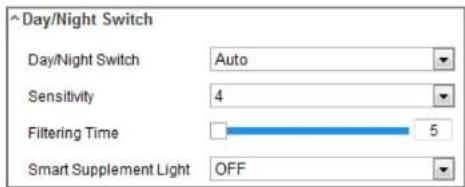
Figure 9-3 Day/Night Switch
Day: the camera stays at day mode.
Night: the camera stays at night mode.
Auto: the camera switches between the day mode and the night mode according to the illumination automatically. The sensitivity ranges from 0 to 7, the higher the value is, the easier the mode switches. The filtering time refers to the interval time between the day/night switch. You can set it from 5s to 120s.
Scheduled-Switch: Set the start time and the end time to define the duration for day/night mode.
Triggered by alarm input: The switch is triggered by alarm input. You can set the triggered mode to day or night.
Triggered by Video: The camera switches between the day mode and the night mode by analyzing the image performance.
too dark to be seen clearly. BLC compensates light to the object in the front to make it clear. OFF, Up, Down, Left, Right, Center, Auto, and Custom are selectable.
Note: If BLC mode is set as Custom, you can draw a red rectangle on the live view image as the BLC area.
WDR: Wide Dynamic Range can be used when there is a high contrast of the bright area and the dark area of the scene.
HLC: High Light Compression function can be used when there are strong lights in the scene affecting the image quality.
- White Balance
White balance is the white rendition function of the camera used to adjust the color temperature according to the environment.

Figure 9-4 White Balance
- Video Adjustment
Mirror: It mirrors the image so you can see it inversed. Left/Right, Up/Down, Center, and OFF are selectable.
Rotate: To make a complete use of the 16:9 aspect ratio, you can enable the rotate function when you use the camera in a narrow view scene.
When installing, turn the camera to the 90 degrees or rotate the 3-axis lens to 90 degrees, and set the rotate mode as on, you will get a normal view of the scene with 9:16 aspect ratio to ignore the needless information such as the wall, and get more meaningful information of the scene.
Scene Mode: Choose the scene as indoor or outdoor according to the real environment.
Video Standard: 50 Hz and 60 Hz are selectable. Choose according to the different video standards; normally 50 Hz for PAL standard and 60 Hz for NTSC standard.
Capture Mode: It's the selectable video input mode to meet the different demands of field of view and resolution.
Lens Distortion Correction: For cameras equipped with motor-driven lens, image may appear distorted to some extent. Turn on this function to correct the
Display Settings
OBD Settings
Privacy Mark

natural_image
Highway traffic scene with multiple lanes, trucks, and vehicles under overcast sky (no visible text or signage)
Figure 9-5 Day/Night Scheduled-Switch Configuration Interface
Steps:
- Click the calendar icon to select the start time and the end time of the switch.
Notes:
• The start time and end time refer to the valid time for day mode.
- The time period can start and end on two days in a row. For example, if you set start time as 10:00 and end time as 1:00, the day mode will be activated at 10 o'clock in the morning and stopped at 1 o'clock early in the next morning.
- Click Common tab to configure the common parameters applicable to the day mode and night mode

Figure 9-6 OSD Settings
Steps:
- Enter the OSD Settings interface: Configuration > Image > OSD Settings.
- Check the corresponding checkbox to select the display of camera name, date or week if required.
- Edit the camera name in the text field of Camera Name.
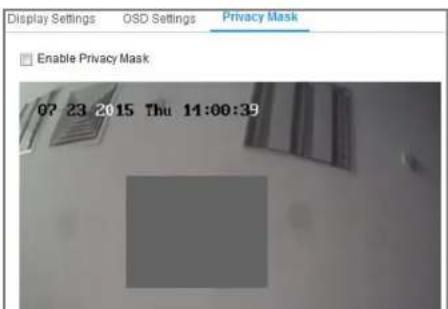
9.3 Configuring Privacy Mask
Purpose:
Privacy mask enables you to cover certain areas on the live video to prevent certain spots in the surveillance area from being live viewed and recorded.
Steps:
- Enter the Privacy Mask Settings interface: Configuration > Image > Privacy Mask.
- Check the checkbox of Enable Privacy Mask to enable this function.
- Click Draw Area.
Chapter 10 Event Settings
This section explains how to configure the network camera to respond to alarm events, including basic event and smart event.
10.1 Basic Events
You can configure the basic events by following the instructions in this section, including motion detection, video tampering, alarm input, alarm output, and exception, etc. These events can trigger the linkage methods, such as Notify Surveillance Center, Send Email, Trigger Alarm Output, etc.
Note: Check the checkbox of Notify Surveillance Center if you want the alarm information to be pushed to PC or mobile client software as soon as the alarm is triggered.
10.1.1 Configuring Motion Detection
Purpose:
Motion detection detects the moving objects in the configured surveillance area, and a series of actions can be taken when the alarm is triggered.
- Check the checkbox of Enable Dynamic Analysis for Motion if you want to mark the detected objects with green rectangles.
Note: Select Disable for rules if you don't want the detected objected displayed with the green rectangles. Select disable rules from Configuration > Local
Configuration > Live View Parameters-rules.

Task 2: Set the Arming Schedule for Motion Detection

bar
| Day | Arming Schedule | Delete All | |---|---|---| | Mon | 0 | 2 | | Tue | 0 | 2 | | Wed | 0 | 2 | | Thu | 0 | 2 | | Fri | 0 | 2 | | Sat | 0 | 2 | | Sun | 0 | 2 | The chart displays a single bar for each day. The values in the table represent the counts of Arming Schedule and Delete All for each day. There is no additional data series in this image. The title of the chart is 'Enable Motion Detection' and 'Enable Dynamic Analysis for Motion'.Figure 10-2 Arming Schedule
Steps:
- Click Arming Schedule to edit the arming schedule.
- Click on the time bar and drag the mouse to select the time period.

Note: Click on the selected time period, you can adjust the time period to the desired time by either moving the time bar or input the exact time period.
- (Optional) Click Delete to delete the current arming schedule, or click Save to save the settings.
- Move the mouse to the end of each day, a copy dialogue box pops up, and you can copy the current settings to other days.
- Click Save to save the settings.
Note: The time of each period can't be overlapped. Up to 8 periods can be configured for each day.
Task 3: Set the Linkage Method for Motion Detection
Check the checkbox to select the linkage method. Audible Warning, Send Email, Notify Surveillance Center, Upload to FTP/Memory Card/NAS, Trigger Channel and Trigger Alarm Output are selectable. You can specify the linkage method when an event occurs.

Send an email with alarm information to a user or users when an event occurs.
Note: To send the Email when an event occurs, please refer to Section 7.2.3 to complete Email setup in advance.
- Upload to FTP/Memory Card/NAS
Capture the image when an alarm is triggered and upload the picture to a FTP server.
Notes:
- Set the FTP address and the remote FTP server first. Refer to Section 7.2.2 Configuring FTP Settings for detailed information.
- Go to Configuration > Storage > Schedule Settings> Capture > Capture Parameters page, enable the event-triggered snapshot, and set the capture interval and capture number.
- The captured image can also be uploaded to the available SD card or network disk.
- Trigger Channel
The video will be recorded when the motion is detected. You have to set the recording schedule to realize this function. Please refer to Section 11.1 for detailed information.
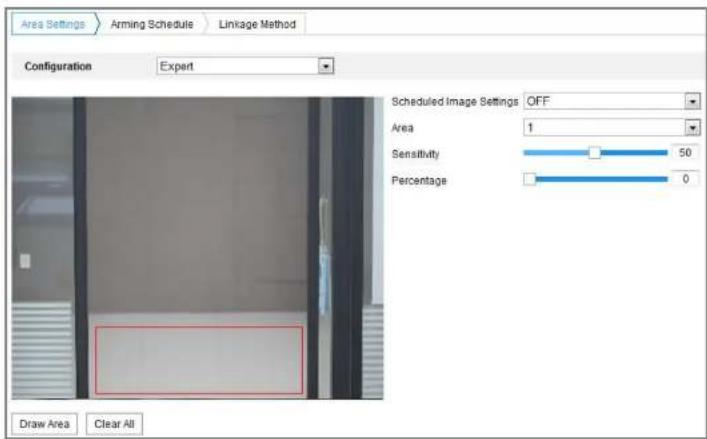
Figure 10-5 Expert Mode of Motion Detection
- Day/Night Switch OFF
Steps:
- Draw the detection area as in the normal configuration mode. Up to 8 areas are supported.
- Select OFF for Scheduled Image Settings.
- Select the area by clicking the area No
the selected area in the daytime.
- Slide the cursor to adjust the sensitivity and proportion of object on the area for the selected area at night.
- Set the arming schedule and linkage method as in the normal configuration mode.
- Click Save to save the settings.
● Day/Night Scheduled-Switch
Steps:
- Draw the detection area as in the normal configuration mode. Up to 8 areas are supported.
- Select Scheduled-Switch for Scheduled Image Settings.

Figure 10-6 Day/Night Scheduled-Switch
- Select the start time and the end time for the switch timing.
- Select the area by clicking the area No.
-
Slide the cursor to adjust the sensitivity and proportion of object on the area for the selected area in the dentition.
-
Enter the video tampering Settings interface, Configuration > Event > Basic Event > Video Tampering.

Audible warning, notify surveillance center, send email and trigger alarm output are selectable. Please refer to Task 3: Set the Linkage Method for Motion Detection in Section 10.1.1.
- Click Save to save the settings.
10.1.3 Configuring Alarm Input
Steps:
- Enter the Alarm Input Settings interface: Configuration > Event > Basic Event > Alarm Input.
- Choose the alarm input No. and the Alarm Type. The alarm type can be NO (Normally Open) and NC (Normally Closed). Edit the name to set a name for the alarm input (optional).

taken for the alarm input. Refer to Task 3: Set the Linkage Method for Motion
Detection in Section 10.1.1.
- You can copy your settings to other alarm inputs.
- Click Save to save the settings.
10.1.4 Configuring Alarm Output

schedule configuration is the same as the settings of the arming schedule for motion detection Refer to Task 2: Set the Arming Schedule for Motion Detection in Section 10.1.1.
- You can copy the settings to other alarm outputs.
- Click Save to save the settings.
10.1.5 Configuring PIR Alarm
Purpose:
A PIR (Passive Infrared) alarm is triggered when an intruder moves within the detector's field of view. The heat energy dissipated by a person, or any other warm blooded creature such as dogs, cats, etc., can be detected.

- Input the alarm name in the text field as desired.
- Click Arming Schedule to enter the Edit Schedule Time interface. The time schedule configuration is the same as the settings of the arming schedule for motion detection Refer to Task 2: Set the Arming Schedule for Motion Detection in Section 10.1.1.
- Check the checkbox to select the linkage method taken for the video tampering. Audible warning, notify surveillance center, send email and trigger alarm output are selectable. Please refer to Task 3: Set the Linkage Method for Motion Detection in Section 10.1.1.
- You can copy the settings to other alarm outputs.
- Click Save to save the settings.
10.1.6 Handling Exception
The exception type can be HDD full, HDD error, network disconnected, IP address conflicted and illegal login to the cameras.
Note: Only certain camera models support this function. The display parameters vary according to the different camera models. Please refer to the actual interface for details.
- Click Save to save the settings.
10.2 Smart Events
You can configure the smart events by following the instructions in this section, including audio exception detection, defocus detection, scene change detection, intrusion detection, and line crossing detection, etc. These events can trigger the linkage methods, such as Notify Surveillance Center, Send Email, Trigger Alarm Output, etc.
10.2.7 Configuring Intrusion Detection
Purpose:
Intrusion detection function detects people, vehicle or other objects which enter and loiter in a pre-defined virtual region, and some certain actions can be taken when the alarm is triggered.
Note: Intrusion detection function varies according to different camera models.
Steps:
- Enter the Intrusion Detection settings interface, Configuration> Event > Smart
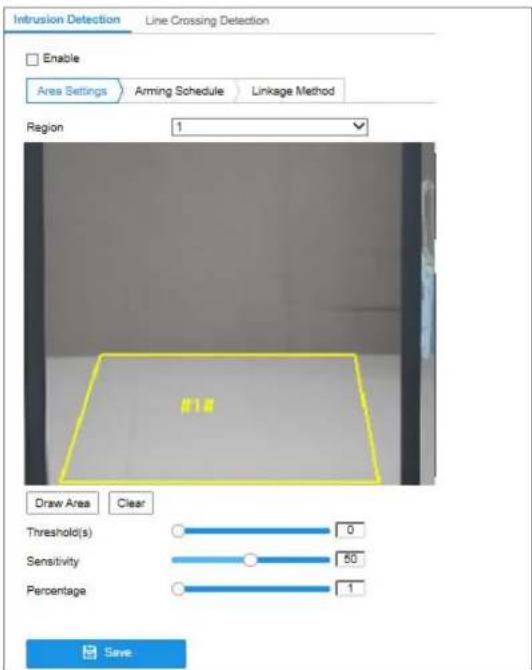
Max. Size: The maximum size of a valid target. Targets with larger sizes would not trigger detection.
Min. Size: The minimum size of a valid target. Targets with smaller sizes would not trigger detection.
-
Click Stop Drawing when finish drawing.
-
Set the time threshold for intrusion detection.
Threshold: Range [0s-10s], the threshold for the time of the object loitering in the region. If you set the value as 0, alarm is triggered immediately after the object entering the region.
- Drag the slider to set the sensitivity value.
Sensitivity: Range [1-100]. Sensitivity stands for the percentage of the body part of an acceptable target that enters the pre-defined region.
$$ \text { Sensitivity } = 1 0 0 - \mathrm{S} _ {1} / \mathrm{S} _ {1} * 1 0 0 $$
S_1 stands for the target body part that goes across the pre-defined region. stands for the complete target body.
Example: if you set the value as 60, the action can be counted as an intrusion only when 40 percent body part enters the region.
Note: The Sensitivity of the detection is supported by certain models. Refer to actual display for details
Line crossing detection function detects people, vehicle or other objects which cross a pre-defined virtual line, and some certain actions can be taken when the alarm is triggered.
Note: Line crossing detection function varies according to different camera models.
Steps:
- Enter the Line Crossing Detection settings interface, Configuration > Event >
Smart Event > Line Crossing Detection.

-
Drag the line, and you can locate it on the live video as desired. Click on the line, two red squares are displayed on each end, and you can click-and-drag one of the red squares to define the shape and length of the line.
-
Set the Max. Size and Min. Size for valid targets. Targets smaller or larger than the valid target size are not able to trigger detection.
Max. Size: The maximum size of a valid target. Targets with larger sizes would not trigger detection.
Min. Size: The minimum size of a valid target. Targets with smaller sizes would not trigger detection.
- Select the direction for line crossing detection. And you can select the directions as A<->B, A->B, and B->A.
A<->B: The object going across the plane with both directions can be detected and alarms are triggered.
A->B: Only the object crossing the configured line from the A side to the B side can be detected.
B->A: Only the object crossing the configured line from the B side to the A side can be detected.
-
Click Stop Drawing when finish drawing.
-
Click the Arming Schedule to set the arming schedule.
- Select the linkage methods for line crossing detection, including Notify Surveillance Center, Send Email, Upload to FTP/Memory Card/NAS, Trigger Channel and Trigger Alarm Output.
- Click Save to save the settings.
Chapter 11 Storage Settings
Before you start:
To configure record settings, please make sure that you have the network storage device or local storage device configured.
11.1 Configuring Record Schedule
Purpose:
There are two kinds of recording for the cameras: manual recording and scheduled recording. In this section, you can follow the instructions to configure the scheduled recording. By default, the record files of scheduled recording are stored in the local storage or in the network disk.
Steps:
- Enter the Record Schedule Settings interface: Configuration > Storage >
Schedule Settings > Record Schedule.


Figure 11-2 Record Parameters
- Pre-record: The time you set to start recording before the scheduled time or the event. For example, if an alarm triggers recording at 10:00, and the pre-record time is set as 5 seconds, the camera starts to record at 9:59:55. The Pre-record time can be configured as No Pre-record, 5s, 10s, 15s, 20s, 25s, 30s or not limited.
- Post-record: The time you set to stop recording after the scheduled time or the event. For example, if an alarm triggered recording ends at 11:00, and the post-record time is set as 5 seconds, the camera records until 11:00:05. The Post-record time can be configured as 5s, 10s, 30s, 1 min, 2 min, 5 min or 10 min.
- Stream Type: Select the stream type for recording.
Method of Motion Detection Settings interface. For detailed information, please refer to the Task 1: Set the Motion Detection Area in the Section 10.1.1.
- Record Triggered by Alarm
If you select Alarm, the video will be recorded when the alarm is triggered via the external alarm input channels.
Besides configuring the recording schedule, you have to set the Alarm Type and check the checkbox of Trigger Channel in the Linkage Method of Alarm Input Settings interface. For detailed information, please refer to Section 10.1.2.
- Record Triggered by Motion & Alarm
If you select Motion & Alarm, the video will be recorded when the motion and alarm are triggered at the same time.
Besides configuring the recording schedule, you have to configure the settings on the Motion Detection and Alarm Input Settings interfaces. Please refer to Section 10.1.1 and Section 10.1.2 for detailed information.
● Record Triggered by Motion | Alarm
If you select Motion | Alarm, the video will be recorded when the external
11.2 Configure Capture Schedule
Purpose:
You can configure the scheduled snapshot and event-triggered snapshot. The captured picture can be stored in the local storage or network storage.
Steps:
- Enter the Capture Settings interface: Configuration > Storage > Storage Settings > Capture.

bar
| Day | Continuous | Delete | Delete All | |---|---|---|---| | Mon | 2 | 4 | 6 | | Tue | 0 | 2 | 4 | | Wed | 0 | 2 | 4 | | Thu | 0 | 2 | 4 | | Fri | 0 | 2 | 4 | | Sat | 0 | 2 | 4 | | Sun | 0 | 2 | 4 | Capture Schedule Capture Parameters Advanced Continuous Delete All- Go to Capture Parameters tab to configure the capture parameters.
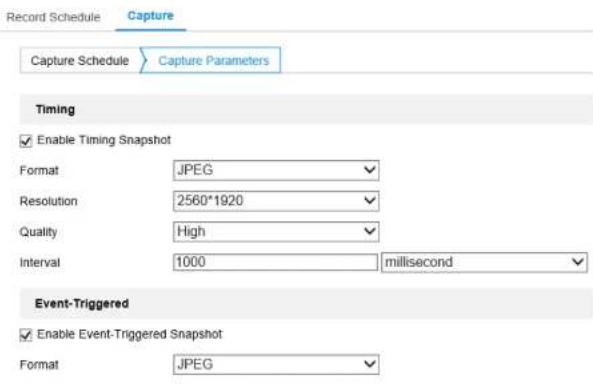
(1) Check the Enable Timing Snapshot checkbox to enable continuous snapshot.
(2) Select the picture format, resolution, quality and capture interval.
(3) Check the Enable Event-triggered Snapshot checkbox to enable event-triggered snapshot.
(4) Select the picture format, resolution, quality, capture interval, and capture number.
Steps:
I. Add Net HDD.
(1) Enter the Net HDD settings interface, Configuration > Storage > Storage Management > Net HDD.

Figure 11-6 Add Network Disk
(2) Enter the IP address of the network disk, and enter the file path.
(3) Select the mounting type. NFS and SMB/CIFS are selectable. And you can set the user name and password to guarantee the security if SMB/CIFS is selected.
Note: Please refer to the NAS User Manual for creating the file path.

- For your privacy and to better protect your system against security risks, we strongly recommend the use of strong passwords for all functions and
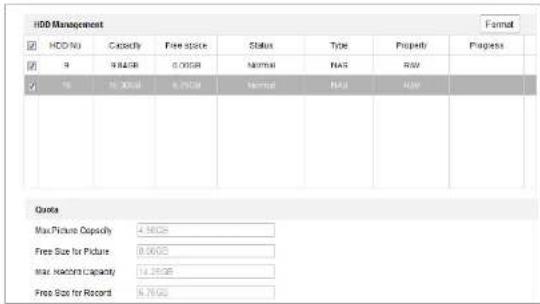
Figure 11-7 Storage Management Interface
(2) If the status of the disk is Uninitialized, check the corresponding checkbox to select the disk and click Format to start initializing the disk.
When the initialization completed, the status of disk will become Normal.
| HDD Management | End | Format | ||||||
| ✓ | HDD No. | Capacity | Free space | Status | Type | Property | Progress | |
| ✓ | 9 | 20.00GB | 0.00GB | Formading | NAS | RVN | ||
Figure 11-8 View Disk Status
- Define the quota for record and pictures.
(1) Input the quota percentage for picture and for record.
Chapter 12 Playback
Purpose:
This section explains how to view the remotely recorded video files stored in the network disks or memory cards.
Steps:
- Click Playback on the menu bar to enter playback interface.

Figure 12-1 Playback Interface
- Click to play the video files found on this date.
The toolbar on the bottom of Playback interface can be used to control playing process.

Figure 12-3 Playback Toolbar
Table 12-1 Description of the buttons
| Button | Operation | Button | Operation |
| Play | Capture a picture | ||
| II | Pause | Start/Stop clipping video files | |
| Stop | Audio on and adjust volume/Mute | ||
| Speed down | Download | ||
| Speed up | Playback by frame | ||
| Enable/Disable digital zoom |
Note: You can choose the file paths locally for downloaded playback video files and pictures in Local Configuration interface.
You can also input the time and click to locate the playback point in the Set
Chapter 13 Picture
Click Picture to enter the picture searching interface. You can search, view, and download the pictures stored in the local storage or network storage.
Notes:
- Make sure HDD, NAS or memory card are properly configured before you process the picture search.
- Make sure the capture schedule is configured. Go to Configuration > Storage >
Schedule Settings > Capture to set the capture schedule.
| File List | |||||
| File Type | No | File Name | Time | File Size | Progress |
| Continuous | 1 | ch01_0800C000000369600 | 2015-07-10 15:35:13 | 134 KB | |
| Start Time | 2 | ch01_0800C000000368700 | 2015-07-10 15:35:18 | 134 KB | |
| 2015-07-05 00:30:03 | 3 | ch01_0800C000000368800 | 2015-07-10 15:35:24 | 134 KB | |
| End Time | 4 | ch01_0800C000000368900 | 2015-07-10 15:35:29 | 132 KB | |
| 2015-07-31 23:59:53 | 5 | ch01_0800C000000369000 | 2015-07-10 15:35:34 | 132 KB | |
| Search | 6 | ch01_0800C000000369100 | 2015-07-10 15:35:39 | 133 KB | |
| 7 | ch01_0800C000000369200 | 2015-07-10 15:35:45 | 133 KB | ||
| 8 | ch01_0800C000000369300 | 2015-07-10 15:35:50 | 131 KB | ||
| 9 | ch01_0800C000000369400 | 2015-07-10 15:35:55 | 131 KB | ||
| 10 | ch01_0800C000000369500 | 2015-07-10 15:35:51 | 132 KB | ||
| 11 | ch01_0800C000000369600 | 2015-07-10 15:35:55 | 132 KB | ||
Note:
Fuzzy searching is supported for plate number. Only numbers and letters are needed for searching by plate number.
(2) Click Search. The results will be listed on the picture list area.
(3) To download the pictures, check the checkbox of desired pictures and click
Download at upper-right corner of the page.
(4) To export vehicle information of the searching results, click Export.
Note:
- Configure the saving path from Configuration > Local > Picture and Clip
Settings > Save snapshots in live view to.
- Up to 4000 pictures can be displayed at one time.
Appendix
Appendix 1 SADP Software Introduction
• Description of SADP
SADP (Search Active Devices Protocol) is a kind of user-friendly and installation-free online device search tool. It searches the active online devices within your subnet and displays the information of the devices. You can also modify the basic network information of the devices using this software.
- Search active devices online
◆ Search online devices automatically
After launch the SADP software, it automatically searches the online devices every 15 seconds from the subnet where your computer locates. It displays the total number and information of the searched devices in the Online Devices interface. Device information including the device type, IP address and port number, etc. will be displayed.

You can also click to refresh the online device list manually. The newly searched devices will be added to the list.

You can click ▲ or ▼ on each column heading to order the information;
you can click to expand the device table and hide the network parameter panel on
the right side, or click to show the network parameter panel.
- Modify network parameters
Steps:
-
Select the device to be modified in the device list and the network parameters of the device will be displayed in the Modify Network Parameters panel on the right side.
-
Edit the modifiable network parameters, e.g. IP address and port number.
-
Enter the password of the admin account of the device in the Admin Password
field and click to save the changes.

- For your privacy and to better protect your system against security risks, we strongly recommend the use of strong passwords for all functions and network
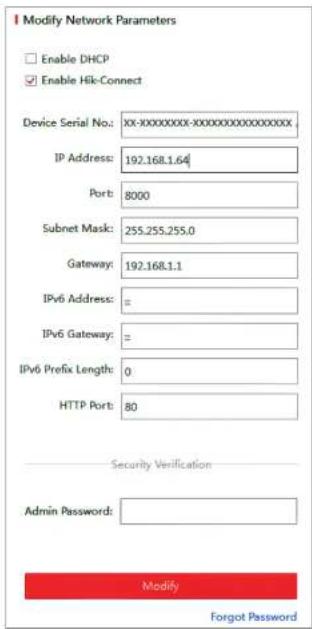
Figure A.1.2 Modify Network Parameters
Appendix 2 Port Mapping
The following settings are for TP-LINK router (TL-WR641G). The settings vary depending on different models of routers.
Steps:
- Select the WAN Connection Type, as shown below:
Figure A.2.1 Select the WAN Connection Type
- Set the LAN parameters of the router as in the following figure, including IP address and subnet mask settings.

another camera as 81.8001, 555, 8201 with IP 192.168.1.24. Refer to the steps as below:
Steps:
- As the settings mentioned above, map the port 80, 8000, 554 and 8200 for the network camera at 192.168.1.23
- Map the port 81, 8001, 555 and 8201 for the network camera at 192.168.1.24.
- Enable ALL or TCP protocols.
- Check the Enable checkbox and click Save to save the settings.


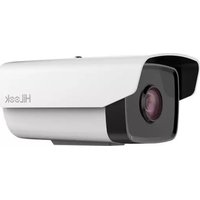
- User Manual
- ALL RIGHTS RESERVED.
- About this Manual
- FCC Conditions
- EU Conformity Statement
- Industry Canada ICES-003 Compliance
- Safety Instruction
- Cautions:
- Notes:
- Table of Contents
- Security Sengs 50
- User Management 53
- Chapter 7 Network Settings....58
- Conguring Basic Sengs 58
- Congure Advanced Sengs....64
- Chapter 10 Event Settings....94
- Basic Events 94
- Smart Events.... 106
- Chapter 11 Storage Settings....112
- Chapter 12 Playback....119
- Chapter 13 Picture ....121
- Appendix 123
- Chapter 1 System Requirement
- Chapter 2 Network Connection
- Note:
- Before you start:
- Setting the Network Camera over the LAN
- Purpose:
- Activating the Camera
- Steps:
- Setting the Network Camera over the WAN
- - Connecting the network camera with static IP directly
- ◆ Private Domain Name Resolution
- Chapter 3 Access to the Network Camera
- Accessing by Web Browsers
- Chapter 2.1.2.
- Accessing by Client Software
- Chapter 4 Wi-Fi Settings
- Configuring Wi-Fi Connection in Manage and Ad-hoc Modes
- Wireless Connection in Ad-hoc Mode
- Security Mode Description:
- Easy Wi-Fi Connection with WPS function
- PBC Mode:
- Chapter 5 Live View
- Live View Page
- PTZ Control:
- Preset/Patrol Settings:
- Starting Live View
- Recording and Capturing Pictures Manually
- Operating PTZ Control
- PTZ Control Panel
- Setting/Calling a Preset
- Chapter 6 Network Camera Configuration
- Configuring Local Parameters
- Configure System Settings
- Configuring Basic Information
- Configuring Time Settings
- Configuring RS232 Settings
- Viewing License
- Maintenance
- Upgrade & Maintenance
- Log
- System Service
- Authentication
- Caution:
- Security Service
- Management.
- - Adding a User
- Chapter 7 Network Settings
- Configuring Basic Settings
- Configuring TCP/IP Settings
- Configuring DDNS Settings
- Configuring PPPoE Settings
- Configuring Port Settings
- Port
- Configure NAT (Network Address Translation) Settings
- Configuring SNMP Settings
- SNMP v1/v2
- SNMP v3
- Configuring FTP Settings
- Configuring Email Settings
- Platform Access
- Configuring QoS Settings
- Configuring 802.1X Settings
- Integration Protocol
- Chapter 8 Video/Audio Settings
- Configuring Video Settings
- Video Type:
- Resolution:
- Bitrate Type:
- Video Quality:
- Frame Rate:
- Max. Bitrate:
- • I Frame Interval:
- • SVC:
- Smoothing:
- Click Save to save the settings.
- Configuring ROI Encoding
- Display Info. on Stream
- Chapter 9 Image Settings
- Configuring Display Settings
- Day/Night Auto-Switch
- - White Balance
- - Video Adjustment
- Configuring Privacy Mask
- Chapter 10 Event Settings
- Basic Events
- Configuring Motion Detection
- Task 3: Set the Linkage Method for Motion Detection
- Configuring Alarm Input
- Configuring Alarm Output
- Configuring PIR Alarm
- Handling Exception
- Smart Events
- Configuring Intrusion Detection
- Chapter 11 Storage Settings
- Configuring Record Schedule
- - Record Triggered by Alarm
- - Record Triggered by Motion & Alarm
- ● Record Triggered by Motion | Alarm
- Configure Capture Schedule
- Add Net HDD.
- Chapter 12 Playback
- Chapter 13 Picture
- Appendix
- Appendix 1 SADP Software Introduction
- • Description of SADP
- - Search active devices online
- ◆ Search online devices automatically
- - Modify network parameters
- Appendix 2 Port Mapping
Brand : HiLook
Model : IPC-B120H-F
Category : Security Camera