
444-014 - Wireless doorbell Marquant - Free user manual and instructions
Find the device manual for free 444-014 Marquant in PDF.


| Type | Wireless Door Chime |
| Brand | Marquant |
| Model | 444-014 |
| Category | Wireless Door Chime |
| Transmitter Power | 1 × 12V 23A battery (included) |
| Receiver Power | 3 × 1.5V AA batteries (not included) or USB |
| Range | Up to 100 metres (unobstructed) |
| Pre-recorded Melodies | 32 |
| Internal Memory | >230 MB |
| Channel Setting | DIP switch on transmitter and receiver |
| Interface | USB for MP3 download and power supply |
| MP3 Editing | Via included MP3 Editor software |
| Volume Control | + and - buttons on receiver |
| Melody Selection | ▶| and |◀ buttons with central select |
| ON/OFF Switch | Yes, on receiver |
| LED Indicator | On transmitter |
| Mounting | Screws (included) |
| Compliance | CE, Low Voltage Directive, R&TTE |
| Environmental | Do not discard with household waste; recycle |
| Manual Pages | 14 |
| Manual Languages | EN (original), SV, NO |
Frequently Asked Questions - 444-014 Marquant
User questions about 444-014 Marquant
0 question about this device. Answer the ones you know or ask your own.
Ask a new question about this device
Download the instructions for your Wireless doorbell in PDF format for free! Find your manual 444-014 - Marquant and take your electronic device back in hand. On this page are published all the documents necessary for the use of your device. 444-014 by Marquant.
USER MANUAL 444-014 Marquant
Operating Instructions for Wireless Door Chime
444-014

natural_image
White rectangular electronic device with a circular button labeled (10) and a handle, no visible text or symbols beyond the button design.SV Bruksanvisning i original
NO Bruksanvisning i original
EN Operating instructions in original
Read the Operating Instructions carefully before use!
TECHNICAL DATA
Transmitter
One 12V 23A battery (included)
Receiver Three 1.5V AA batteries (not included) or
connection to PC via USB cable
Range 100 metres (unobstructed reception)
DESCRIPTION
Transmitter

- LED indicator
- Push button
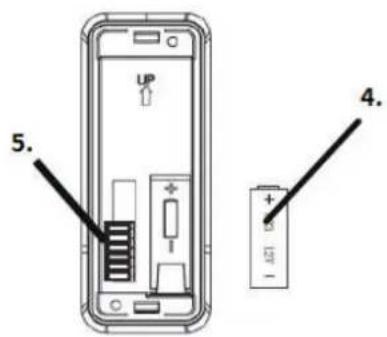
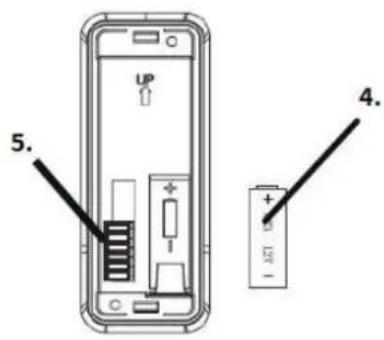
- Use a flat head screwdriver to pry open the transmitter cover.
- Insert a 12V 23A battery and refit the cover.
- DIP switch
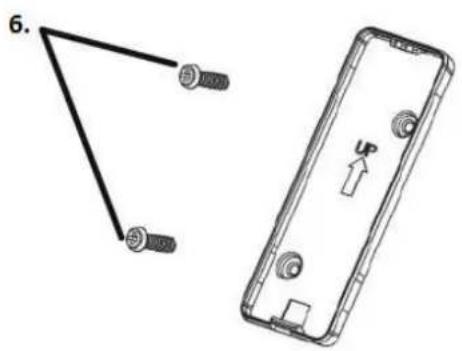
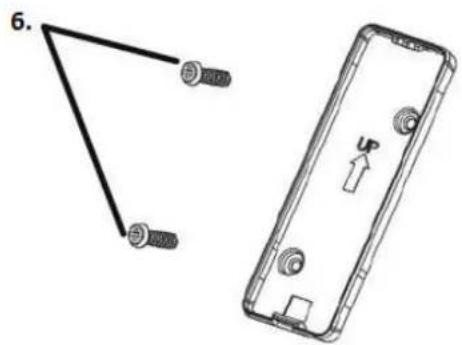
- Mount the transmitter on the door with two screws.
Receiver

- Increase volume
- Next melody
- Previous melody
- Play/stop selected melody
- Decrease volume

- IN/MP3
- On/Off
- USB outlet
- DIP switch
OPERATION
Read these instructions carefully before use
Features
• Door chime that can download music and play music in MP3 format.
• 32 pre-recorded melodies and >230 MB internal memory.
• DIP switch to avoid interference.
Melodies
Set the IN/MP3 switch to MP3 to play the MP3 files in the internal memory. Set the IN/MP3 switch to IN to play the 32 pre-recorded melodies.
Melody selection
Use the ▶| and |◀ buttons on the receiver to select melodies. Listen to the melodies and press the central button to select one.
Volume adjustment
Adjust the volume using the + and - buttons on the receiver.
Switching off
Turn the receiver switch to OFF.
Channel setting
To avoid interference from other wireless devices, set the DIP switch on the transmitter and receiver to the same channel.
USB outlet
Connect the receiver to a PC using the USB cable to download MP3 music. This can also be used for power supply.
MP3 Editor
-
Install the MP3 Editor v1.0.exe software using the CD provided.
-
Click on the Editor icon on the desktop.
-
The Editor window opens.
Click on + to add MP3 files to the list.
Mark a file and click on ▶ to play the music.
- Edit by selecting the file and marking the start and end times on the time bar.
Click on Press to Cut
State where you want the edited MP3 file to be saved.
IMPORTANT: You have to play the music first before you can edit it.
Subject to printing errors and design changes over which we have no control. In the event of problems, please contact our service department.
www.jula.com

Care for the environment!
Must not be discarded with household waste! This product contains electrical or electronic components that should be recycled. Leave the product for recycling at the designated station e.g. the local authority's recycling station.
CE
EC DECLARATION OF CONFORMITY
EG FÖRSÄKRAN OM ÖVERENSSTÄMMELSE
EF SAMSVARSERKLÆRING
DEKLARACJA ZGODNOŚCI WE

Jula AB, Box 363, SE-532 24 SKARA, SWEDEN
Low Voltage Directive 2006/95/EC
Radio and Telecommunications Terminal Equipment 1999/5/EC
ETSI EN 300 220-2 V2.1.2
ETSI EN 301 489-1 V1.6.1
ETSI EN 301 489-3 V1.4.1
EN 60065: 2002+A1:2006
This product was CE marked in year -11
Name and address of the person
authorised to compile the technical file:
Sebastian Ilczuk
Box 363, SE-532 37 Skara, Sweden
Skara
2011-06-30
Henrik Christensson
PRODUCT MANAGER
- Operating Instructions for Wireless Door Chime
- Read the Operating Instructions carefully before use!
- TECHNICAL DATA
- DESCRIPTION
- Transmitter
- Receiver
- OPERATION
- Read these instructions carefully before use
- Features
- Melodies
- Melody selection
- Volume adjustment
- Switching off
- Channel setting
- USB outlet
- MP3 Editor
- Care for the environment!
- CE
- EC DECLARATION OF CONFORMITY
- EG FÖRSÄKRAN OM ÖVERENSSTÄMMELSE
- EF SAMSVARSERKLÆRING
- DEKLARACJA ZGODNOŚCI WE
Brand : Marquant
Model : 444-014
Category : Wireless doorbell