
MIHO005 - Home Automation EnerGenie - Free user manual and instructions
Find the device manual for free MIHO005 EnerGenie in PDF.


| Product Type | Smart Plug Adapter |
| Brand | EnerGenie |
| Model | MIHO005 |
| Category | Home Automation |
| Maximum Load | 3000W, 13A |
| Voltage Range | 230-250V AC, 50Hz |
| Plug and Socket Standards | BS5733, BS1363 |
| Insulation Class | Class II |
| Radio Frequency | 434.300 MHz |
| Modulation | FSK, Manchester encoded |
| Protocol | OpenThings |
| Transmission Interval | 10 seconds |
| Operating Temperature | 0°C to 40°C |
| Storage Temperature | -40°C to 85°C |
| Location | Indoor use only |
| Pairing Method | Via Browser or Smartphone App |
| Range (Open Air) | At least 25 meters |
| Dimensions | UK plug format |
| Compatibility | MiHome Gateway required |
| Safety Features | Overload protection, Class II insulation |
| Warranty | Standard manufacturer warranty |
Frequently Asked Questions - MIHO005 EnerGenie
User questions about MIHO005 EnerGenie
0 question about this device. Answer the ones you know or ask your own.
Ask a new question about this device
Download the instructions for your Home Automation in PDF format for free! Find your manual MIHO005 - EnerGenie and take your electronic device back in hand. On this page are published all the documents necessary for the use of your device. MIHO005 by EnerGenie.
USER MANUAL MIHO005 EnerGenie
The Adapter Plus is part of the MiHome home automaon range. The Adapter Plus links to the MiHome Gateway which provides the communications between your MiHome device and the Internet.

flowchart
graph TD
    A["Mobile Device"] --> B["Internet"]
    C["Cloud Services"] --> B
    B --> D["Network"]
    D --> E["Mobile Services"]
    E --> F["Internet"]
    F --> G["Mobile Services"]
    G --> H["Mobile Services"]
    H --> I["Mobile Services"]
    I --> J["Mobile Services"]
    J --> K["Mobile Services"]
    K --> L["Mobile Services"]
    L --> M["Mobile Services"]
    M --> N["Mobile Services"]
    N --> O["Mobile Services"]
    O --> P["Mobile Services"]
    P --> Q["Mobile Services"]
    Q --> R["Mobile Services"]
    R --> S["Mobile Services"]
    S --> T["Mobile Services"]
    T --> U["Mobile Services"]
    U --> V["Mobile Services"]
    V --> W["Mobile Services"]
    W --> X["Mobile Services"]
    X --> Y["Mobile Services"]
    Y --> Z["Mobile Services"]
Pairing the Adapter Plus
To use the adapter in your
MIHome system It must be
rst "paired" with the
Gateway.
Please ensure that your device
is in range of the Gateway
when you pair it. We suggest
10 metres or so as unobscured
by furniture of walls etc. as
possible.

Mi Home
(1) 深圳市北区政府
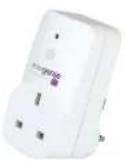
You have two opons to pair your adapter to the Gateway:
either via a bowser on a PC or smart device or via your smart
device App
You will need to have created an account and already
installed the MiHome Gateway that you will use

Mi Home
Via a Browser:
Select the opon to pair a new device and choose the Adapter plus to be registered.
Follow the instrucons to hold down the buon on the front of the housing of the adapter for 5 seconds or more. If pairing is successful you should see the red light on the adapter housing go while the buon is paired and the device come up on the screen as being paired.
Via the App on your smartphone:
Follow the instrucons on the screen when you run the App to pair an Adapter plus.
Please note that aer pairing, your adapter may be moved into dierent locaons. You should be able to control it at a range of at least 25 metres in open air. Less if behind furniture or a wall etc.

Mi Home
If you are having trouble with the range move your adapter closer to the Gateway or move an obstrucon that may act the signal.
Using the Dashboard
You can view and control your paired device by selecng the Dashboard opon on your App or via the browser.

Mi Home
Technical Specification
Electrical
Maximum load: 3000W, 13A
Voltage range: 230-250V 50Hz ac
Plug and socket: BS5733 and BS1363
Insulon: Class II
Radio
Transmission Frequency: 434.300 MHz
Tx duty cycle: <10%
Modulaon: FSK, Manchester encoded
Transmission Interval: 10s
Protocol: OpenThings
Environmental
Operating temperature: 0°C to 40°C
Storage temperature: -40°C to 85°C

Mi Home
Locaon: Indoor use only
Mechanical
Plug adapter housing in UK format

Mi Home
Troubleshooting
- Please ensure that you do not plug MiHome adapters into adjacent sockets in a wall socket or extension lead. There should be several metres distance between individual adapters.
- Any local source of radio noise may eect operaon of the system. This may include poorly regulated fans or other devices running electric motors, noisy power supplies or other low quality electrical and electronic equipment including LED lights.
- If your aempt to pair and adapter fails please try again. Occasionally the signals between devices may be subject to noise or other outside interference which is common for radio systems of this nature.
- The range of communicaon between your Gateway and the device will be aected by anything in between that may obscure the signal such as furniture, walls, ceilings, windows, doors etc.
For further help please look online at mihome4u.co.uk/help or contact us at support@mihome4u.co.uk

Mi Home

Mi Home
Declaration of Conformity
Sandal Plc trading as Energenie declare under our sole responsibility as importer that the product:
Model: MIHO005 is in accordance with the following Direcve(s):
2006/95/EC Low Voltage Directive (LVD)
2014/53/EC R&TTE Directive (Arcle 3.1b and 3.2)
2002/96/EC Waste Electrical and Electronic Equipment (WEEE) Directive
2011/65/EU Restricon of the Use of Certain Hazardous Substances (RoHS) Direcve Recast
The unit complies with all essenal requirements of the above referenced speciaons and direcves and has been issued a CE mark as per direcve 93/98/EEC.

Mi Home
The Technical Construcon File required is maintained at the company headquarters at 5 Harold Close, The Pinnacles, Harlow, Essex, England, CM19 5TH.

Mi Home
Caution
Please be aware that any changes or modicaons not expressly approved in this manual could void your authority to operate this equipment.
Energenie and MIHome are brand names of Sandal Plc. Registered Oce: Claremont House, Deans Court, Bicester, Oxon, OX26 6BW


Mi Home
Other Notices
THIS DEVICE AND ASSOCIATED SOFTWARE ARE NOT DESIGNED, MANUFACTURED OR INTENDED FOR USE OR RESALE FOR THE OPERATION OF NUCLEAR FACILITIES, THE NAVIGATION, CONTROL OR COMMUNICATION SYSTEMS FOR AIRCRAFT OR OTHER TRANSPORTATION, AIR TRAFFIC CONTROL, LIFE SUPPORT OR LIFE SUSTAINING APPLICATIONS, WEAPONS SYSTEMS, OR ANY OTHER APPLICATION IN A HAZARDOUS ENVIRONMENT, OR REQUIRING FAIL-SAFE PERFORMANCE, OR IN WHICH THE FAILURE OF PRODUCTS COULD LEAD DIRECTLY TO DEATH. PERSONAL INJURY, OR SEVERE PHYSICAL OR ENVIRONMENTAL DAMAGE (COLLECTIVELY, "HIGH RISK APPLICATIONS"). YOU AGREE AND ACKNOWLEDGE THAT YOU HAVE NO LICENSE TO, AND SHALL NOT (AND SHALL NOT ALLOW A THIRD PARTY TO) USE THE PRODUCT IN ANY HIGH RISK APPLICATIONS, AND WHERE PERMITTED BY LAW SANDAL PLC SPECIFICALLY DISCLAIMS ANY WARRANTY REGARDING, AND ANY LIABILITY ARISING OUT OF, HIGH RISK APPLICATIONS.

Mi Home
Copyright Noce
© 2015 Sandal Plc.
User Manual
Part no: MIH0005
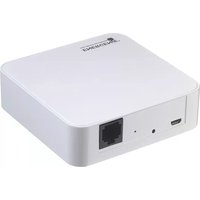


Brand : EnerGenie
Model : MIHO005
Category : Home Automation