
NI-707547 - Access Point Icidu - Free user manual and instructions
Find the device manual for free NI-707547 Icidu in PDF.


| Product Type | 300N Wireless Repeater / Access Point / Client Adapter |
| Brand | Icidu |
| Model | NI-707547 |
| Wireless Standards | IEEE 802.11n, 802.11g, 802.11b |
| Maximum Data Rate | 300 Mbps |
| Frequency Band | 2.4 GHz |
| Antennas | 2 internal antennas (2T2R) |
| Operation Modes | Wireless Repeater, Access Point, Client Adapter |
| Security Encryption | WEP, WPA/WPA2, TKIP/AES |
| Authentication | IEEE 802.1x |
| Power Consumption | 1.8 W |
| Configuration Interface | Web-based (http://repeater or 192.168.2.254) |
| Default Login | Username: admin, Password: 1234 |
| WPS Button | Yes |
| On/Off Switch | Yes |
| Dimensions (approx.) | 10 x 10 x 3 cm (3.9 x 3.9 x 1.2 in) |
| Weight (approx.) | 150 g (5.3 oz) |
| Package Contents | 300N wireless repeater, manual, CD with manuals in 13 languages |
| Guarantee | 10 years |
| Compliance | CE Class B, FCC Part 15 |
Frequently Asked Questions - NI-707547 Icidu
User questions about NI-707547 Icidu
0 question about this device. Answer the ones you know or ask your own.
Ask a new question about this device
Download the instructions for your Access Point in PDF format for free! Find your manual NI-707547 - Icidu and take your electronic device back in hand. On this page are published all the documents necessary for the use of your device. NI-707547 by Icidu.
USER MANUAL NI-707547 Icidu
First of all, let us thank you for purchasing the 300N wireless repeater. This wireless repeater provides a simple way of extending the range of your existing wireless network. It's ideal if your wireless signal is limited by obstacles such as concrete walls. This repeater can also be used as a Wireless Access Point or a Wireless Client Adapter, simply by adjusting the selection button.
- CONTENTS OF THE PACKAGE
- TECHNICAL SPECIFICATIONS
CONTENTS OF THE PACKAGE
Check that all of the required components are present before starting the installation process.
The package should contain:
- 300N wireless repeater
- Manual
- CD with manuals in 13 languages and complete English language manual
Purchase tip: LAN cable
TECHNICAL SPECIFICATIONS
- Configurable as a wireless repeater, wireless client or access point
- Low power consumption, 1.8W
- 802.11n wireless protocol
- Compatible with IEEE802.11g and IEE802.11b
- Supports WEP, WPA/WPA2, TKIP/AES encryption
- IEEE802.1x authentication
- 300 Mbps data transfer rate
- 2x Internal antennae (2T2R)
- Web-based configuration
- WPS
- On/off switch
- Operating system independent
APPLICATIONS
WIRELESS REPEATER
HARDWARE INSTALLATION

1 Switch the device to the desired functionality:
AP – operates as a Wireless Access Point
Repeater – operates as a wireless repeater
Client – operates as a wireless network client

MAKING A CONNECTION
WEB INTERFACE
We recommend logging in via the web interface in order to make use of the extended configurations for the repeater. Connect the repeater to a PC or notebook using a LAN cable. Make sure the computer is set to receive IP. (Automatically receive an IP address from a DHCP server)

Open a web browser and type in 'http://repeater' or '192.168.2.254' in the address box.

The repeater will ask for a user name and password.
WPS (WI-FI PROTECTED SETUP)
Use the WPS button to connect to a wireless broadband router or access point.
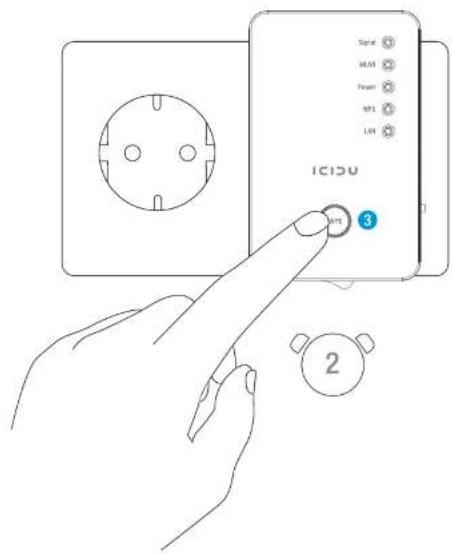

1) Press and hold the WPS button on the repeater for 2 seconds.
LED INDICATIONS
| LED Colour LED status Description | |
| Amber | Constant Receiving a good signal ( strength 100%~50%) |
| Flashing Signal | Normal signalFlashing slowly (50%~25%)Poor signalFlashing rapidly (<25%) |
| Off Out of range, not connected or LED off mode. | |
| Green | Flashing Connecting to a wireless router or access point,WLANreless function is active. (sending or receiving data) |
| Off Wireless network is disabled or LED off mode. | |
| Green | Constant Equipment is switched onIn LED mode, only the Power LED will be on |
| Power | Flashing Ready for "reset to factory settings" |
| Off Equipment is switched off | |
| Green | Constant When the WPS connection is successful, leave the appliance on for 5 minutes. |
| WPS | Flashing WPS in use or waiting for another WPS appliance. |
| Off No WPS in use or LED off mode. | |
| Green | Constant LAN port is connected. |
| LAN | Flashing LAN port is active (data being exchanged). |
RESETTING THE DEVICE
The wireless repeater can easily be reset to the factory settings.
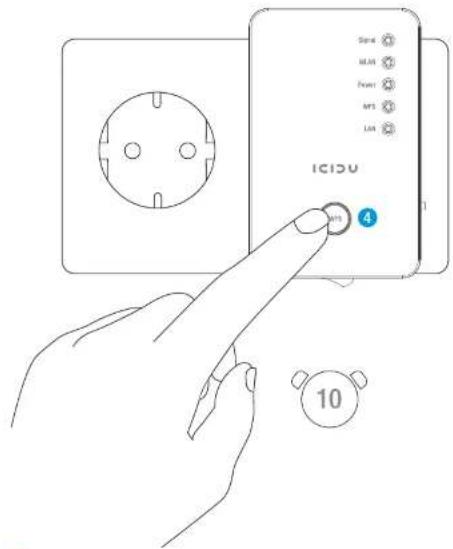

To do this, press and hold the WPS button for 10 seconds. This will then restore the factory settings.

CE MARK WARNING
This is a class B product. In a domestic environment, this product may cause radio interference, in which case the user may be required to take adequate measures.
NATIONAL RESTRICTIONS
This device is intended for home and office use in all EU countries (and other countries following the EU directive 1999/5/EC) without any limitation except for the countries mentioned below:
COUNTRY RESTRICTION REASON/REMARK
Bulgaria None General authorization required for outdoor use and public service
France Outdoor use limited to 10 Military Radiolocation use. mW e.i.r.p. within the band Refarming of the 2.4 GHz band has 2454-2483.5 MHz been ongoing in recent years to allow current relaxed regulation. Full implementation planned 2012
Italy None If used outside of own premises, general authorization is required

FCC STATEMENT
This equipment has been tested and found to comply with the limits for a Class B digital device, pursuant to part 15 of the FCC Rules. These limits are designed to provide reasonable protection against harmful interference in a residential installation. This equipment generates, uses and can radiate radio frequency energy and, if not installed and used in accordance with the instructions, may cause harmful interference to radio communications. However, there is no guarantee that interference will not occur in a particular installation. If this equipment does cause harmful interference to radio or television reception, which can be determined by turning the equipment off and on, the user is encouraged to try to correct the interference by one or more of the following measures:
- Reorient or relocate the receiving antenna.
- Increase the separation between the equipment and receiver.
- Connect the equipment into an outlet on a circuit different from that
to which the receiver is connected. - Consult the dealer or an experienced radio/ TV technician for help.
This device complies with part 15 of the FCC Rules. Operation is subject to the following two conditions:
1) This device may not cause harmful interference.
2) This device must accept any interference received, including interference that may cause undesired operation.
GUARANTEE
There is a 10 year guarantee period for all items sold under the ICIDU name, unless otherwise stated. We provide no support or guarantee for bundled software and rechargeable batteries. The guarantee can only be honoured via the dealer from whom the item in question was purchased.
Specifications may be altered without notice. All ICIDU products meet current European standards and legislation on safety and the environment. Visit our website, www.icidu.com, for further details.
Brand : Icidu
Model : NI-707547
Category : Access Point