
Portable Anemometer 00256 - Anemometer AcuRite - Free user manual and instructions
Find the device manual for free Portable Anemometer 00256 AcuRite in PDF.


| Product Type | Portable Anemometer |
| Brand | AcuRite |
| Model | 00256 |
| Power Source | 3 x AAA alkaline batteries |
| Temperature Measurement Range | -40°F to 158°F (-40°C to 70°C) |
| Humidity Measurement Range | 1% to 99% |
| Wind Speed Measurement Range | 0 to 60 mph, 0 to 97 km/h, 0 to 52 knots, 0 to 27 m/s, 0 to 1990 ft/min |
| Altitude Measurement | Yes, with calibration; displays current altitude, change in altitude, and elevation gains/losses |
| Data Update Rate | Temperature & Humidity: every 30 seconds; Wind: every 1 second; Altitude: every 5 seconds |
| Display Backlight | Momentary (10 seconds) via button press |
| Inspection Light | Yes, auto-off after 15 minutes |
| Tripod Mount | Compatible with 1/4" 20 thread fitting (not included) |
| Integrated Hanger | Yes |
| Auto Power Off | After 1 hour of inactivity (no wind speed change, altitude change <5 ft, or button press) |
| Warranty | Limited 1-year warranty |
| FCC Compliance | Part 15 of FCC rules |
| Additional Functions | Average wind speed, peak wind speed alarm, wind chill, heat index, high/low temperature/humidity |
| Calibration | Altitude calibration required each time the unit is powered on |
| Measurement Units | Temperature: °F/°C; Wind speed: mph, km/h, knots, m/s, ft/min; Altitude: ft/m |
Frequently Asked Questions - Portable Anemometer 00256 AcuRite
User questions about Portable Anemometer 00256 AcuRite
0 question about this device. Answer the ones you know or ask your own.
Ask a new question about this device
Download the instructions for your Anemometer in PDF format for free! Find your manual Portable Anemometer 00256 - AcuRite and take your electronic device back in hand. On this page are published all the documents necessary for the use of your device. Portable Anemometer 00256 by AcuRite.
USER MANUAL Portable Anemometer 00256 AcuRite
Unpacking Instructions 2
Package Contents 2
Product Registration 2
Features & Benefits....3
Setup 4
Using the Anemometer....5
Placement Guidelines....6
Troubleshooting 6
Specifications....6
FCC Information 6
Customer Support 7
Warranty....7
ACU RITE
Congratulations on your new AcuRite product. To ensure the best possible product performance, please read this manual in its entirety and retain it for future reference.
Unpacking Instructions
Remove the protective film that is applied to the LCD screen prior to using this product. Locate the tab and peel off to remove.
Package Contents
- Anemometer
- Instruction Manual
IMPORTANT
PRODUCT MUST BE REGISTERED TO RECEIVE WARRANTY SERVICE
PRODUCT REGISTRATION
Register online to receive 1 year warranty protection
www.AcuRite.com
Features & Benefits

1. Inspection Light
Automatically turns off after 15 minutes.
2. Wind Speed Anemometer
Features extendable design (shown).
3. Button
Press to enable/disable inspection light.
4. Current Wind Speed
5. Indicator
Indicates inspection light is on.
6. Average Wind Speed
Average of all speeds over the past minute.
7. Indicator
Indicates an alarm is set for PEAK wind speed.
8. Altitude
Displays current altitude, change in altitude, and elevation gains and losses since unit was powered on (see page 5).
9. Integrated Hanger
10. Tripod Mount
For compatible tripods with 1/4" 20 thread fitting (not
included).
11. ^ and ∨ Buttons
For setup preferences and cycling through available modes. Activates momentary backlight for 10 seconds.
12. Low Battery Indicator
- Deck Wind Speed
SETUP
Install or Replace Batteries
- Unscrew and remove the battery compartment cover.
- Insert 3 x AAA alkaline batteries into the battery compartment, as shown. Follow the polarity (+/-) diagram in the battery compartment.
- Replace the battery compartment cover and screw.
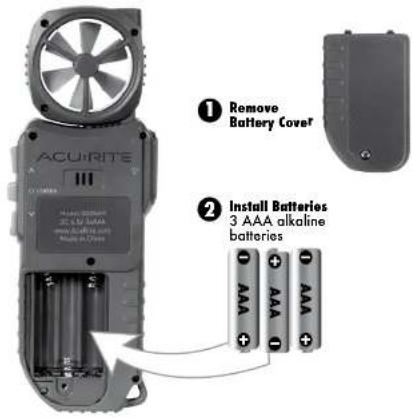
Power ON/OFF
Press and release the "M" button to power on the anemometer.
Press and HOLD the "U" button for 3 seconds to power off the anemometer. Alternatively, access the "POWER" screen using the "^" or "∨" button, and then press and release the "U" button.
If there is no wind speed reading, no change in altitude greater than 5 feet, or no buttons are pressed within 1 hour, the anemometer will automatically power off.
OPERATION
Using the Anemometer
Press and release the “^” or “∨” buttons to navigate through the anemometer sub-menus. Press and release the “ENTER” button to enter or confirm the selection in each menu.
To return to normal viewing mode, press and release the "ENTER" button while viewing the "EXIT" screen.
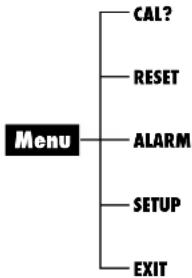
flowchart
graph TD
    A["Menu"] --> B["CAL?"]
    A --> C["RESET"]
    A --> D["ALARM"]
    A --> E["SETUP"]
    A --> F["EXIT"]
1. Altitude Calibration
Access the "CAL?" sub-menu to adjust the altitude readings. Due to normal fluctuations in pressure, this unit must be calibrated to your current known altitude each time it is powered on.
2. RESET
Access the "RESET" sub-menu to revert the anemometer back to factory defaults.
3. ALARM
Access the "ALARM" sub-menu to set and edit peak wind speed alarm value. Press and release any button to silence a sounding alarm.
4. SETUP
Access the "SETUP" sub-menu to select measurement units.
• Temperature (F or C)
• Wind Speed (mph, km/h, knots, meters per second, feet per minute)
- Altimeter (ft. or m)
Display Modes
While in normal viewing mode, using the “^” or “∨” button to view the following additional readings:
- Current Wind Speed
- Peak Wind Speed
- Current Altitude
-
Current Temperature
-
Current Humidity
• High & Low Temperature/Humidity (since the unit was last powered on) - Wind Chill
- Heat Index
Altitude and Elevation
This device features an altimeter to display the current altitude (distance above sea level). It
Placement Guidelines
For the most accurate reading, extend the anemometer using the built-in extension arm. Extending the anemometer helps prevent surrounding objects from impacting the accuracy of the wind speed reading.
Troubleshooting
| Problem Possible Solution | |
| Display screen not working | Check that the batteries are installed correctly. Batteries may need to be replaced.Display may need to be reset. See page 5 for instructions on how to reset the unit. |
Specifications
| TEMPERATURE RANGE | -40°F to 158°F; -40°C to 70°C |
| HUMIDITY RANGE | 1% to 99% |
| WIND SPEED RANGE | 0 to 60 mph; 0 to 97 km/h; 0 to 52 knots; 0 to 27 m/s; 0 to 1990 ft/min |
| POWER | 3 x AAA alkaline batteries |
| DATA REPORTING | Temperature: 30 second updates |
| Humidity: 30 second updates | |
| Wind: 1 second updates | |
| Altitude: 5 second updates |
FCC Information
This device complies with part 15 of FCC rules. Operation is subject to the following two conditions:
1- This device may NOT cause harmful interference, and
- This device must accept any interference received, including interference that may cause undesired operation.
WARNING: Changes or modifications to this unit not expressly approved by the party responsible for compliance could void the
user's authority to operate the equipment. NOTE: This equipment has been tested and found to comply with the limits for a Class B digital device, pursuant to Sept. 15 of the FCC
NOTE: This equipment has been tested and found to comply with the limits for a class a digital device, pursuant to Part 16 of the PCC rules.
This device complies with Industry Canada license-exempt R55 standard(s).
Operation is subject to the following two conditions
[1] This device may not cause interference, and
[2] This device must accept any interference received, including interference that may cause undesired operation of the device.
Customer Support
AcuRite customer support is committed to providing you with best-in-class service. For assistance, please have the model number of this product available and contact us in any of the following ways:

221-1252
Visit us at www.AcuRite.com
▶ Installation Videos ▶ Register your Product
▶ Instruction Manuals ▶ Support User Forum
▶ Replacement Parts ▶ Submit Feedback & Ideas
IMPORTANT
PRODUCT MUST BE REGISTERED TO RECEIVE WARRANTY SERVICE
PRODUCT REGISTRATION
Register online to receive 1 year warranty protection
www.AcuRite.com
Limited 1-Year Warranty
AcuRite is a wholly owned subsidiary of Chaney
Instrument Company. For purchases of AcuRite products, AcuRite provides the benefits and services set forth herein. For purchases of Chaney products, Chaney provides the benefits and services set forth herein.
We warrant that all products we manufacture under this warranty are of good material and workmanship and, when properly installed and operated, will be free of defects for a period of one year from the date of purchase.
Any product which, under normal use and service, is proven to breach the warranty contained herein within ONE YEAR from date of sale will, upon examination by us, and at our sale option, be repaired or replaced by us. Transportation costs and charges for returned goods shall be paid for by the purchaser. We hereby disclaim all responsibility for such transportation costs and charges. This warranty will not be breached, and we will give no credit for products which have received normal wear and fear not affecting the functionality of the product, been damaged (including by acts of nature), tampered, abused, improperly installed, or repaired or altered by others than our authorized representatives.
Remedy for breach of this warranty is limited to repair or replacement of the defective item(s). If we determine that repair or replacement is not feasible, we may, at our option, refund the amount of the original purchase price.
We expressly disclaim all liability for special, consequential, or incidental damages, whether arising in tort or by contract from any breach of this warranty. Some states do not allow the exclusion or limitation of incidental or consequential damages, so the above limitation or exclusion may not apply to you.
We further disclaim liability from personal injury relating to our products to the extent permitted by law. By acceptance of any of our products, the purchaser assumes all liability for the consequences arising from their use or misuse. No person, firm or corporation is authorized to bind us to any other obligation or liability in connection with the sale of our products.
Furthermore, no person, firm or corporation is authorized to modify or waive the terms of this warranty unless done in writing and signed by a duly authorized agent of ours. In no case shall our liability for any claim relating to our products, your purchase or your use thereof, exceed the original purchase price paid for the product.
Applicability of Policy
This Return, Refund, and Warranty Policy applies only to purchases made in the United States and Canada. For purchases made in a country other than the United States or Canada, please consult the policies applicable to the country in which you made your purchase.
Additionally, this Policy applies only to the original purchaser of our products. We cannot and do not offer any return, refund, or warranty services if you buy products used or from people who such as eBay or Crainelit.
ACU RITE®
Weather Stations

Temperature & Humidity

Weather Alert Radio

Kitchen Thermometers & Timers

Clocks
It's More than Accurate, it's ACU RITE.
AcuRite offers an extensive assortment of precision instruments, designed to provide you with information you can depend on to Plan your day with confidence™.
www.AcuRite.com
- ACU RITE
- Unpacking Instructions
- Package Contents
- IMPORTANT
- PRODUCT REGISTRATION
- Inspection Light
- Wind Speed Anemometer
- Button
- Current Wind Speed
- Indicator
- Average Wind Speed
- Indicator
- Altitude
- Integrated Hanger
- Tripod Mount
- ^ and ∨ Buttons
- Low Battery Indicator
- SETUP
- Install or Replace Batteries
- Power ON/OFF
- OPERATION
- Using the Anemometer
- Altitude Calibration
- RESET
- ALARM
- SETUP
- Display Modes
- Altitude and Elevation
- Placement Guidelines
- FCC Information
- Customer Support
- Limited 1-Year Warranty
- Applicability of Policy
- ACU RITE®
Brand : AcuRite
Model : Portable Anemometer 00256
Category : Anemometer