Foldable Headphones LH20 - Headphones Bauhn - Free user manual and instructions
Find the device manual for free Foldable Headphones LH20 Bauhn in PDF.


| Product Type | Foldable Headphones |
| Brand | Bauhn |
| Model | Foldable Headphones LH20 |
| Connectivity | Wired (3.5 mm audio cable) |
| Control Type | Remote control with built-in microphone |
| Compatible Devices | iPod, iPhone, iPad, Android, Windows, Blackberry (limited functionality) |
| Playback Controls | Play/Pause, Skip Forward/Backward, Scan Forward/Backward |
| Call Controls | Answer/End call, Reject call (press and hold 2 seconds) |
| Voice Command | Press and hold until voice activation (compatible with Android and iOS) |
| Design | Foldable earcups for compact storage |
| Carrying Case | Included storage case |
| Package Contents | Foldable headphones, storage case, audio cable, user manual, warranty card |
| Cleaning | Wipe with damp cloth; do not immerse in water or use harsh chemicals |
| Safety Warnings | Do not use while driving; avoid excessive volume; keep away from heat, moisture, and sharp objects |
| Disposal | Do not dispose with household trash; recycle according to local regulations |
| Adjustable Fit | Sliding earcups for personalized fit |
| Earcup Design | Over-ear foldable design |
Frequently Asked Questions - Foldable Headphones LH20 Bauhn
User questions about Foldable Headphones LH20 Bauhn
0 question about this device. Answer the ones you know or ask your own.
Ask a new question about this device
Download the instructions for your Headphones in PDF format for free! Find your manual Foldable Headphones LH20 - Bauhn and take your electronic device back in hand. On this page are published all the documents necessary for the use of your device. Foldable Headphones LH20 by Bauhn.
USER MANUAL Foldable Headphones LH20 Bauhn
EFFORTLESS TECHNOLOGY
FOLDABLE HEADPHONES
AURICULARES PLEGABLES
English.....02
Español .....08

Contents
Product contents....3
Unfolding and fitting 3
Getting connected ....4
Remote control....5
Storage and travel 6
Cleaning....6
Responsible disposal 6
Important safeguards 6
Product contents
Product contents
- Unpack the headphones but keep all packaging materials until you have made sure your new headphones and its accessories are undamaged and in good working order.
Warning: Plastic wrapping can be a suffocation hazard for babies and young children, so ensure all packaging materials are out of their reach.
-
Make sure you find the following items in the package:
-
Foldable headphones
- Storage case
- Audio cable
- User manual
- Warranty card
Unfolding and fitting
- Unfold the earcups.
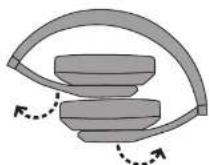
- Slide the earcups up and down for adjustment.

Getting connected
Getting connected
- Plug in audio cable to earcup.

- Plug the other end of the audio cable into the audio jack of your audio source.

Remote control
Remote control
WARNING: Do not adjust the volume too high. Danger of hearing impairment!
Note: Functions may vary depending on the device connected. The microphone can be found on the back side of the remote control.
Note: The remote control is also compatible with Windows ® and Blackberry ® smartphones with varied functionality.


| Function Operation iPod , iPhone | & iPad | Android | |
| Play or pause ▶ II | Press once to start or pause the playback. | Available Available | able |
| Skip forward or backward ◆◆◆◆ | Press twice quickly to skip forward. Press quickly three times to skip backward. | Available Not | available |
| Scan forward or backward ◆◆◆ | Press twice quickly and hold on the second press to scan forward. Press quickly three times and hold on the third press to scan backward. Release the button to stop scanning. | Available Not | available |
| Answer or end a call ↗ ↗ | Press once to receive or end a call. Available Available | ||
| Reject a call ✘ | Press and hold for 2 seconds. Available Available | ||
| Voice command ↙ | Press and hold until voice activation status up. | Available Available | able |
Storage and travel
Storage and travel
To store headphones, fold both earcups and place in the case.

Cleaning
- Wipe the headphones off with a damp cloth. Then let all parts dry completely.
WARNING:
- Avoid the use of chemical solutions and cleaning products because these may damage the device surface or markings.
- Do not immerse the headphones or the audio cable in water or other liquids. DO NOT allow any moisture or liquid to enter the headphones. Never rinse the headphones with water.
- Do not use hard, scouring or abrasive cleaners to clean the headphones.
Responsible disposal
At the end of its working life, do not throw this device out with your household trash. Electrical and electronic products contain substances that can have a detrimental effect on the environment and human health if disposed of inappropriately. Observe any local regulations regarding the disposal of electric products and dispose of it appropriately for recycling. Contact your local authorities for advice on disposal recycling facilities in your area.
Important safeguards
DEAD ALL INSTRUCTIONS
Important safeguards
herein reduce the risk of fire, electric shock and injury when correctly adhered to:
- In order to prevent environmental factors (dampness, dust, food, liquid etc.) from harming the headphones, only use them in a well ventilated, clean environment, away from excessive heat or moisture.
- Do not leave the headphones in direct sunlight.
- In case of damage, do not disassemble, repair or modify the headphones yourself. Contact the after sales support line for advice on repair or replacement, or refer servicing to qualified personnel only.
- The headphones are not intended for use by persons (including children) with reduced physical, sensory or mental capabilities, or lack of experience and knowledge, unless they have been given supervision or instruction concerning the use of the product by a person responsible for their safety.
- Children should be supervised to ensure they do not play with the headphones.
- Do not kink, crush or damage the cable and protect it from sharp edges.
- Keep the headphones away from oils and other chemicals.
- When removing the headphones from your ears, directly grasp the headphones, do not pull the cord. Pulling the cord may result in broken wires and malfunction.
- For outdoor safety, never use the headphones while driving a car or operating any other machine. Always take special care about the traffic around you.
- Make sure the volume control of your audio system is at minimum level before using the headphones. High level sounds close to your ears may cause permanent hearing damage.
- CAUTION: Use this appliance only for its intended use as described in this user manual. BAUHN® is not liable for any damage caused to iPod/MP3 player or any other device. Do not place or store the appliance where it can fall or be pulled into a bath or sink. Do not place or drop the appliance into water or any other liquid.
SAVE THESE INSTRUCTIONS
" iPod", " iPhone" & " iPad" are trademarks of Apple Inc., registered in the U.S. and other countries.
"Android™" is a r trademark of Google Inc. © 2017 Google Inc. All rights reserved. Google and the Google Logo are registered trademarks of Google Inc.
"Windows®" is a registered trademark of Microsoft Corporation in the United States and other countries.
"Blackhorn®" is the property of Research In Motion Limited and is registered and/or
Contenido
Contenido
Control remoto
Limpieza
Brand : Bauhn
Model : Foldable Headphones LH20
Category : Headphones