
SBT-10 - Uncategorized DENVER - Free user manual and instructions
Find the device manual for free SBT-10 DENVER in PDF.


| Type | Bluetooth Selfie Stick |
| Brand | Denver |
| Model | SBT-10 |
| Connectivity | Bluetooth |
| Shutter Button | Bluetooth camera shutter button on handle |
| Phone Bracket | Adjustable bracket for smartphones |
| Extendable | Yes, monopod extends |
| Power Source | Rechargeable battery via Micro USB |
| Charging Port | Micro USB |
| Estimated Battery Life | Up to 100 hours of standby |
| Estimated Range | Up to 10 meters (Bluetooth) |
| Material | Plastic and metal |
| Color | Black with pink accents |
| Collapsed Length | Approximately 20 cm |
| Extended Length | Approximately 80 cm |
| Weight | Approximately 150 grams |
| LED Indicator | Yes, for pairing and battery status |
| Phone Compatibility | Most smartphones up to 3.5 inches wide |
| Operating System | iOS and Android |
| Warranty | 1 year |
| Environmental Compliance | RoHS, WEEE |
Frequently Asked Questions - SBT-10 DENVER
User questions about SBT-10 DENVER
0 question about this device. Answer the ones you know or ask your own.
Ask a new question about this device
Download the instructions for your Uncategorized in PDF format for free! Find your manual SBT-10 - DENVER and take your electronic device back in hand. On this page are published all the documents necessary for the use of your device. SBT-10 by DENVER.
USER MANUAL SBT-10 DENVER
natural_image
Close-up of a black handheld device with a pink handle and lever, mounted on a metal stand (no visible text or symbols)Please read these instructions thoroughly before use and retain for future reference.
Disclaimer
Denver Electronics A/S will under no circumstance take responsibility for any damage done to your mobile phone while using the Bluetooth Selfie Stick (SBT-10). So please handle stick with care and make sure that the mobile phone is mounted properly in the selfie stick holder and that the mobile phone holder is fixed before using the product.
Instructions for use
Please read all instructions carefully.
Product Diagram
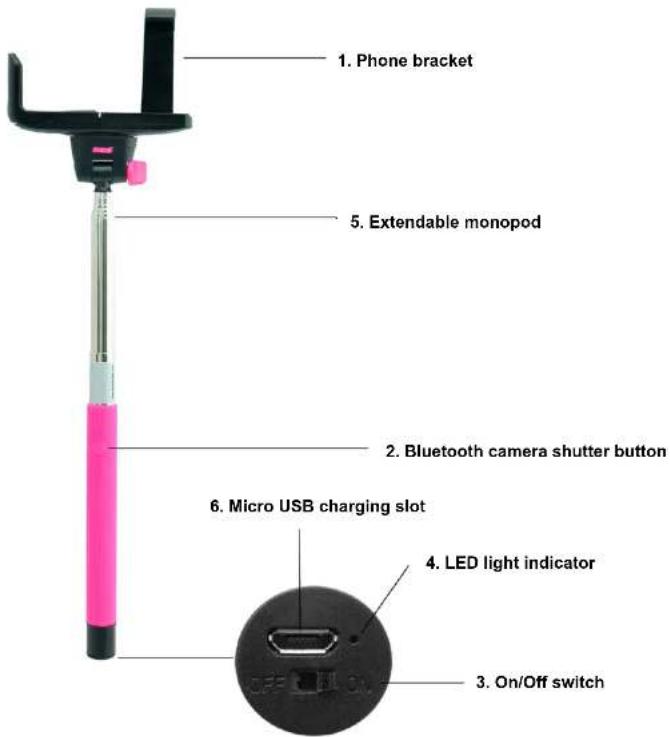
- Phone bracket
- Bluetooth camera shutter button
- On/Off switch
- LED light indicator
- Extendable monopod
- Micro USB charging slot
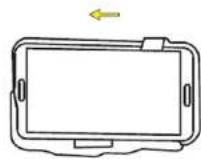
1st Step
Place your smart phone into the phone bracket
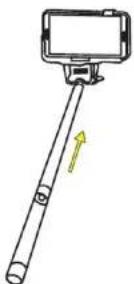
3rd Step
Extend the monopod
2nd Step
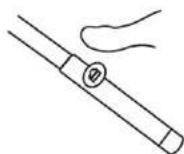
Switch the 'On' button on the Selfie Stick and turn your Bluetooth on your smart phone then pair both devices together as described above
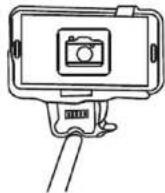
4th Step
Focus on yourself and push the Bluetooth camera shutter button on the handle to take your selfie
ALL RIGHTS RESERVED, COPYRIGHT DENVER ELECTRONICS A/S
DENVER®
www.denver-electronics.com

Electric and electronic equipment and included batteries contains materials, components and substances that can be hazardous to your health and the environment, if the waste material (discarded electric and electronic equipment and batteries) is not handled correctly.
Electric and electronic equipment and batteries is marked with the crossed out trash can symbol, seen below. This symbol signifies that electric and electronic equipment and batteries should not be disposed of with other household waste, but should be disposed of separately.
As the end user it is important that you submit your used batteries to the appropriate and designated facility. In this manner you make sure that the batteries are recycled in accordance with legislature and will not harm the environment.
All cities have established collection points, where electric and electronic equipment and batteries

Brand : DENVER
Model : SBT-10
Category : Uncategorized