
SAX-10 - Uncategorized DENVER - Free user manual and instructions
Find the device manual for free SAX-10 DENVER in PDF.


| Product Type | Selfie Stick |
| Brand | Denver |
| Model | SAX-10 |
| Color | Black |
| Material | Plastic and Metal |
| Extended Length | Up to 100 cm (approx.) |
| Folded Length | Approximately 25 cm |
| Weight | Approximately 150 g |
| Power Source | No battery required (uses AUX cable for remote shutter) |
| Compatibility | Most smartphones with a 3.5mm headphone jack (some Android phones require Camera360 UI mate app) |
| Phone Bracket Width | Adjustable, fits smartphones up to 3.5 inches wide (approx. 8.9 cm) |
| Functions | Shutter button for taking photos, extendable monopod, AUX cable for remote trigger |
| Included Accessories | Selfie stick, phone bracket, AUX cable |
| Safety | Handle with care; ensure phone is securely mounted before use; not responsible for phone damage |
| Cleaning | Wipe with a soft, dry cloth |
| Spare Parts | Not available; product is not repairable |
| Imported by | Denver Electronics A/S, Stavneagervej 22, DK-8250 Egaa, Denmark |
| Warranty | Standard manufacturer warranty (check with retailer) |
| Disposal | Dispose of electronic waste separately from household waste |
Frequently Asked Questions - SAX-10 DENVER
User questions about SAX-10 DENVER
0 question about this device. Answer the ones you know or ask your own.
Ask a new question about this device
Download the instructions for your Uncategorized in PDF format for free! Find your manual SAX-10 - DENVER and take your electronic device back in hand. On this page are published all the documents necessary for the use of your device. SAX-10 by DENVER.
USER MANUAL SAX-10 DENVER
natural_image
Black handheld device with a black handle and metallic clip, no visible text or symbolsDisclaimer
Denver Electronics A/S will under no circumstance take responsibility for any damage done to your mobile phone while using the Aux Sel e S ck (SAX-10). So please handle s ck with care and make sure that the mobile phone is mounted properly in the sel e s ck holder and that the mobile phone holder is xed before using the product.
Instruc ons for use
Please read all instruc ons carefully.
Some Android phones need to download Camera360 UI mate app to make the sel e s ck work.
- Place the mobile phone in the phone bracket and Aux cable in device's port then start your phone's camera func on. Extend the sel e s ck and press the camera shutter bu on on the s ck to take your picture.
1st Step
Place your smart phone into the phone bracket
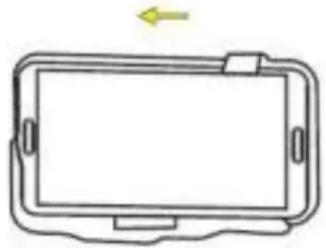
natural_image
Line drawing of a rectangular device with a blank screen and handle, no text or symbols present2nd Step
Connect the Aux cable in device's port
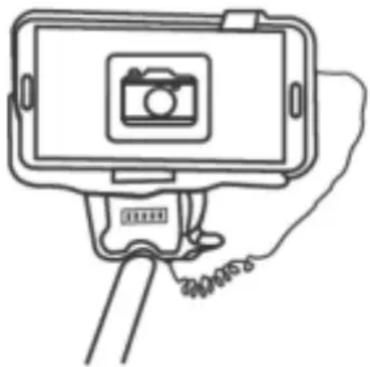
natural_image
Line drawing of a selfie stick with a smartphone mounted on top, showing no text or symbols3rd Step
Extend the monopod
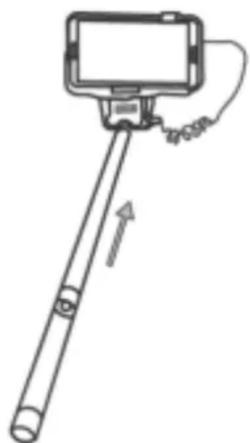
natural_image
Simple line drawing of a selfie stick with a camera and cable, no text or symbols present4th Step
Focus on yourself and push the camera shu er bu on on the handle to take your sel e
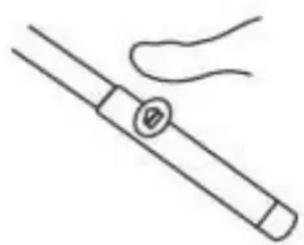
natural_image
Simple line drawing of a pen-like object with a handle and a circular button, no text or symbols present.ALL RIGHTS RESERVED, COPYRIGHT DENVER ELECTRONICS A/S
DENVER®
www.denver-electronics.com

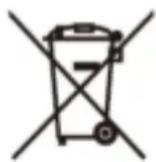

Electric and electronic equipment contains materials, components and substances that can be hazardous to your health and the environment, if the waste material (discarded electric and electronic equipment) is not handled correctly.
Electric and electronic equipment is marked with the crossed out trash can symbol, seen below. This symbol signifies that electric and electronic equipment should not be disposed of with other household waste, but should be disposed of separately.
All cities have established collect on points, where electric and electronic equipment can either be submitted free of charge at recycling stations and other collect on sites, or be collected from the households. Additional information is available at the technical department of your city.
Imported by:
DENVER ELECTRONICS A/S
Stavneagervej 22
DK-8250 Egaa
Denmark
www.facebook.com/denverelectronics

Brand : DENVER
Model : SAX-10
Category : Uncategorized