A3210HD - Television Skantic - Free user manual and instructions
Find the device manual for free A3210HD Skantic in PDF.


| Product Type | 32-inch LED TV |
| Brand | Skantic |
| Model | A3210HD |
| Display Resolution | 1366 x 768 pixels (HD Ready) |
| Energy Efficiency Class | A |
| On Mode Power Consumption | 41 W |
| Standby Power Consumption | 0.5 W |
| Off Mode Power Consumption | 0 W |
| Annual Energy Consumption | 59 kWh/annum |
| Dimensions with Stand (D x W x H) | 185 x 743 x 493 mm |
| Dimensions without Stand (D x W x H) | 39 x 743 x 451 mm |
| Weight | 7.30 kg |
| Operating Voltage | 220-240 V AC, 50/60 Hz |
| Audio Output Power | 2 x 6 W |
| Tuner | DVB-T/C (digital terrestrial and cable) |
| Inputs | 2 x HDMI, 1 x USB, 1 x SCART, 1 x VGA, 1 x YPbPr, 1 x CI slot, 1 x SPDIF, 1 x Headphone |
| Remote Control | Included with 2 x AAA batteries |
| Accessories | Remote control, batteries, side AV cable, quick start guide, instruction book |
| Supported Video Formats (USB) | MPEG1/2/4, H.264, Xvid, AVI, MKV, MP4, VOB, DAT |
| Max USB Drive Capacity | 1 TB (external power supply required for >2.5" drives) |
| Cleaning Instructions | Unplug TV, use a soft dry cloth only |
| Safety Information | Keep 10 cm free space around TV, do not block ventilation, do not expose to liquids or heat sources |
Frequently Asked Questions - A3210HD Skantic
User questions about A3210HD Skantic
0 question about this device. Answer the ones you know or ask your own.
Ask a new question about this device
Download the instructions for your Television in PDF format for free! Find your manual A3210HD - Skantic and take your electronic device back in hand. On this page are published all the documents necessary for the use of your device. A3210HD by Skantic.
USER MANUAL A3210HD Skantic
Ange timer/Ta bort timer
Contents 15
Safety Information....15
Gelting Started....17
Getting Started .... 17
Notifications & Features & Accessories .... 17
Environmental Information 17
Standby Notifications....17
Features 17
Accessories Included....17
Control Buttons on the TV....17
Control Buttons on the TV....17
TV Control Switch & Operation....18
Connect Power 18
Specification 19
Remote Control 20
Connections 21
First Time Installation - USB Connections....22
Media Browser Menu....23
Quick Menu 23
TV Menu Features and Functions 24
TV Menu Features and Functions 24
General TV Operations 26
General TV Operation 26
Using the Channel List 26
Configuring Parental Settings....26
Electronic Programme Guide (EPG) 26
Troubleshooting & Tips....27
PC Input Typical Display Modes 28
Supported File Formats for USB Mode 28
AV and HDMI Signal Compatibility 28

Safety Information

To operate your TV in extreme ambient conditions may cause the damage of the device.

If there is lightning or storms, or if the TV is not going to be used for a while (e.g. if going away on holiday), disconnect the TV set from the mains. The mains plug is used to disconnect TV set from the mains and therefore it must remain readily operable

The exclamation point within an equilateral triangle is intended to alert the user to the presence of important operating and maintenance (servicing) instructions in the literature accompanying the appliance.
Note : Follow the on-screen instructions for operating the related features.

IMPORTANT - Please read these instructions fully before installing or operating
WARNING: Never let people (including children) with reduced physical, sensory or mental capabilities or lack of experience and/or knowledge use electrical devices unsupervised.
- For ventilation purposes, leave a free space of at least 10 cm all around the set.
- Do not block ventilation holes.
- Do not place the TV on sloping or unstable surfaces the TV may tip over.
• Use this device in moderate climates.
- The power cord plug should be easily accessible. Do not place the TV, furniture, etc. on the power cord. A damaged power cord/plug can cause fire or give you an electric shock. Handle the power cord by the plug, do not unplug the TV by pulling the power cord. Never touch the power cord/plug with wet hands as this could cause a short circuit or electric shock. Never make a knot in the power cord or tie it with other cords. When damaged it must be replaced, this should only be done by qualified personnel.
- Do not use this TV in a humid or damp place. Do not expose the TV to liquids. If any liquid falls into the cabinet unplug the TV and have it checked by qualified personnel before operating it any further.
- Do not expose the TV to direct sunlight or other heat sources.
- The TV should not be placed near to open flames or sources of intense heat such as an electric heater.
- Excessive sound pressure from earphones and headphones can cause hearing loss.
- Occasionally, a few non-active pixels may appear on the screen as a fixed blue, green or red point. Please note that this does not affect the performance of your product. Take care not to scratch the screen with fingernails or other hard objects.
• Before cleaning, unplug the TV from the wall socket. Only use a soft, dry cloth while cleaning.
| Warning Serious injury or death risk | |
| Risk of electric shock | Dangerous voltage risk |
| Caution | Injury or property damage risk |
| Important Correctly the system operate | |
| Notice | Additional notes marked |

Getting Started
Notifications & Features & Accessories
Environmental Information
This television is designed to consume less energy to help save the environment. To reduce energy consumption, you should take the following steps:
If you set the Power Save Mode as Eco, the TV will switch to energy-saving mode. The Power Save Mode settings can be found in the 'Picture' section of the Main Menu. Note that some picture settings will be unavailable to be changed.
II Picture Off is selected, "Screen will be off in 3 seconds," message will be displayed. Select PROCEED and press OK to continue. The screen will be off immediately.
When the TV is not in use, please switch off or disconnect the TV from the mains plug. This will also reduce energy consumption.
Standby Notifications
1) If the TV does not receive any input signal (e.g. from an aerial or HDMI source) for 5 minutes, the TV will go into standby. When you next switch-on, the following message will be displayed: "Standby Cause No Signal" Press OK to continue.
2) If the TV has been left on and not been operated for a while, the TV will go into standby. When you next switch-on, the following message will be displayed. "Standby Cause No Operation" Press OK to continue.
Features
• Remote controlled colour TV.
• Fully integrated digital/cable TV (DVB-T/C)
- HDMI inputs are for connecting a device that has a HDMI socket.
- USB input.
- OSD menu system.
- Scart socket for external devices (such as DVD Players, PVR, video games, etc.)
- Stereo sound system.
• Teletext
• Headphone connection.
• Automatic programming system.
• NTSC playback.
• AVL (Automatic Volume Limiting).
- PLL (Frequency Search).
- PC input.
• Plug&Play for Windows 98, ME, 2000, XP, Vista,
Windows 7
• Game Mode (Optional).
Accessories Included
- Remote Control
- Batteries: 2 x AAA
• Instruction Book - Side AV Connection Cable
- Quick Start Guide
Control Buttons on the TV

TV Control Switch & Operation

-
Up direction
-
Down direction
-
Programme/Volume / AV / Standby-On selection switch
The Control button allows you to control the Volume/Programme/ Source and Standby-On functions of the TV.
To change volume: Increase the volume by pushing the button up. Decrease the volume by pushing the button down.
To change channel: Press the middle of the button, the channel information banner will appear on screen. Scroll through the stored channels by pushing the button up or down
To change source: Press the middle of the button twice, the source list will appear on screen. Scroll through the available sources by pushing the button up or down.
To turn the TV off: Press the middle of the button down and hold it down for a few seconds, the TV will turn into standby mode.
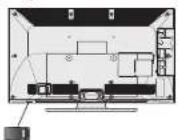
- switch is used for turning the TV on or off.
Inserting the Batteries into the Remote
Lift the cover on the back of the remote upward gently. Install two AAA batteries. Make sure to match the + and - ends of the batteries in the battery compartment (observe the correct polarity). Replace the cover.

Connect Power
IMPORTANT: The TV set is designed to operate on 220-240V AC, 50 Hz socket. After unpacking, allow the TV set to reach the ambient room temperature before you connect the set to the mains. Plug the power cable to the mains socket outlet.
Antenna/Cable Connection
Connect the 'aerial' or 'cable TV' plug to AERIAL INPUT (ANT) socket located on the back of the TV.

Notification
Manufactured under license from Dolby Laboratories. TRADEMARK ACKNOWLEDGMENT
"Dolby" and the double-D symbol are trademarks of Dolby Laboratories.
DOLBY DIGITAL PLUS
"HDMI, the HDMI logo and High-Definition Multimedia Interface are trademarks or registered trademarks of HDMI Licensing LLC."

Information for Users on Disposal of Old Equipment and Batteries
[European Union only]
These symbols indicate that equipment with these symbols should not be disposed of as general household waste. If you want to dispose of the product or battery, please consider the collection systems or facilities for appropriate recycling.
Notice: The sign Pb below the symbol for batteries indicates that this battery contains lead.
![Skantic A3210HD - [European Union only] - 1](/content/2026/05/925035/images/80bc66eb0ca43a81074628429dc81570881200a55529a77d310c68330500c9ce.jpg)
Specification
| TV Broadcasting PAL B/S D/K K | |
| Receiving Channels | VHF (BAND I/III) - UHF (BAND U) - HYPERBAND |
| Number of Preset Channels | 1000 |
| Channel Indicator On Screen Display | |
| RF Aerial Input 75 Ohm (unbalanced) | |
| Operating Voltage 220-240V AC, 60Hz. | |
| Audio German+Nicam Stereo | |
| Audio Output Power (WRMS.) (10% THD) | 2 x 6 |
| Power Consumption 65 W | |
| Weight 7,30 | |
| TV Dimensions DxLxH (with foot) | 185 x 743 x 493 |
| TV Dimensions DxLxH (without foot) | 39 x 743 x 451 |
| Display 16/9 32" inch | |
| Operation temperature and operation humidity: | 0°C up to 40°C, 85% humidity max |
Getting Started
Remote Control
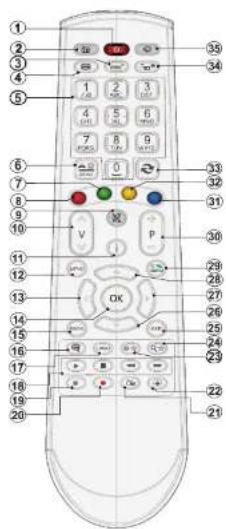
NOTE: The Remote Control range is approximately 7m/23ft.
Using My button 1 (\*)
Press MY BUTTON 1 for five seconds when or a desired source, channel or link, until the "M" BUTTON IS SET" message is displayed on the screen. This confirms that the selected MY BUTTON is now associated with the selected function.
-
Standby
-
Channel list/ back to TV source
-
Sleep timer
-
Teletext
-
Numeric buttons
-
AV Source selection
-
Green button
-
Red button
-
Mute
-
Volume up/down
-
Info/ reveal (in TXT mode)
-
Menu on/off
-
Navigation button
-
Confirm/ Hold( in TXT mode)
-
Return/Back/Index(in TXT mode)
-
Subtitle on/off
-
Language
-
Play, stop, rapid reverse, rapid advance
-
Pause(in media browser mode)
-
No function
-
Electronic program guide
-
Image size
-
My button1 (*)
-
My button 2 (**)
-
Exit
-
Navigation buttons
-
Navigation buttons
-
Navigation buttons
-
Quick menu
-
Programme up/down
-
Blue button
-
Yellow button
-
Swap
-
Media Browser
-
No function
Getting Started
Connections
| Connector Type Cables Device | |||
 | Scart Connection (back) |  |  |
 | VGA Connection (back) | 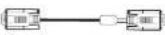 |  |
 | PC/YPbPr Audio Connection (slde) |  |  |
| Sine Audio Video Connection Cable (Subopted) PC Audio Cable (Not supplied) | |||
 | HDMI Connection (back) |  |  |
 | SPDIF Connection (back) |  |  |
 | Slide AV Connection (slde) |  AV Connection Cable (supplcd) AV Connection Cable (supplcd) |  |
 | Headphone Connection (slde) |  | |
| [DBX0] | YPbPr Video Connection (back) |  PC at YPbPr Connection Cable (Not supplied) PC at YPbPr Connection Cable (Not supplied) | [223T] |
 | USB Connection (slde) |  | [738G] |
 | CI Connection (slde) |  | [X80A] |

NOTE: When connecting a device via the Side AV input, you must use a connection cables to enable
Getting Started
First Time Installation - USB Connections
Switching On/Off
To Switch the TV On
Connect the power cord to the 220-240V AC 50 Hz. Switch the "Button" on the bottom right hand side under the screen to position "” so the TV will switch to standby mode. Then the standby LED lights up. Press the "button, P+ / P- or a numeric button on the remote control.
Press the side function switch until the TV comes on from standby.
To Switch the TV Off
Switch the button on the bottom right hand side under the screen to position 2 as illustrated, isolate the TV from the mains, the LED will go out.
To power down the TV completely, unplug the power cord from the mains socket.
Note: When the TV is switched to standby mode, the standby LED can blink to indicate that features such as Standby Search. Over Air Download or Timer is active. The LED can also blink when you switch on the TV from standby mode.
First Time Installation
When turned on for the first time, the language selection screen is displayed. Select the desired language and press OK.
The First Time Installation (FTI) screen will be displayed next. Set your preferences using the navigation buttons and when finished, press OK to continue.
You can activate Store mode (optional) option to be available in "Other settings" menu and your TV's settings will be optimized for best display quality. A confirmation screen will be displayed. Select YES to proceed.
If Home Mode is selected, Store mode (optional) will not be available after the First Time Installation. Press OK button to continue.
Aerial Installation If you select AERIAL option from the Search Type screen, the television will search for digital terrestrial TV broadcasts.
After all the available stations are stored, the Channel List will be displayed on the screen. If you like how the channels are sorted according to the LCN (*), please select "Yes" and then press OK. Press MENU button to quit channel list and watch TV. (*) LCN is the Logical Channel Number system that organizes available broadcasts in accordance with a recognizable channel sequence (if available).
Cable Installation
If you select CABLE option and press OK button on the remote control. To continue, please select YES and press OK. To cancel operation, select NO and press OK. You can select frequency ranges from this screen. Enter the frequency range manually by using the numeric button.
Note: Searching duration will change depending on the selected search step.
Media Playback via USB Input
You can connect a 2.5" and 3.5" inch (hold with external power supply) external hard disk drives or USB memory stick to your TV by using the USB input of the TV.
IMPORTANT! Back up your files before making any connections to the TV. Manufacturer will not be responsible for any file damage or data loss. Certain types of USB devices (e.g. MP3 Players) or USB hard disk drives/memory sticks may not be compatible with this TV.
While formatting a USB hard disk that has 1TB (Tera Byte) or more file capacity, you can experience problems with the formatting process. Do not repeatedly quickly plug and unplug the drive. This may cause physical damage to the USB player and USB device itself. Do not pull out USB module while playing a file.
Media Browser Menu
You can play photo, music, and movie files store on a USB disk by connecting it to your TV. Connect a USB disk to one of the USB inputs located on the side of the TV. Pressing the MENU button while in the Media Browser mode will access the Picture, Sound and Settings menu options. Pressing the MENU button again will exit from this screen. You can sell your Media Browser preferences by using the Settings Menu.
| Start playback with ▶ and activate 📄 | TV plays next file and loop the list |
| Start playback with OK and activate 📄 | the same file will be played in a loop (repeat). |
| Start playback with OK ▶ and activate 📄 | the file will be played in a shuffle. |
Quick Menu
Quick Settings menu allows you to access some options quickly. This menu includes Power Save Mode, Picture Mode, Equalizer Settings, Favourites and Sleep Timer options. Press O.MENU button on the remote control to view quick menu. See the following chapters for the details of the listed features.
TV Menu Features and Functions
| Picture Menu Contents | |
| Mode | You can change the picture mode to suit your preference or requirements. Picture mode can be set to one of these options: Cinema, Game, Sport ,Dynamic and Natural. |
| Contrast Sets the brightness and darkness values of the screen. | |
| Brightness Sets the brightness value for the screen. | |
| Sharpness Sets the sharpness value for the objects displayed on the screen. | |
| Colour Sets the colour value, adjusting the colors. | |
| Power Save Mode | To set the Power Save Mode as Eco. Picture Off and Disabled.(When the Mode is Dynamic, Power Save mode is automatically set as disabled.) |
| Backlight (Optional) | This setting controls the backlight level. The backlight function will be inactive if the Power Save Mode is set to Eco. The backlight cannot be activated in VGA, Media Browser mode or while the picture mode is set to Game. |
| Noise Reduction | If the broadcast signal is weak and the picture is noisy, use the Noise Reduction setting to reduce the amount of noise. |
| Advanced Settings | |
| Dynamic Contrast | You can change the Dynamic Contrast ratio to desired value. |
| Colour Temp Sets the desired colour tone. | |
| Picture Zoom | Sets the desired picture size from picture zoom menu.Note: Auto (Only available in Scart mode with SCART PIN8 high voltage/low voltage switching) |
| HDMI True Black (optional) | While watching from HDMI source, this feature will be visible in the Picture Settings menu. You can use this feature to enhance blackness in the picture. |
| Film Mode | Films are recorded at a different number of frames per second to normal television programmes. Turn this feature on when you are watching films to see the fast motion scenes clearly. |
| Skin Tone Skin tone can be changed between -5 and 5. | |
| Colour Shift Adjust the desired colour tone. | |
| RGB Gain You can configure the colour temperature values using the RGB Gain feature. | |
| Reset Resets the picture settings to factory default settings.(Except Game Mode) | |
| Autoposition (in PC mode) | Automatically optimizes the display. Press OK to optimize. |
| H Position (in PC mode) | This item shifts the image horizontally to the right hand side or left hand side of the screen. |
| V Position (in PC mode) | This item shifts the image vertically towards the top or bottom of the screen. |
| Dot Clock (in PC mode) | Dot Clock adjustments correct the interference that appear as vertical banding in dot intensive presentations like spreadsheets or paragraphs or text in smaller fonts. |
| Sound Menu Contents | |
| Volume Adjusts the volume level. | |
| Equalizer | Selects the equalizer mode. Custom settings can be made only when in use mode. |
| Balance This setting is used for emphasizing left or right speaker balance. | |
| Headphone Sets head- phone volume. | |
| Sound Mode You can select a sound mode. (If the selected channel supports). | |
| AVL (Automatic Volume Limiting) | Function sets the sound to obtain fixed output level between programmes. |
| Headphone/Lincout (Optional) | When you connect an external amplifier to your TV using the headphone jack, you can select this option as Lincout. If you have connected headphones to the TV, set this option as Headphone. |
| Dynamic Bass Enables or disables the Dynamic Bass. | |
| Surround Sound (Optional) | Surround sound mode can be changed as On or Off. |
| Digital Out Sets digital out audio type. | |
| Settings Menu Contents | |
| Conditional Access Controls conditional access modules when available. | |
| Language | Configures language settings (may change depending on the country selected). Preferred and current settings will be available. Current settings can be changed only if the broadcaster supports. |
| Parental | Enter correct password to change parental settings. You can easily adjust men lock, maturity lock (may change depending on the country selected) and child lock in this menu. You can also set new pin number. |
| Timers | Sets sleep timer to turn off the TV after a certain time. Sets timers for selected programmes. |
| Date/Time Sets date and time. | |
| Sources | Enables or disables selected source options. |
| Other Settings: Displays other setting options of the TV set: | |
| Menu Timeout | Changes timeout duration for menu screens. |
| Scan Encrypted Channels | When this setting is on, the search process will locate the encrypted channels as well. |
| Blue Background | Activates or ceactivates the blue background system when the signal is weak or absent. |
| Software Upgrade | To ensure that your TV always has the most up to date firmware. |
| Application Version | Displays application version. |
| Hard of Hearing | Enables any special feature sent from the broadcaster. |
| Audio Description | Audio description refers to an additional narration track for blind and visually impaired viewers of visual media, including television and movies. You can use this feature, only if the broadcaster supports that additional narration track. |
| Auto TV Off | You can set the timeout value of auto off feature. When the timeout value is reached and the TV has not been operated for a selected time, the TV will go into standby mode. |
| Standby Search (Optional) | If the Standby Search is set to On, when the TV is In standby mode, available broadcasts will be searched. If the TV locates any new or missing broadcasts, a menu screen will be displayed, asking you whether or not to execute these changes. Channel list will be updated. |
| Store Mode (optional) | If you are displaying the TV in a store, you can activate this mode. Whilst Store Mode is enabled, some items in the TV menu may not be available. |
| Power Up Mode This setting configures the power up mode preference. | |
| Install and Retune Menu Contents | |
| Automatic Channel Scan (Retune)(If available) | Displays automatic tuning options.Digital Aerial: Searches and stores aerial DVB stations.Digital Cable: Searches and stores cable DVB stations.Analogue: Searches and stores analogue stations.Digital Aerial & Analogue: Searches and stores aerial DVB and analogue stations.Digital Cable & Analogue: Searches and stores cable DVB and analogue stations |
| Manual Channel Scan This feature can be used for direct broadcast entry. | |
| Network Channel Scan Searches for the linked channels in the broadcast system. | |
| Analogue Fine Tune | You can use this setting for fine tuning analogue channels. This feature is not available if no analogue channels are stored. |
| First Time Installation | Deletes all stored channels and settings, resets TV to factory settings. |
General TV Operation
Using the Channel List
The TV sorts all stored stations in the Channel List. You can edit this channel list, set favourites or active stations to be listed by using the Channel List options.
Configuring Parental Settings
To prohibit viewing of certain programmes, channels and menus can be locked by using the parental control system.
To display parental lock menu options, the PIN number should be entered. The factory default PIN number is 0000. After coding the correct PIN number, parental settings menu will be displayed.
Menu Lock (optional): Menu lock setting enables or disables the menu access.
Maturity Lock (optional): When set, this option gets the maturity information from the broadcast and if this maturity level is disabled, disables access to the broadcast.
Child Lock (optional): When Child Lock is set, the TV can only be controlled by the remote control. In this case the control panel buttons will not work.
Set PIN: Defines a new PIN number.
Note: If the Country option is set to France, you can use 4725 as the default code.
Electronic Programme Guide (EPG)
Some, but not all channels send information about the current and next programmes. Press the button to view the EPG menu.
Up/Down/Left/Right: Navigate EPG.
OK: Displays programme options.
“I”: Displays, in detailed, information on the programme selected.
GREEN: Switches to List Schedule EPG.
YELLOW: Switches to Timeline Schedule EPG.
BLUE: Displays filtering options.
Programme Options
In EPG menu, press the OK button to enter the Event Options menu.
Select Channel
In EPG menu, using this option, you can switch to the selected channel.
Set Timer / Delete Timer
After you have selected a programme in the EPG menu, press the OK button. Select the Set Timer on Event option and press the OK button. You can
Your TV is capable of finding and updating automatically via the Aerial/Cable signal or over the Internet.
Software upgrade search via user interface
Simply navigate on your main menu. Choose Settings and select Other Settings menu. In Other Settings menu navigate on to the Software for Upgrade item and press OK button to check for a new software upgrade. Note: Internet connection is needed. If an internet connection is not available, try to upgrade via broadcast. If a new upgrade is found, it starts to download the upgrade. Press OK to continue with the reboot operation.
3 AM search and upgrade mode
While the TV is connected to an aerial signal. If Automatic scanning in the Upgrade Options menu is enabled, the TV wakes up at 03:00 and searches broadcast channels for new software upgrades. If new software is found and downloaded successfully, the next time the TV powers up, it will have the new software version.
Note: If the TV fails to come on after the upgrade unplug the TV for 2 minutes and plug in again.
Troubleshooting & Tips
Tv will not turn on
Make sure the power cord is plugged in securely to wall outlet. The batteries in the remote control may be exhausted. Press the Power button on the TV.
Poor picture
• Have you selected the correct TV system?
- Low signal level can cause picture distortion. Please check antenna access.
- Check if you have entered the correct channel frequency if you have done manual tuning.
- The picture quality may degrade when two devices are connected to the TV at the same time. In such a case, disconnect one of the devices.
No picture
- No Picture means that your TV is not receiving a transmission. Have you selected the correct button on the remote control? Try once more. Also make sure the correct input source has been selected.
• Is the antenna connected properly?
• Is the antenna cable damaged? - Are suitable plugs used to connect the antenna?
- Sound is coming from only one speaker. Is the balance set to one extreme? See Sound Menu section.
Remote control - does not operate
• The batteries may be exhausted. Replace the batteries.
Input sources - can not be selected
- If you cannot select an input source, it is possible that no device is connected. if not
- Check the AV cables and connections if you have tried to connect a device.
Teletext
Press "☐" button to enter. Press again to activate mix mode. Press once more to exit. Follow the instructions displayed on digital locale screen.
Digital Teletext (for UK only)
Press "button to view digital teletext information. Operate it with the coloured buttons, cursor buttons and the OK button. The operation method may differ depending on the contents of the digital teletext. Follow the instructions displayed on the digital teletext screen. When the "button is pressed again, the TV returns to television broadcast.
PC Input Typical Display Modes
The following table is an illustration of some of the typical video display modes. Your TV may not support all resolutions. Your TV supports up to 1920x1080.
| Index Resolution Frequency | |
| 1 640x750p 60 Hz | |
| 2 640x800p 60 Hz | |
| 3 1024x768 60 Hz | |
| 4 1280x768 60 Hz | |
| 5 1360x768 60 Hz | |
| 6 720x60 60 Hz | |
| 7 600x600 60 Hz | |
| 8 600x600 60 Hz | |
| 9 1024x768 60 Hz | |
| 10 1024x768 88 Hz | |
| 11 1280x768 60 Hz | |
| 12 1280x768 88 Hz | |
| 13 1280x1024 60 Hz | |
| 14 1280x950 90 Hz | |
| 15 1280x1024 60 Hz | |
| 16 1420x1050 50 Hz | |
| 17 1620x1200 80 Hz | |
| 18 1820x1093 50 Hz |
AV and HDMI Signal Compatibility
| Source | Supported Signals | Available | |
| EXT(SCART) | PAL 50/60 | O | |
| NTSC 00 | O | ||
| RGB 50 | O | ||
| RGB 60 | O | ||
| Side AV | PAL 50/60 | O | |
| NTSC 00 | O | ||
| PC/YPbPr | 480I, 480P | 60Hz | O |
| 576I, 576P | 50Hz | O | |
| 720P | 50Hz, 60Hz | O | |
| 1080I | 50Hz, 60Hz | O | |
| 1080P | 50Hz, 60Hz | O | |
| HDMI1HDMI2 | 480I | 60Hz | O |
| 480P | 60Hz | O | |
| 576I, 576P | 50Hz | O | |
| 720P | 50Hz, 60Hz | O | |
| 1080I | 50Hz, 60Hz | O | |
| 1080P | 24Hz, 25Hz30Hz, 50Hz,60Hz | O | |
(X: Not Available, O: Available)
In some cases a signal on the LED TV may not be displayed properly. The problem may be an inconsistency with standards from the source equipment (DVD. Set-top box, etc.). If you do experience such a problem please contact your dealer and also the manufacturer of the source equipment.
Supported File Formats for USB Mode
| Media File | Extension | Format | Remarks | |
| Video | Audio | (Maximum resolution/Bit rate etc.) | ||
| Movie | .mpg ,mpeg MPEG1,2 | MPEG Layer 1/2/3 | MAX 1920x1080 @ 3DP 20Mbit/sec | |
| .dat MPEG1,2 | MPEG2 | |||
| .vob | MPEG2 | |||
| .mkv H.264 | MPEG1,2,4 EAC3/AC3 | |||
| .mp4 | MPEG4, Xvid 1.00, Xvid 1.01, Xvid 1.02, Xvid 1.03, Xvid 1.10-data1/2, H.264 | PCM/MP3 | ||
| .avi | MPEG2, MPEG4 | |||
| Xvid 1.00, Xvid 1.01, Xvid 1.02, Xvid | .... | |||
Innholdsfortegnelse
BLÀ:Viser alternative for filtering.
Ohjelmavalinnat
I EPG-menyen, trykker du på OK-knappen for å gå inn i Begivenhet menyen.
Valitse kanava
I EPG-menyen, ved hjelp av dette alternativet, kan du bytte til den valgte kanalen.
| A | Product Fiche | |
| B | Commercial Brand: SKANTIC | |
| C | Product No. 10098119 | |
| D | Model No. A32101D | |
| E | Energy efficiency class A | |
| F | Visible screen size (diagonal, approx.) (inch/cm) | 32 inches 81 cm |
| G | On mode average power consumption (Watt) | 41 |
| H | Annual energy consumption (kWh/annum) | 59 |
| I | Standby power consumption (Watt) | 0.5 |
| J | Off mode power consumption (Watt) | 0 |
| K | Display resolution (psa) 1306 x 700 | |
| ABCOEF | |||||
| English | Product Fiche Commercial Grand Product No. | Model No. | Energy efficiency class | Variable version aux [diagonal approx] / [system] | |
| Dutch | Product: Homehold | Market worker | Production | Production | A single B (B) is recommended for the company, but not a company. |
| Dutrition | Organic nutrition and nutrition medicine | Food centre | Parks, Ill | Marks, Ill | Music together with a company, but not a company. |
| Zetina | Information lab | Anschalk women | Class products | Models | The brand of a company, but not a company. |
| Uraak | Probiology/organizazioni | Vora manke | Produzione | Models | Ergolo di sottolazione, in situati. |
| Suzemi | Taski leks | Konzalezna marika | Tuximera | Staffa | Firani Maria da Sotola, in situati. |
| Prinjysis | Testa prod. | Manica commensaria | Produzione | Models | Escola delàslova, in situati. |
| Ivanaki | BADEVA PRO-DIVOA | Trupendola media | B. prodonda | B. media | Klava oncogene, in situati. |
| Hormands | Prostazione | Commeradone neri | Produzione | Models | Energia e la scelale, in situati. |
| Egrarini | Testa del Prozione | Marza Comercial | Bil. de Produzione | B. de Modulo | Klava oncogene, in situati. |
| Swansea | Probiology division | Vanila tiki | Produzione | Models | Energia |
| Shinyi | Testa prod. | Mantio commensaria | Manura prodensa | Manura media | Klava e la scelale, in situati. |
| Perkta | MARTA PRODUCT | Marza produdla | Ampliculda | B. modelu | Klava e la scelale, in situati. |
| Magyar | Tortezo/benzal adapak | Konzacablanca media | Tortazam | Models | Energia/kaer biogli sociali. |
| Nusa | Tortezo/benzal media | Kommera/melvania | Produzione | Models | Energia/kaer biogli sociali. |
| Pereugues | Testa del prodso | Marza Comercial | Produzione N. | Models | Osteobrassola chefele oncogene. |
| Bomica | Festrostra | Mantio comercia al. | B. Modua | B. Modelu | Escola delàslova, in situati. |
| Ryosami | Ceropedia e nascente, in situati, in situati, in situati, in situati, in situati, in situati, in situati, in situati, in situati, in situati, in situati, in situati, in situati, in situati, in situati, in situati, in situati, in situati, in situati, in situati, in situati, in situati, in situati, in situati, in situati, in situat, in situati, in situati, in situati, in situati, in situati, in situati, in situati, in situati, in situati, in situati, in situati, in situati, in situati, in situati, in situati, in situati, in situati, in situati, in situati, in situati, in situati, in situati, in situati, in situati, in situats, in situati, in situati, in situati, in situati, in situati, in situati, in situati, in situati, in situati, in situati, in situati, in situati, in situati, in situati, in situati, in situati, in situati, in situati, in situati, in situati, in situati, in situati, in situati, in situati, in situasi, in situati, in situati, in situati, in situati, in situati, in situati, in situati, in situati, in situati, in situati, in situati, in situati, in situati, in situati, in situati, in situati, in situati, in situati, in situati, in situati, in situati, in situati, in situati, in situati, in situatis, in situati, in situati, in situati, in situati, in situati, in situati, in situati, in situati, in situati, in situati, in situati, in situati, in situati, in situati, in situati, in situati, in situati, in situati, in situati, in situati, in situati, in situati, in situati, in situati, in situata, in situati, in situati, in situati, in situati, in situati, in situati, in situati, in situati, in situati, in situati, in situati, in situati, in situati, in situati, in situati, in situati, in situati, in situati, in situati, in situati, in situati, in situati, in situati, in situati, in situatic, in situati, in situati, in situati, in situati, in situati, in situati, in situati, in situati, in situati, in situati, in situati, in situati, in situati, in situati, in situati, in situati, in situati, in situati, in situati, in situati, in situati, in situati, in situati, in situati, in situai, in situati, in situati, in situati, in situati, in situati, in situati, in situati, in situati, in situati, in situati, in situati, in situati, in situati, in situati, in situati, in situati, in situati, in situati, in situati, in situati, in situati, in situati, in situati, in situati, in situait, in situati, in situati, in situati, in situati, in situati, in situati, in situati, in situati, in situati, in situati, in situati, in situati, in situati, in situati, in situati, in situati, in situati, in situati, in situati, in situati, in situati, in situati, in situati, in situati, in situatie, in situati, in situati, in situati, in situati, in situati, in situati, in situati, in situati, in situati, in situati, in situati, in situati, in situati, in situati, in situati, in situati, in situati, in situati, in situati, in situati, in situati, in situati, in situati, in situati, in situari, in situati, in situati, in situati, in situati, in situati, in situati, in situati, in situati, in situati, in situati, in situati, in situati, in situati, in situati, in situati, in situati, in situati, in situati, in situati, in situati, in situati, in situati, in situati, in situati, in situosi, in situati, in situati, in situati, in situati, in situati, in situati, in situati, in situati, in situati, in situati, in situati, in situati, in situati, in situati, in situati, in situati, in situati, in situati, in situati, in situati, in situati, in situati, in situati, in situati, in situali, in situati, in situati, in situati, in situati, in situati, in situati, in situati, in situati, in situati, in situati, in situati, in situati, in situati, in situati, in situati, in situati, in situati, in situati, in situati, in situati, in situati, in situati, in situati, in situati, in situadi, in situati, in situati, in situati, in situati, in situati, in situati, in situati, in situati, in situati, in situati, in situati, in situati, in situati, in situati, in situati, in situati, in situati, in situati, in situati, in situati, in situati, in situati, in situati, in situati, in situato, in situati, in situati, in situati, in situati, in situati, in situati, in situati, in situati, in situati, in situati, in situati, in situati, in situati, in situati, in situati, in situati, in situati, in situati, in situati, in situati, in situati, in situati, in situati, in situati, in situatio, in situati, in situati, in situati, in situati, in situati, in situati, in situati, in situati, in situati, in situati, in situati, in situati, in situati, in situati, in situati, in situati, in situati, in situati, in situati, in situati, in situati, in situati, in situati, in situati, in situoti, in situati, in situati, in situati, in situati, in situati, in situati, in situati, in situati, in situati, in situati, in situati, in situati, in situati, in situati, in situati, in situati, in situati, in situati, in situati, in situati, in situati, in situati, in situati, in situati, in situeti, in situati, in situati, in situati, in situati, in situati, in situati, in situati, in situati, in situati, in situati, in situati, in situati, in situati, in situati, in situati, in situati, in situati, in situati, in situati, in situati, in situati, in situati, in situati, in situati, in situativ, in situati, in situati, in situati, in situati, in situati, in situati, in situati, in situati, in situati, in situati, in situati, in situati, in situati, in situati, in situati, in situati, in situati, in situati, in situati, in situati, in situati, in situati, in situati, in situati, in situatin, in situati, in situati, in situati, in situati, in situati, in situati, in situati, in situati, in situati, in situati, in situati, in situati, in situati, in situati, in situati, in situati, in situati, in situati, in situati, in situati, in situati, in situati, in situati, in situati, in situatti, in situati, in situati, in situati, in situati, in situati, in situati, in situati, in situati, in situati, in situati, in situati, in situati, in situati, in situati, in situati, in situati, in situati, in situati, in situati, in situati, in situati, in situati, in situati, in situati, in situAtti, In situati, In situati | 10000000000000000000000000000000000000000000000000000000000000000000000000000000000000000000000000000 | 10000000000000000000000000000000000000000000000000000000000000000000000000000000000000000000000000 | 15000000000000000000000000000000000000000000000000000000000000000000000000000000000000000000000000000 | |
| ORUJ | G | ||||
| English | On node energy power consumption [Watt] | Annual energy consumption [Watt/week] | Sterility power consumption [Watt] | Off node power consumption [Watt] | Coping device (g) |
| Dadech | Dadech's side 3 monitored on a supertherms (Zardt, Watt) | Amid. E. power consumption [Watt/week] (Garden-Devonson, Watt) | Power consumption [Watt] | Power consumption [Watt/week] (Watt/week) | Power consumption [Watt/week] |
| Bulbassar | Cubal and bubal cells are more efficient than the other. The first phase of the cell is a greater than the second. The second phase of the cell is a more efficient than the third. | Purkin's cell cycle is more efficient than the fourth phase of the cell. The first phase of the cell is a more efficient than the fifth. | Purkin's cell cycle is more efficient than the fourth phase of the cell. The second phase of the cell is a more efficient than the fifth. | Purkin's cell cycle is more efficient than the fourth phase of the cell. The second phase of the cell is a more efficient than the fifth. | Purkin's cell cycle is more efficient than the fourth phase of the cell. |
| Barak | Barack's cell cycle is more efficient than the fifth. | Aer. Aer. Aer. Aer. Aer. Aer. Aer. Aer. Aer. Aer. Aer. Aer. Aer. Aer. Aer. Aer. Aer. Aer. Aer. Aer. Aer. Aer. Aer. Aer. Aer. Aer. Aer. Aer. Aer. Aer. Aer. Aer. Aer. Aer. Acr. | Aer. Aer. Aer. Aer. Aer. Aer. Aer. Aer. Aer. Aer. Aer. Aer. Aer. Aer. Aer. Aer. Aer. Aer. Aer. Aer. Aer. Aer. Aer. Aer. Aer. Aer. Aer. Aer. Aer. Aer. Aer. Aer. Acr. | Barak's cell cycle is more efficient than the fifth. | Barak's cell cycle is more efficient than the fourth phase of the cell. |
| Bunjak | Bunjak's cell cycle is more efficient than the fifth. | Purkin's cell cycle is more efficient than the fourth phase of the cell. | Purkin's cell cycle is more efficient than the fifth. | Purkin's cell cycle is more efficient than the fourth phase of the cell. | Purkin's cell cycle is more efficient than the fourth phase of the cell. |
| Brasilad | Brasilad's cell cycle is more efficient than the fifth. | Cubal and bubal cells are more efficient than the fourth phase of the cell. | Cubal and bubal cells are more efficient than the fifth. | Cubal and bubal cells are more efficient than the fourth phase of the cell. | Cubal and bubal cells are more efficient than the fourth phase of the cell. |
| Mandana | Mandana's cell cycle is more efficient than the fifth. | Aer. Aer. Aer. Aer. Aer. Aer. Aer. Aer. Aer. Aer. Aer. Aer. Aer. Aer. Aer. Aer. Aer. Aer. Aer. Aer. Aer. Acr. | Aer. Aer. Aer. Aer. Aer. Aer. Aer. Aer. Aer. Aer. Aer. Bucal and bubal cells are more efficient than the fifth. | Aer. Aer. Aer. Aer. Aer. Aer. Aer. Aer. Aer. Aer. Aer. Aer. Aer. Aer. Aer. Aer. Aer. Aer. Acr. | Aer. Aer. Aer. Aer. Aer. Aer. Aer. Aer. Aer. Aer. Aer. Aer. Aer. Acr. |
| Eupetia | Eupetia's cell cycle is more efficient than the fifth. | Cubal and bubal cells are more efficient than the fourth phase of the cell. | Cubal and bubal cells are more efficient than the fifth. | Cubal and bubal cells are more efficient than the fourth phase of the cell. | Cubal and bubal cells are more efficient than the fourth phase of the cell. |
| Santaka | Santaka's cell cycle is more efficient than the fifth. | Aer. Aer. Aer. Aer. Aer. Aer. Aer. Aer. Aer. Aer. Aer. Aer. Aer. Aer. Aer. Aer. Aer. Aer. Acr. | Aer. Aer. Aer. Aer. Aer. Aer. Aer. Aer. Aer. Aer. Aer. Acr. | Aer. Aer. Aer. Aer. Aer. Aer. Aer. Aer. Aer. Aer. Aer. Aer. Acr. | Aer. Aer. Aer. Aer. Aer. Aer. Aer. Aer. Acr. |
| Izama | Izama's cell cycle is more efficient than the fifth. | Cubal and bubal cells are more efficient than the fourth phase of the cell. | Cubal and bubal cells are more efficient than the fifth. | Cubal and bubal cells are more efficient than the fourth phase of the cell. | Cubal and bubal cells are more efficient than the fourth phase of the cell. |
| Pukla | Pukla's cell cycle is more efficient than the fifth. | Rosa and bubal cells are more efficient than the fourth phase of the cell. | Rosa and bubal cells are more efficient than the fifth. | Rosa and bubal cells are more efficient than the fourth phase of the cell. | Rosa and bubal cells are more efficient than the fourth phase of the cell. |
| Magyar | Magyar's cell cycle is more efficient than the fifth. | Aer. Aer. Aer. Aer. Aer. Aer. Aer. Aer. Aer. Aer. Aer. Aer. Aer. Acr. | Aer. Aer. Aer. Aer. Aer. Aer. Aer. Aer. Aer. Aer. Aer. Acr. | Aer. Aer. Aer. Aer. Aer. Aer. Aer, Acr. | Aer. Aer. Aer. Aer. Aer. Acr. |
| Mona | Mona's cell cycle is more efficient than the fifth. | Aer. Aer. Aer. Aer. Aer. Aer. Aer. Aer. Aer. Aer. Acr. | Aer. Aer. Aer. Aer. Aer. Aer. Aer. Aer. Acr. | Aer. Aer. Aer. Aer. Aer. Aer. Acr. | Aer. Aer. Aer. Aer. Acr. |
| Portugal | Portugal's cell cycle is more efficient than the fifth. | Cubal and bubal cells are more efficient than the fourth phase of the cell. | Cubal and bubal cells are more efficient than the fifth. | Cubal and bubal cells are more efficient than the fourth phase of the cell. | Portugal's cell cycle is more efficient than the fifth. |
| Romezi | Romezi's cell cycle is more efficient than the fifth. | Cubal and bubal cells are more efficient than the fourth phase of the cell. | Cubal and bubal cells are more efficient than the fifth. | Cubal and bubal cells are more efficient than the fourth phase of the cell. | Romezi's cell cycle is more efficient than the fifth. |
| Pyemai | Pyemai's cell cycle is more efficient than the fifth. | Aer. Aer. Aer. Aer. Aer. Aer. Aer. Aer. Aer. Acr. | Aer. Aer. Aer. Aer. Aer. Aer. Aer. Aer. Acr. | Aer. Aer. Aer. Aer. Aer. Aer. Acr. | Pyemai's cell cycle is more efficient than the fifth. |
| Ergyosnai | Ergyosnai's cell cycle is more efficient than the fifth. | Aer. Aer. Aer. Aer. Aer. Aer. Aer. Aer. Acr. | Aer. Aer. Aer. Aer. Aer. Aer. Aer. Acr. | Aer. Aer. Aer. Aer. Aer. Acr. | Ergyosnai's cell cycle is more efficient than the fifth. |
| Imagazepa | Imagazepa's cell cycle is more efficient than the fifth. | Aer. Aer. Aer. Aer. Aer. Aer. Aer. Acr. | Aer. Aer. Aer. Aer. Aer. Aer. Acr. | Aer. Aer. Aer. Aer. Aer. Acr. | Imagazepa's cell cycle is more efficient than the fifth. |
| Insgesmav | Insgesmav's cell cycle is more efficient than the fifth. | Aer. Aer. Aer. Aer. Aer. Aer. Acr. | Aer. Aer. Aer. Aer. Aer. Acr. | Aer. Aer. Aer. Aer. Acr. Acr. | Insgesmav's cell cycle is more efficient than the fifth. |
| Sepal | Sepal's cell cycle is more efficient than the fifth. | Aer. Aer. Aer. Aer. Aer. Acr. | Aer. Aer. Aer. Aer. Aer. Acr. | Aer. Aer. Aer. Aer. Acr. Acr. | Sepal's cell cycle is more efficient than the fifth. |
| Shawada | Shawada's cell cycle is more efficient than the fifth. | Aer. Aer. Aer. Aer. Aer. Acr. | Aer. Aer. Aer. Aer. Aer. Acr. | Aer. Aer. Aer. Aer. Acr. Acr. | Shawada's cell cycle is more efficient than the fifth. |
| Shimshu | Shimshu's cell cycle is more efficient than the fifth. | Aer. Aer. Aer. Aer. Acr. | Aer. Aer. Aer. Aer. Acr. | Aer. Aer. Aer. Acr. Acr. Acr. | Shimshu's cell cycle is more efficient than the fifth. |
| Shinshu | Shinshu's cell cycle is more efficient than the fifth. | Aer. Aer. Aer. Aer. Acr. | Aer. Aer. Aer. Aer. Acr. | Aer. Aer. Aer. Acr. Acr. Acr. | Shinshu's cell cycle is more efficient than the fifth. |
| Shinshu | Shinshu's cell cycle is more efficient than the fifth. | Aer. Aer. Aer. Aer. Acr. | Aer. Aer. Aer. Acr. Acr. | Aer. Aer. Aer. Acr. Acr. Acr. | Shinshu's cell cycle is more efficient than the fifth. |
| Shinshu | Shinshu's cell cycle is more efficient than the fifth. | Aer. Aer. Aer. Aer. Acr. | Aer. Aer. Aer. Acr. Acr. | Aer. Aer. Bucal cells are more efficient than the fifth. | Shinshu's cell cycle is more efficient than the fifth. |
| Shinshu | Shinshu's cell cycle is more efficient than the fifth. | Aer. Aer. Aer. Aer. Acr. | Aer. Aer. Aer. Acr. Acr. | Aer. Aer. Bucal cells are more efficient than the fifth. | Shinshu's cell cycle is more efficient, but not less efficient than the fifth. |
| Shinshu | Shinshu's cell cycle is more efficient than the fifth. | Aer. Aer. Aer. Aer. Acr. | Aer. Aer. Aer. Acr. Acr. | Aer. Aer. Bucal cells are more efficient than the fifth. | Shinshu's cell cycle is more efficient than the fifth. |
| Shinshu' | Shinshu's cell cycle is more efficient than the fifth. | Aer. Aer. Aer. Acr. Acr. | Aer. Aer. Bucal cells are more efficient than the fifth. | Aer. Bucal cells are more efficient than the fifth. | Shinshu's cell cycle is more efficient than the fifth. |
| Shinshu' | Shinshu's cell cycle is more efficient than the fifth. | Aer. Aer. Aer. Acr. Acr. | Aer. Aer. Bucal cells are more efficient than the fifth. | Aer. Bucal cells are more efficient than the fifth, but not less efficient than the fifth. | Shinshu's cell cycle is more efficient than the fifth. |
| Shinshu' | Shinshu's cell cycle is more efficient than the fifth. | Aer. Aer. Aer. Acr. Acr. | Aer. Aer. Bucal cells are more efficient than the fifth. | Aer. Bucal cells are more efficient than the fifth, but not less efficient than the fifth, but not less efficient than the fifth. | Shinshu's cell cycle is more efficient than the fifth, but not less efficient than the fifth, but not less efficient than the fifth, but not less efficient than the fifth, but not less efficient than the fifth, but not less efficient than the fifth, but not less efficient than the fifth, but not less efficient than the fifth, but not less efficient than the fifth, but not less efficient than the fifth, but not less efficient than the fifth, but not less efficient than the fifth, but not less efficient than the fifth, but not less efficient than the five, but not less efficient than the fifth, but not less efficient than the fifth, but not less efficient than the fifth, but not less efficient than the fifth, but not less efficient than the fifth, but not less efficient than the fifth, but not less efficient than the fifth, but not less efficient than the fifth, but not less efficient than the fifth, but not less efficient than the fifth, but not less efficient than the fifth, but not less efficient than the fifth, but not more efficient than the fifth, but not less efficient than the fifth, but not less efficient than the fifth, but not less efficient than the fifth, but not less efficient than the fifth, but not less efficient than the fifth, but not less efficient than the fifth, but not less efficient than the fifth, but not less efficient than the fifth, but not less efficient than the fifth, but not less efficient than the fifth, but not less efficient than the fifth, but not less efficient than that, but not less efficient than the fifth, but not less efficient than the fifth, but not less efficient than the fifth, but not less efficient than the fifth, but not less efficient than the fifth, but not less efficient than the fifth, but not less efficient than the fifth, but not less efficient than the fifth, but not less efficient than the fifth, but not less efficient than the fifth, but not less efficient than the fifth, but not less efficient than the fifth, but not least efficient than the fifth, but not less efficient than the fifth, but not less efficient than the fifth, but not less efficient than the fifth, but not less efficient than the fifth, but not less efficient than the fifth, but not less efficient than the fifth, but not less efficient than the fifth, but not less efficient than the fifth, but not less efficient than the fifth, but not less efficient than the fifth, but not less efficient than the fifth, but not less efficient than the sixth, but not less efficient than the fifth, but not less efficient than the fifth, but not less efficient than the fifth, but not less efficient than the fifth, but not less efficient than the fifth, but not less efficient than the fifth, but not less efficient than the fifth, but not less efficient than the fifth, but not less efficient than the fifth, but not less efficient than the fifth, but not less efficient than the fifth, but not less efficient than the fifth, but not most efficient than the fifth, but not less efficient than the fifth, but not less efficient than the fifth, but not less efficient than the fifth, but not less efficient than the fifth, but not less efficient than the fifth, but not less efficient than the fifth, but not less efficient than the fifth, but not less efficient than the fifth, but not less efficient than the fifth, but not less efficient than the fifth, but not less efficient than the fifth, but not less efficient than the fourth, but not less efficient than the fifth, but not less efficient than the fifth, but not less efficient than the fifth, but not less efficient than the fifth, but not less efficient than the fifth, but not less efficient than the fifth, but not less efficient than the fifth, but not less efficient than the fifth, but not less efficient than the fifth, but not less efficient than the fifth, but not less efficient than the fifth, but not less efficient than the fifth, but not fewer effective than the fifth, but not less efficient than the fifth, but not less efficient than the fifth, but not less efficient than the fifth, but not less efficient than the fifth, but not less efficient than the fifth, but not less efficient than the fifth, but not less efficient than the fifth, but not less efficient than the fifth, but not less efficient than the fifth, but not less efficient than the fifth, but not less efficient than the fifth, but not less efficient than the fifth; but not less efficient than the fifth, but not less efficient than the fifth, but not less efficient than the fifth, but not less efficient than the fifth, but not less efficient than the fifth, but not less efficient than the fifth, but not less efficient than the fifth, but not less efficient than the fifth, but not less efficient than the fifth, but not less efficient than the fifth, but not less efficient than the fifth, but not less efficient than the fifth, but not less effective than the fifth, but not less efficient than the fifth, but not less efficient than the fifth, but not less efficient than the fifth, but not less efficient than the fifth, but not less efficient than the fifth, but not less efficient than the fifth, but not less efficient than the fifth, but not less efficient than the fifth, but not less efficient than the fifth, but not less efficient than the fifth, but not less efficient than the fifth, but not less efficient than the fourth; but not less efficient than the fifth, but not less efficient than the fifth, but not less efficient than the fifth, but not less efficient than the fifth, but not less efficient than the fifth, but not less efficient than the fifth, but not less efficient than the fifth, but not less efficient than the fifth, but not less efficient than the fifth, but not less efficient than the fifth, but not less efficient than the fifth, but not less efficient than the fifth, but not more effective than the fifth, but not less efficient than the fifth, but not less efficient than the fifth, but not less efficient than the fifth, but not less efficient than the fifth, but not less efficient than the fifth, but not less efficient than the fifth, but not less efficient than the fifth, but not less efficient than the fifth, but not less efficient than the fifth, but not less efficient than the fifth, but not less efficient than the fifth, but not less efficient than the five; but not less efficient than the fifth, but not less efficient than the fifth, but not less efficient than the fifth, but not less efficient than the fifth, but not less efficient than the fifth, but not less efficient than the fifth, but not less efficient than the fifth, but not less efficient than the fifth, but not less efficient than the fifth, but not less efficient than the fifth, but not less efficient than the fifth, but not less efficient than the fifth, but notless effective than the fifth, but not less efficient than the fifth, but not less efficient than the fifth, but not less efficient than the fifth, but not less efficient than the fifth, but not less efficient than the fifth, but not less efficient than the fifth, but not less efficient than the fifth, but not less efficient than the fifth, but not less efficient than the fifth, but not less efficient than the fifth, but not less efficient than the fifth, but not less efficient than thefifth, but not less efficient than the fifth, but not less efficient than the fifth, but not less efficient than the fifth, but not less efficient than the fifth, but not less efficient than the fifth, but not less efficient than the fifth, but not less efficient than the fifth, but not less efficient than the fifth, but not less efficient than the fifth, but not less efficient than the fifth, but not less efficient than the fifth, but not less efficient than the fifth, but notless affective from the fifth, but not less efficient than the fifth, but not less efficient than the fifth, but not less efficient than the fifth, but not less efficient than the fifth, but not less efficient than the fifth, but not less efficient than the fifth, but not less efficient than the fifth, but not less efficient than the fifth, but not less efficient than the fifth, but not less efficient than the fifth, but not less efficient than the fifth, but not less efficient than the fifth,but not less efficient than the fifth, but not less efficient than the fifth, but not less efficient than the fifth, but not less efficient than the fifth, but not less efficient than the fifth, but not less efficient than the fifth, but not less efficient than the fifth, but not less efficient than the fifth, but not less efficient than the fifth, but not less efficient than the fifth, but not less efficient than the fifth, but not less efficient than the fifth, but not less efficientthan the fifth, but not less efficient than the fifth, but not less efficient than the fifth, but not less efficient than the fifth, but not less efficient than the fifth, but not less efficient than the fifth, but not less efficient than the fifth, but not less efficient than the fifth, but not less efficient than the fifth, but not less efficient than the fifth, but not less efficient than the fifth, but not less efficient than the fifth, but not less efficient than the fifth, But not less efficient than the fifth, but not less efficient than the fifth, but not less efficient than the fifth, but not less efficient than the fifth, but not less efficient than the fifth, but not less efficient than the fifth, but not less efficient than the fifth, but not less efficient than the fifth, but not less efficient than the fifth, but not less efficient than the fifth, but not less efficient than the fifth, but not less efficient than the fifth, but not less efficient, but not less efficient than the fifth, but not less efficient than the fifth, but not less efficient than the fifth, but not less efficient than the fifth, but not less efficient than the fifth, but not less efficient than the fifth, but not less efficient than the fifth, but not less efficient than the fifth, but not less efficient than the fifth, but not less efficient than the fifth, but not less efficient than the fifth, but not less efficient than the fifth, but notLess effective than the fifth, but not less efficient than the fifth, but not less efficient than the fifth, but not less efficient than the fifth, but not less efficient than the fifth, but not less efficient than the fifth, but not less efficient than the fifth, but not less efficient than the fifth, but not less efficient than the fifth, but not less efficient than the fifth, but not less efficient than the fifth, but not less efficient than the fifth, but not less efficient than the Fifth, but not less efficient than the fifth, but not less efficient than the fifth, but not less efficient than the fifth, but not less efficient than the fifth, but not less efficient than the fifth, but not less efficient than the fifth, but not less efficient than the fifth, but not less efficient than the fifth, but not less efficient than the fifth, but not less efficient than the fifth, but not less efficient than the fifth, but not less efficient than the fifth, but not Less effective than the fifth, but not less efficient than the fifth, but not less efficient than the fifth, but not less efficient than the fifth, but not less efficient than the fifth, but not less efficient than the fifth, but not less efficient than the fifth, but not less efficient than the fifth, but not less efficient than the fifth, but not less efficient than the fifth, but not less efficient than the fifth, but not less efficient than the fifth, but not less efficient than the第五, but not less efficient than the fifth, but not less efficient than the fifth, but not less efficient than the fifth, but not less efficient than the fifth, but not less efficient than the fifth, but not less efficient than the fifth, but not less efficient than the fifth, but not less efficient than the fifth, but not less efficient than the fifth, but not less efficient than the fifth, but not less efficient than the fifth, but not less efficient than the fifth, but notleas effective at the fifth, but not less efficient than the fifth, but not less efficient than the fifth, but not less efficient than the fifth, but not less efficient than the fifth, but not less efficient than the fifth, but not less efficient than the fifth, but not less efficient than the fifth, but not less efficient than the fifth, but not less efficient than the fifth, but not less efficient than the fifth, but not less efficient than the fifth, but not less efficient than the fifth,But not less efficient than the fifth, but not less efficient than the fifth,but not less efficient than the fifth, but not less efficient than the fifth,but not less efficient than the fifth, but not less efficient than the fifth,but not less efficient than the fifth, but not less efficient than the fifth,but not less efficient than the fifth, but not less efficient than the fifth,but not less efficient than the fifth, but not less efficient than the fifth,but not less efficient than the fifth, but not less efficient than the fifth,but not less efficient that can be able to be able to be able to be able to be able to be able to be able to be able to be able to be able to be able to be able to be able to be able to be able to be able to be able to be able to be able to be able to be able to be able to be able to be able to be able to be able to be able to be able to be able to be able to be able to be able to be able to be able tobe able to be able to be able to be able to be able to be able to be able to be able to be able to be able to be able to be able to be able to be able to be able to be able to be able to be able to be able to be able to be able to be able to be able to be able to be able to be able to be able to be able to be able to be able to be able to be able to be able to beable to be able to be able to be able to be able to be able to be able to be able to be able to be able to be able to be able to be able to be able to be able to be able to be able to be able to be able to be able to be able to be able to be able to be able to be able to be able to be able to be able to be able to be able to be able to be able to be able to be ableto be able to be able to be able to be able to be able to be able to be able to be able to be able to be able to be able to be able to be able to be able to be able to be able to be able to be able to be able to be able to be able to be able to be able to be able to be able to be able to be able to be able to be able to be able to be able to be able to be able to bedelioration of the cell cycle in the cell cycle in the cell cycle in the cell cycle in the cell cycle in the cell cycle in the cell cycle in the cell cycle in the cell cycle in the cell cycle in the cell cycle in the cell cycle in the cell cycle in the cell cycle in the cell cycle in the cell cycle in the cell cycle in the cell cycle in the cell cycle in the cell cycle in the cell cycle in the cell cycle in the cell cycle in the cell cycle in the cell cycle in the cell cyclein the cell cycle in the cell cycle in the cell cycle in the cell cycle in the cell cycle in the cell cycle in the cell cycle in the cell cycle in the cell cycle in the cell cycle in the cell cycle in the cell cycle in the cell cycle in the cell cycle in the cell cycle in the cell cycle in the cell cycle in the cell cycle in the cell cycle in the cell cycle in the cell cycle in the cell cycle in the cell cycle in the cell cycle in the cell cycle 100000000000000000000000000000000000000000000000000000000000000000000000000000000000000000000000000001000000000000000000000000000000000000000000000000000000000000000000000000000000000000000000000000001500000000000000000000000000000000000000000000000000000000000000000000000000000000000000000000000000025000000000000000000000000000000000000000000000000000000000000000000000000000000000000000000000000001250000000000000000000000000000000000000000000000000000000000000000000000000000000000000000000001250001250012501250125012501250125012501250125012501250125012501250125012501250125012501250125012501250125012501275012501250125012501250125012501250125012501250125012501250125012501250125012501250125012501250125013125012501250125012501250125012501250125012501250125012501250125012501250125012501250125012501250125125012501250125012501250125012501250125012501250125012501250125012501250125012501250125012501250125-12501250125012501250125012501 |
SKANTIC
- Safety Information
- IMPORTANT - Please read these instructions fully before installing or operating
- Getting Started
- Notifications & Features & Accessories
- Environmental Information
- Standby Notifications
- Features
- Accessories Included
- Control Buttons on the TV
- TV Control Switch & Operation
- Inserting the Batteries into the Remote
- Connect Power
- Antenna/Cable Connection
- Notification
- DOLBY DIGITAL PLUS
- [European Union only]
- Remote Control
- Using My button 1 (\*)
- Connections
- First Time Installation - USB Connections
- Switching On/Off
- To Switch the TV On
- To Switch the TV Off
- First Time Installation
- Cable Installation
- Media Playback via USB Input
- Media Browser Menu
- Quick Menu
- General TV Operation
- Using the Channel List
- Configuring Parental Settings
- Electronic Programme Guide (EPG)
- Programme Options
- Software upgrade search via user interface
- AM search and upgrade mode
- Troubleshooting & Tips
- Tv will not turn on
- Poor picture
- No picture
- Remote control - does not operate
- Input sources - can not be selected
- Teletext
- Digital Teletext (for UK only)
- Innholdsfortegnelse
- Ohjelmavalinnat
- Valitse kanava
- SKANTIC
Brand : Skantic
Model : A3210HD
Category : Television