NP507 - Powerline Adapter Netcomm - Free user manual and instructions
Find the device manual for free NP507 Netcomm in PDF.


| Product Type | Powerline Adapter |
| Brand | Netcomm |
| Model | NP507 |
| Speed | Up to 500 Mbps |
| Ethernet Ports | 1 x Gigabit Ethernet (10/100/1000 Mbps) |
| Standards | HomePlug AV, IEEE 1901 |
| Security | 128-bit AES encryption |
| Plug Type | EU/UK/AU (depending on region), built-in power socket pass-through |
| Dimensions (W x D x H) | Approx. 100 x 60 x 40 mm |
| Weight | Approx. 150 g |
| Power Consumption | < 5W typical, < 0.5W standby |
| Operating Temperature | 0°C to 40°C |
| LED Indicators | Power, Ethernet Link/Activity, Powerline Link |
| Pairing Button | Yes, for secure network setup |
| Maintenance | Clean with a dry, soft cloth; do not use liquids or solvents. |
| Safety Precautions | Do not cover the adapter; ensure proper ventilation; avoid moisture. |
| Spare Parts | Not applicable (no user-replaceable parts); contact support for defective units. |
| Repairability | Non-repairable by user; consult a qualified technician if needed. |
| Compatibility | Works with any standard router with Ethernet port |
Frequently Asked Questions - NP507 Netcomm
User questions about NP507 Netcomm
0 question about this device. Answer the ones you know or ask your own.
Ask a new question about this device
Download the instructions for your Powerline Adapter in PDF format for free! Find your manual NP507 - Netcomm and take your electronic device back in hand. On this page are published all the documents necessary for the use of your device. NP507 by Netcomm.
USER MANUAL NP507 Netcomm
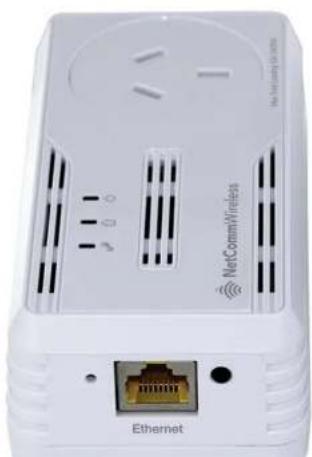
600Mbps Powerline Kit with Gigabit Ethernet
natural_image
White wireless router device with Ethernet port and Ethernet ports, no visible text or symbols on the device itself.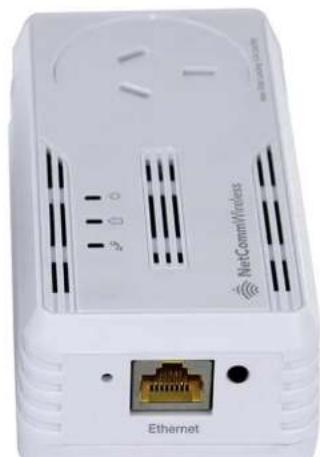
natural_image
White wireless router device with Ethernet port and Ethernet ports, no visible text or symbols on the device itself.
NetCommWireless
Copyright:
Copyright© 2013 NetComm Wireless Limited. All rights reserved.
The information contained herein is proprietary to NetComm Wireless. No part of this document may be translated, transcribed, reproduced, in any form, or by any means without prior written consent of NetComm Wireless.

Note: This document is subject to change without notice.

NetCommWireless
Table of Contents
Overview 4
About the Product ....4
How Does It Work? 4
Package Contents 4
Device Design 5
Determining Connection Rate 8
Getting Started 9
Plan Your Network 9
Powerline Utility 11
Powerline User Interface 12
150
12 Pisaka Kishuandu Blanca 475
FINAL NETWORK NAME 10
Simulate Simple Connect Button....14
Quality of Service 14
Devices 15
Firmware Upgrade....16
Frequently Asked Questions....17
Local and Regulatory Information 19
Product Warranty 10
- VOLUME YOUGHTY
- EQUITY OF WORK
- FINANCE OF WORK
Limitations of Warranty 19

NetCommWireless
Overview
About the Product
The NP507 Powerline Kit is ready to use out of the box and does not require the installation of driver software to work. It can be connected to computers, routers, gaming consoles, hubs, IPTV set top boxes, and other Ethernet devices regardless of operating system.
How Does It Work?
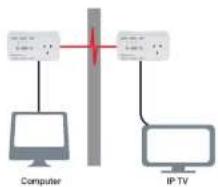
Powerline Adapters utilise the existing electrical wiring in the house as a path to create a secured network of computers and Ethernet devices. With a maximum data rate of up to 600Mops, the NP507 can reliably handle high requirement applications like broadband Internet, high definition video streaming, and Voice over IP.
The NP507 converts digital signals to a complex analog signal that traverses along the electrical wires. When receiving the analog signal, the NP507 converts the analog signal back to digital. To secure the signal, a 128-bit AES encryption is applied.
A Powerline device can only communicate with other Powerline devices that use the same Private Network Name. The Private Network Name can be changed manually using the NP507 Utility software on a computer with a Windows operating system. When you use the software, you have to manually type the Private Network Name for the device. Another way to change the Private Network Name is to use the Simple Connect button. Simple Connect automatically creates an encrypted Private Network Name. It can also be used to reset the Private Network Name or to add a device into an existing Powerline network.
Note: Powerline devices from the Twin Pack are already configured to use a common Private Network Name unique for that pair and are ready to use.
When a Powerline adapter communicates with another device, the Powerline Activity LED colour gives an indication of the connection rate: Red means below 30 Mbps; Amber means 30 to 80 Mbps; and Green means more than 80 Mbps.
Package Contents
The package contains the following items:
2 Powerline Adapters
2 Ethernet cables

NetCommWireless
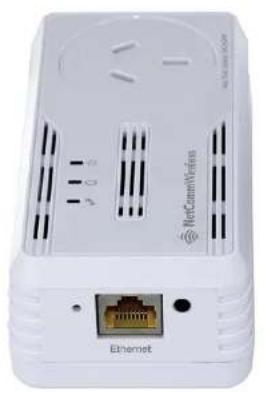
Device Design
natural_image
White wireless router device with Ethernet port and Ethernet ports (no visible text or symbols on body)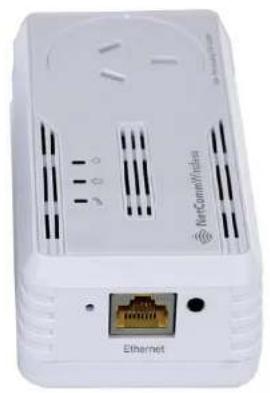
natural_image
White wireless router device with Ethernet port and ventilation slots (no visible text or symbols)| LABEL | STATUS | DESCRIPTION |
| Simple Connect Button | Press to create or join a Powerline network. It can also be used to reset the Private Network Name to a random key. | |
| Power | On | No power. |
| On | After Simple Connect is pressed for two seconds, this LED will blink to confirm the button press.When Simple Connect is pressed for at least 10 seconds, this LED will blink to confirm the Private Network Name next. |

NetCommWireless
How to Use Simple Connect
Note: The Powerline Adapters that you have received are ready for use straight out of the box. They require no initial set-up or configuration - all you need to do is connect them as detailed in the Quick Start Guide. The following Instructions about the Simple Connect button to configure your network are only applicable if you want to change the default private network name or include more adapters into the same powerline network.
Simple Connect provides a more convenient way of creating your Powerline network without the need to open the Powerline Utility software from a computer. The button has three main functions which includes:
Creating a Powerline Network
Resetting the Private Network Name
Joining an existing Powerline Network
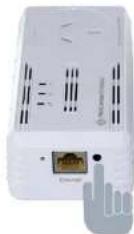
Creating a Powerline Network
To create a Powerline network, you need at least two Powerline devices using random Private Network Names. When you press Simple Connect on both devices, a common Private Network Name will be automatically generated to enable them to communicate with each other.
Note: New Powerlines from a Twin Pack can already communicate with each other out of the box. However, if you intend to create a new Private Network Name using Simple Connect for both devices, you need to reset their Private Network Names to a random key before proceeding.

NetCommWireless
flowchart
graph TD
    A["Computer"] --> B["Switch"]
    C["IP TV"] --> B
    B --> D["Switch"]
    D --> E["Computer"]
Resetting the Private Network Name
Simple Connect allows you to reset the Powerline Adaptor's Private Network Name to a random key. When a Powerline Adaptor is reset to a random key, it will not be able to communicate with any other device.
Note: Resetting the Private Network Name is different from resetting the device to its factory default settings. If you intend to reset the device to its factory default settings, press RESET on the device.
To reset the Private Network Name using Simple Connect:
- Press Simple Connect, wait for the Power LED to blink, and then release. It may take at least 10 seconds for the Power LED to blink.
- To confirm the Private Network Name reset, the Powerline Activity LED will switch off.
Joining an Existing Powerline Network
To enable a new device to join an existing network, the Simple Connect button copies the Private Network Name of the existing network to the new Powerline adapter. If you pressed Simple Connect from multiple Powerline adapters, only the signal from the first two devices will be processed.
To join an existing Secured HomePlug AV network using Simple Connect:
Step
Plug the new Powerline adapter beside one of your existing Powerline adapters. Make sure you can easily observe the LED behavior.

NetCommWireless
Determining Connection Rate
Each colour of the Powerline Activity LED represents a connection rating. The connection rating can only be calculated when the device is part of an existing network. The exact connection rate value can also be viewed using Powerline Utility.
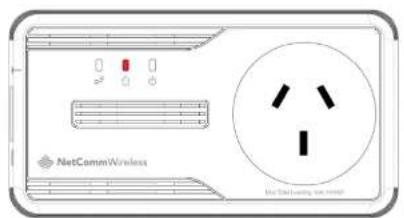
Good (Red) - Connection rate is less than 30 Mbps
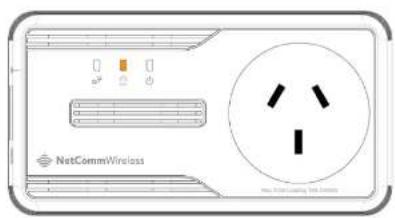

NetCommWireless
Getting Started
Plan Your Network
Here are ideas on how you can plan your Powerline network.
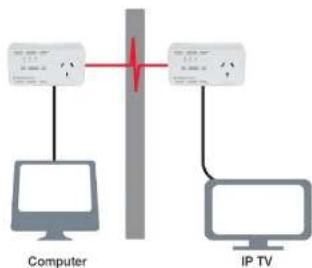
Local Network
Share an ultra fast Internet connection with any computer, wherever it is in the house.
flowchart
graph TD
    A["Computer"] -->|Switch| B["IP TV"]
    B -->|Switch| A
Gaming Network
Connect your gaming console to the Internet and compete with other online players.

NetCommWireless
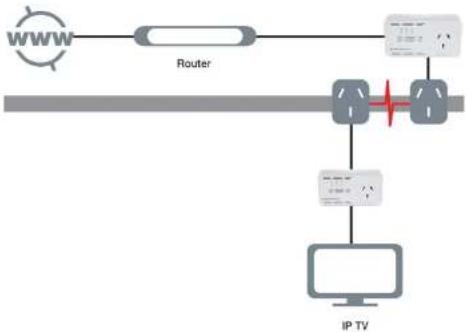
Entertainment Network
Experience IP TV streaming on your home entertainment system.
flowchart
graph TD
    A["WWW"] --> B["Router"]
    B --> C["Switch"]
    C --> D["IP TV"]
    D --> E["Computer"]
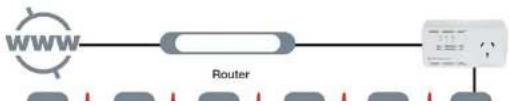
Media Network
Converge your IP devices into a single network.
flowchart
graph LR
    A["WWW"] --> B["Router"]
    B --> C["Device"]
    style A fill:#f9f,stroke:#333
    style B fill:#ccf,stroke:#333
    style C fill:#cfc,stroke:#333

NetCommWireless
Powerline Utility
Powerline Utility is a software application that allows you to configure the Powerline Adapters. It is mainly used for changing the Private Network Name, detecting other Powerline Adapters in the network, and measuring the throughput of devices. Installation is straightforward and the user interface is easy to use. The Powerline utility is downloadable from the NetComm website. Please go to www.netcommwireless.com and navigate to the product page to download.
Note: To use Powerline Utility, you need a computer using a Windows operating system with the .NET Framework installed. If you do not have .NET installed, the Powerline installer will installer it for you.
Requirements
Your computer must meet the following requirements:
Windows 98SE, ME, 2000, XP (32 and 64 bit), Vista (32 and 64 bit) or 7 (32 and 64 bit)
300 MHz Processor
128 Mb of RAM
.NET Framework
Network Interface Card
128 Mb of free hard disk space
Opening Powerline Utility
There are two ways to open Powerline Utility:
Double-click the Powerline Utility desktop shortcut and then select Open.
Click the Start button, click Programs, and then click the Powerline Utility icon.

NetCommWireless
Powerline User Interface
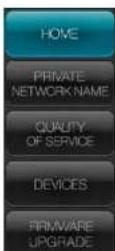
The Powerline Utility user interface is divided into tabs. These tabs include:
Home
Private Network Name
Quality of Service
Devices
Firmware Upgrade
Home


NetCommWireless
Private Network Name
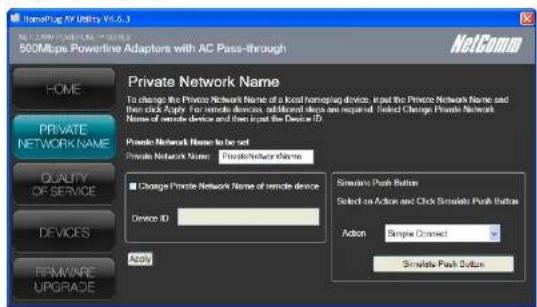
Private Network Name provides the function to manually change the Private Network Name of local and remote Powerline Adapters. A Private Network Name is a string of 8 to 64 characters that enables Powerline devices to communicate with each other.
If you intend to create multiple networks, you can assign different Private Network Names among your devices. You have to, however, make sure that at least two Powerline Adapters have a similar Private Network Name. A Powerline Adapter that uses a unique or random Private Network Name will not be able to communicate with other devices.
Note: In case you cannot connect into the network after changing the Private Network Name, please power cycle the device. To power cycle, disconnect and then reconnect the Powerline Adapters from the power outlet.
Note: You must change the Private Network Name (PNN) on the remote Powerline Adapters before changing your local PNN. If you change the local PNN first you will lose connectivity to the remote.
Local Private Network Name
Local Private Network Name refers to the Private Network Name of the Powerline Adapter that is directly connected to the computer where you use Powerline Utility.
To change the local Private Network Name:

NetCommWireless
After changing the Private Network Name of the remote Powerline Adapter, it will no longer be able to communicate with your local Powerline Adapter, unless you use a similar Private Network Name for your local Powerline Adapter.
Simulate Simple Connect Button
Simulate Simple Connect Button allows you to apply functionalities without manually pressing the Simple Connect button on a Powerline device. However, this only works on local devices.
| SIMULATE SIMPLE CONNECT BUTTON | |
| Simple Connect | Select to search and pair with another device, or search and join an existing Powerline network. |
| NMK Randomivo | Select to reset to a random Private Network Name: A Powerline Adapter using a random Private Network Name will be disconnected from the Powerline network and will not be able to communicate with other devices until it forms a new network or jobs an existing network. |
| AVLN Status | Displays the Powerline Adapters Logical Network membership status number. |
Note: The Simulate Simple Connect Button functions from Powerline Utility can be used for 600Mbps Powerline versions with or without the Simple Connect button on the device.
To simulate a Simple Connect function:
- Connect Powerline Adapter to your computer.
- Select a Simulate Simple Connect Button action:
a. Simple Connect
b. NMK Randomize
c. AVLN Status - Click Simulate Button Push.
Quality of Service


NetCommWireless
Quality of Service gives you the capability to prioritize particular applications within your network. QoS is not enabled by default.
QoS Modes:

Online Game/Internet
Prioritizes data s earning

Audio or Video
Prioritizes data and multimedia
stexming

Voice over IP
Prior zas voies applications
To enable QoS:
- Open Powerline Utility.
- Click Quality of Service.
- Check Enable QoS.
- Select a QoS mode.
Click Apply. When the process is complete, the message Settings Applied appears.
Devices
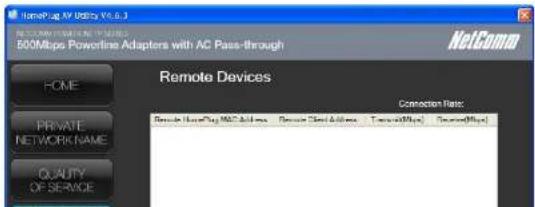

NetCommWireless
Firmware Upgrade
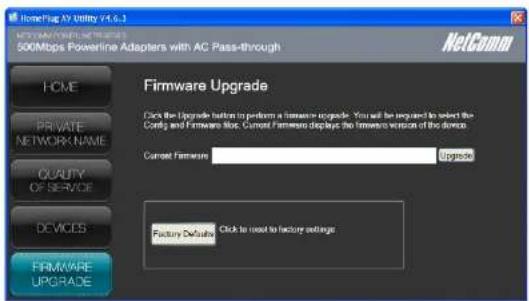
Use this to upgrade the firmware of your PowerlineAdapter. After upgrading, the Powerline Adapter will retain the same Private Network Name and MAC address settings. To upgrade, you need to have both the configuration file (.PIB extension) and firmware file (.NVM extension). Firmware upgrades can be downloaded from www.netcommwireless.com.
To upgrade the firmware of a Powerline:
- Connect Powerline Adapter to the computer where you are using Powerline Utility.
- Open Powerline Utility.
- Click Firmware Upgrade.
- Click Browse to select the location of the configuration and firmware files. The configuration file has a PIB extension while the firmware file has an NVM extension. After you select the location of the configuration and firmware files, the upgrade will immediately start.
To reset to factory default:

NetCommWireless
Frequently Asked Questions
Can I use 600Mbps Powerline Adapters with older Powerline versions?
All Powerline versions can co-exist with each other. 600Mbps Powerline Adapters, however, are not backward compatible with earlier (85Mbps) Powerline releases.
If you will use different versions of 600Mbps Powerline Adapters in a single network, you need to use the Powerline Utility software to create a Private Network Name for all devices. Unlike the new version of 600Mbps Powerline, older versions do not feature the Simple Connect button which enables the device to create a common Private Network Name without using the software.
How does 600Mbps Powerline achieve a higher bandwidth than earlier Powerline releases?
600Mbps Powerline complies with the Powerline standard. It achieves higher data throughput by using a broader frequency spectrum (2-30 MHz rather than 4-21 MHz), by using a better access method (Time Division Multiple Access rather than Carrier Sense Multiple Access/Collision Detection), and by using a better processor with a greater bill load per Hz.
Can 600Mbps Powerline Adapters be used alongside 200Mbps Powerline devices within the network?
600Mbps and 200Mbps Powerline standards can co-exist but they will not be able to communicate with each other.
Which operating system (OS) is compatible with 600Mbps Powerline?
Powerline is operating system independent. However, the Powerline Utility requires a Windows operating system (98SE/ME/2000/XP/Vista/7) with the .NET Framework installed.
How difficult is it to set up a Powerline network?
Powerline Adapters are plug and play devices. Connect to an Ethernet device, plug it to a wall socket, and it is ready to use. Even the most inexperienced user can set up the network with ease. Installing the Powerline Utility software is only needed if you intend to manually change the Private Network Name or view the connection rate.
How many devices do I need to create a Powerline network?
At least two devices are needed to create a Powerline network.
Is 600Mbps Powerline suitable for triple play i.e. use of data, voice, and video applications simultaneously?
Vae triple plan is supported

NetCommWireless
What is the maximum range of a 200Mbps Powerline network?
The maximum range is 200 meters.
If one Powerline adapter is connected to a LAN switch, is it possible for other computers in the switch to communicate with other
Powerline devices?
Yes.
Can my neighbors access my Powerline network?
Your electric meter prevents any signal from going outside your household. However, we strongly suggest that you create your own personalized Private Network Name to prevent unauthorized access into your network.
How much is the power consumption of 200Mbps Powerline on a 230-volt power supply?
Powerline has a power consumption of 4.5 watts when in use.
Can I use Powerline Adapters to connect computers located in different floors of the building?
Yes, as long as the electric wires are connected and do not exceed 200 meters.
Can I use Powerline Adapters in an old house with old power supply lines (partly without separated ground wire)?
Yes. However, performance may be affected because of the quality of the wires.
Can I plug Powerline Adapters into a multiple socket switch or do I have to plug it directly to the wall socket?
You can plug Powerline Adapters into a multiple socket switch. However, we strongly advise to plug it directly to a wall socket to achieve optimal performance.
Do I need electrical grounding for the device?
Powerline networks do not require electrical grounding.
After a blackout, will the Powerline Adapters switch on automatically?
Yes. If you experience connection issues, unplug the device and plug it back.
What will happen if I connect two Powerlines Adapters to the same router?
Legal and Regulatory Information
This manual is copyright. Apart from any fair dealing for the purposes of private study, research, criticism or review, as permitted under the Copyright Act, no part may be reproduced, stored in a retrieval system or transmitted in any form, by any means, be it electronic, mechanical, recording or otherwise, without the prior written permission of NetComm Limited. NetComm Limited accepts no liability or responsibility, for consequences arising from the use of this product. NetComm Limited reserves the right to change the specifications and operating details of this product without notice. NetComm is a registered trademark of NetComm Limited. All other trademarks are acknowledged the property of their respective owners.
Product Warranty
The warranty is granted on the following conditions:
- This warranty extends to the original purchaser (you) and is not transferable;
- This warranty shall not apply to software programs, batteries, power supplies, cables or other accessories supplied in or with the product;
- The customer complies with all of the terms of any relevant agreement with NetComm and any other reasonable requirements of NetComm including producing such evidence of purchase as NetComm may require;
- The cost of transporting product to and from NetComm's nominated premises is your responsibility; and,
- NetComm does not have any liability or responsibility under this warranty where any cost, loss, injury or damage of any kind, whether direct, indirect, consequential, incidental or otherwise arises out of events beyond NetComm's reasonable control. This includes but is not limited to: acts of God, war, riot, embargoes, acts of civil or military authorities, fire, floods, electricity outages, lightning, power surges, or shortages of materials or labour.
- The customer is responsible for the security of their computer and network at all times. Security features may be disabled within the factory default settings. NetComm recommends that you enable these features to enhance your security.
The warranty is automatically voided if:

NetCommWireless
Payment of the cost of having the Goods repaired.
All NetComm ACN 002 490 486 products have a standard 12 months warranty from date of purchase. However some products have an extended warranty option (refer to packaging). To be eligible for the extended warranty you must supply the requested warranty information to NetComm within 30 days of the original purchase by registering on-line via the NetComm web site at www.netcommwireless.com
- 600Mbps Powerline Kit with Gigabit Ethernet
- NetCommWireless
- Table of Contents
- Overview
- About the Product
- How Does It Work?
- Package Contents
- Device Design
- How to Use Simple Connect
- Creating a Powerline Network
- Resetting the Private Network Name
- Determining Connection Rate
- Getting Started
- Plan Your Network
- Local Network
- Gaming Network
- Powerline Utility
- Requirements
- Opening Powerline Utility
- Powerline User Interface
- Private Network Name
- Simulate Simple Connect Button
- To simulate a Simple Connect function:
- Quality of Service
- QoS Modes:
- To enable QoS:
- Devices
- Firmware Upgrade
- To upgrade the firmware of a Powerline:
- Frequently Asked Questions
- Legal and Regulatory Information
- Product Warranty
Brand : Netcomm
Model : NP507
Category : Powerline Adapter