
RocketBox 15s - Roof box Yakima - Free user manual and instructions
Find the device manual for free RocketBox 15s Yakima in PDF.


| Product Type | Roof Box |
| Brand | Yakima |
| Model | RocketBox 15s |
| Crossbar Spread Requirements | 24" - 36" (61 - 91 cm) |
| Lock Type | Key lock (SKS compatible) |
| Clamp Mechanism | Red knobs and thumb wheels |
| Weight Limit | Do not exceed roof rack weight limit |
| Key Retention | Key cannot be removed while box is open |
| Overstuffing Prevention | Box will not close if overstuffed; check lid closure |
| Cleaning | Mild soap and water; automotive wax with UV protectant |
| Lock Maintenance | Spray lubricant monthly |
| Automatic Car Wash | Not allowed with box installed |
| Periodic Inspection | Check knobs and hardware regularly |
| Compatibility with Fairing | Remove fairing before installation |
| Second Key Storage | Keep in a safe place |
| Warranty | Yakima warranty; contact for details |
| Customer Support | (888) 925-4621, www.yakima.com |
Frequently Asked Questions - RocketBox 15s Yakima
User questions about RocketBox 15s Yakima
0 question about this device. Answer the ones you know or ask your own.
Ask a new question about this device
Download the instructions for your Roof box in PDF format for free! Find your manual RocketBox 15s - Yakima and take your electronic device back in hand. On this page are published all the documents necessary for the use of your device. RocketBox 15s by Yakima.
USER MANUAL RocketBox 15s Yakima
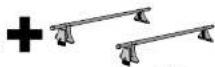
rack weight
if appropriate)

box contents

DO NOT EXCEED
YOUR RACK'S
WEIGHT LIMIT!
Check with your Yakima dealer or on the internet
IMPORTANT WARNING!
IT IS CRITICAL THAT ALL YAKIMA RACKS AND ACCESSORIES BE PROPERLY AND SECURELY ATTACHED TO YOUR VEHICLE. IMPROPER ATTACHMENT COULD RESULT IN AN AUTOMOBILE ACCIDENT, AND COULD CAUSE SERIOUS BODILY INJURY OR DEATH TO YOU OR TO OTHERS. YOU ARE RESPONSIBLE FOR SECURING THE RACKS AND ACCESSORIES TO YOUR CAR, CHECKING THE ATTACHMENTS PRIOR TO USE, AND PERIODICALLY INSPECTING THE PRODUCTS FOR ADJUSTMENT, WEAR, AND DAMAGE. THEREFORE, YOU MUST READ AND UNDERSTAND ALL OF THE INSTRUCTIONS AND CAUTIONS SUPPLIED WITH YOUR YAKIMA PRODUCT PRIOR TO INSTALLATION OR USE. IF YOU DO NOT UNDERSTAND ALL OF THE INSTRUCTIONS AND CAUTIONS, OR IF YOU HAVE NO MECHANICAL EXPERIENCE AND ARE NOT THOROUGHLY FAMILIAR WITH THE INSTALLATION PROCEDURES, YOU SHOULD HAVE THE PRODUCT INSTALLED BY A

CROSSBAR SPREAD
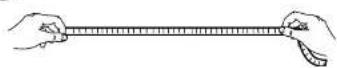
RocketBox 16 ....30" - 36" (76 - 91 cm)
RocketBox 11....30" - 36" (76 - 91 cm)
RocketBox 15s .....24" - 36" (61 - 91 cm)

BARS THAT MOVE: TIGHTEN YOUR CROSSBARS IF YOU LOOSENED THEM.
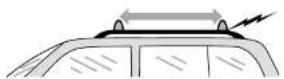

If your vehicle has a fairing, remove the fairing prior to box installation.

OPEN THE BOX
(Use the key to
unlock the box).
• TO OPEN THE BOX, unlock it.
- With the key still inserted,
raise the lid.
The key cannot be removed
while the box is open.
INSIDE THE BOX:

Loosen red knobs and open clamps. Do not remove knobs.


Loosen track thumb wheels 1/2 turn. Do not remove wheels.


REMOVING THUMBWHEELS WILL CAUSE DISASSEMBLY OF LEVER/CLAMP MECHANISM.
LOAD CARGO BOX ONTO VEHICLE:

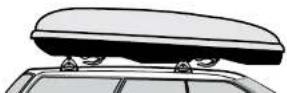
Place box on vehicle with clamps in front of crossbars. A friend could help with this.

natural_image
Simple line diagram showing a curved top edge and two horizontal lines with small black triangular markers at the bottom (no text or symbols)6
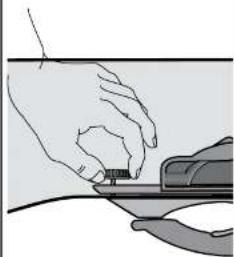
OPEN LID TO GAIN ACCESS TO KNOBS.


natural_image
Illustration of a hand using a tool to lift a curved object, with no visible text or symbols- Check clamp opening for crossbar clearance.
- Loosen red knob further if necessary.
7
Adjust box on top of car.
Measure from towers for reference.

natural_image
Pure diagram of a rectangular object with horizontal arrows and horizontal lines, no text or symbols present8
Tighten knobs to engage clamps.

natural_image
Hand operating a mechanical device with a circular button and arrow indicating rotation (no text or symbols)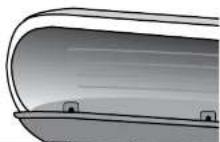

⑨
TIGHTEN ALL
THUMB WHEELS.
natural_image
Illustration of hands using a tool to adjust or install a small component (no text or symbols visible)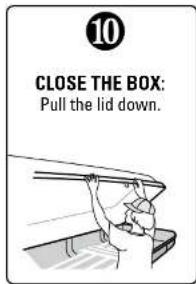
• Overstuffing the box will prevent closure.
- Check the closure by pushing up on the lid.
• To lock the box, turn key all the way to the right until horizontal. Remove key.
TO OPEN THE BOX, unlock it. With the key still inserted, raise the lid. The key cannot be removed while the box is open.
UNLOCK / OPEN
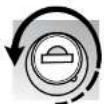
LOCK NOT LOCKED! *

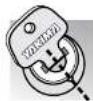
* See 11a below.
11 REPLACEMENT LOCK FOR SAME-KEY-SYSTEM® USERS:
Yakima SKS® locks purchased separately. (If you wish to install matched-key locks; keep this instruction for replacement lock installation).
- Insert lock key and rotate the lock to align lock depression with point on rim.
- REMOVE lock key.
- Insert control key (from kit purchased separately).

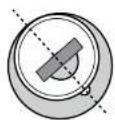
Remove key with lock attached.
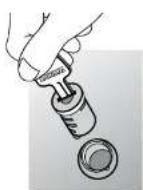
Insert control key into the new lock, and install.
Keep the depression aligned to the point.

- Push the core completely into the housing.
- Turn the key to a horizontal position.
- Hold the core with the tip of your thumb and pull out control key. The lock should remain in the housing.

natural_image
Illustration of hands using a tool to adjust or install a circular component (no text or symbols visible)12 CHECK INSTALLATION BEFORE DRIVING AWAY
a The boy should not slide
TO REMOVE CARGO BOX:
- Do not remove or adjust thumb wheels.
- Simply loosen red knobs and remove box from crossbars.
TO REINSTALL:
- With gear box adjusted to your vehicle, simply reload onto car, tighten red knobs and check for tightness.


To retain the adjustments for your vehicle, leave thumb wheels tightened. REMOVING THUMBWHEELS WILL CAUSE DISASSEMBLY OF LEVER/CLAMP MECHANISM.
CARE AND MAINTENANCE
BOX CARE:
Use a clean soft cloth. Wash with mild soap and water. Polish with automotive type wax and UV protectant to prevent color fade.
LOCK MAINTENANCE:
Spray a small amount of lubricant into lock mechanism once a month.
AUTOMATIC CAR WASHES:
Do not enter car wash with box installed on vehicle.
KEEP YOUR SECOND KEY IN A SAFE PLACE!
CAUTION
IF YOUR VEHICLE
HAS A REAR HATCH:
On some vehicles, hatch interference is unavoidable.
Use caution when opening your hatch.

READ THESE WARNINGS!
Periodically check the knobs inside the box and tighten if
ATTACHMENT
HARDWARE CAN LOOSEN OVER TIME. CHECK AND TIGHTEN IF NECESSARY,
BE SURE ALL HARDWARE IS
SECURED ACCORDING TO INSTRUCTIONS. FAILURE TO PERFORM SAFETY CHECKS BEFORE DRIVING AWAY CAN RESULT IN PROPERTY
IF YOU NEED FURTHER
TECHNICAL ASSISTANCE
OR REPLACEMENT PARTS
Contact your dealer, or visit www.yakima.com, or call (888)925-4621
Monday through Friday,
7:00 AM to 5:00 PM, PST

THIS PRODUCT IS COVERED
BY YAKIMA'S
TO OBTAIN A COPY OF THIS WARRANTY, GO ONLINE TO
WWW.YAKIMA.COM OR EMAIL US AT
YAKWARRANTY@YAKIMA.COM
OR CALL (888) 925-4621
Brand : Yakima
Model : RocketBox 15s
Category : Roof box