
LED52B45RQ - Television RCA - Free user manual and instructions
Find the device manual for free LED52B45RQ RCA in PDF.


| Product Type | LED Television |
| Brand | RCA |
| Model | LED52B45RQ |
| Screen Size (Diagonal) | 52 inches |
| Display Resolution | 1920 x 1080 (Full HD) |
| Refresh Rate | 60 Hz |
| Power Consumption (Typical) | 100 W |
| Standby Power | < 0.5 W |
| Dimensions (W x H x D) without Stand | 47.2 x 27.6 x 3.1 inches (1200 x 700 x 80 mm) |
| Weight without Stand | 35.3 lbs (16 kg) |
| Inputs | HDMI (2), USB, VGA, Component, Composite |
| Audio Output | Optical, Headphone jack |
| Tuner | ATSC / NTSC (Digital/Analog) |
| VESA Mount Compatible | Yes, 400 x 400 mm |
| Key Features | Full HD LED display, Sleep Timer, Parental Lock, Closed Captioning |
| Remote Control | Included (batteries not included) |
| Power Cord | Detachable, 5 ft (1.5 m) |
| Stand | Included (requires assembly) |
| Cleaning Instructions | Wipe with a soft, dry cloth. Do not use liquids or cleaners. |
| Safety Note | Use only the provided power cord. Avoid exposure to rain or moisture. |
| Repairability | Professional service required for internal repairs. |
Frequently Asked Questions - LED52B45RQ RCA
User questions about LED52B45RQ RCA
0 question about this device. Answer the ones you know or ask your own.
Ask a new question about this device
Download the instructions for your Television in PDF format for free! Find your manual LED52B45RQ - RCA and take your electronic device back in hand. On this page are published all the documents necessary for the use of your device. LED52B45RQ by RCA.
USER MANUAL LED52B45RQ RCA
Table of Contents
Child Safety Guide.... Caution and Warning
FCC Notice 2....
Safety Precautions.2.
Preparation for Your New TV,
Check Accessories ....
Setup TV: Blow Stand... Select TV Location.....
Connection and Using.
TV Stand Installation.
TV Signal Connection
Side Panel Connectio
Connecting Air Composite Video device
Connecting YPbPr Component device..
Connecting HDMI device
How to Obtain various kinds of input so TV-jacks Explanation
Keypad and Front Pa
Panel Buttons ......
Front Panel....
Remote Control Instructions Insuring Details in the People
Infaring Baseline in the Remote Remote Control Reception Angle
Learning about Remote Con
Remote Control Buttons......
Initial Setup-7...... Davis Operations-7
Basic Operations .... Turning On and Off ....
Choosing TV Channel...
Selecting Input Source.
Channel Bar....
Adjusting volume...... FBG (Electronic Program
OSD Menu Operation
Adjust the OSD Screen,
Picture Menu ....
Sound Menu ..... Channel Menu
Parental Menu ....
Setup Menu......
Others Menu....
Frequently Asked Questions (FAQs) Troubleshooting
V-Chip Rating Explan
US V-Chip Rating Systems......
Canadian English Rating
Canadian French Rating System...... Wall Mounting Unit Specification
USB Media Play
Product Specification
Warranty Card......
Child Safety Guide
CHILD SAFETY:
It Makes A Difference How and You Use Your First Panel Div
- 用 R 的定理
Congratulations on your purchase!
As you enjoy your new product, please keep these safety tips in mind:
THE ISSUE
The home theater entertainment experience is a growing trend and larger flat panel
displays are popular purchases. However, lot panel displays are not always supported on the proper stands or installed according to the manufacture's
recommendations. - Flat panel displays that are inappropriately situated on stores, bookcases, shelves,
desku, speakers, chests or cars may fall over and cause injury.
THIS MANUFACTURER CARES!
- No seasonal season(s) history a certain to having some understand more enjoyable and safe.
TUNE INTO SAFETY
- One size bolt is not still followed by installation, recommended for full use installation and use of your flat panel display.
- Carefully read and understand all enclosed to product.
- Don't allow children to climb on or play with furniture and television sets. - Don't place flat panel displays on furniture that can easily be used as steps, such as
n chest of drawers. • Japanese children are leaves carried with a drawing a cream, except
- Generalized TV brander can become excited after watching a program, especially on a "longer than life" flat panel display. Care should be taken to place or install
- The display where it cannot be pushed, pulled over, or knocked down. - Care should be taken to route all cords and cables connected to the flat panel.
display so that they cannot be pulled or grabbed by curious children.
WALL MOUNTING: IF YOU DECIDE TO WALL MOUNT YOUR FLAT PANEL DISPLAY. ALWAYS:
- Use a mount that has been recommended by the display manufacturer and/or used by an independent laboratory such as JL, CS4, E71.
- follow all instructions supplied by the display and wall mount manufactures.
- If you have any extent to cover your ability to manage inside your own panel tray, contact your retailer about professional installation.
- Make sure that the wall where you are mounting the display is appropriate. Some wall mounts are not designed to be mounted to walls with steel studs or did cinder
block construction. If you are unsure, contact a professional installer • A minimum of two people are required for installation. Flat panel displays
can be heavy.


Child Safety Guide
SEGURIDAD DE NIÑOS:
Caution: To reduce the risk of electric shock, do not remove cover or back. No user-serviceable parts inside.
Refer servicing to qualified service personnel.
The lightning flash with arrowhead
WARNING: TO REDUCE
EXPOSE THIS APPLIANCE TO RAIN OR MOISTURE.
CAUTION: CHANGES OR MODIFICATIONS NOT EXPRESSLY APPROVED
BY THE PARTY RESPONSIBLE FOR COMPLIANCE WITH THE FCC RULES COULD AVOID THE USERS AUTHORITY TO
OPERATE TI
ECC Notice
FOO Not
CC Information
cc information his equipment has been
Class B digital device, p nits are designed to pre
tarference in a resident
to can facilitate automatic accordance with the inst
Radio Communications. Parlerance will not occur
oes cause harmful inter an be determined by tor
ncouraged to try to con allowing measures:
- Reorient or relocate
- Increase the separa - Connect the equipn
that to which the re-Consult the dealer
(1) 2017年1月1日
Safety Pr
,
. Read these instructio
- Keep these instructic - Heed all warnings.
Follow all instructions Do not use this appa
near a laundry tub, in and the Box
Clean only with dry c
DO NOT BLOCK ANY VER manufacturer's instru
or bottom are provided of the TV and to prot
not be blocked or co by placing the TV on
Do not install near an peristars, Stovea, or
produce heat.
. Do not deal a small plug. A polarized plug
A grounding-type pie The wide blade or the
provided plug does r replacement of the o
1. Protect the power co particularly at plugs.
they exit from the app Only use attachment
2. Use only with carl, st
manufacturer, or soft cart is used, use cau
cart/apparatus comb tip-over. A TV and co
moved with care. Qu and uneven surfaces
combination to over 3. Unplug this apparatus
long periods of time, during a lightning rod
during lightning and of time, unplug it from
cable system. This was and power line surge
4. Peter all servicing to required when the ap
[Non-Text]
[Non-Text]
[Non-Text]
[Non-Text]
[Non-Text]
[Non-Text]
[Non-Text]
[Non-Text]
[Non-Text]
[Non-Text]
[Non-Text]
[Non-Text]
[Non-Text]
[Non-Text]
[Non-Text]
[Non-Text]
[Non-Text]
[Non-Text]
[Non-Text]
[Non-Text]
[Non-Text]
[Non-Text]
[Non-Text]
[Non-Text]
[Non-Text]
[Non-Text]
[Non-Text]
[Non-Text]
[Non-Text]
[Non-Text]
[Non-Text]
[Non-Text]
[Non-Text]
[Non-Text]
[Non-Text]
[Non-Text]
[Non-Text]
[Non-Text]
[Non-Text]
[Non-Text]
[Non-Text]
[Non-Text]
[Non-Text]
[Non-Text]
[Non-Text]
[Non-Text]
[Non-Text]
[Non-Text]
[Non-Text]
[Non-Text]
[Non-Text]
[Non-Text]
[Non-Text]
[Non-Text]
[Non-Text]
[Non-Text]
[Non-Text]
[Non-Text]
[Non-Text]
[Non-Text]
[Non-Text]
[Non-Text]
[Non-Text]
[Non-Text]
[Non-Text]
[Non-Text]
[Non-Text]
[Non-Text]
[Non-Text]
[Non-Text]
[Non-Text]
[Non-Text]
[Non-Text]
[Non-Text]
[Non-Text]
[Non-Text]
[Non-Text]
[Non-Text]
WARNING: The IRISH OF THE RISK OF THE POWER. This is a key insight that the IRISH OF THE POWER has been made to ensure that the POWER has not been an arbitrary or arbitrary motion. The POWER has not been a serious, rather than a serious, or a serious, or a serious, or a serious, or a serious, or a serious, or a serious, or a serious, or a serious, or a serious, or a serious, or a serious, or a serious, or a serious, or a serious, or a serious, or a serious, or a serious, or a serious, or a serious, or a serious, or a serious, or a serious, or a serious, or a serious, or a serious,
[Non-Text]
[Non-Text]
[Non-Text]
[Non-Text]
[Non-Text]
[Non-Text]
[Non-Text]
[Non-Text]
[Non-Text]
[Non-Text]
[Non-Text]
[Non-Text]
[Non-Text]
[Non-Text]
[Non-Text]
[Non-Text]
[Non-Text]
[Non-Text]
[Non-Text]
[Non-Text]
[Non-Text]
[Non-Text]
[Non-Text]
[Non-Text]
[Non-Text]
[Non-Text]
[Non-Text]
[Non-Text]
[Non-Text]
[Non-Text]
[Non-Text]
[Non-Text]
[Non-Text]
[Non-Text]
[Non-Text]
[Non-Text]
[Non-Text]
[Non-Text]
[Non-Text]
[Non-Text]
[Non-Text]
[Non-Text]
[Non-Text]
[Non-Text]
[Non-Text]
[Non-Text]
[Non-Text]
[Non-Text]
[Non-Text]
[Non-Text]
[Non-Text]
[Non-Text]
[Non-Text]
[Non-Text]
[Non-Text]
[Non-Text]
[Non-Text]
WARNING:
O REDUCE THE RISK EXPOSE THIS APPLI
AUTION: HANGES OR MODIF
Y THE PARTY RESPO
US ROLES COULD ARE PERATE THIS EQUIP
ECC Net
TOC Not
Class B digital device,
nits are designed to pro tarifrance in a residenti
nd can rotate radio fre ccordance with the inst
dio Communications. H terfERENCE will not occu
ces cause harmful inter
that be determined by encouraging to try to com
- Recipient or reiterate
- Increase the separa
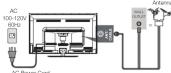
TV Signal Connection
The first step in connecting your TV is obtaining the signal. Your TV
LED/5dB45HQ Hall a black planet, which allows you to nickel analog and/or digital television channels via ANT/CABLE jack.
Before connecting your TV, determine using an antenna or a cable service to obtain the signal.
- Antenna
A. Antenna Connect the antenna to TV via couxial cable on ANT/CABLE jack
of the back panel. You are ready to receive air local digital and analog channels
B. S. H. T.
B. Cable TV service
Connect the cable TV wall jack to TV via coastal cable on ANT/CABLE jack of the back panel. You are ready to receive
off-air local digital and analog channels.
C. Set-Top Box
If you use a set-top b
or baseline service provider, which use a special connection, please refer to the user's guide of set-200 box.
1.2.10 15:30 PM
Note: Do not plug th
as the connection: between
Cable Connections
Choose Your Connections
TV LED52B45RQ supports various connections to other devices
(such as DVD, VCR, Set-top box, etc.). Please follow the table to choose the cables which adapt to your device.
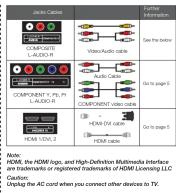
Side Panel Connections
Connecting AV Composite device
(Good Video Quality)
广力云智慧零售收银系统
Composite connector will be shared with Component Y connector.
To connect a composite AV view, such as a DVD player, follow these steps:
- Connect the COMPOSITE jack on the side of TV to the video output
jacks of device via video cable (yellow) 2. Connect the L-AUDIO-R jacks on the
output jacks of device via audio cable.
Notice the left channel jack and plugs are while and the right channel jack and plugs are red.
Note: AV signal belongs to composite video. This kind of video signal
has regular good display quality:
Composite Video Connection
The picture below is an example of a connection using the
composite video jack.
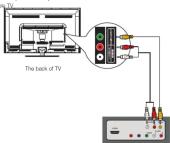
The output panel of other device
Connecting YPbPr Component device
(Better video quality)
To connect a component device, such as a DVD player, follow these
steps: 1 Connect the COUPROWENT IN USBs/Link on the side of TU to the
FOR INECT THE COMPONENT IN THE LIFT JACK ON THE SIDE OF TV TO THE video output jacks of device via video cable (green, blue and red).
- Connect the L-AUDIO-R jacks on the side of TV to the audio output jacks of device via audio cable
Notice the left channel jack and plugs are white and the right channel
jack and plugs are red.
Note: Y/Pb/Pr jacks are component video. This kind of video signal has
better display quality.
Component Video Connection
component video connection
The picture below is an example of a connection using the component.
video jack.
[Figure]
| |
1
图 1
图 1-3
The back of TV
THE 2021-4-17
-
( ) |
C
| |
| |
| |
| |
| |
□ □
[Non-Text]
-
-
The Ground Truth image displays a single, solid horizontal line. According to Rule 2 (UNDERSCORE & LINE RULES), if the GT contains lines used for stylistic emphasis or as background elements (like ruled paper), the OCR result must ignore them. The provided OCR content is "____", which consists of four underscores. This is incorrect because underscores are not equivalent to a solid line and are not permitted under the “Stylistic/Background Lines (Ignore)” rule. Outputting underscores for a stylistic line violates the rule and constitutes an error. Therefore, the OCR result is inconsistent with the Ground Truth.
The output panel of other device
Connecting HDMI device
Connecting HDMI device (Rest Version Quality)
(Best video quality)
To connect a HDMI device, such as a DVD player, please Connect the
HDMI1/DVI, 2 jack on the side of TV to the output jacks of device via HTRB sales.
HOW ICE.
To connect a DVI device, via DVI port of PC or Device and HDMI
- Connect the HDMI/CVI jack on the side of TV to the [D] port of
PC via HDMI-DVI cable.
- Connect the L-AUDIO-RJ jack on the side of TV to the audio output jack of computer with audio cable (clusi-channel BGJ jacks
to 3.5mm stereo jack or the L-AUDIO-R jack).
Note: L. HDMI (Link Definition Multisyncle Interface) is a program
AUDIO 1. ALDAR (High-DAIR) from NVIDIA Interlady is in compact audio/video interface for transmitting uncompressed digital data. It
carries the audio and video signal via the same cable and has the best display quality.
- HDMI-DVI cable transfers only video signal from DVI part of
DVI device to HDMI jack of TV. For audio signal, please connect audio
output to L-ADUC/A jack on TV back panel.
HDMI Connection
The point below is to switch of a parameter using the CI study.
The picture below is an example of a connection using the HDMI video jack.
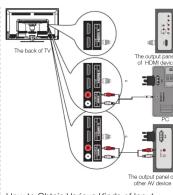
How to Obtain various kinds of input
Sources The conversion is done, over PDF to two or more units on TV
After connection is done, press INPUT button on manual control of TV top panel to choose the input source you need. See page 7. Basic
Operation of TV.
TV Jacks Explanation
HEAD PHONE: Connect a 3.5mm headphone for
USB: Connect your USB storage device to enjoy music!
photo files on your TV. (Also used for service purpose).
HOMI/DWI, 2: (High-Damition Modemable Interface) It provides an uncompensated digital connection that
carries both video and audio data by way of an integrated
mini-plug cable. COMPONENT Y/Pb/Pr: Connect a device that has
component video jacks, such as a DVD player. To access
device connected to the 17/PbHY jack, press the INPUT button on your remote; then press the up/down arrow to
button on your phone, then pool the spring menu to select Component. Press the ENTER button at last to
confirm. • X/Yth (Rx (Component Vector): They provide good
- ITP/RFI [Outperform Video]. They provide good picture quality because the video signal is separated into
three components. Use three video-grade or component video ratings for the programming. When using XIFb4b
make sure you connect left and right audio cables to the
AUDIO IN R/L jacks. I. AUDIO B. COMPOSITE: Connect as N/A desire that has composite
2-ASUBIO-14, COMP OUTLE: Connect an AP device that has computer video jacks, such as a VCR or a DVD player. To access device connected
to these jacks, press the INPUT button on your remote; then press the
Up/down show to select Air. Press the ENTER button at last to confirm. • AUDIO IN L: Left audio channel connection. The left audio
connector is usually white. For mono audio sources, be sure to use the
- AUDIO INPUT: • AUDIO IN R: Right audio channel connection. The right audio
- Satellite in the high-able channel connection: the light, double connector is usually red.
ANT/CABLE: Connect to receive the signal from your antenna or cable via universal cable.
Digital Audio out: Connect a coastal cable for digital audio output.
[Non-Text]
Keypad and Front Panel
Keypad Buttons
Keypad Buttons
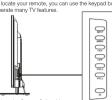
MENU: Displays the TV Main Menu.
CH#: Soans up through the channel list. In the TV menu system, it acts
Take the up arrow on the remote control and can be used to select menu options.
CH#: Scans down through the channel list. In the TV menu system, it also like the down price on the remote control and are be used to
is actually the down arrow on a narrow control and can be used to select menu options.
VOL+: Increases the volume. In the TV menu system, it acts like the
right arrow on the remote control and can be used to select menu
VOL:- Decreased the volume. In the TV menu system, it acts like the
left arrow on the remote control and can be used to select menu
options. POWER (Φ): Turn the TV on and off.
Front Panel
Profit Parlor
A##: ### ## ## ## ## ## ## ## ## ## ## ## ## ## ## ## ## ## ## ## ## ## ## ## ## ## ## ## ## ## ## ## ## ## ## ## ## ## ## ## ## ## ## ## ## ## ## ## ## ## ## ## ## ## ## ## ## ## ## ## ## ## ## ## ## ## ## ## ## ## ## ## ## ## ## ## ## ## ## ## ## ## ## ## #
Power Station by indicator. Light up in bed when the TV is in standby mode. Light out when the TV is on.
Remote Control Sensor: Remote control IR sensor, which receives induced my control response to control.
Infrared Ray SNI: by Namibia Control
- Remote Control Sensor
1
1
Power/Standby Indicator
Powertrainable solution
(No text)
m = 311
Remote Cont
Hemoto Senta
The Ground Truth image displays a single, solid horizontal line. According to Rule 2 (UNDERSCORE & LINE RULES), this is a stylistic or background line, not a placeholder underscore. Therefore, the OCR result must ignore it and output nothing or only meaningful text. The provided OCR content is "____", which consists of four underscores. This is an incorrect interpretation of the line as a placeholder, violating the rule that stylistic lines must be ignored. The OCR has hallucinated underscores where none should exist based on the GT's visual context. Hence, the OCR result is inconsistent with the Ground Truth.
Inserting Batteries in the Remote
- Remove the cover of battery cabin on the back of the
- Nominal 2nd collar upholstery basin on the back of the front end box by lifting the cover.
- Insert two AAA batteries, making aligned correctly
- Place the cover back.
1
1
图 20
(1)
(2)
If the remote control does not work, check these points:
- Are the polarities [+, -) correct. - Are the batteries worn out?
+ is there an AG power failure?
- Is the power cord plugged in? - Is there any interference or bit
- If there any insurance or book near the remote costs or sensitive
CAUTION:
■ Used batteries should be recycled.
- Keep out of children's reach. - DO NOT use raws and old huttened
- Change both the batteries at the same time.
- When not using the remote control for a long hatched or from the unit
Gard
Remote Control Reception Angle
The view of control within the distance and mode groups shown
Tell your below:


↓
Universal Remote Control Code List
For Universal Remote Control brands listed below: please up
for example, the other third quarter is not allowed by a companying codes and refer to your Universal Remote Control User
Manual fo model
■ Codes for DIRECTV: 0178, 10178
• Codes for Time Warner Cable: 0170,
- Codes for Cox Communications: 0178 - Codes for Comcast: 10178
- Codes for Dish Network: 627
- Codes for Floe Verizon: 0205, 0057, 0480, 0775
m = 311
Learning about Remote Control
m = 311
D. 10, C. 14, B. 15
Remo
MUTE (☒): Reduces the TV volume to
Prieis aga
POWER (c): Turns the TV on or off.
CA.DIST FAV.: Ac
favorite list, or enases the current channel from
your favorite channel
FAV.+ or FAV.-: Scans up or down through
the curial Numero
numbers.
=: To e channel
this button to enter the sub-channel and press
ENTER.
McCall (2) 3. Returns to the previous channel. EPS: Shows Electronic Program Guide (see
page 81.
[TV, AG]
the arrows to highlight options, and press
ENTER
to highlight different items in the TV menu or shares the value. The version of new items are
change the value. The up/down arrow can ask work as GHz/GHz, button, and the left/right
arrow can also work as VOL-/VOL+ button.
ENTER: Enter and confirm button. MENU: Accesses the Main Menu, or return to
the upper
FREEZE: Freeze the current screen frame,
DISPLAY
page 7). EXIT: Exits the current menu or function
VOL+ or VOL-: Increases or decreases the TV
volume.
CH- or CH-1 Scans up or down through the current channel list. Press once to change the channel up or down; news and hold to
Continue changing channels.
PICTURE: Switches between the preset picture mode (see page 8)
SOUND: Switches between the preset sound mode (see page 8).
SLEEP: Selects the sleep timer, after which the TV will shut off
automatically.
ASPECT: Switchms between the preset screen size model (see play CC; Selects the closed caption.
MTB: Selects the multi-channel television sound.
Initial Setup
Initial Setup
(1) is the first time you can see TV, every have done Gray.
If it is the first time you turn on your TV, or you have done clear Channel List option (see page 10), the initial setup menu appears
automatical
Stop One
Please take up/down an
need. Available languages: English, Spanish Initial Setup
and French
Step Two Please select the TV installation mode, press
the up/dow
need: Home, Retail. If you select Home mode, the next option is step three. If you
select Retail mode, please refer the step four
Step Three
Please choose between Energy Saving and Dynamic mode. You can save more energy
with Energy
Step Four
To choose
the signal type: Air, Cable. Note: please select TV signal type according to the antenna or cab
closed cìrou
Step Five
If you accomplish the initial setup, the TV will search channels automatically.
RETURN ONION
#
ALTO CHANNEL SERVICE
the following. Point that.
m - 1 0 ; 当 m > 32 且 m 1 时方程有两个不等实数根
m = 311
Digital TransNet Fund Digital TransNet Fund
m = 311
m = 311
What to notice: 1. The channel search score starts from the Amazon TV channel
-
March searching
-
The channels that have been found will be stored automatically.
-
You are more MCHI but to play episodic digital shares.
-
You can press INFO about to skip analog/digital channel searching.
-
You can
(1) m = 311
Basic Operations
m = 311
Turning On and Off
Connect the AG cord to power the LED LCD TV. At this time the T
will enter standby mode and power indicator will turn red. Use Power
button (D) on the top panel of TV or on the remote control to turn the TV. After switching off the TV for 5 seconds, you can turn on T
again.
Choosing TV Channel
2.12.2019年1月28日
Tuning To Analog Channels
An analog channel has a channel number beginning with "A". Input the
- digital number with numeric buttons directly and please ENTER button to confirm
For example, to watch analog channel "A51", press "5", "1", "ENTER"
on remote control in sequence. Note: Although there is no wrong TV signal available in America, see
Reserve ATV functions for some expansible use.
Turing To Digital Channels
Tuning to Digital Channels
A digital channel has a channel number beginning with "D". Input the main digital number with no mode by dense density, then group "on"
main digital number with numeric buffer to directly, then press button on remote control, and input the sub number at last.
For example, to watch analog channel "D31-1", press "3", "1", "—", "1", "ENTER" or remote control in sequence.
- ENBLY G-remole conform sequence.
Changing Channels Directly
You can use CHΦ button to increase
- You can use on 1 - buttons to increase channel number and on 4 - to decrease channel number. When no OSD (On Screen Display) is used,
the up/down arrows can also work as CH-/CH- button.
2.1.1.1.1.2
Selecting Input Source
EPG (Electronic Program Guide)
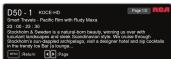
Press EPG button on the remote control, the electronic program guide will appear in the center of screen. The electronic program guide gives the TV program playing project. You can use left/right arrows to switch pages.

Adjust the OSD Screen
The OSD (On Screen Display) menu enables you to approach to the TV
To use OSD menu system, press MENU button on remote control, then use left/right arrow to highlight an option from PICTURE, SOUND, CHANNEL, PARENTAL, SETUP or OTHERS and press ENTER/cloven button.
Press the up and down arrow to move to a different option within each menu. If necessary, press ENTER or right arrow to display the choices of the option you've highlighted. If available, use the text at the bottom of each screen for help. To return to the previous menu, press the MENU button.
To exit the OSD menu: - Press the EXIT button. The menu will clear from the screen.


Picture Menu
The Picture Menu contains menus and controls to configure the way the picture appears. The Picture Menu options apply to the video for the main TV and VIDEO INPUT selections. All picture options can be applied to each input. Menu MENU on the remote. Select Picture from the Main menu. Box

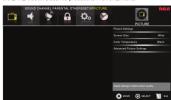
Use up/down to choose the function you need, press ENTER or right arrow to adjust or enter a sub-menu. The sub-menu image and
explanation are shown below. If available, use the bed at the bottom of each screen for help.
Picture Settings
Picture Mode: Choose the preset visual mode of your TV: Standard, Moka, User, Dynamic. Power Saving. (Only in User mode you can adjust Brightness, Contrast, Color, Tint and Sharpness. Changes to Power Saving mode can decrease their power consumption.)
- Brightness: Adjust the brightness of picture. - Contrast: Adjust the contrast of color.
- Color: Adjust the richness of color. - Tint: Adjust the balance between re
available in NTSC signal). - Sharpness: Adjust the sharpness level of picture
Screen Size
Screen Size: Selo
Ginema, Zoom, and Normal.) Please choose the ratio that applies to your video signal format best.
Color Temperature
This option allows you to select one of three automatic color adjustments: Cool for a blue color to picture colors: Normal or
adjustments: Good for a darker palette of picture colors, Normal of Warm for a redder palette of color.

- Dynamic Contrast: Set dynamic contrast Off/low/Medium/High. - Film Mode: Set film mode pn/off.
- Noise Reduction: Set noise reduction as Off/low/Medium/High. - MPEG Noise Reduction: Set MPEG noise reduction as Off/low/
- Wt Corlnds/Stockers for Mr. 2015: Hold in position as an offer. Mediumor High. - Intro: Union production index to ramp on the price of "Bollis" as
Now, National Biochemistry is robust to the picture-based or any type of interference. This feature is especially useful for
providing a cleaner picture in weak analog signal conditions. The MPEG Noise Reduction specifically works on video signal
with MPEG coding
ound Menu
Sound Menu lets you adjust audio output. To access the Sound
SOUND HANDS lets you export radio output. To access the SOUND menu, press MENU on the remote, and then select SOUND from the in Mean. Press PNTCD liquid button to prevent to SOUND every
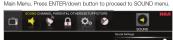







explanation are shown below Sound Settings
Sound Settings • Sound Mode: Cho
Standard, Soft, User, Dynamic. Only in User mode you can
- Adjust Basis, 1906, Balance. - Bias: Adjust the basis component of TV sound.
- Treble: Adjust the treble component of TV source - Balance: Adjust the balance between the left and
Surround Mode
Creates a 3D sound su
deep and rich enh
Auto volume Set auto-volume control on/off
Analog Sound
Select analog TV audio sound type: Stereo, Mono or SAP (only available in TV marks)
Digital Sound
Select digital TV audio language type: English, French or Spanish
(only available for DTV channel
Digital Audio Output Set the audio output type as C
Option according to your power amplifier.
Equalizer Settings
The seven-band graphic equalizer allows you to adjust the audio frequency settings. You can select one of the equalizer presets
(Off, Pop, Rock, Jazz) or create your own personal preset (User).
Press the left or right allow to select the frequency (100Hz, 250Hz, 500Hz, 1kHz, 2kHz, 4kHz, 10kHz) you want to adjust. Use the
up or down arrow to adjust
Channel Menu
The Channel Menu enables you to search, view and edit channels. It is
available in TV mode only. Press MENU and choose CHANNEL from the Main menu. Press the ENTERdown button to proceed to
CHANNEL menu.








Use up/down to choose the function you need, press ENTER or right
arrow to adjust or enter a sub-menu. The sub-menu image and explanation are shown below.


























Lock Parental Control
- When the Parental Control Menu is accessed from the Main Menu, you need to enter password to unlock the menu function
Please enter your four-digit password with numeric keys 0-9. Note: The original password is "0000".
- After unlocking, the items in parental control menu can be used. Like errors unknown to highlight the function you good and more
USE ALLOW UP Problem to highlight the forecast you need and press ENTER or right arrow to use V-chip, Change Password, Keypad Larki and Goura Larki. Chay Chagari List out many
Look and Source Look, Clear Channel List sub-hand.
V-Chip Press ENTER





m = 311
· = 0

m = 311
US V-Chip
Press ENTER or light arrow to enter US V-Chip listings menu, which contains two sub-menus: Movie Rating and TV rating. See
next page for more details.
Movie Rating
One allow keys to select that rating level you want to block, print ENTER to lock/unlock the rating level. If you have blocked a low
level rating, this higher ratings will be blocked too. For example, when PG-13 is blocked, R, NC-17 and X will be
blocked at the sa
TV Rating
Similar with Mobile Rating. After adjusting, press MENU to return or press EXIT to exit the menu.




TV-PG Parents
TV-
TVX7 Direct
Years 4 TVX 4 Children
For more rating explanation, see page 12
Canada V. Chin
Canada V-chip Press ENTER or right
which contains two sub-menus: English Rating and French Rating.
English Rating
Press ENTER or light arrow to enter English rating menu. Use arrow keys to select the rating level you want to block press
ENTER to lock/unlock the rating level. If you have blocked a lower level rating, the higher ratings will be blocked too.
For example, when PG is blocked, 14+ and 18+ will be blocked at the same time.
1o same time.
French Rating Press ENTER or
Similar with English Rating.
Note: Nasal racing rating information.
Block Unrated Show
Block all the unrated program
Downloadable Rating, Clear Downloadable Data Antiplate as downloadable rating data, if available
Charge Password
Change the password of parental menu.
Old PIN: Input the old password.
New PIN, Input the new password. Confirm: Input the new password again to confirm.
Remote
Select your Remote: Off, Remote1 or Remote2. This is for special
Keynad Lock
Select this option 1
so that they can't be used.
Source Lock This option gives
This option allows you to look of unlock the input source. The source blocked can not be chosen from input list unless you input
Use up/down arrow to select the source, press ENTER to lock or
unlock it,
Clear Channel List This option allows you to
This option allows you to execute Clear Channel Exit Function. This function will reset the whole TV system to factory default (not only one USD euro).
Nasal. USD/MH1).
etup Menu

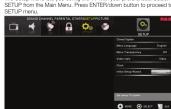



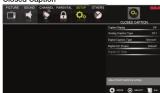
Caption Display
Press left/tight arrow to select caption display on or off.
Analog Caption Type
PISA flight arrow to select analog button capton type: CC1, CC2, CC3, CC4, TEXT1, TEXT2, TEXT3, TEXT4.
Digital Caption Type
Press left/right arrow to select digital closed caption type: Service1, Service2, Service3, Service4, Service5, Service6.
Digital CC Draft
Digital CC Preset Press left/right arrow to
Custom. Only in custom mode you can adjust the digital closed caption style.
Dil. it + 08 01
Digital CC Style Press left/right answer
to select the closed caption style.
select the item you want to adjust in Digital CC Style menu with up/down arrows.
After changing, you
Menu Language
To choose your menu language, press the left/right arrow until the language you need appears.
Available languages: English, French and Spanish
Menu Transparency
To choose your menu transparency mode, press the left/right arrow until the transparency you need appears: Off. Low. Medium
High.
Video Style
If you connect the HDMI/DVI port of PC to HDMI jack of the TV and the video signal is 10800, please choose the compatible video
style: Video, Graphia

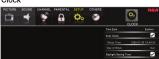


Select auto clock on/off. Auto clock helps you synchronize your TV time to standard time from DTV signal.
Setup Time
Setup Time (Set your TV time manually (needs to turn off auto clock)
Day of Wool
Day of Week Displays what day it is (can't be adjusted, displays only)
Daylight Saving Time
Set your daylight saving time
Initial Set
Initial Setup Wizard To set the initial settings. (see page 7)
House, Moody
thers Menu
Others Menu lets you config the TV with your preferences in other
DNS: Choose OTHERS from the on to proceed to SETUP menu
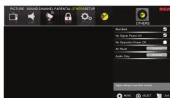
Use up/down to choose the function you need, press ENTER or arrow to adjust or enter a sub-menu. The sub-menu image and
explanation are shown below.
Blue Back
Press ENTER button to select Blue Back on or off. If the Blue Back is turned on, the TV will display a blue background when there is
no signal input.
No Signal Power Off
Press ENTER button to select "No Signal Power Off" on or off. If it is turned on, the TV will shut off after 10-minute no signal time. We
suggest you turn on this function when Blue Back is turned on. It may hurt the LED LCD panel if blue screen is on for too long.
Note: In PC mode, the monitor standby and power off settings depend on the No Signal Off time.
No Operation Power Off
Press ENTER button to select "No Operation Power Off" on or off.
If it is turned on, the TV will shut off after a 3-hour no operation time.
All Reset
Press ENTER button to execute reset to TV system. All the settings
will be reset to factory default
Audio Only
Press ENTER button to activate audio only mode. The TV will output only sound and the panel will be turned off. To restore
normal playing, hold POWER button for three seconds.
Now: The Oso's appearance and color are married to the actual appliance.


What's the most convenient way to view High
What's the most conv Definition (HD) video?
Connect an antenna to the TV Input jack to view free local digital
channels. You may need to purchase an antenna. (See page 4 for more information about antenna setup).
Visit www.antennaweb.org for assistance in deciding what type of antenna to use to receive the local digital channels available to you
After entering your location, this mapping program tells you which local analog and digital stations are available using a certain antenna.
Are there other ways to view High Definition
Are there other ways to view High Definition (HD) video?
Besides using an antenna as mentioned above, you can also use a
set-top book to receive digital video. Contact your cable service provider or satellite provider to purchase digital programming and have them
connect the box to ensure you are viewing channels in the best way.
How do I tell an analog channel from a digital channel?
Dress the DIFDI
Press the DIS-DRY custom to display the Channel Bar. Cook at the top right corner of the screen. An "A" is displayed for an analog channel.
A "D" is displayed for a digital channel. Note: Since the analog TV in America has been cut off, we reserve
analog TV function only for some unexpected use.
Why are there bars on my screen, and can I get
rid of them?
Most digital video is sent in a 10Hz format which fills your screen, but it sometimes sent in 4/3 which does not fill your screen. It depends on
how the station or device connected to your TV is formatting the video. If there are bars on the screen,
press the ASPECT button to try a different format that may eliminate the bars. Some bars can't be removed because of the way the format.
is sent by the broadcaster. The format changes as you press the ASPECT button and the format type is displayed at the bottom of the
ASP LOT button and the format type to displayed at the bottom of the screen. For more information on screen size, go to page 8.
Why does channel search find a lot of channels,
but when I try to tune to them, there's nothing
there?
Some channels don't carry programming, such as video On Demand. When channels are unavailable, your TV screen is blank or appears like
snow. You probably want to remove these channels from your channel list. Remove these in the Channel List Menu. Go to page 9 for more
information.
Why does it take a long time when I search the
channels at first time?
If you have both analog and digital channels, the TV is looking for all available channels in the channel list. If you do have digital channels,
the TV is also searching for scrambled channels, non-scrambled channels, and each sub-channel of that digital channel.
The Ground Truth image displays a single, solid horizontal line. According to Rule 2 (UNDERSCORE & LINE RULES), if the GT contains lines used for stylistic emphasis or as background elements (like ruled paper), the OCR result must ignore them. The line in the GT is clearly a stylistic or background line, not a placeholder for text. Therefore, the OCR should not have output any underscores. Outputting `____` constitutes an error under Rule 2, as it hallucinates placeholder symbols where none are semantically intended. No punctuation mismatch or formatting transformation applies here because the content is purely symbolic and not textual.


Identifying Problems
If there are any problems when using the product, please consult the
list below. If the list does not solve the problem, call our Customer Service Center immediately.
TV Problems
The TV can't be turned
- Make sure the AC cord is plugged in - Check the wall outlet, make sure the
- Onlook the Wall outlet, make sure the AD export works normally and stably. - The side panel may be Ireland (infrequently). Like the remote control to
- The blue panel may be locked (disabled). Use the remote control to turn on the TV.
- Select the Keypad Look function in the PARENTAL Menu and press ENTER to uncheck the locking status.
There is no picture or sound but the TV is on and there
is a "No Signal" sign on screen. • If you want to use an app or app with no choice supported by
- Are you trying to deal an input source with device connected to it? For using other video/audio devices, make sure the external
demona works normally first, than press INPUT and choose the right input source.
- The Signal Type option may be set incorrectly. Go to page 9 for detailed instructions.
- The channel may be blank. Try to search the channel again or change another channel.
The sound is fine, but th
• If you can only get black and white pictures from that you've connected to your TV, maybe it is ck
that you do connected to your TV, maybe it is due to the wood cables is not connected wall, or they are connected wrongly. Check: the connection stability first, from check for purposes. For
Check the connection stability list, then check the correctness. For AV input, the yellow video cable connects to the yellow Video In
jack on the side of your TV. For Component input, the three Y, Pb, Pr video cables (red, blue, and green) should be connect to the
corresponding input jacks on the side of your TV. • Check the antenna connections. Make sure all of the cables are
firmly connected to the TV jack on side of your TV. • Try adjusting the colour features to improve
There is no sound, but the picture is fine
- The sound might be muted. Try pressing the MUTE button to
• For using AV or Component, remember to connect the device's left
:
8
[Non-Text]
and right audio output correctly. The left channel cable is white and the right channel cable is red. Please match the cables and jacks according to their colors.
- The sound settings may not be set correctly. Go to page 8.1 or more information
- If your audio source has only one jack or is a (mono) audio - source,
make sure you have p jack /Whitel on the TV.
(1) 2017年1月1日
The buttons on the side panel don't work.
- The side panel may be locked (disabled). Use the remote control to turn on the TV.
- Select the Keypad Lock function in the PARENTAL Manu and press
ENTER to uncheck the locking status.
- Onalog the TV from the AC power for 10 minibass and then plug it back. Turn the TV on and try again.
[Non-Text]
The TV turns off unexpectedly,
- The electronic protection circuit may have been activated because of a power surge. Wait 3G seconds and then turn the TV on again
If this happens frequently, the voltage in your house may be
abnormal. If the other electronic equipment in your home can't work normally, consult a qualified service personnel.
Nominal, conform to
Can't select a certain channel
• The channel may be blocked or not approved in the PARENTAL
• The channel may be skipped in channel list in CHANNEL Menu.
Check the blocking and skipping status of channel.
The following table is presented in the image.
The stereo sound performance is bad. It may be a weak station. Use the SOUND Menu and set Analog
Sound as Mono.
[Non-Text]
A black box appears on the screen.
- Closed captioning might be on. Check Cidad Captish in the SETUP menu. Go to page 10 for more instructions.
Problems with the HDMI Connection.
- Make sure the HDMI device (DVD, video gamer, etc.) is turned on and the cables are firmly connected. If problems still occur, turn off
is the states are trying to establish problems for use; it has your device and reconnect it. Reset the power by unplugging the
power cord and plugging it again.
- If a No Signal Message appears on screen, the HDMI device is an responding. Contact the manufacturer of the HDMI device for
further assistance.
- If you have black bars on each side of your picture (which "the TV can not display a full-screen image), the device you
connected might have a switch or a menu option allowing you to choose the right on quality test that will be this. Choose either
Change the picture quality output that will fix this. Choose either 720p or 1080s.
,
The Remote control doesn't work.
- Something might be blocking between the remote control and the remote sensor on the front panel of the TV. Make sure there is a
Remote sensor on the front panel of the TV. We'll see there is a clear path.
- The remote may not be aimed directly at the TV. - The batteries in the remote may also reach, shared, or installed.
- The batteries in the remote may be break, omit incorrectly. Put new batteries in the remote.
,
You are experiencing problems with V-Chip/Parental
Controls.
- If the rating what don't work, you must look the settings. Go to the Main Menu (press MENU on your remote), select PARENTAL to
check the settings.
(1) 2017年 ,公司及子公司
What else can I do? If you've been through the
fixed your problem, try rebooting your TV. Note that after a reboot, you
may need to run your TV through the setup process again. To reboot, upturn the power cord from the wall or flat or power strip. Keep your
unplug the power cord from the final case of power strip. Keep your TV unplugged for about 5 minutes. Then plug in the TV and turn it on.
See if the problem is fixed. If the problem remains, then please visit the Customer Department Many of the company and published EAOs at contact
RCA Customer Support at the support number provided in your
'Warranty card.
12
V-Chip Rating Explanations
US V-Chip Rating System
2.1 Chip Mining System
TV-MA (Mature Audience Only): Specifically designed to be viewed by adults and may be unsuitable for children under 17. It contains one
by words and may be difficult for children under it; it contains one or more of the following content themes: crude indecent language (L),
explicit sexual activity (S), or graphic violence (N).
TV-14 (Parents Strongly Cautioned): Contains some material that many parents would find unsuitable for children under 14. Parents see
many parents would find possible for children under 14. For one is strongly urged to exercise greater care in monitoring this program and
are cautioned against letting children under the age of 14 watch unattended. This program contains age or more of the following
unasscribed: This program contains one of more or the following content themes: intensely suggestive dialogue (D), strong coarse
language (L), intense sexual situations (S), or intense violence (V).
TV-PG (Parental Guidance Suggested) : Contains material that parents may find up or doable for your children. How parents may
parents may find unsuitable for younger children. Many parents may want to watch it with their younger children. The program contains one
or more of the following content themes: some suggestive dialogue (D):
Inefficient course language (L), some sexual situations (S), or moderate violence (N).
TV-G (Parental Audience): Most parents would find this program
suitable for all ages. It contains little or no sexual dialogue (D) or
situations (s), no strong language (c), and miss of no violence (v).
Canadian English V-Chip Rating Syster
10+ (Adult): Programming intended for adults 10 and older. It may contain short-term violations, insurance, and several context which
contain barriers of violance, language, and sexual constant which could make it unsuitable for viewers under 1/1. Violence Guidelines:
May contain violence integral to the development of the plot, character
or theme, intended for adult audiences. Other Content Guidelines: Men contain graphic languages and explicit portrayals of purity and/or say
14+ (Year 14 and year): Programming contains themes or content
which may not be suitable for viewers under the age of 14. Parents are
strongly cautioned to exercise discretion in permitting viewing by pre-teens and early teens. Violence Guidelines: May contain intense
scenes of violence. Could deal with mature themes and societal issues
in a realistic fashion. Other Content Guidelines: May contain scenes of purity and/or sexual activity. There could be frequent use of prosperity.
RG (Parental Guidance): Programming intended for a general
Audience but which may not be suitable for younger children (under the
age of 8). Parents may consider some content inappropriate for unsupervised viewing by children good R-13. Wireless Guidance
Depictions of conflict and/or aggression will be limited and moderate;
may include physical, fantasy, or supernatural violence. Other Content Guidelines: May control interest and probability, only identify suppression
guidelines. Way contain inrequent mild proirality, of mildly suggestive language. Could also contain brief scenes of nudity.
G (General Audience): Programming considered acceptable for all
ages groups. While not designed specifically for children, it is
Understood younger viewers may be part of the audience. Violence Guideline: Will contain very little violence, either physical or verbal or
emotional. Will be sensitive to themes which could frighten a younger child, will not want realistic expressions which minimize or else
child, will not depict realistic scenarios of violence which minimize or gibt over the effects of violent acts. Other Content Guidelines: There may be
some inoffensive slang, no rotanity and no nudity.
C8+ (Children 8 and older): Programming generally considered
acceptable for children 8 years and over to watch on their own. Violence Guidelines: Violence will not be portrayed as the preferred.
acceptable, or only way to resolve conflict or encourage children to
imitate dangerous acts which they may sea on television. Any realistic depictions of violence will be infrequent, discreet, of low intensity and
opinions of violence will be irrelevant; described, how authority and will show the consequences of the acts. Other Content Guidelines:
There will be no probability, nudity or sexual content.
C (Children): Programming intended for children under age of 8. Violence Guidelines: Careful attention is paid to themes which could
there are students and the same name of job to this job in their health threaten children's sense of security and well being. There will be no
realistic scene of violence. Depictions of aggressive behavior will be infrequent and limited to portrayals that are clearly imaginary, comedic
in support and invalid to persons who are clearly imaginary, serious or unrealistic in nature. Other Content Guidelines: There will be no
offensive language, nudity or sexual content.
Canadian French V-Chip Rating System
18+ (Adult): Programming is for adults only. This program contains
sustained violence or extremely violent scenes.
16+ (Viewer 16 and over): Programming is not suitable for those
under age 16. This program contains frequent scenes of violence or intensely violent scenes.
13+56year 13 and over: Programming may not be suitable for
Test [Editor 16 and 17]. Programming may not be suitable for children under the age of 13. This program either contains several
violent licensed or one of more licensed that are violent enough to learn them. Viewing in the company of an adult is therefore strongly
recommended for children under the age of 13.
8+ (Viewer 8 and over): Not recommended for young children. This
program is suitable for most audiences, but it contains mild or occasional violence that could upset young children. Viewing in the
• occasional violence that could upset young children. Working in the company of an adult is therefore recommended for young children
(under the age of B) who do not distinguish between reality and imagination.
G (General Audience). This program is suitable for audiences of all
or quasi-mental reassessiveness: This program is accessible for laboratories of all ages. It contains no violence, or any violence that it does contain is
either minimal or is presented in a humorous manner, as a caricature, or to do an unrealistic way.
or that of realistic way.
WLM-31-Unit O-0.054
Wall Mounting Unit Specification
The Ground Truth image displays a single, solid horizontal line. According to Rule 2 (UNDERSCORE & LINE RULES), if the GT contains lines used for stylistic emphasis or as background elements (like ruled paper), the OCR result must ignore them. The line in the GT is clearly a stylistic or background line, not a placeholder for text. Therefore, the OCR should not have output any underscores. Outputting `____` constitutes an error under Rule 2, as it hallucinates placeholder symbols where none are semantically intended. No punctuation mismatch or formatting transformation applies here because the content is purely symbolic and not textual.
-
Model Unit Dimension (unit:mm) Screw
1.2014.10.20 1.2014.10.20 1.50
LED82B454G VESA 200 x 200 Mo SONWAL, LAKIN TURIM
2.1.1.
200 mm
(1)
(2)
200 mm
[Table 1]
[Non-Text]
Notes
A. The wall me
television. We only provide the installing specifications but not the wall mount itself. If you need the mount, please consult with the local dive
mount is set. If you need the mount, please consult with the local deal for a VESA wall mount.
B. We strongly suggest to set the wall mount with equipments of modification an entire level, improvements installing any square
specification will be allowed. If not, inappropriate invaliding may cause damage to device or people.
C. We suggest that you keep your TV at least 2.36 inches(50mm) from the wall to prevent cable impedance.
THE WINS TO PREVENT CABLE INTERFERENCE
Warnings:
-
Do not set up the wall mount
-
The TV should not be mounted on walls or surfaces which have an
angle more than 10 degrees with vertical direction. Otherwise the
TV set may fall. 3. The walls for mounting must have enough strength to hold the
whole weight of TV sat. For example, concrete wall and brickwork
are eligible. Do not place the mount on soft walls such as earth walls and plasterboard.
- If spare parts of different specifications (such as screws) are used
during mounting, consult with qualified professionals to make sure these parts are safe and effective.
- Before attaching the base to wall, ensure the holes for anchors are
in keeping with the installing rules. Otherwise there may exist some potential problems.
- Do not place any heating source under your television. Or else, it
can cause fire. 7. Do not place the TV near anything dropping, Transducers and high
- Do not please the TV nor blushing clipping. Transbeats do high voltage wires should be kept far away from the apparatus too. Or
else, it may cause creepage, electric shock or bad resonance.
-
Do not place TV in a location where collision or violation is liable to happen.
-
In order to avoid unexpected falling of the TV set, do not put any
-
Be sure to unplug the TV before installing. Keep anything hard or
sharp away from the screen panel to prevent the scuffing.
- After installing, if there is any need to move the cabinet, please contact the qualified professionals.
USB Media Play
With USB Media Play, you can enjoy music and photo files stored in a
USB storage device on your RCA TV.
Connecting a USB storage device
Connecting a USB storage device
- Connect a USB storage device to the USB port in the back of the TV. - Press "INPUT" and select "Media".
- "USB Media Play" menu will appear.
The Ground Truth image displays a single, solid horizontal line. According to Rule 2 (UNDERSCORE & LINE RULES), this is a stylistic or background line, not a placeholder underscore. Therefore, the OCR result must ignore it and output nothing or only meaningful text. The provided OCR content is "____", which consists of four underscores. This is an incorrect interpretation of the line as a placeholder, violating the rule that stylistic lines must be ignored. The OCR has hallucinated underscores where none should exist based on the GT's visual context. Hence, the OCR result is inconsistent with the Ground Truth.
· = 0
Music Proto Media Editing Have Playing
#
• □ △ ▪
· = 0
m = 311
Playing back Music files
- Press arrow (◀ /▶) to select "Music" and press "ENTER". - The file or folder list will reveal up. Press arrow (▲ /▶) to select a file
- The file of folder list will show up. Please answer ▲ ▼ ▼ to select a file or folder. Press "ENTER" to playback the music file you selected.
Playing back Photo file
- Press arrow (◀) to select "Photo" and press "ENTER".
- The file or folder list will show up. Press arrow (▲/▼) to select a file or folder. Press "ENTER", and you will be open forward.
time of folder. Press "LATCH", and you will be given several options to view photo files.
• You can directly open and p
photo preview, or play sideshall.
Media setting for Slideshow and Music playback
- Press arrow (▶) to select "Media Setting" and press "ENTER". - In "Media Setting", you can set various options for Slidehow and
Music Playback.
Media Support Specification
2.1.1.
Supported Files
• Photo JPG/JPEG files
• Music VIOSV Files
(一)交易价格
Supported USB storage/wire system format
• USB Storage USB flash drive
• File System format FAT32
10.2.2023年1月1日
Caution: Do not turn off the TV or disconnect USB storage device while the TV
is playing back picture or music. This may result in loss of data or
damage to the USB storage device, and RCA is not responsible for any damage to access of data on the USB storage device.
damage to, or loss of, data on the USB storage device.
The Ground Truth image displays a single, solid horizontal line. According to Rule 2 (UNDERSCORE & LINE RULES), if the GT contains lines used for stylistic emphasis or as background (like ruled paper), the OCR result must ignore them. The provided OCR content is "____", which consists of four underscores. This is an incorrect interpretation of the line as a placeholder symbol, violating the rule that stylistic lines must be ignored. Therefore, the OCR output is inconsistent with the Ground Truth.
Product Specification
The Ground Truth image displays a single, solid horizontal line. According to Rule 2 (UNDERSCORE & LINE RULES), if the GT contains lines used for stylistic emphasis or as background elements (like ruled paper), the OCR result must ignore them. The provided OCR content is "____", which consists of four underscores. This is incorrect because underscores are not equivalent to a solid line and are not permitted under the “Stylistic/Background Lines (Ignore)” rule. The OCR has hallucinated underscores where none should exist in the GT, violating the “Stylistic/Background Lines (Ignore)” rule. Therefore, the OCR result is inconsistent with the Ground Truth.
(1) AD = BD = 1
Miyad LFD5284580
Financial Results: 2017
Diagonal Display Size 52 McNati American TV standards
Television System ATSC/NTSC system
VHP: 2-13 UHP: 14-69
Channel Coverage CATV: 1-135
Storage Temperature is
Temperature -20℃→+60℃ (-47→+1437)
Operating Temperature is (°C) , 80^ , ±375^ , ±100^
| Humidity | Storage Humidity: Less than 80% RH(No condensation) | |
| Operating Humidity: Less than 80% RH(No condensation) | ||
| Power Supply AC 100-120V, 60Hz | ||
| Connection Interface | RIF Input Cable | Antenna x 1 |
| Video Input | JV x 1 | |
| Component x 1 | ||
| HDMI x 2 | ||
| JV x Audio Input | ||
| Audio output Headphone x 1, Digital Audio Out x 1 | ||
| Resolution 1000 x 1000 | ||
| Component/DMI noise | 490, 490p, 720p, 1080, 1080p | |
| Dimensions | With stand | 47.4"W x 30.2"W x 11.2"D |
| Without stand | 47.4"W x 25.2"W x 4.2"D | |
| Weight | With stand 44 | 3.85 (20.49KG) |
| Without stand | 39.3.285 (17.9KG) | |
| Power Consumption less than 1kW | ||
Notice: Specifications are subject to change without notice
m = 311
DOS
Made for Today.
www.fca.com
Limited Warranty
Limited Warranty
for USA and Mexico
Overseas Labor
Coverage = Labor
For a period of 12 months from date of purchase of your RCA product, we will pay an authorized RCA service center for
labor charge to repair any defects in materials or workmanship
In your television. If your television is unrepairable we will provide up with a refurbished unit of the same body material.
provide you with a refurbished link of the same or better model.
Coverage – Parts
For a period of 12 months from date of purchase of your RCA product, we will pay no authorized PCA service center for the
product, we will pay an abemnized from service sensor for the new or at our option, refurbished replacement parts needed to
repair any defects in material or workmanship in your television.
If your television is unrepairable we will provide you with a refurbished unit of the same or better model.
Coverage – LED LCD Panel
Coverage - EES E&P Fund
For a period of 12 months from date of purchase of your HCA product, we will pay an authorized HCA service center for the
new, or at our option, refurbished LED LCD panel needed to
repair any defects in material or workmanship in your television. However, television is very small as we will provide way with a
If your television is unrepairable we will provide you with a refurbished unit of the same or better model.
How to Obtain Service
• For assistance (U.S.A) - if you purchased BCA product in
U.S.A. please call 1-888-977-6722.
Or visit www.rca.com
• For assistance (Mexico) - if you purchased RCA product in Mexico, please call 01/202/223559.
Mexico, please call 01-609-8233636 Or visit www.roe.com
Mexico service cents
The service representative will review your options for service.
As a convenience we offer three ways to obtain warranty service. You may mail your product to the address provided by
service: You may mail your product to the address provided by the service representative, you may take your product to an
authorized service center, or you may request in home service
(servicer will determine if product is serviceable in home or must be taken here to level service center for repair). Gaming
be taken back to local service client for repair). Service representative will supply instructions for preferred service. At
the time of service proof of purchase such as original receipt,
will be required. Only 37" LCD size and above are applicable for in-home-service
in millions (or 100)
Items Not Covered By Limited Warranty
Items Not Covered By Limited Warranty Your limited warranty does not cover the following items:
m = 311
- Up-installation, installations and adi
- On installation, installation and deployment of customer controls and operating instruction.
● Batteries and customer replacement
- Damage due to misuse, abuse, negligence or neglect including but not limited to damage resulting from
exposure to moisture, humidity or salt.
● Inability to recall by the product
● Damage to the product due to images burnt into the screen.
● Product purchased or serviced outside of Country of
Original Purchase. -i.e. Purchased USA can not be serviced in Mexico/Purchased in Mexico can not be
serviced in USA
- Product modified or incorporated into other products.
● Damage due to acts of nature, including but not limited to, littaining damage or flooding.
● Service calls which do not involve any defect in materials
or workmanship
Commercial Use Excluded
This limited warranty only applies to products used for personal
use and boe; not cover any product used for interlusional, commercial or rental purposes.
The following table provides:
LIMITATION OF WARRANTY
LIMITATION OF WARRANTY
THIS LIMITED WARRANTY (10) THE
THIS LIMITED WARRANTY IS THE SOLE AND EXCLUSIVE WARRANTY APPLICABLE TO THIS PRODUCT. ON OGBP
US, INC., THE MANUFACTURER OF THIS PRODUCT,
DISCLAIMS ALL OTHER WARRANTIES, EXPRESSED OR IMPIED INCLUDING ALL IMPIED WARRANTIES OF
MERCHANTABILITY OR FITNESS FOR A PARTICULAR
PURPOSE). NO VERBAL OR WRITTEN INFORMATION GIVEN BY ON CORRUS, INC. ITS AGENTS INDEPENDENT
GROWTH ON CORP-US, INC., ITS AGENTS, INDEPENDENT CONTRACTORS. SALES REPRESENTATIVES. EMPLOYEES
RETAIL DEALERS, WHOLE SALE DISTRIBUTORS OR ANY
OTHER THIRD PARTY SHALL CREATE A GUARANTY OR INCREASE, EXPAND OR MODIFY THE SCORE OF THIS
LIMITED WARRA
REPLACEMENT OF THE PRODUCT. ON CORP US, INC.
SHALL NOT BE LIABLE FOR SPECIAL, INCIDENTAL OR CONSEQUENTIAL DAMAGES ARISING OUT OF THE USE
OF THEP RODUCT OR ARISING OUT OF A BREACH
EXPRESSED OR IMPLIED WARRANTY ON THIS PRODUCT.
THIS LIMITED WARRANTY AND THE DISCLAIMERS
CONTAINED HEREIN ARE GOVERNED BY THE LAWS OF THE STATE OF PEACH, SUFFERED TO THE OUTPUT
THE STATE OF INDIANA. EXCEPT TO THE EXTENT PROHIBITED BY APPLICABLE LAW, ANY IMPIED
WARRANTY OF MERCHANTABILITY OR FITNESS FOR A
PARTICULAR PURPOSE IS LIMITED TO APPLICABLE LIMITED WARRANTY PERIOD(S) SET SOUTH ABOVE
LIMITED WARRANTY PERIOD(S) SET FORTHABOVE.
- Table of Contents
- Child Safety Guide
- CHILD SAFETY:
- SEGURIDAD DE NIÑOS:
- ECC Notice
- FOO Not
- CC Information
- cc information his equipment has been
- Class B digital device, p nits are designed to pre
- tarference in a resident
- to can facilitate automatic accordance with the inst
- Radio Communications. Parlerance will not occur
- oes cause harmful inter an be determined by tor
- ncouraged to try to con allowing measures:
- - Reorient or relocate
- - Increase the separa - Connect the equipn
- that to which the re-Consult the dealer
- 2017年1月1日
- Safety Pr
- ,
- Read these instructio
- - Keep these instructic - Heed all warnings.
- Follow all instructions Do not use this appa
- near a laundry tub, in and the Box
- Clean only with dry c
- DO NOT BLOCK ANY VER manufacturer's instru
- or bottom are provided of the TV and to prot
- not be blocked or co by placing the TV on
- Do not install near an peristars, Stovea, or
- produce heat.
- Do not deal a small plug. A polarized plug
- A grounding-type pie The wide blade or the
- provided plug does r replacement of the o
- Protect the power co particularly at plugs.
- they exit from the app Only use attachment
- Use only with carl, st
- manufacturer, or soft cart is used, use cau
- cart/apparatus comb tip-over. A TV and co
- moved with care. Qu and uneven surfaces
- combination to over 3. Unplug this apparatus
- long periods of time, during a lightning rod
- during lightning and of time, unplug it from
- cable system. This was and power line surge
- Peter all servicing to required when the ap
- [Non-Text]
- WARNING: The IRISH OF THE RISK OF THE POWER. This is a key insight that the IRISH OF THE POWER has been made to ensure that the POWER has not been an arbitrary or arbitrary motion. The POWER has not been a serious, rather than a serious, or a serious, or a serious, or a serious, or a serious, or a serious, or a serious, or a serious, or a serious, or a serious, or a serious, or a serious, or a serious, or a serious, or a serious, or a serious, or a serious, or a serious, or a serious, or a serious, or a serious, or a serious, or a serious, or a serious, or a serious, or a serious,
- WARNING:
- O REDUCE THE RISK EXPOSE THIS APPLI
- AUTION: HANGES OR MODIF
- Y THE PARTY RESPO
- US ROLES COULD ARE PERATE THIS EQUIP
- ECC Net
- TOC Not
- Class B digital device,
- nits are designed to pro tarifrance in a residenti
- nd can rotate radio fre ccordance with the inst
- dio Communications. H terfERENCE will not occu
- ces cause harmful inter
- that be determined by encouraging to try to com
- - Recipient or reiterate
- - Increase the separa
- TV Signal Connection
- Cable Connections
- Side Panel Connections
- Keypad and Front Panel
- Initial Setup
- m = 311
- Basic Operations
- V-Chip Rating Explanations
- USB Media Play
Brand : RCA
Model : LED52B45RQ
Category : Television