WH-248 - Machine à effets BeamZ - Free user manual and instructions
Find the device manual for free WH-248 BeamZ in PDF.


| Product Type | LED Wash Light |
| Model | WH-248 |
| Number of LEDs | 24 x 8W Quad LEDs (RGBW) |
| Power Consumption | 230W |
| Power Supply | 220-240VAC / 50Hz |
| IP Rating | IP65 (indoor/outdoor use) |
| Tilt Range | 220° (manual) |
| DMX Channels | 1, 4, or 8 channels |
| Built-in Programs | 10 auto modes, color mix, static colors |
| Dimming | Electronic 0-100% |
| Operating Modes | DMX, Auto, Master/Slave, Sound-activated |
| DMX Address Setting | Via menu (Addr) |
| Password Protection | Yes (Pasd function) |
| Display | LED menu with buttons |
| Reset Function | Yes (rEST) |
| Temperature Monitoring | Yes (Temp display) |
| Strobe | Yes, adjustable in 8-channel mode |
| Maintenance | Clean optics monthly with alcohol and soft cloth; disconnect power |
| Safety | Grounded circuit, indoor use, avoid moisture, no flammable materials nearby |
| Fuse Replacement | Disconnect power before replacement; use specified type |
| Environmental Temperature | Max ambient 40°C (104°F) |
| Certifications | CE (EN 60598, EN 55015, EN 61547, EN 61000) |
| Dimensions (approx.) | Not specified, typical for 24 LED wash: ~40 x 30 x 20 cm |
| Weight (approx.) | Not specified, typical for similar fixtures: ~5-7 kg |
Frequently Asked Questions - WH-248 BeamZ
User questions about WH-248 BeamZ
0 question about this device. Answer the ones you know or ask your own.
Ask a new question about this device
Download the instructions for your Machine à effets in PDF format for free! Find your manual WH-248 - BeamZ and take your electronic device back in hand. On this page are published all the documents necessary for the use of your device. WH-248 by BeamZ.
USER MANUAL WH-248 BeamZ
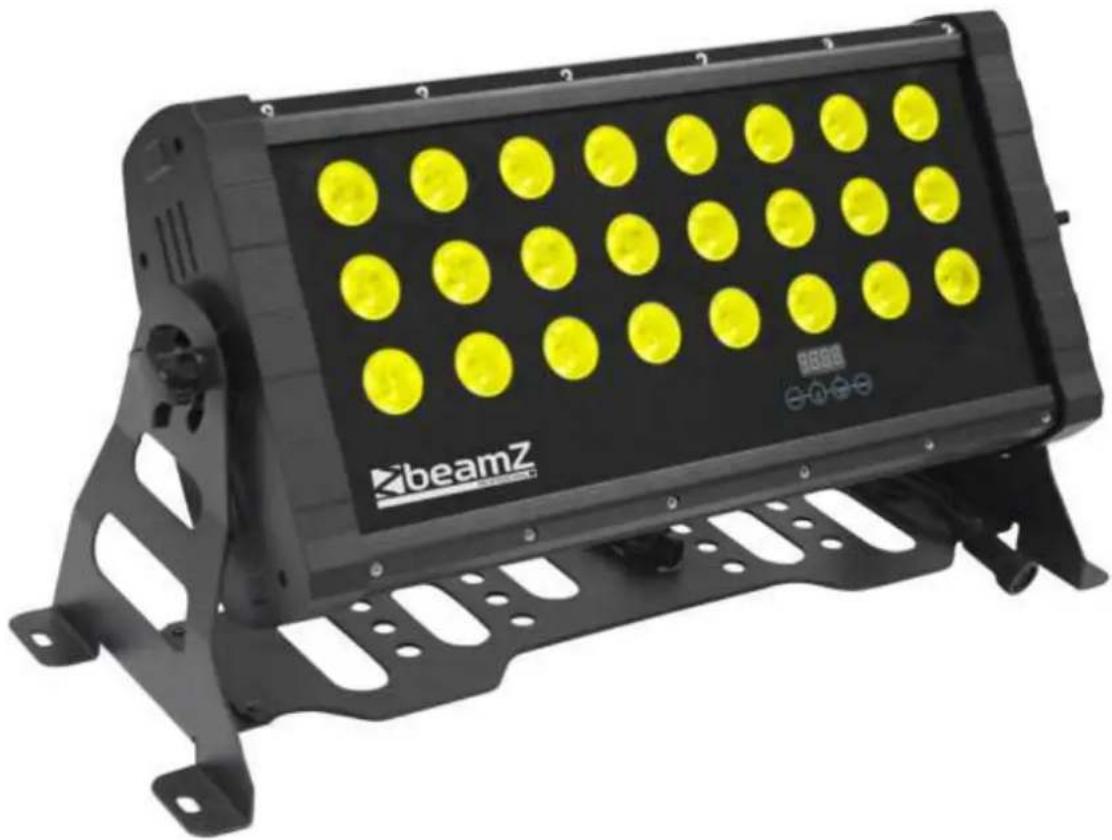
WH-248 LED WASH 24X 8W QUAD DMX
natural_image
Black beamZ lighting fixture with yellow circular light displays, mounted on a metal frame (no text or symbols visible)MANUAL
Thank you for purchasing one of our products. Before you use this product please read these instructions carefully to enjoy optimal performance and a longer service life.
UNPACKING INSPECTIONS
Unpacking instructions
- Please unpack the carton and check the goods carefully when you receive it, if you discover any packing damage, shortage or quality problems, please notify the shipper and reject the goods.
- Before using this product, please read the instructions carefully and store them in a safe place for future reference.
SAFETY INSTRUCTIONS
- Always connect this product to a grounded circuit to avoid the risk of electrocution.
- Never put tiny metal objects such as a screwdriver, iron wire, etc. into this product in case of a short circuit.
- Please make sure that the voltage of the outlet to which you are connecting this product is within the range stated on the decal or rear panel of the product.
- Avoid physical damage to the product during transportation. Never carry this product from the power cord or any moving part. Always use the hanging / mounting bracket or the handles.
- This product is for indoor use only. To avoid risk of fire or shock, do not expose this product to rain or moisture.
- Never pull or tug on the cord and change it for another one, stop using it when it is damaged or becomes hot.
- Stop using the product once there are sparks when connecting it to the power socket.
- Do not operate this product with wet hands and never place it near water or any other liquids.
- Make sure there are no flammable materials close to the unit while operating. Always install it in a location with adequate ventilation.
- When the original lightning source is damaged, do not replace it with a lightning source which has different specifications and ratings.
• Always disconnect this product from the power source before replacing the light source or the fuse. - The maximum ambient temperature is 40^(104^) .
- Never clean the unit with water, thinner or any other dissolving agent.
- Stop using the product in case of a serious operating problem and send it to our maintenance agent immediately. Never get this product repaired by non-professional workers.
- Avoid direct eye exposure to the light source while this product is on.
- Never clean the fixture by water, thinner or other dissolved agent.
- Stop using the product in case of a serious operating problem and send it to our maintenance agent immediately. Never repair by non-professional workers.
- Avoid direct eye exposure to the light source while the product is on.
SPECIFICATION
Tilt movement: 220° manually
No. of LEDs: 24x 8W Quad LEDs
No. of patterns: 10
DMX channels: 1-4-8
IP Rating": IP65
Power Supply: 220-240Vac / 50Hz
Consumption: 230W
MAINTENANCE
The unit should be cleaned periodically to ensure the optimal performance, smudginess can decrease the life of the light source and the output of light is affected by the dust which can make the machine overheat. It is advised to perform maintenance 2 times a month. Be sure to disconnect the unit from the power socket before cleaning.
Do not clean until the unit recovers a normal temperature, use the lens tissue or soft cotton cloth with alcohol and wipe gently.
The cleaning frequency depends on the environment in which this unit operates, damp, smoky or dirty surroundings can cause greater accumulation of dirt on the optics. Never rub or press strongly on the panel.
FUNCTIONS INTRODUCTIONS
Main Functions
• 1, 4 or 8 DMX channels.
- DMX, auto and master/slave mode.
- 24x 8W Quad LEDs
• 10 Built-in programs
• Electronic dimming 0 – 100%
SYSTEM MENU
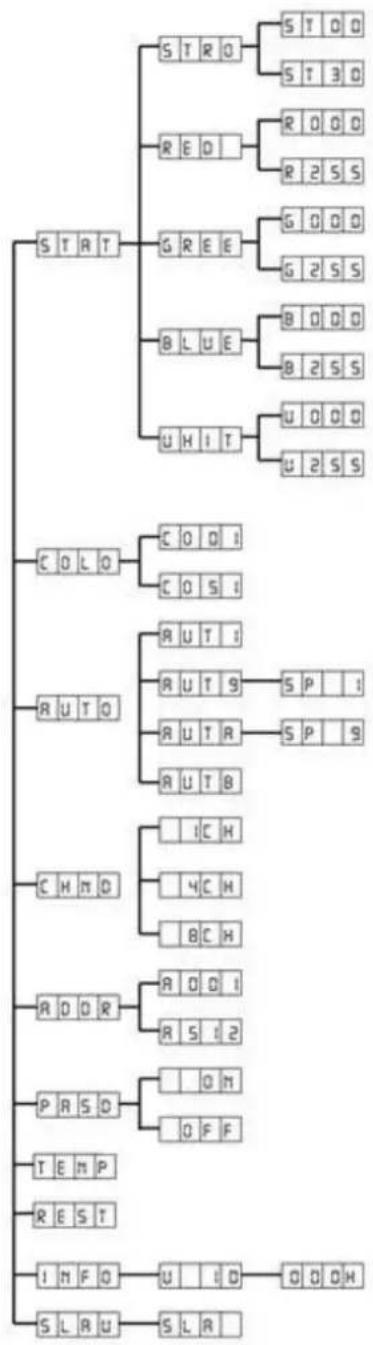
flowchart
graph TD
    A["STATE"] --> B["S T R O"]
    A --> C["RED"]
    A --> D["GREE"]
    A --> E["B L U E"]
    A --> F["U H I T"]
    A --> G["U O O D"]
    A --> H["U 2 S S"]
    A --> I["C O L O"]
    A --> J["R U T O"]
    A --> K["C H N O"]
    A --> L["R O D R"]
    A --> M["P R S D"]
    A --> N["T E M P"]
    A --> O["RE S T"]
    A --> P["I N F O"]
    A --> Q["S L R U"]

    B --> B1["S T O D"]
    B --> B2["S T 3 D"]
    C --> C1["R O O D"]
    C --> C2["R 2 S S"]
    D --> D1["G O O D"]
    D --> D2["G 2 S S"]
    E --> E1["B O O D"]
    E --> E2["B 2 S S"]
    F --> F1["U O O D"]
    F --> F2["U 2 S S"]

    J --> J1["C O D I"]
    J --> J2["C O S I"]
    K --> K1["R U T I"]
    K --> K2["R U T S"]
    K --> K3["R U T R"]
    K --> K4["R U T B"]

    L --> L1["IC H"]
    L --> L2["4C H"]
    L --> L3["8C H"]

    M --> M1["R O D I"]
    M --> M2["R S I 2"]

    N --> N1["O H"]
    N --> N2["O F F"]

    O --> O1["Q O H"]

    P --> P1["U I D"]

    Q --> Q1["G O O H"]

    style A fill:#f9f9f9
    style B fill:#e6f7ff
    style C fill:#e6f7ff
    style D fill:#e6f7ff
    style E fill:#e6f7ff
    style F fill:#e6f7ff
    style G fill:#e6f7ff
    style H fill:#e6f7ff
    style I fill:#e6f7ff
    style J fill:#e6f7ff
    style K fill:#e6f7ff
    style L fill:#e6f7ff
    style M fill:#e6f7ff
    style N fill:#e6f7ff
    style O fill:#e6f7ff
Stat - Set the static color mode and strobe mode
Press MENU, press the UP or DOWN button until "Stat" is displayed, press ENTER.
You have now 5 options. To select the desired option press ENTER. With the UP and DOWN button the desired value can be set. Press ENTER to confirm the desired value.
Colo - Built-in color mix
Press MENU, press the UP or DOWN button until "Colo" is displayed, press ENTER.
"Colx" will now be displayed, ("x" representing a number between 0 - 51). Press the UP or DOWN button to find the desired static mode. Press ENTER to confirm.
Auto mode - This menu will let you select the desired auto mode
Press MENU, press the UP or DOWN button until "Auto" is displayed, press ENTER.
There are 11 auto modes, press the UP or DOWN button to select the desired mode, press ENTER to confirm.
Channel mode - Select the desired channel mode
Press MENU, press the UP or DOWN button until "Chnd" is displayed, press ENTER
"X Ch" will now be displayed, ("X" represents the displayed channel mode). Press the UP or DOWN button to find the desired channel mode. Press ENTER to confirm.
DMX Address - Set the DMX address
Press MENU, press the UP or DOWN button until "Addr" is displayed, press ENTER.
"Axxx" will now be displayed, ("xxx" represents the displayed address). Press the UP or DOWN button to find the desired address. Press ENTER to confirm
Pasd - Password function switch
Press MENU, press the UP or DOWN button until "Pasd" is displayed, press ENTER.
Set the password for the password function. Password is MENU - UP - DOWN - ENTER
Temp: Temperature
rEST: Reset
Info - Will display the software version and working time of the unit.
Press MENU, press the UP or DOWN button until "Info" is displayed, press ENTER.
The software version of the unit will be displayed. Press MENU to leave this function
Slave mode - In this mode the unit functions as a slave
Press MENU, press the UP or DOWN button until "Slav" is displayed, press ENTER. "Sla" will now be displayed, Slave mode is confirmed. The unit will now act as a slave in Auto, sound and chase mode.
OPERATING INSTRUCTIONS
DMX connection.

flowchart
graph LR
    A["DMX out"] --> B["Example 1"]
    B --> C["Last spot/Last unit"]
    B --> D["Termination resistor"]
    style A fill:#f9f,stroke:#333
    style B fill:#ccf,stroke:#333
    style C fill:#cfc,stroke:#333
    style D fill:#fcc,stroke:#333
Master / Slave connection.
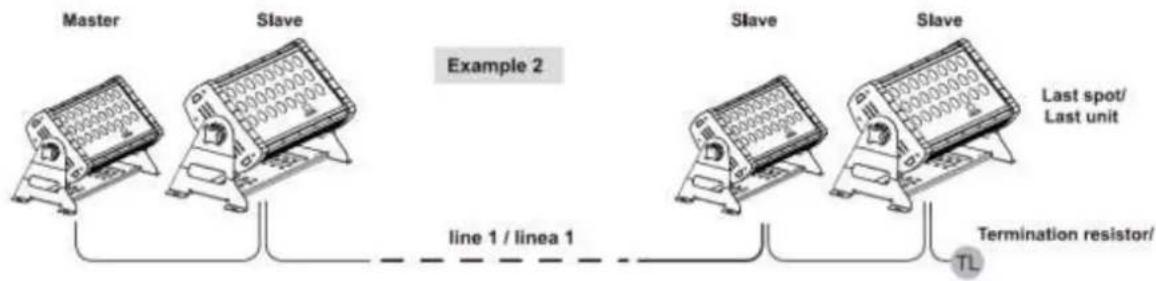
flowchart
graph LR
    A["Master"] --> B["Slave"]
    B --> C["Example 2"]
    C --> D["Slave"]
    D --> E["Slave"]
    E --> F["Last spot/<br>Last unit"]
    C -.-> G["line 1 / linea 1"]
    D -.-> H["Termination resistor/TL"]
DMX CHANNELS
1 DMX Channel mode
| DMX | Value | Description |
| 1 | 000 – 000 | Light off |
| 001 – 004 | Color 1 | |
| 005 – 009 | Color 2 | |
| 010 – 014 | Color 3 | |
| ~ | ||
| 240 – 244 | Color 49 | |
| 245 – 249 | Color 50 | |
| 250 – 255 | Color 51 |
4 DMX Channel mode
| DMX | Value | Description |
| 1 | 000 – 255 | Red |
| 2 | 000 – 255 | Green |
| 3 | 000 – 255 | Blue |
| 4 | 000 – 255 | White |
8 DMX Channel mode
| DMX | Value | Description |
| 1 | 000 – 255 | Master dimmer |
| 2 | 000 – 255 | Red |
| 3 | 000 – 255 | Green |
| 4 | 000 – 255 | Blue |
| 5 | 000 – 255 | White |
| 6 | 000 – 255 | Strobe |
| 7 | 000 – 000 | Channel 1 – 6 |
| 001 – 024 | Auto 1 | |
| 025 – 049 | Auto 2 | |
| 050 – 074 | Auto 3 | |
| 075 – 099 | Auto 4 | |
| 100 – 124 | Auto 5 | |
| 125 – 149 | Auto 6 | |
| 150 – 174 | Auto 7 | |
| 175 – 199 | Auto 8 | |
| 200 – 224 | Auto 9 | |
| 225 – 249 | Auto 10 | |
| 250 – 255 | Auto 11 | |
| 8 | 000-255 | Auto Speed Ch 7 (slow-fast) |

natural_image
Blue glossy circular logo with stylized white 't' shape (no text or symbols)tronios
Sound & Light
CE Declaration of Conformity
Importer: TRONIOS BV
Regulatory Requirement: EN 60598-1/-2-17
EN 55015
EN 61547
EN 61000-3-2/-3-3
The product meets the requirements stated in Directives 2006/95 and 2004/108/EC and conforms to the above mentioned Declarations.
13-12-2012
Signature:

P. Feldman
Specifications and design are subject to change without prior notice..
www.tronios.com
Copyright © 2013 by TRONIOS the Netherlands


- WH-248 LED WASH 24X 8W QUAD DMX
- UNPACKING INSPECTIONS
- Unpacking instructions
- SAFETY INSTRUCTIONS
- SPECIFICATION
- MAINTENANCE
- FUNCTIONS INTRODUCTIONS
- Main Functions
- SYSTEM MENU
- Stat - Set the static color mode and strobe mode
- Colo - Built-in color mix
- Auto mode - This menu will let you select the desired auto mode
- Channel mode - Select the desired channel mode
- DMX Address - Set the DMX address
- Pasd - Password function switch
- Info - Will display the software version and working time of the unit.
- Slave mode - In this mode the unit functions as a slave
- OPERATING INSTRUCTIONS
- DMX CHANNELS
- DMX Channel mode
- DMX Channel mode
- DMX Channel mode
- tronios
- Sound & Light
- CE Declaration of Conformity
Brand : BeamZ
Model : WH-248
Category : Machine à effets