
PI-325CS(4-9) - Security Camera Provision-ISR - Free user manual and instructions
Find the device manual for free PI-325CS(4-9) Provision-ISR in PDF.


| Product Type | Security Camera |
| Model | PI-325CS(4-9) |
| Brand | Provision-ISR |
| Resolution | 3 Megapixels (2048 x 1536) |
| Lens Type | Varifocal, 4-9mm |
| Day/Night Mode | Yes, with IR cut filter |
| Infrared Distance | Up to 30 meters |
| Video Compression | H.265, H.264, MJPEG |
| Minimum Illumination | 0.01 Lux (color), 0 Lux with IR |
| Power Supply | PoE (IEEE 802.3af), 12V DC |
| Power Consumption | ≤ 7.5W |
| Dimensions (mm) | Φ108 × 85 |
| Weight | Approx. 0.5 kg |
| Housing Material | Metal (aluminum alloy) |
| Ingress Protection | IP67 |
| Operating Temperature | -30°C to 60°C |
| Main Functions | Motion detection, tamper alarm, privacy masking, mirror/flip |
| Storage | MicroSD card slot (up to 256GB), NVR support |
| Maintenance and Cleaning | Clean lens with dry microfiber cloth; avoid water jets |
| Safety | Complies with CE, FCC, RoHS |
| Spare Parts and Repairability | Contact authorized service center; no user-serviceable parts |
| General Information | Indoor/outdoor use; includes mounting bracket, screw pack, Allen key |
Frequently Asked Questions - PI-325CS(4-9) Provision-ISR
User questions about PI-325CS(4-9) Provision-ISR
0 question about this device. Answer the ones you know or ask your own.
Ask a new question about this device
Download the instructions for your Security Camera in PDF format for free! Find your manual PI-325CS(4-9) - Provision-ISR and take your electronic device back in hand. On this page are published all the documents necessary for the use of your device. PI-325CS(4-9) by Provision-ISR.
USER MANUAL PI-325CS(4-9) Provision-ISR
Content
EN English Manual 2

In order to avoid electrical shock or fire, please use proper power according to the manual.
Nota:
Thank you for using our products. Before use, please read this manual carefully to ensure correct use of this series of products. Please keep the manual properly for future use.
This series of cameras take high-sensitivity CCD as the image sensor, all circuits have long work life and high reliability. Excellent image will be top choice for your camera.
Main Features
- Easy to install and assemble.
- High resolution, high sensitivity and high s/n ratio.
- Low illumination, high quality image.
- CCD sensor can prolong the work life of camera.
- With SONY DSP and CCD chip, image is clear and stable.
Precautions
- Do not install the camera in places where the temperature is above 50^ C or under -10^ C.
- Do not touch the CCD surface with your finger. If cleaning is needed, please wipe it using a soft cloth with a little bit of alcohol.
- Do not install in places with high humidity, it can seriously damage the quality of the picture.
- Do not drop the camera and avoid physical shock.
- Do not face your camera to a strong light, it can damage the CCD.
- Do not expose the camera to rain or dusty surroundings.
- Its highly important to use the correct and suitable power supply(DC12V) for the camera.
- Only professional and qualified technician can install and test
- During use, if any errors occur, cut off the power immediately and contact your local distributor.
EN
2
Installation
1. PI Models
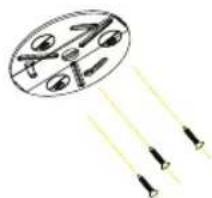
natural_image
Simple diagram of a drone flying over a plane with two arrows indicating flight direction (no text or labels)Step 2.
Install camera to
bracket
Step 1.
Install bracket on
ceiling


natural_image
Cross-sectional diagram of a mechanical device with internal components and directional arrows (no text or symbols)Step 3. Rotate camera clockwise until hear a click sound
2. PA Models

natural_image
Simple line drawing of a sphere with arrows pointing upward (no text or symbols)
Step 1.
Install bracket on
ceiling
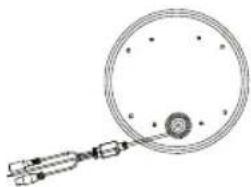
natural_image
Simple line drawing of a circular object with a central knob and attached mechanical components (no text or symbols)Step 2.
Install camera to
bracket

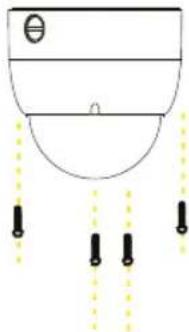
natural_image
Simple line drawing of a showerhead with downward arrows and a small circle on the top (no text or symbols)

5
EN EN
□
6
DIP Switch Setup
With DIP Switch you can configure address, protocol and baudrate on the camera.
1-PI Models
DIP switch unit to be located under a stick label on the ceiling mount.

natural_image
Technical line drawing of a cylindrical mechanical component with mounting holes and a central tab (no text or symbols)
natural_image
Circular diagram with a red circular arrow and surrounding symbols (no readable text or labels)2-PZ/PA Models
DIP switch unit to be located on the board of the camera under plastic cover.
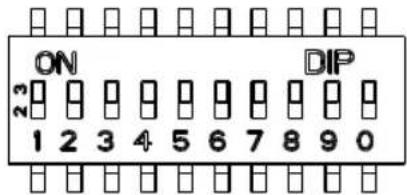
For configuration address, protocol and baudrate with DIP Switch use values in the given below tables:
DIP Switch 1-6 are for adress setting (DEFAULT 001)
Pelco D adress setting
Pelco P adress setting
DIP Switch 7,8 are for Baud Rate (DEFAULT 2400)
| 9600 OFF ON | |
| 4800 ON ON | |
| 2400 OFF OFF | |
| 1200 ON OFF |
DIP Switch 9 is for Protocol (DEFAULT Pelcod)
| Pelco P ON |
| Pleco D OFF |
Setup Address, Protocol and Baud rate for Remote Controller
Via remote controller you can control several cameras with different address , protocol and baudrate (like address 1 is Pelco P baudrate 9600 ,address 2 can be Pelco D baudrate 2400)
To setup remote controller protocol and baudrate for each address you please use the following steps:
-connect cameras to the remote controller plug RS-485
-chose channel number by pressing the desire number on the remote control
-press setup key for 3-5 seconds –screen will display number and letter, for example D=24 ,this is display protocol and baudrate of this address.
Letter refers to protocol:
D- Pelco D, P- Pelco P
Number means baudrate:
12 means baud rate 1200
24 means baud rate 2400
48 means baud rate 4800
96 means baud rate 9600
- to modify use Left & Right key for baudrate and Up & Down key for protocol on the remote control
-press ENTER key to save it
For clean all setup and default setup remote controller press C key.
Default setup- all address Pelco -D baudrate 2400
Mechanical Specifications
| PI-Models | PZ-ModelsPA-M | ||
| Dome Type: | Indoor IR | Indoor Anti-Vandal | Indoor/Outdoor Plastic Case(M For Metal case) |
| Effective Pixels: | PAL:500x582 | ||
| Protocol: | Pelco-P/D | ||
| Baudrate: | 1200/2400/4800/9600 bps | ||
| Address: | 0-255 | ||
| Pan Rotation: | 360° Continues rotation | ||
| Tilt Rotation: | 0°~90° | ||
| Max Pan Speed: | 60°/Sec | ||
| Max Tilt Speed: | 30°/Sec | ||
| Preset speed: | 60°/Sec | 100°/Sec | |
| Preset accuracy: | ±3° | ||
| Preset points: | 32 Points | ||
| Pattern Tours: | Programable 16 preset pointProgramable preset number and dwell time / speed | ||
| Auto Scan: | Yes (Programable speed and left right limited point) | ||
| Power-off memory: | Current setting and state(Include Pattern, Not include auto scan) | ||
| Home position: | Yes (Programable auto come back home position) | ||
| Zoom: | Optical 3X | ||
| Communication: | RS485 (+/-) | ||
| Protection: | Indoor use | P66 for outdoor use(Wall Mount) | |
| Operating: | 0°C ~ 60°C | -5°C ~ 60°C | |
| Power: | 12VDC 500mA | ||
Camera Specifications
| PI-355CSVF | PI-325CSVF | |
| Image sensor | 1/3" SONY HQ1 | 1/3" SONY DSP Chipset |
| Horizontal Resolution | 420TVL540TVL | |
| Effective Pixels | PAL:795(H)x596(V)NTSC:811(H)x508(V) | PAL:537(H)x597(V)NTSC:537(H)x505(V) |
| Power supply voltage | 12V DC, 80mA | |
| TV system | PAL/NTSC | |
| White Balance | Auto | |
| Synchronous System | Internal | |
| Minimum Illumination | 0.5Lux /F1.2 (0 Lux IR On) | |
| S/N Ratio | ≥48db | |
| Electronic Shutter | 1/50(1/60)-1/100000 Sec | |
| Video signal | 1.0vp-p750hms. | |
| Lens configuration | 06/4~9/8~20mm | |
| LED number | 24 pcs (PTD-208) | |
| PA-355CSVF | PA-325CSVF | |
| Image sensor | 1/3" SONY HQ1 | 1/3" SONY D$P Chipset |
| Horizontal Resolution | 420TVL540TVL | |
| Effective Pixels | PAL:795(H)x596(V)NTSC:811(H)x508(V) | PAL:537(H)x597(V)NTSC:537(H)x505(V) |
| Power supply voltage | 12V DC, 80mA | |
| TV system | PAL/ NTSC | |
| White Balance | Auto | |
| Synchronous System | Internal | |
| Minimum Illumination | 0.02Lux / F1.2 | 0.05Lux /F1.2 |
| S/N Ratio | ≥48db | |
| Electronic Shutter | 1/50(1/60)-1/100000 Sec | |
| Video signal | 1.0vp-p750hms. | |
| Lens configuration | 06/4~9/8~20mm | |
Camera Specifications
| PZ-355CSVF | PZ-325CSVF | |
| Image sensor | 1/3" SONY HQ1 | 1/3" SONY DSP Chipset |
| Horizontal Resolution | 420TVL540TVL | |
| Effective Pixels | PAL:795(H)x596(V)NTSC:811(H)x508(V) | PAL:537(H)x597(V)NTSC:537(H)x505(V) |
| Power supply voltage | 12V DC, 80mA | |
| TV system | PAL'NTSC | |
| White Balance | Auto | |
| Synchronous System | Internal | |
| Minimum Illumination | 0.02Lux / F1.2 | 0.05Lux / F1.2 |
| S/N Ratio | ≥48db | |
| Electronic Shutter | 1/50(1/60)-1/100000 Sec | |
| Video signal | 1.0vp-p750hms. | |
| Lens configuration | 06/4~9/8~20mm | |
General
natural_image
Diagram showing a circular object with internal structures and three arrows pointing outward (no text or symbols)
natural_image
Diagram of a mechanical or electrical component with three red arrows indicating direction, no text or symbols present.natural_image
Diagram of a spherical object with three vertical arrows pointing upward, no text or symbols presentnatural_image
Simple line drawing of a circular mechanical component with a central hub and attached rod (no text or symbols)natural_image
Simple line drawing of a showerhead with downward arrows and three vertical lines below (no text or symbols)
16
ES ES
- MODELOS PZ

natural_image
Technical line drawing of a mechanical component with connectors (no text or symbols)natural_image
Technical line drawing of a mechanical device with connectors and a close-up inset showing a component detail (no text or symbols)

natural_image
Line drawing of a mechanical device with a spherical component and connecting rod (no text or symbols)natural_image
Simple line drawing of a mechanical device with a bulb and attached rod (no text or symbols)
Conexión del Cable

natural_image
Technical line drawing of a El cab (RS-48) sensor with two connected components (no text or symbols on the diagram itself)natural_image
Line drawing of a cylindrical electronic component with a metallic tip and threaded shaft (no text or symbols)natural_image
Illustration of a cylindrical mechanical component with a small rectangular object on top (no text or symbols visible)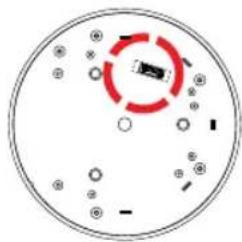
natural_image
Circular diagram with a red circular arrow and scattered symbols, no readable text or labels2-Modelos PZ/PA
Brand : Provision-ISR
Model : PI-325CS(4-9)
Category : Security Camera