
BR-22B - Lighting BRESSER - Free user manual and instructions
Find the device manual for free BR-22B BRESSER in PDF.


| Product Type | LED Ring Light |
| Brand | Bresser |
| Model | BR-22B |
| Power Output | 22W |
| Luminous Flux | 2000 lm |
| Number of LEDs | 192 |
| Color Temperature Range | 3000K - 6500K (adjustable) |
| Color Rendering Index (CRI) | ≥80 |
| Dimming Range | 10% - 100% |
| Power Input | AC 100-240V, 50/60Hz |
| Battery Compatibility | V-Mount (NP-F550/750/970, optional) |
| Dimensions (Outer Diameter) | 255 mm |
| Dimensions (Inner Diameter) | 185 mm |
| Dimensions (Thickness) | 31 mm |
| Housing Material | High-strength ABS plastic |
| Mounting Options | Tripod socket (1/4") and cold shoe for accessories |
| Adjustable Tilt | Yes, via locking tilt joint |
| Controls | On/off switch, dimmer knob, color temperature adjuster |
| Included Accessories | Power cable (C7 to Euro plug) |
| Safety Features | Glare warning, electric shock protection, tip-over prevention |
| Warranty | 2 years |
Frequently Asked Questions - BR-22B BRESSER
User questions about BR-22B BRESSER
0 question about this device. Answer the ones you know or ask your own.
Ask a new question about this device
Download the instructions for your Lighting in PDF format for free! Find your manual BR-22B - BRESSER and take your electronic device back in hand. On this page are published all the documents necessary for the use of your device. BR-22B by BRESSER.
USER MANUAL BR-22B BRESSER
natural_image
Line drawing of a ring light bulb mounted on a stand with a handle and control knob (no text or symbols)GB INSTRUCTION MANUAL
GENERAL WARNINGS
⚠️ DANGER OF BODILY INJURY!
Do not use in the presence of children or animals. Store out of reach of children and animals.
RISK OF MATERIAL DAMAGE!
Make sure that no one can trip over connection cables of the device. The device could be knocked over.
Only use the recommended power cable or the recommended battery for the power supply!
The manufacturer accepts no liability for voltage damage caused by the use of an unsuitable power supply!
DANGER OF AN ELECTRIC SHOCK!
This device contains electronic parts that are powered by a power source (power adapter). Only use the device as described in the manual. Otherwise, you run the DANGER of an ELECTRIC SHOCK.
Never bend, squeeze or pull power cables, connecting cables, extensions or connectors. Protect cables from sharp edges and he
Check this device, cables and connections for damage before use. Never attempt to operate a damaged device, or a device with damaged electrical parts! Damaged parts must be replaced immediately by an authorized service agent.
Operate the device only in a completely dry environment and do not touch the device with wet or damp body parts.
RISK OF GLARE!
Make sure that people and animals do not look into the light. The high luminosity can cause glare to the eyes and afterimages. This impairment of vision can lead to accidents.
! FIRE/EXPLOSION HAZARD!
Always place the device in such a way that it cannot tip over and ensure that it is stored in a reasonably safe place.
- Keep children and animals away from the device! They could knock the device over.
- Make sure that no one can trip over connection cables. The device could be knocked over.
- Do not expose the device to high temperatures. Do not short-circuit the device or dispose of in fire! Excessive heat and improper handling can cause short circuits, fires and even explosions!
- Only use the recommended power supply*!
! IMPORTANT NOTE!
Do not disassemble the device! In the event of a defect, please contact your dealer. They will contact the Service Center and can arrange the return of this device for repair if necessary.
Disconnect the power supply by pulling the mains plug when the appliance is not in use, in case of a longer interruption of operation and before any maintenance and cleaning work.
Place your device so that it can be disconnected from the power supply at any time. The power outlet should always be near your
appliance and should be easily accessible, as the plug of the power cord serves as a disconnect device from the mains supply.
To disconnect the unit from the mains, always pull the mains plug and never pull the cable!
Do not subject the device to excessive vibrations.
PRODUCT INFORMATION
Thanks for choosing our Led Ring Light!
The LED beads have less heat to increase their lifespan.
The light shell is high-strength ABS, sturdy, durable, beautiful and fashionable. It's light and handy, simply designed and easy to carry. Make the live show more effective.
EC DECLARATION OF CONFORMITY
CE Hereby, Bresser GmbH declares that the equipment type with part number: F004593 is in compliance with Directive:
2014/53/EU. The full text of the EU declaration of conformity is available at the following internet address:
www.bresser.de/download/F004593/CE/F004593_CE.pdf
UKCA DECLARATION OF CONFORMITY
UK CA Bresser UK Ltd. has issued a „Declaration of Conformity“ in accordance with applicable guidelines and corresponding standards. The full text of the UKCA declaration of conformity
is available at the following internet address:
www.bresser.de/download/F004593/UKCA/F004593_UKCA.pdf
Bresser UK Ltd. • Suite 3G, Eden House, Enterprise Way,
Edenbridge, Kent TN8 6HF, Great Britain
WARRANTY & SERVICE
The regular guarantee period is 2 years and begins on the day of purchase. You can consult the full guarantee terms and details of our services at www.bresser.de/warranty_terms. Would you like detailed instructions for this product in a particular language? Then visit our website via the link below (QR code) for available versions.
www.bresser.de/warranty_terms
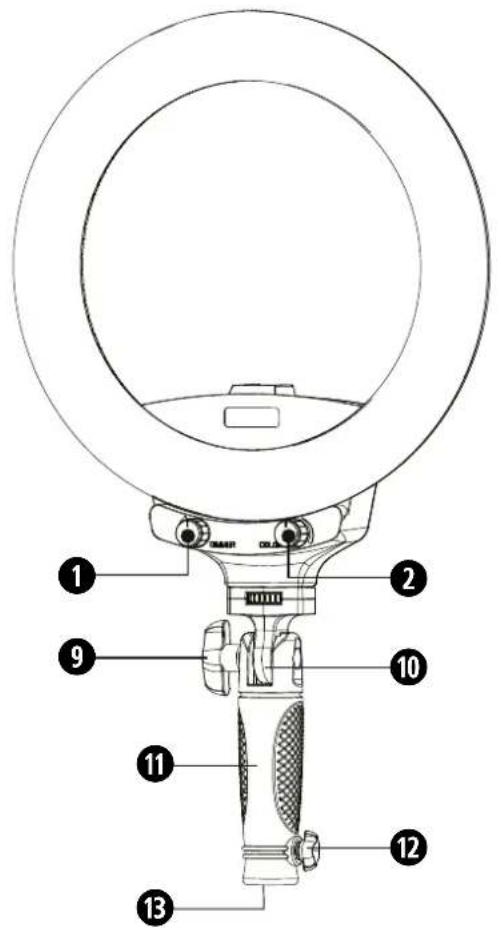
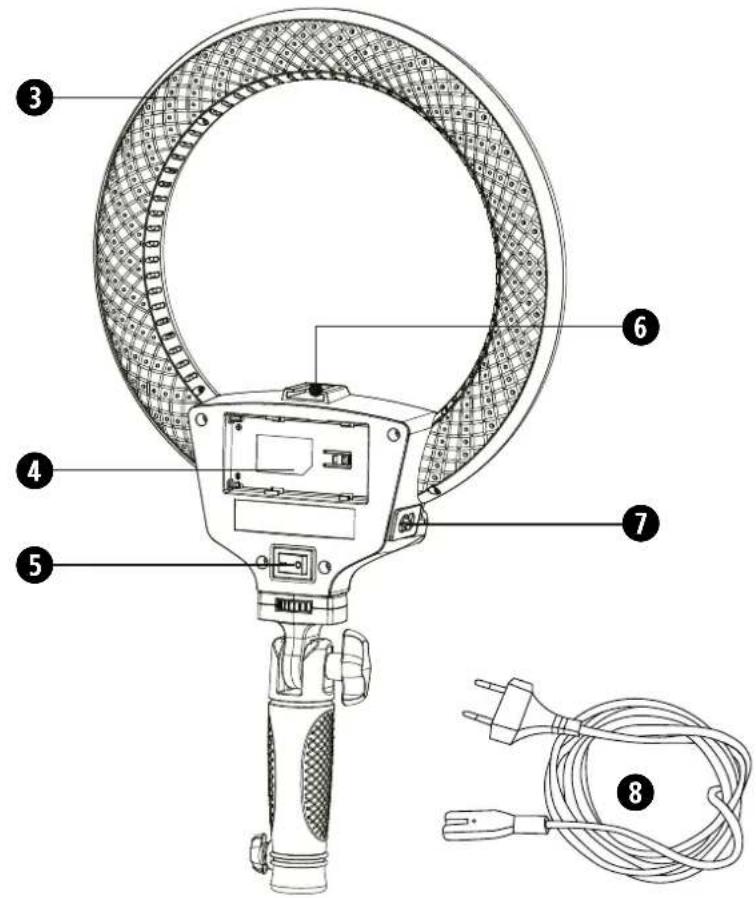
PARTS OVERVIEW
① Dimmer knob
When turned on, the brightness range is 10-100%
② Color temperature adjuster
When turned on, the CCT range is 3000-6500K.
③ Vents
④ V-mount battery socket
⑤ Power switch
6 Cold shoe
⑦ Power socket
8 Power cable
9 Locking screw (tilt joint)
10 Tilt joint
⑪ Handle
⑫ Fixing screw (tripod connection)
⑬ Tripod connection
INSTALLING THE POWER CABLE
- Insert the two-pin C7 plug of the power cable ⑧) into the power connection socket (⑦) on the ring light.
- Insert the Euro plug of the power cable into the socket.
INSTALLING THE V-MOUNT BATTERY (optional)
- Slide the fully charged V-mount battery* (type NP-F550 / 750/970) into the holder (4) from the side so that the battery clicks into place.
- To remove, slide the battery out of the holder in the opposite direction.
TURNING ON THE LED LIGHT
- Establish the power supply for the device (insert battery or connect power cable).
- Move the on / off switch ⑤) to the 'I' position to switch the device on. The lighting is switched on with the settings of the last use.
- Move the on / off ⑤) switch to the '0' position to switch off the device. The last settings made are retained until the device is switched on again.
Important: Disconnect the device from the power supply if it is not going to be used for a long period of time!
BRIGHTNESS ADJUSTMENT
- Turn the dimmer knob (1) clockwise to increase the brightness.
- Turn the dimmer knob ①) counterclockwise to decrease the brightness.
COLOR TEMPERATURE ADJUSTMENT
- Switch on the device.
- Briefly turn the color temperature adjuster ⑦) to set the desired light temperature.
ADJUSTING THE TILT ANGLE
- Hold the ring light and slowly loosen the locking screw for the tilt joint (9).
- Move the lamp head to the desired position and tighten the locking screw (9) again hand-tight.
MOUNTING ON A TRIPOD (optional)
-
Loosen the fixing screw (12) for the tripod connection so far that the opening of the tripod connection is exposed.
-
Place the lamp with the opening of the tripod connection (13) on the spigot adapter * of a tripod * and tighten the fixing screw firmly.
Note: The ring light can also be held with the handle - if necessary by a second person. In this way, the lighting position can be changed quickly and easily.
ATTACHING ACCESSORIES (optional)
The ring light has a so-called cold shoe, which can be used to attach a smartphone holder*, for example.
DISPOSAL

Dispose of the packaging materials properly, according to their type, such as paper or cardboard. Contact your local waste-disposal service or environmental authority for information on the proper disposal.

Do not dispose of electronic devices in the household garbage! As per the Directive 2002/96/EC of the European Parliament on waste electrical and electronic equipment and its adaptation into German law, used electronic devices must be collected separately and recycled in an environmentally friendly manner.

In accordance with the regulations concerning batteries and rechargeable batteries, disposing of them in the normal household waste is explicitly forbidden. Please make sure to dispose of your used batteries as required by law — at a local collection point or in the retail market. Disposal in domestic waste violates the Battery Directive. Batteries that contain toxins are marked with a sign and a chemical symbol.
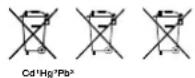
^1 battery contains cadmium ^2 battery contains mercury ^3 battery contains lead
TECHNICAL DATA
| Model R-22B | |
| Output Power 22W | |
| Lumious Flux 2000LM | |
| LED Quantity 192 pcs | |
| Color Temperature 3000K-6500K | |
| Color Rendering Index (CRI) ≥80 | |
| Dimmer 10 - 100% | |
| Light Source 0.2W SMD LED w. high brightness | |
| Power Input AC100-240V 50/60Hz | |
| Lithium Battery Type | V-Mount NP-F550/750/970 |
| Size | Outer diameter 255mm,Inner diameter 185mm,Thickness 31mm |
ALGEMENE WAARSCHUWINGEN
⚠️ GEVAAR OP LICHAMELIJK LETSEL!
Bresser UK Ltd. • Suite 3G, Eden House, Enterprise Way, Edenbridge, Kent TN8 6HF, Great Britain
GARANTIE & SERVICE
OVERZICHT ONDERDELEN
HELDERHEIDSAANPASSING
⚠️ GEFAHR EINES STROMSCHLAGS!
INFORMATIONEN ZUM PRODUKT
TEILEÜBERSICHT
Please contact the service centre first for any questions regarding the product or claims, preferably by e-mail.
e-mail: service@bresseruk.com
Telephone*: +44 1342 837 098
BRESSER UK Ltd
Customer Support
Suite G3, Eden House
Enterprise Way
Edenbridge, Kent TN8 6HF
United Kingdom
* Number charged at local rates in the UK (the amount you will be charged per phone call will depend on the tariff of your phone provider); calls from abroad will involve higher costs.
FR BE
Enterprise Way, Edenbridge,
Kent TN8 6HF, Great Britain


@BresserEurope
- GB INSTRUCTION MANUAL
- GENERAL WARNINGS
- ⚠️ DANGER OF BODILY INJURY!
- RISK OF MATERIAL DAMAGE!
- DANGER OF AN ELECTRIC SHOCK!
- RISK OF GLARE!
- ! FIRE/EXPLOSION HAZARD!
- ! IMPORTANT NOTE!
- PRODUCT INFORMATION
- EC DECLARATION OF CONFORMITY
- UKCA DECLARATION OF CONFORMITY
- WARRANTY & SERVICE
- PARTS OVERVIEW
- INSTALLING THE POWER CABLE
- INSTALLING THE V-MOUNT BATTERY (optional)
- TURNING ON THE LED LIGHT
- BRIGHTNESS ADJUSTMENT
- COLOR TEMPERATURE ADJUSTMENT
- ADJUSTING THE TILT ANGLE
- MOUNTING ON A TRIPOD (optional)
- ATTACHING ACCESSORIES (optional)
- DISPOSAL
- ALGEMENE WAARSCHUWINGEN
- ⚠️ GEVAAR OP LICHAMELIJK LETSEL!
- GARANTIE & SERVICE
- OVERZICHT ONDERDELEN
- HELDERHEIDSAANPASSING
- ⚠️ GEFAHR EINES STROMSCHLAGS!
- INFORMATIONEN ZUM PRODUKT
- TEILEÜBERSICHT
- FR BE
Brand : BRESSER
Model : BR-22B
Category : Lighting