WSAC 50W - Measurement PCE Instruments - Free user manual and instructions
Find the device manual for free WSAC 50W PCE Instruments in PDF.


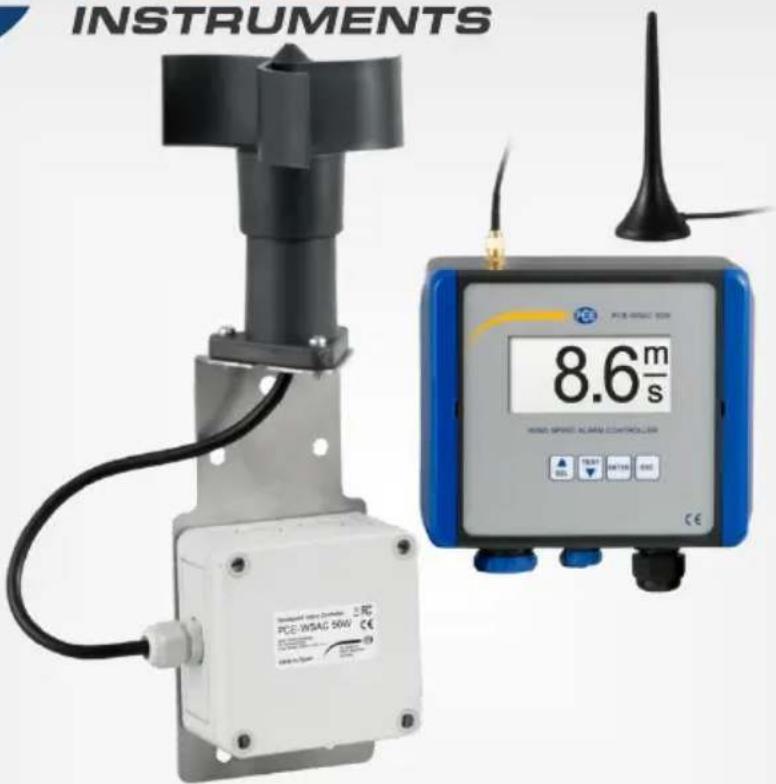
| Product Type | Wind Speed Anemometer with Display (PCE-WSAC 50W) |
| Brand | PCE Instruments |
| Model | WSAC 50W |
| Measurement Range (Wind Speed) | 4 ... 180 km/h |
| Start-up Speed | 8 km/h |
| Maximum Speed | 200 km/h |
| Accuracy | ±1 km/h (4 ... 15 km/h), ±3 % (15 ... 180 km/h) |
| Units | km/h, mph, m/s |
| Data Transfer | Wireless IEEE 802.15.4 ISM 2.4 GHz |
| Transmission Range (Indoor) | Max. 60 m, typ. 30 m |
| Transmission Range (Outdoor, Line of Sight) | Max. 750 m, typ. 200 m |
| Power Supply (Sensor) | Monocell battery D 1.5 V |
| Power Supply (Display) | 110 ... 230 V AC 50/60 Hz (or 24 V DC depending on version) |
| Display | Backlit 128 x 64 pixel LCD |
| Alarm Relay | 250 V AC, 8 A |
| Analogue Output | 4 ... 20 mA, max. 500 Ohm |
| Data Logger | Internal memory with selectable recording periods (10 s to 1 h), MicroSD export |
| Protection Class | IP65 |
| Dimensions (Sensor with standard bracket) | 320 x 110 x 100 mm |
| Weight (Sensor with standard bracket) | 680 g |
| Operating Temperature | -20 ... +70 °C |
| Storage Temperature | -35 ... +70 °C |
| Humidity | 0 ... 95 % RH non-condensing |
| Case Material (Display) | Polycarbonate |
| Delivery Contents | 1x wind speed sensor (incl. standard bracket), 1x wind speed display, 1x self-levelling additional bracket, 1x radio antenna, 1x monocell battery D 1.5V DC, 1x user manual |
| Maintenance & Cleaning | Clean with a damp cloth and pH-neutral cleaner; do not use abrasives or solvents. |
| Safety Notes | Read manual before use; only qualified personnel should operate; do not use in explosive atmospheres; avoid exceeding measurement ranges. |
| Spare Parts / Repairability | Available accessories: PCE-WS A (4-20 mA output sensor), PCE-WS P (pulse output sensor), PCE-WV A (wind direction sensor). Battery and antenna are replaceable; case opening only by qualified personnel. |
Frequently Asked Questions - WSAC 50W PCE Instruments
User questions about WSAC 50W PCE Instruments
0 question about this device. Answer the ones you know or ask your own.
Ask a new question about this device
Download the instructions for your Measurement in PDF format for free! Find your manual WSAC 50W - PCE Instruments and take your electronic device back in hand. On this page are published all the documents necessary for the use of your device. WSAC 50W by PCE Instruments.
USER MANUAL WSAC 50W PCE Instruments
natural_image
Abstract logo design with blue and yellow curved shapes forming a stylized 'E' (no text or symbols)PCE
INSTRUMENTS
User manuals in various languages (français, italiano, español, português, nederlands, türk, polski, русский, 中文) can be found by using our product search on: www.pce-instruments.com
2 Specifications....14
2.1 Technical specifications of the wind speed sensor version....14
2.2 Technical specifications of the wind speed display....15
2.3 Delivery contents 15
2.4 Sensors....16
3 Assembly 16
3.1 Standard bracket 16
3.2 Self-levelling additional bracket....16
3.3 Assembly plan with borehole description 17
3.4 Preparing the wind speed sensor....17
3.5 Connections....18
3.6 Function keys 19
4 Operation of wind speed display.... 19
4.1 Sensor connection....19
4.2 Settings / main menu....20
5 Contact....23
6 Disposal 23
natural_image
Technical drawing of a rectangular component with six circular holes and a central square cutout, shown with dimension lines (no text or symbols)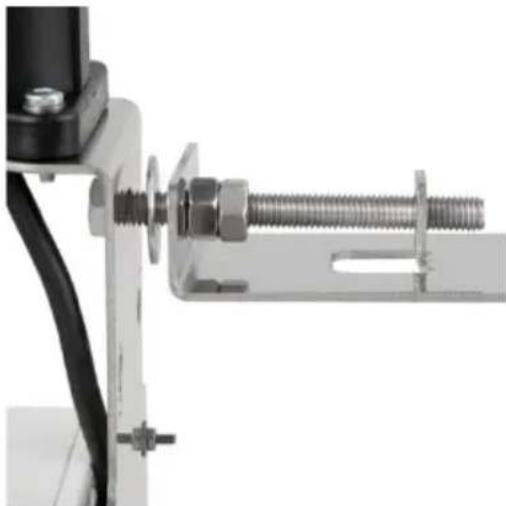
natural_image
Close-up of a mechanical clamp or bracket assembly with bolts and a metal bracket (no visible text or symbols)
natural_image
Two views of an electrical control box: one with a red wire and labeled component, the other showing internal components (no visible text or symbols)
natural_image
Black conical object with a long stem and curved base, resembling a stylized antenna or connector (no text or symbols visible)natural_image
Close-up of industrial electrical connectors with blue and black plastic components (no visible text or symbols)3.6 Funktionstasten
Please read this manual carefully and completely before you use the device for the first time. The device may only be used by qualified personnel and repaired by PCE Instruments personnel. Damage or injuries caused by non-observance of the manual are excluded from our liability and not covered by our warranty.
- The device must only be used as described in this instruction manual. If used otherwise, this can cause dangerous situations for the user and damage to the meter.
- The instrument may only be used if the environmental conditions (temperature, relative humidity, ...) are within the ranges stated in the technical specifications. Do not expose the device to extreme temperatures, direct sunlight, extreme humidity or moisture.
- Do not expose the device to shocks or strong vibrations.
- The case should only be opened by qualified PCE Instruments personnel.
- Never use the instrument when your hands are wet.
- You must not make any technical changes to the device.
- The appliance should only be cleaned with a damp cloth. Use only pH-neutral cleaner, no abrasives or solvents.
- The device must only be used with accessories from PCE Instruments or equivalent.
- Before each use, inspect the case for visible damage. If any damage is visible, do not use the device.
- Do not use the instrument in explosive atmospheres.
- The measurement range as stated in the specifications must not be exceeded under any circumstances.
- Non-observance of the safety notes can cause damage to the device and injuries to the user.
We do not assume liability for printing errors or any other mistakes in this manual.
We expressly point to our general guarantee terms which can be found in our general terms of business.
Safety symbols
Safety-related instructions the non-observance of which can cause damage to the device or personal injury carry a safety symbol.
| Symbol | Designation / description | |
 | General warning signNon-observance can cause damage to the device and injuries to the user. | |
 | Warning: electrical voltageNon-observance can cause electric shock. | |
2 Specifications
2.1 Technical specifications of the wind speed sensor version
| Measurement | |
| Measurement range | 4 ... 180 km/h |
| Start-up speed | 8 km/h |
| Maximum speed | 200 km/h |
| Accuracy | ±1 km/h (4 ... 15 km/h)±3 % (15 ... 180 km/h) |
| Units | km/hmphm/s |
| Data transfer | |
| Type of data transfer | IEEE 802.15,4. ISM 2.4 GHz |
| Transmission power | 6.3 mW (8 dBm) |
| Receiving sensitivity | -102 dBm |
| Reach | In buildingsmax. 60 m, typ. 30 mOutside buildings, direct sight:max. 750 m, typ. 200 m |
| Transmission time | 2 s |
| Electrical specifications | |
| Power supply | Monocell battery D 1.5 V |
| Power consumption | Approx. 0.3 W when power supply is 1.5 V DC |
| General specifications | |
| Case material | PA + FG |
| Ball bearing | Stainless steel X65Cr13 |
| Bracket | Stainless steel AISI |
| Weight (with standard bracket) | 680 g |
| Weight (with self-levelling bracket) | 900 g |
| Dimensions | 320 x 110 x 100 mm |
| Environmental conditions | -20 ... +70 °C (Operation)-35 ... +70 °C (Storage)0 ... 95 % RH non-condensing |
| Protection class | IP65 |
2.2 Technical specifications of the wind speed display
| Electrical specifications | |
| Power supply | Depending on version:PCE-WSAC 50W 230:110 ... 230 V AC, 50 / 60 HzPCE-WSAC 50W 24:24 V DC |
| Power consumption | <3.5 VA |
| Inputs | |
| Analogue | 4 ... 20 mA |
| Wireless | IEEE 802.15.4 ISM 2.4 GHz |
| Pulse input | |
| Outputs | |
| Analogue output | 4...20 mA |
| max. connectable impedance | 500 Ohm |
| Resolution of analogue output | 10 bits |
| Accuracy of analogue output | 1.5 % |
| Alarm relay | 250 V AC, 8 A |
| General specifications | |
| Display | Backlit 128 x 64 pixel LC display |
| Case material | Polycarbonate |
| Weight | 250 g |
| Dimensions | 145 x 95 x 125 mm |
| Environmental conditions | -20 ... +70 °C (Operation)-35 ... +70 °C (Storage)0 ... 95 % RH non-condensing |
| Protection class | IP65 |
2.3 Delivery contents
2.3.1 PCE-WSAC 50W / PCE-WSAC 50W+
1x wind speed sensor (incl. standard bracket)
1x wind speed display
1x self-levelling additional bracket
1x radio antenna
1x monocell battery D 1.5V DC
1x user manual
2.3.2 PCE-WSAC 50+
1x wind speed display
1x user manual
Note: The sensors for the PCE-WSAC 50+ models must be ordered separately.
2.4 Sensors
| Order code | Description |
| PCE-WS A | Wind speed sensor with 4 ... 20 mA output |
| PCE-WS P | Wind speed sensor with pulse output |
| PCE-WV A | Wind direction sensor with 4 ... 20 mA output |
3 Assembly
3.1 Standard bracket
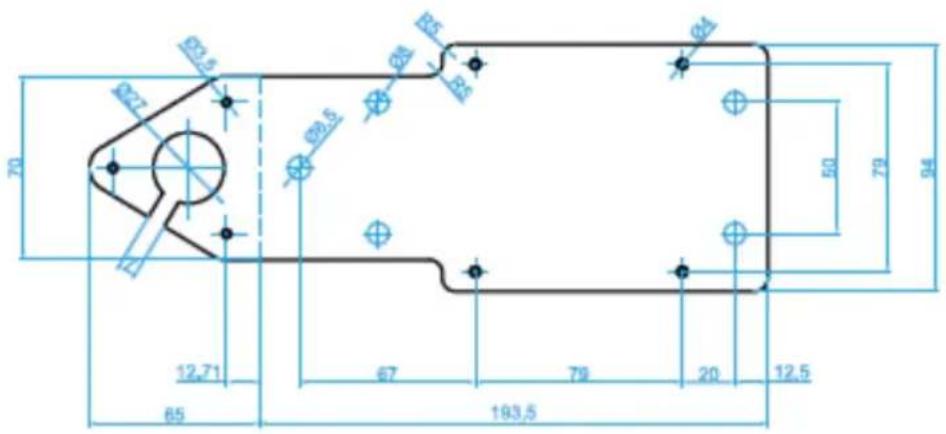
60-degree bending along dashed line, stainless steel, 2 mm thick
3.2 Self-levelling additional bracket
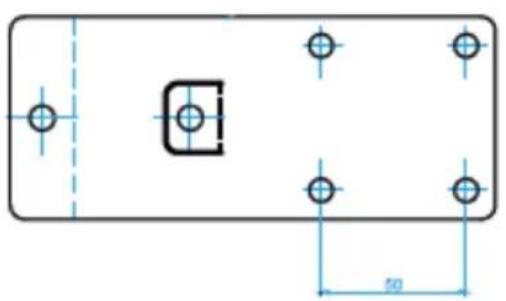
natural_image
Technical drawing of a rectangular component with six circular holes and a central square cutout, shown with dimension lines (no text or symbols)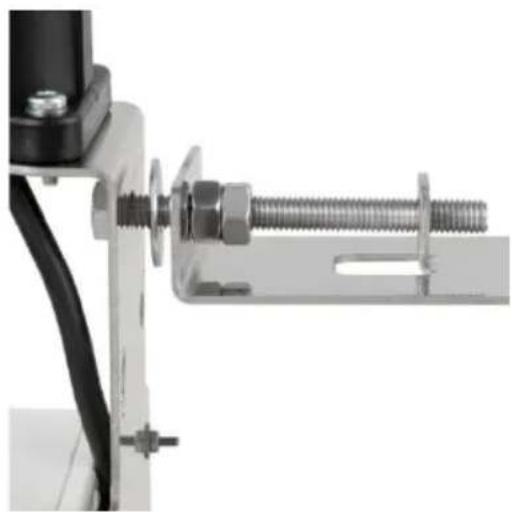
natural_image
Close-up of a mechanical clamp or bracket assembly with bolts and a metal bracket (no visible text or symbols)
ATTENTION: When mounting the self-levelling additional bracket, make sure it is not completely tightened. It must be locked with the two M8 nuts in a way that it is still freely movable but without play!
Observe the correct order of the connecting elements (see image).
3.3 Assembly plan with borehole description
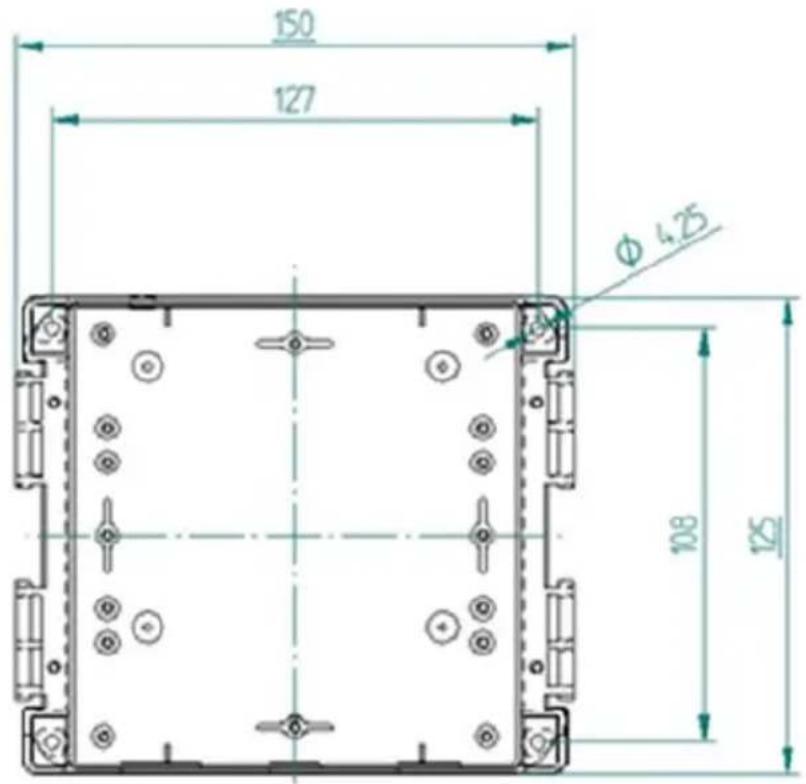
3.4 Preparing the wind speed sensor
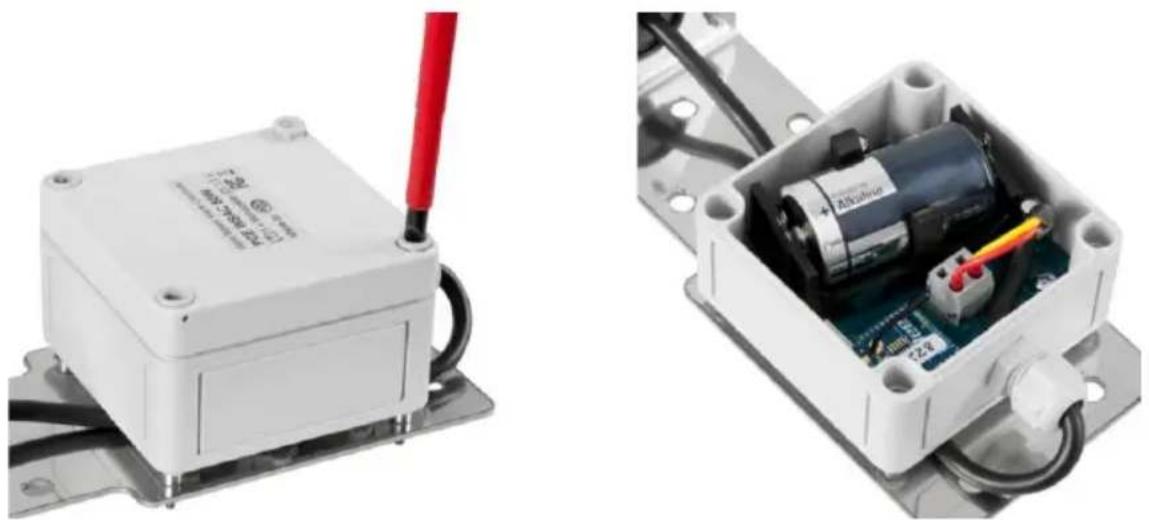
natural_image
Two views of an electrical control box: one with a red wire and labeled component, the other showing internal components (no visible text or symbols)
ATTENTION: Ensure correct polarity! Before inserting or replacing the battery, loosen all 4 screws of the case.
3.5 Connections
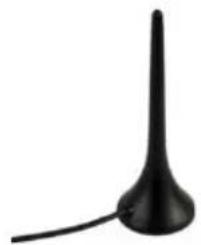
natural_image
Black conical object with a long stem and curved base, resembling a stylized antenna or connector (no text or symbols visible)- Connect the antenna to the threaded bush of the case, via the screw connection.
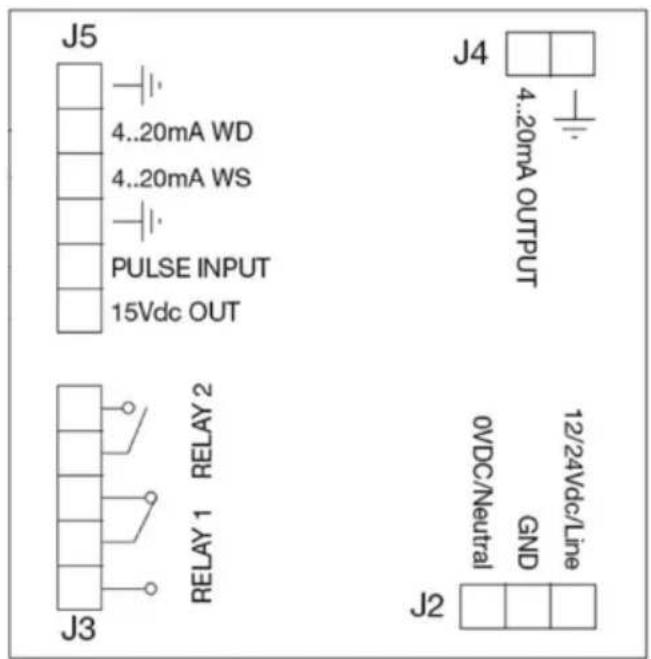
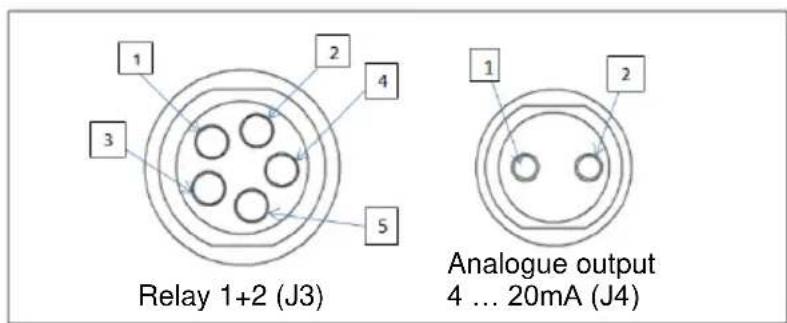
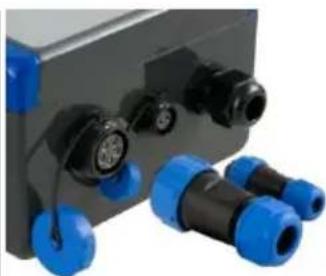
- To establish the power supply for the wind speed display, open the case.
- Connect the power cable to terminal J2 in the case.
ATTENTION: Disconnect the device from the power supply before opening the case cover!
natural_image
Close-up of industrial electrical connectors with blue and black plastic fittings (no visible text or symbols)3.6 Function keys
Key functions in programming mode
| Key | Function | |
| SEL |  | Increases the program steps (P00, P01 ...) and the programmable options and values |
| TEST |  | Decreases the program steps and the programmable options and values |
| ENTER | Confirms entered values, ends program step | |
| ESC | Leaves current program and moves decimal place | |
4 Operation of wind speed display
4.1 Sensor connection
4.1.1 PCE-WSAC 50W / PCE-WSAC 50W+
The wind speed sensor is coupled with the wind speed display via radio.
The wind speed measured by the sensor is displayed when the battery is inserted into the transmitter.
The transmitter and the receiver communicate via RF IEEE 802.15.4, at a frequency of 2.4 GHz.
The wind sensor must always be positioned vertically!
4.1.2 PCE-WSAC 50+
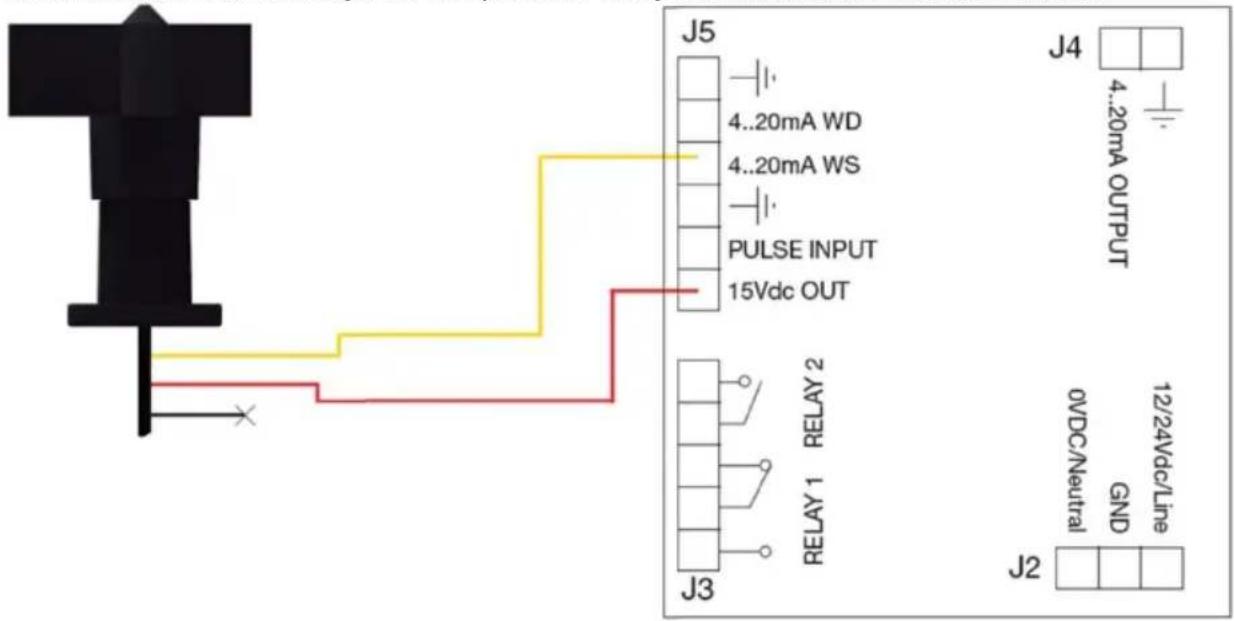
The wind speed sensor must be connected to the display by cable. To do this, open the housing cover, feed the cable through the compression fitting and connect the sensor as follows:
4.1.3 Wind direction sensor (all models)
A wind direction sensor can be connected to the display unit on all models. To do this, open the housing cover, feed the cable through the compression fitting and connect the sensor as follows:
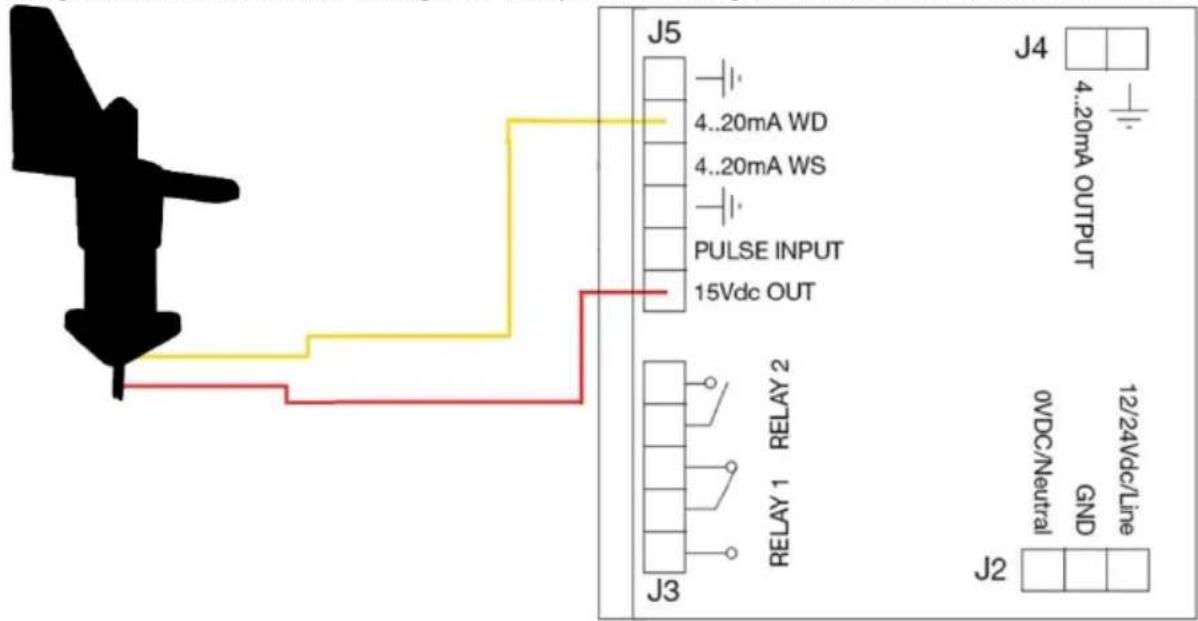
4.2 Settings / main menu
In order to enter programming mode, press the "ENTER" and "ESC" keys simultaneously for 2 seconds.
4.2.1 Standard user setting
You can save your settings as "standard user setting" and use them again when required. If no configuration has been saved, the same operation will restore the factory default settings.
When no configuration has been saved, the factory settings can be restored with this procedure.
| Program no. | Function |
| P00 | Options to leave the menu:(1) Discard changes and return to normal measuring mode(2) Save changes and return to normal measuring mode(3) Save changes as „standard user setting“ and return to normal measuring mode(4) Restore „standard user setting“ when parameters have been changed unintentionally. To do so, press and hold the ENTER key for at least 10 seconds. If the reset was successful, “USER SETTINGS RESTORED“ will appear in the display. |
4.2.2 Sensor selection
The following menu items are relevant for setting the sensors.
| Program no. | Function |
| P01 | Wind sensor selection:(0) wind speed meter only, [0](1) wind direction meter only,(2) wind speed meter + wind direction meter |
| P02 | Setting the input for the wind speed:For P01 = 0 and P01 = 2 only(0) pulse input, [0] (1) 4 ... 20 mA input (2) radio sensor |
| P03 | Setting the input for the wind direction:Forr P01 = 1 and P01 = 2 only(0) 4-20 mA input, [0] (1) radio sensor |
| P04 | Unit:(0) km/h, [0] (1) mph (2) m/s |
| P05 | For P02 = 0 onlyDisplayed reference speed (1-999) [100] |
| P06 | For P02 = 0 onlyFrequency [Hz] for visualisation of the programmed value in P05 [121] |
| P07 | For P02 = 0 onlyRatio offset = speed / frequency [3] |
| P08 | Selection of maximum measurement range (wind speed)For P02 = 1 only(0) 120 km / h, [0] (1) 180 km / h |
| P09 | Selection of maximum measurement range (wind direction)For P03 = 0 only(0-359) [0] |
4.2.3 Alarm
The alarm is triggered when the wind speed exceeds the set value. A delay time can be set via the function keys. This is to prevent unnecessary alarms from being triggered, for example, by wind gusts.
When the wind speed is below the set value, no alarm will be triggered.
When ALARM 2 is activated, ALARM 1 will be deactivated. When ALARM 2 is triggered, the reading will flash to additionally warn of strong wind gusts.
| Program no. | Function |
| P10 | ALARM 1(0) deactivated (1) normally open contact (NO), [1] (2) normally closed contact (NC) |
| P11 | ALARM 1Threshold value (1-999) [50] |
| P12 | ALARM 1 mode(0) Continuous alarm (1) pulsating alarm [1] |
| P13 | ALARM 1For P12 = 1 onlySwitch-on time when pulsating alarm is activated in 0.1 s (1-99) [10] |
| P14 | ALARM 1For P12 = 1 onlySwitch-off time when pulsating alarm is activated in 0.1 s (1-99) [10] |
| P15 | ALARM 1Activation delay in seconds (0...999) [2] |
| P16 | ALARM 1Deactivation delay in seconds (0...999) [5] |
| P17 | ALARM 2(0) deactivated (1) normally open contact (NO), [1] (2) normally closed contact (NC) |
| P18 | ALARM 2as P11, [70](When this value is exceeded, the displayed value will flash, as an additional warning). |
| P19 | ALARM 2as P12, [0] |
| P20 | ALARM2as P13, [5] |
| P21 | ALARM 2as P14, [5] |
| P22 | ALARM 2as P15 [2] |
| P23 | ALARM 2as P16 [5] |
| P24 | ALARM 2(0) non-resting, [0] (1) resting (switch off to enable) |
4.2.4 Analogue output
| Program no. | Function |
| P25 | Analogue output(0) deactivate, [0] (1) proportional to wind speed(2) proportional to wind direction |
| P26 | Wind speed / direction value corresponding to the analogue output value of 20 mA [120] |
4.2.5 Timeout
| Program no. | Function |
| P27 | Timeout of radio transmissionFor P02 = 2 and P03 = 1 onlyTime in seconds (5 ... 99) [12]NOTE: The Timeout should not be less than 9 seconds if the meter is battery powered |
| P28 | Alarm status when timeout is activated(0) no alarm (1) ALARM 1 active (2) ALARM 2 active, [2] |
| P36 | ALARM association [0](0) ALARM1 and ALARM2 associated with anemometer 1,(1) ALARM1 and ALARM2 associated with anemometer 2,(2) ALARM1 associated with anemometer 1 and ALARM 2 associated with anemometer 2,(3) ALARM1 associated with anemometer 2 and ALARM 2 associated with anemometer 1 |
4.2.6 Data logger
| Program no. | Function |
| P34 | Recording periods(0) 10-second periods, (1) 1-minuten periods, (2) 10-minute periods, (3) 1-hour periods. [2] |
| P35 | MicroSD management(0) Exit without any action, (1) Export new data to the SD card that has not been exported before(2) Export all data of the internal memory to the SD card(This process can take up to 5 minutes), (3) Clear internal memory (up to 20 seconds) |
4.2.7 Indication of minimum and maximum wind readings
The PCE–WSAC 50W automatically records the minimum and maximum wind speed. Press the ENTER key in normal measuring mode to view the lowest wind speed measured after powering on the meter. Press the ENTER key again to view the highest measured wind speed.
The meter returns to normal measuring mode when no key has been pressed for 3 seconds. To reset the minimum and maximum values, press and hold the ESC key for 2 seconds.
Note: Both values will be deleted when the power supply is interrupted.
5 Contact
If you have any questions, suggestions or technical problems, please do not hesitate to contact us. You will find the relevant contact information at the end of this user manual.
6 Disposal
For the disposal of batteries in the EU, the 2006/66/EC directive of the European Parliament applies. Due to the contained pollutants, batteries must not be disposed of as household waste. They must be given to collection points designed for that purpose.
In order to comply with the EU directive 2012/19/EU we take our devices back. We either re-use them or give them to a recycling company which disposes of the devices in line with law.
For countries outside the EU, batteries and devices should be disposed of in accordance with your local waste regulations.
If you have any questions, please contact PCE Instruments.

PCE Instruments contact information
Germany France Spain
PCE Deutschland GmbH PCE Instruments France EURL PCE Ibérica S.L.
Im Langel 26 23, rue de Strasbourg Calle Mula, 8
D-59872 Meschede 67250 Soultz-Sous-Forets 02500 Tobarra (Albacete)
Chester Rd, Old Trafford
Manchester M32 0RS
United Kingdom
Tel: +44 (0) 161 464902 0
Fax: +44 (0) 161 464902 9
info@pce-instruments.co.uk
www.pce-instruments.com/english
Italy
PCE Italia s.r.l.
Via Pesciatina 878 / B-Interno 6
55010 Loc. Gragnano Pehlivan Sok. No.6/C
Capannori (Lucca)
Italia
www.pce-instruments.com/turkish
The Netherlands
PCE Brookhuis B.V.
Institutenweg 15
7521 PH Enschede
Nederland
Telefoon: +31 (0)53 737 01 92
info@pcebenelux.nl
www.pce-instruments.com/dutch Fax: +1 (561) 320-9176
United States of America
PCE Americas Inc.
1201 Jupiter Park Drive, Suite 8
Jupiter / Palm Beach
33458 FL
USA
Tel: +1 (561) 320-9162
www.pce-instruments.com/dansk
Denmark
PCE Instruments Denmark ApS
Birk Centerpark 40
7400 Herning
Denmark
www.pce-instruments.com/us
User manuals in various languages (français, italiano, español, português, nederlands, türk, polski, русский, 中文) can be found by using our product search on: www.pce-instruments.com
Specifications are subject to change without notice.
- Funktionstasten
- Safety symbols
- Specifications
- Delivery contents
- PCE-WSAC 50W / PCE-WSAC 50W+
- PCE-WSAC 50+
- Sensors
- Assembly
- Standard bracket
- Self-levelling additional bracket
- Assembly plan with borehole description
- Preparing the wind speed sensor
- Connections
- Function keys
- Operation of wind speed display
- Sensor connection
- PCE-WSAC 50W / PCE-WSAC 50W+
- PCE-WSAC 50+
- Wind direction sensor (all models)
- Settings / main menu
- Standard user setting
- Sensor selection
- Alarm
- Analogue output
- Timeout
- Data logger
- Indication of minimum and maximum wind readings
- Contact
- Disposal
- PCE Instruments contact information
- Germany France Spain
- Italy
- The Netherlands
- United States of America
- Denmark
Brand : PCE Instruments
Model : WSAC 50W
Category : Measurement