
HS Freeze Q1 - Flash ROLLEI - Free user manual and instructions
Find the device manual for free HS Freeze Q1 ROLLEI in PDF.


| Type | Attachable Flash for Cameras |
| Model | HS Freeze Q1 |
| Power Output | 18.0 Ws (Guide Number 26) |
| Flash Modes | TTL, Manual, Master, Slave, Continuous Light, Light Effects |
| Synchronization Modes | Normal, HSS, 1st Curtain, 2nd Curtain |
| Flash Duration (t=0.5) | 1/110 s |
| Recycling Time (full power) | 1.5 s |
| Burst Rate | Up to 20 fps |
| Color Temperature (Flash) | 5600 K ±200 K |
| Color Temperature (Continuous) | 2700–6500 K |
| LED Output (Continuous) | 12.0 W |
| TLCI / CRI | 97+ / 95 |
| Power Supply | Battery: Input 5.0 V 2.0 A, Output 8.4 V 5.0 A |
| Max Flashes (full power) | >1,000 |
| Channels / Groups | 32 / 6 |
| Zoom Range | Wide to Spot (illuminance varies per mode) |
| Connections | USB-C (charging and firmware) |
| Operating Temperature | 0 °C to 40 °C |
| Flash Head Tilt | -7° to +90° (tilt) |
| Radio Frequency | 2.402–2.482 GHz, max 6 dBm |
| Dimensions (W x H x D) | 12.6 x 10.6 x 7.9 cm |
| Weight | 408 g |
| Included Accessories | USB-C cable, cold shoe stand, bag, quick start guide |
| Protection Features | Overheating protection, sleep mode, auto-off |
Frequently Asked Questions - HS Freeze Q1 ROLLEI
User questions about HS Freeze Q1 ROLLEI
0 question about this device. Answer the ones you know or ask your own.
Ask a new question about this device
Download the instructions for your Flash in PDF format for free! Find your manual HS Freeze Q1 - ROLLEI and take your electronic device back in hand. On this page are published all the documents necessary for the use of your device. HS Freeze Q1 by ROLLEI.
USER MANUAL HS Freeze Q1 ROLLEI
Content
Before first Use 20
Intended Use 20
Explanation of Symbols 20
Warnings and Safety Instructions 21
What's in the Box 25
Product Overview 26
Operating 27
General Information 33
Technical Data....34
Disposal 35
EU Declaration of Conformity 35

natural_image
Line drawing of a Rollei brand light bulb device (no text or symbols on the device itself)natural_image
Line drawing of a coiled cable with two connectors (no text or symbols)

natural_image
Line drawing of a Rollei brand air purifier with no text or symbols on the body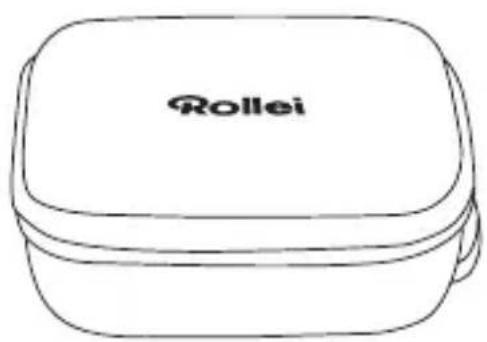

natural_image
Pure diagram of a symmetrical mechanical or electrical component with no text, numbers, or symbolsProdukt-Übersicht
natural_image
Icon depicting a camera with sound waves and a play button, no text or symbols presentSpeedlite
Dauerlicht

natural_image
Abstract icon with Wi-Fi signal, camera, and human figure symbol (no text or labels)Master

natural_image
Abstract icon with a stylized 'R' and arrow, no readable text or symbolsSlave
natural_image
Simple icon with gear, play button, and robot silhouette on dark background (no text or symbols)Einstellungen

Slave Modus
Read the operating instructions and the safety instructions carefully before using the device for the first time. Keep the operating instructions together with the device for future use. If you pass on the device to a third party, this manual is part of the device and must be supplied with the device.
Intended Use
This unit is designed for use as photo and video lighting only. It must not be used for other purposes and in particular not for domestic room lighting.
Explanation of Symbols
The following symbols are used in this manual, on the flash, the power supply unit or on the packaging.

Products marked with this symbol comply with all relevant community regulations of the European Economic Area.

Products marked with this symbol are operated with direct current.
Danger from electric current!
Faulty electrical installations or excessive mains voltage can cause electric shock.
- Only connect the product if the mains voltage of the socket corresponds to the specifications on the type plate.
- Connect the product to an easily accessible power outlet so that you can quickly disconnect it from the mains in case of problems.
- Use only the supplied power cord.
- Do not use the product if it is visibly damaged or if the cable is defective.
- If the product or its accessories are damaged, they must be replaced or repaired by the manufacturer, its service department or a similarly qualified person to prevent hazards.
- The housing must not be opened and repairs must only be carried out by a qualified technician. To do this, contact a specialist workshop. Any liability and all warranty claims are excluded in the event of repairs by the user, improper connection or incorrect operation.
- Do not use the product with an external timer or a separate remote control system.
- If you do not use the product for a long period of time, always disconnect it from the power source.
- Protect the product from moisture. Do not touch the product with wet/damp hands or immerse it in water.
- This product is not waterproof! Do not use this product in the rain or in wet environments. Never touch the product during a thunderstorm.
- Before disconnecting the power or battery, turn off the unit at the main switch.
- Do not store or use the flash in places where it is exposed to strong electromagnetic fields or dust. Keep the unit away from other sources of interference.
Warnings and Safety Instructions
- Do not open or damage the battery, short-circuit it, bypass it or use it for any other purpose.
Caution!
- Never use the mains cable as a carrying handle.
- Keep the product and accessories away from naked flames, hot surfaces and easily flammable materials.
- Lay the power cord in such a way that it does not present a tripping hazard.
- Do not bend the power cord or lay it over sharp edges.
Caution!
Danger for children and persons with reduced physical, sensory or mental abilities (e.g. partially disabled, elderly persons with reduced physical and mental abilities) or lack of experience and know-how (e.g. older children).
- This product may be used by persons with reduced physical, sensory or mental abilities or lack of experience and know-how, provided that they are supervised or have received instructions for the safe use of the product and understand the potential risks arising from its use. Children must not play with the product. The product must not be cleaned or maintained by children. Keep children under eight years of age away from the product and its accessories.
- Do not insert any objects into the product.
- Do not leave the product unattended during operation.
- The product is not a toy. Keep the product, accessories and packaging materials away from children and pets to prevent accidents and suffocation.
- Do not discharge the flash at a very close distance to objects, people or animals.
- For photographic lighting purposes only. Not suitable for permanent room lighting.
- Do not dazzle car, bus, bicycle, motorbike or train drivers while driving this product. The driver may be dazzled and cause an accident. This also applies to unlisted persons or groups if possible glare could cause an accident.
- Do not shine directly into the eyes of people or animals as this may cause damage to the retina, visual disturbances and even blindness.
- Ensure adequate ventilation during operation. Never cover the ventilation slits of the unit.
- Do not use or store the unit in high temperatures or in closed rooms exposed to direct sunlight, and do not charge the battery while doing so. The product should not be used in ambient temperatures above 40°C.
- Mount the flash unit on a tripod with sufficient load-bearing capacity and set up the tripod so that it cannot tip over or slip.
- For storage or transport, disconnect the battery from the flash unit.
- Allow the flash to cool down before packing it for transport or storage.
Warnings for Rechargeable Batteries
- Do not dismantle, hit or puncture the battery, take care not to short-circuit the battery.
- Do not expose the battery to high temperatures.
- Do not continue to use the battery if it leaks or expands.
- Always charge through the system. If the battery is replaced with the wrong type, there is a risk of explosion.
- Keep the battery away from children and animals.
- Batteries can explode if exposed to an open fire. Never throw batteries into a fire.
– Dispose of used batteries according to local regulations. - Before disposing of the unit, remove the battery and dispose of it separately.
- Batteries must be fully charged before using the unit for the first time.
What's in the Box
- HS Freeze Q1 / Q1s attachable flash
- USB-C cable
- Cold shoe stand
- Bag
- Quick start guide

natural_image
Line drawing of a coiled cable with two connectors (no text or symbols)

natural_image
Line drawing of a Roller brand air purifier with black and white casing (no text or symbols)

natural_image
Pure diagram of a symmetrical mechanical or electrical component with no text, numbers, or symbolsProduct Overview
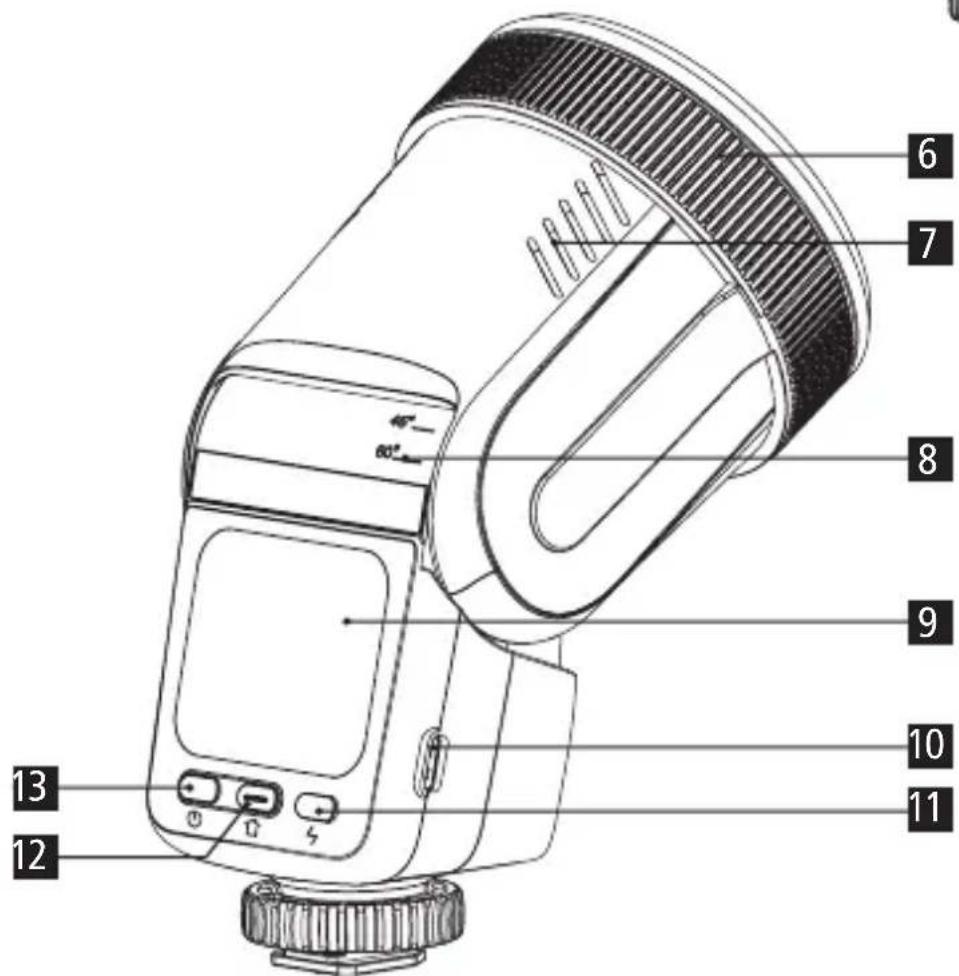
1 Quick-Freeze Mount
2 Fresnel lens
3 Ventilation slots
4 Hot shoe unlocking ring
5 Hot shoe
6 Zoom ring
7 Ventilation slots
8 Lamp angle indicator
9 Display
10 USB-C port
11 Flash test button
12 Home button
13 On/off button


Switching on the device
- Press and hold the on/off button to switch on the light.
- After the screen lights up, click the symbol in the centre to enter the mode interface.
Select mode
After switching on, you are in the mode interface. Select the mode by navigating through the user interface using the arrow buttons. The available operating modes are:

Speedlite Permanent light Master Slave Settings
Making settings
- Navigate in the mode interface by clicking on the left or right arrow to switch between the different modes.
- Swipe up or down to make specific settings.
Back to the main interface
- Press the Home button to return to the main interface.
- Press the Home button again to return to your last setting.
Overview of the setting options
 | CanonNikonSonyFujifilmOlympus |  | MaxMedMin |  | OnOff |  | Off153060 |
 | Off60 min. | 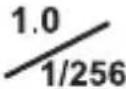 | DecimalFraction |  GRGruppen-schriftfarbe GRGruppen-schriftfarbe | RedYellowGreenBlue |  Confirmation symbol Confirmation symbol | |
| Auto off(min.) | 120 min | Decimal /Fraction | |||||
 | YesNo | ||||||
| Reset | |||||||
Speedlite settings
| ○○ | Status of hot-shoe communication | 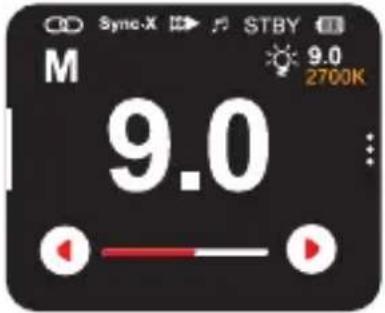 |
| Sync-X | Single-pin communication mode | |
| ▶▶ | Synchronisation status | |
| ♪ | Signal tone display | |
| STBY | Standby mode to activate the exposure preview in the camera | |
| Battery charging status | ||
| M/TTL | Flash mode indicator (M/TTL) | |
| Status of the modelling light | ||
| 9.0+0.0 | Flash parameters in M modeFlash parameters in TTL mode: The flash output can be adjusted by clicking on the numbers or by swiping up and down | |
| Tap to adjust the flash output |
Modelling light settings
Swipe from right to left to access the modelling light settings, as shown in the illustration.


Switching the modelling light on/off

Adjust brightness: Tap and then swipe up or down to adjust the brightness in the range from 1.0 to 9.0

Proportional light adjustment: The brightness of the modelling lamp is adjusted proportionally to the set flash output

Adjust the color temperature: Tap and then swipe up or down to adjust the color temperature in the range from 2700 to 6500 K
Flash mode settings
M/TTL
M/TTL: Flash mode (M/TTL)
TTL: Automatic flash metering through the lens

Lock: Lock screen

Front shutter curtain: Flash is triggered when the shutter is opened

HSS: Allows flash synchronisation at very fast shutter speeds

Rear shutter curtain: Flash is triggered shortly before the shutter closes, ideal for motion blur

Beep button: Tap to switch on/off


Press the symbol for 2 seconds to unlock

Master
| ♪ | Beep function |
| CH12 | Channel |
| GR ALL | Select all groups, set power for all groups together |
| : | Page up and down, tap to adjust the flash power |
| A-F | Display of the slave groups |
| ☀️ | 100% brightness |
| 2700K | Color temperature |
| 9.0 | Flash output in M mode |
| +0.0 | TTL value |
| -.- | Sleep mode |
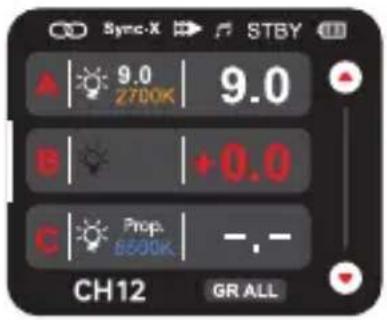
Click the group letter to enter the group interface (Group A is the default setting), as shown in the following figure, and set the numeric value.
| A | Current group |
| M/TTL | Flash mode setting |
| Beep setting for group A | |
| Same settings as in Speedlite mode | |
| 9.0 | Flash output in M mode |
| +0.0 | TTL value |
| Click to change the flash output | |
| Swipe up or down to change the group interface |

Operation
Further settings
Swipe from left to right to call up the interface for further settings. For the setting operations, see Speedlite mode.

Flash off on master light
Interface for channel setting

Tap to set the channel

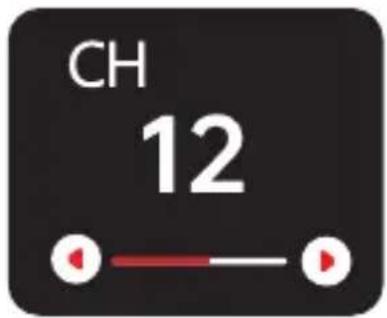
Slave mode
Setting the flash parameters in slave mode, as shown in the illustration. For the operation of the modelling light, see Speedlite mode.
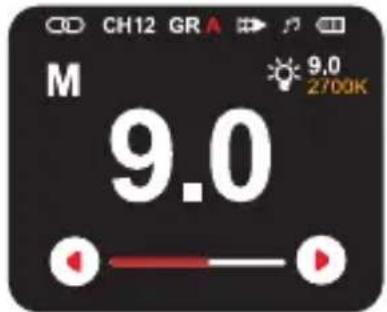
Other settings
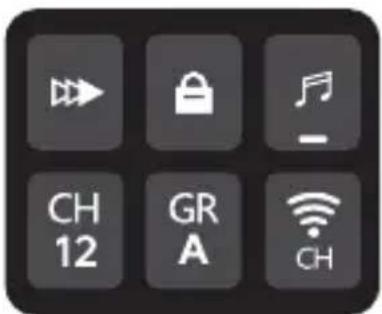
Swipe from left to right to call up the interface for other settings (as shown in the adjacent illustrations). For operation, see Speedlite mode.

Setting the wireless mode: CH, CH/GR, TTL-All

Click to customise the corresponding group
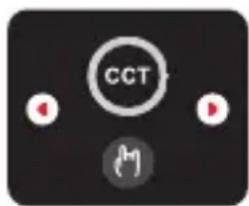
Continuous light mode
The brightness and color temperature settings are shown in this illustration.
CCT Color temperature mode

Click on the brightness for a quick change

Click on the color temperature for a quick change from 2700 to 6500 K

Click on the arrows to change the settings

Swipe the surface from right to left to switch to the light effect surface. The light effect settings are shown in the following illustration.
FX1 Light effect mode
100% 100% brightness adjustment 1 – 100%

Light effect type

Light effects Pause playback

Light effect frequency (1 - 9)

Available lighting effects

TV Paparazzi


Defective light bulb Spotlight


Storm SOS


Fire Warning


Pulse
Charging time
100 minutes via USB-C connection.
A red light illuminates during the charging process and a green light when fully charged.
Overheating protection (OH)
If the internal temperature is too high, overheating protection may occur. The recycling time can be extended to 6 seconds or 10 seconds.
Sleep mode
Switches to sleep mode without operation (optional 15/30/60/OFF), switches off automatically (optional 60/120/OFF) and wakes up directly with any button or the camera trigger on the device.
| Power 18.0 Ws | |
| Guide number 26 | |
| Modes TTL / Manual | |
| Synchronisation modes Normal / HSS / 1st / 2nd shutter curtain | |
| Power adjustment 9 steps (0.1 / 1.0 steps) | |
| Flash duration (t = 0.5 s) | 1/110 s |
| Recycling time 1.5 sec. (at full power) | |
| Burst mode Up to 20 shots per second | |
| Color temperature 5,600 K | ±200 K | |
| TLCI 97+ | |
| CRI 95 | |
| Channels | Groups 32 | 6 | |
| Power supply Battery operation: Input: 5.0 V 2.0 A max.‡ | |
| Max. flashes | Output: 8.4 V = 5.0 A max. |
| Battery operation: >1,000 (at full power) | |
| LED output continuous light | 12.0 W |
| Color temperature continuous light | 2,700 – 6,500 K |
| Illuminance | Without reflector: 2,700 K: >1,000 lux (1 m), 5,500 K: >1,500 lux (1 m), 6,500 K: >1,600 lux (1 m) Zoom wide angle: 2,700 K: >958 lux (1 m), 5,500 K: >1,500 lux (1 m), 6,500 K: >1,610 lux (1 m) Zoom spot: 2,700 K: >1,880 lux (1 m), 5,500 K: >2,590 lux (1 m), 6,500 K: >3,160 lux (1 m) |
| Connections | USB-C |
| Operating temperature 0 | up to 40 °C |
| Flash head | -7 ° up to 90 ° (pan / tilt) |
| Radio frequency band | 2.402 – 2.482 GHz |
| Max. radiated transmitting power | 6 dBm |
| Dimensions | weight | 12.6 x 10.6 x 7.9 cm | 408 g |
| What's in the box | HS Freeze Q1 / Q1s, USB-C cable, cold shoe stand, bag, quick start guide |
We reserve the right to update functions or parameters without further notice. Misprints and errors excepted. Reproduction of these operating instructions – even in part – is not permitted. *Only with adapter.

Dispose of the packaging according to its type. Use the local possibilities for collecting paper, cardboard and other materials (applicable in the European Union and other European countries with systems for the separate collection of recyclable materials).
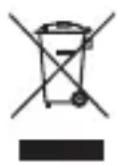
Devices that are marked with this symbol must not be disposed of with household waste! You are legally obliged to dispose of old devices separately from to dispose of household waste. Information on collection points that accept old appliances free of charge can be obtained from your local authority or town council.

Batteries and rechargeable accumulators must not be dis posed of in household waste! As a consumer you are legally obliged to dispose of all batteries and accumulators, whether they contain harmful substances* or not, to be disposed of in an environmentally sound manner. Accumulators and batteries are therefore marked with the symbol shown opposite. For more information, contact your dealer or contact return and collection points in your community.
*marked with: Cd = Cadmium, Hg = Mercury, Pb = Lead
EU Declaration of Conformity
Herewith Rollei GmbH & Co. KG declares that the radio system types "Rollei HS Freeze Q1" and "Rollei HS Freeze Q1s" comply with Directive 2014/53/EU.
The complete text of the EU Declaration of Conformity can be downloaded at the following internet addresses: www.rollei.com/egk/hsfreezeq1 www.rollei.com/egk/hsfreezeq1s

Rollei GmbH & Co. KG, In de Tarpen 42, D-22848 Norderstedt, Germany
Rollei
- Content
- Produkt-Übersicht
- Slave Modus
- Intended Use
- Explanation of Symbols
- Danger from electric current!
- Warnings and Safety Instructions
- Caution!
- Warnings for Rechargeable Batteries
- What's in the Box
- Product Overview
- Switching on the device
- Select mode
- Making settings
- Back to the main interface
- Overview of the setting options
- Speedlite settings
- Modelling light settings
- Flash mode settings
- M/TTL
- Master
- Operation
- Further settings
- Slave mode
- Other settings
- Continuous light mode
- Available lighting effects
- Charging time
- Overheating protection (OH)
- Sleep mode
- EU Declaration of Conformity
- Rollei
Brand : ROLLEI
Model : HS Freeze Q1
Category : Flash