
MH200 - Uncategorized DUAL - Free user manual and instructions
Find the device manual for free MH200 DUAL in PDF.


| Product Type | Universal Marine Gimbal Housing |
| Brand | Dual |
| Model | MH200 |
| Compatibility | Fits most single DIN size marine head units |
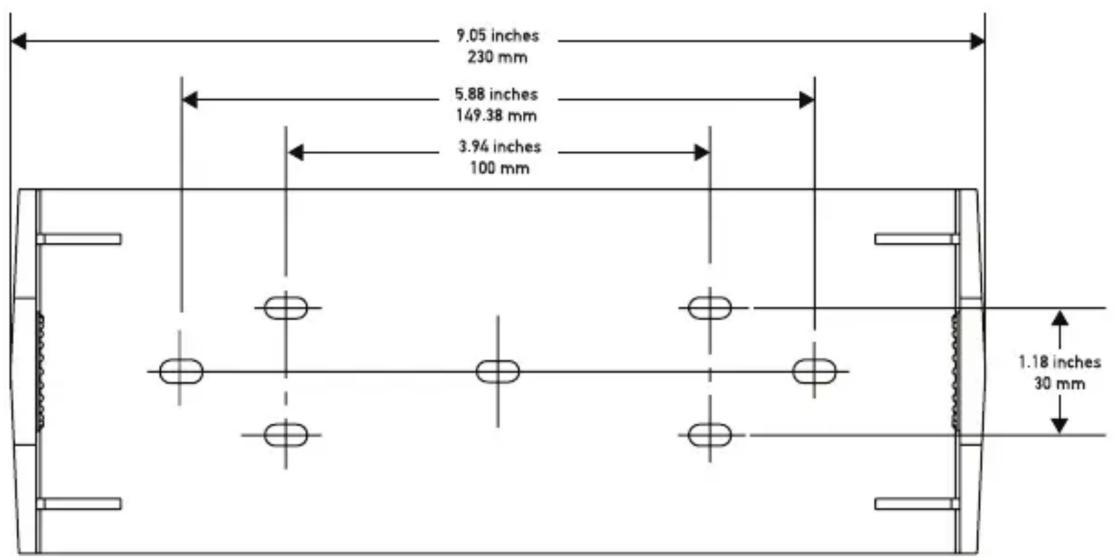
| Mounting Bracket Width | 9.05 in (230 mm) |
| Mounting Bracket Height | 5.88 in (149.38 mm) |
| Mounting Bracket Depth | 3.94 in (100 mm) |
| Mounting Bracket Hole Spacing | 1.18 in (30 mm) |
| Material | Marine grade construction |
| Protection Rating | Protects against splashes and debris |
| Adjustability | Adjustable viewing angle with thumbscrews |
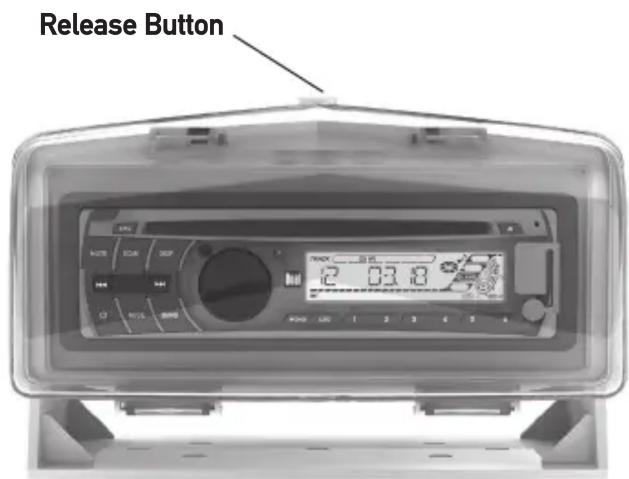
| Cover Mechanism | Press release button to open, click to close |
| Wiring Access | Interchangeable rubber grommets on left and right sides |
| Installation | Can be mounted on flat surface or suspended |
| Included Hardware | Mounting bracket and thumbscrews |
| Warranty | 1 year limited warranty |
| Safety Precautions | Disconnect battery before installation; avoid drilling into fuel/electrical lines |
| Maintenance | Wipe clean with a damp cloth; avoid harsh chemicals |
Frequently Asked Questions - MH200 DUAL
User questions about MH200 DUAL
0 question about this device. Answer the ones you know or ask your own.
Ask a new question about this device
Download the instructions for your Uncategorized in PDF format for free! Find your manual MH200 - DUAL and take your electronic device back in hand. On this page are published all the documents necessary for the use of your device. MH200 by DUAL.
USER MANUAL MH200 DUAL
natural_image
Exterior view of a digital water heater device with control panel and display (no readable text or symbols)MH200
INSTALLATION/OWNER'S MANUAL
Universal Marine Gimbal Housing
Preparation
Protect your marine head unit from damage and the harsh marine environment with the MH200 gimbal housing. This marine grade housing fits most single DIN size head units and provides full protection against splashes and debris.
Before You Start
- Disconnect negative battery terminal. Consult a qualified marine technician or service manual for instructions.
- Due to differences in head units, it is recommended to temporarily mount head unit in the gimbal housing before installation to ensure the cover will close properly.
- Use extreme caution when drilling holes to avoid damaging fuel lines or existing wiring.
Mounting Bracket Dimensions
Opening and Closing the Gimbal Housing
- Press the release button on top to open the cover and access the head unit.
- To close, fold the cover up and press until it clicks into place.
Mounting
Mounting
- Prepare surface for mounting the gimbal housing bracket. For maximum installation flexibility, the gimbal housing bracket can be mounted to any flat surface or it can also be suspended.
- Use the bracket as a template and mark and drill the holes for the mounting bracket. Use caution before you drill or cut! Be careful not to cut or drill into gas tanks, fuel lines, hydraulic lines, vacuum lines or electrical wiring.
- Secure the mounting bracket using supplied hardware. Attach gimbal housing by inserting the thumbscrews through the bracket and into the gimbal housing. Adjust the desired angle and hand tighten the thumbscrews. Do not overtighten the thumbscrews.
- Route all head unit wiring to the gimbal housing. Using a suitable tool, carefully cut an "X" in the desired rubber grommet. The grommets are interchangeable between the left and right sides of the gimbal housing.
- Install mounting sleeve (supplied with head unit) into gimbal housing. This may vary depending on head unit manufacturer and installation instructions. Refer to head unit owner's manual for details.
- Connect head unit wiring and test for correct operation.
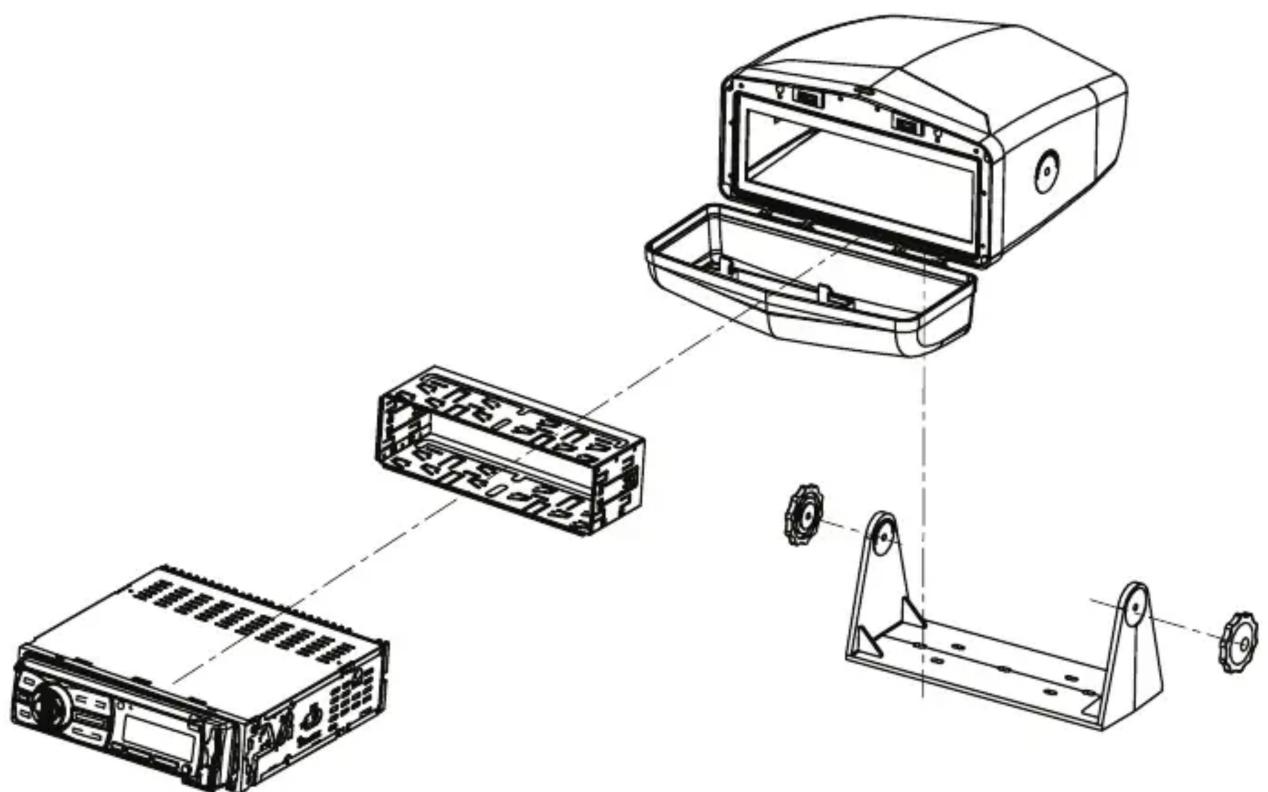
TYPICAL MOUNTING *Head Unit not included.
Limited One Year Warranty
This warranty gives you specific legal rights. You may also have other rights which vary from state to state.
Dual Electronics Corp. warrants this product to the original purchaser to be free from defects in material and workmanship for a period of one year from the date of the original purchase.
Dual Electronics Corp. agrees, at our option, during the warranty period, to repair any defect in material or workmanship or to furnish an equal new, renewed or comparable product (whichever is deemed necessary) in exchange without charges, subject to verification of the defect or malfunction and proof of the date of purchase. Subsequent replacement products are warranted for the balance of the original warranty period.
Who is covered? This warranty is extended to the original retail purchaser for products purchased from an authorized Dual dealer and used in the U.S.A.
What is covered? This warranty covers all defects in material and workmanship in this product. The following are not covered: software, installation/removal costs, damage resulting from accident, misuse, abuse, neglect, product modification, improper installation, incorrect line voltage, unauthorized repair or failure to follow instructions supplied with the product, or damage occurring during return shipment of the product. Specific license conditions and copyright notices for the software can be found via www.dualav.com.
What to do?
- Before you call for service, check the troubleshooting guide in your owner's manual. A slight adjustment of any custom controls may save you a service call.
- If you require service during the warranty period, you must carefully pack the product (preferably in the original package) and ship it by prepaid transportation with a copy of the original receipt from the retailer to an authorized service center.
- Please describe your problem in writing and include your name, a return UPS shipping address (P.O. Box not acceptable), and a daytime phone number with your shipment.
- For more information and for the location of the nearest authorized service center please contact us by one of the following methods:
• Call us toll-free at 1-866-382-5476
• E-mail us at cs@dualav.com
Exclusion of Certain Damages: This warranty is exclusive and in lieu of any and all other warranties, expressed or implied, including without limitation the implied warranties of merchantability and fitness for a particular purpose and any obligation, liability, right, claim or remedy in contract or tort, whether or not arising from the company's negligence, actual or imputed. No person or representative is authorized to assume for the company any other liability in connection with the sale of this product. In no event shall the company be liable for indirect, incidental or consequential damages.
Brand : DUAL
Model : MH200
Category : Uncategorized