
ABTS-08 - Portable Bluetooth Speaker AKAI - Free user manual and instructions
Find the device manual for free ABTS-08 AKAI in PDF.


| Product Type | Portable Bluetooth Speaker |
| Brand | AKAI |
| Model | ABTS-08 |
| Bluetooth Version | V5.1 |
| Bluetooth Range | 10 m |
| Speaker Size | 2 inch × 2 |
| RMS Power Output | 8W (4Ω) |
| Peak Power Output | 16W (4Ω) |
| Frequency Response | 80 Hz – 20 kHz |
| Battery Type | Lithium-ion, 3.7V, 1500mAh |
| Play Time | Up to 3 hours at max volume, 7 hours at 50% volume |
| Charging Time | Approx. 3 hours |
| Charging Input | 5V/1~3A via Type-C port |
| Dimensions (L×W×H) | 255 × 87 × 110 mm |
| Audio Inputs | Bluetooth, USB, AUX, FM Radio |
| Functions | TWS (AWS) pairing, Hands-free calling, Voice assistant, RGB lighting modes, Music playback control |
| Package Contents | Speaker, Type-C charging cable, Audio cable, User manual |
| USB Support | USB flash drive up to 32GB, supports MP3/WMA (assumed) |
| FM Antenna | Use charging cable as antenna |
| Material | Plastic with rainbow gradient back |
| Control Buttons | Power, Mode/AWS, Play/Pause/Voice, Volume/Forward/Backward, RGB Light |
| Reset | Reset button inside AUX port (use a pin) |
| Safety | Do not expose to rain, do not disassemble, avoid prolonged high volume |
Frequently Asked Questions - ABTS-08 AKAI
User questions about ABTS-08 AKAI
0 question about this device. Answer the ones you know or ask your own.
Ask a new question about this device
Download the instructions for your Portable Bluetooth Speaker in PDF format for free! Find your manual ABTS-08 - AKAI and take your electronic device back in hand. On this page are published all the documents necessary for the use of your device. ABTS-08 by AKAI.
USER MANUAL ABTS-08 AKAI
natural_image
Black portable electronic device with a rainbow-colored back cover and handle, no visible text or symbols.To ensure correct operation and avoid damage, please read this user manual carefully before using this product.
Features:
• 2.0CH portable Bluetooth speaker
- AWS function, achieve true wireless playing with double enhanced stereo sound
- Optimized voice assistant control
- Hands-free Mic for easy picking up the call
- Three different modes of RGB Lighting
- With A2DP Bluetooth, wireless stream music from any Bluetooth-enabled device
- USB support
- FM radio
- Line-in function, suitable for PC, MID, TV and other audio devices
● Built-in lithium rechargeable battery 1500mAh
Specifications:
Bluetooth version: V5.1
Bluetooth frequency: 2.4 – 2.483 GHz
Bluetooth channel emission power: '-6\~4dbm
Bluetooth connecting range: 10m
Speaker Size: 2 inch*2
RMS power output: 8W, 4Ω
Peak power output: 16W, 4Ω
Lithium-ion battery Capacity: 3.7V, 1500mAh
AKAI
Play time: 3 hours at maximum volume & 7 hours at 50% volume
Frequency Response: 80HZ-20KHZ
Product size: 255(L)*87(W)*110(H)MM
Package Contents:
• 1xPortable Bluetooth Speaker
- 1xType-C Charging cable
- 1xAudio cable
- 1xUser manual
Product Details:
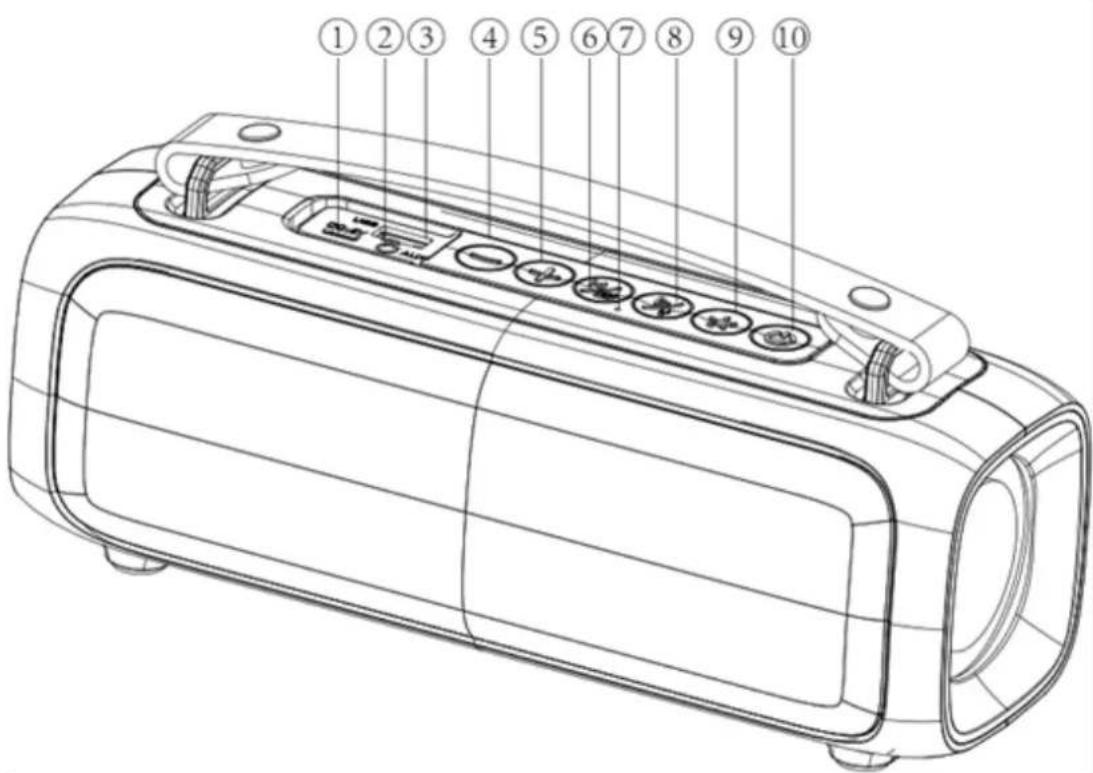
① Type-C Charging Jack
② AUX Port
③ USB Port
④ Backward/Volume Down
⑤ Forward/Volume Up
⑥ Mode/AWS Button
AKAI
⑦ Mic Hole
⑧ Play/Pause & Voice Assistant Button
⑨ RGB Light
⑩ Power Button
Power On/Off
Long-press the Power button to turn the speaker on and off.
Bluetooth:
- Turn the power button to "ON". The speaker enters Bluetooth mode automatically.
- Activate Bluetooth of mobile phone and search for device name "AKAI ABTS-08" then connect it.
- Play the music from your mobile phone and enjoy.
- Long-press Forward or Backward button to select songs.
- Short-press Forward or Backward button to adjust volume up and down.
- Short-press Play/Pause button to play/pause the music.
- Long-press the RGB Light button to disconnect the Bluetooth connection with the mobile device.
AWS Function:
- Turn on two identical speakers you want to pair, both under BT mode. Only need to set one of the two units.
- Long-press the AWS button to pair, speaker will make a tone to start to pair, and make a tone again after paired successfully.
- Make Bluetooth connection with your mobile phone to play music by the two paired Speakers.
- Long-press the AWS button again to exit AWS function.
Playing music from USB disk:
- Turn the Power button to "ON".
- Insert USB flash disk into slot, the speaker will play the stored music automatically. USB maximum support is 32GB
- Long-press Forward or Backward button to select songs you like, short-press to adjust the volume up and down.
- Short-press Play/Pause to play or pause.
Notes: Under any playing mode, when you insert a USB disk to the speaker, it will switch to play the USB disk.
FM Radio:
AKAI
- Under FM radio state, the charging cable provided treat as antenna, please Insert the charging cable to the charging port before using.
- Turn the power button to "ON", short-press the "MODE" button to enter radio state.
- Short-press "Play/Pause" button to mute the speaker. Long-press "Play/Pause" button to auto search the EM Channel and store it automatically.
- Long-press Forward or Backward button to change the stored FM channel, short-press to adjust the volume up and down.
AUX-IN:
- For other compatible music devices, use an audio line cable to connect from the device's "Line Out" to the "Aux In" of this device, then enjoy...
- Under any playing mode, when you use the audio cable to connect the device, it will auto-switch to the AUX mode.
- When using an external device, all functions can be controlled by the external device.
RGB Light
The RGB light is on when speaker powered on, user can short-press the RGB Light button to turn the three different light modes and turn it off.
Activating Voice Assistant:
- Make Bluetooth connection with your mobile phone.
- Long-press Voice Assistant button to activate voice assistant.
Hands-free call:
- Under Bluetooth connection status, if there is an incoming call, user can short-press Play/Pause button to accept the call or long-press Play/Pause button to reject the call.
● During the call, user can long-press Play/Pause button to switch to talking on the phone. - Short-press Play/Pause button or operate on mobile phone to end the call.
Reset Functionality:
If the speaker does not turn off or respond, user can short-press the RESET button in Aux Port with a small round pin.
More Remarks:
- Default volume is at 50% status of max volume.
- Play time may vary depending on volume level and music style.
How to charge:
- The charger is not included in the package, please charge this speaker via a standard 5V/1\~3A charger or via a PC.
- Charge time should be 3 hours. Once the speaker is full charged, the charging indicator will be off.
- The unit does not have power bank function; it is forbidden to charge other device via this
AKAI
unit or to connect other device via the USB port.
- To protect the battery, please do not use the speaker while it is charging.
Warning:
- Please store and use this product in an environment of normal temperature.
- Please do not expose this product to rain or moisture environment.
- Please do not disassemble, repair or modify this product by yourself without authorization.
- When cleaning this product, please use a soft cloth or with little water if needed, please do not use chemicals for cleaning.
- In order to have an extended product life and protect your hearing, please avoid listening to songs on maximum volume for long time.
- The product is with built-in lithium battery, to avoid dangers, please do not discard or put it in the fair.
DISPOSAL OF ELECTRICAL AND ELECTRONIC EQUIPMENT

This symbol on the product or packaging means that the product should not be treated as household waste. Do not throw garbage at the end of its life, but take it to a collection center for recycling. in this way you will help to protect the environment and be able to prevent any negative consequences that it would have on the environment and human health.
To find your nearest collection center:
-Contact local authorities
- Access the website: www.mmediu.ro;
- Request additional information from the store where you purchased the product.
IMPORTER: SC INTERVISION TRADING-RO SRL
Street I.C Bratianu, no. 48-52, building A, floor. 5, room 504-505, Pitesti City, Arges County, Romania
Postal code: 110121
AKAI
natural_image
Black portable electronic device with a colorful gradient screen and handle (no visible text or symbols)natural_image
Black rectangular electronic device with a handle and colorful gradient screen (no text or symbols visible)AKAI
natural_image
Black portable electronic device with a rainbow-colored back panel and handle (no visible text or symbols)AKAI
natural_image
Colorful portable electronic device with a black handle and rainbow gradient screen (no text or symbols visible)natural_image
Black portable electronic device with a rainbow-colored back panel and handle (no visible text or symbols)natural_image
Colorful portable electronic device with a black handle and rainbow gradient screen (no text or symbols visible)natural_image
Black portable electronic device with a colorful gradient screen and handle (no visible text or symbols)① Nabíjecí konektor typu C
② Port AUX
③ USB port
AKAI
natural_image
Colorful portable electronic device with a black handle and rainbow gradient screen (no text or symbols visible)
- Features:
- Specifications:
- AKAI
- Package Contents:
- Product Details:
- Power On/Off
- Bluetooth:
- AWS Function:
- Playing music from USB disk:
- FM Radio:
- AUX-IN:
- RGB Light
- Activating Voice Assistant:
- Hands-free call:
- Reset Functionality:
- More Remarks:
- How to charge:
- Warning:
- DISPOSAL OF ELECTRICAL AND ELECTRONIC EQUIPMENT
- IMPORTER: SC INTERVISION TRADING-RO SRL
Brand : AKAI
Model : ABTS-08
Category : Portable Bluetooth Speaker