
C III - Stool Sachtler - Free user manual and instructions
Find the device manual for free C III Sachtler in PDF.


| Product Type | Camera Pedestal |
| Brand | Sachtler |
| Model | C III |
| Max Payload | 55 kg (121 lbs) |
| Minimum Height | 715 mm (28.1 in) |
| Maximum Height | 1570 mm (61.8 in) |
| On-Shot Stroke | 42 cm (16.5 in) |
| Wheel Diameter | 125 mm (4.9 in) |
| Dolly Weight | 6.7 kg (14.8 lbs) |
| Column Weight | 9.8 kg (21.6 lbs) |
| Total Weight | 16.5 kg (36.4 lbs) |
| Code Number | 5195 |
| Included Accessories | Hand pump, Allen wrench (4 mm) |
| Wheel Brakes | Yes, on each wheel |
| Wheel-Angle Locks | Yes, for straight and circular moves |
| Transport Lock | Yes |
| Pressure Gauge | Yes, on column |
| Safety Valve | Yes, prevents overpressuring |
| Assembly | Simple: attach column to dolly, mount head |
| Maintenance | Wipe with clean, dry cloth |
| Safety Warning | Pressurized column rises rapidly; always secure transport lock |
Frequently Asked Questions - C III Sachtler
User questions about C III Sachtler
0 question about this device. Answer the ones you know or ask your own.
Ask a new question about this device
Download the instructions for your Stool in PDF format for free! Find your manual C III - Sachtler and take your electronic device back in hand. On this page are published all the documents necessary for the use of your device. C III by Sachtler.
USER MANUAL C III Sachtler

sachtler
We want to offer Sachtler products that are always state of the art.
Therefore we reserve the right to make changes based on technical advances.
1 General Information ....1
2 Intended use ....1
3 Symbols used in the user's manual....2
4 Safety Instructions....2
5 Scope of Supply ....3
6 Assembly of the Pedestal
6.1 Unfolding Dolly ....4
6.2 Connecting the column to the dolly ....4
6.3 Setting the height ....4
6.4 Mount the head to the pedestal ....4
6.5 Adjusting the C III 5
6.6 Adjusting the Dolly 6
6.7 Standby mode ....6
6.8. Dismantling....6
7 Cleaning and Maintenance ....7
8 Warranty....7
9 Technical Data....7
Inhaltsverzeichnis
This manual is an important part of the equipment and is aimed at personnel who operate and maintain the C III pedestal. It contains information about the C III and it's proper use. Above all it serves to safeguard users and the environment.
It is the duty of each user to familiarize themselves with the contents of the manual and to adhere exactly to all instructions relating to safety.
In addition the rules and regulations governing the prevention of accidents must also be observed. Please keep this manual for future reference.
2 Intended Use
This pedestal was developed for moving and elevating cameras in studios or other locations. Any use above and beyond this purpose is deemed improper.
The max. payload of the C III is 55 kg (121 lbs) and you must not exceed this limit.
The C III must only be maintained and serviced with original Sachler parts.
3 Symbols used in the user's manual
Indicates a possible danger to the life and health of users.
Non-observance of these instructions may have seriously harmful consequences to health, including life-threatening injuries.

Indicates a possibly harmful situation.
Non-observance can damage the machine or the environment.

Indicates that tools are needed to complete this operation.

4 Safety Instructions
-> A pressurized pedestal will rise rapidly when the safety lock is released.
-> Observe all current regulations for the prevention of accidents
5. Scope of Supply
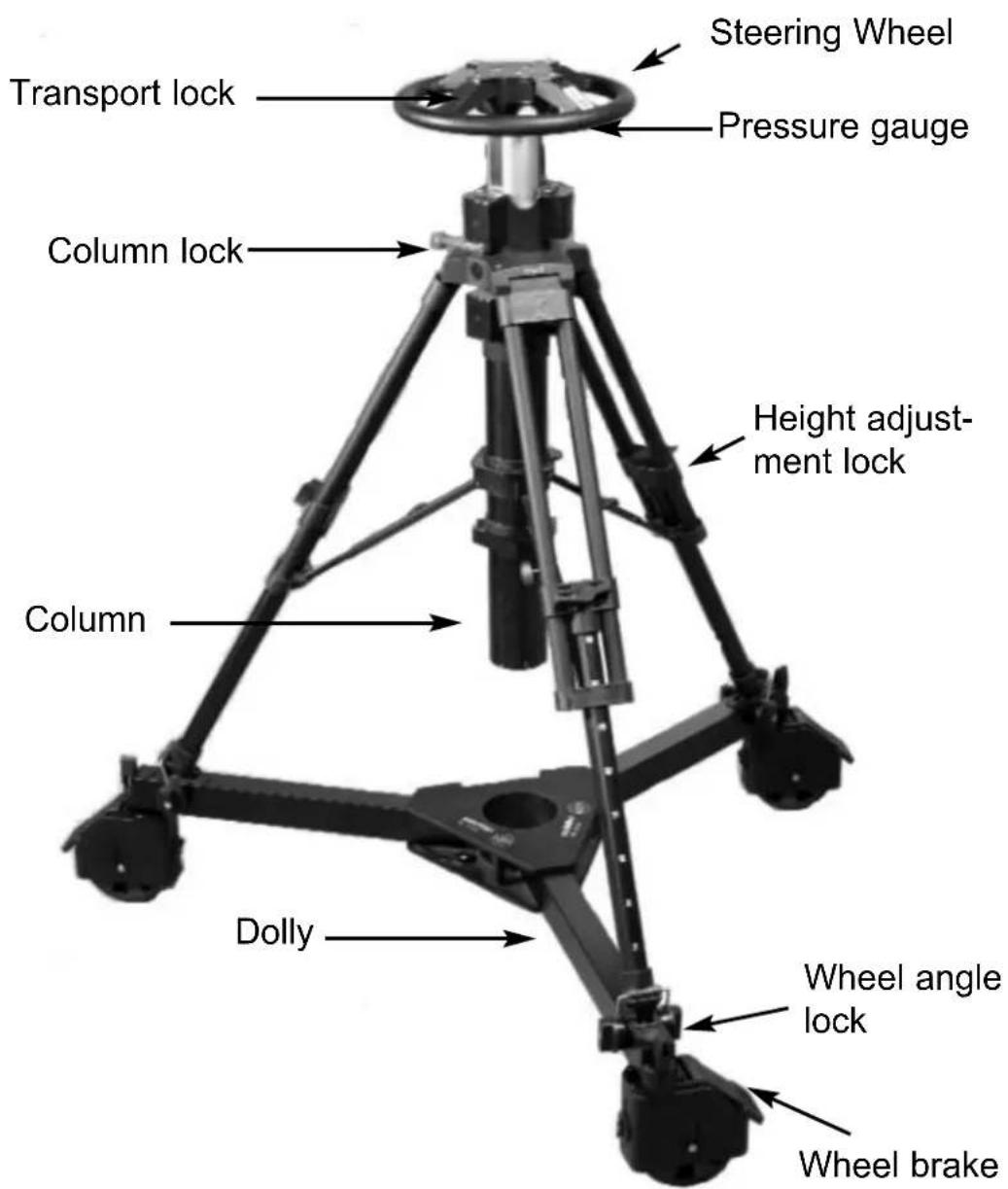
The C III comprises a telescopic column and a dolly. Both units can be separated for transport. It also includes a hand pump and an Allen Wrench No. 4mm.
6 Assembly of the Pedestal
6.1 Unfolding Dolly
Release the arms of the dolly by pushing the buttons on the bottom. Unfold the arms until they lock at the fully open position. — Apply the wheel brakes.

6.2 Connecting the column to the dolly
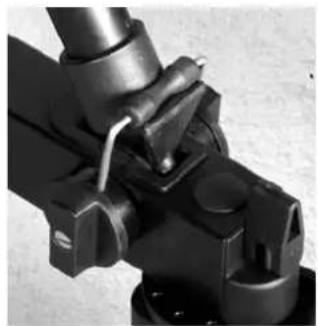
Place the column onto the dolly so that the spikes of the pedestal's legs fit in the recessess of the dolly. Turn the cams inward to tighten the spikes safely to the dolly.
6.3 Setting the height
Adjustable tripod stages allow for a variety of working heights.
Ensure that the centre column is secured by its transport lock when setting the tripod height.

6.4 Mount the head to the pedestal
While pushing down the steering wheel pull centre column's transport lock to release.
Rise column carefully to a convenient position for attaching the head and close the safety lock.

Connect the head to the column by tightening the 3 screws with the supplied allen wrench. Make sure that it is mounted securely.
Allen Wrench No 4 mm


6.5 Adjusting the C III
Mount camera and accessories before you start to pressurize the column.
Release column lock (red lever to green dot)

As some pressure is already applied at the factory, the centre column may now move upwards. You can check the pressure with the pressure gauge at the column.

Push down the center pin of the Schrader valve with the back of the valve cap and release air until the camera is held in position. If the center column won't hold the camera and moves downward mount the enclosed pump by pressing it straight and firmly onto the valve. Pump in a few strokes until the centre column will stay at the desired height. A safety valve is installed in the system to prevent overpressuring the column.

6.6 Adjusting the dolly
By turning the wheel-angle locks of the dolly straight and circular moves can be preset and repeatable. This angle-lock is completely independent of the wheels brake.

6.7 Standby mode
Lock centre column (red lever to red dot) and secure dolly by locking one caster.
Note: Prior to first use and after longer breaks move centre column several times fully up and down to achieve utmost smooth performance.

6.8 Dismantling
Completely remove camera and fluid head from pedestal. Make sure that the transport lock is engaged while continuing to dismantle the C III pedestal for transport.

7 Cleaning and maintenance
The C III should be wiped regularly with a clean and dry cloth to remove dirt and dust.
8 Warranty
Warranty expires if the CIII is operated improperly or not in line with the specified technical data (please refer to our general terms of sale and delivery).
Please register at www.sachtler.com for an extended warranty period.
9 Technical Data
Code No: 5195
Payload max: 55 kg (121 lbs)
Min height: 715 mm (28.1")
Max height: 1570 mm (61.8")
On-shot stoke: 42 cm (16.5")
Wheel diameter: 125 mm (4.9")
Dolly weight: 6,7 kg (14.8 lbs)
Column weight: 9,8 kg (21.6 lbs)
Total pedestal weight: 16,5 kg (36.4 lbs)
1 Allgemeine Information
6.7 Pausen
8 Gewährleistung
sachtler


- INHALTSVERZEICHNIS
- 2 INTENDED USE
- 3 SYMBOLS USED IN THE USER'S MANUAL
- 4 SAFETY INSTRUCTIONS
- SCOPE OF SUPPLY
- 6 ASSEMBLY OF THE PEDESTAL
- 6.1 UNFOLDING DOLLY
- 6.2 CONNECTING THE COLUMN TO THE DOLLY
- 6.3 SETTING THE HEIGHT
- 6.4 MOUNT THE HEAD TO THE PEDESTAL
- 6.5 ADJUSTING THE C III
- 6.6 ADJUSTING THE DOLLY
- 6.7 STANDBY MODE
- 6.8 DISMANTLING
- 7 CLEANING AND MAINTENANCE
- 8 WARRANTY
- 9 TECHNICAL DATA
- 1 ALLGEMEINE INFORMATION
- 6.7 PAUSEN
- 8 GEWÄHRLEISTUNG
Brand : Sachtler
Model : C III
Category : Stool