
Reference 6000cs - Car hands-free kit INFINITY - Free user manual and instructions
Find the device manual for free Reference 6000cs INFINITY in PDF.


| Product Type | Car Hands-Free Kit |
| Brand | Infinity |
| Model | Reference 6000cs |
| Dimensions | Approx. 100 × 50 × 20 mm |
| Weight | Approx. 50 g |
| Power Supply | 12V DC (cigarette lighter socket) |
| Bluetooth Version | Bluetooth 4.0 |
| Range | Up to 10 meters |
| Main Functions | Hands-free calling, audio streaming, noise reduction |
| Controls | Answer/end call, volume control, voice dial |
| Microphone | Built-in, noise-cancelling |
| Speaker | Built-in, full-range |
| Mounting | Clip-on sun visor or dashboard mount |
| Cable Length | 1.2 m |
| Material | ABS plastic |
| Compatible Devices | Smartphones with Bluetooth |
| Battery | No internal battery (powered by car) |
| Maintenance | Clean with a dry, soft cloth |
| Safety | Use in compliance with local traffic laws; do not operate while driving if distracted |
| Spare Parts | Power cable, mounting clip |
| Repairability | Repairs should be carried out by qualified personnel |
| General Information | User manual available for download in PDF |
Frequently Asked Questions - Reference 6000cs INFINITY
User questions about Reference 6000cs INFINITY
0 question about this device. Answer the ones you know or ask your own.
Ask a new question about this device
Download the instructions for your Car hands-free kit in PDF format for free! Find your manual Reference 6000cs - INFINITY and take your electronic device back in hand. On this page are published all the documents necessary for the use of your device. Reference 6000cs by INFINITY.
USER MANUAL Reference 6000cs INFINITY

Infinity®
reference series 5000cs, 6000cs & 6800cs
instructions
IMPORTANT: Installation of automotive stereo components can require extensive experience with a variety of mechanical and electrical procedures. Although these instructions explain how to install Reference Series speakers in a general sense, they do not show the exact installation methods for your particular vehicle. If you do not feel you have the experience, do not attempt the installation yourself; instead, ask your authorized Infinity car audio dealer about professional installation options.
WARNING: Playing loud music in an automobile can permanently damage your hearing, as well as hinder your ability to hear traffic. The maximum volume levels achievable with Infinity speakers, combined with high power amplification, may exceed safe levels for extended listening. We recommend using low volume levels when driving. Infinity accepts no liability for hearing loss, bodily injury, or property damage as a result of use or misuse of this product.
INSTALLATION WARNINGS AND TIPS
- A Iways wear protective eyewear when using any tools.
- T urn off all audio systems and other electrical devices before you start. Disconnect the (−) negative load from your vehicle's battery.
- Negative lead from your vehicle's battery.
- Keep speakers in their package until final installation. When moving a speaker, always rest it with the cone or dome facing up. Never use force to install any speaker.
- Check clearances on both sides of a planned mounting surface before drilling any holes or installing any screws. Remember that the screws can extend behind the surface.
- At the installation sites, locate and make a note of all fuel lines, hydraulic brake lines, vacuum lines, and electrical wiring. Use extreme caution when cutting or drilling in and around these areas.
CAUTION: In some cars, fuel tanks may be located directly beneath the rear deck. Check for adequate speaker basket clearance before considering this location! - Before drilling or cutting holes, use a utility knife to remove unwanted fabric or vinyl, to keep material from snagging in a drill bit or saw.
- F or door installations, check the clearance with the windows throughout the range of the window's travel, and verify that a mounted speaker will not interfere with the window crank or power window mechanism.
- If mounting speakers elsewhere, check for clearance around rear deck torsion bars, glove box, or other structural elements.
- Do not mount speakers where they will get wet.
INSTALLATION
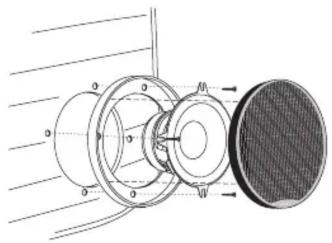
Figure 1.
Mounting the 5000cs woofer with the grille.
natural_image
Technical diagram of a mechanical assembly with concentric circles and a textured base (no text or symbols)INSTALLATION
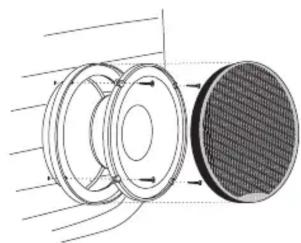
Figure 2.
Mounting the 6000cs woofer with the grille.
natural_image
Diagram of a mechanical component with three circular parts and directional arrows, no text or symbols present.NOTE: The 6800cs is designed to replace speakers installed behind existing vehicle grilles, and does not include grilles. If you are mounting the 6800cs woofer in a 6" x 8" location, use the supplied adapter. The adapter is not required in 5" x 7" applications.

Infinity®
INSTALLATION
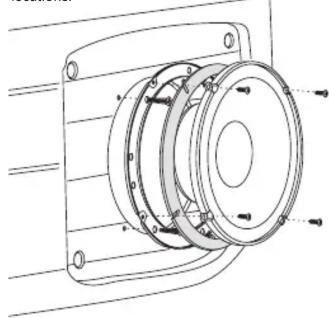
Figure 3.
Mounting the 6000cs woofer in standard speaker locations.
natural_image
Technical line drawing of a mechanical assembly with mounting flanges and a central circular component (no text or symbols)Note: The 6000cs uses an adapter to fit standard 6" openings. Secure the adapter ring to the vehicle using the sheet-metal screws provided, then attach the 6000cs woofer to the ring with the machine screws.
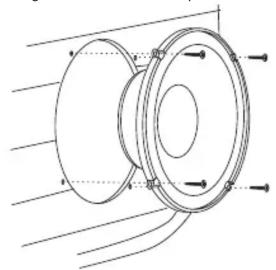
Figure 4.
Mounting the 6000cs in 165mm speaker locations.
natural_image
Technical line drawing of a mechanical component with mounting holes and internal flow lines (no text or symbols)INSTALLATION
Figure 5A.
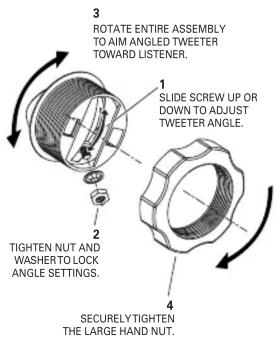
Mounting the tweeter using the I-Mount ^™ (patent no. 5,859,917) flush-mounting kit.
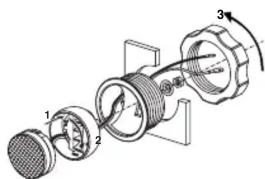
Note: Aim the tweeter at the listening position by sliding the stud in the groove on the back of the tweeter cup and rotating the entire assembly in the mounting surface. Lock the tweeter in place, using the small retaining nut and the large plastic mounting nut.
Figure 5B.
INSTALLATION
Figure 6.
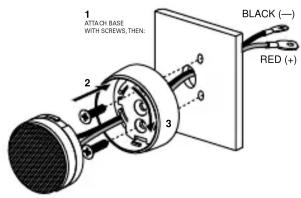
Mounting the tweeter using the surface-mounting kit.
CONNECTIONS
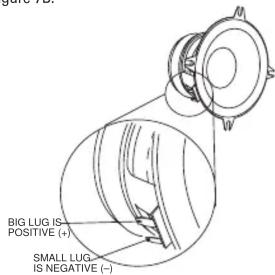
Connect the speakers to the crossover and the crossover to the amplifier, observing proper polarity.
Figure 7A.
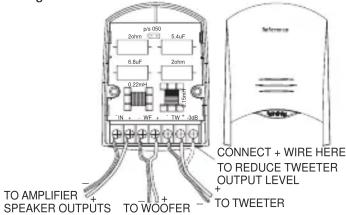
Figure 7B.
SPECIFICATIONS
5000cs
Type: 5-1/4" 2-Way Component System
Speaker Impedance: 4 Ohms
Power Handling: 75W RMS, 225W Peak
Frequency Response: 67Hz – 21kHz
Sensitivity (2.83V, 1m): 92dB
Crossover Frequency: 3.5kHz
Mounting Depth: Woofer: 2-1/4" (58mm)
Tweeter: 1-1/4" (32mm)
Cut-out Diameter: Woofer: 4-11/16" (120mm)
Tweeter: 1-13/16" (47mm)
6800cs
Type: 6" x 8"/5" x 7" 2-Way Component System
Speaker Impedance: 4 Ohms
Power Handling: 90W RMS, 270W Peak
Frequency Response: 49Hz – 21kHz
Sensitivity (2.83V, 1m): 92dB
Crossover Frequency: 3.5kHz
Mounting Depth: Woofer: 2-7/16" (62mm)
Tweeter: 1-1/4" (32mm)
Cut-out Diameter: Woofer: 5" x 7-1/4" (127mm x 185mm)
Tweeter: 1-13/16" (47mm)
6000cs
Type: 6-1/2" 2-Way Component System
Speaker Impedance: 4 Ohms
Power Handling: 90W RMS, 270W Peak
Frequency Response: 53Hz – 21kHz
Sensitivity (2.83V, 1m): 92dB
Crossover Frequency: 3.5kHz
Mounting Depth: Woofer: 2-1/16" (53mm)
Tweeter: 1-1/4" (32mm)
Cut-out Diameter: Woofer: 5" (127mm)
Tweeter: 1-13/16" (47mm)
A valid serial number is required for warranty coverage.
Features, specifications and appearance are subject to change without notice.
© 2002 Harman International Industries, Incorporated • Part No.: REFCSOM • Printed 12/02
H A Harman International Company
Declaration of Conformity
CE
We, Harman Consumer International
2, route de Tours
72500 Chateau-du-Loir
declare in own responsibility, that the products
described in this owner's manual are in compliance
with technical standards:
EN 50081-1:1992
EN 50082-1:1997

Emmanuel Millot
Harman Consumer International
Chateau-du-Loir, France. 12/02
Brand : INFINITY
Model : Reference 6000cs
Category : Car hands-free kit