
Pathlight - Lighting RING - Free user manual and instructions
Find the device manual for free Pathlight RING in PDF.


| Product Type | Solar Path Light |
| Brand | Ring |
| Model | Pathlight |
| Category | Outdoor Lighting |
| Material | Aluminum housing, polycarbonate lens |
| Dimensions | 14.5 x 4.3 x 4.3 inches (H x W x D) |
| Weight | 1.5 lbs (0.68 kg) |
| Power Source | Solar panel with rechargeable battery |
| Battery Type | Lithium-ion 18650, 3.7V, 2600mAh |
| Battery Life | Up to 12 hours on full charge |
| Light Source | LED (integrated) |
| Lumens | 100 lumens |
| Color Temperature | 3000K (warm white) |
| Motion Sensor | Not included (passive) |
| Dusk-to-Dawn Sensor | Yes, automatic |
| Water Resistance Rating | IP65 |
| Mounting Type | Ground stake or wall mount bracket (included) |
| Included Accessories | Ground stake, wall mount screws, rechargeable battery |
| Warranty | 1 year limited warranty |
| Maintenance | Clean solar panel with a soft cloth |
| Safety Certifications | UL, FCC |
Frequently Asked Questions - Pathlight RING
User questions about Pathlight RING
0 question about this device. Answer the ones you know or ask your own.
Ask a new question about this device
Download the instructions for your Lighting in PDF format for free! Find your manual Pathlight - RING and take your electronic device back in hand. On this page are published all the documents necessary for the use of your device. Pathlight by RING.
USER MANUAL Pathlight RING
natural_image
Black nightlight lamp with illuminated side panel and control buttons (no text or symbols visible)1. Set up your Pathlight.
Download the Ring app.
The app walks you through setting up and managing your Ring Pathlight.
Search for "Ring" in one of these app stores, or visit: ring.com/app


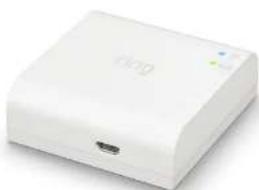
Set up your Ring Bridge.
The Bridge connects your Ring Smart Lights to the Ring app and the rest of your Ring devices.
To set up your Bridge, follow the instructions in the Ring app or the Bridge user manual.
natural_image
White wireless router device with ports and indicator lights (no visible text or symbols)Insert the batteries.
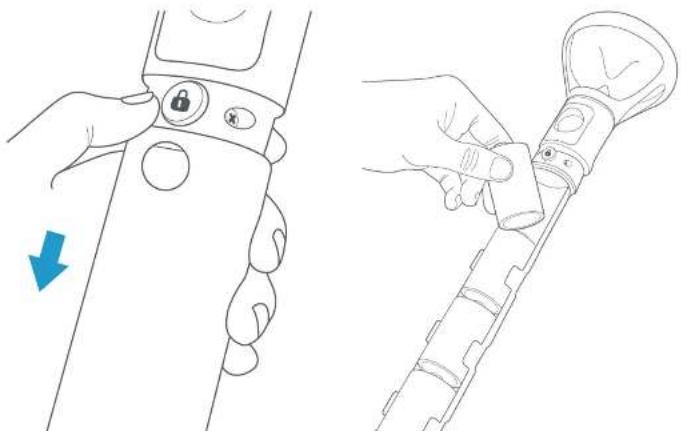
Push in the lock button on the front of your Pathlight, and slide off the battery cover.
Then insert four D Cell batteries (not included), flat end first, into the battery compartment.
natural_image
Line drawing showing a hand holding a device with a lock and a cable being inserted (no text or symbols)Set up your Pathlight in the Ring app.
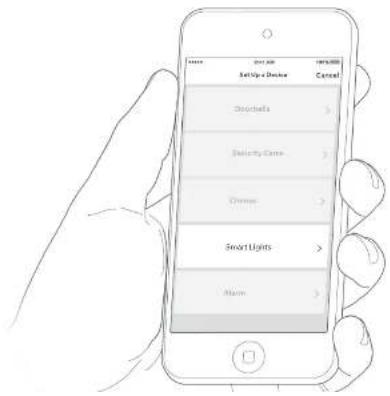
In the app, tap Set Up a Device.
When prompted, select Smart Lights and follow the in-app instructions.
Once setup is complete, slide the battery cover back onto your Pathlight.
2. Install your Pathlight.
Place the stake.
Gently drive the stake into the ground at your chosen location.
Make sure the "Sensor Direction" arrow is pointing toward the area you want to monitor for motion.

If you're installing multiple Pathlights, space them 5-7 feet apart for the best motion sensing performance.
Attach your Pathlight.
Lower your Pathlight onto the stake and twist clockwise until it clicks to lock it into place.


For additional help, visit: ring.com/help
Or give us a call...
US 1 800 656 1918
Canada 1 855 300 7289
Worldwide +1 310 929 7085
For a list of all our customer support numbers, visit: ring.com/callus
To review your warranty coverage, please visit www.ring.com/warranty.
Patents: www.ring.com/patents
© 2019 Ring LLC or its affiliates.
RING, ALWAYS HOME, and all related logos are trademarks of Ring LLC or its affiliates.
Last updated: 01/04/19
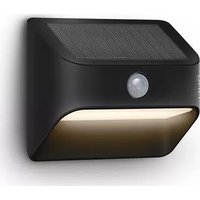


Brand : RING
Model : Pathlight
Category : Lighting