
ADD4954 - Water dispenser PHILIPS - Free user manual and instructions
Find the device manual for free ADD4954 PHILIPS in PDF.


| Product Type | Water Dispenser |
| Brand | Philips |
| Model | ADD4954 |
| Dimensions (W x D x H) | Approx. 200 x 300 x 400 mm |
| Weight | Approx. 3.5 kg |
| Power Supply | AC 220-240V, 50/60 Hz |
| Power Consumption | 550 W (heating) / 90 W (cooling) |
| Water Tank Capacity | 1.5 L (hot), 2.0 L (cold), 2.0 L (room temp) |
| Temperature Settings | Hot (85-95°C), Cold (5-15°C), Room Temperature |
| Child Lock | Yes |
| Drip Tray | Removable for easy cleaning |
| Material | ABS plastic, stainless steel heating element |
| Filter | Replaceable filter (model: FIDENO or compatible) |
| Maintenance | Descaling every 3 months recommended |
| Safety Features | Automatic shut-off, boil-dry protection |
| Spare Parts | Available from Philips service centers |
| Manual | Free PDF download at notice-facile.com or Philips website |
| Warranty | 2 years (subject to terms) |
Frequently Asked Questions - ADD4954 PHILIPS
User questions about ADD4954 PHILIPS
0 question about this device. Answer the ones you know or ask your own.
Ask a new question about this device
Download the instructions for your Water dispenser in PDF format for free! Find your manual ADD4954 - PHILIPS and take your electronic device back in hand. On this page are published all the documents necessary for the use of your device. ADD4954 by PHILIPS.
USER MANUAL ADD4954 PHILIPS
natural_image
Line drawing of a Philips water dispenser with front panel and side door (no text or symbols on device body)User Manual 1-6
1 Main technical specification 1
2 Product overview 2
3 Instruction 3
4 Precautions 3
5 5Cleaning and maintenance
6 5 Trouble shooting
7 Guarantee and Service 6
8 Packing list 6
1 Main technical specification
| Model | ADD4954 |
| Rated voltage | 220V-240V~ |
| Rated frequency | 50Hz |
| Heating power | 170W/350W |
| Cooling power | 85W |
| Hot water | ≥90°C, 3.8L/h with high power, 1.8L/h with low power |
| Cold water | ≤10°C, 2L/h |
| Environmental temp. | T |
| Coolant | R134a, 38g |
| Relative humidity | ≤90% |
| Protection of anti-electric shock | I |
2 Product overview
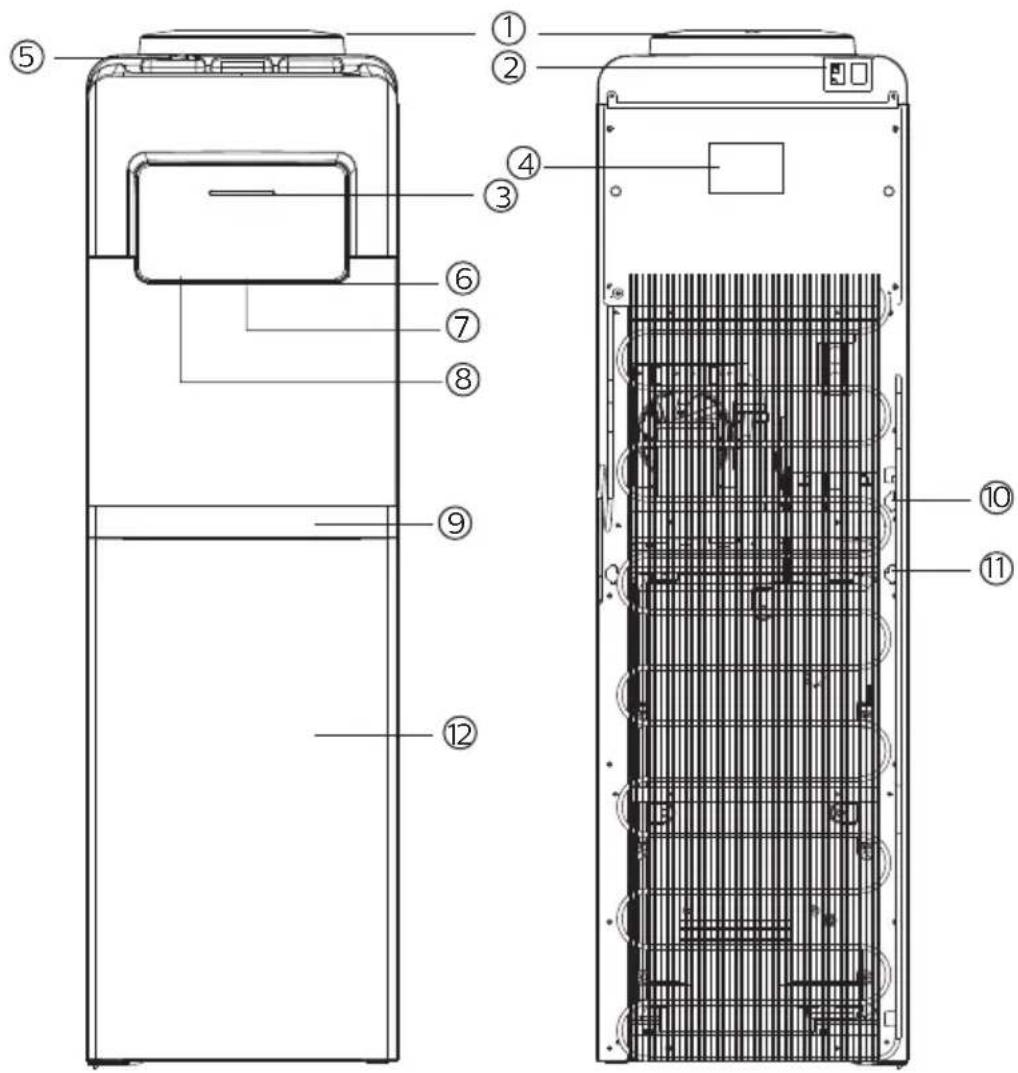
① Bottle Seat
② Power Switch
③ Indicator Lights
④ Information Plate
⑤ Child Safety Lock
⑥ Cold Water Faucet
⑦ Ambient Water Faucet
⑧ Hot Water Faucet
⑨ Drip Tray
⑩ Electric Power Cord
⑪ Drain Plug
⑫ Lower Cabinet
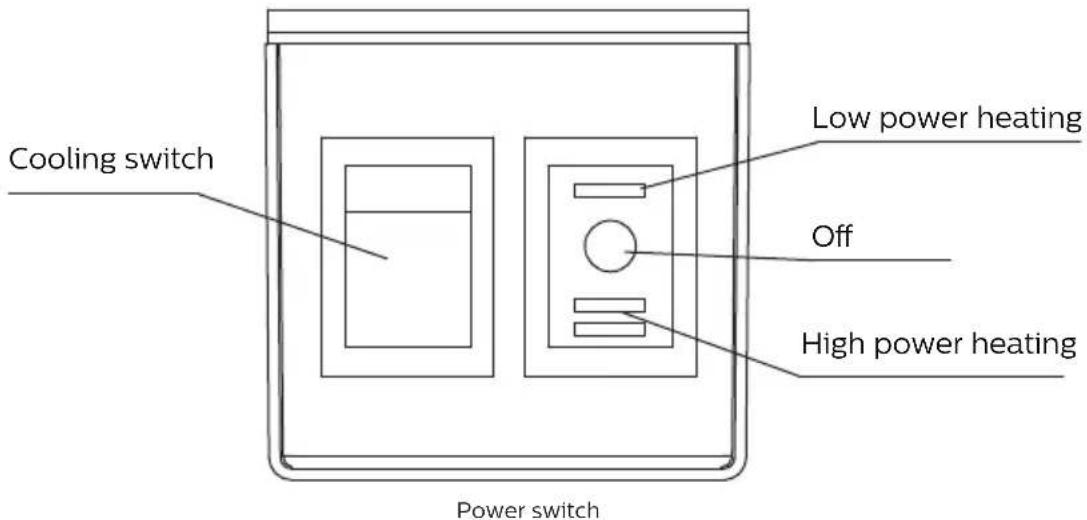
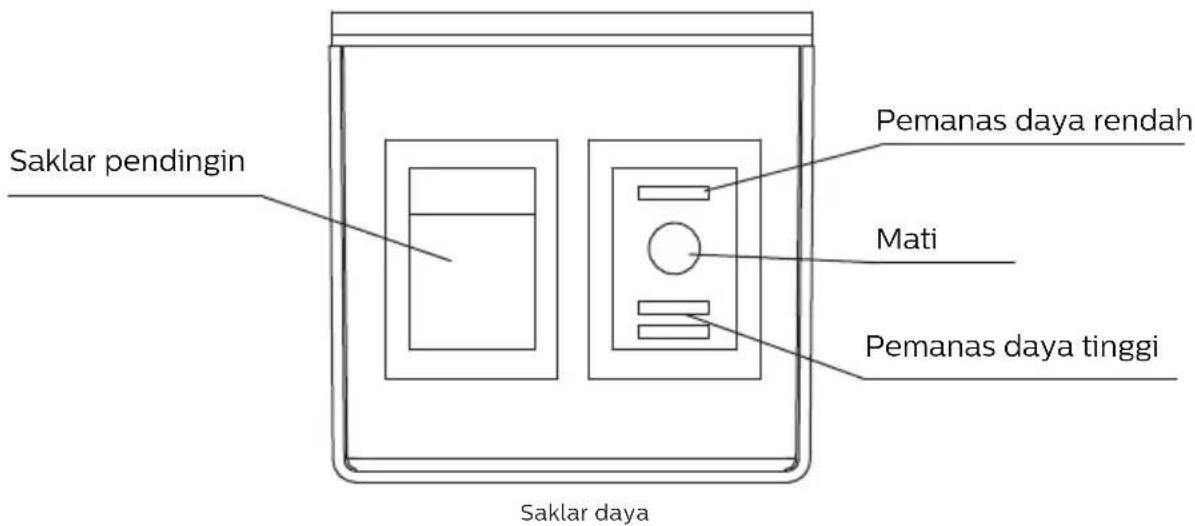
At the back of the dispenser there is a black switch which controls the heating power. You may press it to switch between high power, low power and OFF.
Every time when you plug in the water dispenser again, it will need some time for getting hot and cold water.
Turn the black heating switch to 'I', please wait for around 30 minutes for hot water; Turn the black heating switch to 'II', please wait for around 15 minutes for hot water; Turn the green cooling switch to 'ON', please wait for around an hour for cold water.
3 Instruction
- Unpack the water dispenser. Place the dispenser indoors, on a flat surface and at a distance no less than 15 cm from the back wall.
- Insert the bottle vertically on the seat
- Press the red hot water faucet until water flows out.
- Insert the power plug to the wall socket.
- Turn on the power switch on the back of the unit. The cooling or heating feature will start running. The indicator light will be on when heating or cooling function is working. Do not touch both switches during the time.
- Enjoy the hot or cold water you need.
- If you are not going to use hot water, turn the black heating switch to 'O'; if you are not going to use cold water, turn the green cooling switch to "OFF" to conserve energy.
4 Precautions
- The drain plug on the back of the unit may become loose during shipping. Fasten the drain plug tightly before you start to operate the unit. If the drain plug is loose, the unit may leak and cause floor damage.
- Make sure to have poured water from the hot water faucet before plugging and switching the appliance ON to heat. If the dispenser is turned ON with an empty water tank, it can be damaged.
- When you are ready to move the water dispenser, do not tilt more than 45^ to avoid damage to the compressor.
- Keep this appliance away from high temperatures and in a dry and ventilated place. Never install it in the open air or under rain or direct sunlight.
- Children should not use the red hot water tap.
- If the appliance is not going to be used for a long period of time, unplug it and drain all water in its interior.
- Before the first use and after a long period of not using it, the water tank and water pipes should be cleaned well. If possible, they should be disinfected and disinfect, and the first heated water must be discarded (switch the heating switch to 'O' while draining the system).
- Wash and disinfect the system every 3-6 months with a suitable cleaner and according to its instructions for use.
- Do not pull out the cable to unplug. Do not turn on and off the appliance by connecting it and disconnecting it from the source of electricity.
- Do not clean the outside of the appliance with water in case of electric shock. Clean it with a soft cloth.
- If you are not using the appliance for a long period of time or during the night, you can turn it off to save energy.
- Do not attempt to change the power cord by yourself if it has any damage. Contact the aftersales personnel for support.
· If the power cable suffers any damage, contact the aftersales personnel for support.
- The equipment must be installed keeping easy access to the electrical plug.
- WARNING – to avoid the risks of an unstable installation, the equipment must be installed following its instruction.
- WARNING – keep the ventilation openings at the back of the appliance uncovered and unobstructed.
- NOTICE - do not damage the refrigerant circuit.
· The environmental temperature for this appliance should be between 18°C and 38°C.
- This appliance can be used by children aged from 8 years and above and persons with reduced physical, sensory or mental capabilities or lack of experience and knowledge if they have been given supervision or instruction concerning use of the appliance in a safe way and understand the hazards involved. Children shall not play with the appliance. Cleaning and use maintenance shall not be made by children without supervision.
- Do not store explosive substances such as aerosol cans with a flammable propellant in this appliance.
5 Cleaning and maintenance
· To avoid accidents, turn off and unplug the water dispenser from the outlet before cleaning.
- A soft damp cloth may be used to clean the surface of the water dispenser. When necessary, a mild detergent may be used. DO NOT use corrosive chemical solvents to clean the unit, as this may damage the surface of the water dispenser.
· DO NOT pour water on the exterior of the unit to avoid getting the internal electrical system wet. DO NOT immerse the unit in water when cleaning.
· The water bottle cap, hose, and drip tray may be washed in a dishwasher (top rack only).
- Keep the water dispenser 6 inches (15cm) away from the wall so it can work properly. Make certain all ventilation openings are clear of obstruction.
- Do not damage the heating or cooling system, paying particular attention to the black condenser or heating radiator on the back of the water dispenser.
- If you will not use the water dispenser for a long period of time, please unplug the power cord and drain the water dispenser. Drain the water from all faucets, then remove the drain plug on back and allow it to drain. Make certain the drain plug is fastened tightly when finished.
6 Trouble shooting
| Trouble Possible causes Solutions | ||
| Lights do not lit | 1.Appliance is not connected to the electrical system2.The switch is not on | 1.Make sure that the switch is ON and the plug is connected2.Turn the switch into on |
| Leaking | 1.The water tank is broken2.The water pipe is broken3.The faucet is damaged | Contact aftersales personnel for support |
| Not heating | 1.Heating switch is damaged or makes not contact2.The heating tank is broken3.The electrical connection is loose | Contact aftersales personnel for support |
| Not cooling | 1.Cooling switch is damaged or makes no contact2.The electrical connection is loose | Contact aftersales personnel for support |
7 Guarantee and Service
This product includes a two-year warranty for the dispenser and five-year warranty for compressor from the date of purchase. For more details about warranty conditions, please refer to the warranty information in the box. If you need more information, please visit: www.Philips.com.
Within the warranty period, you will receive free warranty service for any damage caused by the manufacturing process or components under normal operation confirmed by our maintenance service.
The warranty service does not include frequent replaced consumable components (water purifier filter, pitcher filter, granular activated carbon, ion exchange resin, hollow fiber membrane, etc.), auxiliary devices, transportation fee and door-to-door service.
Please show the proof of purchase to the service personnel during maintenance.
You cannot receive free warranty service under the following conditions:
- Damage by improper operation, such as improper components connection, improper installation, deprived of manual use, misoperation.
- Negligence and damage because of transportation or other accident.
- Maintenance and modification without approval.
- Other damage caused by force majeure (such as natural disaster, abnormal voltage, etc.).
- Damage caused by general use outside home (e.g. industrial and commercial use).
- Aging, wear and tear caused by normal operation of the product without affecting normal operation of the product.
This statement serves as a publicity for free maintenance within the specified time limit and conditions, and does not limit the legal rights of consumers.
8 Packing list
| Water dispenser | 1x |
| User Manual | 1x |
Please keep this user manual for future reference.
Daftar Isi
① Dudukan galon
② Saklar daya
③ Lampu indikator
④ Label informasi
⑤ Kunci pengaman anak untuk air panas
⑥ Tombol kran air dingin
⑦ Tombol kran air normal
⑧ Tombol kran air panas
⑨ Baki tetesan air
⑩ Kabel daya listrik
⑪ Saluran pembuangan
⑫ Kabinet bawah
Register your product and learn more in the website link below: www.philips.com/welcome
Specifications are subject to change without notice
© 2019 AquaShield
All rights reserved.
The Philips trademark and the Philips Shield Emblem are registered trademarks
of Koninklijke Philips N.V. used under license.
This product has been manufactured by and is sold under the responsibility of Hong Kong AquaShield Health
Technology Company Limited and Hong Kong AquaShield Health Technology Company Limited is the warrantor in relation to this product.
Rev A Sep 19
Brand : PHILIPS
Model : ADD4954
Category : Water dispenser