
CDP-9 - Media player NuPrime - Free user manual and instructions
Find the device manual for free CDP-9 NuPrime in PDF.


| Product Type | Media Player (CD Player, DAC, Preamp, Headphone Amp) |
| Disc Compatibility | CD-DA, CD-R, CD-RW |
| Sampling Rates (USB) | PCM up to 32-bit/768kHz; DSD up to DSD512 (via DoP) |
| Sampling Rates (Coaxial) | PCM up to 768kHz; DSD up to DoP256 |
| Sampling Rates (Optical) | PCM up to 192kHz; DSD up to DoP64 |
| DAC THD+N | 0.0005% |
| DAC SNR | >120 dB |
| CD THD+N | 0.003% |
| CD SNR | >114 dB |
| Headphone Output Power | 150 mW @ 33 ohms |
| Analog Output (RCA) | 4 Vrms |
| Analog Output (XLR) | 8 Vrms |
| Digital Outputs | Optical (DoP64), Coaxial (DoP256), I2S (DoP512) |
| Inputs | Coaxial, Optical, USB, AES, Extension (for Bluetooth/WiFi) |
| Volume Control | FPGA-based resistor ladder; 99 steps of 0.5 dB |
| Headphone Output | 3.5mm front panel |
| Dimensions (W x D x H) | 235 mm x 281 mm x 55 mm (including feet) |
| Weight | 2.3 kg |
| Power Supply | 100-240V AC adapter; DC 19V/1.2A input |
| Power Consumption | Low standby mode |
| Finish | Black or silver anodized aluminum |
| Safety Certifications | FCC Class B, CE |
| Warranty | 1 year limited warranty |
Frequently Asked Questions - CDP-9 NuPrime
User questions about CDP-9 NuPrime
0 question about this device. Answer the ones you know or ask your own.
Ask a new question about this device
Download the instructions for your Media player in PDF format for free! Find your manual CDP-9 - NuPrime and take your electronic device back in hand. On this page are published all the documents necessary for the use of your device. CDP-9 by NuPrime.
USER MANUAL CDP-9 NuPrime
Ultra-High sampling rate converter, DAC & single-speed Red Book error-correcting CD Player

NUPRIME
FCC Notice - Declaration of Conformity Information
This equipment has been tested and found to comply with the limits for a Class B digital device, pursuant to part 15 of the FCC Rules. These limits are designed to provide reasonable protection against harmful interference in a residential installation. This equipment uses and can radiate radio frequency energy and, if not installed and used in accordance with the instructions, may cause harmful interference to radio communications.
However, there is no guarantee that interference will not occur in a particular installation. If this equipment does cause harmful interference to radio or television reception, which can be determined by turning the equipment off and on, the user is encouraged to try to correct the interference by one or more of the following measures:
- Reorient or relocate the receiving antenna.
- Increase the separation between the equipment and receiver.
- Connect the equipment into an outlet on a circuit different from that to which the receiver is connected.
- Consult the dealer or an experienced radio/TV technician for help.
WARNING: Only peripherals complying with the FCC class B limits may be attached to this equipment.
Changes or modifications made to this equipment, not expressly approved by us or parties authorized by us could void the user's authority to operate the equipment. This device complies with part 15 of the FCC Rules. Operation is subject to the following two conditions: (1) This device may not cause harmful interference, and (2) this device must accept any interference received, including interference that may cause undesired operation.
NUPRIME
EU Declaration of Conformity

Hereby, NuPrime Audio, Inc. declares that this device is in compliance with the essential requirements and other relevant provisions of Directive 2004/108/EC.
The manufacturer of this product is NuPrime Audio, Inc., 1712 Pioneer Ave. Ste 1817, Cheyenne, Wyoming 82001, USA.
The Authorized Representative for EMC and product safety is NuPrime Audio, Inc., 1712 Pioneer Ave. Ste 1817, Cheyenne, Wyoming 82001, USA.
For any service or guarantee matters please refer to the addresses given in separate service or guarantee documents.
For customers in Europe

Disposal of Old Electrical & Electronic Equipment (Applicable in the European Union and other European countries with separate collection systems)
This symbol on the product or on its packaging indicates that this product shall not be treated as household waste. Instead it shall be handed over to the applicable collection point for the recycling of electrical and electronic equipment. By ensuring this product is disposed of correctly, you will help prevent potential negative consequences for the environment and human health, which could otherwise be caused by inappropriate waste handling of this product. The recycling of materials will help to conserve natural resources. For more detailed information about recycling of this product, please contact your local Civic Office, your household waste disposal service or the shop where you purchased the product.
NUPRIME
SAFETY INSTRUCTIONS
There are two categories of Safety Instructions included in this manual:
- Product Warnings, (i.e., what must never be done to assure avoiding those hazards that could cause bodily injury or property damage); and
• User Directions (i.e., what must always be done to assure the safe use of your device).
The Safety Instructions contained in this manual have been categorized in accordance with the seriousness of the potential hazards through the use of Signal Words. Those Signal Words, and their intended meanings, are as follows:
DANGER: Indicates that a failure to observe the Safety Instructions could result in death or catastrophic bodily injury.
WARNING: Indicates that a failure to observe the Safety Instructions could result in serious bodily injury.
CAUTION: Indicates that a failure to observe the Safety Instructions could result in minor bodily injury or property damage.
NOTE: Designates important information that relates to activities and/or conditions that might result in loss of data and/or damage to your device.
Safe Use and Operation of Your Device
This equipment emits stray RF energy and will interfere with the reception of signals by airborne electronic navigational devices or medical devices. Do not operate this equipment near any sensitive medical devices.
WARNING: Use only grounded AC power cords.
Always immediately disconnect the power to the equipment in the event the device emits an unusual odor or sound or generates smoke.
NUPRIME
WARNING: Never attempt to disassemble, repair or make any modification to your device.
Disassembly, modification or any attempt at repair could cause bodily injury or property damage, as well as damage to the device itself.
WARNING: Your device is not a toy. Never allow children to play with your device. Misuse, rough or improper handling of your device by children could result in serious bodily injury for any of the enumerated safety warnings in this manual. In addition, always keep all accessories and components out of the reach of small children as small parts might present a choking hazard. Seek immediate medical attention if choking occurs or if any small part has been swallowed.
CAUTION: Never raise the sound volume level too high when using your device with earphones. An excessive sound volume level could cause damage to your hearing.
WARNING: To reduce the risk of fire or electric shock, do not expose the unit to moisture or water.
Do not allow foreign objects to get into the enclosure. If the unit is exposed to moisture, or a foreign object gets into the enclosure, immediately disconnect the power cord from the wall. Take the unit to a qualified service person for inspection and necessary repairs.
Read all the instructions before connecting or operating the component.
Keep this manual so you can refer to these safety instructions.
Heed all warnings and safety information in these instructions and on the product itself. Follow all operating instructions.
Do not use this unit near water.
You must allow a minimum 10 cm or 4 inches of unobstructed clearance around the unit. Do not place the unit on a bed, sofa, rug, or similar surface that could block the ventilation openings. If the unit is placed in a bookcase or cabinet, there must be ventilation of the cabinet to allow proper cooling. Keep the component away from radiators, heat registers, stoves, or any other appliance that produces heat.
NUPRIME
The unit must be connected to a power supply only of the type and voltage specified on the rear panel. Connect the component to the power outlet only with the supplied power supply cable or an exact equivalent. Do not modify the supplied cable.
Do not route the power cord where it will be crushed, pinched, bent, exposed to heat, or damaged in any way. Pay particular attention to the power cord at the plug and where the cord exits the back of the unit.
The power cord should be unplugged from the wall outlet during a lightning storm or if the unit is to be left unused for a long period of time.
Immediately stop using the component and have it inspected and/or serviced by a qualified service agency if:
- The power supply cord or plug has been damaged.
- Objects have fallen or liquid has been spilled into the unit.
• The unit has been exposed to rain. - The unit shows signs of improper operation.
The unit has been dropped or damaged in any way
NUPRIME
Introduction
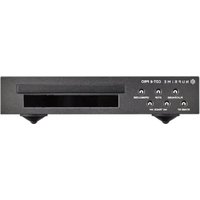
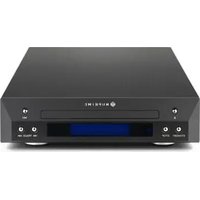
Here now and for the forthcoming decade: The NuPrime CDP-9 is a highly accurate CD player with an integrated high-end DAC and preamp. A powerful DSP-based decoder that provides all Red Book error-correction capabilities with master-clock control of the entire decoding system, thus lowering jitter significantly. The transport's single speed minimizes vibration and unbalanced discs. The high-performance DAC, together with a selectable sampling rate converter for the digital output (up to 32bit/768kHz and DSD512) converts the CD format to either SPDIF at highest sampling rate or DSD format up to DSD512.
Features
Highly Accurate CD Playback
• A powerful ARM chip LPC2103F CD reads, writes and controls error correction
• Philips SAA7824HL high-end laser reads/writes head control and decodes chips
• Supports CD-DA CD-R, CD-RW
• Algorithm reduces digital interference and jitter
A Reference Class Preamp
- Advanced, FPGA-implemented, switched-resistor ladder network for controlling volume with a single resistor in the signal path at any volume setting
• Individually adjustable volume on each input for precise source-level matching - Volume adjustments in 99 precise 0.5dB increments. Full microprocessor control with memory retention
Sampling Rate Converter
- The sampling rate of any digital inputs, including CD playback, can be converted up or down between PCM and DSD, from 44.1kHz to 768kHz or DSD64 to DSD512
- The conversion is achieved by up-sampling to mega hertz before down converting to the targeted sampling rate with ultra-low jitter and distortion
NUPRIME
Headphone Amp
• High performance op-amp headphone amp
Compatible OS
• Exclusive driver software for Windows
• Standard driver software for Mac
Power and Mechanical
- Low power consumption in Standby Mode
• Available in black or silver anodized aluminum finish
Specifications
- USB Sampling Rates: 44.1KHz, 48KHz, 88.2KHz, 96KHz, 176.4KHz, 192KHz, 352.8KHz, 384KHz and DSD 2.8MHz(64), 5.6MHz(128), 11.2MHz(256)
- Coaxial Sampling Rates: 44.1KHz, 48KHz, 88.2KHz, 96KHz, 176.4KHz, 192KHz, 352.8KHz, 384KHz, 705KHz, 768KHz, Dop 64, Dop128, Dop 256
• Optical Sampling Rates: 44.1KHz, 48KHz, 88.2KHz, 96KHz, 176.4KHz, 192KHz, Dop64 - Bit Resolution: 16-32-bits
• D/A THD+N: 0.0005 %
• D/A SNR > 120 dB
• Frequency Response: 10Hz to 20KHz ± 0.3dB - CD THD+N: 0.003%
- CD SNR > 114 dB
• Headphone output power: 150 mW @ 1 kHz and 33 ohm load
• Dimensions: 235 mm W x 281 mm D x 55 mm H (including feet) - Weight: 2.3Kg
• Worldwide AC voltage: 100VAC\~240VAC Adapter
NUPRIME
Quick Start Guide

1 CD tray
2 Control Knob:
Power :
Hold and press for 3 sec to ON/OFF standby mode.
Volume:
Turn the knob to adjust volume.
Input Selection:
Briefly press to switch between input channels.
3 3.5mm Earphone out
4 Display
5 Standby indicator light
6 IR remote control sensor
7 Function buttons
NUPRIME
Rear Panel View:
![graph TD A["CD/DVD/BD Players"] -->|AES| B["USB"] C["Computer or NAS"] -->|AES| B D["CD/DVD/BD Players & TV"] -->|USB| B E["ADL/ANOG OUTPUT"] --> F["Analog Output"] G["DIGITAL OUTPUT"] --> H["Digital Output"] I["INPUT"] --> J["Microcontroller"] K["COA"] --> L["USB"] M["OPT"] --> N["Optical"] O["Blue…](/content/2026/05/909022/images/69bf3cf38fb75bd79b59567b73778037337f2a6177232da4445ab85dbd8dc381.jpg)
Inputs:
COA: Coaxial input for CD/DVD/BD players, TV and any device with a coaxial source.
OPT: Optical input for CD/DVD/BD players, TV and any device with an optical source.
USB: USB input for computer (PC/MAC) and for NAS devices.
EXT: Extension port for Bluetooth and WiFi module. (Optional)
AES: AES balance input.
- CDP-9 does not guarantee that all NAS will operate and be compatible due to wide variety of brands and custom specs.
NUPRIME
Rear Panel View:
![graph TD A["DC IN 19V/1.2A"] --> B["XLR or RCA output"] C["NC"] --> B D["L"] --> B E["R"] --> B F["L"] --> G["Digital Output"] H["L"] --> G I["LS"] --> G J["OPTICAL"] --> G K["AES"] --> G L["USB"] --> M["Digital Preamp"] N["EXTENSION PORT"] --> M O["OPTICAL"] --> M P["Input"] --> M](/content/2026/05/909022/images/1617bf3bf8b3023d0a279406ef9d451811100695f824f0365f0934fe50101c69.jpg)
Outputs:
- Optical Output (up to 24 bits / 192 kHz) (DoP64)
- Coaxial Output (up to 24 bits / 768KHz) (DoP256)
- 12S Output (up to 24 bits / 768KHz) (DoP512)
4 ANALOG OUT: Stereo RCA Output (4Vrms) - XLR Balance OUT: True balance XLR balance Output (8Vrms)
I2S PIN Define:
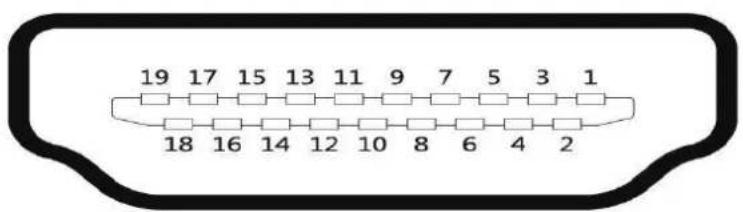
| PIN 1: I2S_DATA- | PIN 10: I2S_MCK+ |
| PIN 2: GND | PIN 11: GND |
| PIN 3: I2S_DATA+ | PIN 12: I2S_MCK- |
| PIN 4: I2S_BCK+ | PIN 13: NC |
| PIN 5: GND | PIN 14: DSD ON |
| PIN 6: I2S_BCK- | PIN 15: NC |
| PIN 7: I2S_LRCK- | PIN 16: NC |
| PIN 8: GND | PIN 17: GND |
| PIN 9: I2S_LRCK+ | PIN 18: NC |
| PIN 19: NC |
NUPRIME
Using the Remote Control:
Power: Power On/Off
DIS: Display information
CH +: Input selection next channel
CH -: Input selection previous channel
VOL +: Volume up
VOL -: Volume down
Mute: Mute/Unmute audio
▲ Eject. Opening/Closing CD tray
Play/Pause CD
Previous track/Search Backward
▶ Next track/Search Forward
■ Stop CD playback
RPT: Repeat & shuffle CD playlist
SRC: SRC Menu / Setting

Battery Replacement:
To change the battery, please remove the 4 screws and the bottom cover to reveal the battery casing.
NUPRIME
Start Up
Long press power knob for 3 seconds or power button on remote control to turn on CDP-9.

Once the CDP-9 in on, the default input is set to CD Player. Note: During DISC loading, all function is disabled until DISC status is ready.
CD PLAYER:
Briefly press the Power/Volume knob on the front panel or CH+ & CH- buttons on the remote control to switch through channels to select CD PLAYER.

When the CD PLAYER input is selected, CDP-9 will start loading the DISC.

The full album information is displayed once the DISC is successfully loaded.

-
Playback Mode 2. Total tracks of the album 3. Total time of the album
-
Playback Mode: Display current playback mode. Repeat One, Repeat All, Shuffle All, Shuffle Repeat, & no repeat or shuffle.
- Total tracks of the album: Display how many tracks are content in the album. Up to 99 tracks can be displayed.
- Total time of the album: Display the combine play time of all tracks in the album. Up to 99 hours and 99 minutes can be displayed.
NUPRIME
If no DISC is load or incorrect format is load, No DISC is displayed.

CD Function: Eject
To load DISC, please press Eject button ▲ on the front panel or remote control to Eject the CD tray.

Once the tray is out, place CD DISC onto the tray and press Eject for closing.

After closing, DISC is loaded and status is displayed.
CD Function: Play / Pause
Once the DISC status is successfully loaded, press Play/Pause button ▶ on the front panel or remote control to begin playback.

If no Playback Mode is selected, playback begins from track 1 of the album.
NUPRIME
During playback, press Play / Pause button again to Pause playback. In pause mode, a flashing PAUSE is displayed.

CD Function: Previous / Search Backward & Next track / Search Forward
Briefly press Previous & Next buttons ◀◀ &▶▶ to skip to previous track or next track during playback.
If playback is still in the first 3 sec, pressing Previous button will skip to previous track. If playback is more than 3 sec in, Pressing Previous button will repeat current track from the beginning.
While in CD status menu, briefly press Previous & Next buttons to select desire track. Once the desire track is selected, press PLAY button ▶ to begin playback.

Press and hold ◀◀&▶ during playback to fast rewind backward or forward the current playing track. Release to resume playback.
CD Function: Stop
You can stop playback any time by pressing the STOP button ■ on the front panel or remote control to stop playback.

Once playback is stop, CD status menu is displayed.

NUPRIME
CD Function: Playback Mode
You can press RPT button on the remote control to toggle between the playback modes, REPEAT ONE, REPEAT ALL, SHUFFLE ALL, SHUFFLE REP, and REF SHU OFF.
When REPEAT ONE is selected, only the current track will be played repeatedly. During REPEAT ONE mode, both Previous / Next will repeat the current playing track from beginning.

Playback mode display changes to RT (Repeat Track).

When REPEAT ALL is selected, all tracks in the album will be repeated in numerical order.

Playback mode display changes to RA (Repeat All).

When SHUFFLE ALL is selected, all tracks in the album will be play once in random order. When SHUFFLE ALL is selected, a random track is immediately selected and played.

NUPRIME
Playback mode display changes to SA (Shuffle All).

When SHUFFLE REPEAT is selected, all tracks in the album will be repeated in random order.

Playback mode display changes to SR (Shuffle Repeat).

DIGITAL INPUTS: COAXIAL
Briefly press the Power/Volume knob on the front panel or CH+ & CH- buttons on the remote control to switch through channels to select COAXIAL.

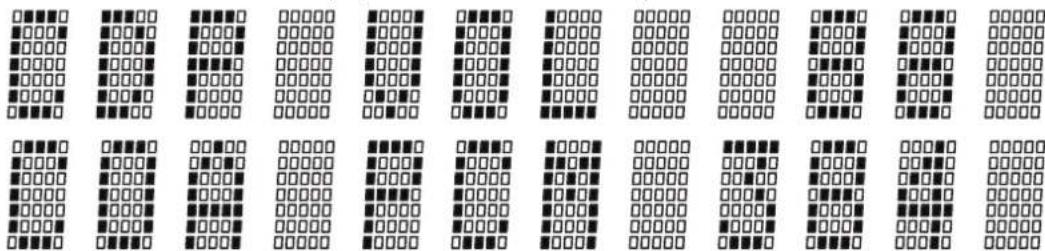
When COAXIAL is selected, CDP-9 will display the set volume and sample rate with 2 second interval.
NUPRIME
Default sample rate is shown on display if SRC is set to OFF. Otherwise, the set SRC sample rate is shown.
If no COAXIAL source is connected to CDP-9 and no SRC is set. Only the volume is displayed. Sample rate will be blank.

DIGITAL INPUTS: OPTICAL
Briefly press the Power/Volume knob on the front panel or CH+ & CH- buttons on the remote control to switch through channels to select OPTICAL.

When OPTICAL is selected, CDP-9 will display the set volume and sample rate with 2 second interval.

Default sample rate is shown on display if SRC is set to OFF. Otherwise, the set SRC sample rate is shown.
If no COAXIAL source is connected to CDP-9 and no SRC is set. Only the volume is displayed. Sample rate will be blank.

NUPRiME
DIGITAL INPUTS: EXTENSION
Briefly press the Power/Volume knob on the front panel or CH+ & CH- buttons on the remote control to switch through channels to select EXTENSION.

When EXTENSION is selected, CDP-9 will display the set volume and sample rate with 2 second interval.

Default sample rate is shown on display if SRC is set to OFF. Otherwise, the set SRC sample rate is shown. If no EXTENSION source is connected to CDP-9 and no SRC is set. Only the volume is displayed. Sample rate will be blank.

DIGITAL INPUTS: AES
Briefly press the Power/Volume knob on the front panel or CH+ & CH- buttons on the remote control to switch through channels to select AES.

NUPRIME
When AES is selected, CDP-9 will display the set volume and sample rate with 2 second interval.

Default sample rate is shown on display if SRC is set to OFF. Otherwise, the set SRC sample rate is shown. If no AES source is connected to CDP-9 and no SRC is set. Only the volume is displayed. Sample rate will be blank.

DIGITAL INPUTS: USB
Briefly press the Power/Volume knob on the front panel or CH+ & CH- buttons on the remote control to switch through channels to select USB.

When USB is selected, CDP-9 will display the set volume and sample rate with 2 second interval.

NUPRIME
Default sample rate is shown on display if SRC is set to OFF. Otherwise, the set SRC sample rate is shown. If no USB source is connected to CDP-9 and no SRC is set. Only the volume is displayed. Sample rate will be blank.

To run the NuPrime CDP-9 USB DAC on Mac- PCM:
- Power on NuPrime CDP-9, select USB input. The device will enumerate as a USB Audio device on your Mac.
- In Audio Midi Setup, select the "NuPrime CDP-9" device as your default Input and Output device.
- The sample rate of the device can be selected using the drop down menu.
- The audio is also output over SPDIF.
To run the NuPrime CDP-9 USB DAC on Mac–DSD:
- Install playback software on MAC.
Ex: Audirvana 15 days free http://audirvana.com/site/?page_id=112 - In Preferences Setup, Audio System selects the "NuPrime CDP-9" as your Default Device.
- The Native DSD Capability select the "DSD Over PCM standard 1.0"
- SPDIF output is not working on DSD playback.
To run the NuPrime CDP-9 USB DAC on Windows – PCM:
- Please visit www.nuprimeaudio.com and download the latest driver.
- Connect computer to USB DAC and power on NuPrime CDP-9, select USB DAC input.
The device will enumerate as a USB Audio device on your PC.
- Install the latest driver just download via NuPrime website.
- In Control Panel->Sound, select "NuPrime CDP-9" as your Default Device.
To run the NuPrime CDP-9 USB DAC on Windows – DSD:
Install playback software on Windows
- Install the Foobar media player (http://www.foobar2000.org/download)
NUPRIME
- Download the 'SACD' plugin http://sourceforge.net/projects/sacddecoder/files/latest/download
a. To install, in Foobar goto File->Preferences and select Components
b. Click the Install... button
c. Select the zip file
d. Click Apply (foobar will restart)
- Download the ASIO plugin from http://www.foobar2000.org/components/view/foo_out_asio
a. Install the plugin
b. Click Apply (foobar will restart)
4. Configure the Output Device
a. Go to Playback->Output
b. Select the Device: ASIO foo_dsd_asio
5. Configure the ASIO output
a. Go to Playback->Output->ASIO, double-click on foo_dsd_asio
b. Select the NuPrime ASIO Driver
c. Select ASIO Native
d. Select PCM to DSD Method: None
e. Select Fs: DSD128
6. Configure the SACD plugin to play DSD (and not convert from DSD to PCM)
a. Go to Tools->SACD
b. Set ASIO Driver Mode to DSD
c. Set PCM Sample Rate to 352800
Function: Mute
You can at any time press MUTE on the remote control to mute the CDP-9. When muted, MUTE is displayed and flashes.

To disable mute, press MUTE on the remote control again or adjust volume.
NUPRiME
Function: Display
You can at any time press DIS on the remote control to display information regarding the current input channel.
In CD PLAYER, DIS function will display the following information.
CD status > Current Volume Level > SRC setting sample rate.
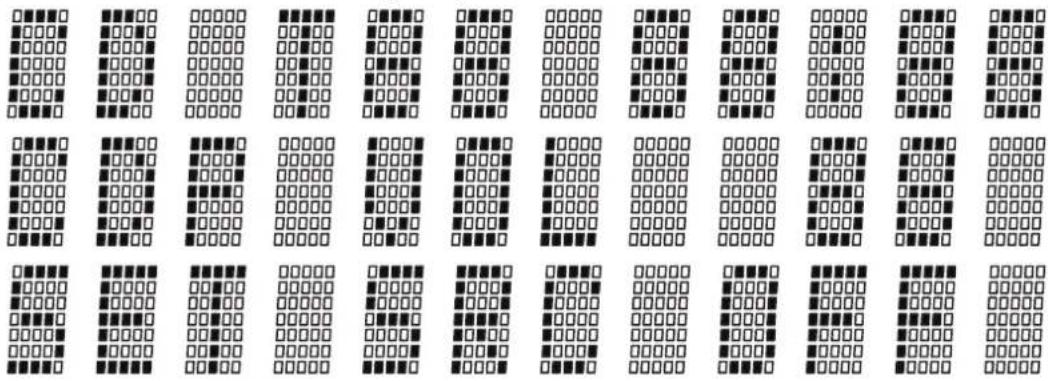
In DIGITAL INPUTS, DIS function will display the following information.
Default Sample Rate > SRC setting sample rate > Volume level.

NUPRIME
Function: SRC
SRC allows you to up-sampling or down-sampling your sampling rate to your desire value.
To set SRC, press SRC on the front panel or the remote control to bring up the SRC menu, use volume control on the front panel knob or Vol+ and Vol- on the remote control to toggle through all the values. Once a desired value is selected, press SRC button again to set.
Please note that once SRC menu is active, all other function is disable until SRC is set.

NUPRIME

NUPRIME
NuPrime's Limited Warranty and Limitation of Liabilities
ADDITIONAL RIGHTS
FOR CONSUMERS, WHO ARE COVERED BY CONSUMER PROTECTION LAWS OR REGULATIONS IN THEIR COUNTRY OF PURCHASE OR, IF DIFFERENT, THEIR COUNTRY OF RESIDENCE, THE BENEFITS CONFERRED BY THIS WARRANTY ARE IN ADDITION TO ALL RIGHTS AND REMEDIES CONVEYED BY SUCH CONSUMER PROTECTION LAWS AND REGULATIONS. THIS WARRANTY DOES NOT EXCLUDE, LIMIT OR SUSPEND ANY RIGHTS OF CONSUMERS ARISING OUT OF NONCONFORMITY WITH A SALES CONTRACT. SOME COUNTRIES, STATES AND PROVINCES DO NOT ALLOW THE EXCLUSION OR LIMITATION OF INCIDENTAL OR CONSEQUENTIAL DAMAGES OR ALLOW LIMITATIONS ON HOW LONG AN IMPLIED WARRANTY OR CONDITION MAY LAST, SO THE LIMITATIONS OR EXCLUSIONS DESCRIBED BELOW MAY NOT APPLY TO YOU. THIS WARRANTY GIVES YOU SPECIFIC LEGAL RIGHTS, AND YOU MAY ALSO HAVE OTHER RIGHTS THAT VARY BY COUNTRY, STATE OR PROVINCE. THIS LIMITED WARRANTY IS GOVERNED BY AND CONSTRUED UNDER THE LAWS OF THE COUNTRY IN WHICH THE PRODUCT PURCHASE TOOK PLACE.
LIMITED WARRANTY
For a period of ONE (1) YEAR from the date of retail purchase by the original end-user purchaser ("Warranty Period"), NuPrime warrants (in) this product against defects in materials and workmanship, and (ii) that each Product, unmodified and under normal use and conditions, will substantially comply with NuPrime' applicable written technical documentation for the Product. NuPrime reserves the right to make substitutions and modifications from time to time in the specifications of Products sold by NuPrime, provided that such substitutions or modifications do not materially affect overall Product performance.
If a hardware defect exists and a valid claim is received within the Warranty Period, at its option and to the extent permitted by law, NuPrime will (1) repair the hardware defect at no charge, using new or refurbished replacement parts, (2) exchange the product with a product that is new or which has been manufactured from new or serviceable used parts and is at least functionally equivalent to the original product, or (3) refund the purchase price of the product. NuPrime may request that you replace defective parts with user-installable new or refurbished parts that NuPrime provides in fulfillment of its warranty
NUPRIME
obligation. A replacement product/part assumes the remaining warranty of the original product or ninety (90) days from the date of replacement or repair, whichever provides longer coverage for you. When a product or part is exchanged, any replacement item becomes your property and the replaced item becomes NuPrime's property. When a refund is given, your product becomes NuPrime's property.
OBTAINING WARRANTY SERVICE
If you purchased the product in the U.S., deliver the product, at your expense, to any NuPrime Service Center located in the U.S. If you purchased the product outside of the U.S., deliver the product to any NuPrime Authorized Importer in the country where you purchased the product. Be aware, however, that not all countries have NuPrime Authorized Service Providers ('NASP') and not all Authorized Service Providers outside the country of purchase have all parts or replacement units for the product. If the product cannot be repaired or replaced in the country it is in, it may need to be sent to a different country or returned to the country of purchase at your expense for repair or replacement. If you seek service in a country that is not the country of original purchase, you will comply with all applicable import and export laws and regulations and be responsible for all custom duties, V.A.T. and other associated taxes and charges. Where international service is available, NuPrime may repair or exchange defective products and parts with comparable products and parts that comply with local standards.
You can always deliver the product to NuPrime's U.S. main service center for obtaining warranty service, however, you may have to pay for return shipping cost.
NuPrime may send you user-installable new or refurbished replacement product or parts to enable you to service or exchange your own product ("DIY Service"). Upon receipt of the replacement product or part, the original product or part becomes the property of NuPrime and you agree to follow instructions, including, if required, arranging the return of original product or part to NuPrime in a timely manner.
When providing DIY Service requiring the return of the original product or part, NuPrime may require a credit card authorization as security for the retail price of the replacement product or part and applicable shipping costs. If you follow instructions, NuPrime will cancel the credit card authorization, so you will not be charged for the product or part and shipping costs. If you fail to return the replaced product or part as instructed or the replaced product or part is not eligible for warranty service, NuPrime will charge the credit card for the authorized amount.
NUPRIME
EXCLUSIONS AND LIMITATIONS
This Limited Warranty applies only to hardware products manufactured by or for NuPrime that can be identified by the "NuPrime" trademark, trade name, or logo affixed to them. The Limited Warranty does not apply to any non-NuPrime hardware products or any accessories, even if packaged or sold with NuPrime hardware. Non-NuPrime manufacturers, suppliers, may provide their own warranties. Other accessories distributed by NuPrime under the NuPrime brand name are not covered under this Limited Warranty. This warranty does not apply: (a) to damage caused by accident, abuse, misuse, misapplication, liquid contact, fire, earthquake, non-NuPrime products, or other external causes; (b) to damage caused by service performed by anyone who is not a NASP; (c) to a product or a part that has been modified without the written permission of NuPrime; (d) to consumable parts, such as batteries, or protective coatings designed to diminish over time unless failure has occurred due to a defect in materials or workmanship; (e) to cosmetic damage, including but not limited to scratches, dents, and broken plastic on ports; (f) to defects caused by normal wear and tear or otherwise due to the normal a ging of the product; or (g) if any NuPrime serial number has been removed or defaced.
Important: Do not open the hardware product. Opening the hardware product may cause damage that is not covered by this warranty. Only NuPrime or a NASP should perform service on this hardware product.
THIS WARRANTY AND REMEDIES SET FORTH ABOVE ARE EXCLUSIVE AND IN LIEU OF ALL OTHER WARRANTIES, REMEDIES AND CONDITIONS, WHETHER ORAL OR WRITTEN, EXPRESS OR IMPLIED. NUPRIME SPECIFICALLY DISCLAIMS ANY AND ALL IMPLIED WARRANTIES, INCLUDING, WITHOUT LIMITATION, WARRANTIES OF MERCHANTABILITY AND FITNESS FOR A PARTICULAR PURPOSE. IF NUPRIME CANNOT LAWFULLY DISCLAIM IMPLIED WARRANTIES UNDER THIS LIMITED WARRANTY, ALL SUCH WARRANTIES, INCLUDING WARRANTIES OF MERCHANTABILITY AND FITNESS FOR A PARTICULAR PURPOSE ARE LIMITED IN DURATION TO THE DURATION OF THIS WARRANTY. No NuPrime reseller, agent, or employee is authorized to make any modification, extension, or addition to this warranty.
NUPRIME
NUPRIME IS NOT RESPONSIBLE FOR DIRECT, SPECIAL, INCIDENTAL OR CONSEQUENTIAL DAMAGES RESULTING FROM ANY BREACH OF WARRANTY OR CONDITION, OR UNDER ANY OTHER LEGAL THEORY, INCLUDING BUT NOT LIMITED TO LOST PROFITS, DOWNTIME, GOODWILL, DAMAGE TO OR REPLACEMENT OF EQUIPMENT AND PROPERTY, ANY COSTS OF RECOVERING, REPROGRAMMING, OR REPRODUCING ANY PROGRAM OR DATA STORED IN OR USED WITH NUPRIME PRODUCTS, AND ANY FAILURE TO MAINTAIN THE CONFIDENTIALITY OF DATA STORED ON THE PRODUCT. NUPRIME SPECIFICALLY DOES NOT REPRESENT THAT IT WILL BE ABLE TO REPAIR ANY PRODUCT UNDER THIS WARRANTY OR MAKE A PRODUCT EXCHANGE WITHOUT RISK TO OR LOSS OF PROGRAMS OR DATA.
Some states and provinces do not allow the exclusion or limitation of incidental or consequential damages or exclusions or limitations on the duration of implied warranties or conditions, so the above limitations or exclusions may not apply to you. This warranty gives you specific legal rights, and you may also have other rights that vary by state or province.
Proof of purchase in the form of a bill of sale or receipted invoice which is evidence that the unit is within the Warranty period must be presented to obtain warranty service.
REPLACEMENT AS PROVIDED UNDER THIS WARRANTY IS THE EXCLUSIVE REMEDY OF THE CONSUMER. NUPRIME SHALL NOT BE LIABLE FOR ANY INCIDENTAL OR CONSEQUENTIAL DAMAGES FOR BREACH OF ANY EXPRESS OR IMPLIED WARRANTY ON THIS PRODUCT. EXCEPT TO THE EXTENT PROHIBITED BY APPLICABLE LAW, ANY IMPLIED WARRANTY OF MERCHANTABILITY OR FITNESS FOR A PARTICULAR PURPOSE ON THIS PRODUCT IS LIMITED IN DURATION TO THE DURATION OF THIS WARRANTY.
© 2016 NuPrime Audio, Inc. All rights reserved. 1712 Pioneer Ave. Ste 1850 Cheyenne Wyoming 82001 USA
Beyond Ordinary
- NUPRIME
- FCC NOTICE - DECLARATION OF CONFORMITY INFORMATION
- EU DECLARATION OF CONFORMITY
- FOR CUSTOMERS IN EUROPE
- SAFETY INSTRUCTIONS
- SAFE USE AND OPERATION OF YOUR DEVICE
- INTRODUCTION
- FEATURES
- HIGHLY ACCURATE CD PLAYBACK
- A REFERENCE CLASS PREAMP
- SAMPLING RATE CONVERTER
- HEADPHONE AMP
- COMPATIBLE OS
- POWER AND MECHANICAL
- SPECIFICATIONS
- INPUTS
- OUTPUTS
- USING THE REMOTE CONTROL
- BATTERY REPLACEMENT
- START UP
- CD PLAYER
- CD FUNCTION: EJECT
- CD FUNCTION: PLAY / PAUSE
- CD FUNCTION: PREVIOUS / SEARCH BACKWARD & NEXT TRACK / SEARCH FORWARD
- CD FUNCTION: STOP
- CD FUNCTION: PLAYBACK MODE
- DIGITAL INPUTS: COAXIAL
- DIGITAL INPUTS: OPTICAL
- DIGITAL INPUTS: EXTENSION
- DIGITAL INPUTS: AES
- DIGITAL INPUTS: USB
- TO RUN THE NUPRIME CDP-9 USB DAC ON MAC- PCM
- TO RUN THE NUPRIME CDP-9 USB DAC ON MAC–DSD
- TO RUN THE NUPRIME CDP-9 USB DAC ON WINDOWS – PCM
- TO RUN THE NUPRIME CDP-9 USB DAC ON WINDOWS – DSD
- FUNCTION: MUTE
- FUNCTION: DISPLAY
- FUNCTION: SRC
- NUPRIME'S LIMITED WARRANTY AND LIMITATION OF LIABILITIES
- ADDITIONAL RIGHTS
- LIMITED WARRANTY
- OBTAINING WARRANTY SERVICE
- EXCLUSIONS AND LIMITATIONS
- BEYOND ORDINARY
Brand : NuPrime
Model : CDP-9
Category : Media player