HPA-9 - Headphone amplifier NuPrime - Free user manual and instructions
Find the device manual for free HPA-9 NuPrime in PDF.


Pick your language and provide your email: we'll send you a specifically translated version.
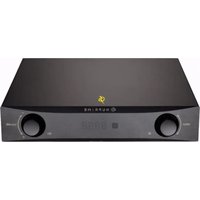
| Type | Headphone Amplifier |
| Brand | NuPrime |
| Model | HPA-9 |
| Amplifier Type | Solid-state (Class A/AB) |
| Inputs | 1 x RCA stereo pair |
| Outputs | 1 x 6.35mm headphone jack, 1 x RCA pre-out |
| Frequency Response | 20 Hz – 20 kHz (±0.5 dB) |
| Output Power | 2 W per channel into 32 ohms |
| THD+N | < 0.005% |
| Signal-to-Noise Ratio | > 110 dB |
| Headphone Impedance | 16 – 600 ohms |
| Gain Settings | Low and High (switchable) |
| Power Supply | External AC adapter (24 V / 1 A) |
| Dimensions (W x D x H) | 235 x 200 x 55 mm |
| Weight | 2.5 kg |
| Chassis Material | Aluminum |
| Warranty | 2 years |
| Accessories | Power adapter, RCA cable, user manual |
Frequently Asked Questions - HPA-9 NuPrime
What type of amplifier is the NuPrime HPA-9?
The NuPrime HPA-9 is a solid-state headphone amplifier operating in Class A/AB, designed for high-fidelity audio reproduction.
What headphone impedance does the HPA-9 support?
It supports headphones with impedance ranging from 16 to 600 ohms, making it suitable for a wide variety of headphones including demanding high-impedance models.
How do I connect the HPA-9 to my source?
Connect your source (e.g., DAC, CD player) to the RCA input on the rear panel using a high-quality RCA interconnect cable. Ensure the amplifier is powered off during connection.
Does the HPA-9 have a pre-amp output?
Yes, it features a RCA pre-out that allows you to connect powered speakers or an external power amplifier, enabling the HPA-9 to function as a preamplifier.
How do I switch between low and high gain?
The gain switch is located on the front panel. Select Low for sensitive headphones (e.g., IEMs) and High for less sensitive or high-impedance headphones to achieve optimal volume range.
What is the recommended power-up sequence?
To avoid thumps, power on your source first, then the HPA-9. When powering down, turn off the HPA-9 first, then the source. Always ensure volume is set to minimum before switching on.
How do I clean the NuPrime HPA-9?
Use a soft, dry cloth to wipe the chassis. Do not use any solvents, abrasive cleaners, or spray liquids directly on the unit. Avoid cleaning while the amplifier is powered on.
Does the HPA-9 include a built-in DAC?
No, the HPA-9 is a purely analog headphone amplifier and does not include a digital-to-analog converter. It requires an external DAC or analog source.
What are the dimensions and weight of the HPA-9?
The amplifier measures approximately 235 mm wide x 200 mm deep x 55 mm high and weighs about 2.5 kg, making it a compact desktop unit.
Where can I download the user manual for the HPA-9?
The user manual can be downloaded for free from the official NuPrime website or from third-party manual repositories such as Notice-Facile.com in PDF format.
User questions about HPA-9 NuPrime
0 question about this device. Answer the ones you know or ask your own.
Ask a new question about this device
No questions yet. Be the first to ask one.
Download the instructions for your Headphone amplifier in PDF format for free! Find your manual HPA-9 - NuPrime and take your electronic device back in hand. On this page are published all the documents necessary for the use of your device. HPA-9 by NuPrime.
USER MANUAL HPA-9 NuPrime


Manual assistant
Powered by Anthropic
Waiting for your message
Product information
Brand : NuPrime
Model : HPA-9
Category : Headphone amplifier