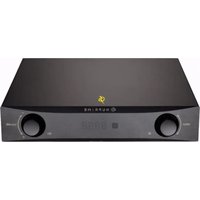
IDA-9 - Receiver NuPrime - Free user manual and instructions
Find the device manual for free IDA-9 NuPrime in PDF.


Pick your language and provide your email: we'll send you a specifically translated version.
| Product Type | Integrated Amplifier / Receiver |
| Power Output | 2 x 120W (8 ohms) |
| Inputs | Optical, Coaxial, USB, Bluetooth, Analog RCA |
| Outputs | Speaker terminals, Pre-out |
| Frequency Response | 20 Hz - 20 kHz |
| Signal-to-Noise Ratio | >100 dB |
| Dimensions (W x H x D) | 430 x 60 x 300 mm |
| Weight | 8 kg |
| Power Consumption | 250 W (max) |
| Standby Power | <1 W |
| Amplifier Class | Class D |
| Supported Audio Formats | PCM up to 384kHz, DSD up to DSD256 |
| Bluetooth Version | 4.0 with aptX |
| Remote Control | Included |
| Color | Black |
| Warranty | 2 years |
| DAC Chip | AKM AK4490EQ |
| Input Sensitivity | 1 V (RCA), 2.4 V (XLR) |
| Speaker Impedance | 4 - 8 ohms |
Frequently Asked Questions - IDA-9 NuPrime
How do I connect my TV to the IDA-9?
Use an optical cable from your TV's optical output to the optical input on the IDA-9. Alternatively, use a coaxial or HDMI ARC if supported.
Can I use the IDA-9 with a subwoofer?
Yes, connect a powered subwoofer to the pre-out output on the IDA-9 using an RCA cable.
What Bluetooth codecs does the IDA-9 support?
It supports SBC, AAC, and aptX for high-quality wireless streaming.
How do I update the firmware?
Firmware updates can be done via USB. Download the latest firmware from the NuPrime website, save to a USB stick, and follow the update procedure in the manual.
What is the power output in 4 ohms?
The IDA-9 delivers approximately 2 x 220W into 4 ohms.
Can I use the IDA-9 as a preamp only?
Yes, you can use the pre-out to connect to a separate power amplifier. The internal amplifier can be disabled via setup.
Does the IDA-9 have a headphone output?
No, the IDA-9 does not include a dedicated headphone output. Use an external headphone amplifier connected to the pre-out.
How do I reset the IDA-9 to factory settings?
To reset, power off the unit, then hold the 'Standby' button for 5 seconds until the LED flashes. Release and power on.
What is the recommended speaker impedance?
The amplifier is stable with speakers rated between 4 and 8 ohms.
Can I use the USB input with a computer?
Yes, connect the IDA-9 to your computer via USB. The device will appear as a sound output. Install appropriate drivers if needed (Windows).
User questions about IDA-9 NuPrime
0 question about this device. Answer the ones you know or ask your own.
Ask a new question about this device
No questions yet. Be the first to ask one.
Download the instructions for your Receiver in PDF format for free! Find your manual IDA-9 - NuPrime and take your electronic device back in hand. On this page are published all the documents necessary for the use of your device. IDA-9 by NuPrime.
USER MANUAL IDA-9 NuPrime
Manual assistant
Powered by Anthropic
Waiting for your message
Product information
Brand : NuPrime
Model : IDA-9
Category : Receiver