
ANTI 1992 - Guitar effects pedal Universal Audio - Free user manual and instructions
Find the device manual for free ANTI 1992 Universal Audio in PDF.


| Product Type | Audio Processor / Channel Strip |
| Brand | Universal Audio |
| Model | ANTI 1992 |
| Form Factor | 1U Rackmount |
| Dimensions (W x D x H) | 19 x 6 x 1.75 inches (approx.) |
| Weight | 5 lbs (approx.) |
| Power Supply | External AC adapter (12V DC) |
| Inputs | 2 x XLR (mic/line), 2 x 1/4" TRS (line) |
| Outputs | 2 x XLR, 2 x 1/4" TRS |
| Preamp Type | Class A solid-state with transformer |
| Compression | Optical compressor with variable ratio |
| EQ Section | 3-band parametric EQ with high-pass filter |
| Frequency Response | 20 Hz - 20 kHz (+/-0.5 dB) |
| Maximum Input Level | +24 dBu |
| THD+N | < 0.01% (typical) |
| Signal-to-Noise Ratio | > 105 dB (A-weighted) |
| Phantom Power | +48V switched per channel |
| Metering | LED VU meter on front panel |
| Construction | Steel chassis with aluminium front plate |
| Accessories Included | Power adapter, rack ears, user manual |
| Cleaning Instructions | Wipe with dry cloth; avoid liquids |
| Repairability | Modular design; replaceable op-amps and transformers |
| Warranty | 1 year limited |
Frequently Asked Questions - ANTI 1992 Universal Audio
User questions about ANTI 1992 Universal Audio
0 question about this device. Answer the ones you know or ask your own.
Ask a new question about this device
Download the instructions for your Guitar effects pedal in PDF format for free! Find your manual ANTI 1992 - Universal Audio and take your electronic device back in hand. On this page are published all the documents necessary for the use of your device. ANTI 1992 by Universal Audio.
USER MANUAL ANTI 1992 Universal Audio
This article contains complete operating instructions for the UAFX ANTI 1992 High Gain Amp effects pedal from Universal Audio.
![[RESO] PRE GAIN [CATE] PRESENCE OUTPUT CAB UK V30 CA V30 WHITE 75 [ALT] AMP STORE RTHM CRNCH LEAD CHANNEL LOW [OVERDRIVE] MID [OD TONE] HIGH [OD LEVEL] ANTI 1992 HIGH GAIN AMP ON PRESET](/content/2026/05/908565/images/28130763f159d54f1249a3bde993e9904ae3470c9b755188283a48f2596ff4e8.jpg)
In this article
• A Letter From Bill Putnam, Jr.
• Getting Started with ANTI
• ANTI Overview
• ANTI Operation
• ANTI Controls
• ANTI Cabs
• ANTI Channels
• ANTI Overdrive
• UAFX Control with ANTI
• ANTI Specifications
• ANTI Safety.
A Letter From Bill Putnam, Jr.
Congratulations on your new UAFX pedal. We know that buying any new piece of gear requires an investment of time and money, and we aim to make your investment pay off!
At UA, we are dedicated to the idea of building "instant classics" — the type of music and audio gear that delivers album-worthy sounds to inspire you for decades.
UAFX pedals represent more than 20 years of research into vintage analog effects, coupled with next-generation digital engineering and rock-solid reliability.
Please let us know how we're doing. Feel free to reach out to us via our website www.uaudio.com, and via our social media channels.
Thank you for your support, and enjoy your sonic exploration!
Sincerely,

natural_image
Abstract line drawing with curved strokes (no text or symbols)Bill Putnam Jr.
Getting Started with ANTI
ANTI Quick Start
UAFX pedals include a quick start sheet in the box. To download the sheet, go here.
PRE GAIN Adjusts gain to the preamp circuit
[RESO] Adjusts low frequency response and thump
PRESENCE Adjusts high end sparkle
[GATE] Adjusts gate threshold, bypassed at minimum
OUTPUT Overall volume control
CAB Cycles through available speakers
When LED is off, amp remains active but cab and room are disabled
SWITCH [ALT]: Activates Reso, Gate, Overdrive, OD Tone, and OD Level controls
AMP: Standard knob controls
STORE: Hold down to save sound as preset
CHANNEL RTHM: Clean channel
CRNCH: Crunch channel for overdrive
LEAD: Lead channel for heavy saturation
LOW Adjusts low frequencies
[OVERDRIVE] Adjusts overdrive pedal gain
MID Adjusts middle frequencies
[OD TONE] Adjusts overdrive pedal tone
HIGH Adjusts high frequencies
[ OD LEVEL ] Adjusts overdrive pedal output, bypassed at minimum
ON Toggles amp on/off*
LED lit when knob settings are active
PRESET Toggles preset on/off*
LED lit when stored settings are active
*Get more footswitch modes and deeper editing with the UAFX Control app
![[RESO] PRE GAIN [CAB] UK V30 CA V30 WHITE 75 [GATE] PRESENCE [ALT] AMP STORE RTHM CRNCH LEAD OUTPUT CHANNEL LOW [OVERDRIVE] MID [OD TONE] HIGH [OD LEVEL] ANTI 1992 HIGH GAIN AMP ON PRESET](/content/2026/05/908565/images/771ada5033997a3ec716d5f38d4c5ec2729123806265f2118cb3e28abc798193.jpg)
ANTI Firmware
Be sure to update your pedal's firmware with UA Connect to get the latest features and functionality. To learn how to use UA Connect with your UAFX pedals, go here.
ANTI Power
To learn how to power your UAFX pedal, go here.
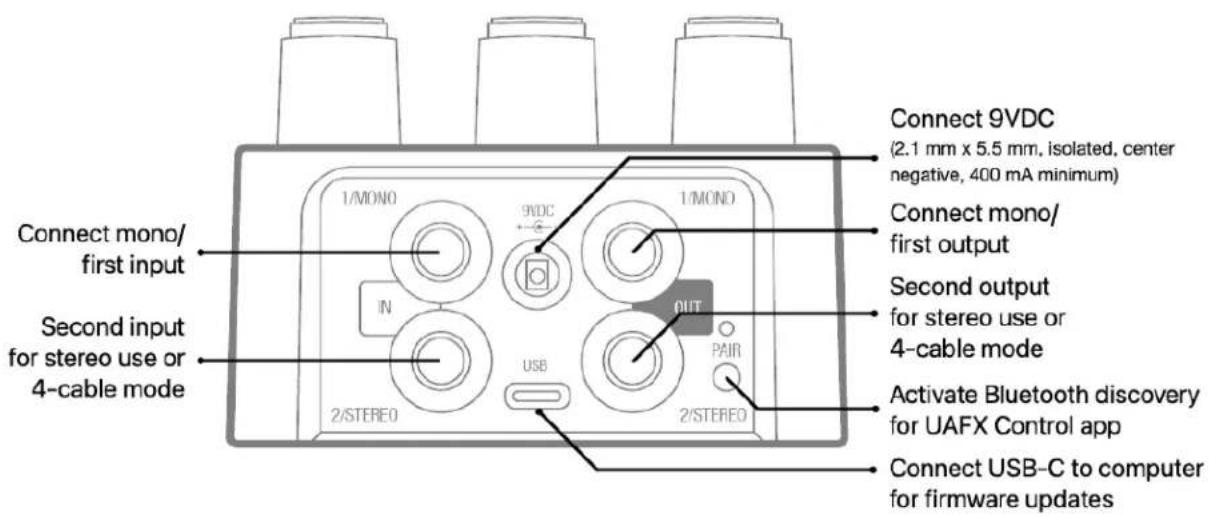
ANTI Connections
To learn how to wire your UAFX pedals, go here.
ANTI Overview
Experience the insane tones that defined modern metal.
The UAFX ANTI 1992 High Gain Amp delivers the savage guitar tones of Slipknot, In Flames, Machine Head, and countless Scandinavian metal bands right at your feet.*
With ANTI, you get the authentic sound of the 120-watt tube behemoth that gave rise to aggressive "scooped" guitar tones, combined with perfectly-miked cabinets to unleash bone-crushing riffs, searing leads, crystalline cleans, and everything in between.
Plug into the early '90s 120-watt tone monster that defined new genres of modern metal
- Get complete album-ready sounds with built-in noise gate, TS-style overdrive, and preamp boost
- Experiment with six classic mic/speaker pairings used on decades of iconic metal and hard rock records
- Play presets designed by the guitarists of Nevermore, Arch Enemy, Tetrarch, and The Black Dahlia Murder; or customize and save your own tones in the UAFX mobile app
Unleash Beastly Guitar Tones
In punishing detail, ANTI 1992 High Gain Amp captures the sound of the 120-watt amp that gave rise to notorious Metal subgenres throughout the '90s. From Thrash and Death Metal to Grunge, Black Metal, and beyond — ANTI delivers the rich, scooped tones that have fueled iconic bands for decades.
Plug into Album-Ready Sound
ANTI's built-in noise gate keeps your signal clear, even at super high gain settings. And its TS-style overdrive adds classic mid-boost saturation, perfect for tight and articulate playing, or switch to an integrated preamp boost for authentic Scandinavian metal tones. This means you can get polished, album-ready guitar sounds straight out of the box.
Explore Famous Mic & Speaker Pairings
ANTI's six perfectly-modeled mic and speaker combinations conjure legendary sounds used on decades of famous metal recordings. Whether you're chasing the brutal clarity of Scandinavian Death Metal or the thick, saturated crunch of American Thrash, ANTI puts a palette of vicious tones at your feet.
• UK V30: 4x12 Marshall cab with V30's
• CA V30: 4x12 Oversized cab with V30's
• White 75: 4x12 Marshall cab with Celestion 75's
• 3 Bonus Cabs: 2x12 D65, 4x12 Celestion 80, 4x12 Brown JB
Customize Your Sound with the UAFX Control App
With the UAFX Control app, you can pull up presets designed by the guitarists of Nevermore, Arch Enemy, Tetrarch, The Black Dahlia Murder, and more — giving you instant access to the settings that pros use on their amps. Plus the app unlocks deep customization for your pedal, allowing you to tweak hidden controls, save boosts and noise gate settings, and even adjust output tube biasing.
*Use of artist names does not constitute official endorsement of ANTI 1992 High Gain Amp pedal.
UAFX Control and UA Connect software
UA Connect and UAFX Control are the companion apps for your UAFX pedal.
UA Connect Computer App – UA Connect is for firmware updates and getting your free bonus speaker cabinets.
UAFX Control Mobile App – UAFX Control is for getting your free bonus speaker cabinets and factory/artist presets, and deeper editing.
UAFX Control also has preset management and deeper editing for global settings such as footswitch modes, and settings to personalize your pedal sound.
Free Bonus Speaker Cabinets and Presets
Register your pedal with UA Connect or UAFX Control to get three bonus speaker cabinets and factory/artist presets for more great tones. To get UA Connect and UAFX Control, visit:
uaudio.com/uafx/start
Personalize your Pedal with a Mobile App
With the UAFX Control mobile app, you can set footswitch mode, load presets, and adjust the following amp settings:
• Overdrive/preamp type
- Bright switch
- Noise gate
- Input routing
• Rhythm channel mode
- Bias mode
- Post gain
- Room amount
Get UAFX Control
ANTI Operation
Live Mode and Preset Mode
Note: ANTI is in Live | Preset mode by default. You can use UAFX Control to change footswitch assignments.
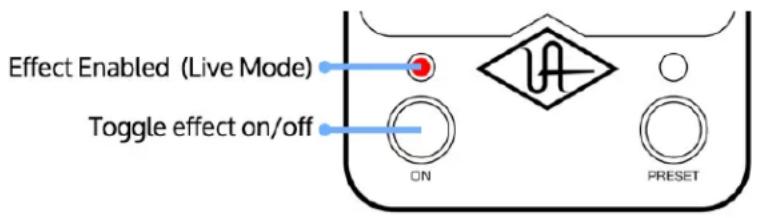
In Live mode, the sound reflects the current positions of the knobs, switches, and LEDs on the pedal, and the left footswitch toggles the Live mode effect on/off.
In Preset mode, you hear the settings that are stored as a preset, and the current positions of the knobs and switches do not reflect the sound. Instead, all knob and switch positions are internally set to their stored positions, and the right footswitch toggles the preset effect on/off.
You can store a preset you've made with your own settings by holding down the STORE switch until the green PRESET footswitch LED blinks rapidly (about 0.5 seconds)
Live Mode
To enter Live mode, press the left footswitch. Press the left footswitch again to toggle the live effect on/off. The left footswitch LED is lit red when the Live mode effect is on.
Preset Mode
To enter Preset mode, press the right footswitch. Press the right footswitch again to toggle the preset on/off. The right footswitch LED is lit green when the preset is on.

Note: The left and right footswitch functions can be changed in UAFX Control.
Stored Preset
You can store a preset on your UAFX pedal, and recall it using the right footswitch. All presets you store, and other artist and factory presets, are available in UAFX Control.
When you store a preset while in Live mode, the position of all knobs and switches on the pedal (including ALT values) are saved. When you make a great sound in Live mode, storing it is as easy as holding down the STORE switch until the green PRESET footswitch LED blinks rapidly (about 0.5 seconds).
When you store a preset while in Preset mode, only those knobs and switches that have changed since you loaded the preset are saved. So, when saving in Preset mode, what you hear is what is saved, and not the current positions of the knobs and switches.
To store your sound as a preset
1 Set your sound as you want it stored in the preset.
2 Press and hold the STORE switch in the down position until the green PRESET footswitch LED blinks rapidly (about 0.5 seconds).
Preset Notes
- The settings for Preset mode and Live mode are completely independent.
- When you move a knob or switch in Preset mode, the settings for the sound immediately jump to the new knob or switch position.
- You can view and audition all of your pedal's presets with UAFX Control.
- Presets can only be stored when the pedal is not bypassed.
ANTI Controls
The following controls are available on ANTI.
Pre Gain / Reso
Adjusts two different settings, depending on the position of the Alt / Amp /Store switch.
- AMP mode: Pre Gain adjusts the level of preamp gain. As you turn this up, the sound gets increasingly distorted and saturated, especially on the CRNCH and LEAD channels, and on the Punch and Punch+ modes of the RTHM channel.
- ALT mode: Reso adjusts the resonance control on the amp, which adds low bass content. Above noon, this control can add a lot of low end to the sound. The output volume level is compensated automatically at higher Reso settings.
Tip: For more gain, set the Input Routing in the UAFX Control app to High. For cleaner sounds, set the Input Routing to Low. The High input is the default setting for the CRNCH and LEAD sounds, while the RTHM channel uses the LOW routing by default. See [Input Routing] for more information.
Presence / Gate
Adjusts two different settings, depending on the position of the Alt / Amp /Store switch.
- AMP mode: Presence adds high end sparkle and grit to the sound.
- ALT mode: Gate adjusts the noise gate threshold for the sound. See [Noise Gate] for more information.
Note: Adjusting the Gate control enables the noise gate if it is not enabled.
Output
Adjusts the overall output level from the pedal. Output allows you to set the level for your setup. Output level is strictly the volume level from the pedal, and not the same as the [Post Gain] control, which is more like a master volume.
Output level from ANTI varies depending on the channel and mode. Because of the amount of low end energy generated by the amplifier, you may have to set your output level above noon to match
your bypassed level.
Low / Overdrive
Adjusts two different settings, depending on the position of the Alt / Amp /Store switch.
- AMP mode: Adjusts the low frequency response of the amp's tone stack.
- ALT mode: Adjusts the overdrive gain amount (TS overdrive) or the low EQ amount (TC preamp)
Mid / OD Tone
Adjusts two different settings, depending on the position of the Alt / Amp /Store switch.
- AMP mode: Adjusts the mid frequency response of the amp's tone stack.
- ALT mode: Adjusts the overdrive tone control (TS overdrive) or the treble EQ amount (TC preamp).
High / OD Level
Adjusts two different settings, depending on the position of the Alt / Amp /Store switch.
- AMP mode: Adjusts the high frequency response of the amp's tone stack.
- ALT mode: Adjusts the overdrive output volume (TS overdrive) or the output level (TC preamp). Set to minimum to turn off the pedal.
Note: Overdrive is routed before the pedal input, so the overdrive output level does not increase the pedal's output level, but instead increases distortion by pushing the front end of the amp.
TS Overdrive and TC Preamp settings
The TS overdrive or TC preamp are typically used to push the amp's input stage harder to increase gain. These pedals are renowned because they also provide a necessary cut in the low-end EQ, which can make the heavily distorted amp sound tighter for classic palm-muted riffing and chugging.
TS suggested settings
- Overdrive – Set low or completely off. Used with active or high output pickups, many player prefer to turn the gain all the way off. With lower output pickups some players will add a small amount of overdrive.
- OD Tone – Start at noon and adjust. Typically, this sounds best between noon and 2 o'clock.
- OD Level – Crank this all the way up! This pushes the front end of the amp into thick distortion. Adjust to taste.
TC suggested settings
- Overdrive (Bass) – Set this completely off for ultra tight djent tones. Add some bass for looser or thicker metal sounds.
- OD Tone (Treble) – Start at noon and adjust. Typically sounds great between noon and 2 o'clock
- OD Level (Volume) – Crank this all the way up! This pushes the front end of the amp into thick distortion. Adjust to taste.
Cab Switch
Push this switch up or down to change the speaker cabinet and microphone. When you push the switch repeatedly in the same direction, the pedal cycles through all available speaker cabinets.
Tip: Register your pedal to get free bonus speaker cabinets.
Cab LED
The currently selected speaker cabinet is indicated by this LED. A red LED indicates that the speaker cabinet printed on the pedal is selected. A bonus speaker cabinet is selected when an LED is green (the bonus speaker cabinets don't have labels).
When the LED is off, the amp is active but no speaker cabinet simulation or room sound is applied.
Tip: When playing through a real guitar amplifier and speaker cabinet, you might want to bypass the speaker cabinet emulation by pressing the pedal's CAB switch until its LED is unlit.
Alt / Amp / Store
In AMP mode, the standard knob controls are available for the amp.
In ALT mode, the Reso, Gate, Overdrive OD Tone, and OD Level controls are available on the Pre Gain, Presence, Low, Mid, and High knobs.
To store a preset, press and hold the ALT/AMP/STORE switch in the down position until the PRESET footswitch LED blinks rapidly (about 0.5 seconds).
Channel Switch
ANTI includes three independent amplifier channels, each of which provides different amp character and features.]
Use the channel switch to select the channel. See [ANTI Channels] for more details about the channels.
- RTHM is based on the Rhythm channel from the original amp. This channel is somewhat clean at lower volumes, but breaks up nicely as you increase Pre Gain. Our implementation of the Rhythm channel includes two special "beyond reality" modes that you can enable in the UAFX Control app for far more versatility than the original amplifier.
- CRNCH is based on the Rhythm channel's Crunch mode from the original amp. This channel includes plenty of gain for rhythm tones and heavy chugging. The midrange focus of this
channel is also excellent for lead tones.
- LEAD is based on the Lead channel from the original amp. The Lead channel provides tight, articulate high gain tones for heavy chugging and searing lead tones.
Left Switch LED
By default, the left footswitch LED is lit red when Live mode knob and switch settings are active. Other states for the left footswitch LED are detailed in the table below.
Left Footswitch
By default, press to toggle the Live mode sound on/off with the current knob and switch settings. This footswitch can also toggle other options, depending on the footswitch mode, as detailed in the table below.
Preset Footswitch LED
The preset footswitch LED is lit green when stored settings are active. There are other modes for the right footswitch LED, as detailed in the table below.
Right Footswitch
By default, press to toggle the Preset sound on/off. This footswitch can also toggle other options, depending on the pedal footswitch mode, as detailed in the table below.
Footswitch modes
With UAFX Control, you can change the operation of your pedal and your pedal's footswitches for your amplifier setup and performance preferences.
For more information on footswitch modes and how to enable them, see [UAFX Control with ANTI].
| Mode Left | Footswitch | Right Footswitch |
| Live | Preset Live mode | on/off | Preset on/off |
| Overdrive | Live/Preset Overdrive | on/off | Live mode/Preset toggle |
| Gate | Live/Preset Gate on/off Live mode/Preset | toggle | |
| 4-cable mode | Live mode | Preset mode on/off |
| Note: If Live and Preset are off, you hear your amp's sound. | on/off |
ANTI Cabs
Each speaker, cabinet, and mic setting has a unique sound. Toggle up or down to cycle through the list with the Cab switch. When you register your pedal with UAFX Control software, you get three free bonus cabs (indicated by green LEDs).
ANTI bonus speaker cabinets
When you register your pedal using the UA Connect or UAFX Control apps, your free bonus speaker cabinets are added to the pedal. To select these speaker cabinets, push the Cab switch until the top, middle, or bottom Cab LED is lit green.


Note: The speaker cabinet labels on the pedal apply only when that speaker switch's LED is red. The labels when the LED is green are only visible in UAFX Control.
| SwitchLabel | LEDColor | ActiveCab | Speaker/Cab/Mic Notes | |
| UKV30 | Red | Vee30 | This vintage style closed-back cabinet with four 12-inch speakers is one of the industry standards for modern rock and metal guitar. Miked with a dynamic 57. | This cabinet and speaker setup has an aggressive upper midrange edge. |
| CAV30 | Red | 4x12CAVee30 | This modern and deep closed-back cabinet with four 12-inch speakers was designed for heavy, distorted, and scooped amp tones. Miked with a dynamic 57. | This cabinet and speaker setup has a forward low midrange with high end edge. |
| WHI TE75 | Red | White 75 | This custom ported cabinet features 12-inch "white/cream" 75-watt modern British speakers. Miked with a dynamic 57 and a ribbon 121. | These speakers have an extended treble/presence frequency response. |
| UKV30 | Gre en | D65 | This custom ported cabinet features two British style 65-watt speakers and is the choice of many modern blues and rock players. Miked with a dynamic 57 and a ribbon 121. | The speaker and cabinet combination delivers tight bottom end clarity. |
| CAV30 | Gre en | Supe r 80 | This custom ported cabinet features four 12-inch vintage "lead" 80-watt speakers. Miked with a dynamic 57 and a ribbon 121. | These speakers have a soft treble response, but with an aggressive and forward midrange. |
| WHI TE75 | Gre en | Bro wn JB | 1968 basketweave 4x12 cabinet with vinyl removed, with two Celestion Greenback speakers and two JBL 120F speakers. Both speaker types are miked separately with dynamic 57s, and pre-mixed. | Combines the girth and midrange of the Celestion speakers with the high end sizzle of the JBL speakers. |
| Non e | Off Exter nal | No cabinet/mic/room emulation. Use with a real guitar | cabinet or external cabinet emulation. | |
Note: Product names used herein are trademarks of their respective owners, which are in no way affiliated with Universal Audio Inc. These name(s) are used solely to identify products studied in the creation of the sound models found in ANTI.
ANTI Channels
Each amp channel has a unique gain structure and sound. You increase the amount of gain and the effect of the boost by increasing Pre Gain, and adding gain from the TS or TC pedal in ALT mode.
Channel Rhythm Mode\* Description
RTHM Clean The clean channel from the original amp. Use the Low input for sparkling cleans, or the High input for light crunch.
Punch A custom, modified overdrive channel that combines elements of the Lead and Clean channels, for in-between rhythm tones.
Punch+ A unique custom heavy crunch channel, combining a late '70s British amp's "cold clipping" circuit with the ANTI power amp for dense, harmonically rich rhythm and lead sounds.
CRNCH – On the original amp, pressing the Crunch button on the Rhythm channel gives you this channel. Heavy crunch with plenty of saturation and thickness, for aggressive and tight metal sounds.
LEAD – The Lead channel from the original amp, with over the top gain, saturation, and sustain.
* Rhythm Mode channels are only available when the RTHM channel is selected. The default Rhythm Mode is Clean. You can select the Punch or Punch+ Rhythm Mode in the UAFX Control app.
ANTI Overdrive
ANTI's overdrive knobs add gain and EQ control by employing one of two classic pedals with multiple controls to "juice" the front end of the amp, adding tightness and boosting gain. Pedal controls are available in ALT mode on the Low/Mid/High knobs. To enable overdrive, turn the High/OD Level knob above minimum with the pedal in ALT mode, or toggle overdrive on/off in Overdrive | Live/Preset footswitch mode. [You can choose the TS or TC overdrive in the UAFX Control app].
Note: The Overdrive controls are only active In ALT mode.
UAFX Control with ANTI
With UAFX Control, you can manage your presets, change the operation of ANTI's footswitches, and change multiple global and per-channel settings to customize your tone.
In UAFX Control, tap the icons at the bottom of the screen to access the Presets, Edit, and Settings screens. You may need to scroll down on this screen to see all available settings.
ANTI footswitch modes
The footswitch functions can be changed to suit your preferences. You can configure ANTI to switch between Live and Preset modes, or have Boost on the left footswitch and toggle between Live/Preset modes on the right footswitch.
Choosing a footswitch mode
To select a footswitch mode, open the Settings screen. Then tap the current footswitch mode (colored bar) and choose a mode from the drop menu.
Note: See Assigning the preset or live sound for information about how to set the pedal sound when you use a footswitch mode that cannot be bypassed.

flowchart
graph TD
    A["Live"] --> B["Preset"]
    C["Overdrive"] --> D["Live/Preset"]
    E["Gate"] --> F["Live/Preset"]
Live | Preset
In Live | Preset mode, you can access Live mode (knobs and switches) and the stored preset.
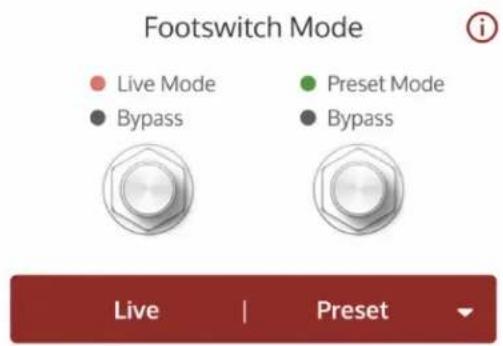
Left switch toggles Live Mode and Bypass. Right switch toggles Preset Mode and Bypass.
• Left Footswitch toggles the Live sound on/off
• Right Footswitch toggles the stored preset on/off
- Pedal can be bypassed
• 4-cable mode is available
Boost | Live/Preset
In Boost | Live/Preset mode, you can switch Boost on and off, and toggle between Live mode (knobs and switches) and the stored preset.

Left switch toggles Boost on/off. Right switch toggles Live Mode and Preset Mode.
• Left Footswitch toggles Boost on/off
• Right Footswitch toggles between Live mode (red LED) and the stored preset (green LED)
• Pedal is always on and cannot be bypassed
• 4-cable mode is not available
Gate | Live/Preset
In Gate | Live/Preset mode, you can switch the Gate on and off, and toggle between Live mode (knobs and switches) and the stored preset.

Left switch toggles Gate on/off. Right switch toggles Live Mode and Preset Mode.
• Left Footswitch toggles Gate on/off
- Right Footswitch toggles between Live mode (red LED) and the stored preset (green LED)
• Pedal is always on and cannot be bypassed
• 4-cable mode is not available
ANTI 4-cable mode
4-cable mode lets you add another switchable channel to any real guitar amplifier that has an effects loop. This special mode lets you switch between your guitar amplifier's built-in preamp section and the sounds in your pedal.
Warning: Turn off your amplifier before wiring the pedal and enabling 4-cable mode. If you enable 4-cable mode with incorrect wiring, you can cause extreme feedback.
To learn how to set up and operate 4-cable mode, go here.
Adjusting ANTI Editor settings
ANTI includes an editor that allows you to make further adjustments to the amp's settings.
To open the Editor, tap Edit at the bottom of the UAFX Control screen.
In Live mode, editor settings apply either globally or per-channel. Preset sounds can have different global settings but Live mode global settings are restored when you switch back to Live mode.
Global Settings Per-channel settings
Overdrive Input Routing
Bright Switch Rhythm Mode (RTHM channel only)
Noise Gate enable and settings Bias Mode
Post Gain
Room
Overdrive
Selects the overdrive pedal type. The overdrive type is global in Live Mode. You can enable the overdrive pedal by turning the High/OD Level knob past minimum in ALT mode or toggling overdrive on in Overdrive | Live/Preset mode. Adjust the overdrive settings with the Low, Mid, and High knobs in ALT mode.
TS
The default overdrive is the classic green pedal with gain, tone, and volume controls. The TS is the perfect front end for crushing metal tones with ANTI. This pedal emphasizes high mids and cuts bass, providing for tighter sounds with tons of gain on tap.
Tip: For classic 90s death metal tones set the overdrive fully counter-clockwise, or just above if you use passive pickups, with treble at noon and volume fully clockwise.
TC
Rare vintage black preamp pedal with volume, bass, and treble controls gives a massive amount of control when pushing the front end of ANTI. Controls are available on Low/Mid/High knobs when the ALT switch is enabled.
Tip: For crushing math metal tones, set bass fully counter-clockwise, treble at noon and volume fully clockwise.
Bright Switch
Bright Switch
OFF
ON
The Bright Switch, when on, adds bite and edge to your tone. The bright switch is a global setting, but does not have an audible effect on the LEAD channel.
ANTI Noise Gate

flowchart
graph LR
    A["min"] --> B["Threshold"]
    B --> C["max"]
    D["fast"] --> E["Attack"]
    E --> F["slow"]
    G["fast"] --> H["Release"]
    H --> I["slow"]
    J["min"] --> K["Attenuation"]
    K --> L["max"]
    M["min"] --> N["Hold"]
    N --> O["max"]
Toggle the noise gate by tapping the red button next to Noise Gate. Adjust the noise gate settings for your current instrument and sound to eliminate any extraneous noise.
ANTI's noise gate silences extraneous noise by detecting your guitar signal at the input, but acting at the end of the signal chain. This clever design is extremely effective at both detecting and stopping extraneous noise.
Noise
Gate
setting
Description
| Threshold | Sets the level at which the noise gate opens/closes. Increase Threshold until amp noise is stopped, but your softest playing is still heard. You can also control the Threshold in ALT mode with the Presence knob. |
| Attack Sets how fast the gate opens when the signal exceeds the Threshold. Set this to allow natural dynamics.For classic metal settings, set this as fast as possible for your setup. | |
| Release Sets how fast the gate closes when the signal falls below the Threshold. Increase until your decaying notes are not cut off too soon. Interacts with the Hold control.For classic metal settings, set this as fast as possible for your setup. | |
| Attenuation | Sets amount of noise reduction. Higher values prevent all noise, while lower values pass some noise.For classic metal settings, set this to Max reduction. |
Hold Sets how long the threshold-level signal is heard before release begins. Adjust so notes decay naturally. Adjust this with Release to avoid "chatter."
Input Routing
Input Routing
High
Low
Sets whether the low or high amp input is used. The High input has more gain and the low input is cleaner. This setting is stored per-channel.
Rhythm Mode (RTHM channel only)
Rhythm Mode

On the RTHM channel, you have a choice of three rhythm modes, two of which are unique to ANTI. Tap the mode to select it.
Rhyth
m
Mode
Description
Clean The clean channel from the original amp. Use the Low input for sparkling cleans, or the High input for light crunch.
Punch This custom ANTI exclusive is a modified overdrive channel that combines elements of the Lead and Clean channels, for in-between rhythm tones.
Punch+ This custom heavy crunch channel is another ANTI exclusive, combining a late '70s British amp's "cold clipping" circuit with the ANTI power amp for dense, harmonically rich rhythm and lead sounds.
Bias Mode

flowchart
graph TD
    A["Cool"] --> B["Warm"]
    B --> C["Cool Choke"]
    C --> D["Warm Choke"]
The Bias Mode sets the power tube bias and configuration of the amplifier, with four common configurations. Tap to choose the bias mode.
Bias Mode Description
Cool Reduced mids and plenty of saturation.
Warm Classic hardware mod that opens up the midrange, for warmer leads and vintage-style crunch tones.
Cool Reduced mids. Choke is tighter, crisper, and less fuzzy.
Choke
Warm Open midrange. Crisper and tighter with less fuzz.
Choke
Post Gain

Post Gain adds another level of output gain with some harmonic content, based on the Post Gain control from the original amp. Use this to add more output volume for your setup, or for creative effect. By default, Post Gain is set to the minimum.
Room

Room adds room tone into the signal. By default, Room level is at the minimum in Live Mode and on the default preset. Turning up the Room knob adds ambience from the room microphones set up in the tracking room of a studio.
Notes and tips for Room
- Room amount only affects your sound when you use a speaker cabinet. When the speaker cabinet is bypassed, Room has no effect. The Speaker LED blinks rapidly to indicate the knob is inactive.
- With heavily distorted sounds and plenty of low end content, large amounts of Room may not be useful.
• There is no fully wet Room sound.
Revert to Default (Live sound only)
Revert to Default
Tap to revert to the default Edit screen settings for the Live Sound (knob and switch settings are unchanged).
Restore Preset (Preset sound only)
Restore Preset
Tap to revert any changes you have made to the current preset.
ANTI Specifications
Note: All specifications are subject to change without notice.
Power requirements Isolated 9VDC, center-negative, 400mA minimum (power supply sold separately)
Inputs 2 x 1/4" unbalanced TS (input 2 for stereo connections)
Outputs 2 x 1/4" unbalanced TS (output 2 for stereo connections)
Input impedance 500 Kilohms (Mono In)
1 Megohms (Stereo In)
Output impedance 500 Ohms
Maximum input level 12.2 dBu
Maximum output level 12.1 dBu
Frequency response 20 Hz to 20 kHz, ±3 dB
USB Type-C For registration and firmware updates via computer
Wireless technology Bluetooth v5
Transmitted Frequency Range 2.402 - 2.480 GHz
Maximum Output Power +4.35 dBm
Dimensions Height: 2.56 inches, 6.5 cm
(with knobs and protrusions) Width: 3.62 inches, 9.2 cm
Depth: 5.55 inches, 14.1 cm
Weight (unboxed) 1.34 lbs
0.605 kg
ANTI Safety

Caution: To help maintain the safety of your product, the chosen power supply must be a certified power supply complying with Limited Power Source (LPS) requirements with the following characteristics and electrical ratings: Isolated 9VDC, center-negative, 400 mA minimum, 2.1x5.5 mm barrel connector. Additional details at help.uaudio.com.

Before using this unit, be sure to carefully read the applicable items of these operating instructions and the safety suggestions. Afterwards, keep them handy for future reference. Take special care to follow the warnings indicated on the unit, as well as in the operating instructions.
- Read the instructions.
- Keep these instructions.
- Heed all warnings.
- Follow all instructions.
- Do not use this apparatus near water.
- Clean only with dry cloth.
- Do not block any ventilation openings. Install in accordance with the manufacturer's instructions.
- Do not install near any heat source such as radiators, heat registers, stoves, or other apparatus (including amplifiers) that produce heat.
- Do not defeat the safety purpose of the polarized or grounding-type plug. A polarized plug has two blades with one wider than the other.
- Protect the power cord from being walked on or pinched particularly at plugs, convenience receptacles, and the point where they exit from the apparatus.
- Only use with attachments/accessories specified by the manufacturer.
- Refer all servicing to qualified service personnel. Servicing is required when the apparatus has been damaged in any way, such as power-supply cord or plug is damaged, liquid has been spilled
or objects have fallen into the apparatus, the apparatus has been exposed to rain or moisture, does not operate normally, or has been dropped.
- This equipment does not contain a fuse or any other user-replaceable parts.
- A compliance marking label is provided on bottom of the unit.
United States Class B Manual Statement
NOTE: This equipment has been tested and found to comply with the limits for a Class B digital device pursuant to Part 15 of the FCC Rules. These limits are designed to provide reasonable protection against harmful interference in a residential installation. This equipment generates, uses, and can radiate radio frequency energy and, if not installed and used in accordance with the instructions, may cause harmful interference to radio communications. However, there is no guarantee that interference will not occur in a particular installation. If this equipment does cause harmful interference to radio or television reception, which can be determined by turning the equipment off and on, the user is encouraged to try and correct the interference by one or more of the following measures:
- Reorient or relocate the receiving antenna.
- Increase the separation between the equipment and the receiver.
- Connect the equipment into an outlet on a circuit different from that to which the receiver is connected.
- Consult the dealer or an experienced radio/TV technician for help.
Japanese Class B Manual Statement
(This is Class B equipment. Although this equipment is intended for use in residential environments, it could cause poor reception if used near a radio television receiver. Please follow instructions in the instruction manual.)
License exempt. This device complies with Industry Canada license-exempt RSS standard(s).
Operation is subject to the following two conditions: (1) this device may not cause interference, and (2) this device must accept any interference, including interference that may cause undesired operation of the device.
Taiwan NCC Warning Statement
The company's products have obtained the NCC low-power radio frequency equipment verification certificate according to the new warnings of "Low-power radio frequency equipment technical specifications" as follows: "The low-power radio frequency equipment that has obtained the verification certificate shall not be changed by the company, firm or user without approval.
Frequency, increase power, or change the features and functions of the original design. The use of low-power radio frequency equipment shall not affect flight safety and interfere with legal communications; continue to use.

Used electrical and electronic equipment should not be mixed with general household waste.
Please dispose in accordance with local regulations.
This device is in compliance with the essential requirements and other relevant provisions of Directive 2014/53/EU. All essential radio test suites have been carried out.
Changes or modifications made to this equipment not expressly approved by Universal Audio and may void the FCC and IC authorization to operate this equipment.
· IEC 62368-1
- FCC ID: 2AXKQ2077
- IC: 26610-2077


- In this article
- A Letter From Bill Putnam, Jr.
- Getting Started with ANTI
- ANTI Quick Start
- ANTI Firmware
- ANTI Power
- ANTI Connections
- ANTI Overview
- Experience the insane tones that defined modern metal.
- Plug into the early '90s 120-watt tone monster that defined new genres of modern metal
- Unleash Beastly Guitar Tones
- Plug into Album-Ready Sound
- Explore Famous Mic & Speaker Pairings
- UAFX Control and UA Connect software
- Free Bonus Speaker Cabinets and Presets
- Personalize your Pedal with a Mobile App
- ANTI Operation
- Live Mode and Preset Mode
- Live Mode
- Preset Mode
- Stored Preset
- To store your sound as a preset
- Preset Notes
- ANTI Controls
- Pre Gain / Reso
- Presence / Gate
- Output
- Low / Overdrive
- Mid / OD Tone
- High / OD Level
- TS Overdrive and TC Preamp settings
- TS suggested settings
- TC suggested settings
- Cab Switch
- Cab LED
- Alt / Amp / Store
- Channel Switch
- Left Switch LED
- Left Footswitch
- Preset Footswitch LED
- Right Footswitch
- Footswitch modes
- ANTI Cabs
- ANTI bonus speaker cabinets
- ANTI Channels
- Channel Rhythm Mode\* Description
- ANTI Overdrive
- UAFX Control with ANTI
- ANTI footswitch modes
- Choosing a footswitch mode
- Live | Preset
- Boost | Live/Preset
- Gate | Live/Preset
- ANTI 4-cable mode
- Adjusting ANTI Editor settings
- Global Settings Per-channel settings
- Overdrive
- TS
- TC
- Bright Switch
- ANTI Noise Gate
- Input Routing
- Rhythm Mode (RTHM channel only)
- Rhyth
- Mode
- Description
- Bias Mode
- Post Gain
- Room
- Notes and tips for Room
- Revert to Default (Live sound only)
- Revert to Default
- Restore Preset (Preset sound only)
- Restore Preset
- ANTI Specifications
- ANTI Safety
- United States Class B Manual Statement
- Japanese Class B Manual Statement
- Taiwan NCC Warning Statement
Brand : Universal Audio
Model : ANTI 1992
Category : Guitar effects pedal